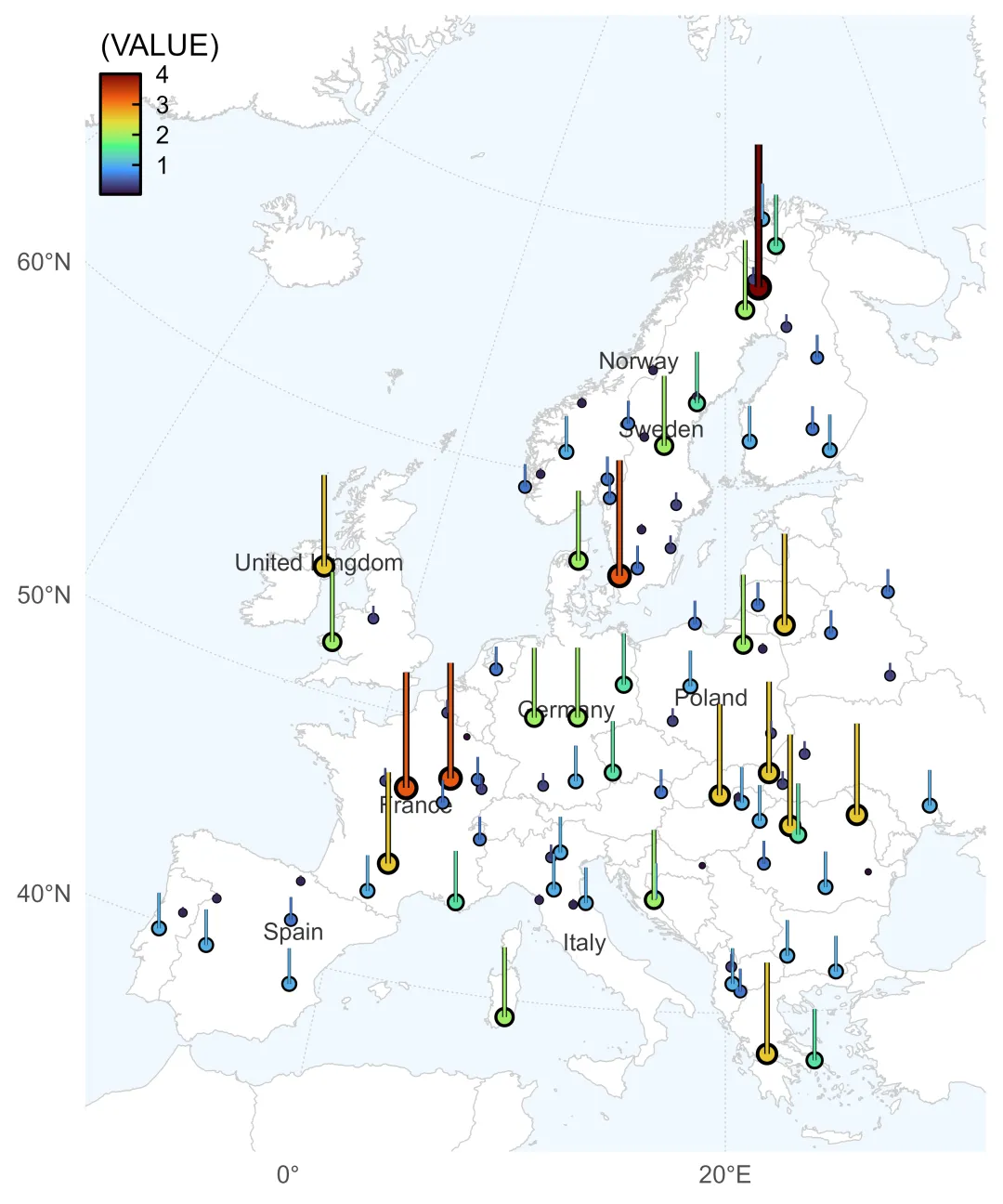
仿制一篇 Nature 论文地图(其附图 Extended Data Fig. 2 )。易知,图中柱子高度代表某变量的数值大小——这或许比点的大小、颜色渐变更容易直接比较。
Pesticide residues alter taxonomic and functional biodiversity in soils
https://www.nature.com/articles/s41586-025-09991-z#Fig6
效果如下,
代码如下,
# =============================================================================# 欧洲三维地图可视化核心代码# 功能:获取欧洲空间数据、坐标处理、数据生成、地图绘制(伪 3D 效果)# 依赖包:ggplot2, dplyr, rnaturalearth, sf, geocn# =============================================================================# 1. 加载所需包 --------------------------------------------------------------library(ggplot2) # 可视化library(dplyr) # 数据处理library(rnaturalearth) # 地理边界数据library(sf) # 空间数据处理library(ggview) # 指定尺寸、分辨率预览# 安装 geocn# install.packages(# "geocn",# repos = c(# "https://stscl.r-universe.dev",# "https://cloud.r-project.org"# ),# dep = TRUE# )library(geocn)# 2. 获取欧洲地图数据 ---------------------------------------------------------# 世界地图world_country_sf <- geocn::load_world_country()# 获取欧洲国家地图(中等比例尺)# 裁剪范围europe_sf <- ne_countries(scale = "medium", returnclass = "sf") |> filter(continent == "Europe") |> filter(!name %in% c("Russia", "Turkey")) |> st_crop(xmin = -10, xmax = 32, ymin = 36, ymax = 72) # 去除大部分海外岛屿europe_sf# 3. 提取欧洲边界并生成经纬度网格 ---------------------------------------------# 获取欧洲区域的边界框europe_bbox <- europe_sf |> st_bbox()# 调整边界范围,使欧洲居中显示lon_center <- mean(europe_bbox[c(1, 3)])lat_center <- mean(europe_bbox[c(2, 4)])# 4. 定义投影坐标系 -----------------------------------------------------------# GEOS投影(适合从侧面观看的3D效果,高度为同步卫星高度)# base_proj <- "+proj=geos +h=358000000 +ellps=WGS84 +no_defs"base_proj <- "+proj=laea +ellps=WGS84 +no_defs"# 设置投影中心为欧洲中心(经度15°,纬度50°)center_params <- paste0("+lon_0=", round(lon_center), " +lat_0=", round(lat_center))# 合并为完整投影定义full_proj <- paste(base_proj, center_params)# 5. 生成随机采样点及柱高数据 ------------------------------------------------# 增加采样点数量以适应更大区域sample_size <- 100set.seed(7) # 确保结果可复现# 在整个欧洲区域内随机采样sampled_points_sf <- st_sample(europe_sf, size = sample_size, type = "random") |> st_as_sf()# 提取坐标并生成柱高数据sampled_data <- sampled_points_sf |> st_coordinates() |> as.data.frame() |> rename(longitude = X, latitude = Y) |> mutate(# bar_height = runif(n(), 0.2, 2.5) ^2, # 生成柱状图高度 bar_height = (rpois(n(), 5) / 5) ^2, # 生成柱状图高度# 添加国家信息(可选) country = st_intersects(sampled_points_sf, europe_sf) |> sapply(function(x) ifelse(length(x) > 0, europe_sf$name[x[1]], NA)) )# 6. 准备2D可视化数据 ---------------------------------------------------------# 调整投影中心参数,优化视角adjusted_proj <- paste(base_proj, "+lon_0=20 +lat_0=40") # 欧洲中心视角# 转换采样点到新投影坐标系magnification <- 1.5e5# 调整放大倍数transformed_data <- sampled_data |> st_as_sf(coords = c("longitude", "latitude"), crs = "WGS84") |> st_transform(crs = adjusted_proj) |> st_coordinates() |> as.data.frame() |> mutate(# 放大柱高以便在2D图中清晰显示 bar_height = sampled_data$bar_height * magnification # 调整放大倍数 )# 转换欧洲地图到同一投影europe_reproj_sf <- europe_sf |> st_transform(adjusted_proj)# 7. 创建欧洲2D对比柱图 -------------------------------------------------------plot_2d_europe <- ggplot() +# 绘制世界国家边界 geom_sf( data = world_country_sf, color = "gray80", fill = "gray100", linewidth = 0.2 ) +# 若仅仅绘制欧洲国家边界# geom_sf(# data = europe_reproj_sf,# color = "gray80",# fill = "gray100",# linewidth = 0.2# ) +# 添加主要国家名称标签(避免标签重叠) geom_sf_text( data = europe_reproj_sf |> filter(name %in% c("Germany", "France", "United Kingdom", "Italy","Spain", "Poland", "Sweden", "Norway" )), aes(label = name), family = "sans", color = "gray20", size = 3, check_overlap = TRUE ) +# 绘制采样点(大小和颜色根据柱高变化) geom_point( data = transformed_data, aes(x = X, y = Y, size = bar_height * 3), color = "grey0",# alpha = 0.8 ) + geom_point( data = transformed_data, aes(x = X, y = Y, size = bar_height, color = bar_height / magnification),# alpha = 0.6 ) +# 绘制柱状图线段 geom_segment( data = transformed_data, aes( x = X, y = Y, xend = X, yend = Y + bar_height, linewidth = bar_height * 3 ), color = "grey0" ) + geom_segment( data = transformed_data, aes( x = X, y = Y, xend = X, yend = Y + bar_height, color = bar_height / magnification, linewidth = bar_height ) ) +# 颜色和尺寸比例尺设置 scale_color_viridis_c( option = "H", # A~H direction = 1, name = "(VALUE)" ) +# scale_color_distiller(# palette = "RdYlBu",# direction = -1,# name = "(VALUE)"# ) + scale_size_continuous(guide = "none", range = c(0.4, 4)) + scale_linewidth_continuous(guide = "none", range = c(0.3, 1.3)) + labs(x = NULL, y = NULL) +# 坐标系设置 coord_sf( crs = adjusted_proj, xlim = st_bbox(europe_reproj_sf)[c("xmin", "xmax")] * 1, ylim = st_bbox(europe_reproj_sf)[c("ymin", "ymax")] * 1.1, # 增加5%边距# clip = "off" ) +# 主题设置 theme_minimal(base_line_size = 0.4) +# theme_classic(base_line_size = 0.4) +# theme_linedraw(base_rect_size = 0.3, base_line_size = 0.4) + theme(# plot.margin = margin(t = 5, b = 0, l = 0, r = 0), panel.background = element_rect(color = NA, fill = "aliceblue", linewidth = 0), panel.grid.major = element_line(color = "grey80", linewidth = 0.2, linetype = 3), legend.position = c(0, 1), legend.justification = c(0, 1), legend.background = element_blank(), legend.key.width = unit(1, "line"), legend.key.height = unit(0.6, "line"),# legend.box.background = element_rect(color = NA, fill = alpha("grey100", 1)), legend.frame = element_rect(color = "black"), legend.ticks = element_line(color = "black"), legend.ticks.length = unit(c(3, 0), "pt") )# 8. 展示2D地图 --------------------------------------------------------------plot_2d_europe + ggview::canvas(5, 6, dpi = 600)
 10个月宝宝每天需要喝多少奶粉?