当前位置:首页>java>100行代码,讲懂主流Agent开发框架的原理和流程

100行代码,讲懂主流Agent开发框架的原理和流程

  • 2026-02-05 00:59:13
100行代码,讲懂主流Agent开发框架的原理和流程
本期介绍

背景与目的

当前主流LLM应用开发框架越来越多,如LangChainDifyLlamaIndexSemantic KernelCoze 等,效果更是每过几天就会给人一个大惊喜!

这些主流框架,复杂度也越来越高,刚入门的同学很多云里雾里,无从下手,本🤖 miniWeatherAgent极简项目 基于最原生的Python,不使用任何开发框架,以天气Agent的极简项目,为大家展现出Agent开发框架的核心逻辑和设计理念,重点突出Agent 的核心决策与调度逻辑,总代码仅 100 余行,一眼看懂 Agent 工作流程,目的在于让大家理解LLM应用开发框架的流程!

文末有项目源代码!

1. 🤖 miniWeatherAgent项目介绍

  • 极致精简:单文件、100 余行核心代码,无冗余、无嵌套、一眼看懂;

  • 聚焦核心:移除所有非必要代码,重点突出Agent 类的框架 大模型 大决策能力 工具注册与调用

  • 交互简单:循环命令行,输入即查询,输入exit即退出,无需复杂 UI

  • 保留思想:完全保留微软 Agent 主体化、工具插件化、大模型驱动决策核心思想,是最轻量化的 Agent 实践。

2. 🤖 miniWeatherAgent项目流程

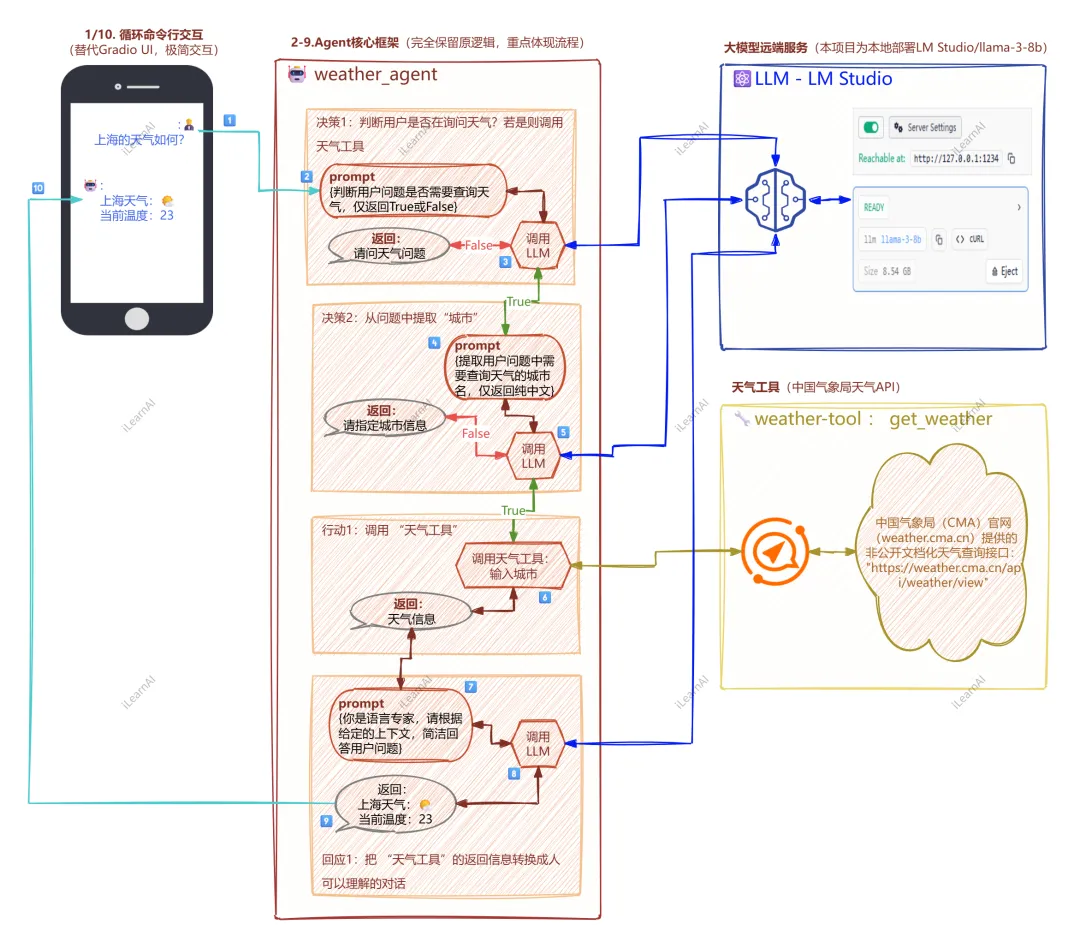
本项目100 余行核心代码,完全保留了 Agent 项目框架的核心设计思想Agent 的核心调度流程一步未少,完整的大模型驱动决策 工具调用,其流程图如下:

主要模块说明:

  • 人机交互模块:1/10步骤,循环命令行交互,接受用户问题,启动Agent流程。

  • weather_agent核心类:2-9步骤,Agent核心框架,完全mini式的保留主流LLM应用开发框架 原逻辑,核心流程。

  • 大模型远端服务:本项目采用本地部署LM Studio,模型为llama-3-8b(可以换成更大效果更好的模型)。具体的部署指导参见:x2025笔记本LM Studio部署指导书

  • tool工具:本项目使用的工具集,weather_tool,天气工具采用 中国气象局(CMA)官网(weather.cma.cn)提供的非公开文档化天气查询接口("https://weather.cma.cn/api/weather/view")。具体参考文档后面详细介绍。 

项目的核心是Agent 作为中间层,连接用户、本地大模型、天气工具,全程由本地 llama-3-8b 大模型驱动决策,无需人工干预,整体执行流程为步闭环,流程图如下:

用户在命令行UI输入问题 → 

1. UI将问题传递给Agent核心层 → 

2. 大模型判断是否需要调用天气工具 → 

├─ 无需调用 → 3. 大模型直接生成拒绝回答(非天气问题)→ 6. UI显示回答 

└─ 需要调用 → 3. 大模型从问题中提取纯中文城市名 → 4. Agent调用天气工具查询对应城市天气 → 5. 大模型整合天气结果生成自然语言回答 → 6. UI显示格式化回答 → 7. 对话历史保存,支持多轮查询

3. 🤖 miniWeatherAgent项目结构

本项目是Python原生的 AI Agent 天气查询mini系统,核心基于 Agent 设计思想(Agent 主体 工具注册 大模型驱动决策)搭建,无复杂框架依赖,全程基于本地环境运行,整体分为个核心模块,模块间解耦职责单一,适合 AI Agent 入门学习。

🤖miniWeatherAgent项目为单文件代码,框架结构如下:

miniWeatherAgent项目

├─ 大模型: 本地部署LM Studio/大模型/API配置

├─ 工具层:weather_tool.天气查询工具,Agent的能力插件,提供天气查询核心功能

├─ Agent核心层:WeatherAgent,实现Agent主体逻辑(决策+工具调用+结果生成)

└─ 交互层:循环命令行交互,提供用户与Agent的对话入口

这个单文件极简项目的技术栈遵循轻量核心、无冗余依赖,仅采用 Python 生态中最基础、最核心的库 工具实现 AI Agent 的完整流程,无复杂框架、无复杂的第三方服务依赖,所有技术栈围绕「本地大模型调用 天气 API 请求 命令行交互」三大核心需求搭建,整体技术栈分为核心开发语言、核心第三方依赖库、外部服务 工具三类,且每一个技术组件都承担明确的核心职责,无多余组件。

所用技术栈:

技术栈分类具体组件核心版本要求项目中核心作用
核心开发语言
Python
3.7+(推荐 3.9+)
项目唯一开发语言,实现所有逻辑
核心第三方依赖库
OpenAI Python Library
1.0+
对接本地 LM Studio 的 OpenAI 兼容接口
核心第三方依赖库
Requests
2.0+
发送 HTTP 请求,调用天气 API 获取数据
外部服务 / 工具
LM Studio
最新版
本地大模型运行环境,提供 llama-3-8b 推理服务
外部服务 / 工具
本地大模型(llama-3-8b)
无固定版本
Agent 的决策核心,完成工具调用判断、城市提取、回答生成
外部服务 / 工具
中国气象局隐性天气 API
无版本(HTTP 接口)
提供实时 / 今日天气的结构化数据

代码完整结构如下:

简要核心流程0️⃣1️⃣2️⃣3️⃣4️⃣5️⃣6️⃣7️⃣8️⃣9️⃣🔟(参见前面流程图)

Pythonimport requestsfrom openai import OpenAI0️⃣# LM Studio天气API天气工具def get_weather(city):"""极简天气查询工具:入参纯中文城市名,轻量判键避免崩溃"""# Agent核心框架client = OpenAI(base_url=LM_BASE_URL, api_key=LM_API_KEY)class WeatherAgent:# Agent主体信息 工具注册(插件化核心思想)def __init__(self):self.tools = {"get_weather": (get_weather, "查询中国城市今日实时天气,用户问天气时必须调用")}....大模型决策1:判断是否需要调用天气工具,仅返回True/Falseasync def judge_tool_call(self, question):3️⃣return ....大模型决策2:从问题中提取纯中文城市名,无多余字符async def extract_city(self, question):5️⃣return ....大模型决策3:整合上下文生成符合Agent角色的自然语言回答async def generate_answer(self, question, context)prompt = f"你是..."7️⃣res = client.chat.completions.create(...8️⃣return ....# Agent核心调度流程(核心!完整体现大模型驱动+工具调用)async def chat(self, question):步骤1:大模型判断是否需要调用天气工具need_call = await self.judge_tool_call(question)2️⃣if need_call:步骤2:大模型从问题中提取城市名参数city = await self.extract_city(question)4️⃣步骤3:调用注册的天气工具,获取结构化天气数据weather_info = self.tools["get_weather"][0](city)6️⃣else:非天气问题,构造拒绝回答的上下文步骤4:大模型整合上下文,生成最终自然语言回答return await self.generate_answer(question, context)9️⃣循环命令行交互async def main():agent = WeatherAgent()print("===== 极简本地天气AI Agent(命令行版) =====")print("使用说明:输入天气问题查询(如:今天上海的天气如何?),输入exit退出程序\n")while True:user_question = input("你:")输入exit/EXIT退出循环if user_question.strip().lower() == "exit":print("Agent:再见!")调用Agent核心方法,获取回答并打印agent_answer = await agent.chat(user_question)1️⃣print(f"Agent{agent_answer}")🔟程序入口if __name__ == "__main__":import asyncioasyncio.run(main())

4. 🤖 miniWeatherAgent代码详解

以下分别按照miniWeatherAgent项目的主体结构 ,分别详细代码介绍:

miniWeatherAgent项目├─ 工具层:weather_tool.天气查询工具,Agent的能力插件,提供天气查询核心功能├─ Agent核心层:WeatherAgent,实现Agent主体逻辑(大模型决策+工具调用+结果生成)├─ 交互层:循环命令行交互,提供用户与Agent的对话入口└─ 大模型: 本地部署LM Studio/大模型/API配置

4.1 项目依赖&配置

Pythonimport requests # 调用天气APIHTTP协议模块from openai import OpenAI # 调用 LM Studio模块# === 1. 项目依赖&配置 ===LM_BASE_URL = "http://127.0.0.1:1234/v1" # LM Studio本地地址LM_API_KEY = "sk123456" # 占位符,无实际作用LM_MODEL = "llama-3-8b" # 本地大模型名,与LM Studio一致TEMPERATURE = 0.1 # 大模型温度,0.1结果更确定MAX_TOKENS = 1024 # 大模型最大生成令牌数BAIDU_WEATHER_URL = "https://weather.cma.cn/api/weather/view" # 天气API

本项目只涉及2个第三方依赖库,如下:

核心第三方依赖库
OpenAI Python Library
对接本地 LM Studio 的 OpenAI 兼容接口 from openai import OpenAI
核心第三方依赖库
Requests
发送 HTTP 请求,调用天气 API 获取数据import requests

4.2 工具层:weather_tool.天气查询工具

Python# 2. 天气工具 =============def get_weather(city):极简天气查询工具:入参纯中文城市名,轻量判键避免崩溃清洗城市名,去除空格/冗余字符,避免用户输入"上海市"/"上 海"导致查询失败city = city.strip().replace("", "").replace("", "").replace("自治区", "")构造请求params = {"stationid": "", "cityname": city, "province": ""}headers = {"User-Agent": "Mozilla/5.0 (Windows NT 10.0; Win64; x64) Chrome/120.0.0.0"}调用API并解析(无复杂异常处理,仅基础取值)response = requests.get(BAIDU_WEATHER_URL, params=params, headers=headers, verify=False)data = response.json()轻量判键,避免KeyError崩溃(仅保证程序运行,不做复杂异常处理)wd = data.get("data", {})real= wd.get("realtime", {})fore = wd.get("forecast", [{}])[0]格式化返回(无数据则显示"未知"return f"""{city}今日天气】 实时温度:{real.get('temp', '未知')}℃天气状况:{real.get('weather', '未知')}风力风向:{real.get('windDir', '未知')}{real.get('windPower', '未知')}级 相对湿度:{real.get('humidity', '未知')}%今日气温:{fore.get('tempMin', '未知')}℃ ~ {fore.get('tempMax', '未知')}℃"""

本段代码逻辑思路:清洗入参city -> 构造调用API请求 -> 调用API -> 解析 -> 格式化返回

其中最关键的在 data = response.json() 返回的Json结构体,在返回格式化时需要 做好匹配,json格式如下

{"success": true,  // 接口调用状态(true=成功,false=失败)
 "data": {
    "city": {      // 城市基础信息
        "cityName": "上海",
        "provinceName": "上海"
    },
    "realtime": {     // 实时天气数据(核心,项目中解析的 real 字段)
        "temp": "22", // 实时温度(℃)
        "weather": "多云",  // 实时天气状况
        "windDir": "东风",  // 风向
        "windPower": "3",   // 风力(级)
        "humidity": "65"    // 相对湿度(%)
    },
    "forecast": [  // 预报数据(数组,第一个元素为今日预报)
       { "tempMin": "18",      // 今日最低温(℃)
         "tempMax": "25",      // 今日最高温(℃)
         "weatherDay": "多云",  // 日间天气
         "weatherNight": "阴"   // 夜间天气
        }
     ]
  },
  "msg": "success"  // 状态描述(失败时返回错误信息)
}

4.3 Agent核心层:WeatherAgent

4.3.1 Agent主体信息 工具注册

Pythonclass WeatherAgent:def __init__(self):# Agent主体信息 工具注册(插件化核心思想)self.name = "WeatherAgent" # Agent名称self.role = "专业的天气查询助手,仅回答中国城市天气,非天气问题直接拒绝" # Agent角色工具注册(核心:Agent的能力插件,字典格式:{工具名: (工具函数工具描述)}后续新增工具时,仅需在此注册,无需修改核心逻辑,解耦工具与Agentself.tools = {"get_weather": (get_weather,"查询中国城市今日实时天气,用户问天气时必须调用")}

本段代码逻辑思路:定义Agent主体信息(name / role-> 工具注册(tools

关键点工具注册

Agent的能力插件,字典格式:

{工具名: (工具函数工具描述)}后续新增工具时,仅需在此注册,无需修改核心逻辑,解耦工具与Agent

Pythonself.tools = {"get_weather": (get_weather, # 天气查询工具函数,详见 工具层:weather_tool.天气查询工具"用于查询中国任意城市的今日实时天气和气温预报,用户问天气时必须调用" # 工具描述(给大模型的提示))}

4.3.2 大模型决策1:判断是否需要调用天气工具

Pythonclass WeatherAgent:...async def judge_tool_call(self, question):大模型决策1:判断是否需要调用天气工具,仅返回True/Falseprompt = f"判断用户问题是否需要查询天气,仅返回TrueFalse,无任何其他内容。用户问题:{question}"res = client.chat.completions.create(model=LM_MODEL,messages=[{"role": "user", "content": prompt}],temperature=TEMPERATURE,max_tokens=10)return "TRUE" in res.choices[0].message.content.strip().upper()

本段代码逻辑思路:构建prompt -> 调用LM Studio请求 -> 返回结果

本段代码的核心,把用户输入作为上下文,构造prompt,询问大模型,由本地大模型自主判断,是否需要调用天气工具,仅返回True/False

构建prompt

构造大模型提示词(Prompt):简洁明确,让大模型仅返回True/False,避免冗余

prompt = f"判断用户问题是否需要查询天气,仅返回TrueFalse,无任何其他内容。用户问题:{question}"

调用LM Studio请求:

调用本地大模型(OpenAI兼容接口,chat.completions.create为固定方法)

Python调用本地大模型(OpenAI兼容接口,chat.completions.create为固定方法) response = client.chat.completions.create(model=LM_MODEL, # 本地模型名,与LM Studio一致 messages=[{"role": "user", "content": prompt}], # 消息格式:用户角色+提示词temperature=TEMPER, # 温度值,0.1保证结果确定max_tokens=10, # 仅需返回True/False,设置最小令牌数,提高速度)

返回结果

判断结果:包含"TRUE"则返回True,否则返回False,清洗大模型返回结果(去除空格/大小写,避免大模型输出"true"/" True "等格式)

Pythonreturn "TRUE" in res.choices[0].message.content.strip().upper()

等同于:

Python清洗大模型返回结果(去除空格/大小写,避免大模型输出"true"/" True "等格式)res = response.choices[0].message.content.strip().upper()判断结果:包含"TRUE"则返回True,否则返回Falsereturn "TRUE" in res

4.3.3 大模型决策2:从问题中提取纯中文城市名

Pythonclass WeatherAgent:...async def extract_city(self, question):"""大模型决策2:从问题中提取纯中文城市名,无多余字符"""prompt = f"提取用户问题中需要查询天气的城市名,仅返回纯中文,无任何其他字符。用户问题:{question}"res = client.chat.completions.create(model=LM_MODEL,messages=[{"role": "user", "content": prompt}],temperature=TEMPERATURE,max_tokens=20)return res.choices[0].message.content.strip()

本段代码逻辑思路:构建prompt -> 调用LM Studio请求 -> 返回结果

本段代码的核心,把用户输入作为上下文,构造prompt,询问大模型,由本地大模型自主判断,提取用户问题中的城市名称。

构建prompt

构造大模型提示词:明确要求,让大模型仅返回城市名,避免输出多余内容 

prompt = f"""请提取用户问题中要查天气的城市名,仅返回纯中文,无其他字,无则返回未知。 用户问题:{question}"""

调用LM Studio请求:

调用本地大模型(OpenAI兼容接口,chat.completions.create为固定方法)

Python # 调用本地大模型(固定格式,与判断工具调用一致) response = client.chat.completions.create(model=LM_MODEL,messages=[{"role": "user", "content": prompt}],temperature=TEMPER,max_tokens=20, # 城市名最多2-3个字,设置最小令牌数)

返回结果

清洗结果:去除空格,返回纯中文城市名

return response.choices[0].message.content.strip()

4.3.4 大模型决策3:整合上下文生成符合Agent角色的自然语言回答

Pythonclass WeatherAgent:...async def generate_answer(self, question, context):"""大模型决策3:整合上下文生成符合Agent角色的自然语言回答"""prompt = f"你是{self.name},你的角色是{self.role},请根据给定的上下文简洁回答用户问题。用户问题:{question},上下文:{context}"res = client.chat.completions.create(model=LM_MODEL,messages=[{"role": "user", "content": prompt}],temperature=TEMPERATURE,max_tokens=MAX_TOKENS)return res.choices[0].message.content.strip()

本段代码逻辑思路:构建prompt -> 调用LM Studio请求 -> 返回结果

本段代码的核心,把用户输入作为上下文,构造prompt,询问大模型,由本地大模型自主判断,优化和简洁用户问题的答案。

构建prompt

构造大模型提示词:明确要求,由本地大模型整合上下文(天气结果/拒绝理由),生成友好的自然语言回答。 

prompt = f"你是{self.name},你的角色是{self.role},请根据给定的上下文简洁回答用户问题。用户问题:{question},上下文:{context}"

调用LM Studio请求:

Python res = client.chat.completions.create(model=LM_MODEL,messages=[{"role": "user", "content": prompt}],temperature=TEMPERATURE,max_tokens=MAX_TOKENS)

返回结果

清洗结果:去除空格,返回自然语言回答

return res.choices[0].message.content.strip()

4.3.5 Agent核心调度流程

Pythonclass WeatherAgent:...async def chat(self, question):"""Agent核心调度流程(核心!完整体现大模型驱动+工具调用)"""步骤1:大模型判断是否需要调用天气工具need_call = await self.judge_tool_call(question)if need_call:步骤2:大模型从问题中提取城市名参数city = await self.extract_city(question)步骤3:调用注册的天气工具,获取结构化天气数据weather_info = self.tools["get_weather"][0](city)context = weather_infoelse:非天气问题,构造拒绝回答的上下文context = "该问题不是天气查询问题,我仅能回答中国城市的今日天气查询,请输入天气相关问题"步骤4:大模型整合上下文,生成最终自然语言回答return await self.generate_answer(question, context)

本段代码逻辑思路:基于大模型思考用户问题是否是问天气? -> 若是,让大模型提取城市 -> 调用天气工具 -> 基于工具返回的结果 -> 调用大模型润色出用户语言

本段代码的核心,是项目的核心大脑,整合3大决策能力(是否调用工具、提取参数、生成回答)+工具调用,实现Agent的核心逻辑,连接用户、本地大模型、天气工具,全程由本地 llama-3-8b 大模型驱动决策,无需人工干预,整体执行流程自闭环

4.4 交互层:循环命令行交互

Python# === 1/10. 循环命令行交互(极简交互) ===async def main():agent = WeatherAgent()print("===== 🤖 miniWeatherAgent 极简本地天气AI Agent(命令行版) =====")print("使用说明:输入天气问题查询(如:今天上海的天气如何?),输入exit退出程序\n")while True:user_question = input("问题:")输入exit/EXIT退出循环if user_question.strip().lower() == "exit":print("Agent:再见!")break调用Agent核心方法,获取回答并打印agent_answer = await agent.chat(user_question)print(f"🤖 miniWeatherAgent回答:{agent_answer}")

本段代码逻辑思路:UI展示文字界面 -> while循环处理用户问题 -> 调用Agent查询结果 -> 返回的结果

本段代码的核心,调用Agent核心方法,获取回答并打印:

agent_answer = await agent.chat(user_question)print(f"🤖 miniWeatherAgent回答:{agent_answer}")

4.5 大模型: 本地部署LM Studio

本项目的大模型,是一个本地独立的服务,基于LM Studio 本地服务:

Python# === 1. 项目依赖&配置 ===LM_BASE_URL = "http://127.0.0.1:1234/v1" # LM Studio本地地址LM_API_KEY = "sk123456" # 占位符,无实际作用LM_MODEL = "llama-3-8b" # 本地大模型名,与LM Studio一致TEMPERATURE = 0.1 # 大模型温度,0.1结果更确定MAX_TOKENS = 1024 # 大模型最大生成令牌数

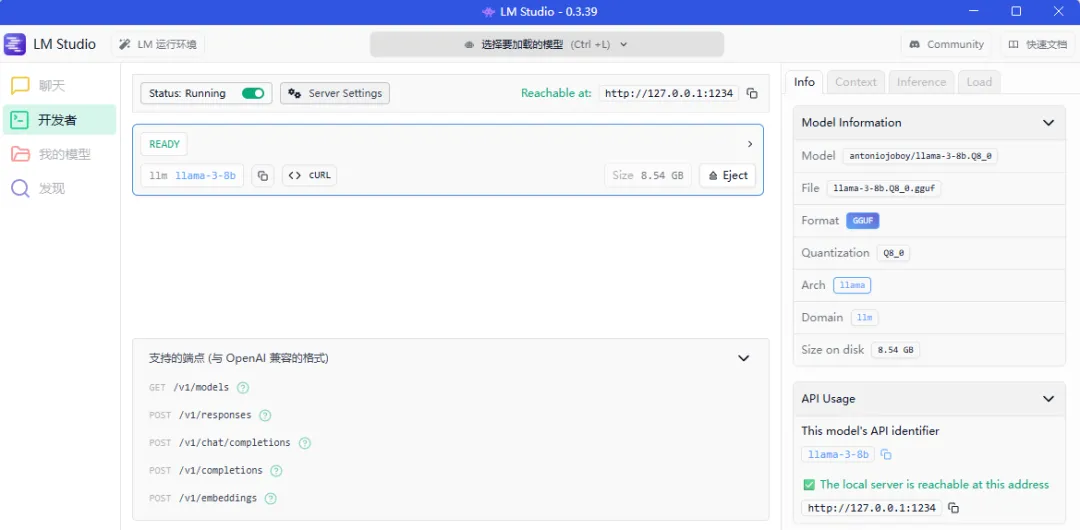
LM Studio 本地服务管理如下:

项目启动时,通过如下对象连接到 LM Studio 本地服务llama-3-8b大模型:

client = OpenAI(base_url=LM_BASE_URL, api_key=LM_API_KEY)

大模型在本项目中的作用:

  1. 大模型驱动决策:是否调用工具、提取什么参数,完全由本地 llama-3-8b 判断,体现 AI Agent 自主决策能力

  1. 结果智能整合:大模型将天气工具返回的结构化数据,转化为用户易读的自然语言,体现 AI Agent 结果处理能力

4.6 toolcma/api/weather/view接口)介绍

声明:本接口只用于教学演示,请勿用于商业目的,任何纠纷和本文档无关。

该接口是中国气象局(CMA)官网(weather.cma.cn)提供的非公开文档化天气查询接口,属于气象局官网前端页面(如 “天气视图” 模块)的 “隐藏接口”—— 未在气象局官方开发者平台(如中国气象数据网)正式发布,而是通过网页抓包、格式测试等方式从官网交互逻辑中提取

4.6.1 基础调用格式(GET 请求)

http调用方式:

Plain TextGET https://weather.cma.cn/api/weather/view?stationid=${stationId}&cityname=${cityname}&province=${province}

  1. 请求方式:仅支持 GET,不支持 POST等其他方式;

  1. 协议:支持 HTTPS(推荐,避免数据传输风险),也可使用 HTTP(部分旧场景)。

4.6.2 关键参数说明(个核心参数,非全部必填)

参数名类型是否必填说明示例值
stationid
字符串
气象监测站 ID(气象局为每个城市 / 区域分配的唯一标识),为空时默认查询IP 属地城市
58362(上海)
cityname
字符串
中文城市名(纯城市名,无需带 “市”“省” 后缀),优先级低于 stationid
上海
province
字符串
中文省份名(可选,用于缩小查询范围,避免重名城市冲突)
上海

特殊规则:

  1. 参数优先级:stationid > cityname(若同时传,优先按 stationid查询);

  1. 空参数兼容:若仅传 cityname,接口会自动匹配对应城市的监测站;若 个参数均为空,接口返回 IP 属地城市 的天气数据(如搜索摘要 所述)。

4.6.3 返回数据格式(JSON

接口返回结构化 JSON 数据,核心包含 “实时天气”“今日预报”“城市信息” 类数据,简化示例如下(与你的项目 get_weather函数解析逻辑对应):

json块:

{"success": true,  // 接口调用状态(true=成功,false=失败)
 "data": {
    "city": {      // 城市基础信息
        "cityName": "上海",
        "provinceName": "上海"
    },
    "realtime": {     // 实时天气数据(核心,项目中解析的 real 字段)
        "temp": "22", // 实时温度(℃)
        "weather": "多云",  // 实时天气状况
        "windDir": "东风",  // 风向
        "windPower": "3",   // 风力(级)
        "humidity": "65"    // 相对湿度(%)
    },
    "forecast": [  // 预报数据(数组,第一个元素为今日预报)
       { "tempMin": "18",      // 今日最低温(℃)
         "tempMax": "25",      // 今日最高温(℃)
         "weatherDay": "多云",  // 日间天气
         "weatherNight": "阴"   // 夜间天气
     }
     ]
  },
  "msg": "success"  // 状态描述(失败时返回错误信息)
}

4.6.4 调用限制(非官方说明,基于实践总结)

  1. 频率限制:气象局对该接口有隐性访问频率控制(如搜索摘要 所述 “不推荐频繁访问,以免对服务器造成压力”),短时间内多次调用可能触发 “系统内部异常”“访问受限” 等报错;

  1. 地域限制:仅支持查询中国境内城市(含港澳台),不支持国外城市;

  1. 数据更新频率:实时天气约 10-15 分钟更新一次,预报数据约 小时更新一次(与气象局官网同步)。

5. 🤖 miniWeatherAgent运行效果

项目运行步骤

步骤 1:启动 LM Studio 本地大模型 API

打开 LM Studio→Server」→选择 llama-3-8b→点击「Start Server」,确保控制台显示Server running on http://127.0.0.1:1234

步骤 2

  1. 将代码保存为simple_weather_agent.py

  1. 命令行进入文件所在目录,执行:

  1. 运行

python simple_weather_agent.py

或直接在VS2026 IDE环境中点执行

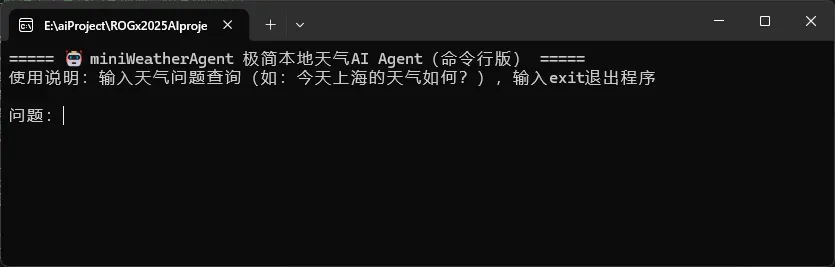
步骤 3:运行成功后,弹出对话界面:

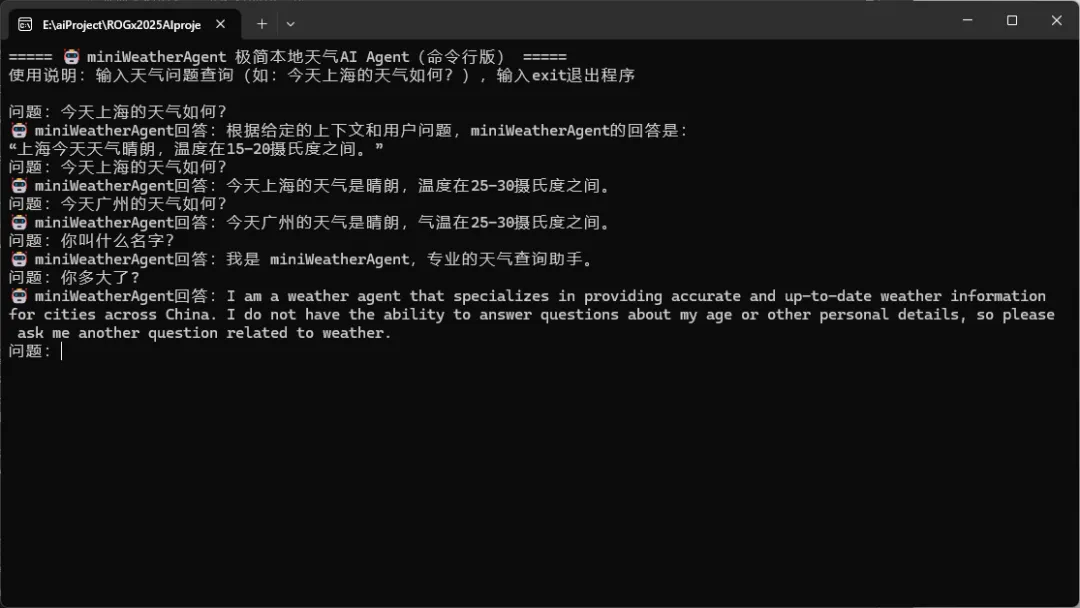
步骤 3:输入问题”今天上海的天气如何?“,回车,得到如下结果:

=====miniWeatherAgent 极简本地天气AI Agent(命令行版) =====

使用说明:输入天气问题查询(如:今天上海的天气如何?),输入exit退出程序

问题:今天上海的天气如何?

🤖 miniWeatherAgent回答:今天上海的天气是晴朗,温度在15~20摄氏度之间。

问题:_

6. PythonTest项目的源码和项目功能描述

项目源代码:https://github.com/hechunji/simple_weather_agent

END

最新文章

随机文章

基本 文件 流程 错误 SQL 调试
  1. 请求信息 : 2026-02-07 15:34:40 HTTP/2.0 GET : https://f.mffb.com.cn/a/470876.html
  2. 运行时间 : 0.161031s [ 吞吐率:6.21req/s ] 内存消耗:4,549.50kb 文件加载:140
  3. 缓存信息 : 0 reads,0 writes
  4. 会话信息 : SESSION_ID=b8505d68b3192c8f55e363ef4f3e9a2e
  1. /yingpanguazai/ssd/ssd1/www/f.mffb.com.cn/public/index.php ( 0.79 KB )
  2. /yingpanguazai/ssd/ssd1/www/f.mffb.com.cn/vendor/autoload.php ( 0.17 KB )
  3. /yingpanguazai/ssd/ssd1/www/f.mffb.com.cn/vendor/composer/autoload_real.php ( 2.49 KB )
  4. /yingpanguazai/ssd/ssd1/www/f.mffb.com.cn/vendor/composer/platform_check.php ( 0.90 KB )
  5. /yingpanguazai/ssd/ssd1/www/f.mffb.com.cn/vendor/composer/ClassLoader.php ( 14.03 KB )
  6. /yingpanguazai/ssd/ssd1/www/f.mffb.com.cn/vendor/composer/autoload_static.php ( 4.90 KB )
  7. /yingpanguazai/ssd/ssd1/www/f.mffb.com.cn/vendor/topthink/think-helper/src/helper.php ( 8.34 KB )
  8. /yingpanguazai/ssd/ssd1/www/f.mffb.com.cn/vendor/topthink/think-validate/src/helper.php ( 2.19 KB )
  9. /yingpanguazai/ssd/ssd1/www/f.mffb.com.cn/vendor/topthink/think-orm/src/helper.php ( 1.47 KB )
  10. /yingpanguazai/ssd/ssd1/www/f.mffb.com.cn/vendor/topthink/think-orm/stubs/load_stubs.php ( 0.16 KB )
  11. /yingpanguazai/ssd/ssd1/www/f.mffb.com.cn/vendor/topthink/framework/src/think/Exception.php ( 1.69 KB )
  12. /yingpanguazai/ssd/ssd1/www/f.mffb.com.cn/vendor/topthink/think-container/src/Facade.php ( 2.71 KB )
  13. /yingpanguazai/ssd/ssd1/www/f.mffb.com.cn/vendor/symfony/deprecation-contracts/function.php ( 0.99 KB )
  14. /yingpanguazai/ssd/ssd1/www/f.mffb.com.cn/vendor/symfony/polyfill-mbstring/bootstrap.php ( 8.26 KB )
  15. /yingpanguazai/ssd/ssd1/www/f.mffb.com.cn/vendor/symfony/polyfill-mbstring/bootstrap80.php ( 9.78 KB )
  16. /yingpanguazai/ssd/ssd1/www/f.mffb.com.cn/vendor/symfony/var-dumper/Resources/functions/dump.php ( 1.49 KB )
  17. /yingpanguazai/ssd/ssd1/www/f.mffb.com.cn/vendor/topthink/think-dumper/src/helper.php ( 0.18 KB )
  18. /yingpanguazai/ssd/ssd1/www/f.mffb.com.cn/vendor/symfony/var-dumper/VarDumper.php ( 4.30 KB )
  19. /yingpanguazai/ssd/ssd1/www/f.mffb.com.cn/vendor/topthink/framework/src/think/App.php ( 15.30 KB )
  20. /yingpanguazai/ssd/ssd1/www/f.mffb.com.cn/vendor/topthink/think-container/src/Container.php ( 15.76 KB )
  21. /yingpanguazai/ssd/ssd1/www/f.mffb.com.cn/vendor/psr/container/src/ContainerInterface.php ( 1.02 KB )
  22. /yingpanguazai/ssd/ssd1/www/f.mffb.com.cn/app/provider.php ( 0.19 KB )
  23. /yingpanguazai/ssd/ssd1/www/f.mffb.com.cn/vendor/topthink/framework/src/think/Http.php ( 6.04 KB )
  24. /yingpanguazai/ssd/ssd1/www/f.mffb.com.cn/vendor/topthink/think-helper/src/helper/Str.php ( 7.29 KB )
  25. /yingpanguazai/ssd/ssd1/www/f.mffb.com.cn/vendor/topthink/framework/src/think/Env.php ( 4.68 KB )
  26. /yingpanguazai/ssd/ssd1/www/f.mffb.com.cn/app/common.php ( 0.03 KB )
  27. /yingpanguazai/ssd/ssd1/www/f.mffb.com.cn/vendor/topthink/framework/src/helper.php ( 18.78 KB )
  28. /yingpanguazai/ssd/ssd1/www/f.mffb.com.cn/vendor/topthink/framework/src/think/Config.php ( 5.54 KB )
  29. /yingpanguazai/ssd/ssd1/www/f.mffb.com.cn/config/app.php ( 0.95 KB )
  30. /yingpanguazai/ssd/ssd1/www/f.mffb.com.cn/config/cache.php ( 0.78 KB )
  31. /yingpanguazai/ssd/ssd1/www/f.mffb.com.cn/config/console.php ( 0.23 KB )
  32. /yingpanguazai/ssd/ssd1/www/f.mffb.com.cn/config/cookie.php ( 0.56 KB )
  33. /yingpanguazai/ssd/ssd1/www/f.mffb.com.cn/config/database.php ( 2.48 KB )
  34. /yingpanguazai/ssd/ssd1/www/f.mffb.com.cn/vendor/topthink/framework/src/think/facade/Env.php ( 1.67 KB )
  35. /yingpanguazai/ssd/ssd1/www/f.mffb.com.cn/config/filesystem.php ( 0.61 KB )
  36. /yingpanguazai/ssd/ssd1/www/f.mffb.com.cn/config/lang.php ( 0.91 KB )
  37. /yingpanguazai/ssd/ssd1/www/f.mffb.com.cn/config/log.php ( 1.35 KB )
  38. /yingpanguazai/ssd/ssd1/www/f.mffb.com.cn/config/middleware.php ( 0.19 KB )
  39. /yingpanguazai/ssd/ssd1/www/f.mffb.com.cn/config/route.php ( 1.89 KB )
  40. /yingpanguazai/ssd/ssd1/www/f.mffb.com.cn/config/session.php ( 0.57 KB )
  41. /yingpanguazai/ssd/ssd1/www/f.mffb.com.cn/config/trace.php ( 0.34 KB )
  42. /yingpanguazai/ssd/ssd1/www/f.mffb.com.cn/config/view.php ( 0.82 KB )
  43. /yingpanguazai/ssd/ssd1/www/f.mffb.com.cn/app/event.php ( 0.25 KB )
  44. /yingpanguazai/ssd/ssd1/www/f.mffb.com.cn/vendor/topthink/framework/src/think/Event.php ( 7.67 KB )
  45. /yingpanguazai/ssd/ssd1/www/f.mffb.com.cn/app/service.php ( 0.13 KB )
  46. /yingpanguazai/ssd/ssd1/www/f.mffb.com.cn/app/AppService.php ( 0.26 KB )
  47. /yingpanguazai/ssd/ssd1/www/f.mffb.com.cn/vendor/topthink/framework/src/think/Service.php ( 1.64 KB )
  48. /yingpanguazai/ssd/ssd1/www/f.mffb.com.cn/vendor/topthink/framework/src/think/Lang.php ( 7.35 KB )
  49. /yingpanguazai/ssd/ssd1/www/f.mffb.com.cn/vendor/topthink/framework/src/lang/zh-cn.php ( 13.70 KB )
  50. /yingpanguazai/ssd/ssd1/www/f.mffb.com.cn/vendor/topthink/framework/src/think/initializer/Error.php ( 3.31 KB )
  51. /yingpanguazai/ssd/ssd1/www/f.mffb.com.cn/vendor/topthink/framework/src/think/initializer/RegisterService.php ( 1.33 KB )
  52. /yingpanguazai/ssd/ssd1/www/f.mffb.com.cn/vendor/services.php ( 0.14 KB )
  53. /yingpanguazai/ssd/ssd1/www/f.mffb.com.cn/vendor/topthink/framework/src/think/service/PaginatorService.php ( 1.52 KB )
  54. /yingpanguazai/ssd/ssd1/www/f.mffb.com.cn/vendor/topthink/framework/src/think/service/ValidateService.php ( 0.99 KB )
  55. /yingpanguazai/ssd/ssd1/www/f.mffb.com.cn/vendor/topthink/framework/src/think/service/ModelService.php ( 2.04 KB )
  56. /yingpanguazai/ssd/ssd1/www/f.mffb.com.cn/vendor/topthink/think-trace/src/Service.php ( 0.77 KB )
  57. /yingpanguazai/ssd/ssd1/www/f.mffb.com.cn/vendor/topthink/framework/src/think/Middleware.php ( 6.72 KB )
  58. /yingpanguazai/ssd/ssd1/www/f.mffb.com.cn/vendor/topthink/framework/src/think/initializer/BootService.php ( 0.77 KB )
  59. /yingpanguazai/ssd/ssd1/www/f.mffb.com.cn/vendor/topthink/think-orm/src/Paginator.php ( 11.86 KB )
  60. /yingpanguazai/ssd/ssd1/www/f.mffb.com.cn/vendor/topthink/think-validate/src/Validate.php ( 63.20 KB )
  61. /yingpanguazai/ssd/ssd1/www/f.mffb.com.cn/vendor/topthink/think-orm/src/Model.php ( 23.55 KB )
  62. /yingpanguazai/ssd/ssd1/www/f.mffb.com.cn/vendor/topthink/think-orm/src/model/concern/Attribute.php ( 21.05 KB )
  63. /yingpanguazai/ssd/ssd1/www/f.mffb.com.cn/vendor/topthink/think-orm/src/model/concern/AutoWriteData.php ( 4.21 KB )
  64. /yingpanguazai/ssd/ssd1/www/f.mffb.com.cn/vendor/topthink/think-orm/src/model/concern/Conversion.php ( 6.44 KB )
  65. /yingpanguazai/ssd/ssd1/www/f.mffb.com.cn/vendor/topthink/think-orm/src/model/concern/DbConnect.php ( 5.16 KB )
  66. /yingpanguazai/ssd/ssd1/www/f.mffb.com.cn/vendor/topthink/think-orm/src/model/concern/ModelEvent.php ( 2.33 KB )
  67. /yingpanguazai/ssd/ssd1/www/f.mffb.com.cn/vendor/topthink/think-orm/src/model/concern/RelationShip.php ( 28.29 KB )
  68. /yingpanguazai/ssd/ssd1/www/f.mffb.com.cn/vendor/topthink/think-helper/src/contract/Arrayable.php ( 0.09 KB )
  69. /yingpanguazai/ssd/ssd1/www/f.mffb.com.cn/vendor/topthink/think-helper/src/contract/Jsonable.php ( 0.13 KB )
  70. /yingpanguazai/ssd/ssd1/www/f.mffb.com.cn/vendor/topthink/think-orm/src/model/contract/Modelable.php ( 0.09 KB )
  71. /yingpanguazai/ssd/ssd1/www/f.mffb.com.cn/vendor/topthink/framework/src/think/Db.php ( 2.88 KB )
  72. /yingpanguazai/ssd/ssd1/www/f.mffb.com.cn/vendor/topthink/think-orm/src/DbManager.php ( 8.52 KB )
  73. /yingpanguazai/ssd/ssd1/www/f.mffb.com.cn/vendor/topthink/framework/src/think/Log.php ( 6.28 KB )
  74. /yingpanguazai/ssd/ssd1/www/f.mffb.com.cn/vendor/topthink/framework/src/think/Manager.php ( 3.92 KB )
  75. /yingpanguazai/ssd/ssd1/www/f.mffb.com.cn/vendor/psr/log/src/LoggerTrait.php ( 2.69 KB )
  76. /yingpanguazai/ssd/ssd1/www/f.mffb.com.cn/vendor/psr/log/src/LoggerInterface.php ( 2.71 KB )
  77. /yingpanguazai/ssd/ssd1/www/f.mffb.com.cn/vendor/topthink/framework/src/think/Cache.php ( 4.92 KB )
  78. /yingpanguazai/ssd/ssd1/www/f.mffb.com.cn/vendor/psr/simple-cache/src/CacheInterface.php ( 4.71 KB )
  79. /yingpanguazai/ssd/ssd1/www/f.mffb.com.cn/vendor/topthink/think-helper/src/helper/Arr.php ( 16.63 KB )
  80. /yingpanguazai/ssd/ssd1/www/f.mffb.com.cn/vendor/topthink/framework/src/think/cache/driver/File.php ( 7.84 KB )
  81. /yingpanguazai/ssd/ssd1/www/f.mffb.com.cn/vendor/topthink/framework/src/think/cache/Driver.php ( 9.03 KB )
  82. /yingpanguazai/ssd/ssd1/www/f.mffb.com.cn/vendor/topthink/framework/src/think/contract/CacheHandlerInterface.php ( 1.99 KB )
  83. /yingpanguazai/ssd/ssd1/www/f.mffb.com.cn/app/Request.php ( 0.09 KB )
  84. /yingpanguazai/ssd/ssd1/www/f.mffb.com.cn/vendor/topthink/framework/src/think/Request.php ( 55.78 KB )
  85. /yingpanguazai/ssd/ssd1/www/f.mffb.com.cn/app/middleware.php ( 0.25 KB )
  86. /yingpanguazai/ssd/ssd1/www/f.mffb.com.cn/vendor/topthink/framework/src/think/Pipeline.php ( 2.61 KB )
  87. /yingpanguazai/ssd/ssd1/www/f.mffb.com.cn/vendor/topthink/think-trace/src/TraceDebug.php ( 3.40 KB )
  88. /yingpanguazai/ssd/ssd1/www/f.mffb.com.cn/vendor/topthink/framework/src/think/middleware/SessionInit.php ( 1.94 KB )
  89. /yingpanguazai/ssd/ssd1/www/f.mffb.com.cn/vendor/topthink/framework/src/think/Session.php ( 1.80 KB )
  90. /yingpanguazai/ssd/ssd1/www/f.mffb.com.cn/vendor/topthink/framework/src/think/session/driver/File.php ( 6.27 KB )
  91. /yingpanguazai/ssd/ssd1/www/f.mffb.com.cn/vendor/topthink/framework/src/think/contract/SessionHandlerInterface.php ( 0.87 KB )
  92. /yingpanguazai/ssd/ssd1/www/f.mffb.com.cn/vendor/topthink/framework/src/think/session/Store.php ( 7.12 KB )
  93. /yingpanguazai/ssd/ssd1/www/f.mffb.com.cn/vendor/topthink/framework/src/think/Route.php ( 23.73 KB )
  94. /yingpanguazai/ssd/ssd1/www/f.mffb.com.cn/vendor/topthink/framework/src/think/route/RuleName.php ( 5.75 KB )
  95. /yingpanguazai/ssd/ssd1/www/f.mffb.com.cn/vendor/topthink/framework/src/think/route/Domain.php ( 2.53 KB )
  96. /yingpanguazai/ssd/ssd1/www/f.mffb.com.cn/vendor/topthink/framework/src/think/route/RuleGroup.php ( 22.43 KB )
  97. /yingpanguazai/ssd/ssd1/www/f.mffb.com.cn/vendor/topthink/framework/src/think/route/Rule.php ( 26.95 KB )
  98. /yingpanguazai/ssd/ssd1/www/f.mffb.com.cn/vendor/topthink/framework/src/think/route/RuleItem.php ( 9.78 KB )
  99. /yingpanguazai/ssd/ssd1/www/f.mffb.com.cn/route/app.php ( 1.72 KB )
  100. /yingpanguazai/ssd/ssd1/www/f.mffb.com.cn/vendor/topthink/framework/src/think/facade/Route.php ( 4.70 KB )
  101. /yingpanguazai/ssd/ssd1/www/f.mffb.com.cn/vendor/topthink/framework/src/think/route/dispatch/Controller.php ( 4.74 KB )
  102. /yingpanguazai/ssd/ssd1/www/f.mffb.com.cn/vendor/topthink/framework/src/think/route/Dispatch.php ( 10.44 KB )
  103. /yingpanguazai/ssd/ssd1/www/f.mffb.com.cn/app/controller/Index.php ( 4.81 KB )
  104. /yingpanguazai/ssd/ssd1/www/f.mffb.com.cn/app/BaseController.php ( 2.05 KB )
  105. /yingpanguazai/ssd/ssd1/www/f.mffb.com.cn/vendor/topthink/think-orm/src/facade/Db.php ( 0.93 KB )
  106. /yingpanguazai/ssd/ssd1/www/f.mffb.com.cn/vendor/topthink/think-orm/src/db/connector/Mysql.php ( 5.44 KB )
  107. /yingpanguazai/ssd/ssd1/www/f.mffb.com.cn/vendor/topthink/think-orm/src/db/PDOConnection.php ( 52.47 KB )
  108. /yingpanguazai/ssd/ssd1/www/f.mffb.com.cn/vendor/topthink/think-orm/src/db/Connection.php ( 8.39 KB )
  109. /yingpanguazai/ssd/ssd1/www/f.mffb.com.cn/vendor/topthink/think-orm/src/db/ConnectionInterface.php ( 4.57 KB )
  110. /yingpanguazai/ssd/ssd1/www/f.mffb.com.cn/vendor/topthink/think-orm/src/db/builder/Mysql.php ( 16.58 KB )
  111. /yingpanguazai/ssd/ssd1/www/f.mffb.com.cn/vendor/topthink/think-orm/src/db/Builder.php ( 24.06 KB )
  112. /yingpanguazai/ssd/ssd1/www/f.mffb.com.cn/vendor/topthink/think-orm/src/db/BaseBuilder.php ( 27.50 KB )
  113. /yingpanguazai/ssd/ssd1/www/f.mffb.com.cn/vendor/topthink/think-orm/src/db/Query.php ( 15.71 KB )
  114. /yingpanguazai/ssd/ssd1/www/f.mffb.com.cn/vendor/topthink/think-orm/src/db/BaseQuery.php ( 45.13 KB )
  115. /yingpanguazai/ssd/ssd1/www/f.mffb.com.cn/vendor/topthink/think-orm/src/db/concern/TimeFieldQuery.php ( 7.43 KB )
  116. /yingpanguazai/ssd/ssd1/www/f.mffb.com.cn/vendor/topthink/think-orm/src/db/concern/AggregateQuery.php ( 3.26 KB )
  117. /yingpanguazai/ssd/ssd1/www/f.mffb.com.cn/vendor/topthink/think-orm/src/db/concern/ModelRelationQuery.php ( 20.07 KB )
  118. /yingpanguazai/ssd/ssd1/www/f.mffb.com.cn/vendor/topthink/think-orm/src/db/concern/ParamsBind.php ( 3.66 KB )
  119. /yingpanguazai/ssd/ssd1/www/f.mffb.com.cn/vendor/topthink/think-orm/src/db/concern/ResultOperation.php ( 7.01 KB )
  120. /yingpanguazai/ssd/ssd1/www/f.mffb.com.cn/vendor/topthink/think-orm/src/db/concern/WhereQuery.php ( 19.37 KB )
  121. /yingpanguazai/ssd/ssd1/www/f.mffb.com.cn/vendor/topthink/think-orm/src/db/concern/JoinAndViewQuery.php ( 7.11 KB )
  122. /yingpanguazai/ssd/ssd1/www/f.mffb.com.cn/vendor/topthink/think-orm/src/db/concern/TableFieldInfo.php ( 2.63 KB )
  123. /yingpanguazai/ssd/ssd1/www/f.mffb.com.cn/vendor/topthink/think-orm/src/db/concern/Transaction.php ( 2.77 KB )
  124. /yingpanguazai/ssd/ssd1/www/f.mffb.com.cn/vendor/topthink/framework/src/think/log/driver/File.php ( 5.96 KB )
  125. /yingpanguazai/ssd/ssd1/www/f.mffb.com.cn/vendor/topthink/framework/src/think/contract/LogHandlerInterface.php ( 0.86 KB )
  126. /yingpanguazai/ssd/ssd1/www/f.mffb.com.cn/vendor/topthink/framework/src/think/log/Channel.php ( 3.89 KB )
  127. /yingpanguazai/ssd/ssd1/www/f.mffb.com.cn/vendor/topthink/framework/src/think/event/LogRecord.php ( 1.02 KB )
  128. /yingpanguazai/ssd/ssd1/www/f.mffb.com.cn/vendor/topthink/think-helper/src/Collection.php ( 16.47 KB )
  129. /yingpanguazai/ssd/ssd1/www/f.mffb.com.cn/vendor/topthink/framework/src/think/facade/View.php ( 1.70 KB )
  130. /yingpanguazai/ssd/ssd1/www/f.mffb.com.cn/vendor/topthink/framework/src/think/View.php ( 4.39 KB )
  131. /yingpanguazai/ssd/ssd1/www/f.mffb.com.cn/vendor/topthink/framework/src/think/Response.php ( 8.81 KB )
  132. /yingpanguazai/ssd/ssd1/www/f.mffb.com.cn/vendor/topthink/framework/src/think/response/View.php ( 3.29 KB )
  133. /yingpanguazai/ssd/ssd1/www/f.mffb.com.cn/vendor/topthink/framework/src/think/Cookie.php ( 6.06 KB )
  134. /yingpanguazai/ssd/ssd1/www/f.mffb.com.cn/vendor/topthink/think-view/src/Think.php ( 8.38 KB )
  135. /yingpanguazai/ssd/ssd1/www/f.mffb.com.cn/vendor/topthink/framework/src/think/contract/TemplateHandlerInterface.php ( 1.60 KB )
  136. /yingpanguazai/ssd/ssd1/www/f.mffb.com.cn/vendor/topthink/think-template/src/Template.php ( 46.61 KB )
  137. /yingpanguazai/ssd/ssd1/www/f.mffb.com.cn/vendor/topthink/think-template/src/template/driver/File.php ( 2.41 KB )
  138. /yingpanguazai/ssd/ssd1/www/f.mffb.com.cn/vendor/topthink/think-template/src/template/contract/DriverInterface.php ( 0.86 KB )
  139. /yingpanguazai/ssd/ssd1/www/f.mffb.com.cn/runtime/temp/067d451b9a0c665040f3f1bdd3293d68.php ( 11.98 KB )
  140. /yingpanguazai/ssd/ssd1/www/f.mffb.com.cn/vendor/topthink/think-trace/src/Html.php ( 4.42 KB )
  1. CONNECT:[ UseTime:0.000914s ] mysql:host=127.0.0.1;port=3306;dbname=f_mffb;charset=utf8mb4
  2. SHOW FULL COLUMNS FROM `fenlei` [ RunTime:0.000961s ]
  3. SELECT * FROM `fenlei` WHERE `fid` = 0 [ RunTime:0.000310s ]
  4. SELECT * FROM `fenlei` WHERE `fid` = 63 [ RunTime:0.000342s ]
  5. SHOW FULL COLUMNS FROM `set` [ RunTime:0.000492s ]
  6. SELECT * FROM `set` [ RunTime:0.000195s ]
  7. SHOW FULL COLUMNS FROM `article` [ RunTime:0.000715s ]
  8. SELECT * FROM `article` WHERE `id` = 470876 LIMIT 1 [ RunTime:0.001441s ]
  9. UPDATE `article` SET `lasttime` = 1770449680 WHERE `id` = 470876 [ RunTime:0.014339s ]
  10. SELECT * FROM `fenlei` WHERE `id` = 65 LIMIT 1 [ RunTime:0.000365s ]
  11. SELECT * FROM `article` WHERE `id` < 470876 ORDER BY `id` DESC LIMIT 1 [ RunTime:0.000630s ]
  12. SELECT * FROM `article` WHERE `id` > 470876 ORDER BY `id` ASC LIMIT 1 [ RunTime:0.000587s ]
  13. SELECT * FROM `article` WHERE `id` < 470876 ORDER BY `id` DESC LIMIT 10 [ RunTime:0.003152s ]
  14. SELECT * FROM `article` WHERE `id` < 470876 ORDER BY `id` DESC LIMIT 10,10 [ RunTime:0.001306s ]
  15. SELECT * FROM `article` WHERE `id` < 470876 ORDER BY `id` DESC LIMIT 20,10 [ RunTime:0.001656s ]
0.163857s