一个趣味循环 LaTeX 编程练习
- 2026-08-27 08:04:03
一个趣味循环 LaTeX 编程练习
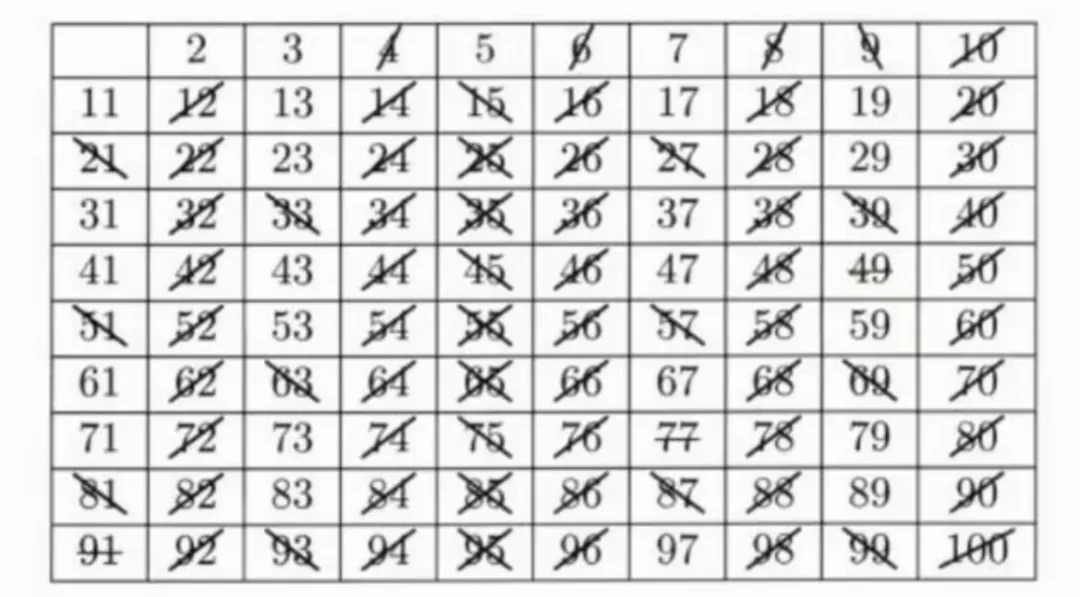
解决方案一: TiKZ方式实现: 效果: 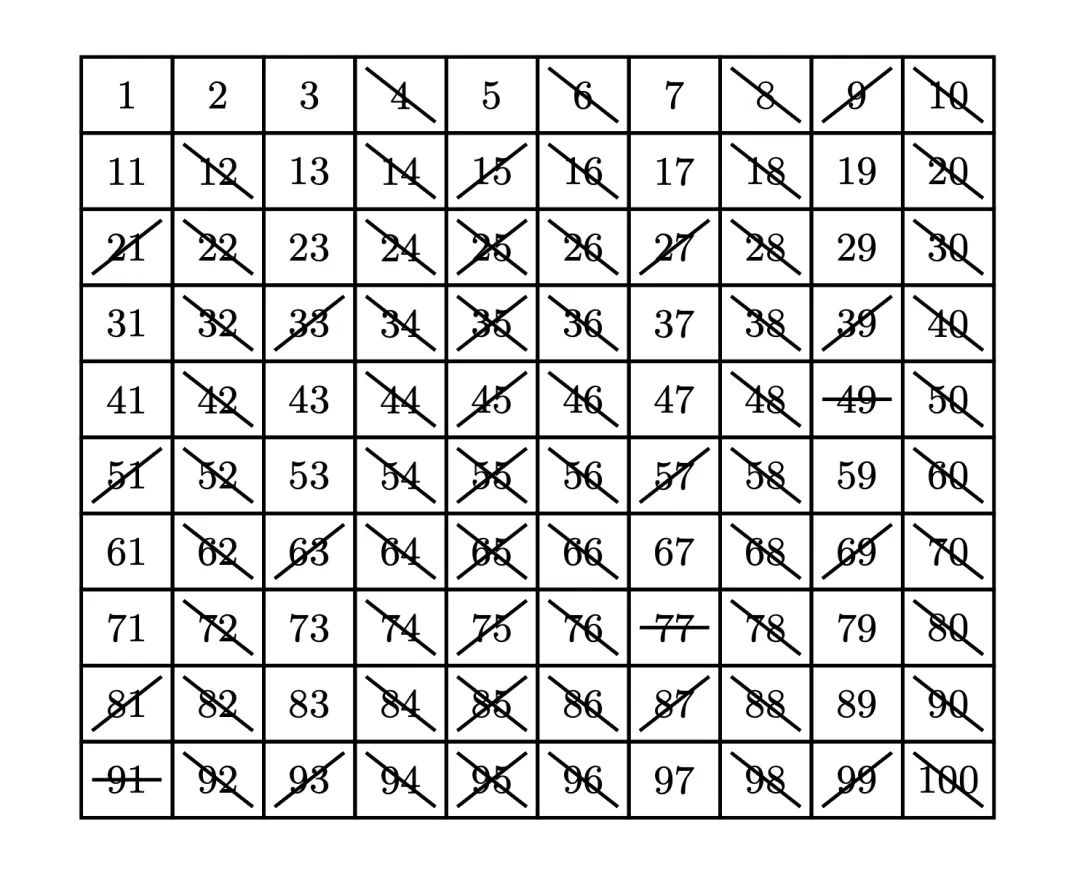
解决方案二: 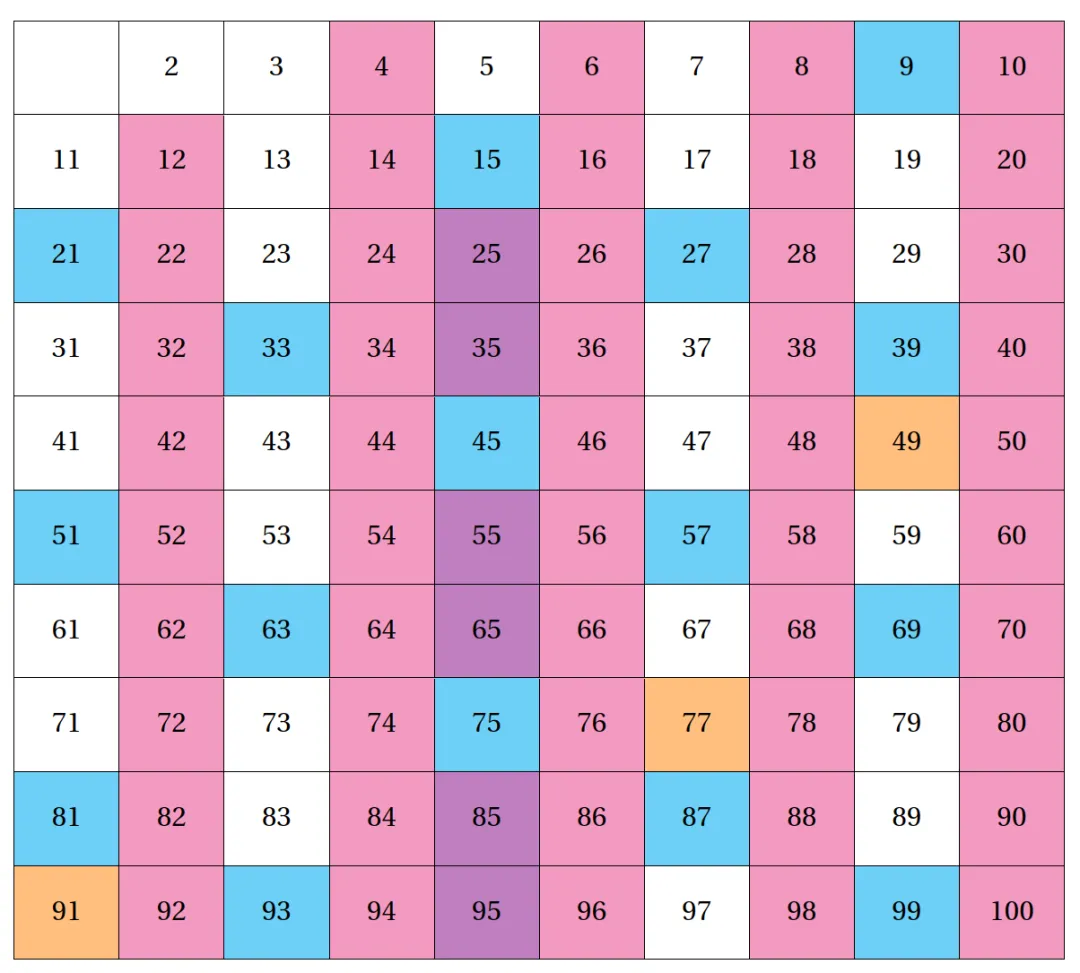
方案提供者:Sagittarius Rover 
更懂中文用户的 LaTeX 在线平台来了,点击领取福利! 

选自:https://ask.latexstudio.net/ask/question/18000.html
如题,希望实现如下的表格的自动化排版。
代码越简洁、越高度自动化、越具有强拓展性越好。
对具体的实现方法不做任何限制~优雅即可
划去线的逻辑不必与此相同(我觉得涂色似乎更显眼,在tabularray框架里应该也更容易实现),能体现不同的条件判断即可。
由于我也会试试,这里暂不给出MWE.
\documentclass[tikz,border=1cm]{standalone}\begin{document}\begin{tikzpicture}[cell/.style={draw,line width=0.8pt,minimum width=7.2mm,minimum height=6mm,inner sep=0pt,font=\small}]\def\inset{1mm}\foreach \x in {1,...,100} {\pgfmathsetmacro{\row}{int((\x-1)/10)}\pgfmathsetmacro{\col}{int((\x-1) - 10*\row)}\node[cell] (N\x) at ({7.2mm*\col},{-6mm*\row}) {\x};\ifnum\x=2\relax\else\ifnum\x=3\relax\else\ifnum\x=5\relax\else\ifnum\x=7\relax\else\pgfmathtruncatemacro{\mii}{mod(\x,2)}\ifnum\mii=0\draw[thick]([xshift=\inset,yshift=-\inset]N\x.north west) --([xshift=-\inset,yshift=\inset]N\x.south east);\else\pgfmathtruncatemacro{\miii}{mod(\x,3)}\ifnum\miii=0\draw[thick]([xshift=-\inset,yshift=-\inset]N\x.north east) --([xshift=\inset,yshift=\inset]N\x.south west);\else\pgfmathtruncatemacro{\mv}{mod(\x,5)}\ifnum\mv=0\draw[thick]([xshift=\inset,yshift=-\inset]N\x.north west) --([xshift=-\inset,yshift=\inset]N\x.south east);\draw[thick]([xshift=-\inset,yshift=-\inset]N\x.north east) --([xshift=\inset,yshift=\inset]N\x.south west);\else\pgfmathtruncatemacro{\mvii}{mod(\x,7)}\ifnum\mvii=0\draw[thick]([xshift=\inset]N\x.west) --([xshift=-\inset]N\x.east);\fi\fi\fi\fi\fi\fi\fi\fi}\end{tikzpicture}\end{document}
\documentclass{article}\usepackage{fourier}\usepackage{xcolor}\usepackage{tabularray}\UseTblrLibrary{functional}\IgnoreSpacesOn\prgNewFunction \makeHundredCells { } {\tlSet \lTmpaTl { }\intStepOneInline {1} {100} {\intCaseF { ##1 } {{ 2 } { }{ 3 } { }{ 5 } { }{ 7 } { }} {\intCompareTF { \intMathMod{##1}{2} } = { 0 } {\tlPutRight \lTmpaTl { \SetCell{bg=magenta!50} }}{\intCompareTF { \intMathMod{##1}{3} } = { 0 } {\tlPutRight \lTmpaTl { \SetCell{bg=cyan!50} }}{\intCompareTF { \intMathMod{##1}{5} } = { 0 } {\tlPutRight \lTmpaTl { \SetCell{bg=violet!50} }}{\intCompareT { \intMathMod{##1}{7} } = { 0 } {\tlPutRight \lTmpaTl { \SetCell{bg=orange!50} }}}}}}\intCompareTF { ##1 } = { 1 } {\tlPutRight \lTmpaTl { }}{\tlPutRight \lTmpaTl { ##1 }}\intCompareTF { \intMathMod{##1}{10} } = { 0 } {\tlPutRight \lTmpaTl { \\ }}{\tlPutRight \lTmpaTl { & }}}\prgReturn { \expValue \lTmpaTl }}\IgnoreSpacesOff\begin{document}\begin{tblr}[evaluate=\makeHundredCells]{colspec = {*{10}{X[c]}},hlines, vlines,rows = {m, ht=3em},}\makeHundredCells\end{tblr}\end{document}

www.texhub.com
点击👇“LaTeX工作室” 关注公众号
● LaTeX 重制最牛最难《中学数学实验教材》共 6 册-免费下载 - 增加百度网盘
● 2026 最新国家自然科学基金项目 LaTeX 模版,科研党的福音来了!
● MathLive —— 轻松编辑数学公式的宝藏神器!即时渲染、支持 LaTeX 输入,完美公式编辑体验!
● 高中物理甲种本第一册重制豪华版来了(附全套教材下载)
本文来自网友投稿或网络内容,如有侵犯您的权益请联系我们删除,联系邮箱:596563534@qq.com 。
