Python爬虫新利器!Playwright助你一键获取豆瓣Top250完整数据
- 2026-09-17 11:28:52
在网页自动化测试和爬虫领域,Selenium曾是无可争议的王者。但今天,我要向大家介绍一个更强大、更快速、更易用的替代品——Playwright。由Microsoft开发,支持所有主流浏览器,并且提供了同步和异步两种API,Playwright正在迅速成为开发者的新宠。
一、Playwright的优势亮点
1. 多浏览器支持
Chromium、Firefox、WebKit(Safari内核)全支持 跨平台一致性,测试更可靠
2. 自动等待机制
智能等待元素出现,告别 time.sleep()内置大量等待条件,代码更简洁
3. 丰富的操作API
文件上传、下载处理 地理位置模拟、设备模拟 截图、录屏功能
二、环境安装与配置
# 安装playwright库pip install playwright三、快速上手:第一个Playwright脚本
from playwright.sync_api import sync_playwrightdefbaidu_search():with sync_playwright() as p:# 启动浏览器(默认Chromium) browser = p.chromium.launch(headless=False) # headless=False显示浏览器界面 page = browser.new_page()# 访问百度 page.goto("https://www.baidu.com")# 输入搜索关键词 page.fill("#kw", "Playwright自动化")# 点击搜索按钮 page.click("#su")# 等待结果加载 page.wait_for_selector(".result.c-container", timeout=10000)# 截图保存 page.screenshot(path="search_result.png")# 获取搜索结果 results = page.query_selector_all(".result.c-container h3")for i, result inenumerate(results[:5], 1): title = result.text_content()print(f"{i}. {title}")# 关闭浏览器 browser.close()if __name__ == "__main__": baidu_search()四、核心功能详解
1. 元素定位与操作
# 多种定位方式page.click("text=登录") # 按文本定位page.fill("#username", "test_user") # CSS选择器page.click("button:has-text('提交')") # 组合选择器# XPath定位page.click("//button[@class='submit-btn']")# 处理iframeframe = page.frame_locator("iframe[name='content']")frame.locator("button").click()2. 等待策略
# 多种等待方式page.wait_for_load_state("networkidle") # 等待网络空闲page.wait_for_selector(".modal") # 等待元素出现page.wait_for_timeout(3000) # 强制等待(尽量避免使用)# 等待函数page.wait_for_function(""" () => { return document.querySelectorAll('.item').length >= 10 }""")3. 处理弹窗和对话框
# 监听对话框page.on("dialog", lambda dialog: dialog.accept())# 处理新窗口with page.expect_popup() as popup_info: page.click("a[target='_blank']")new_page = popup_info.value4. 文件上传和下载
# 文件上传page.set_input_files("input[type='file']", "test.jpg")# 下载处理with page.expect_download() as download_info: page.click("a.download-link")download = download_info.valuedownload.save_as("downloaded_file.pdf")五、实战案例:豆瓣电影Top250爬虫
运行效果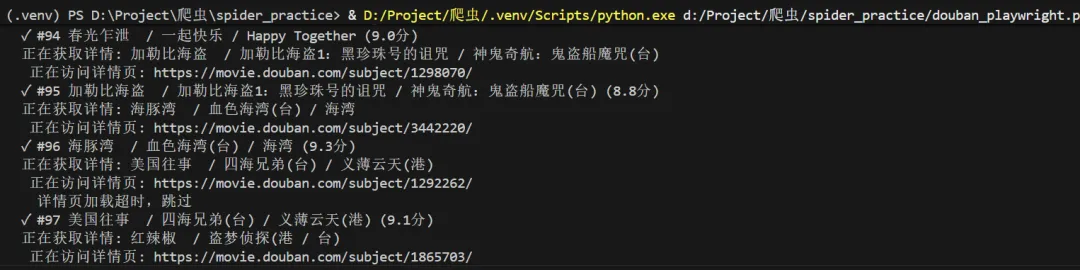
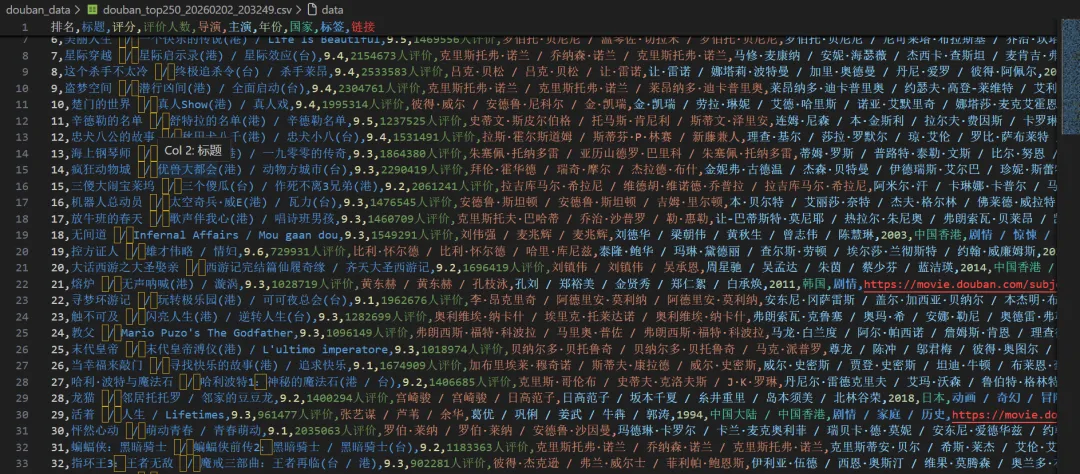
import asyncioimport csvimport jsonimport osimport sysfrom dataclasses import dataclass, asdictfrom datetime import datetimefrom typing importListfrom playwright.async_api import async_playwrightimport re@dataclassclassMovie: rank: int title: str rating: float rating_count: str directors: str actors: str year: str country: str tags: str link: strclassConfig:"""配置文件"""# 自定义浏览器路径(设为None则使用默认) CHROME_PATH = r'C:\Program Files (x86)\Google\Chrome\Application\chrome.exe'# 你的路径# CHROME_PATH = None # 使用Playwright自带的Chromium# 代理设置(如果需要) PROXY = None# 例如: {'server': 'http://127.0.0.1:1080'}# 请求间隔(秒) REQUEST_DELAY = 1# 输出目录 OUTPUT_DIR = 'douban_data'classDoubanScraper:def__init__(self, config: Config):self.config = configself.movies: List[Movie] = []# 确保输出目录存在 os.makedirs(config.OUTPUT_DIR, exist_ok=True)asyncdefcreate_browser(self):"""创建浏览器实例,支持自定义路径""" p = await async_playwright().start() launch_options = {'headless': False, # 显示浏览器界面'slow_mo': 100, # 减慢操作速度,便于观察'args': ['--disable-blink-features=AutomationControlled','--start-maximized','--disable-notifications', ] }# 添加代理(如果配置了)ifself.config.PROXY: launch_options['proxy'] = self.config.PROXY# 如果指定了Chrome路径,使用系统Chromeifself.config.CHROME_PATH and os.path.exists(self.config.CHROME_PATH):print(f"使用自定义Chrome: {self.config.CHROME_PATH}") launch_options['executable_path'] = self.config.CHROME_PATH launch_options['channel'] = 'chrome'else:print("使用Playwright自带Chromium")# 检查是否安装了Chromiumifnotself._check_chromium_installed():print("正在安装Chromium...") os.system(f'{sys.executable} -m playwright install chromium')try: browser = await p.chromium.launch(**launch_options)return p, browserexcept Exception as e:print(f"启动浏览器失败: {e}")# 尝试无头模式 launch_options['headless'] = True browser = await p.chromium.launch(**launch_options)return p, browserdef_check_chromium_installed(self):"""检查Chromium是否已安装"""from playwright._impl._driver import get_driver_envimport jsontry:# 获取浏览器信息 env = get_driver_env() browsers_file = os.path.join(env["PLAYWRIGHT_BROWSERS_PATH"], ".browsers.json")if os.path.exists(browsers_file):withopen(browsers_file, 'r') as f: browsers = json.load(f)returnany(b['name'] == 'chromium'for b in browsers['browsers'])except:passreturnFalseasyncdefscrape_movie_details(self, page, movie_link: str) -> dict:"""爬取电影详情页信息 - 修复版""" details = {'directors': '','actors': '','year': '','country': '','tags': '', # 修改为tags,与Movie类字段名一致'duration': '' }try:# 创建新页面访问详情 context = page.context detail_page = await context.new_page()print(f" 正在访问详情页: {movie_link}")await detail_page.goto(movie_link, wait_until='domcontentloaded')# 等待基本信息区域加载try:await detail_page.wait_for_selector('#info', timeout=10000)except:print(" 详情页加载超时,跳过")await detail_page.close()return details# 获取整个信息区域的文本 info_text = await detail_page.locator('#info').text_content() info_text = info_text.strip() if info_text else""# 提取导演信息try:# 方法1:使用更精确的选择器 director_elements = await detail_page.query_selector_all('#info span:has-text("导演") ~ span a')if director_elements: directors = []for elem in director_elements[:3]: # 最多取3个导演 name = await elem.text_content()if name: directors.append(name.strip()) details['directors'] = ' / '.join(directors)else:# 如果上面的方法没找到,尝试另一种方式 director_element = await detail_page.query_selector('#info span:has-text("导演")')if director_element: director_value_span = await director_element.query_selector('..')if director_value_span:# 获取下一个兄弟节点中的span next_span = await director_value_span.query_selector('following-sibling::span[1]')if next_span: director_text = await next_span.text_content() directors = director_text.split('/') details['directors'] = ' / '.join([d.strip() for d in directors[:3]])except Exception as e:print(f" 提取导演失败: {e}")# 提取演员信息(前5位)try:# 查找演员区域 actor_elements = await detail_page.query_selector_all('#info span:has-text("主演") ~ span a')if actor_elements: actors = []for actor_elem in actor_elements[:5]: # 最多取5个演员 actor_name = await actor_elem.text_content()if actor_name: actors.append(actor_name.strip()) details['actors'] = ' / '.join(actors)else:# 如果上面的方法没找到,尝试另一种方式 actor_element = await detail_page.query_selector('#info span:has-text("主演")')if actor_element: actor_value_span = await actor_element.query_selector('..')if actor_value_span:# 获取下一个兄弟节点中的span next_span = await actor_value_span.query_selector('following-sibling::span[1]')if next_span: actor_text = await next_span.text_content() actors = actor_text.split('/') details['actors'] = ' / '.join([a.strip() for a in actors[:5]])except Exception as e:print(f" 提取演员失败: {e}")# 提取年份(使用正则表达式)try: year_match = re.search(r'(\d{4})', info_text)if year_match: details['year'] = year_match.group(1)except Exception as e:print(f" 提取年份失败: {e}")# 提取国家/地区try:if'制片国家/地区:'in info_text: country_part = info_text.split('制片国家/地区:')[1]# 取第一个换行符之前的内容 country_text = country_part.split('\n')[0].strip() details['country'] = country_textexcept Exception as e:print(f" 提取国家失败: {e}")# 提取类型/标签(tags字段)try:# 方法1:使用属性选择器 genre_elements = await detail_page.query_selector_all('#info span[property="v:genre"]')if genre_elements: genres = []for elem in genre_elements: genre = await elem.text_content()if genre: genres.append(genre.strip()) details['tags'] = ' / '.join(genres) # 赋值给tags字段else:# 方法2:从文本中提取if'类型:'in info_text: genre_part = info_text.split('类型:')[1] genre_text = genre_part.split('\n')[0].strip() details['tags'] = genre_text # 赋值给tags字段except Exception as e:print(f" 提取类型失败: {e}")# 提取时长(duration字段)try: duration_elem = await detail_page.query_selector('#info span[property="v:runtime"]')if duration_elem: duration = await duration_elem.text_content() details['duration'] = duration.strip()else:# 尝试从文本中查找时长信息 runtime_matches = re.findall(r'(\d+分钟|\d+集)', info_text)if runtime_matches: details['duration'] = ', '.join(runtime_matches)except Exception as e:print(f" 提取时长失败: {e}")await detail_page.close()except Exception as e:print(f" 爬取详情页失败: {e}")# 确保页面被关闭try:await detail_page.close()except:passreturn detailsasyncdefscrape(self):"""主爬取函数"""print("="*60)print("豆瓣电影Top250爬虫启动")print("="*60) playwright, browser = awaitself.create_browser()try: context = await browser.new_context( viewport={'width': 1920, 'height': 1080}, user_agent='Mozilla/5.0 (Windows NT 10.0; Win64; x64) AppleWebKit/537.36 ''(KHTML, like Gecko) Chrome/120.0.0.0 Safari/537.36', locale='zh-CN', timezone_id='Asia/Shanghai' )# 拦截图片请求,加快速度await context.route("**/*.{png,jpg,jpeg}", lambda route: route.abort()) page = await context.new_page()for page_num inrange(10): # 总共10页 start = page_num * 25 url = f'https://movie.douban.com/top250?start={start}&filter='print(f"\n📄 正在爬取第 {page_num + 1} 页...")await page.goto(url, wait_until='networkidle')# 等待电影列表加载await page.wait_for_selector('.grid_view .item', timeout=10000)# 获取当前页的所有电影项目 items = await page.locator('.grid_view .item').all()for item in items:try:# 基础信息 rank = await item.locator('em').inner_text() title = await item.locator('.title').first.inner_text()# 处理可能的外文标题 other_title_elem = item.locator('.other')ifawait other_title_elem.count() > 0: other_title = await other_title_elem.inner_text() title = f"{title}{other_title}" rating = await item.locator('.rating_num').inner_text() rating_count = await item.locator('span:nth-child(4)').inner_text() link_elem = item.locator('a').first movie_link = await link_elem.get_attribute('href')# 爬取详情信息print(f" 正在获取详情: {title}") details = awaitself.scrape_movie_details(page, movie_link)# 创建电影对象 - 修复:使用正确的字段名 movie = Movie( rank=int(rank), title=title.strip(), rating=float(rating), rating_count=rating_count.strip(), directors=details['directors'], actors=details['actors'], year=details['year'], country=details['country'], tags=details['tags'], # 修复:使用details['tags']而不是details['genres'] link=movie_link )self.movies.append(movie)print(f" ✓ #{movie.rank}{movie.title} ({movie.rating}分)")except Exception as e:print(f" ✗ 解析电影失败: {e}")continueprint(f"✅ 第 {page_num + 1} 页完成,获取 {len(items)} 部电影")# 延迟await asyncio.sleep(self.config.REQUEST_DELAY)except Exception as e:print(f"爬取过程出错: {e}")finally:await browser.close()await playwright.stop()defsave_results(self):"""保存结果"""ifnotself.movies:print("没有数据可保存")return# 按排名排序self.movies.sort(key=lambda x: x.rank) timestamp = datetime.now().strftime("%Y%m%d_%H%M%S")# 保存为CSV csv_path = os.path.join(self.config.OUTPUT_DIR, f'douban_top250_{timestamp}.csv')withopen(csv_path, 'w', newline='', encoding='utf-8-sig') as f: writer = csv.writer(f) writer.writerow(['排名', '标题', '评分', '评价人数', '导演', '主演', '年份', '国家', '标签', '链接'])for movie inself.movies: writer.writerow([ movie.rank, movie.title, movie.rating, movie.rating_count, movie.directors, movie.actors, movie.year, movie.country, movie.tags, # 标签字段 movie.link ])# 保存为JSON json_path = os.path.join(self.config.OUTPUT_DIR, f'douban_top250_{timestamp}.json')withopen(json_path, 'w', encoding='utf-8') as f: data = {'scrape_time': datetime.now().isoformat(),'total': len(self.movies),'movies': [asdict(m) for m inself.movies] } json.dump(data, f, ensure_ascii=False, indent=2)# 打印统计信息print("\n" + "="*60)print("🎬 爬取完成!")print("="*60)print("📊 统计信息:")print(f" 总电影数: {len(self.movies)}")print(f" 最高评分: {max(m.rating for m in self.movies):.1f}")print(f" 平均评分: {sum(m.rating for m in self.movies)/len(self.movies):.2f}")print("\n💾 文件已保存:")print(f" CSV文件: {csv_path}")print(f" JSON文件: {json_path}")# 显示Top 5print("\n🏆 Top 5电影:")for movie inself.movies[:5]:print(f" #{movie.rank} 《{movie.title}》 - {movie.rating}分")print(f" 导演: {movie.directors}")print(f" 类型: {movie.tags}")print("="*60)asyncdefmain():"""主函数"""# 配置 config = Config()# 创建爬虫并运行 scraper = DoubanScraper(config)await scraper.scrape() scraper.save_results()if __name__ == "__main__":# Windows上需要设置事件循环策略if sys.platform == 'win32': asyncio.set_event_loop_policy(asyncio.WindowsProactorEventLoopPolicy())# 运行主函数 asyncio.run(main())六、高级技巧与优化
1. 性能优化
# 禁用图片加载,加速页面context = await browser.new_context( viewport={"width": 1920, "height": 1080}, user_agent="Mozilla/5.0...", bypass_csp=True, # 绕过内容安全策略 java_script_enabled=True,# 优化性能的选项 extra_http_headers={"Accept-Language": "zh-CN,zh;q=0.9" })# 拦截请求,只加载必要资源await page.route("**/*.{png,jpg,jpeg,gif,svg}", lambda route: route.abort())2. 错误处理与重试
from tenacity import retry, stop_after_attempt, wait_exponential@retry( stop=stop_after_attempt(3), wait=wait_exponential(multiplier=1, min=4, max=10))asyncdefsafe_click(page, selector):try:await page.click(selector)except Exception as e:print(f"点击失败: {e}")raise3. 分布式部署
# 使用playwright-core进行远程连接from playwright.sync_api import sync_playwrightdefconnect_to_remote_browser():with sync_playwright() as p:# 连接远程浏览器实例 browser = p.chromium.connect_over_cdp("http://remote-server:9222") page = browser.new_page()# ... 后续操作结语
Playwright作为新一代的浏览器自动化工具,以其强大的功能和优雅的API设计,正在改变自动化测试和网页爬虫的游戏规则。无论你是测试工程师、开发人员还是数据分析师,掌握Playwright都将为你的工作带来极大的便利。
学习资源推荐:
官方文档[1] Gitee仓库[2] 中文社区[3]
引用链接
[1]官方文档: https://playwright.dev/python/
[2]Gitee仓库: https://gitee.com/fengde_jijie/python_spider
[3]中文社区: https://playwright.nodejs.cn/python/docs/intro
在网页自动化测试和爬虫领域,Selenium曾是无可争议的王者。但今天,我要向大家介绍一个更强大、更快速、更易用的替代品——Playwright。由Microsoft开发,支持所有主流浏览器,并且提供了同步和异步两种API,Playwright正在迅速成为开发者的新宠。
一、Playwright的优势亮点
1. 多浏览器支持
Chromium、Firefox、WebKit(Safari内核)全支持 跨平台一致性,测试更可靠
2. 自动等待机制
智能等待元素出现,告别 time.sleep()内置大量等待条件,代码更简洁
3. 丰富的操作API
文件上传、下载处理 地理位置模拟、设备模拟 截图、录屏功能
二、环境安装与配置
# 安装playwright库pip install playwright三、快速上手:第一个Playwright脚本
from playwright.sync_api import sync_playwrightdefbaidu_search():with sync_playwright() as p:# 启动浏览器(默认Chromium) browser = p.chromium.launch(headless=False) # headless=False显示浏览器界面 page = browser.new_page()# 访问百度 page.goto("https://www.baidu.com")# 输入搜索关键词 page.fill("#kw", "Playwright自动化")# 点击搜索按钮 page.click("#su")# 等待结果加载 page.wait_for_selector(".result.c-container", timeout=10000)# 截图保存 page.screenshot(path="search_result.png")# 获取搜索结果 results = page.query_selector_all(".result.c-container h3")for i, result inenumerate(results[:5], 1): title = result.text_content()print(f"{i}. {title}")# 关闭浏览器 browser.close()if __name__ == "__main__": baidu_search()四、核心功能详解
1. 元素定位与操作
# 多种定位方式page.click("text=登录") # 按文本定位page.fill("#username", "test_user") # CSS选择器page.click("button:has-text('提交')") # 组合选择器# XPath定位page.click("//button[@class='submit-btn']")# 处理iframeframe = page.frame_locator("iframe[name='content']")frame.locator("button").click()2. 等待策略
# 多种等待方式page.wait_for_load_state("networkidle") # 等待网络空闲page.wait_for_selector(".modal") # 等待元素出现page.wait_for_timeout(3000) # 强制等待(尽量避免使用)# 等待函数page.wait_for_function(""" () => { return document.querySelectorAll('.item').length >= 10 }""")3. 处理弹窗和对话框
# 监听对话框page.on("dialog", lambda dialog: dialog.accept())# 处理新窗口with page.expect_popup() as popup_info: page.click("a[target='_blank']")new_page = popup_info.value4. 文件上传和下载
# 文件上传page.set_input_files("input[type='file']", "test.jpg")# 下载处理with page.expect_download() as download_info: page.click("a.download-link")download = download_info.valuedownload.save_as("downloaded_file.pdf")五、实战案例:豆瓣电影Top250爬虫
运行效果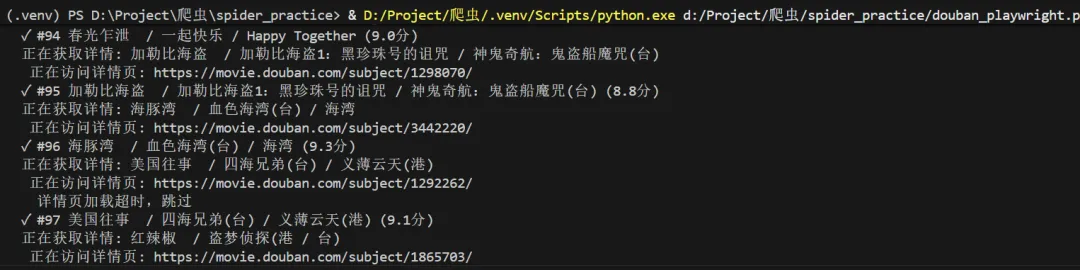
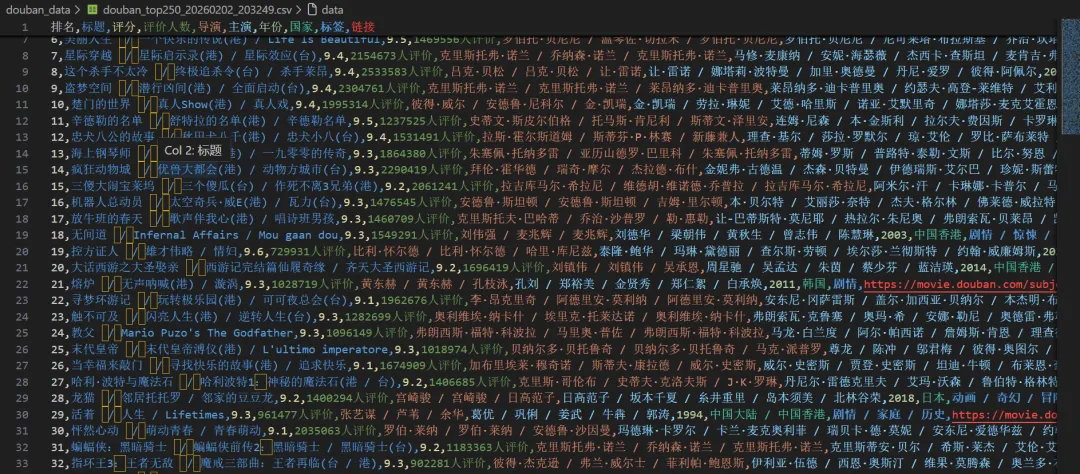
import asyncioimport csvimport jsonimport osimport sysfrom dataclasses import dataclass, asdictfrom datetime import datetimefrom typing importListfrom playwright.async_api import async_playwrightimport re@dataclassclassMovie: rank: int title: str rating: float rating_count: str directors: str actors: str year: str country: str tags: str link: strclassConfig:"""配置文件"""# 自定义浏览器路径(设为None则使用默认) CHROME_PATH = r'C:\Program Files (x86)\Google\Chrome\Application\chrome.exe'# 你的路径# CHROME_PATH = None # 使用Playwright自带的Chromium# 代理设置(如果需要) PROXY = None# 例如: {'server': 'http://127.0.0.1:1080'}# 请求间隔(秒) REQUEST_DELAY = 1# 输出目录 OUTPUT_DIR = 'douban_data'classDoubanScraper:def__init__(self, config: Config):self.config = configself.movies: List[Movie] = []# 确保输出目录存在 os.makedirs(config.OUTPUT_DIR, exist_ok=True)asyncdefcreate_browser(self):"""创建浏览器实例,支持自定义路径""" p = await async_playwright().start() launch_options = {'headless': False, # 显示浏览器界面'slow_mo': 100, # 减慢操作速度,便于观察'args': ['--disable-blink-features=AutomationControlled','--start-maximized','--disable-notifications', ] }# 添加代理(如果配置了)ifself.config.PROXY: launch_options['proxy'] = self.config.PROXY# 如果指定了Chrome路径,使用系统Chromeifself.config.CHROME_PATH and os.path.exists(self.config.CHROME_PATH):print(f"使用自定义Chrome: {self.config.CHROME_PATH}") launch_options['executable_path'] = self.config.CHROME_PATH launch_options['channel'] = 'chrome'else:print("使用Playwright自带Chromium")# 检查是否安装了Chromiumifnotself._check_chromium_installed():print("正在安装Chromium...") os.system(f'{sys.executable} -m playwright install chromium')try: browser = await p.chromium.launch(**launch_options)return p, browserexcept Exception as e:print(f"启动浏览器失败: {e}")# 尝试无头模式 launch_options['headless'] = True browser = await p.chromium.launch(**launch_options)return p, browserdef_check_chromium_installed(self):"""检查Chromium是否已安装"""from playwright._impl._driver import get_driver_envimport jsontry:# 获取浏览器信息 env = get_driver_env() browsers_file = os.path.join(env["PLAYWRIGHT_BROWSERS_PATH"], ".browsers.json")if os.path.exists(browsers_file):withopen(browsers_file, 'r') as f: browsers = json.load(f)returnany(b['name'] == 'chromium'for b in browsers['browsers'])except:passreturnFalseasyncdefscrape_movie_details(self, page, movie_link: str) -> dict:"""爬取电影详情页信息 - 修复版""" details = {'directors': '','actors': '','year': '','country': '','tags': '', # 修改为tags,与Movie类字段名一致'duration': '' }try:# 创建新页面访问详情 context = page.context detail_page = await context.new_page()print(f" 正在访问详情页: {movie_link}")await detail_page.goto(movie_link, wait_until='domcontentloaded')# 等待基本信息区域加载try:await detail_page.wait_for_selector('#info', timeout=10000)except:print(" 详情页加载超时,跳过")await detail_page.close()return details# 获取整个信息区域的文本 info_text = await detail_page.locator('#info').text_content() info_text = info_text.strip() if info_text else""# 提取导演信息try:# 方法1:使用更精确的选择器 director_elements = await detail_page.query_selector_all('#info span:has-text("导演") ~ span a')if director_elements: directors = []for elem in director_elements[:3]: # 最多取3个导演 name = await elem.text_content()if name: directors.append(name.strip()) details['directors'] = ' / '.join(directors)else:# 如果上面的方法没找到,尝试另一种方式 director_element = await detail_page.query_selector('#info span:has-text("导演")')if director_element: director_value_span = await director_element.query_selector('..')if director_value_span:# 获取下一个兄弟节点中的span next_span = await director_value_span.query_selector('following-sibling::span[1]')if next_span: director_text = await next_span.text_content() directors = director_text.split('/') details['directors'] = ' / '.join([d.strip() for d in directors[:3]])except Exception as e:print(f" 提取导演失败: {e}")# 提取演员信息(前5位)try:# 查找演员区域 actor_elements = await detail_page.query_selector_all('#info span:has-text("主演") ~ span a')if actor_elements: actors = []for actor_elem in actor_elements[:5]: # 最多取5个演员 actor_name = await actor_elem.text_content()if actor_name: actors.append(actor_name.strip()) details['actors'] = ' / '.join(actors)else:# 如果上面的方法没找到,尝试另一种方式 actor_element = await detail_page.query_selector('#info span:has-text("主演")')if actor_element: actor_value_span = await actor_element.query_selector('..')if actor_value_span:# 获取下一个兄弟节点中的span next_span = await actor_value_span.query_selector('following-sibling::span[1]')if next_span: actor_text = await next_span.text_content() actors = actor_text.split('/') details['actors'] = ' / '.join([a.strip() for a in actors[:5]])except Exception as e:print(f" 提取演员失败: {e}")# 提取年份(使用正则表达式)try: year_match = re.search(r'(\d{4})', info_text)if year_match: details['year'] = year_match.group(1)except Exception as e:print(f" 提取年份失败: {e}")# 提取国家/地区try:if'制片国家/地区:'in info_text: country_part = info_text.split('制片国家/地区:')[1]# 取第一个换行符之前的内容 country_text = country_part.split('\n')[0].strip() details['country'] = country_textexcept Exception as e:print(f" 提取国家失败: {e}")# 提取类型/标签(tags字段)try:# 方法1:使用属性选择器 genre_elements = await detail_page.query_selector_all('#info span[property="v:genre"]')if genre_elements: genres = []for elem in genre_elements: genre = await elem.text_content()if genre: genres.append(genre.strip()) details['tags'] = ' / '.join(genres) # 赋值给tags字段else:# 方法2:从文本中提取if'类型:'in info_text: genre_part = info_text.split('类型:')[1] genre_text = genre_part.split('\n')[0].strip() details['tags'] = genre_text # 赋值给tags字段except Exception as e:print(f" 提取类型失败: {e}")# 提取时长(duration字段)try: duration_elem = await detail_page.query_selector('#info span[property="v:runtime"]')if duration_elem: duration = await duration_elem.text_content() details['duration'] = duration.strip()else:# 尝试从文本中查找时长信息 runtime_matches = re.findall(r'(\d+分钟|\d+集)', info_text)if runtime_matches: details['duration'] = ', '.join(runtime_matches)except Exception as e:print(f" 提取时长失败: {e}")await detail_page.close()except Exception as e:print(f" 爬取详情页失败: {e}")# 确保页面被关闭try:await detail_page.close()except:passreturn detailsasyncdefscrape(self):"""主爬取函数"""print("="*60)print("豆瓣电影Top250爬虫启动")print("="*60) playwright, browser = awaitself.create_browser()try: context = await browser.new_context( viewport={'width': 1920, 'height': 1080}, user_agent='Mozilla/5.0 (Windows NT 10.0; Win64; x64) AppleWebKit/537.36 ''(KHTML, like Gecko) Chrome/120.0.0.0 Safari/537.36', locale='zh-CN', timezone_id='Asia/Shanghai' )# 拦截图片请求,加快速度await context.route("**/*.{png,jpg,jpeg}", lambda route: route.abort()) page = await context.new_page()for page_num inrange(10): # 总共10页 start = page_num * 25 url = f'https://movie.douban.com/top250?start={start}&filter='print(f"\n📄 正在爬取第 {page_num + 1} 页...")await page.goto(url, wait_until='networkidle')# 等待电影列表加载await page.wait_for_selector('.grid_view .item', timeout=10000)# 获取当前页的所有电影项目 items = await page.locator('.grid_view .item').all()for item in items:try:# 基础信息 rank = await item.locator('em').inner_text() title = await item.locator('.title').first.inner_text()# 处理可能的外文标题 other_title_elem = item.locator('.other')ifawait other_title_elem.count() > 0: other_title = await other_title_elem.inner_text() title = f"{title}{other_title}" rating = await item.locator('.rating_num').inner_text() rating_count = await item.locator('span:nth-child(4)').inner_text() link_elem = item.locator('a').first movie_link = await link_elem.get_attribute('href')# 爬取详情信息print(f" 正在获取详情: {title}") details = awaitself.scrape_movie_details(page, movie_link)# 创建电影对象 - 修复:使用正确的字段名 movie = Movie( rank=int(rank), title=title.strip(), rating=float(rating), rating_count=rating_count.strip(), directors=details['directors'], actors=details['actors'], year=details['year'], country=details['country'], tags=details['tags'], # 修复:使用details['tags']而不是details['genres'] link=movie_link )self.movies.append(movie)print(f" ✓ #{movie.rank}{movie.title} ({movie.rating}分)")except Exception as e:print(f" ✗ 解析电影失败: {e}")continueprint(f"✅ 第 {page_num + 1} 页完成,获取 {len(items)} 部电影")# 延迟await asyncio.sleep(self.config.REQUEST_DELAY)except Exception as e:print(f"爬取过程出错: {e}")finally:await browser.close()await playwright.stop()defsave_results(self):"""保存结果"""ifnotself.movies:print("没有数据可保存")return# 按排名排序self.movies.sort(key=lambda x: x.rank) timestamp = datetime.now().strftime("%Y%m%d_%H%M%S")# 保存为CSV csv_path = os.path.join(self.config.OUTPUT_DIR, f'douban_top250_{timestamp}.csv')withopen(csv_path, 'w', newline='', encoding='utf-8-sig') as f: writer = csv.writer(f) writer.writerow(['排名', '标题', '评分', '评价人数', '导演', '主演', '年份', '国家', '标签', '链接'])for movie inself.movies: writer.writerow([ movie.rank, movie.title, movie.rating, movie.rating_count, movie.directors, movie.actors, movie.year, movie.country, movie.tags, # 标签字段 movie.link ])# 保存为JSON json_path = os.path.join(self.config.OUTPUT_DIR, f'douban_top250_{timestamp}.json')withopen(json_path, 'w', encoding='utf-8') as f: data = {'scrape_time': datetime.now().isoformat(),'total': len(self.movies),'movies': [asdict(m) for m inself.movies] } json.dump(data, f, ensure_ascii=False, indent=2)# 打印统计信息print("\n" + "="*60)print("🎬 爬取完成!")print("="*60)print("📊 统计信息:")print(f" 总电影数: {len(self.movies)}")print(f" 最高评分: {max(m.rating for m in self.movies):.1f}")print(f" 平均评分: {sum(m.rating for m in self.movies)/len(self.movies):.2f}")print("\n💾 文件已保存:")print(f" CSV文件: {csv_path}")print(f" JSON文件: {json_path}")# 显示Top 5print("\n🏆 Top 5电影:")for movie inself.movies[:5]:print(f" #{movie.rank} 《{movie.title}》 - {movie.rating}分")print(f" 导演: {movie.directors}")print(f" 类型: {movie.tags}")print("="*60)asyncdefmain():"""主函数"""# 配置 config = Config()# 创建爬虫并运行 scraper = DoubanScraper(config)await scraper.scrape() scraper.save_results()if __name__ == "__main__":# Windows上需要设置事件循环策略if sys.platform == 'win32': asyncio.set_event_loop_policy(asyncio.WindowsProactorEventLoopPolicy())# 运行主函数 asyncio.run(main())六、高级技巧与优化
1. 性能优化
# 禁用图片加载,加速页面context = await browser.new_context( viewport={"width": 1920, "height": 1080}, user_agent="Mozilla/5.0...", bypass_csp=True, # 绕过内容安全策略 java_script_enabled=True,# 优化性能的选项 extra_http_headers={"Accept-Language": "zh-CN,zh;q=0.9" })# 拦截请求,只加载必要资源await page.route("**/*.{png,jpg,jpeg,gif,svg}", lambda route: route.abort())2. 错误处理与重试
from tenacity import retry, stop_after_attempt, wait_exponential@retry( stop=stop_after_attempt(3), wait=wait_exponential(multiplier=1, min=4, max=10))asyncdefsafe_click(page, selector):try:await page.click(selector)except Exception as e:print(f"点击失败: {e}")raise3. 分布式部署
# 使用playwright-core进行远程连接from playwright.sync_api import sync_playwrightdefconnect_to_remote_browser():with sync_playwright() as p:# 连接远程浏览器实例 browser = p.chromium.connect_over_cdp("http://remote-server:9222") page = browser.new_page()# ... 后续操作结语
Playwright作为新一代的浏览器自动化工具,以其强大的功能和优雅的API设计,正在改变自动化测试和网页爬虫的游戏规则。无论你是测试工程师、开发人员还是数据分析师,掌握Playwright都将为你的工作带来极大的便利。
学习资源推荐:
官方文档[1] Gitee仓库[2] 中文社区[3]
引用链接
[1]官方文档: https://playwright.dev/python/
[2]Gitee仓库: https://gitee.com/fengde_jijie/python_spider
[3]中文社区: https://playwright.nodejs.cn/python/docs/intro
