当前位置:首页>python>《告别PS!Python一键批量去除图片黑边,效率提升10倍,小白也能用!》

《告别PS!Python一键批量去除图片黑边,效率提升10倍,小白也能用!》

  • 2026-02-05 01:09:18
《告别PS!Python一键批量去除图片黑边,效率提升10倍,小白也能用!》

“带你横跨办公自动化的数据江海”

@摸鱼

闻道有先后,术业有专攻。各位大佬们大家好!~我是你们的老朋友摸鱼~,本人在十多年的日常工作中摸爬滚打攒了不少Python办公自动化的实用项目技巧,自创立"码海听潮"公众号以来,已经陆续分享70多篇原创文章啦!里面满满的办公实操干货,希望能与各位大佬共同探讨办公效率提升之道,实现不加班自由。

好叻,多了不说,少了不唠,咱直接上干货。

办公需求场景

从崩溃到优雅的进化

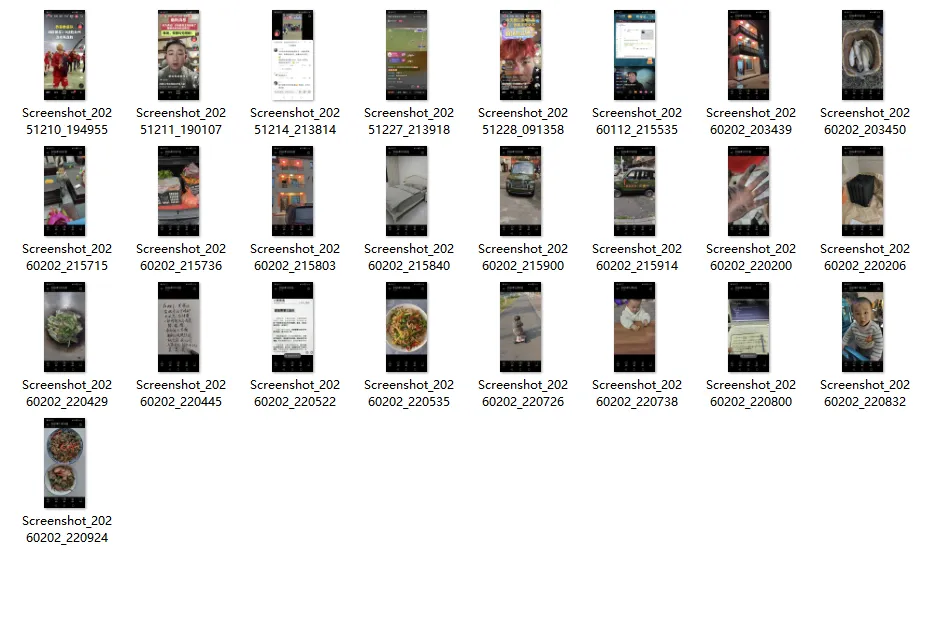
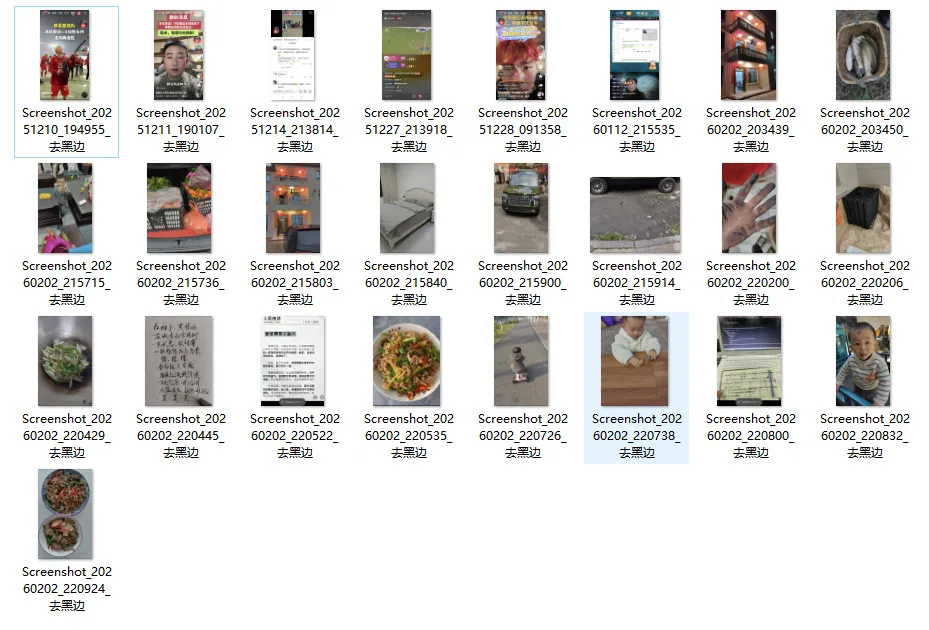
有一个神秘的图片文件夹,里面有多张手机截图,截图四周里有很黑边,现在的要求是去除所有截图的这些黑边, 要是这种类似的需求你的Big Boss安排你去完成,请问阁下该如何应对?

需求的图片文件夹和黑边图片如下图:

  • 图片文件夹

  • 黑边图片

办公痛点分析

01

 痛点1:重复劳动多,效率极低

    • 每张图都需要手动用软件(如PS)选择边界,处理速度慢

    02

     痛点2:精度不一

      • 肉眼判断边界容易误差,导致切多或切少,需要反复调整

      03

      痛点3:批次处理困难

      • 即使使用动作脚本,每张图黑边情况可能不同,仍需人工检查

      由此可见若操作成百上千个带黑边图片的话整个操作流程繁琐且耗时,高频次的鼠标点击和键盘输入使操作者手指疲劳,堪称"键盘敲冒烟"式的体力劳动,加上人工疲劳操作极易导致遗漏文件夹。于是乎这时候,按以往的 “解题套路”,Python 的专属 BGM 该响起来了 ——go~ go~ go~,救苦救难的大救星这不就来了!!

      @摸鱼

      问题拆解思路

      1.遍历文件夹→

      2.利用算法检测每张图片的黑边区域

      3.裁剪掉黑边

      4.保存到原位置

      下面,我就用python代码让excel见识一下,什么叫"传统文化遇上赛博效率"(仅展示部分代码,非完整代码,需完整代码看文章末尾说明~)

      import sysimport osfrom pathlib import Pathfrom PyQt6.QtWidgets import (QMainWindow, QWidget, QVBoxLayout, QHBoxLayout,                             QPushButtonQLabelQFileDialogQProgressBar                            QMessageBoxQScrollAreaQSplitterQApplication,                            QGridLayout)from PyQt6.QtCore import (Qt, pyqtSignal, QSize, QRect)from PyQt6.QtGui import (QPainter, QColor, QPen, QImage, QPixmap, QFont)class ThumbnailWidget(QWidget):    """缩略图小部件 - 修复点击事件"""    clicked = pyqtSignal(str)    def __init__(self, image_path, parent=None):        super().__init__(parent)        self.image_path = image_path        self.is_selected = False        self.setFixedSize(100120)  # 缩小尺寸        # 设置鼠标悬停和点击效果        self.setMouseTracking(True)    def paintEvent(self, event):        painter = QPainter(self)        painter.setRenderHint(QPainter.RenderHint.Antialiasing)        # 绘制背景        if self.is_selected:            painter.setBrush(QColor(10014923780))  # 选中时更明显的背景色            painter.setPen(QPen(QColor(70130180), 2))        else:            painter.setBrush(QColor(245245245))            painter.setPen(QPen(QColor(200200200), 1))        painter.drawRoundedRect(11self.width()-2self.height()-266)        # 绘制缩略图        try:            # 检查文件是否存在            if os.path.exists(self.image_path):                # 使用QImage加载图片                img = QImage(self.image_path)                if not img.isNull():                    # 缩放图片以适合缩略图区域                    scaled_img = img.scaled(8080Qt.AspectRatioMode.KeepAspectRatio                                          Qt.TransformationMode.SmoothTransformation)                    # 居中显示缩略图                    x = (self.width() - scaled_img.width()) // 2                    y = 8                    painter.drawImage(x, y, scaled_img)                    # 绘制文件名                    painter.setPen(QColor(606060))                    font = painter.font()                    font.setPointSize(7)                    font.setFamily("Microsoft YaHei")                    painter.setFont(font)                    file_name = os.path.basename(self.image_path)                    if len(file_name) > 12:                        file_name = file_name[:10+ "..."                    # 使用drawText绘制文本,确保在区域内                    painter.drawText(QRect(090self.width(), 20),                                    Qt.AlignmentFlag.AlignCenter | Qt.TextFlag.TextWordWrap                                   file_name)            else:                # 文件不存在时显示提示                painter.setPen(QColor(200100100))                painter.drawText(self.rect(), Qt.AlignmentFlag.AlignCenter"图片丢失")        except Exception as e:            print(f"绘制缩略图时出错: {e}")            painter.setPen(QColor(200100100))            painter.drawText(self.rect(), Qt.AlignmentFlag.AlignCenter"加载失败")    def mousePressEvent(self, event):        if event.button() == Qt.MouseButton.LeftButton:            # 确保图片路径有效            if os.path.exists(self.image_path):                self.clicked.emit(self.image_path)            else:                print(f"图片不存在: {self.image_path}")            event.accept()    def enterEvent(self, event):        if not self.is_selected:            self.setCursor(Qt.CursorShape.PointingHandCursor)        super().enterEvent(event)    def leaveEvent(self, event):        self.unsetCursor()        super().leaveEvent(event)class MainWindow(QMainWindow):    def __init__(self):        super().__init__()        self.setWindowTitle("批量处理图片去黑边工具V1.0(欢迎关注微信公众号:码海听潮)")        self.setGeometry(100100900650)  # 缩小主窗口尺寸        self.folder_path = None        self.image_files = []        self.actual_image_files = []  # 实际有效的图片文件列表        self.current_preview_image = None        self.init_ui()        self.apply_stylesheet()    def init_ui(self):        # 创建中央部件        central_widget = QWidget()        self.setCentralWidget(central_widget)        main_layout = QVBoxLayout(central_widget)        main_layout.setSpacing(8)        main_layout.setContentsMargins(10101010)        # 顶部工具栏        toolbar = QWidget()        toolbar.setMaximumHeight(60)        toolbar_layout = QHBoxLayout(toolbar)        toolbar_layout.setSpacing(10)        # 选择文件夹按钮        self.select_folder_btn = QPushButton("📁 选择文件夹")        self.select_folder_btn.clicked.connect(self.select_folder)        self.select_folder_btn.setMinimumHeight(36)        self.select_folder_btn.setIconSize(QSize(2020))        toolbar_layout.addWidget(self.select_folder_btn)        # 文件夹路径显示        self.folder_label = QLabel("未选择文件夹")        self.folder_label.setStyleSheet("""            padding: 8px 12px;            background-color: #f8f9fa;            border: 1px solid #dee2e6;            border-radius: 4px;            color: #495057;            font-size: 13px;        """)        self.folder_label.setMinimumHeight(36)        toolbar_layout.addWidget(self.folder_label, 1)        # 处理按钮        self.process_btn = QPushButton("🚀 批量处理")        self.process_btn.clicked.connect(self.process_images)        self.process_btn.setMinimumHeight(36)        self.process_btn.setEnabled(False)        toolbar_layout.addWidget(self.process_btn)        main_layout.addWidget(toolbar)        # 创建分割器        splitter = QSplitter()        splitter.setStyleSheet("QSplitter::handle { background-color: #dee2e6; }")        # 左侧图片列表区域(缩小比例)        left_widget = QWidget()        left_layout = QVBoxLayout(left_widget)        left_layout.setSpacing(5)        left_layout.setContentsMargins(5555)        # 图片列表标题        list_title = QLabel("📷 图片列表")        list_title.setStyleSheet("""            font-size: 13px;            font-weight: bold;            padding: 8px;            background-color: #e9ecef;            border-radius: 4px;            color: #495057;        """)        left_layout.addWidget(list_title)        # 图片列表容器        self.list_container = QScrollArea()        self.list_container.setWidgetResizable(True)        self.list_container.setHorizontalScrollBarPolicy(Qt.ScrollBarPolicy.ScrollBarAlwaysOff)        self.list_container.setStyleSheet("""            QScrollArea {                border: 1px solid #dee2e6;                border-radius: 4px;                background-color: white;            }            QScrollBar:vertical {                width: 10px;                background-color: #f8f9fa;            }            QScrollBar::handle:vertical {                background-color: #adb5bd;                border-radius: 4px;                min-height: 20px;            }        """)        self.list_widget = QWidget()        self.list_layout = QGridLayout(self.list_widget)        self.list_layout.setSpacing(8)        self.list_layout.setAlignment(Qt.AlignmentFlag.AlignTop)        self.list_layout.setContentsMargins(8888)        self.list_container.setWidget(self.list_widget)        left_layout.addWidget(self.list_container)        # 右侧预览区域(增大比例)        right_widget = QWidget()        right_layout = QVBoxLayout(right_widget)        right_layout.setSpacing(8)        right_layout.setContentsMargins(5555)        # 预览标题        preview_title = QLabel("👁️ 图片预览")        preview_title.setStyleSheet("""            font-size: 13px;            font-weight: bold;            padding: 8px;            background-color: #e9ecef;            border-radius: 4px;            color: #495057;        """)        right_layout.addWidget(preview_title)        # 预览图片显示区域        preview_container = QWidget()        preview_container_layout = QVBoxLayout(preview_container)        preview_container_layout.setContentsMargins(0000)        self.preview_label = QLabel()        self.preview_label.setAlignment(Qt.AlignmentFlag.AlignCenter)        self.preview_label.setMinimumSize(400400)        self.preview_label.setStyleSheet("""            QLabel {                border: 2px dashed #adb5bd;                border-radius: 8px;                background-color: #f8f9fa;                color: #6c757d;                font-size: 14px;                padding: 20px;            }        """)        self.preview_label.setText("请从左侧选择图片进行预览")        self.preview_label.setWordWrap(True)        # 图片信息标签        self.image_info_label = QLabel()        self.image_info_label.setAlignment(Qt.AlignmentFlag.AlignCenter)        self.image_info_label.setStyleSheet("""            color: #495057;            font-size: 12px;            padding: 5px;            background-color: #e9ecef;            border-radius: 4px;        """)        self.image_info_label.setMaximumHeight(40)        preview_container_layout.addWidget(self.preview_label, 1)        preview_container_layout.addWidget(self.image_info_label)        right_layout.addWidget(preview_container)        # 添加分割器部件        splitter.addWidget(left_widget)        splitter.addWidget(right_widget)        splitter.setSizes([250650])  # 调整左右比例        main_layout.addWidget(splitter, 1)        # 底部状态栏        status_bar = QWidget()        status_layout = QVBoxLayout(status_bar)        status_layout.setSpacing(5)        # 进度条        self.progress_bar = QProgressBar()        self.progress_bar.setVisible(False)        self.progress_bar.setTextVisible(True)        status_layout.addWidget(self.progress_bar)        # 状态标签        self.status_label = QLabel("就绪")        self.status_label.setStyleSheet("""            padding: 6px 10px;            background-color: #e8f4fc;            border: 1px solid #c9e2f3;            border-radius: 4px;            color: #2c5aa0;            font-size: 12px;        """)        status_layout.addWidget(self.status_label)        main_layout.addWidget(status_bar)    def apply_stylesheet(self):        self.setStyleSheet("""            QMainWindow {                background-color: #f5f7fa;            }            QPushButton {                background-color: #4a86e8;                color: white;                border: none;                padding: 8px 16px;                border-radius: 4px;                font-size: 13px;                font-weight: bold;            }            QPushButton:hover {                background-color: #3a76d8;            }            QPushButton:pressed {                background-color: #2a66c8;            }            QPushButton:disabled {                background-color: #cccccc;                color: #666666;            }            QLabel {                color: #333333;            }            QProgressBar {                border: 1px solid #cccccc;                border-radius: 4px;                text-align: center;                height: 22px;                font-size: 11px;            }            QProgressBar::chunk {                background-color: #4a86e8;                border-radius: 4px;            }        """)    def select_folder(self):        folder = QFileDialog.getExistingDirectory(self"选择图片文件夹")        if folder:            self.folder_path = folder            self.folder_label.setText(f"📂 {folder}")            self.load_image_files()            self.process_btn.setEnabled(True)            self.status_label.setText(f"已选择文件夹: {folder}")    def load_image_files(self):        if not self.folder_path:            return        # 清除现有列表        self.clear_thumbnail_list()        # 清空之前的数据        self.image_files = []        self.actual_image_files = []        # 获取图片文件        extensions = {'.jpg', '.jpeg', '.png', '.bmp', '.tiff', '.tif', '.webp', '.gif'}        try:            for root, dirs, files in os.walk(self.folder_path):                for file in files:                    ext = os.path.splitext(file)[1].lower()                    if ext in extensions:                        full_path = os.path.join(root, file)                        self.image_files.append(full_path)            # 更新状态            if self.image_files:                self.status_label.setText(f"找到 {len(self.image_files)} 张图片")            else:                self.status_label.setText("文件夹中没有找到图片文件")                return            # 创建缩略图            self.create_thumbnails()        except Exception as e:            self.status_label.setText(f"读取文件夹时出错: {str(e)}")    def clear_thumbnail_list(self):        # 安全地清除现有缩略图        while self.list_layout.count():            item = self.list_layout.takeAt(0)            if item.widget():                widget = item.widget()                widget.deleteLater()    def create_thumbnails(self):        # 创建缩略图        for i, img_path in enumerate(self.image_files):            row = i // 3            col = i % 3            thumbnail = ThumbnailWidget(img_path)            thumbnail.clicked.connect(self.preview_image)            self.list_layout.addWidget(thumbnail, row, col)        # 调整列表widget的大小        self.list_widget.adjustSize()    def get_actual_image_count(self):        """获取实际有效的图片数量(根据列表中实际显示的缩略图)"""        actual_count = 0        for i in range(self.list_layout.count()):            widget = self.list_layout.itemAt(i).widget()            if isinstance(widget, ThumbnailWidget):                actual_count += 1        return actual_count    def preview_image(self, img_path):        """预览选中的图片 - 修复版本"""        try:            # 清除之前的选中状态            for i in range(self.list_layout.count()):                widget = self.list_layout.itemAt(i).widget()                if isinstance(widget, ThumbnailWidget):                    widget.is_selected = False                    widget.update()            # 设置当前选中            for i in range(self.list_layout.count()):                widget = self.list_layout.itemAt(i).widget()                if isinstance(widget, ThumbnailWidget) and widget.image_path == img_path:                    widget.is_selected = True                    widget.update()                    break            # 更新预览            self.update_preview(img_path)        except Exception as e:            print(f"预览图片时出错: {e}")            self.preview_label.setText(f"预览失败: {str(e)}")            self.image_info_label.clear()    def update_preview(self, img_path):        """更新预览区域"""        try:            # 检查文件是否存在            if not os.path.exists(img_path):                self.preview_label.setText("图片文件不存在")                self.image_info_label.clear()                return            # 使用QImage加载图片            img = QImage(img_path)            if img.isNull():                self.preview_label.setText("无法加载图片格式")                self.image_info_label.clear()                return            # 获取预览区域尺寸            preview_size = self.preview_label.size()            max_width = preview_size.width() - 40            max_height = preview_size.height() - 40            # 缩放图片            scaled_img = img.scaled(                max_width,                 max_height,                Qt.AspectRatioMode.KeepAspectRatio,                Qt.TransformationMode.SmoothTransformation            )            # 显示图片            self.preview_label.setPixmap(QPixmap.fromImage(scaled_img))            # 显示图片信息            file_name = os.path.basename(img_path)            file_size = os.path.getsize(img_path)            file_size_str = self.format_file_size(file_size)            info_text = f"""            <div style='text-align: center;'>                <b>📄 文件名:</b> {file_name}<br>                <b>📏 尺寸:</b> {img.width()} × {img.height()} 像素<br>                <b>💾 大小:</b> {file_size_str}<br>                <b>📍 路径:</b> {img_path[:80]}{'...' if len(img_path) > 80 else ''}            </div>            """            self.image_info_label.setText(info_text)        except Exception as e:            print(f"更新预览时出错: {e}")            self.preview_label.setText(f"加载错误: {str(e)}")            self.image_info_label.clear()    def format_file_size(self, size_bytes):        """格式化文件大小"""        for unit in ['B', 'KB', 'MB', 'GB']:            if size_bytes < 1024.0:                return f"{size_bytes:.1f} {unit}"            size_bytes /= 1024.0        return f"{size_bytes:.1f} TB"    def process_images(self):        """批量处理图片 - 以图片列表中实际存在的图片数量为准"""        # 获取图片列表中实际存在的图片        actual_images = []        for i in range(self.list_layout.count()):            widget = self.list_layout.itemAt(i).widget()            if isinstance(widget, ThumbnailWidget):                img_path = widget.image_path                # 检查图片文件是否存在                if os.path.exists(img_path):                    actual_images.append(img_path)        # 使用实际存在的图片数量        actual_image_count = len(actual_images)        if actual_image_count == 0:            self.status_label.setText("没有图片需要处理")            return        # 确认对话框 - 使用实际图片数量        reply = QMessageBox.question(            self, '确认处理',            f'确定要处理 {actual_image_count} 张图片吗?',            QMessageBox.StandardButton.Yes | QMessageBox.StandardButton.No,            QMessageBox.StandardButton.No        )        if reply != QMessageBox.StandardButton.Yes:            return        self.progress_bar.setVisible(True)        self.progress_bar.setMaximum(actual_image_count)        self.progress_bar.setValue(0)        success_count = 0        fail_count = 0        # 处理实际存在的图片        for i, img_path in enumerate(actual_images, 1):            self.progress_bar.setValue(i)            file_name = os.path.basename(img_path)[:20+ ("..." if len(os.path.basename(img_path)) > 20 else "")            self.status_label.setText(f"正在处理: {file_name}")            QApplication.processEvents()            # 这里应该是实际的图片处理逻辑            # 暂时模拟处理结果            result = {'success': True}  # 模拟成功            if result['success']:                success_count += 1            else:                fail_count += 1        self.progress_bar.setVisible(False)        self.status_label.setText(f"处理完成!成功: {success_count} 张,失败: {fail_count} 张")        # 显示完成对话框        QMessageBox.information(            self            "处理完成",            f"批量处理完成!\n\n成功: {success_count} 张\n失败: {fail_count} 张",            QMessageBox.StandardButton.Ok        )def main():    app = QApplication(sys.argv)    app.setStyle('Fusion')    app.setApplicationName("批量处理图片去黑边工具V1.0")    # 设置字体    font = QFont("Microsoft YaHei"9)    app.setFont(font)    window = MainWindow()    window.show()    sys.exit(app.exec())if __name__ == "__main__":    main()

      最终将所有的图片的黑边都去除了完美实现了既定的需求...

      通过上面Python自动化脚本,仅用几十秒钟的时间就完成原需手动操作数小时的工作任务。从最初准备手动人工机械操作的麻木到用python实现高效自动化的畅快,工作效率获得指数级提升,终于实现了不加班熬夜的自由!

      大佬们也可以举一反三,参照上面的代码思路根据自己工作中的实际情况来具体问题具体分析,实现自己定制化的需求。

      结语

      当Python遇见办公,牛马打工人终于笑出了猪叫声

      【职场人必看】每天早上一睁眼,想到又要面对:

      1.📊 堆积如山的Excel表格

      2.📑 机械重复的复制粘贴

      3.✍️ 永远改不完的各类文档

      4.诸如此类的更多........

      是不是连Ctrl+Alt+Delete的心都有了?

      别慌!别急,摸鱼这位“职场外挂”已经带着Python代码来拯救你了!

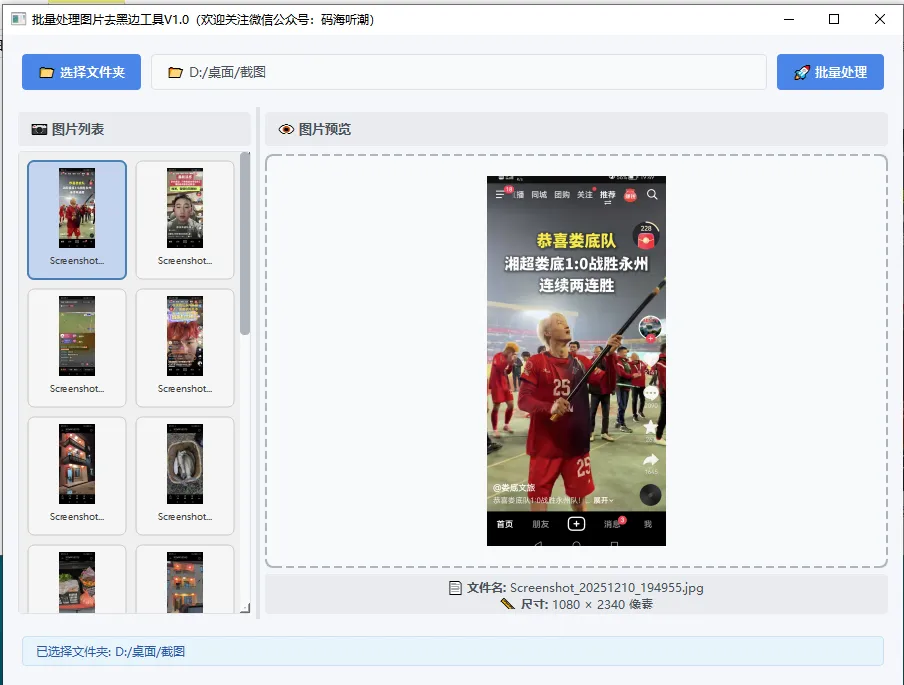
      友情提示:考虑到没有python环境的朋友需要打包好的成品exe,摸鱼早已贴心打包好,本篇文章代码打包的exe截图如下:

      另外,《码海听潮》公众号所有文章码和exe程序已打包好上传绿联nas私有云,有需要的大佬扫一扫上面博主的个人微信二维码,需要的大佬需支付9.9元永久拥有公众号资源(写原创干货费时费力,属实不易),邀请您进入社区群获取下载链接!!,群内提供python办公自动化交流问题,解决问题,且码海听潮微信公众号文章发布会第一时间会更新到群里,非诚勿扰哈!

      码海听潮官方社区群如下:

      赶紧微信扫一扫下方二维码添加摸鱼君微信

      最新文章

      随机文章

      基本 文件 流程 错误 SQL 调试
      1. 请求信息 : 2026-02-08 08:33:01 HTTP/2.0 GET : https://f.mffb.com.cn/a/472288.html
      2. 运行时间 : 0.238696s [ 吞吐率:4.19req/s ] 内存消耗:4,525.63kb 文件加载:140
      3. 缓存信息 : 0 reads,0 writes
      4. 会话信息 : SESSION_ID=ae28f2dd2b39178b2baacf506f361283
      1. /yingpanguazai/ssd/ssd1/www/f.mffb.com.cn/public/index.php ( 0.79 KB )
      2. /yingpanguazai/ssd/ssd1/www/f.mffb.com.cn/vendor/autoload.php ( 0.17 KB )
      3. /yingpanguazai/ssd/ssd1/www/f.mffb.com.cn/vendor/composer/autoload_real.php ( 2.49 KB )
      4. /yingpanguazai/ssd/ssd1/www/f.mffb.com.cn/vendor/composer/platform_check.php ( 0.90 KB )
      5. /yingpanguazai/ssd/ssd1/www/f.mffb.com.cn/vendor/composer/ClassLoader.php ( 14.03 KB )
      6. /yingpanguazai/ssd/ssd1/www/f.mffb.com.cn/vendor/composer/autoload_static.php ( 4.90 KB )
      7. /yingpanguazai/ssd/ssd1/www/f.mffb.com.cn/vendor/topthink/think-helper/src/helper.php ( 8.34 KB )
      8. /yingpanguazai/ssd/ssd1/www/f.mffb.com.cn/vendor/topthink/think-validate/src/helper.php ( 2.19 KB )
      9. /yingpanguazai/ssd/ssd1/www/f.mffb.com.cn/vendor/topthink/think-orm/src/helper.php ( 1.47 KB )
      10. /yingpanguazai/ssd/ssd1/www/f.mffb.com.cn/vendor/topthink/think-orm/stubs/load_stubs.php ( 0.16 KB )
      11. /yingpanguazai/ssd/ssd1/www/f.mffb.com.cn/vendor/topthink/framework/src/think/Exception.php ( 1.69 KB )
      12. /yingpanguazai/ssd/ssd1/www/f.mffb.com.cn/vendor/topthink/think-container/src/Facade.php ( 2.71 KB )
      13. /yingpanguazai/ssd/ssd1/www/f.mffb.com.cn/vendor/symfony/deprecation-contracts/function.php ( 0.99 KB )
      14. /yingpanguazai/ssd/ssd1/www/f.mffb.com.cn/vendor/symfony/polyfill-mbstring/bootstrap.php ( 8.26 KB )
      15. /yingpanguazai/ssd/ssd1/www/f.mffb.com.cn/vendor/symfony/polyfill-mbstring/bootstrap80.php ( 9.78 KB )
      16. /yingpanguazai/ssd/ssd1/www/f.mffb.com.cn/vendor/symfony/var-dumper/Resources/functions/dump.php ( 1.49 KB )
      17. /yingpanguazai/ssd/ssd1/www/f.mffb.com.cn/vendor/topthink/think-dumper/src/helper.php ( 0.18 KB )
      18. /yingpanguazai/ssd/ssd1/www/f.mffb.com.cn/vendor/symfony/var-dumper/VarDumper.php ( 4.30 KB )
      19. /yingpanguazai/ssd/ssd1/www/f.mffb.com.cn/vendor/topthink/framework/src/think/App.php ( 15.30 KB )
      20. /yingpanguazai/ssd/ssd1/www/f.mffb.com.cn/vendor/topthink/think-container/src/Container.php ( 15.76 KB )
      21. /yingpanguazai/ssd/ssd1/www/f.mffb.com.cn/vendor/psr/container/src/ContainerInterface.php ( 1.02 KB )
      22. /yingpanguazai/ssd/ssd1/www/f.mffb.com.cn/app/provider.php ( 0.19 KB )
      23. /yingpanguazai/ssd/ssd1/www/f.mffb.com.cn/vendor/topthink/framework/src/think/Http.php ( 6.04 KB )
      24. /yingpanguazai/ssd/ssd1/www/f.mffb.com.cn/vendor/topthink/think-helper/src/helper/Str.php ( 7.29 KB )
      25. /yingpanguazai/ssd/ssd1/www/f.mffb.com.cn/vendor/topthink/framework/src/think/Env.php ( 4.68 KB )
      26. /yingpanguazai/ssd/ssd1/www/f.mffb.com.cn/app/common.php ( 0.03 KB )
      27. /yingpanguazai/ssd/ssd1/www/f.mffb.com.cn/vendor/topthink/framework/src/helper.php ( 18.78 KB )
      28. /yingpanguazai/ssd/ssd1/www/f.mffb.com.cn/vendor/topthink/framework/src/think/Config.php ( 5.54 KB )
      29. /yingpanguazai/ssd/ssd1/www/f.mffb.com.cn/config/app.php ( 0.95 KB )
      30. /yingpanguazai/ssd/ssd1/www/f.mffb.com.cn/config/cache.php ( 0.78 KB )
      31. /yingpanguazai/ssd/ssd1/www/f.mffb.com.cn/config/console.php ( 0.23 KB )
      32. /yingpanguazai/ssd/ssd1/www/f.mffb.com.cn/config/cookie.php ( 0.56 KB )
      33. /yingpanguazai/ssd/ssd1/www/f.mffb.com.cn/config/database.php ( 2.48 KB )
      34. /yingpanguazai/ssd/ssd1/www/f.mffb.com.cn/vendor/topthink/framework/src/think/facade/Env.php ( 1.67 KB )
      35. /yingpanguazai/ssd/ssd1/www/f.mffb.com.cn/config/filesystem.php ( 0.61 KB )
      36. /yingpanguazai/ssd/ssd1/www/f.mffb.com.cn/config/lang.php ( 0.91 KB )
      37. /yingpanguazai/ssd/ssd1/www/f.mffb.com.cn/config/log.php ( 1.35 KB )
      38. /yingpanguazai/ssd/ssd1/www/f.mffb.com.cn/config/middleware.php ( 0.19 KB )
      39. /yingpanguazai/ssd/ssd1/www/f.mffb.com.cn/config/route.php ( 1.89 KB )
      40. /yingpanguazai/ssd/ssd1/www/f.mffb.com.cn/config/session.php ( 0.57 KB )
      41. /yingpanguazai/ssd/ssd1/www/f.mffb.com.cn/config/trace.php ( 0.34 KB )
      42. /yingpanguazai/ssd/ssd1/www/f.mffb.com.cn/config/view.php ( 0.82 KB )
      43. /yingpanguazai/ssd/ssd1/www/f.mffb.com.cn/app/event.php ( 0.25 KB )
      44. /yingpanguazai/ssd/ssd1/www/f.mffb.com.cn/vendor/topthink/framework/src/think/Event.php ( 7.67 KB )
      45. /yingpanguazai/ssd/ssd1/www/f.mffb.com.cn/app/service.php ( 0.13 KB )
      46. /yingpanguazai/ssd/ssd1/www/f.mffb.com.cn/app/AppService.php ( 0.26 KB )
      47. /yingpanguazai/ssd/ssd1/www/f.mffb.com.cn/vendor/topthink/framework/src/think/Service.php ( 1.64 KB )
      48. /yingpanguazai/ssd/ssd1/www/f.mffb.com.cn/vendor/topthink/framework/src/think/Lang.php ( 7.35 KB )
      49. /yingpanguazai/ssd/ssd1/www/f.mffb.com.cn/vendor/topthink/framework/src/lang/zh-cn.php ( 13.70 KB )
      50. /yingpanguazai/ssd/ssd1/www/f.mffb.com.cn/vendor/topthink/framework/src/think/initializer/Error.php ( 3.31 KB )
      51. /yingpanguazai/ssd/ssd1/www/f.mffb.com.cn/vendor/topthink/framework/src/think/initializer/RegisterService.php ( 1.33 KB )
      52. /yingpanguazai/ssd/ssd1/www/f.mffb.com.cn/vendor/services.php ( 0.14 KB )
      53. /yingpanguazai/ssd/ssd1/www/f.mffb.com.cn/vendor/topthink/framework/src/think/service/PaginatorService.php ( 1.52 KB )
      54. /yingpanguazai/ssd/ssd1/www/f.mffb.com.cn/vendor/topthink/framework/src/think/service/ValidateService.php ( 0.99 KB )
      55. /yingpanguazai/ssd/ssd1/www/f.mffb.com.cn/vendor/topthink/framework/src/think/service/ModelService.php ( 2.04 KB )
      56. /yingpanguazai/ssd/ssd1/www/f.mffb.com.cn/vendor/topthink/think-trace/src/Service.php ( 0.77 KB )
      57. /yingpanguazai/ssd/ssd1/www/f.mffb.com.cn/vendor/topthink/framework/src/think/Middleware.php ( 6.72 KB )
      58. /yingpanguazai/ssd/ssd1/www/f.mffb.com.cn/vendor/topthink/framework/src/think/initializer/BootService.php ( 0.77 KB )
      59. /yingpanguazai/ssd/ssd1/www/f.mffb.com.cn/vendor/topthink/think-orm/src/Paginator.php ( 11.86 KB )
      60. /yingpanguazai/ssd/ssd1/www/f.mffb.com.cn/vendor/topthink/think-validate/src/Validate.php ( 63.20 KB )
      61. /yingpanguazai/ssd/ssd1/www/f.mffb.com.cn/vendor/topthink/think-orm/src/Model.php ( 23.55 KB )
      62. /yingpanguazai/ssd/ssd1/www/f.mffb.com.cn/vendor/topthink/think-orm/src/model/concern/Attribute.php ( 21.05 KB )
      63. /yingpanguazai/ssd/ssd1/www/f.mffb.com.cn/vendor/topthink/think-orm/src/model/concern/AutoWriteData.php ( 4.21 KB )
      64. /yingpanguazai/ssd/ssd1/www/f.mffb.com.cn/vendor/topthink/think-orm/src/model/concern/Conversion.php ( 6.44 KB )
      65. /yingpanguazai/ssd/ssd1/www/f.mffb.com.cn/vendor/topthink/think-orm/src/model/concern/DbConnect.php ( 5.16 KB )
      66. /yingpanguazai/ssd/ssd1/www/f.mffb.com.cn/vendor/topthink/think-orm/src/model/concern/ModelEvent.php ( 2.33 KB )
      67. /yingpanguazai/ssd/ssd1/www/f.mffb.com.cn/vendor/topthink/think-orm/src/model/concern/RelationShip.php ( 28.29 KB )
      68. /yingpanguazai/ssd/ssd1/www/f.mffb.com.cn/vendor/topthink/think-helper/src/contract/Arrayable.php ( 0.09 KB )
      69. /yingpanguazai/ssd/ssd1/www/f.mffb.com.cn/vendor/topthink/think-helper/src/contract/Jsonable.php ( 0.13 KB )
      70. /yingpanguazai/ssd/ssd1/www/f.mffb.com.cn/vendor/topthink/think-orm/src/model/contract/Modelable.php ( 0.09 KB )
      71. /yingpanguazai/ssd/ssd1/www/f.mffb.com.cn/vendor/topthink/framework/src/think/Db.php ( 2.88 KB )
      72. /yingpanguazai/ssd/ssd1/www/f.mffb.com.cn/vendor/topthink/think-orm/src/DbManager.php ( 8.52 KB )
      73. /yingpanguazai/ssd/ssd1/www/f.mffb.com.cn/vendor/topthink/framework/src/think/Log.php ( 6.28 KB )
      74. /yingpanguazai/ssd/ssd1/www/f.mffb.com.cn/vendor/topthink/framework/src/think/Manager.php ( 3.92 KB )
      75. /yingpanguazai/ssd/ssd1/www/f.mffb.com.cn/vendor/psr/log/src/LoggerTrait.php ( 2.69 KB )
      76. /yingpanguazai/ssd/ssd1/www/f.mffb.com.cn/vendor/psr/log/src/LoggerInterface.php ( 2.71 KB )
      77. /yingpanguazai/ssd/ssd1/www/f.mffb.com.cn/vendor/topthink/framework/src/think/Cache.php ( 4.92 KB )
      78. /yingpanguazai/ssd/ssd1/www/f.mffb.com.cn/vendor/psr/simple-cache/src/CacheInterface.php ( 4.71 KB )
      79. /yingpanguazai/ssd/ssd1/www/f.mffb.com.cn/vendor/topthink/think-helper/src/helper/Arr.php ( 16.63 KB )
      80. /yingpanguazai/ssd/ssd1/www/f.mffb.com.cn/vendor/topthink/framework/src/think/cache/driver/File.php ( 7.84 KB )
      81. /yingpanguazai/ssd/ssd1/www/f.mffb.com.cn/vendor/topthink/framework/src/think/cache/Driver.php ( 9.03 KB )
      82. /yingpanguazai/ssd/ssd1/www/f.mffb.com.cn/vendor/topthink/framework/src/think/contract/CacheHandlerInterface.php ( 1.99 KB )
      83. /yingpanguazai/ssd/ssd1/www/f.mffb.com.cn/app/Request.php ( 0.09 KB )
      84. /yingpanguazai/ssd/ssd1/www/f.mffb.com.cn/vendor/topthink/framework/src/think/Request.php ( 55.78 KB )
      85. /yingpanguazai/ssd/ssd1/www/f.mffb.com.cn/app/middleware.php ( 0.25 KB )
      86. /yingpanguazai/ssd/ssd1/www/f.mffb.com.cn/vendor/topthink/framework/src/think/Pipeline.php ( 2.61 KB )
      87. /yingpanguazai/ssd/ssd1/www/f.mffb.com.cn/vendor/topthink/think-trace/src/TraceDebug.php ( 3.40 KB )
      88. /yingpanguazai/ssd/ssd1/www/f.mffb.com.cn/vendor/topthink/framework/src/think/middleware/SessionInit.php ( 1.94 KB )
      89. /yingpanguazai/ssd/ssd1/www/f.mffb.com.cn/vendor/topthink/framework/src/think/Session.php ( 1.80 KB )
      90. /yingpanguazai/ssd/ssd1/www/f.mffb.com.cn/vendor/topthink/framework/src/think/session/driver/File.php ( 6.27 KB )
      91. /yingpanguazai/ssd/ssd1/www/f.mffb.com.cn/vendor/topthink/framework/src/think/contract/SessionHandlerInterface.php ( 0.87 KB )
      92. /yingpanguazai/ssd/ssd1/www/f.mffb.com.cn/vendor/topthink/framework/src/think/session/Store.php ( 7.12 KB )
      93. /yingpanguazai/ssd/ssd1/www/f.mffb.com.cn/vendor/topthink/framework/src/think/Route.php ( 23.73 KB )
      94. /yingpanguazai/ssd/ssd1/www/f.mffb.com.cn/vendor/topthink/framework/src/think/route/RuleName.php ( 5.75 KB )
      95. /yingpanguazai/ssd/ssd1/www/f.mffb.com.cn/vendor/topthink/framework/src/think/route/Domain.php ( 2.53 KB )
      96. /yingpanguazai/ssd/ssd1/www/f.mffb.com.cn/vendor/topthink/framework/src/think/route/RuleGroup.php ( 22.43 KB )
      97. /yingpanguazai/ssd/ssd1/www/f.mffb.com.cn/vendor/topthink/framework/src/think/route/Rule.php ( 26.95 KB )
      98. /yingpanguazai/ssd/ssd1/www/f.mffb.com.cn/vendor/topthink/framework/src/think/route/RuleItem.php ( 9.78 KB )
      99. /yingpanguazai/ssd/ssd1/www/f.mffb.com.cn/route/app.php ( 1.72 KB )
      100. /yingpanguazai/ssd/ssd1/www/f.mffb.com.cn/vendor/topthink/framework/src/think/facade/Route.php ( 4.70 KB )
      101. /yingpanguazai/ssd/ssd1/www/f.mffb.com.cn/vendor/topthink/framework/src/think/route/dispatch/Controller.php ( 4.74 KB )
      102. /yingpanguazai/ssd/ssd1/www/f.mffb.com.cn/vendor/topthink/framework/src/think/route/Dispatch.php ( 10.44 KB )
      103. /yingpanguazai/ssd/ssd1/www/f.mffb.com.cn/app/controller/Index.php ( 4.81 KB )
      104. /yingpanguazai/ssd/ssd1/www/f.mffb.com.cn/app/BaseController.php ( 2.05 KB )
      105. /yingpanguazai/ssd/ssd1/www/f.mffb.com.cn/vendor/topthink/think-orm/src/facade/Db.php ( 0.93 KB )
      106. /yingpanguazai/ssd/ssd1/www/f.mffb.com.cn/vendor/topthink/think-orm/src/db/connector/Mysql.php ( 5.44 KB )
      107. /yingpanguazai/ssd/ssd1/www/f.mffb.com.cn/vendor/topthink/think-orm/src/db/PDOConnection.php ( 52.47 KB )
      108. /yingpanguazai/ssd/ssd1/www/f.mffb.com.cn/vendor/topthink/think-orm/src/db/Connection.php ( 8.39 KB )
      109. /yingpanguazai/ssd/ssd1/www/f.mffb.com.cn/vendor/topthink/think-orm/src/db/ConnectionInterface.php ( 4.57 KB )
      110. /yingpanguazai/ssd/ssd1/www/f.mffb.com.cn/vendor/topthink/think-orm/src/db/builder/Mysql.php ( 16.58 KB )
      111. /yingpanguazai/ssd/ssd1/www/f.mffb.com.cn/vendor/topthink/think-orm/src/db/Builder.php ( 24.06 KB )
      112. /yingpanguazai/ssd/ssd1/www/f.mffb.com.cn/vendor/topthink/think-orm/src/db/BaseBuilder.php ( 27.50 KB )
      113. /yingpanguazai/ssd/ssd1/www/f.mffb.com.cn/vendor/topthink/think-orm/src/db/Query.php ( 15.71 KB )
      114. /yingpanguazai/ssd/ssd1/www/f.mffb.com.cn/vendor/topthink/think-orm/src/db/BaseQuery.php ( 45.13 KB )
      115. /yingpanguazai/ssd/ssd1/www/f.mffb.com.cn/vendor/topthink/think-orm/src/db/concern/TimeFieldQuery.php ( 7.43 KB )
      116. /yingpanguazai/ssd/ssd1/www/f.mffb.com.cn/vendor/topthink/think-orm/src/db/concern/AggregateQuery.php ( 3.26 KB )
      117. /yingpanguazai/ssd/ssd1/www/f.mffb.com.cn/vendor/topthink/think-orm/src/db/concern/ModelRelationQuery.php ( 20.07 KB )
      118. /yingpanguazai/ssd/ssd1/www/f.mffb.com.cn/vendor/topthink/think-orm/src/db/concern/ParamsBind.php ( 3.66 KB )
      119. /yingpanguazai/ssd/ssd1/www/f.mffb.com.cn/vendor/topthink/think-orm/src/db/concern/ResultOperation.php ( 7.01 KB )
      120. /yingpanguazai/ssd/ssd1/www/f.mffb.com.cn/vendor/topthink/think-orm/src/db/concern/WhereQuery.php ( 19.37 KB )
      121. /yingpanguazai/ssd/ssd1/www/f.mffb.com.cn/vendor/topthink/think-orm/src/db/concern/JoinAndViewQuery.php ( 7.11 KB )
      122. /yingpanguazai/ssd/ssd1/www/f.mffb.com.cn/vendor/topthink/think-orm/src/db/concern/TableFieldInfo.php ( 2.63 KB )
      123. /yingpanguazai/ssd/ssd1/www/f.mffb.com.cn/vendor/topthink/think-orm/src/db/concern/Transaction.php ( 2.77 KB )
      124. /yingpanguazai/ssd/ssd1/www/f.mffb.com.cn/vendor/topthink/framework/src/think/log/driver/File.php ( 5.96 KB )
      125. /yingpanguazai/ssd/ssd1/www/f.mffb.com.cn/vendor/topthink/framework/src/think/contract/LogHandlerInterface.php ( 0.86 KB )
      126. /yingpanguazai/ssd/ssd1/www/f.mffb.com.cn/vendor/topthink/framework/src/think/log/Channel.php ( 3.89 KB )
      127. /yingpanguazai/ssd/ssd1/www/f.mffb.com.cn/vendor/topthink/framework/src/think/event/LogRecord.php ( 1.02 KB )
      128. /yingpanguazai/ssd/ssd1/www/f.mffb.com.cn/vendor/topthink/think-helper/src/Collection.php ( 16.47 KB )
      129. /yingpanguazai/ssd/ssd1/www/f.mffb.com.cn/vendor/topthink/framework/src/think/facade/View.php ( 1.70 KB )
      130. /yingpanguazai/ssd/ssd1/www/f.mffb.com.cn/vendor/topthink/framework/src/think/View.php ( 4.39 KB )
      131. /yingpanguazai/ssd/ssd1/www/f.mffb.com.cn/vendor/topthink/framework/src/think/Response.php ( 8.81 KB )
      132. /yingpanguazai/ssd/ssd1/www/f.mffb.com.cn/vendor/topthink/framework/src/think/response/View.php ( 3.29 KB )
      133. /yingpanguazai/ssd/ssd1/www/f.mffb.com.cn/vendor/topthink/framework/src/think/Cookie.php ( 6.06 KB )
      134. /yingpanguazai/ssd/ssd1/www/f.mffb.com.cn/vendor/topthink/think-view/src/Think.php ( 8.38 KB )
      135. /yingpanguazai/ssd/ssd1/www/f.mffb.com.cn/vendor/topthink/framework/src/think/contract/TemplateHandlerInterface.php ( 1.60 KB )
      136. /yingpanguazai/ssd/ssd1/www/f.mffb.com.cn/vendor/topthink/think-template/src/Template.php ( 46.61 KB )
      137. /yingpanguazai/ssd/ssd1/www/f.mffb.com.cn/vendor/topthink/think-template/src/template/driver/File.php ( 2.41 KB )
      138. /yingpanguazai/ssd/ssd1/www/f.mffb.com.cn/vendor/topthink/think-template/src/template/contract/DriverInterface.php ( 0.86 KB )
      139. /yingpanguazai/ssd/ssd1/www/f.mffb.com.cn/runtime/temp/067d451b9a0c665040f3f1bdd3293d68.php ( 11.98 KB )
      140. /yingpanguazai/ssd/ssd1/www/f.mffb.com.cn/vendor/topthink/think-trace/src/Html.php ( 4.42 KB )
      1. CONNECT:[ UseTime:0.001081s ] mysql:host=127.0.0.1;port=3306;dbname=f_mffb;charset=utf8mb4
      2. SHOW FULL COLUMNS FROM `fenlei` [ RunTime:0.001464s ]
      3. SELECT * FROM `fenlei` WHERE `fid` = 0 [ RunTime:0.001362s ]
      4. SELECT * FROM `fenlei` WHERE `fid` = 63 [ RunTime:0.000766s ]
      5. SHOW FULL COLUMNS FROM `set` [ RunTime:0.001680s ]
      6. SELECT * FROM `set` [ RunTime:0.019314s ]
      7. SHOW FULL COLUMNS FROM `article` [ RunTime:0.001641s ]
      8. SELECT * FROM `article` WHERE `id` = 472288 LIMIT 1 [ RunTime:0.008285s ]
      9. UPDATE `article` SET `lasttime` = 1770510781 WHERE `id` = 472288 [ RunTime:0.004937s ]
      10. SELECT * FROM `fenlei` WHERE `id` = 66 LIMIT 1 [ RunTime:0.006263s ]
      11. SELECT * FROM `article` WHERE `id` < 472288 ORDER BY `id` DESC LIMIT 1 [ RunTime:0.001527s ]
      12. SELECT * FROM `article` WHERE `id` > 472288 ORDER BY `id` ASC LIMIT 1 [ RunTime:0.005899s ]
      13. SELECT * FROM `article` WHERE `id` < 472288 ORDER BY `id` DESC LIMIT 10 [ RunTime:0.003769s ]
      14. SELECT * FROM `article` WHERE `id` < 472288 ORDER BY `id` DESC LIMIT 10,10 [ RunTime:0.001008s ]
      15. SELECT * FROM `article` WHERE `id` < 472288 ORDER BY `id` DESC LIMIT 20,10 [ RunTime:0.001299s ]
      0.240264s