📦 安装
从源码安装(最新功能,推荐用于开发)
git clone https://github.com/HKUDS/nanobot.gitcd nanobotpip install -e .
使用 uv 安装(稳定,快速)
uv tool install nanobot-ai
从 PyPI 安装(稳定)
pip install nanobot-ai
🚀 快速开始
提示:在 ~/.nanobot/config.json 中设置你的 API 密钥。
获取 API 密钥:OpenRouter (LLM) · Brave Search(可选,用于网络搜索)
你也可以将模型更改为 minimax/minimax-m2 以降低成本。
1. 初始化
nanobot onboard
2. 配置 (~/.nanobot/config.json)
{ "providers": { "openrouter": { "apiKey": "sk-or-v1-xxx" } }, "agents": { "defaults": { "model": "anthropic/claude-opus-4-5" } }, "tools": { "web": { "search": { "apiKey": "BSA-xxx" } } }}
3. 聊天
nanobot agent -m "What is 2+2?"
就这样!你在 2 分钟内就有了一个可用的 AI 助手。
🖥️ 本地模型 (vLLM)
使用你自己的本地模型运行 nanobot,通过 vLLM 或任何 OpenAI 兼容的服务器。
1. 启动你的 vLLM 服务器
vllm serve meta-llama/Llama-3.1-8B-Instruct --port 8000
2. 配置 (~/.nanobot/config.json)
{ "providers": { "vllm": { "apiKey": "dummy", "apiBase": "http://localhost:8000/v1" } }, "agents": { "defaults": { "model": "meta-llama/Llama-3.1-8B-Instruct" } }}
3. 聊天
nanobot agent -m "Hello from my local LLM!"
提示:对于不需要身份验证的本地服务器,apiKey 可以是任何非空字符串。
💬 聊天应用
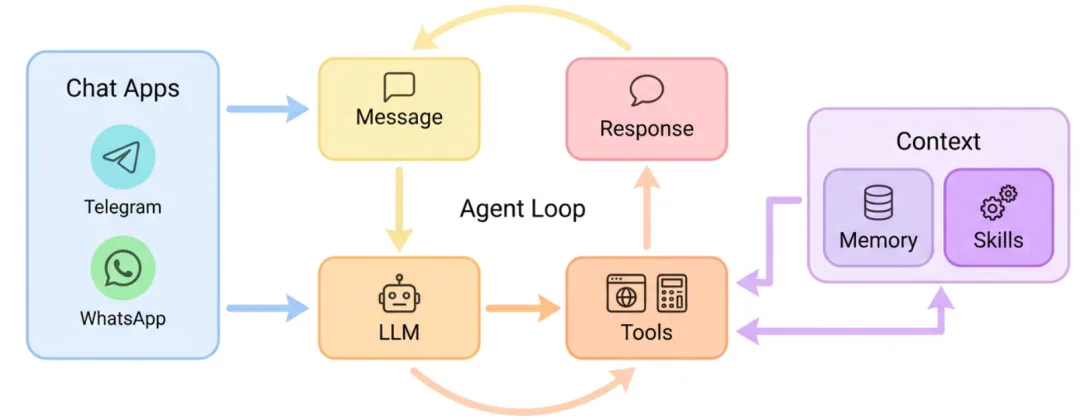
通过 Telegram 或 WhatsApp 与你的 nanobot 交谈 —— 随时,随地。
Telegram(推荐)
1. 创建一个机器人
- • 打开 Telegram,搜索 @BotFather
2. 配置
{ "channels": { "telegram": { "enabled":true, "token": "YOUR_BOT_TOKEN", "allowFrom": ["YOUR_USER_ID"] } }}
从 Telegram 上的 @userinfobot 获取你的用户 ID。
3. 运行
nanobot gateway
WhatsApp
需要 Node.js ≥18。
1. 链接设备
nanobot channels login# 使用 WhatsApp 扫描二维码 → 设置 → 链接的设备
2. 配置
{ "channels": { "whatsapp": { "enabled":true, "allowFrom": ["+1234567890"] } }}
3. 运行(两个终端)
# 终端 1nanobot channels login# 终端 2nanobot gateway
⚙️ 配置
配置文件:~/.nanobot/config.json
提供商
注意:Groq 通过 Whisper 提供免费的语音转录。如果配置了,Telegram 语音消息将自动转录。
完整配置示例
{ "agents": { "defaults": { "model": "anthropic/claude-opus-4-5" } }, "providers": { "openrouter": { "apiKey": "sk-or-v1-xxx" }, "groq": { "apiKey": "gsk_xxx" } }, "channels": { "telegram": { "enabled":true, "token": "123456:ABC...", "allowFrom": ["123456789"] }, "whatsapp": { "enabled":false } }, "tools": { "web": { "search": { "apiKey": "BSA..." } } }}
CLI 参考
项目地址:https://github.com/HKUDS/nanobot