Python从入门到精通day32
- 2026-09-07 07:14:44
Python从入门到精通day32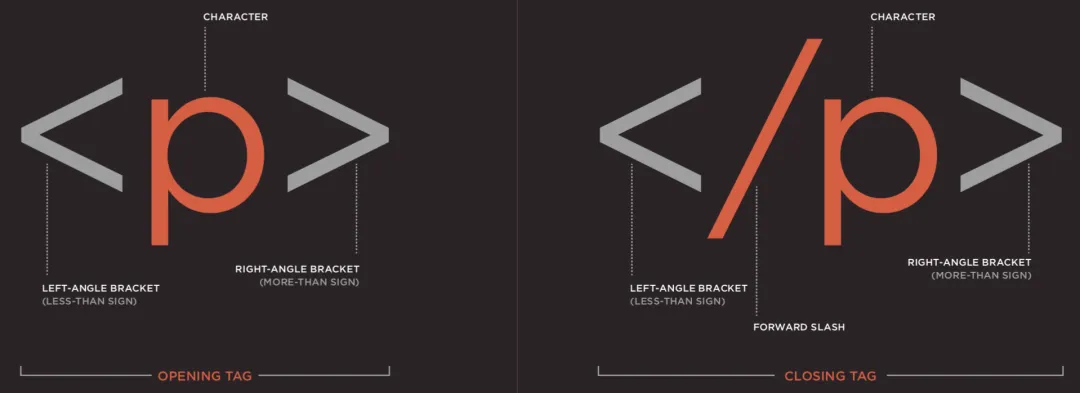
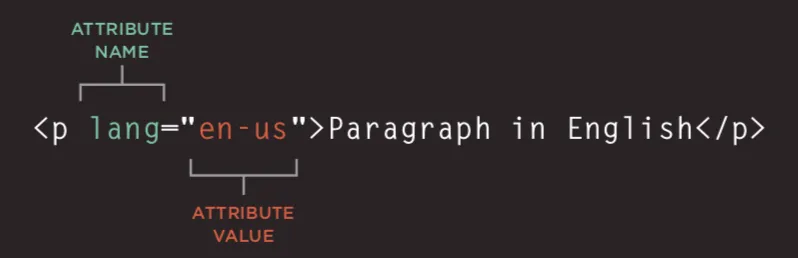
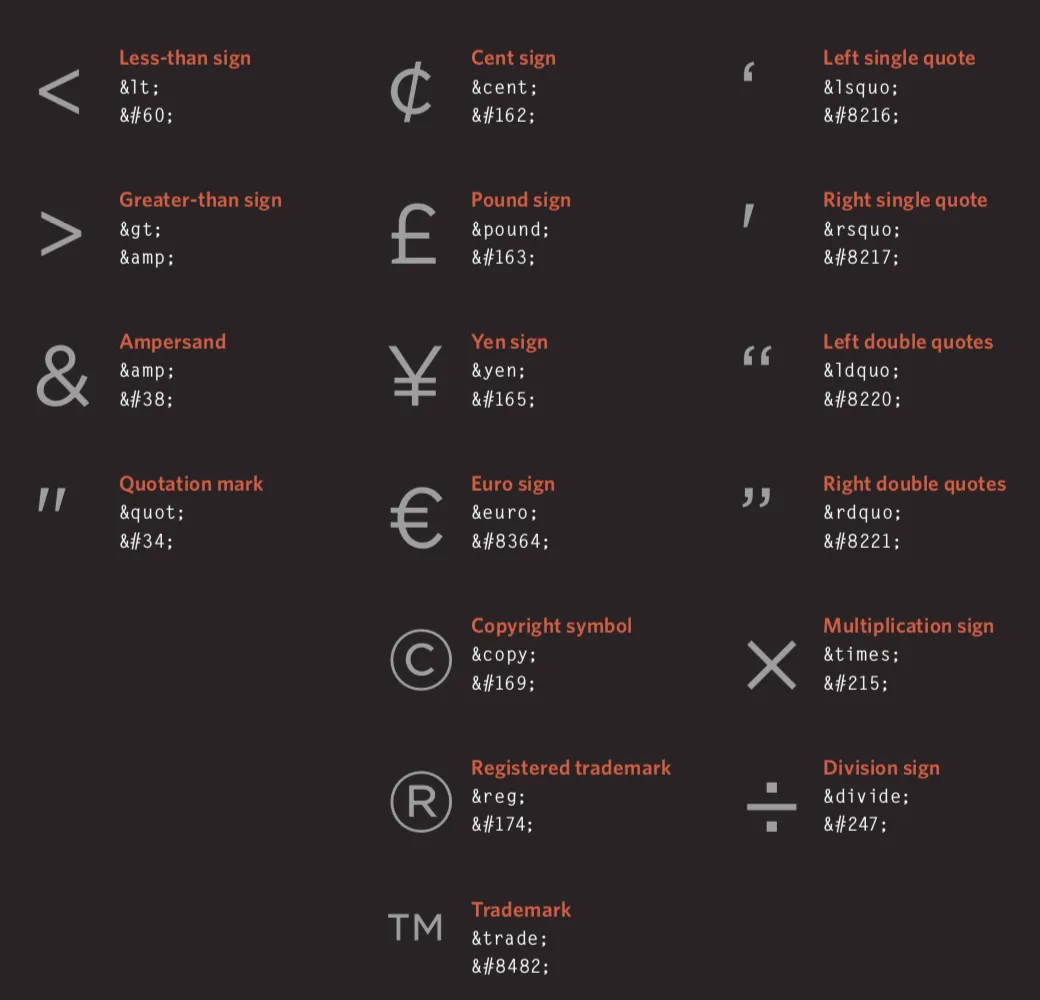
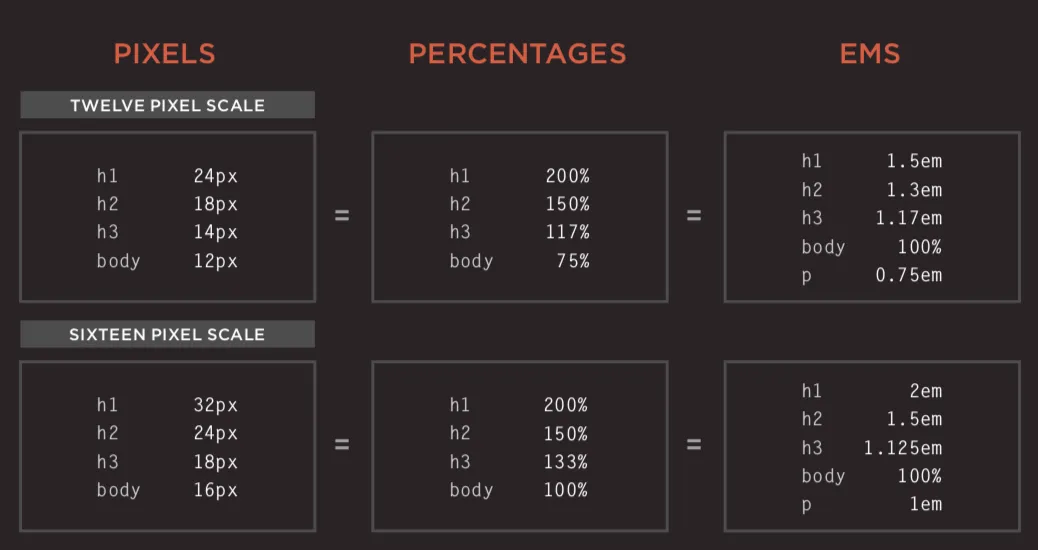
・有序列表(ordered list)- ol /li 标签组合 ・无序列表(unordered list)- ul /li 标签组合 ・定义列表(definition list)- dl /dt(定义项)/dd(描述项)标签组合 • 图像存储位置 ・基础表格结构 - table /tr(行)/td(单元格)/th(表头)标签 ・表格标题 - caption 标签 ・单元格跨行 / 跨列 - rowspan 属性 /colspan 属性 ・长表格分段 - thead(表头)/tbody(主体)/tfoot(表尾)标签 ・表单核心属性 - action(提交地址)/method(提交方式)/enctype(编码类型) ・表单控件(input)- 基于 type 属性区分类型 ・普通文本框 - text / 密码输入框 - password / 数字输入框 - number ・邮箱输入框 - email / 电话号码框 - tel / 日期选择框 - date / 滑动条 - range / 网址输入框 - url / 搜索框 - search ・单选按钮 - radio / 复选框 - checkbox ・文件上传控件 - file / 隐藏域 - hidden ・提交按钮 - submit / 图像按钮 - image / 重置按钮 - reset ・下拉选择框 - select /option 标签组合 ・多行文本输入框 - textarea 标签 ・表单元素分组 - fieldset(分组)/legend(组标题)标签 ・主流视频格式与播放器适配 ・第三方视频托管服务(如 YouTube、B 站等) ・嵌入视频前的准备工作 ・video 标签核心属性 - autoplay(自动播放)/controls(显示控件)/loop(循环播放)/muted(静音)/preload(预加载)/src(资源地址) ・audio 标签核心属性 - autoplay /controls/loop /muted/preload /src/width /height/poster(封面图) • 字符实体(实体替换符) • 规则、属性和值 • 常用选择器 • 文本的大小和字型(font-size / font-family) 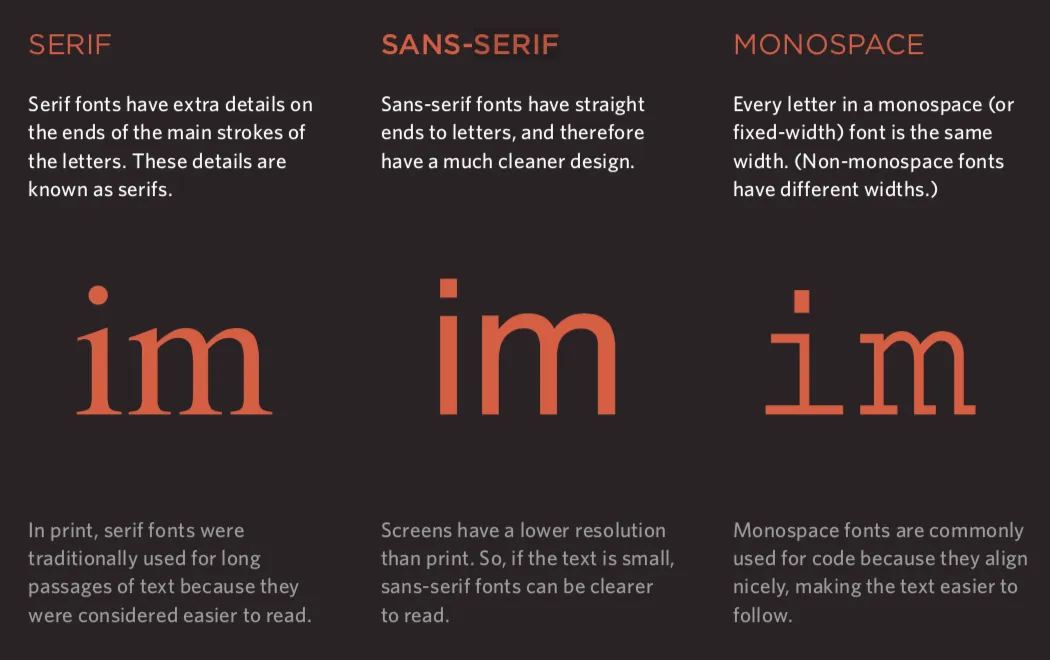
• 粗细、样式、拉伸和装饰(font-weight / font-style / font-stretch / text-decoration)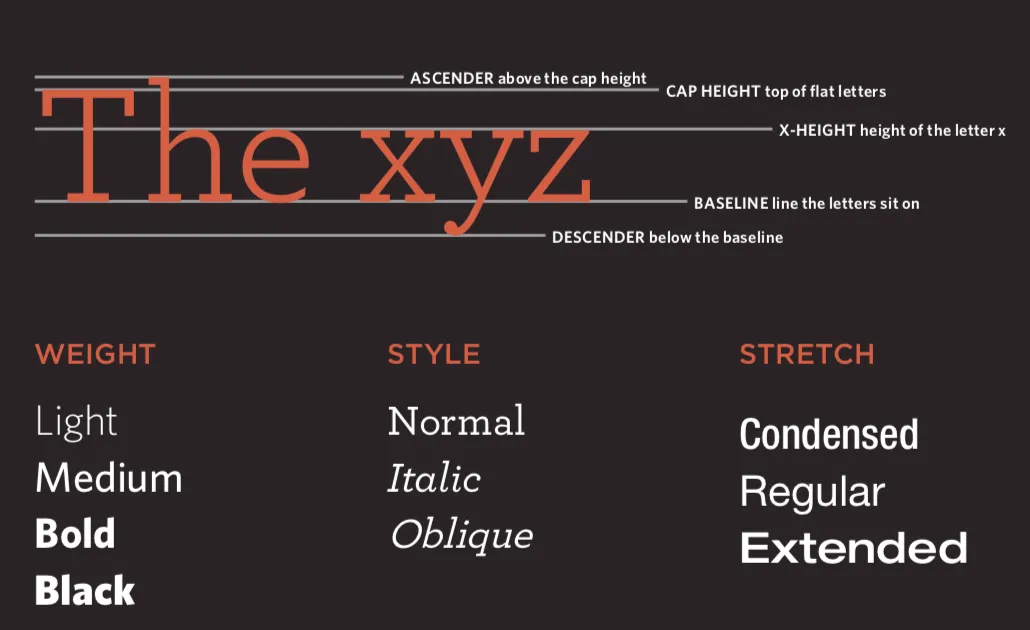
• 盒子大小的控制(width / height) • 盒子的边框、外边距和内边距(border / margin / padding) • HTML5布局 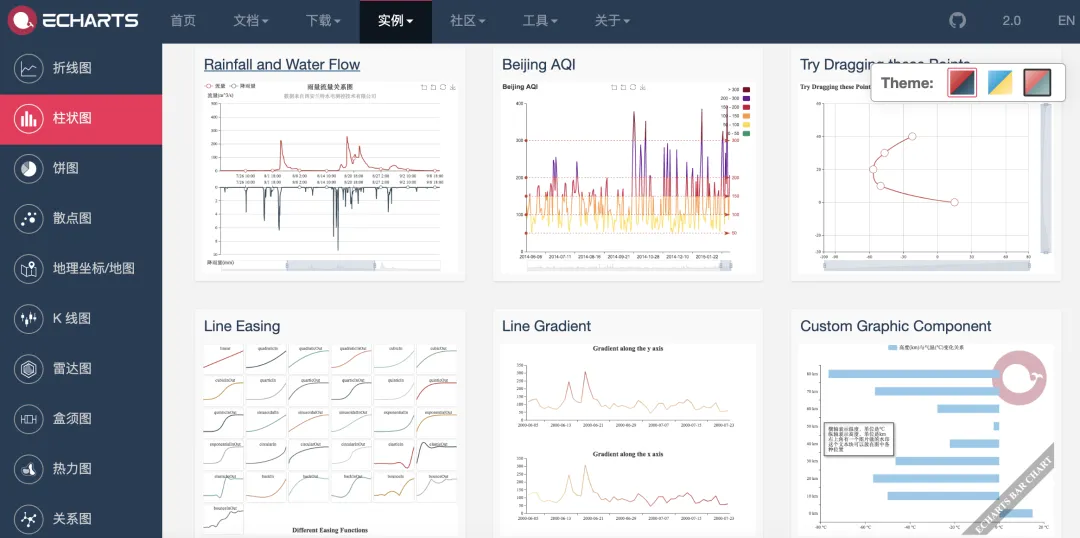
3. 可视化
Web前端核心知识梳理
说明:本文引用的部分配图来源于 Jon Duckett 所著的《HTML and CSS: Design and Build Websites》,这是一本极具价值的前端入门教程,感兴趣的读者可前往亚马逊等电商平台购买该书。
HTML 是用于定义网页结构的标记语言,其英文全称为 Hyper-Text Markup Language(超文本标记语言)。我们在浏览器中看到的文字内容、交互按钮、图片素材、视频资源等各类页面元素,均是通过 HTML 编写后由浏览器解析渲染呈现的。
HTML发展历程
1. 1991 年 10 月:欧洲核子研究中心(CERN)发布了一份非正式文档,首次公开了 18 个 HTML 标签。该文档由物理学家蒂姆・伯纳斯 - 李撰写,他也因此被公认为万维网的发明者,同时担任万维网联盟(W3C)主席一职。 2. 1995 年 11 月:HTML 2.0 标准正式发布(对应 RFC 1866 文档)。 3. 1997 年 1 月:HTML 3.2 以 W3C 推荐标准的形式发布。 4. 1997 年 12 月:HTML 4.0 被确立为 W3C 推荐标准。 5. 1999 年 12 月:HTML4.01 版本成为 W3C 推荐标准。 6. 2008 年 1 月:W3C 将 HTML5 以工作草案的形式对外发布。 7. 2011 年 5 月:W3C 把 HTML5 推进至 “最终征求意见”(Last Call)阶段。 8. 2012 年 12 月:W3C 将 HTML5 列入 “候选推荐标准” 范畴。 9. 2014 年 10 月:HTML5 正式成为稳定的 W3C 推荐标准,这也标志着 HTML5 的标准化工作全部完成。
HTML5核心新特性
1. 引入原生多媒体支持(audio和video标签) 2. 引入可编程内容(canvas标签) 3. 引入语义Web(article、aside、details、figure、footer、header、nav、section、summary等标签) 4. 引入新的表单控件(日历、邮箱、搜索、滑条等) 5. 引入对离线存储更好的支持(localStorage和sessionStorage) 6. 引入对定位、拖放、WebSocket、后台任务等的支持
基于HTML标签承载页面内容
结构
・html:页面根容器标签
・head:存放页面元信息的头部标签
・title:定义网页标题的标签
・meta:设置页面元数据(编码、视口等)的标签
・body:承载页面可视内容的核心标签
文本类标签
・标题(heading)与段落(paragraph)
・h1 ~ h6:六级标题标签
・p:段落标签
・上标(superscript)与下标(subscript)
・sup:上标标签
・sub:下标标签
・空白处理(空白字符自动折叠)
・换行(break)与水平分隔线(horizontal ruler)
・br:强制换行标签
・hr:水平分隔线标签
・语义化文本标签
・强调重要性(加粗)- strong 标签
・长文本引用 - blockquote 标签
・缩写词与首字母缩写 - abbr /acronym 标签
・文献引用 - cite 标签
・联系信息展示 - address 标签
・内容修改标记 - ins(插入)/del(删除)标签
列表(list)类标签
链接(anchor)类标签
・站内 / 站外页面跳转链接
・页面内锚点定位链接
・邮件、电话等功能型链接
图像(image)相关标签与规范
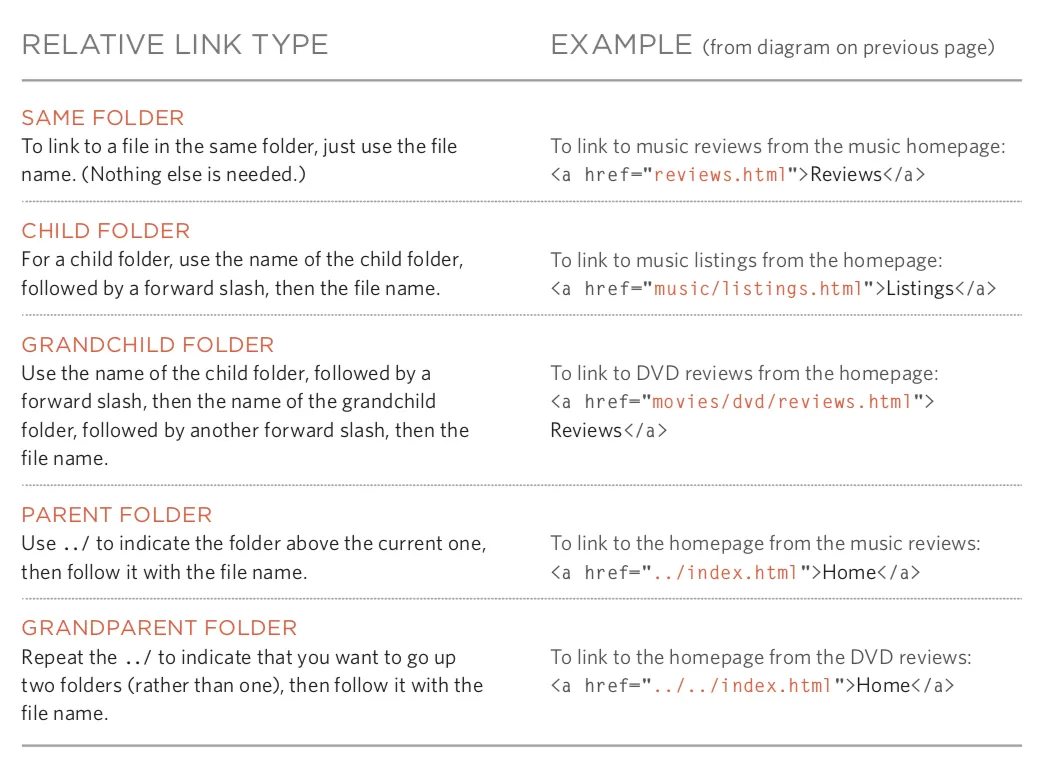
・图像文件的存储路径规范 ・图像标签及宽高属性设置 ・图像格式的选择原则 ・JPEG 格式:适合照片类高色彩度图像 ・GIF 格式:支持动图和透明色的简单图像 ・PNG 格式:无损压缩、支持透明的图像 ・矢量图格式:缩放不失真的图像类型 ・语义化图像标签 - figure(图像容器)/figcaption(图像说明)
表格(table)类标签
表单(form)类标签
音视频(audio / video)标签
窗口(frame)相关标签(慎用)
• 框架集(过时,不建议使用) - frameset / frame • 内嵌窗口 - iframe
HTML其他核心规范
• 文档类型声明 <!doctype html><!DOCTYPE HTMLPUBLIC"-//W3C//DTD HTML 4.01//EN""http://www.w3.org/TR/html4/strict.dtd"><!DOCTYPE HTMLPUBLIC"-//W3C//DTD HTML 4.01 Transitional//EN""http://www.w3.org/TR/html4/loose.dtd">• 注释写法 <!-- 这是一段注释,注释不能够嵌套 -->• 标签通用属性 • id:唯一标识 • class:元素所属的类,用于区分不同的元素 • title:元素的额外信息(鼠标悬浮时会显示工具提示文本) • tabindex:Tab键切换顺序 • contenteditable:元素是否可编辑 • draggable:元素是否可拖拽 • 块级元素 / 行级元素
使用CSS 实现页面样式渲染
简介
• CSS的作用 • CSS的工作原理
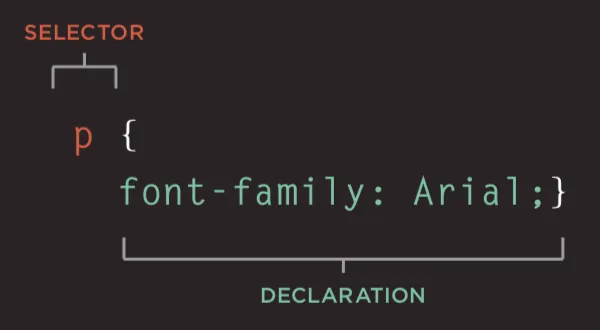
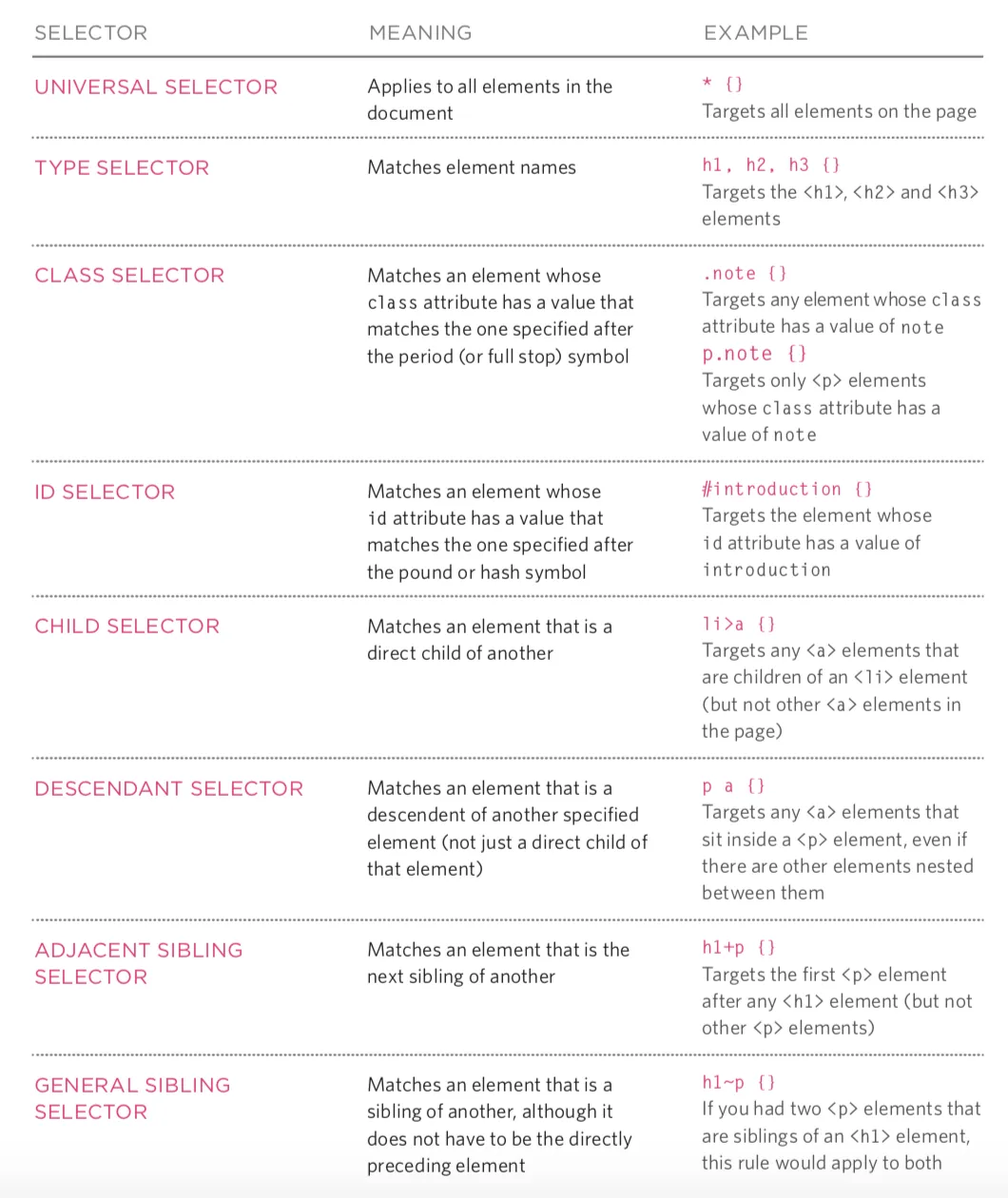
颜色(color)
• 如何指定颜色 • 颜色术语和颜色对比 • 背景色
文本(text / font)
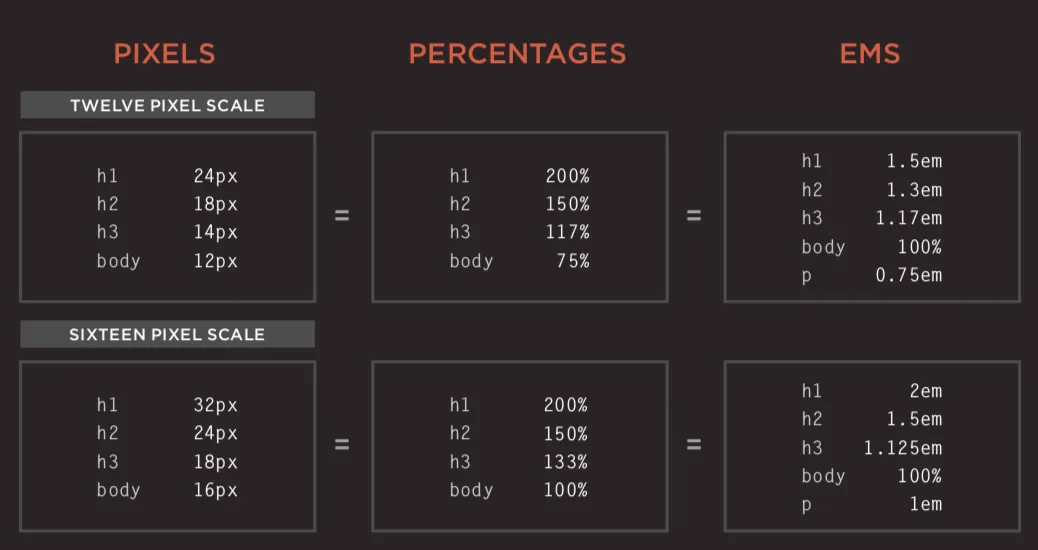
• 行间距(line-height)、字母间距(letter-spacing)和单词间距(word-spacing) • 对齐(text-align)方式和缩进(text-ident) • 链接样式(:link / :visited / :active / :hover) • CSS3新属性 • 阴影效果 - text-shadow • 首字母和首行文本(:first-letter / :first-line) • 响应用户
盒子(box model)
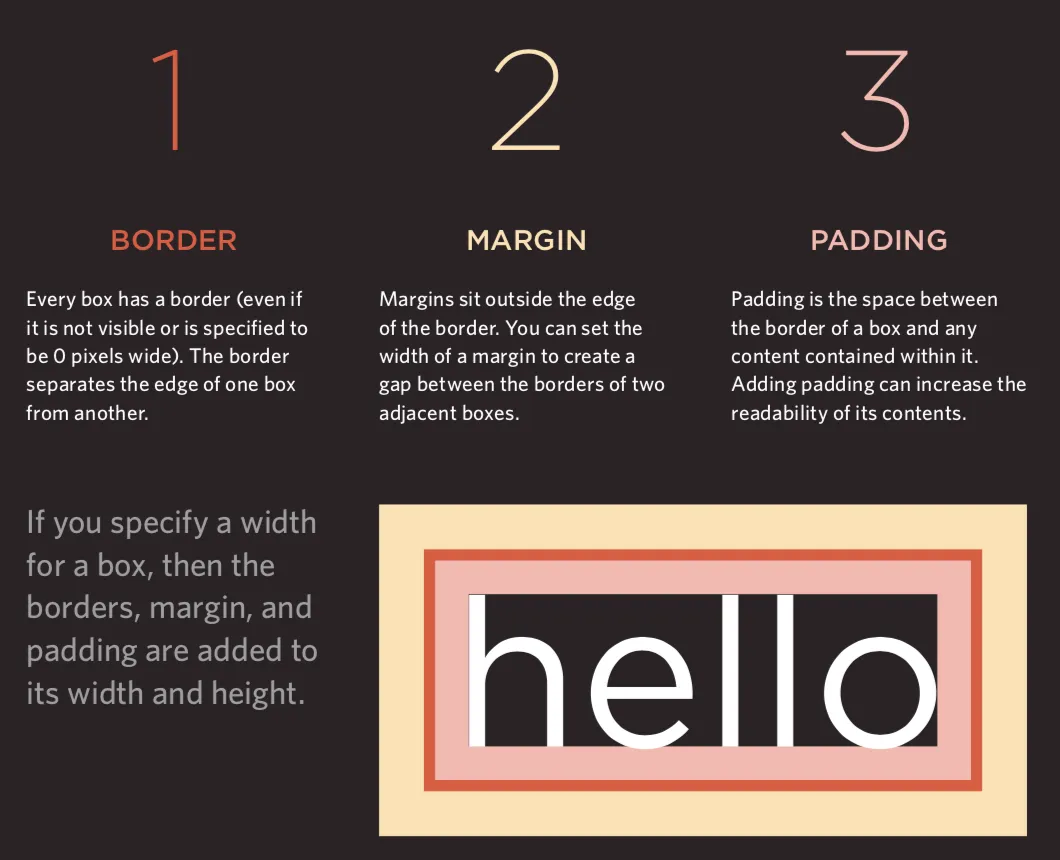
• 盒子的显示和隐藏(display / visibility) • CSS3新属性 • 边框图像(border-image) • 投影(border-shadow) • 圆角(border-radius)
列表、表格和表单
• 列表的项目符号(list-style) • 表格的边框和背景(border-collapse) • 表单控件的外观 • 表单控件的对齐 • 浏览器的开发者工具
图像
• 控制图像的大小(display: inline-block) • 对齐图像 • 背景图像(background / background-image / background-repeat / background-position)
布局
• 控制元素的位置(position / z-index) • 普通流 • 相对定位 • 绝对定位 • 固定定位 • 浮动元素(float / clear) • 网站布局
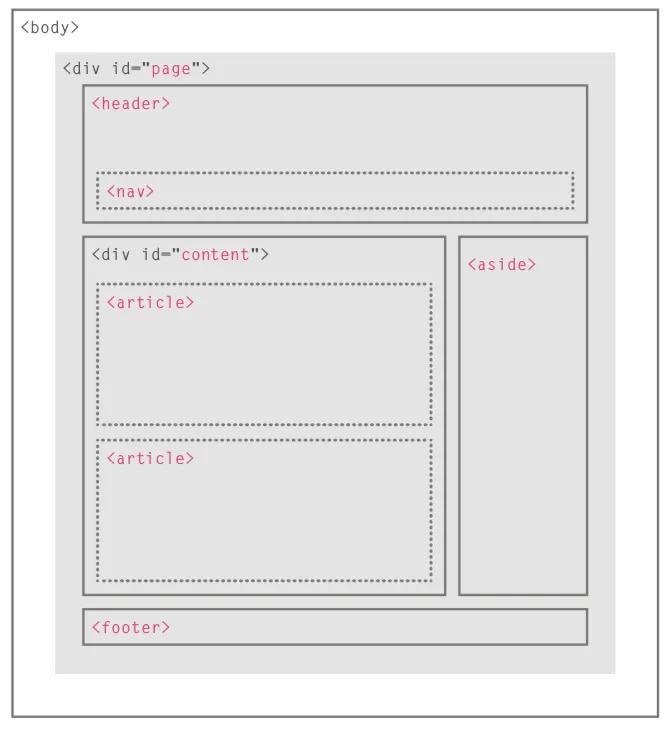
• 适配屏幕尺寸 • 固定宽度布局 • 流体布局 • 布局网格
使用JavaScript控制行为
JavaScript基本语法
• 语句和注释 • 变量和数据类型 • 声明和赋值 • 简单数据类型和复杂数据类型 • 变量的命名规则 • 表达式和运算符 • 赋值运算符 • 算术运算符 • 比较运算符 • 逻辑运算符: &&、||、!• 分支结构 • if...else...• switch...cas...default...• 循环结构 • for循环• while循环• do...while循环• 数组 • 创建数组 • 操作数组中的元素 • 函数 • 声明函数 • 调用函数 • 参数和返回值 • 匿名函数 • 立即调用函数
面向对象
• 对象的概念 • 创建对象的字面量语法 • 访问成员运算符 • 创建对象的构造函数语法 • this关键字• 添加和删除属性 • delete关键字• 标准对象 • Number/String/Boolean/Symbol/Array/Function• Date/Error/Math/RegExp/Object/Map/Set• JSON/Promise/Generator/Reflect/Proxy
BOM
• window对象的属性和方法• history对象• forward()/back()/go()• location对象• navigator对象• screen对象
DOM
• DOM树 • 访问元素 • getElementById()/querySelector()• getElementsByClassName()/getElementsByTagName()/querySelectorAll()• parentNode/previousSibling/nextSibling/children/firstChild/lastChild• 操作元素 • nodeValue• innerHTML/textContent/createElement()/createTextNode()/appendChild()/insertBefore()/removeChild()• className/id/hasAttribute()/getAttribute()/setAttribute()/removeAttribute()• 事件处理 • 事件类型 • UI事件: load/unload/error/resize/scroll• 键盘事件: keydown/keyup/keypress• 鼠标事件: click/dbclick/mousedown/mouseup/mousemove/mouseover/mouseout• 焦点事件: focus/blur• 表单事件: input/change/submit/reset/cut/copy/paste/select• 事件绑定 • HTML事件处理程序(不推荐使用,因为要做到标签与代码分离) • 传统的DOM事件处理程序(只能附加一个回调函数) • 事件监听器(旧的浏览器中不被支持) • 事件流:事件捕获 / 事件冒泡 • 事件对象(低版本IE中的window.event) • target(有些浏览器使用srcElement)• type• cancelable• preventDefault()• stopPropagation()(低版本IE中的cancelBubble)• 鼠标事件 - 事件发生的位置 • 屏幕位置: screenX和screenY• 页面位置: pageX和pageY• 客户端位置: clientX和clientY• 键盘事件 - 哪个键被按下了 • keyCode属性(有些浏览器使用which)• String.fromCharCode(event.keyCode)• HTML5事件 • DOMContentLoaded• hashchange• beforeunload
JavaScript API
• 客户端存储 - localStorage和sessionStoragelocalStorage.colorSetting = '#a4509b';localStorage['colorSetting'] = '#a4509b';localStorage.setItem('colorSetting', '#a4509b');• 获取位置信息 - geolocationnavigator.geolocation.getCurrentPosition(function(pos) { console.log(pos.coords.latitude)console.log(pos.coords.longitude)})• 从服务器获取数据 - Fetch API • 绘制图形 - <canvas>的API• 音视频 - <audio>和<video>的API
前端框架
渐进式框架 - Vue.js
前后端分离开发(前端渲染)必选框架。
快速上手
1. 引入Vue的JavaScript文件,我们仍然推荐从CDN服务器加载它。 <scriptsrc="https://cdn.jsdelivr.net/npm/vue"></script>2. 数据绑定(声明式渲染 )。 <divid="app"><h1>{{ product }}库存信息</h1></div><scriptsrc="https://cdn.jsdelivr.net/npm/vue"></script><script>const app = newVue({el: '#app',data: {product: 'iPhone X' } });</script>3. 条件与循环。 <divid="app"><h1>库存信息</h1><hr><ul><liv-for="product in products"> {{ product.name }} - {{ product.quantity }}<spanv-if="product.quantity === 0"> 已经售罄</span></li></ul></div><scriptsrc="https://cdn.jsdelivr.net/npm/vue"></script><script>const app = newVue({el: '#app',data: {products: [ {"id": 1, "name": "iPhone X", "quantity": 20}, {"id": 2, "name": "华为 Mate20", "quantity": 0}, {"id": 3, "name": "小米 Mix3", "quantity": 50} ] } });</script>4. 计算属性。 <divid="app"><h1>库存信息</h1><hr><ul><liv-for="product in products"> {{ product.name }} - {{ product.quantity }}<spanv-if="product.quantity === 0"> 已经售罄</span></li></ul><h2>库存总量:{{ totalQuantity }}台</h2></div><scriptsrc="https://cdn.jsdelivr.net/npm/vue"></script><script>const app = newVue({el: '#app',data: {products: [ {"id": 1, "name": "iPhone X", "quantity": 20}, {"id": 2, "name": "华为 Mate20", "quantity": 0}, {"id": 3, "name": "小米 Mix3", "quantity": 50} ] },computed: {totalQuantity() {returnthis.products.reduce((sum, product) => {return sum + product.quantity }, 0); } } });</script>5. 处理事件。 <divid="app"><h1>库存信息</h1><hr><ul><liv-for="product in products"> {{ product.name }} - {{ product.quantity }}<spanv-if="product.quantity === 0"> 已经售罄</span><button @click="product.quantity += 1"> 增加库存</button></li></ul><h2>库存总量:{{ totalQuantity }}台</h2></div><scriptsrc="https://cdn.jsdelivr.net/npm/vue"></script><script>const app = newVue({el: '#app',data: {products: [ {"id": 1, "name": "iPhone X", "quantity": 20}, {"id": 2, "name": "华为 Mate20", "quantity": 0}, {"id": 3, "name": "小米 Mix3", "quantity": 50} ] },computed: {totalQuantity() {returnthis.products.reduce((sum, product) => {return sum + product.quantity }, 0); } } });</script>6. 用户输入。 <divid="app"><h1>库存信息</h1><hr><ul><liv-for="product in products"> {{ product.name }} - <inputtype="number"v-model.number="product.quantity"min="0"><spanv-if="product.quantity === 0"> 已经售罄</span><button @click="product.quantity += 1"> 增加库存</button></li></ul><h2>库存总量:{{ totalQuantity }}台</h2></div><scriptsrc="https://cdn.jsdelivr.net/npm/vue"></script><script>const app = newVue({el: '#app',data: {products: [ {"id": 1, "name": "iPhone X", "quantity": 20}, {"id": 2, "name": "华为 Mate20", "quantity": 0}, {"id": 3, "name": "小米 Mix3", "quantity": 50} ] },computed: {totalQuantity() {returnthis.products.reduce((sum, product) => {return sum + product.quantity }, 0); } } });</script>7. 通过网络加载JSON数据。 <divid="app"><h2>库存信息</h2><ul><liv-for="product in products"> {{ product.name }} - {{ product.quantity }}<spanv-if="product.quantity === 0"> 已经售罄</span></li></ul></div><scriptsrc="https://cdn.jsdelivr.net/npm/vue"></script><script>const app = newVue({el: '#app',data: {products: [] },created() {fetch('https://jackfrued.top/api/products') .then(response => response.json()) .then(json => {this.products = json }); } });</script>
使用脚手架 - vue-cli
Vue为商业项目开发提供了非常便捷的脚手架工具vue-cli,通过工具可以省去手工配置开发环境、测试环境和运行环境的步骤,让开发者只需要关注要解决的问题。
1. 安装脚手架。 2. 创建项目。 3. 安装依赖包。 4. 运行项目。
UI框架 - Element
基于Vue 2.0的桌面端组件库,用于构造用户界面,支持响应式布局。
1. 引入Element的CSS和JavaScript文件。 <!-- 引入样式 --><linkrel="stylesheet"href="https://unpkg.com/element-ui/lib/theme-chalk/index.css"><!-- 引入组件库 --><scriptsrc="https://unpkg.com/element-ui/lib/index.js"></script>2. 一个简单的例子。 <!DOCTYPE html><html><head><metacharset="UTF-8"><linkrel="stylesheet"href="https://unpkg.com/element-ui/lib/theme-chalk/index.css"></head><body><divid="app"><el-button @click="visible = true">点我</el-button><el-dialog:visible.sync="visible"title="Hello world"><p>开始使用Element吧</p></el-dialog></div></body><scriptsrc="https://unpkg.com/vue/dist/vue.js"></script><scriptsrc="https://unpkg.com/element-ui/lib/index.js"></script><script>newVue({el: '#app',data: {visible: false, } })</script></html>3. 使用组件。 <!DOCTYPE html><html><head><metacharset="UTF-8"><linkrel="stylesheet"href="https://unpkg.com/element-ui/lib/theme-chalk/index.css"></head><body><divid="app"><el-table:data="tableData"stripestyle="width: 100%"><el-table-columnprop="date"label="日期"width="180"></el-table-column><el-table-columnprop="name"label="姓名"width="180"></el-table-column><el-table-columnprop="address"label="地址"></el-table-column></el-table></div></body><scriptsrc="https://unpkg.com/vue/dist/vue.js"></script><scriptsrc="https://unpkg.com/element-ui/lib/index.js"></script><script>newVue({el: '#app',data: {tableData: [ {date: '2016-05-02',name: '王一霸',address: '上海市普陀区金沙江路 1518 弄' }, {date: '2016-05-04',name: '刘二狗',address: '上海市普陀区金沙江路 1517 弄' }, {date: '2016-05-01',name: '杨三萌',address: '上海市普陀区金沙江路 1519 弄' }, {date: '2016-05-03',name: '陈四吹',address: '上海市普陀区金沙江路 1516 弄' } ] } })</script></html>
报表框架 - ECharts
百度出品的开源可视化库,常用于生成各种类型的报表。
基于弹性盒子的CSS框架 - Bulma
Bulma是一个基于Flexbox的现代化的CSS框架,其初衷就是移动优先(Mobile First),模块化设计,可以轻松用来实现各种简单或者复杂的内容布局,即使不懂CSS的开发者也能够使用它定制出漂亮的页面。
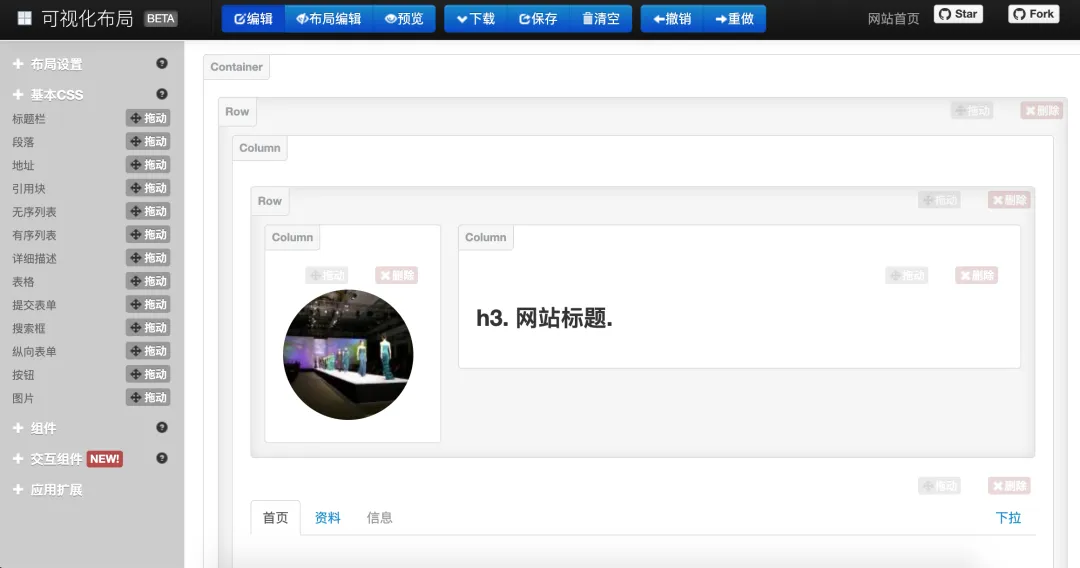
<!DOCTYPE html><htmllang="en"><head><metacharset="UTF-8"><title>Bulma</title><linkhref="https://cdn.bootcss.com/bulma/0.7.4/css/bulma.min.css"rel="stylesheet"><styletype="text/css">div { margin-top: 10px; }.column { color: #fff; background-color: #063; margin: 10px10px; text-align: center; }</style></head><body><divclass="columns"><divclass="column">1</div><divclass="column">2</div><divclass="column">3</div><divclass="column">4</div></div><div><aclass="button is-primary">Primary</a><aclass="button is-link">Link</a><aclass="button is-info">Info</a><aclass="button is-success">Success</a><aclass="button is-warning">Warning</a><aclass="button is-danger">Danger</a></div><div><progressclass="progress is-danger is-medium"max="100">60%</progress></div><div><tableclass="table is-hoverable"><tr><th>One</th><th>Two</th></tr><tr><td>Three</td><td>Four</td></tr><tr><td>Five</td><td>Six</td></tr><tr><td>Seven</td><td>Eight</td></tr><tr><td>Nine</td><td>Ten</td></tr><tr><td>Eleven</td><td>Twelve</td></tr></table></div></body></html>响应式布局框架 - Bootstrap
用于快速开发Web应用程序的前端框架,支持响应式布局。
1. 特点 • 支持主流的浏览器和移动设备 • 容易上手 • 响应式设计 2. 内容 • 网格系统 • 封装的CSS • 现成的组件 • JavaScript插件
总结
本文完整梳理了 Web 前端核心技术体系,涵盖 HTML 结构搭建、CSS 样式渲染、JavaScript 交互控制三大基础层,以及 Vue.js 等主流框架的实战应用; HTML5 的语义化、CSS3 的样式增强、JavaScript 的 DOM/BOM 操作是前端开发的核心基础,框架的使用可大幅提升开发效率; 不同前端框架有其适配场景:Vue.js 适合渐进式开发,Element 适配桌面端 UI,ECharts 专注可视化,Bulma/Bootstrap 侧重布局实现,可根据业务需求选择。
AI工具,提高学习,工作效率: 国内直接使用顶级AI工具
谷歌浏览器访问:https://www.nezhasoft.cloud/r/vMPJZr
本文来自网友投稿或网络内容,如有侵犯您的权益请联系我们删除,联系邮箱:596563534@qq.com 。
随机文章
-
 10个月宝宝每天需要喝多少奶粉?
- Python程序跑得慢,性能瓶颈找不到?pyinstrument一键定位,快速上手!
- 妖孽但能让Python技术突飞猛进邪修大法
- 【Python小白速通】导入模块?说白了就是"给代码装插件、借工具"!
- 2026年最新Python学习路线,存一下吧
- 从零开始学Python:其他内置函数解析(四)
- 2026年五大最强隐私专注Linux发行版
- 看看Python的内存管理(三):对象在内存中的存储
- 最强编程语言出现了:人人都会,但不是Python
- Linux 文件系统(三) --- overlayfs简介
- PHP 生态首个多 Ai Agentic 架构框架 Neuron