当前位置:首页>Linux>Linux运维-综合架构-实时同步

Linux运维-综合架构-实时同步

  • 2026-02-24 06:16:09
Linux运维-综合架构-实时同步

Linux运维之实时同步

目的:了解生产环境中存储同步到备份节点是如何搭配使用的;

什么是实时同步

只要当前目录发生变化则会触发一个事件,事件触发 后将变化的目录同步至远程服务器。

实时同步原理

实时同步需要借助 Inotify 通知接口,用来监控本 地目录的变化,如果监控本地的目录发生变更。则触 发动作,这个动作可以是进行同步操作,或其他操 作。 create、modify、write、

实时同步场景

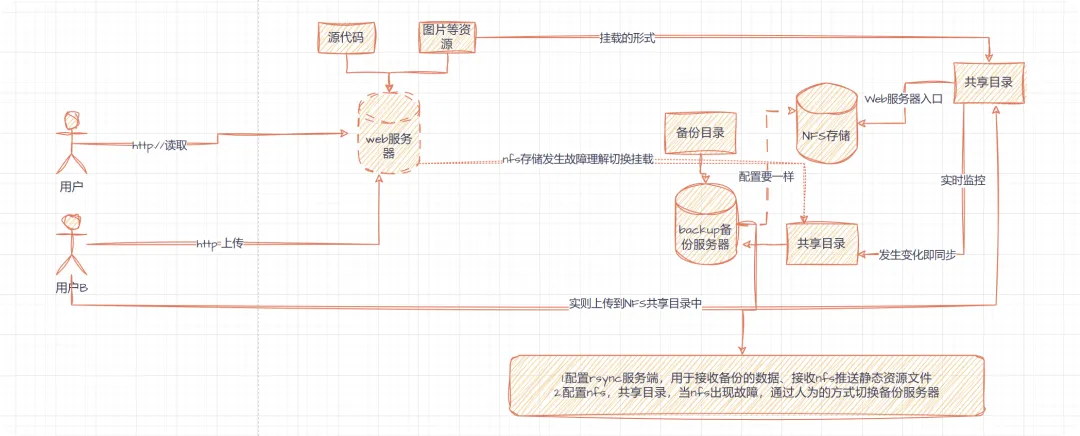
  • 场景一、解决 nfs 单点故障。保证同步的数据连续性。 nfs --> backup;

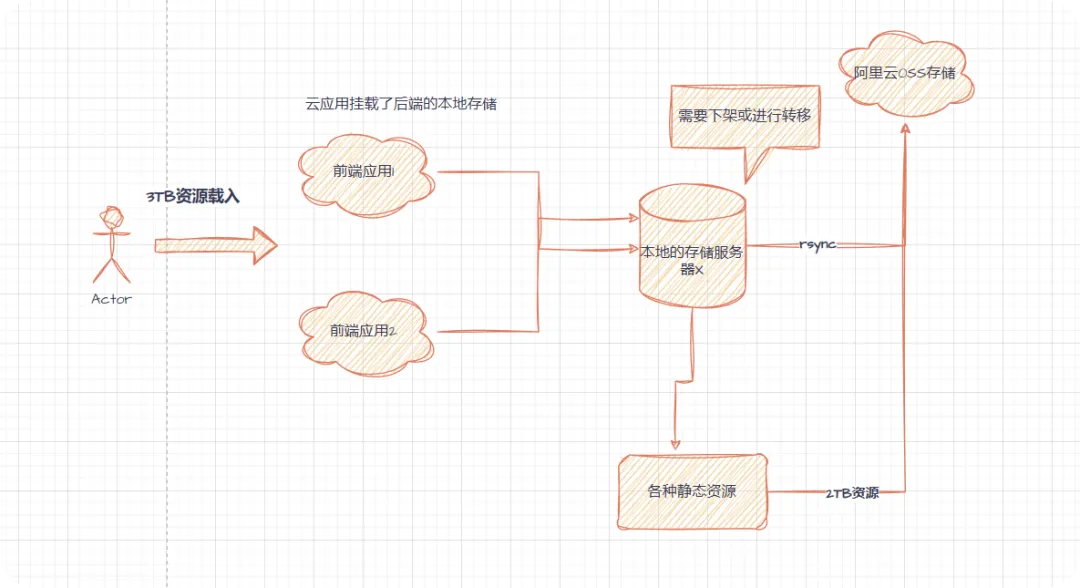
  • 场景二(上云业务)本地无缝迁移云端。

使用rsync同步存储业务的过程中,遇到再次前端访问会出现同步数据不一致,造成后端本地存储无法下架
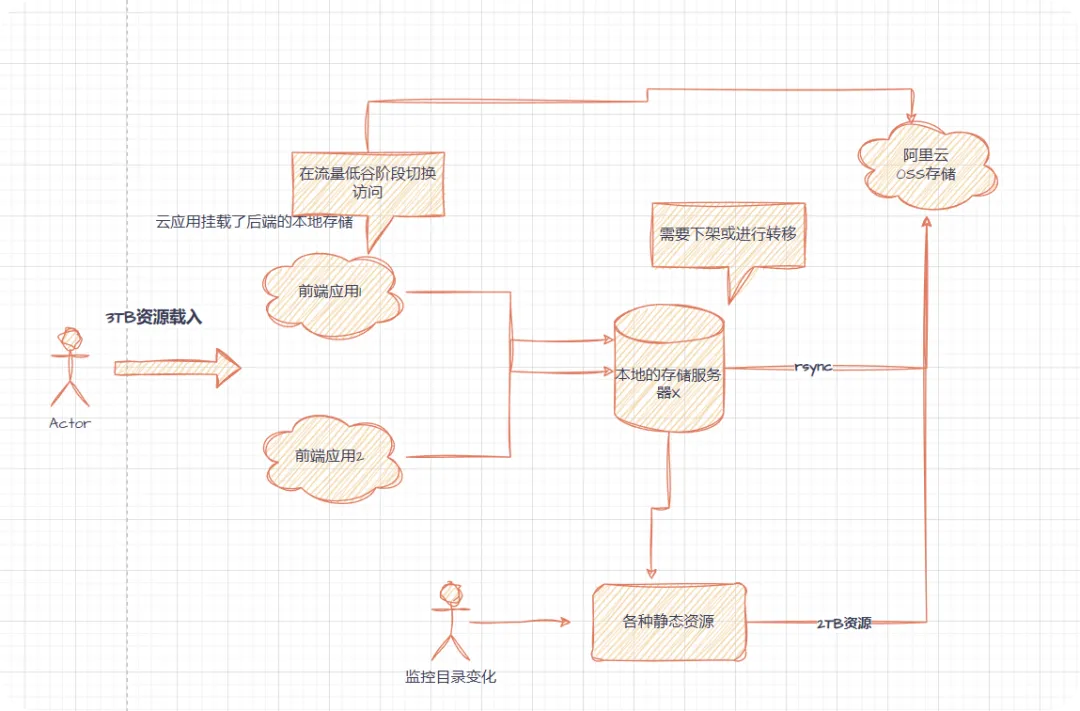
  • 迁移的过程中,一定保持一定的时间间隔,保留原有的设备;
用户无感知进行切换同步

实时同步工具

  • sersync 是国人基于 rsync+inotify 基础之上开发的工具,强化了实时监控,文件过滤,简化配置等功能,帮助用户提高运行效率,节省时间和网络资源,社区项目不再更新;(实际生产环境,数据抖动率较小,百万张数据可以做到实时同步)

  • lsyncd 是一款开源的数据实时同步工具,基于 inotify 和 rsync 基础之上进行开发,主要用于网站数据备份、网站搬家等等。

实时同步配置

目的:实现 web 上传视频文件,实则是写入 NFS 至存储,当 NFS 存在新的数据则会实时的同步到备份服务

实验场景图

实验拓扑

角色
IP(外网)
IP(内网)
安装的服务
文件目录说明
nfs
192.168.0.14
10.0.0.14
nfs,sersync或lsync
共享目录/share_data001/
web
192.168.0.21
10.0.0.21
httpd.php
站点目录/var/www/html
备份
192.168.0.13
10.0.0.13
nfs,sersync
备份目录/share_data001
验证NFS故障后,手动切换同步

配置 NFS 共享存储

//安装 nfs服务组件[root@nfs_0.14[ ~]# rpm -aq nfs-utils    //有的话不用再安装nfs-utils-1.3.0-0.68.el7.2.x86_64[root@nfs_0.14[ ~]  yum install -y nfs-utils//配置NFS,自己指定一个用户ID为666的www用户[root@nfs_0.14[ ~]  cat /etc/exports/share_data001   10.0.0.0/24(rw,sync,all_squash,anonuid=666,anongid=666)//系统中要存在这个用户,NFS服务端创建用户/组Id为666的www用户[root@nfs_0.14[ /]# groupadd -g 666 www[root@nfs_0.14[ /]# useradd -u 666 -g 666 www[root@nfs_0.14[ /]# id wwwuid=666(www) gid=666(www) 组=666(www)//创建共享目录 实际生产环境要大一点的空间[root@nfs_0.14[ /]# mkdir /share_data001/[root@nfs_0.14[ /]# chown -R www.www /share_data001/[root@nfs_0.14[ /]# ls -ld /share_data001/drwxr-xr-x 2 www www 37 7月   7 21:53 /share_data001///开机自启动&启动[root@nfs_0.14[ /]  systemctl enable nfs-server  ^C[root@nfs_0.14[ /]  systemctl start nfs-server[root@nfs_0.14[ /]  netstat -lntup | grep 111tcp        0      0 0.0.0.0:111             0.0.0.0:*               LISTEN      1131/rpcbindtcp6       0      0 :::111                  :::*                    LISTEN      1131/rpcbindudp        0      0 0.0.0.0:111             0.0.0.0:*                           1131/rpcbindudp6       0      0 :::111                  :::*                                1131/rpcbind

配置 web 服务器

//便于部署,暂用apache_web服务[root@web01_0.21[ ~]  rpm -qa httpd   //有的话不用安装httpd-2.4.6-99.el7.centos.1.x86_64root@web01_0.21[ ~]# yum install -y httpd已加载插件:fastestmirrorLoading mirror speeds from cached hos....//启动apache服务[root@web01_0.21[ ~]  systemctl start httpd[root@web01_0.21[ ~]  netstat -lntup | grep 80tcp        0      0 0.0.0.0:22              0.0.0.0:*               LISTEN      1480/sshdtcp6       0      0 :::22                   :::*                    LISTEN      1480/sshdtcp6       0      0 :::80                   :::*                    LISTEN      1827/httpd
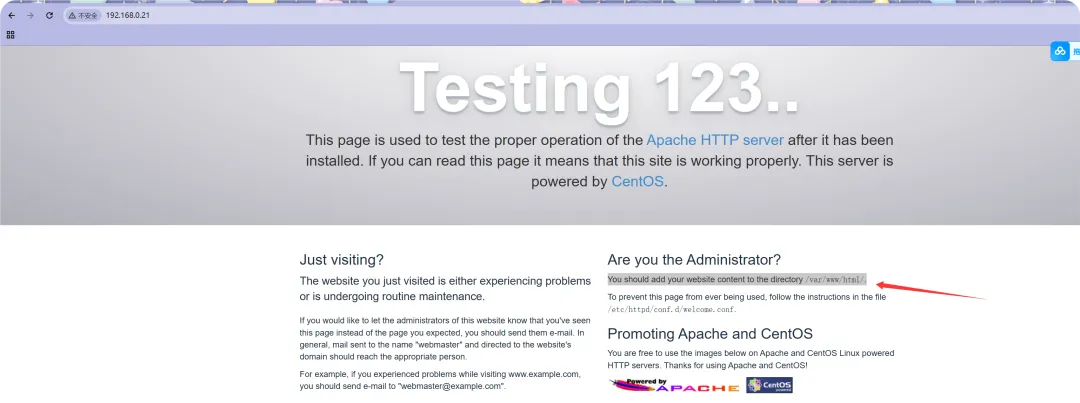
启动httpd后,客户端浏览器访问测试截图,并提示了站点存储的路径

配置 web,将静态的资源目录,作为 nfs 共享存储的入口;

//假设用户上传的资料文件,在此目录下/var/www/html/.//web站点中,apache默认的执行用户身份是apache;[root@web01_0.21[ /var/www/html]# ps aux | grep httpdroot       1799  0.0  0.0 230448  5228 ?        Ss   19:25   0:00 /usr/sbin/httpd -DFOREGROUNDapache     1800  0.0  0.0 230584  3740 ?        S    19:25   0:00 /usr/sbin/httpd -DFOREGROUNDapache     1801  0.0  0.0 230584  3748 ?        S    19:25   0:00 /usr/sbin/httpd -DFOREGROUNDapache     1802  0.0  0.0 230448  2984 ?        S    19:25   0:00 /usr/sbin/httpd -DFOREGROUNDapache     1803  0.0  0.0 230448  2984 ?        S    19:25   0:00 /usr/sbin/httpd -DFOREGROUNDapache     1804  0.0  0.0 230448  2984 ?        S    19:25   0:00 /usr/sbin/httpd -DFOREGROUNDapache     1805  0.0  0.0 230448  2984 ?        S    19:25   0:00 /usr/sbin/httpd -DFOREGROUNDapache     1806  0.0  0.0 230448  2984 ?        S    19:25   0:00 /usr/sbin/httpd -DFOREGROUNDapache     1807  0.0  0.0 230448  2984 ?        S    19:25   0:00 /usr/sbin/httpd -DFOREGROUNDroot       1829  0.0  0.0 112828   984 pts/0    S+   19:31   0:00 grep --color=auto httpd//实际上文件上传的目录所有者是root[root@web01_0.21[ /var/www/html]# ls -ld /var/www/html/drwxr-xr-x 2 root root 6 5月  30 2023 /var/www/html///修改上传静态资源的目录属主是www,和NFS保持的用户一致[root@web01_0.21[ /var/www/html]# pwd/var/www/htmlroot@web01_0.21[ /var/www/html]  chown -R www.www /var/www/html/[root@web01_0.21[ /var/www/html]# ls -ld ./drwxr-xr-x 2 www www 6 5月  30 2023 .///在web服务器上添加统一的进程验证用户[root@web01_0.21[ /var/www/html]  groupadd -g 666 www[root@web01_0.21[ /var/www/html]  useradd -u 666 -g 666 www[root@web01_0.21[ /var/www/html]  id wwwuid=666(www) gid=666(www) 组=666(www)//需要修改web服务器的web配置文件。将原有apche进程用户身份修改成www[root@web01_0.21[ /var/www/html]  grep -E '^(User|Group)' /etc/httpd/conf/httpd.conf | grep -v '^#'User wwwGroup www//当然,也可以使用sed取值修改,c的意思是指:以xxx开头的一整行进行替换,连同xxx后面所有的一整行内容都替换掉[root@web01_0.21[ /var/www/html]  cp /etc/httpd/conf/httpd.conf /etc/httpd/conf/httpd.conf.back[root@web01_0.21[ /var/www/html]  sed -i '/^User/c User apache' /etc/httpd/conf/httpd.conf.back[root@web01_0.21[ /var/www/html]  sed -i '/^Group/c Group apache' /etc/httpd/conf/httpd.conf.back**[root@web01_0.21[ /var/www/html]  grep -E '^(User|Group)' /etc/httpd/conf/httpd.conf.back | grep -v '^#'User apacheGroup apache
  • 目前阶段,用户上传的静态资源达到 web 节点的/var/www/html/上,按照需求,实际要上传到 NFS 服务端中去
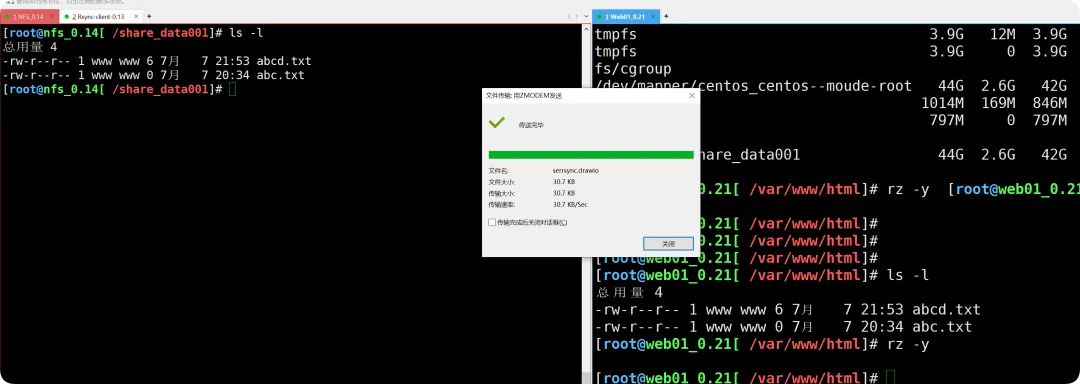
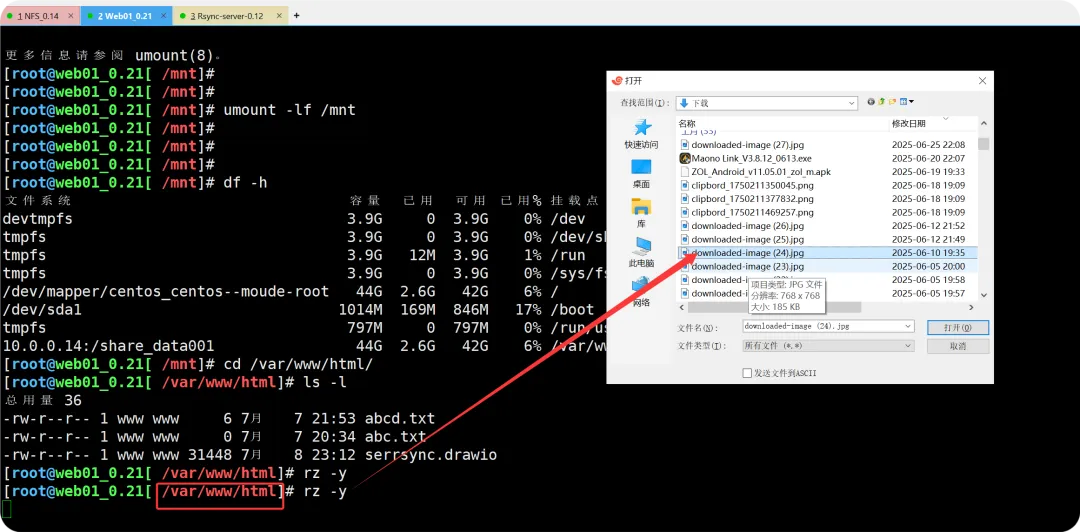
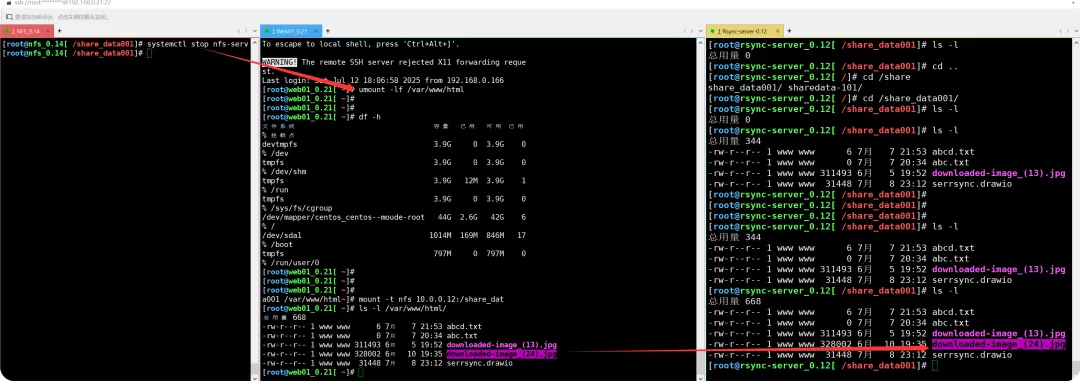
// 模拟用户上传资料到该目录上[root@web01_0.21[ /var/www/html]# rz -y[root@web01_0.21[ /var/www/html]# ls -l总用量 4-rw-r--r-- 1 root root 3814 1月   5 2008 eula.2052.txt//按照需求,此目录是作为NFS中共享目录的入口[root@web01_0.21[ /]# mount -t nfs 10.0.0.14:/share_data001 /var/www/html/[root@web01_0.21[ /]# df -h文件系统                               容量  已用  可用 已用% 挂载点devtmpfs                               3.9G     0  3.9G    0% /devtmpfs                                  3.9G     0  3.9G    0% /dev/shmtmpfs                                  3.9G   12M  3.9G    1% /runtmpfs                                  3.9G     0  3.9G    0% /sys/fs/cgroup/dev/mapper/centos_centos--moude-root   44G  2.6G   42G    6% //dev/sda1                             1014M  169M  846M   17% /boot10.0.0.14:/share_data001                44G  2.6G   42G    6% /mnttmpfs                                  797M     0  797M    0% /run/user/0
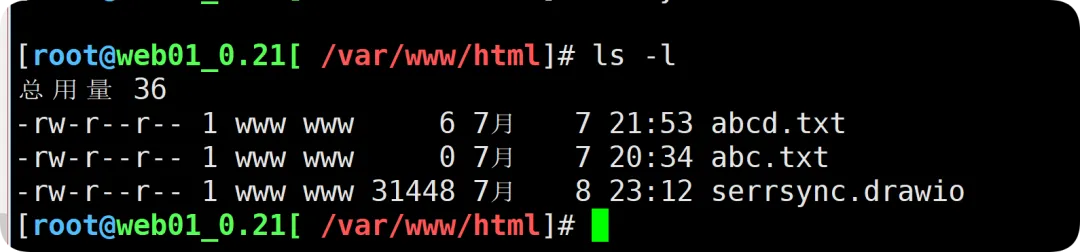
  • 如图所示:当文件发生上传且 web01 节点的/var/www/html 下的目录挂载到 NFS 端的/share_data001 下,其实文件本身已不再 web01 节点上,而是通过这个入口到达了 NFS 的共享目录下;

<<< 左右滑动见更多 >>>

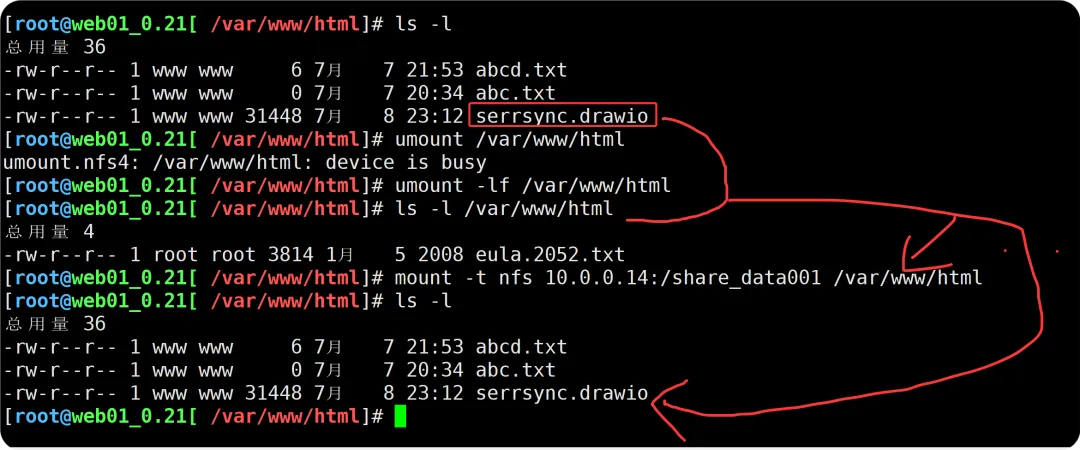
若是web节点卸载共享目录,看不到二次上传的数据,若重新挂载则能看到
配置 Backup 备份服务器 增加共享模块 配置 nfs,将本地的共享目录共享出来,与nfs服务端保持完全一致

  • 调整备份服务器节点的模块功能
//我之前安装过RSYNC服务端 [root@rsync-server_0.12[ /]# rpm -qa | grep rsyncrsync-3.1.2-12.el7_9.x86_64//修改Rsync服务端配置文件[root@rsync-server_0.12[ /]# cat /etc/rsyncd.confuid = www   //这是要创建的www进程执行用户gid = wwwport = 873fake super = yesuse chroot = nomax connections = 200timeout = 600#ignore errorsread only = falselist = trueauth users = rsync_backupsecrets file = /etc/rsync.passwdlog file = /var/log/rsyncd.log####################################[linshi01]comment = “这是临时rsync的测试文件”path = /linshi01[sharedata101]"comment = "这是NFS、Web01的业务数据""path = /sharedata-101[share_data001-rsync-NFS]   //这是新增的模块path = /share_data001//查看rsync服务端是否有www这个用户[root@rsync-server_0.12[ /]# groupadd -g 666 www[root@rsync-server_0.12[ /]# useradd -u 666 -g 666 www[root@rsync-server_0.12[ /]# id wwwuid=666(www) gid=666(www) 组=666(www)//创建备份目录[root@rsync-server_0.12[ /]# mkdir /share_data001[root@rsync-server_0.12[ /]# chown -R www.www /share_data001/[root@rsync-server_0.12[ /]# ls -ld /share_data001/drwxr-xr-x 2 www www 6 7月  10 21:22 /share_data001///重启服务[root@rsync-server_0.12[ /]# systemctl restart rsyncd
测试NFS节点到备份服务器的推送脚本执行是否正常
  • 因为rsync上没有nfs-utlis组件,所以要配置
[root@rsync-server_0.12[ /]  rpm -aq nfs-utils[root@rsync-server_0.12[ /]  yum install -y nfs-utils已加载插件:fastestmirror//将NFS服务器的配置拉取到rsync备份服务器中[root@rsync-server_0.12[ /]# rpm -qa nfs-utilsnfs-utils-1.3.0-0.68.el7.2.x86_64[root@rsync-server_0.12[ /]  rsync -avz 10.0.0.14:/etc/exports /etc/exportsThe authenticity of host '10.0.0.14 (10.0.0.14)' can't be established.ECDSA key fingerprint is SHA256:Rsz40jXQHU7ASd2WGAc5BJggESaRkKIFYWs1lZiY+8s.ECDSA key fingerprint is MD5:7f:4b:53:47:2f:a9:cd:64:d5:84:d5:4f:2c:44:02:20.Are you sure you want to continue connecting (yes/no)? yesWarning: Permanently added '10.0.0.14' (ECDSA) to the list of known hosts.root@10.0.0.14's password: receiving incremental file listexportssent 43 bytes  received 152 bytes  26.00 bytes/sectotal size is 73  speedup is 0.37[root@rsync-server_0.12[ /]  cat /etc/exports   //同步配置/share_data001   10.0.0.0/24(rw,sync,all_squash,anonuid=666,anongid=666)//在rsync服务端中重启Nfs[root@rsync-server_0.12[ /]# systemctl restart nfs-server[root@rsync-server_0.12[ /]# systemctl enable nfs-serverCreated symlink from /etc/systemd/system/multi-user.target.wants/nfs-server.service to /usr/lib/systemd/system/nfs-server.service.

配置实时同步,监控 Nfs 共享目录,一旦发生后变化,同步到 backup服务器的共享模块之种

//NFS节点服务器上下载 rsync和inotify工具[root@nfs_0.14[ /]# yum install rsync inotify-tools -y//在NFS节点下载 sersync ,由于它托管在github上,需要翻q才可以,因此用其他链接的镜像下载[root@nfs_0.14[ /tools]  tar xf sersync2.5.4_64bit_binary_stable_final.tar.gz   //解压[root@nfs_0.14[ /tools]# ls -ldrwxr-xr-x 2 root root     41 10月 26 2011 GNU-Linux-x86  /发现GNU开头的文件夹//移动文件夹并改名,方便后续配置(版本未有变化的前提下,可以不做软链)[root@nfs_0.14[ /tools]# mv GNU-Linux-x86/ /usr/local/sersync[root@nfs_0.14[ /tools]# cd /usr/local/sersync/[root@nfs_0.14[ /usr/local/sersync]# ls -l总用量 1772-rwxr-xr-x 1 root root    2214 10月 26 2011 confxml.xml  //配置文件,格式为xml,重点了解-rwxr-xr-x 1 root root 1810128 10月 26 2011 sersync2     //命令工具包;//使用file命令查看这两个文件类型//这是二进制文件--执行程序[root@nfs_0.14[ /usr/local/sersync]# file sersync2   sersync2: ELF 64-bit LSB executable, x86-64, version 1 (GNU/Linux), statically linked, for GNU/Linux 2.6.15, BuildID[sha1]=c41f3d73f3d4fe1d6931d93a4e64fe805769b28f, stripped//配置文件的格式[root@nfs_0.14[ /usr/local/sersync]# file confxml.xml confxml.xml: XML 1.0 document, ASCII text
  • 配置sersync

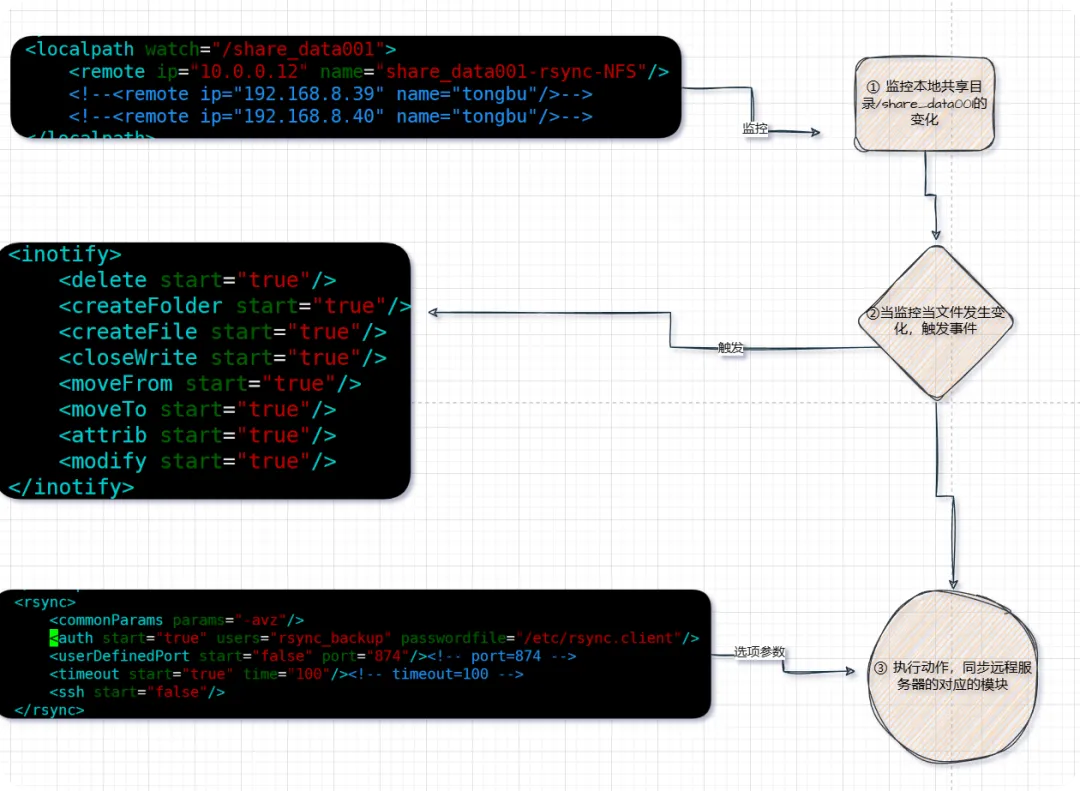
sersync配置文件详解

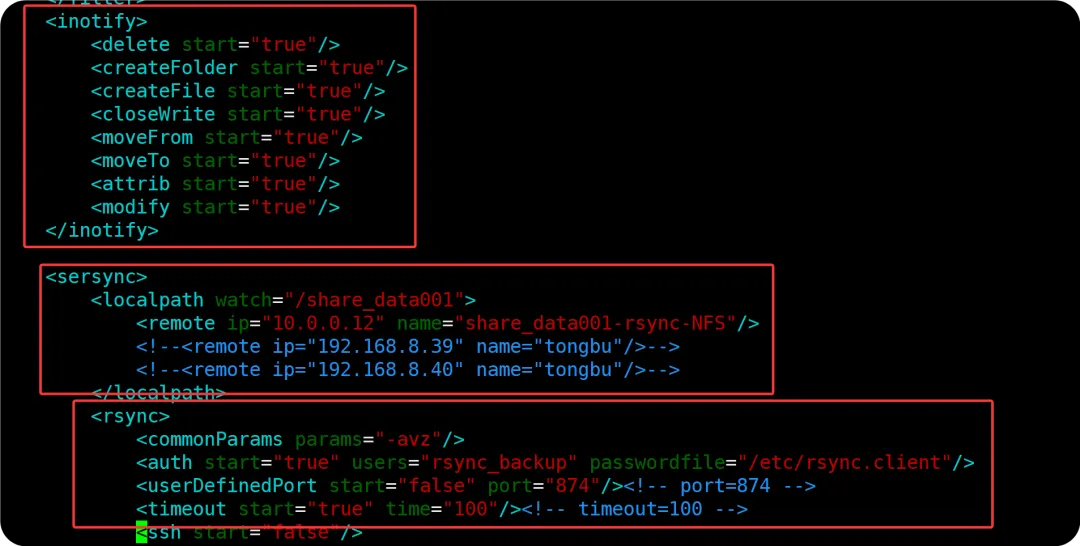
读取这样的配置文件,需要看着成对的标签,按块去分析
//原sersync的配置文件[root@nfs_0.14[ /usr/local/sersync]# cat confxml.xml <?xml version="1.0" encoding="ISO-8859-1"?>   <! -- --><head version="2.5">    <host hostip="localhost" port="8008"></host>    <debug start="false"/>    <fileSystem xfs="false"/>    //这里需要修改文件系统类型true    <filter start="false">   //排除,正则表达式的方式,用来做代码同步这些格式 <exclude expression="(.*)\.svn"></exclude> <exclude expression="(.*)\.gz"></exclude> <exclude expression="^info/*"></exclude> <exclude expression="^static/*"></exclude>    </filter>    <inotify>   //监控本地文件的事件 ,这里都需要改成true <delete start="true"/>  //删除 <createFolder start="true"/>  //创建文件夹 <createFile start="false"/>   //创建文件夹 <closeWrite start="true"/>    //写入后的关闭 <moveFrom start="true"/>  //移动的从 <moveTo start="true"/>    //移动的到 <attrib start="false"/>    //属性 <modify start="false"/>  //修改    </inotify>    <sersync>   //当事件发生后,监控的本地目录 <localpath watch="/opt/tongbu">       //这里修改监控的本地目录     <remote ip="127.0.0.1" name="tongbu1"/>   //监控到发生事件后,推送到远程服务器的哪个模块之上     <!--<remote ip="192.168.8.39" name="tongbu"/>-->     <!--<remote ip="192.168.8.40" name="tongbu"/>--> </localpath> <rsync>     <commonParams params="-artuz"/>    //rsync的选项,这里要成-avz     <auth start="false" users="root" passwordfile="/etc/rsync.pas"/>  //rsync的认证选项要打开     <userDefinedPort start="false" port="874"/><!-- port=874 -->   //端口保持874     <timeout start="false" time="100"/><!-- timeout=100 -->   //这里修改成true     <ssh start="false"/>  //保持默认不用修改 </rsync> <failLog path="/tmp/rsync_fail_log.sh" timeToExecute="60"/><!--default every 60mins execute once--> <crontab start="false" schedule="600"><!--600mins-->     <crontabfilter start="false">  <exclude expression="*.php"></exclude>  <exclude expression="info/*"></exclude>     </crontabfilter> </crontab> <plugin start="false" name="command"/>    </sersync>    <plugin name="command"> <param prefix="/bin/sh" suffix="" ignoreError="true"/> <!--prefix /opt/tongbu/mmm.sh suffix--> <filter start="false">     <include expression="(.*)\.php"/>     <include expression="(.*)\.sh"/> </filter>    </plugin>    <plugin name="socket"> <localpath watch="/opt/tongbu">     <deshost ip="192.168.138.20" port="8009"/> </localpath>    </plugin>    <plugin name="refreshCDN"> <localpath watch="/data0/htdocs/cms.xoyo.com/site/">     <cdninfo domainname="ccms.chinacache.com" port="80" username="xxxx" passwd="xxxx"/>     <sendurl base="http://pic.xoyo.com/cms"/>     <regexurl regex="false" match="cms.xoyo.com/site([/a-zA-Z0-9]*).xoyo.com/images"/> </localpath>    </plugin></head>
  • 修改完的配置文件如下
[root@nfs_0.14[ /usr/local/sersync]# cat confxml.xml <?xml version="1.0" encoding="ISO-8859-1"?><head version="2.5">    <host hostip="localhost" port="8008"></host>    <debug start="false"/>    <fileSystem xfs="true"/>    <filter start="false"> <exclude expression="(.*)\.svn"></exclude> <exclude expression="(.*)\.gz"></exclude> <exclude expression="^info/*"></exclude> <exclude expression="^static/*"></exclude>    </filter>    <inotify> <delete start="true"/> <createFolder start="true"/> <createFile start="true"/> <closeWrite start="true"/> <moveFrom start="true"/> <moveTo start="true"/> <attrib start="true"/> <modify start="true"/>    </inotify>    <sersync> <localpath watch="/share_data001">     <remote ip="10.0.0.12" name="share_data001-rsync-NFS"/>     <!--<remote ip="192.168.8.39" name="tongbu"/>-->     <!--<remote ip="192.168.8.40" name="tongbu"/>--> </localpath> <rsync>     <commonParams params="-avz"/>     <auth start="true" users="rsync_backup" passwordfile="/etc/rsync.client"/>     <userDefinedPort start="false" port="874"/><!-- port=874 -->     <timeout start="true" time="100"/><!-- timeout=100 -->     <ssh start="false"/> </rsync> <failLog path="/tmp/rsync_fail_log.sh" timeToExecute="60"/><!--default every 60mins execute once--> <crontab start="false" schedule="600"><!--600mins-->     <crontabfilter start="false">  <exclude expression="*.php"></exclude>  <exclude expression="info/*"></exclude>     </crontabfilter> </crontab> <plugin start="false" name="command"/>    </sersync>    <plugin name="command"> <param prefix="/bin/sh" suffix="" ignoreError="true"/> <!--prefix /opt/tongbu/mmm.sh suffix--> <filter start="false">     <include expression="(.*)\.php"/>     <include expression="(.*)\.sh"/> </filter>    </plugin>    <plugin name="socket"> <localpath watch="/opt/tongbu">     <deshost ip="192.168.138.20" port="8009"/> </localpath>    </plugin>    <plugin name="refreshCDN"> <localpath watch="/data0/htdocs/cms.xoyo.com/site/">     <cdninfo domainname="ccms.chinacache.com" port="80" username="xxxx" passwd="xxxx"/>     <sendurl base="http://pic.xoyo.com/cms"/>     <regexurl regex="false" match="cms.xoyo.com/site([/a-zA-Z0-9]*).xoyo.com/images"/> </localpath>    </plugin></head>
理解执行配置文件顺序

  • 启动sersync
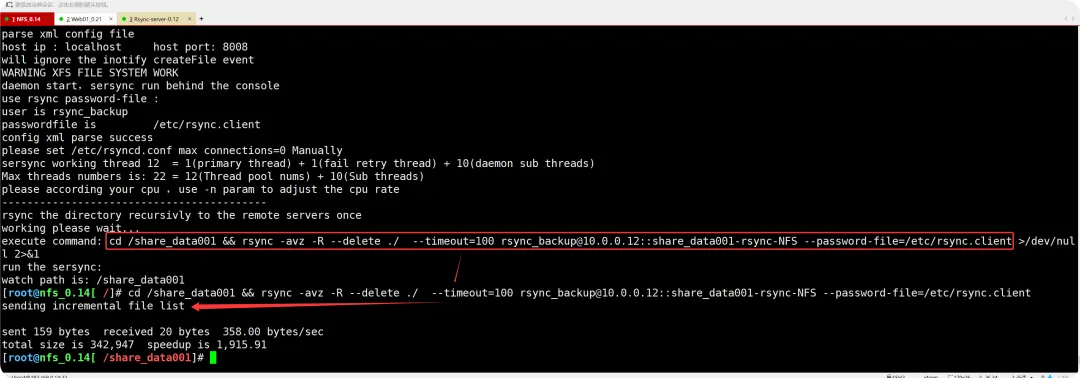
//启动前,查看sersycn的参数,这里保持不变[root@nfs_0.14[ /]# /usr/local/sersync/sersync2 -hset the system paramexecute:echo 50000000 > /proc/sys/fs/inotify/max_user_watchesexecute:echo 327679 > /proc/sys/fs/inotify/max_queued_eventsparse the command param_______________________________________________________参数-d:启用守护进程模式参数-r:在监控前,将监控目录与远程主机用rsync命令推送一遍c参数-n: 指定开启守护线程的数量,默认为10个参数-o:指定配置文件,默认使用confxml.xml文件参数-m:单独启用其他模块,使用 -m refreshCDN 开启刷新CDN模块参数-m:单独启用其他模块,使用 -m socket 开启socket模块参数-m:单独启用其他模块,使用 -m http 开启http模块不加-m参数,则默认执行同步程序//启动携带配置文件,会进行一次全量备份[root@nfs_0.14[ /]# /usr/local/sersync/sersync2 -dro /usr/local/sersync/confxml.xml set the system paramexecute:echo 50000000 > /proc/sys/fs/inotify/max_user_watchesexecute:echo 327679 > /proc/sys/fs/inotify/max_queued_eventsparse the command paramoption: -d  run as a daemonoption: -r  rsync all the local files to the remote servers before the sersync workoption: -o  config xml name:  /usr/local/sersync/confxml.xmldaemon thread num: 10parse xml config filehost ip : localhost host port: 8008will ignore the inotify createFile event WARNING XFS FILE SYSTEM WORKdaemon start,sersync run behind the console use rsync password-file :user is rsync_backuppasswordfile is  /etc/rsync.clientconfig xml parse successplease set /etc/rsyncd.conf max connections=0 Manuallysersync working thread 12  = 1(primary thread) + 1(fail retry thread) + 10(daemon sub threads) Max threads numbers is: 22 = 12(Thread pool nums) + 10(Sub threads)please according your cpu ,use -n param to adjust the cpu rate------------------------------------------rsync the directory recursivly to the remote servers onceworking please wait...execute commandcd /share_data001 && rsync -avz -R --delete ./  --timeout=100 rsync_backup@10.0.0.12::share_data001-rsync-NFS --password-file=/etc/rsync.client >/dev/null 2>&1 run the sersync: watch path is: /share_data001
启动后验证是否有错误

  • 关闭sersync
//因为sersync是二进制文件,是不提供命令关闭的,只能强制杀掉进程[root@nfs_0.14[ /share_data001]# ps aux | grep sersyncroot       1784  0.0  0.0  92324   700 ?        Ssl  19:53   0:00 /usr/local/sersync/sersync2 -dro /usr/local/sersync/confxml.xmlroot       1800  0.0  0.0 112824   988 pts/0    S+   19:54   0:00 grep --color=auto sersync[root@nfs_0.14[ /share_data001]# ps aux | grep sersync | grep -v greproot       1784  0.0  0.0  92324   700 ?        Ssl  19:53   0:00 /usr/local/sersync/sersync2 -dro /usr/local/sersync/confxml.xml[root@nfs_0.14[ /share_data001]# ps aux | grep sersync | grep -v grep | awk '{print $2}'1784//强制杀掉[root@nfs_0.14[ /share_data001]# kill  $(ps aux | grep sersync | grep -v grep | awk '{print $2}')[root@nfs_0.14[ /share_data001]# ps aux | grep sersync | grep -v grep | awk '{print $2}'[root@nfs_0.14[ /share_data001]#    //没有结果表示已杀掉sersyc的进程//如果需要再次启动即可[root@nfs_0.14[ /]# /usr/local/sersync/sersync2 -dro /usr/local/sersync/confxml.xml 

验证同步和发生故障后的手动切换

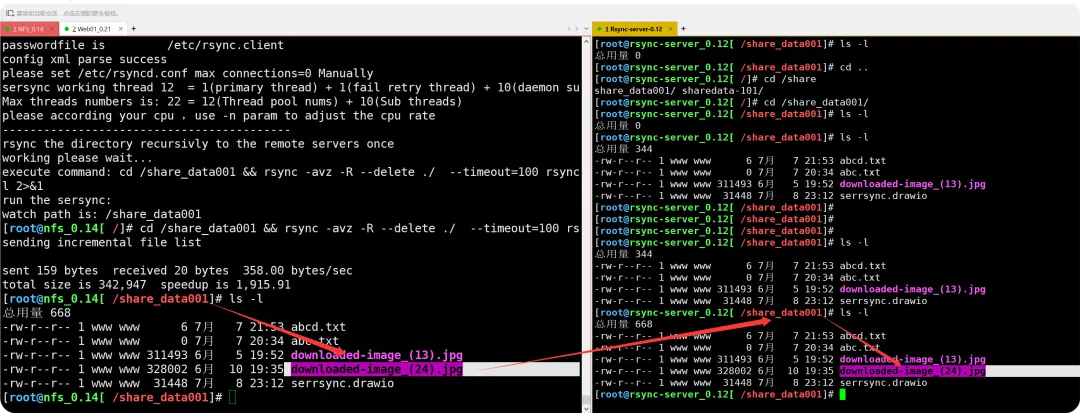
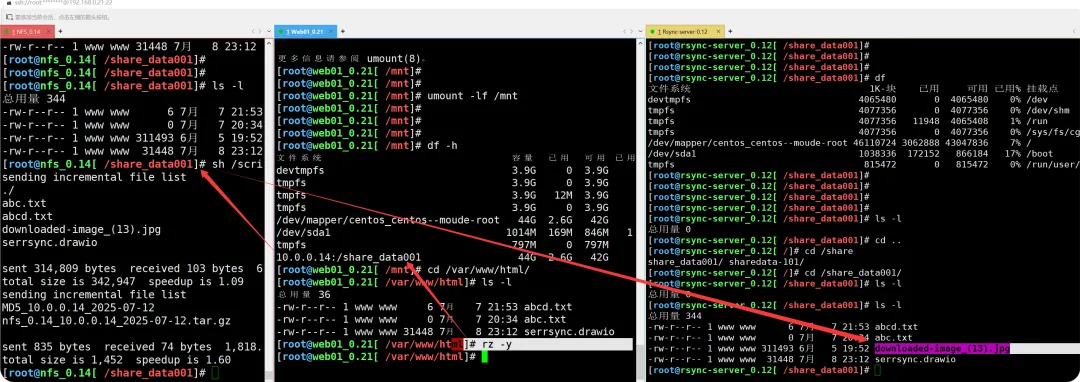
  • 在实际的云端切换上,原理就是这样的

<<< 左右滑动见更多 >>>

停止NFS节点服务后,web站点无法查看挂载情况,需要卸载掉
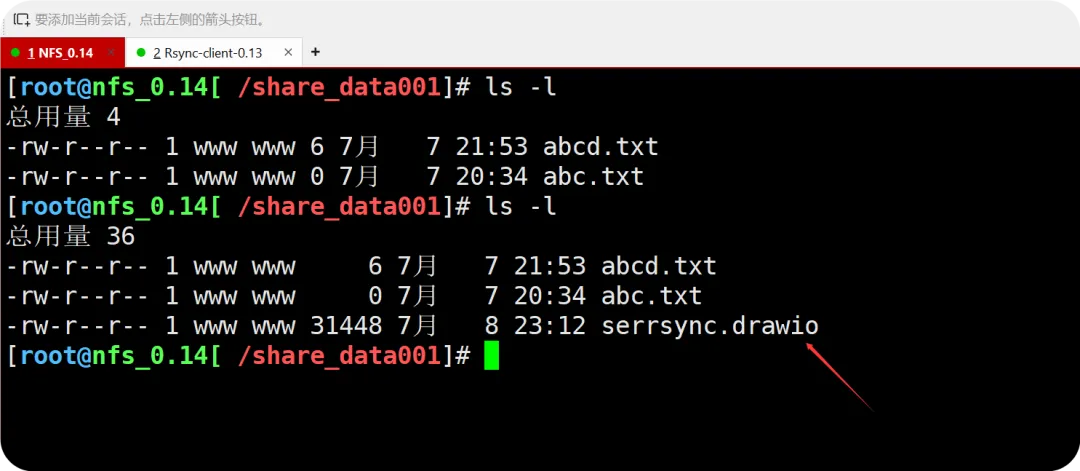
验证NFS共享目录丢失后,手动同步web站点到rsync备份服务器上,数据未丢失
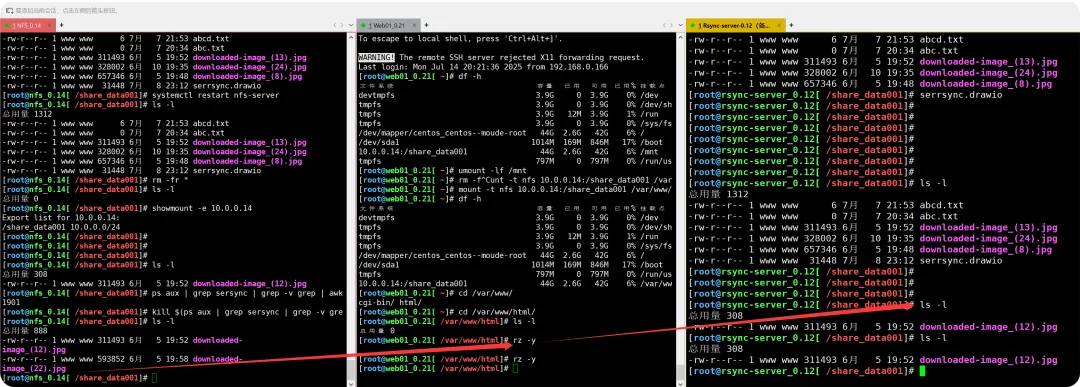
关掉备份服务器节点上的sersync程序,结果显示NFS和备份服务器无法进行同步

最新文章

随机文章

基本 文件 流程 错误 SQL 调试
  1. 请求信息 : 2026-02-28 09:02:18 HTTP/2.0 GET : https://f.mffb.com.cn/a/475318.html
  2. 运行时间 : 0.095908s [ 吞吐率:10.43req/s ] 内存消耗:6,426.60kb 文件加载:140
  3. 缓存信息 : 0 reads,0 writes
  4. 会话信息 : SESSION_ID=7d45363e8a3c33b7931ca4165b51237a
  1. /yingpanguazai/ssd/ssd1/www/f.mffb.com.cn/public/index.php ( 0.79 KB )
  2. /yingpanguazai/ssd/ssd1/www/f.mffb.com.cn/vendor/autoload.php ( 0.17 KB )
  3. /yingpanguazai/ssd/ssd1/www/f.mffb.com.cn/vendor/composer/autoload_real.php ( 2.49 KB )
  4. /yingpanguazai/ssd/ssd1/www/f.mffb.com.cn/vendor/composer/platform_check.php ( 0.90 KB )
  5. /yingpanguazai/ssd/ssd1/www/f.mffb.com.cn/vendor/composer/ClassLoader.php ( 14.03 KB )
  6. /yingpanguazai/ssd/ssd1/www/f.mffb.com.cn/vendor/composer/autoload_static.php ( 4.90 KB )
  7. /yingpanguazai/ssd/ssd1/www/f.mffb.com.cn/vendor/topthink/think-helper/src/helper.php ( 8.34 KB )
  8. /yingpanguazai/ssd/ssd1/www/f.mffb.com.cn/vendor/topthink/think-validate/src/helper.php ( 2.19 KB )
  9. /yingpanguazai/ssd/ssd1/www/f.mffb.com.cn/vendor/topthink/think-orm/src/helper.php ( 1.47 KB )
  10. /yingpanguazai/ssd/ssd1/www/f.mffb.com.cn/vendor/topthink/think-orm/stubs/load_stubs.php ( 0.16 KB )
  11. /yingpanguazai/ssd/ssd1/www/f.mffb.com.cn/vendor/topthink/framework/src/think/Exception.php ( 1.69 KB )
  12. /yingpanguazai/ssd/ssd1/www/f.mffb.com.cn/vendor/topthink/think-container/src/Facade.php ( 2.71 KB )
  13. /yingpanguazai/ssd/ssd1/www/f.mffb.com.cn/vendor/symfony/deprecation-contracts/function.php ( 0.99 KB )
  14. /yingpanguazai/ssd/ssd1/www/f.mffb.com.cn/vendor/symfony/polyfill-mbstring/bootstrap.php ( 8.26 KB )
  15. /yingpanguazai/ssd/ssd1/www/f.mffb.com.cn/vendor/symfony/polyfill-mbstring/bootstrap80.php ( 9.78 KB )
  16. /yingpanguazai/ssd/ssd1/www/f.mffb.com.cn/vendor/symfony/var-dumper/Resources/functions/dump.php ( 1.49 KB )
  17. /yingpanguazai/ssd/ssd1/www/f.mffb.com.cn/vendor/topthink/think-dumper/src/helper.php ( 0.18 KB )
  18. /yingpanguazai/ssd/ssd1/www/f.mffb.com.cn/vendor/symfony/var-dumper/VarDumper.php ( 4.30 KB )
  19. /yingpanguazai/ssd/ssd1/www/f.mffb.com.cn/vendor/topthink/framework/src/think/App.php ( 15.30 KB )
  20. /yingpanguazai/ssd/ssd1/www/f.mffb.com.cn/vendor/topthink/think-container/src/Container.php ( 15.76 KB )
  21. /yingpanguazai/ssd/ssd1/www/f.mffb.com.cn/vendor/psr/container/src/ContainerInterface.php ( 1.02 KB )
  22. /yingpanguazai/ssd/ssd1/www/f.mffb.com.cn/app/provider.php ( 0.19 KB )
  23. /yingpanguazai/ssd/ssd1/www/f.mffb.com.cn/vendor/topthink/framework/src/think/Http.php ( 6.04 KB )
  24. /yingpanguazai/ssd/ssd1/www/f.mffb.com.cn/vendor/topthink/think-helper/src/helper/Str.php ( 7.29 KB )
  25. /yingpanguazai/ssd/ssd1/www/f.mffb.com.cn/vendor/topthink/framework/src/think/Env.php ( 4.68 KB )
  26. /yingpanguazai/ssd/ssd1/www/f.mffb.com.cn/app/common.php ( 0.03 KB )
  27. /yingpanguazai/ssd/ssd1/www/f.mffb.com.cn/vendor/topthink/framework/src/helper.php ( 18.78 KB )
  28. /yingpanguazai/ssd/ssd1/www/f.mffb.com.cn/vendor/topthink/framework/src/think/Config.php ( 5.54 KB )
  29. /yingpanguazai/ssd/ssd1/www/f.mffb.com.cn/config/app.php ( 0.95 KB )
  30. /yingpanguazai/ssd/ssd1/www/f.mffb.com.cn/config/cache.php ( 0.78 KB )
  31. /yingpanguazai/ssd/ssd1/www/f.mffb.com.cn/config/console.php ( 0.23 KB )
  32. /yingpanguazai/ssd/ssd1/www/f.mffb.com.cn/config/cookie.php ( 0.56 KB )
  33. /yingpanguazai/ssd/ssd1/www/f.mffb.com.cn/config/database.php ( 2.48 KB )
  34. /yingpanguazai/ssd/ssd1/www/f.mffb.com.cn/vendor/topthink/framework/src/think/facade/Env.php ( 1.67 KB )
  35. /yingpanguazai/ssd/ssd1/www/f.mffb.com.cn/config/filesystem.php ( 0.61 KB )
  36. /yingpanguazai/ssd/ssd1/www/f.mffb.com.cn/config/lang.php ( 0.91 KB )
  37. /yingpanguazai/ssd/ssd1/www/f.mffb.com.cn/config/log.php ( 1.35 KB )
  38. /yingpanguazai/ssd/ssd1/www/f.mffb.com.cn/config/middleware.php ( 0.19 KB )
  39. /yingpanguazai/ssd/ssd1/www/f.mffb.com.cn/config/route.php ( 1.89 KB )
  40. /yingpanguazai/ssd/ssd1/www/f.mffb.com.cn/config/session.php ( 0.57 KB )
  41. /yingpanguazai/ssd/ssd1/www/f.mffb.com.cn/config/trace.php ( 0.34 KB )
  42. /yingpanguazai/ssd/ssd1/www/f.mffb.com.cn/config/view.php ( 0.82 KB )
  43. /yingpanguazai/ssd/ssd1/www/f.mffb.com.cn/app/event.php ( 0.25 KB )
  44. /yingpanguazai/ssd/ssd1/www/f.mffb.com.cn/vendor/topthink/framework/src/think/Event.php ( 7.67 KB )
  45. /yingpanguazai/ssd/ssd1/www/f.mffb.com.cn/app/service.php ( 0.13 KB )
  46. /yingpanguazai/ssd/ssd1/www/f.mffb.com.cn/app/AppService.php ( 0.26 KB )
  47. /yingpanguazai/ssd/ssd1/www/f.mffb.com.cn/vendor/topthink/framework/src/think/Service.php ( 1.64 KB )
  48. /yingpanguazai/ssd/ssd1/www/f.mffb.com.cn/vendor/topthink/framework/src/think/Lang.php ( 7.35 KB )
  49. /yingpanguazai/ssd/ssd1/www/f.mffb.com.cn/vendor/topthink/framework/src/lang/zh-cn.php ( 13.70 KB )
  50. /yingpanguazai/ssd/ssd1/www/f.mffb.com.cn/vendor/topthink/framework/src/think/initializer/Error.php ( 3.31 KB )
  51. /yingpanguazai/ssd/ssd1/www/f.mffb.com.cn/vendor/topthink/framework/src/think/initializer/RegisterService.php ( 1.33 KB )
  52. /yingpanguazai/ssd/ssd1/www/f.mffb.com.cn/vendor/services.php ( 0.14 KB )
  53. /yingpanguazai/ssd/ssd1/www/f.mffb.com.cn/vendor/topthink/framework/src/think/service/PaginatorService.php ( 1.52 KB )
  54. /yingpanguazai/ssd/ssd1/www/f.mffb.com.cn/vendor/topthink/framework/src/think/service/ValidateService.php ( 0.99 KB )
  55. /yingpanguazai/ssd/ssd1/www/f.mffb.com.cn/vendor/topthink/framework/src/think/service/ModelService.php ( 2.04 KB )
  56. /yingpanguazai/ssd/ssd1/www/f.mffb.com.cn/vendor/topthink/think-trace/src/Service.php ( 0.77 KB )
  57. /yingpanguazai/ssd/ssd1/www/f.mffb.com.cn/vendor/topthink/framework/src/think/Middleware.php ( 6.72 KB )
  58. /yingpanguazai/ssd/ssd1/www/f.mffb.com.cn/vendor/topthink/framework/src/think/initializer/BootService.php ( 0.77 KB )
  59. /yingpanguazai/ssd/ssd1/www/f.mffb.com.cn/vendor/topthink/think-orm/src/Paginator.php ( 11.86 KB )
  60. /yingpanguazai/ssd/ssd1/www/f.mffb.com.cn/vendor/topthink/think-validate/src/Validate.php ( 63.20 KB )
  61. /yingpanguazai/ssd/ssd1/www/f.mffb.com.cn/vendor/topthink/think-orm/src/Model.php ( 23.55 KB )
  62. /yingpanguazai/ssd/ssd1/www/f.mffb.com.cn/vendor/topthink/think-orm/src/model/concern/Attribute.php ( 21.05 KB )
  63. /yingpanguazai/ssd/ssd1/www/f.mffb.com.cn/vendor/topthink/think-orm/src/model/concern/AutoWriteData.php ( 4.21 KB )
  64. /yingpanguazai/ssd/ssd1/www/f.mffb.com.cn/vendor/topthink/think-orm/src/model/concern/Conversion.php ( 6.44 KB )
  65. /yingpanguazai/ssd/ssd1/www/f.mffb.com.cn/vendor/topthink/think-orm/src/model/concern/DbConnect.php ( 5.16 KB )
  66. /yingpanguazai/ssd/ssd1/www/f.mffb.com.cn/vendor/topthink/think-orm/src/model/concern/ModelEvent.php ( 2.33 KB )
  67. /yingpanguazai/ssd/ssd1/www/f.mffb.com.cn/vendor/topthink/think-orm/src/model/concern/RelationShip.php ( 28.29 KB )
  68. /yingpanguazai/ssd/ssd1/www/f.mffb.com.cn/vendor/topthink/think-helper/src/contract/Arrayable.php ( 0.09 KB )
  69. /yingpanguazai/ssd/ssd1/www/f.mffb.com.cn/vendor/topthink/think-helper/src/contract/Jsonable.php ( 0.13 KB )
  70. /yingpanguazai/ssd/ssd1/www/f.mffb.com.cn/vendor/topthink/think-orm/src/model/contract/Modelable.php ( 0.09 KB )
  71. /yingpanguazai/ssd/ssd1/www/f.mffb.com.cn/vendor/topthink/framework/src/think/Db.php ( 2.88 KB )
  72. /yingpanguazai/ssd/ssd1/www/f.mffb.com.cn/vendor/topthink/think-orm/src/DbManager.php ( 8.52 KB )
  73. /yingpanguazai/ssd/ssd1/www/f.mffb.com.cn/vendor/topthink/framework/src/think/Log.php ( 6.28 KB )
  74. /yingpanguazai/ssd/ssd1/www/f.mffb.com.cn/vendor/topthink/framework/src/think/Manager.php ( 3.92 KB )
  75. /yingpanguazai/ssd/ssd1/www/f.mffb.com.cn/vendor/psr/log/src/LoggerTrait.php ( 2.69 KB )
  76. /yingpanguazai/ssd/ssd1/www/f.mffb.com.cn/vendor/psr/log/src/LoggerInterface.php ( 2.71 KB )
  77. /yingpanguazai/ssd/ssd1/www/f.mffb.com.cn/vendor/topthink/framework/src/think/Cache.php ( 4.92 KB )
  78. /yingpanguazai/ssd/ssd1/www/f.mffb.com.cn/vendor/psr/simple-cache/src/CacheInterface.php ( 4.71 KB )
  79. /yingpanguazai/ssd/ssd1/www/f.mffb.com.cn/vendor/topthink/think-helper/src/helper/Arr.php ( 16.63 KB )
  80. /yingpanguazai/ssd/ssd1/www/f.mffb.com.cn/vendor/topthink/framework/src/think/cache/driver/File.php ( 7.84 KB )
  81. /yingpanguazai/ssd/ssd1/www/f.mffb.com.cn/vendor/topthink/framework/src/think/cache/Driver.php ( 9.03 KB )
  82. /yingpanguazai/ssd/ssd1/www/f.mffb.com.cn/vendor/topthink/framework/src/think/contract/CacheHandlerInterface.php ( 1.99 KB )
  83. /yingpanguazai/ssd/ssd1/www/f.mffb.com.cn/app/Request.php ( 0.09 KB )
  84. /yingpanguazai/ssd/ssd1/www/f.mffb.com.cn/vendor/topthink/framework/src/think/Request.php ( 55.78 KB )
  85. /yingpanguazai/ssd/ssd1/www/f.mffb.com.cn/app/middleware.php ( 0.25 KB )
  86. /yingpanguazai/ssd/ssd1/www/f.mffb.com.cn/vendor/topthink/framework/src/think/Pipeline.php ( 2.61 KB )
  87. /yingpanguazai/ssd/ssd1/www/f.mffb.com.cn/vendor/topthink/think-trace/src/TraceDebug.php ( 3.40 KB )
  88. /yingpanguazai/ssd/ssd1/www/f.mffb.com.cn/vendor/topthink/framework/src/think/middleware/SessionInit.php ( 1.94 KB )
  89. /yingpanguazai/ssd/ssd1/www/f.mffb.com.cn/vendor/topthink/framework/src/think/Session.php ( 1.80 KB )
  90. /yingpanguazai/ssd/ssd1/www/f.mffb.com.cn/vendor/topthink/framework/src/think/session/driver/File.php ( 6.27 KB )
  91. /yingpanguazai/ssd/ssd1/www/f.mffb.com.cn/vendor/topthink/framework/src/think/contract/SessionHandlerInterface.php ( 0.87 KB )
  92. /yingpanguazai/ssd/ssd1/www/f.mffb.com.cn/vendor/topthink/framework/src/think/session/Store.php ( 7.12 KB )
  93. /yingpanguazai/ssd/ssd1/www/f.mffb.com.cn/vendor/topthink/framework/src/think/Route.php ( 23.73 KB )
  94. /yingpanguazai/ssd/ssd1/www/f.mffb.com.cn/vendor/topthink/framework/src/think/route/RuleName.php ( 5.75 KB )
  95. /yingpanguazai/ssd/ssd1/www/f.mffb.com.cn/vendor/topthink/framework/src/think/route/Domain.php ( 2.53 KB )
  96. /yingpanguazai/ssd/ssd1/www/f.mffb.com.cn/vendor/topthink/framework/src/think/route/RuleGroup.php ( 22.43 KB )
  97. /yingpanguazai/ssd/ssd1/www/f.mffb.com.cn/vendor/topthink/framework/src/think/route/Rule.php ( 26.95 KB )
  98. /yingpanguazai/ssd/ssd1/www/f.mffb.com.cn/vendor/topthink/framework/src/think/route/RuleItem.php ( 9.78 KB )
  99. /yingpanguazai/ssd/ssd1/www/f.mffb.com.cn/route/app.php ( 1.72 KB )
  100. /yingpanguazai/ssd/ssd1/www/f.mffb.com.cn/vendor/topthink/framework/src/think/facade/Route.php ( 4.70 KB )
  101. /yingpanguazai/ssd/ssd1/www/f.mffb.com.cn/vendor/topthink/framework/src/think/route/dispatch/Controller.php ( 4.74 KB )
  102. /yingpanguazai/ssd/ssd1/www/f.mffb.com.cn/vendor/topthink/framework/src/think/route/Dispatch.php ( 10.44 KB )
  103. /yingpanguazai/ssd/ssd1/www/f.mffb.com.cn/app/controller/Index.php ( 4.81 KB )
  104. /yingpanguazai/ssd/ssd1/www/f.mffb.com.cn/app/BaseController.php ( 2.05 KB )
  105. /yingpanguazai/ssd/ssd1/www/f.mffb.com.cn/vendor/topthink/think-orm/src/facade/Db.php ( 0.93 KB )
  106. /yingpanguazai/ssd/ssd1/www/f.mffb.com.cn/vendor/topthink/think-orm/src/db/connector/Mysql.php ( 5.44 KB )
  107. /yingpanguazai/ssd/ssd1/www/f.mffb.com.cn/vendor/topthink/think-orm/src/db/PDOConnection.php ( 52.47 KB )
  108. /yingpanguazai/ssd/ssd1/www/f.mffb.com.cn/vendor/topthink/think-orm/src/db/Connection.php ( 8.39 KB )
  109. /yingpanguazai/ssd/ssd1/www/f.mffb.com.cn/vendor/topthink/think-orm/src/db/ConnectionInterface.php ( 4.57 KB )
  110. /yingpanguazai/ssd/ssd1/www/f.mffb.com.cn/vendor/topthink/think-orm/src/db/builder/Mysql.php ( 16.58 KB )
  111. /yingpanguazai/ssd/ssd1/www/f.mffb.com.cn/vendor/topthink/think-orm/src/db/Builder.php ( 24.06 KB )
  112. /yingpanguazai/ssd/ssd1/www/f.mffb.com.cn/vendor/topthink/think-orm/src/db/BaseBuilder.php ( 27.50 KB )
  113. /yingpanguazai/ssd/ssd1/www/f.mffb.com.cn/vendor/topthink/think-orm/src/db/Query.php ( 15.71 KB )
  114. /yingpanguazai/ssd/ssd1/www/f.mffb.com.cn/vendor/topthink/think-orm/src/db/BaseQuery.php ( 45.13 KB )
  115. /yingpanguazai/ssd/ssd1/www/f.mffb.com.cn/vendor/topthink/think-orm/src/db/concern/TimeFieldQuery.php ( 7.43 KB )
  116. /yingpanguazai/ssd/ssd1/www/f.mffb.com.cn/vendor/topthink/think-orm/src/db/concern/AggregateQuery.php ( 3.26 KB )
  117. /yingpanguazai/ssd/ssd1/www/f.mffb.com.cn/vendor/topthink/think-orm/src/db/concern/ModelRelationQuery.php ( 20.07 KB )
  118. /yingpanguazai/ssd/ssd1/www/f.mffb.com.cn/vendor/topthink/think-orm/src/db/concern/ParamsBind.php ( 3.66 KB )
  119. /yingpanguazai/ssd/ssd1/www/f.mffb.com.cn/vendor/topthink/think-orm/src/db/concern/ResultOperation.php ( 7.01 KB )
  120. /yingpanguazai/ssd/ssd1/www/f.mffb.com.cn/vendor/topthink/think-orm/src/db/concern/WhereQuery.php ( 19.37 KB )
  121. /yingpanguazai/ssd/ssd1/www/f.mffb.com.cn/vendor/topthink/think-orm/src/db/concern/JoinAndViewQuery.php ( 7.11 KB )
  122. /yingpanguazai/ssd/ssd1/www/f.mffb.com.cn/vendor/topthink/think-orm/src/db/concern/TableFieldInfo.php ( 2.63 KB )
  123. /yingpanguazai/ssd/ssd1/www/f.mffb.com.cn/vendor/topthink/think-orm/src/db/concern/Transaction.php ( 2.77 KB )
  124. /yingpanguazai/ssd/ssd1/www/f.mffb.com.cn/vendor/topthink/framework/src/think/log/driver/File.php ( 5.96 KB )
  125. /yingpanguazai/ssd/ssd1/www/f.mffb.com.cn/vendor/topthink/framework/src/think/contract/LogHandlerInterface.php ( 0.86 KB )
  126. /yingpanguazai/ssd/ssd1/www/f.mffb.com.cn/vendor/topthink/framework/src/think/log/Channel.php ( 3.89 KB )
  127. /yingpanguazai/ssd/ssd1/www/f.mffb.com.cn/vendor/topthink/framework/src/think/event/LogRecord.php ( 1.02 KB )
  128. /yingpanguazai/ssd/ssd1/www/f.mffb.com.cn/vendor/topthink/think-helper/src/Collection.php ( 16.47 KB )
  129. /yingpanguazai/ssd/ssd1/www/f.mffb.com.cn/vendor/topthink/framework/src/think/facade/View.php ( 1.70 KB )
  130. /yingpanguazai/ssd/ssd1/www/f.mffb.com.cn/vendor/topthink/framework/src/think/View.php ( 4.39 KB )
  131. /yingpanguazai/ssd/ssd1/www/f.mffb.com.cn/vendor/topthink/framework/src/think/Response.php ( 8.81 KB )
  132. /yingpanguazai/ssd/ssd1/www/f.mffb.com.cn/vendor/topthink/framework/src/think/response/View.php ( 3.29 KB )
  133. /yingpanguazai/ssd/ssd1/www/f.mffb.com.cn/vendor/topthink/framework/src/think/Cookie.php ( 6.06 KB )
  134. /yingpanguazai/ssd/ssd1/www/f.mffb.com.cn/vendor/topthink/think-view/src/Think.php ( 8.38 KB )
  135. /yingpanguazai/ssd/ssd1/www/f.mffb.com.cn/vendor/topthink/framework/src/think/contract/TemplateHandlerInterface.php ( 1.60 KB )
  136. /yingpanguazai/ssd/ssd1/www/f.mffb.com.cn/vendor/topthink/think-template/src/Template.php ( 46.61 KB )
  137. /yingpanguazai/ssd/ssd1/www/f.mffb.com.cn/vendor/topthink/think-template/src/template/driver/File.php ( 2.41 KB )
  138. /yingpanguazai/ssd/ssd1/www/f.mffb.com.cn/vendor/topthink/think-template/src/template/contract/DriverInterface.php ( 0.86 KB )
  139. /yingpanguazai/ssd/ssd1/www/f.mffb.com.cn/runtime/temp/067d451b9a0c665040f3f1bdd3293d68.php ( 11.98 KB )
  140. /yingpanguazai/ssd/ssd1/www/f.mffb.com.cn/vendor/topthink/think-trace/src/Html.php ( 4.42 KB )
  1. CONNECT:[ UseTime:0.000701s ] mysql:host=127.0.0.1;port=3306;dbname=f_mffb;charset=utf8mb4
  2. SHOW FULL COLUMNS FROM `fenlei` [ RunTime:0.000796s ]
  3. SELECT * FROM `fenlei` WHERE `fid` = 0 [ RunTime:0.000333s ]
  4. SELECT * FROM `fenlei` WHERE `fid` = 63 [ RunTime:0.000548s ]
  5. SHOW FULL COLUMNS FROM `set` [ RunTime:0.000460s ]
  6. SELECT * FROM `set` [ RunTime:0.000209s ]
  7. SHOW FULL COLUMNS FROM `article` [ RunTime:0.000516s ]
  8. SELECT * FROM `article` WHERE `id` = 475318 LIMIT 1 [ RunTime:0.004172s ]
  9. UPDATE `article` SET `lasttime` = 1772240538 WHERE `id` = 475318 [ RunTime:0.009947s ]
  10. SELECT * FROM `fenlei` WHERE `id` = 67 LIMIT 1 [ RunTime:0.000224s ]
  11. SELECT * FROM `article` WHERE `id` < 475318 ORDER BY `id` DESC LIMIT 1 [ RunTime:0.000421s ]
  12. SELECT * FROM `article` WHERE `id` > 475318 ORDER BY `id` ASC LIMIT 1 [ RunTime:0.000823s ]
  13. SELECT * FROM `article` WHERE `id` < 475318 ORDER BY `id` DESC LIMIT 10 [ RunTime:0.000934s ]
  14. SELECT * FROM `article` WHERE `id` < 475318 ORDER BY `id` DESC LIMIT 10,10 [ RunTime:0.000705s ]
  15. SELECT * FROM `article` WHERE `id` < 475318 ORDER BY `id` DESC LIMIT 20,10 [ RunTime:0.010826s ]
0.097551s