太棒了!欢迎来到 【跟着AI学Python】第20天!🎉今天我们将学习 正则表达式(Regular Expressions) —— 文本处理的“瑞士军刀”!
💡 正则表达式能让你用简洁模式匹配、提取、替换复杂文本,是爬虫、日志分析、数据清洗的必备技能!
🎯 第20天目标:
✅ 掌握 基础元字符:\d, \w, ., *, +, ?✅ 熟练使用 re.search() 和 re.findall()✅ 实战:提取邮箱、手机号
📘 一、正则表达式基础:元字符速查
| | |
|---|
\d | | \d\d→ "23" |
\w | | \w+→ "user_1" |
. | | a.c→ "abc", "a@c" |
* | | ab*c → "ac", "abbc" |
+ | | ab+c → "abc", "abbbc"(不能是"ac") |
? | | colou?r → "color", "colour" |
^ | | ^Hello → 匹配开头的 "Hello" |
$ | | world$ → 匹配结尾的 "world" |
🔑 关键概念:
- 贪婪匹配:*/+ 默认尽可能多匹配(如 a.*b匹配 "a...b...b" 中最长部分)
- 非贪婪匹配:加 ? 变成 *?/+?(如 a.*?b 匹配最短部分)
📘 二、re 模块核心函数
🔹 re.search(pattern, string)
- 搜索字符串中第一个匹配项
- 返回
Match 对象(有 .group() 方法)或 None
import retext = "我的电话是 13812345678"match = re.search(r"\d{11}", text) # 匹配11位数字if match: print("找到手机号:", match.group()) # 13812345678
🔹 re.findall(pattern, string)
text = "邮箱: alice@example.com, 联系 bob@test.org"emails = re.findall(r"\w+@\w+\.\w+", text)print(emails) # ['alice@example.com', 'bob@test.org']
✅ 原始字符串 r"":避免反斜杠转义(如 \d 不被解释为转义字符)
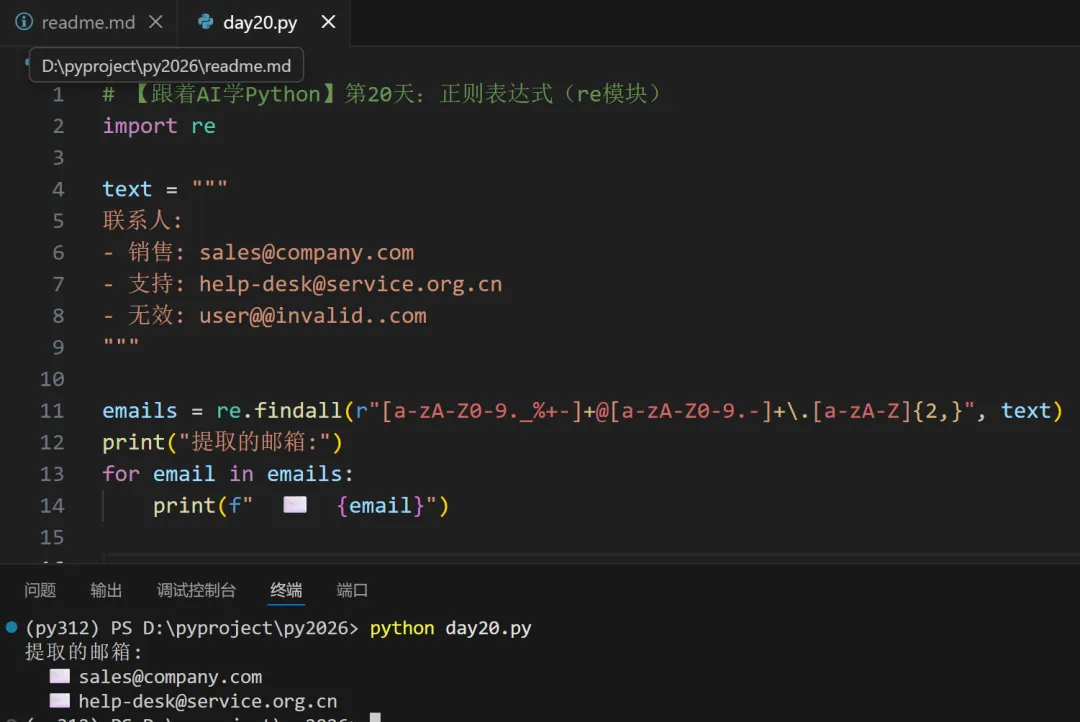
📘 三、实战1:提取邮箱
🔹 邮箱正则(简化版)
email_pattern = r"\w+@\w+\.\w+"
\w+ :用户名(字母/数字/下划线)@ :必须包含 @\w+\.\w+ :域名(如 example.com)
🔹 改进版(支持点、连字符)
# 更健壮的邮箱匹配(仍非完美,但覆盖常见格式)email_pattern = r"[a-zA-Z0-9._%+-]+@[a-zA-Z0-9.-]+\.[a-zA-Z]{2,}"
🔹 代码示例
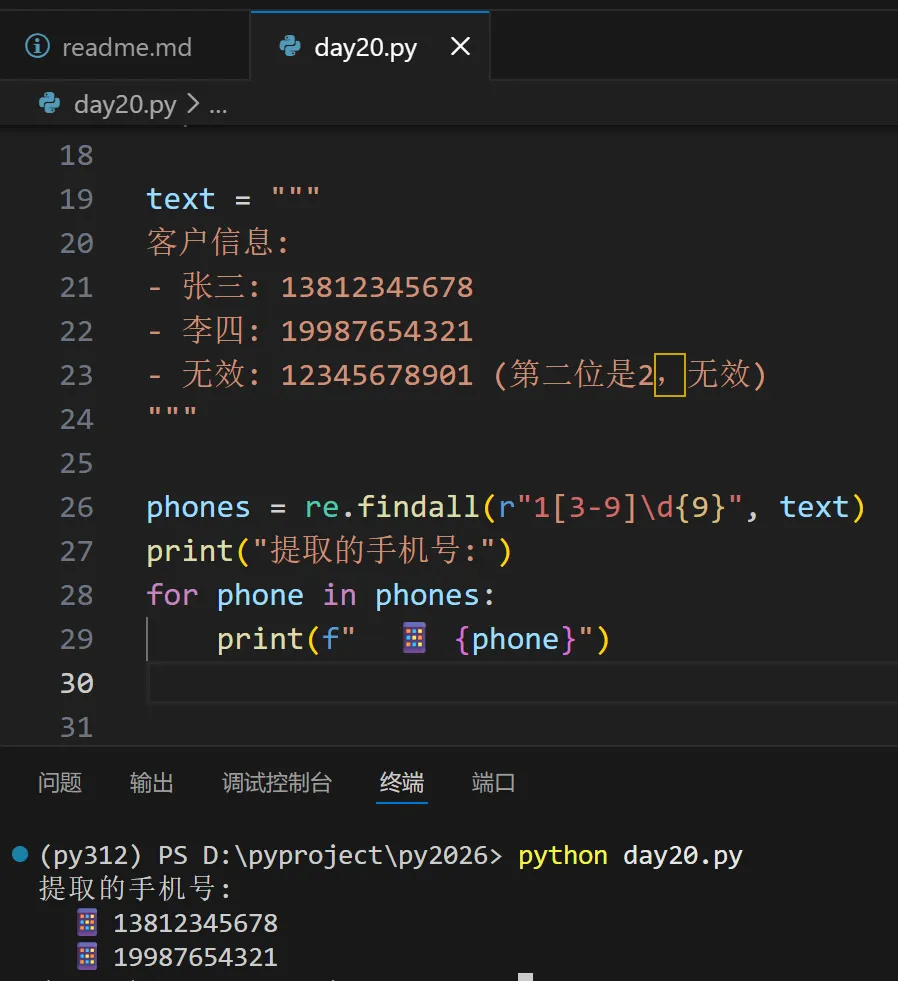
📘 四、实战2:提取中国大陆手机号
🔹 手机号规则
- 第二位通常是
3-9(如 13x, 15x, 18x, 19x 等)
🔹 正则表达式
phone_pattern = r"1[3-9]\d{9}"
1:第一位是1[3-9]:第二位是3-9\d{9}:后面9位数字
🔹 代码示例
📘 五、高级技巧:分组 () 与命名分组
🔹 提取结构化数据
import relog = "2026-01-28 10:30:45 [INFO] User login"# 使用分组提取日期、时间、级别、消息pattern = r"(\d{4}-\d{2}-\d{2})\s+(\d{2}:\d{2}:\d{2})\s+\[(.*)\]\s+(.*)"match = re.match(pattern, log.strip())if match: date, time,level,msg = match.groups() print(f"日期: {date}, 时间: {time},级别: {level}, 消息: {msg}")
🔹 命名分组(更清晰)
pattern = r"(?P<date>\d{4}-\d{2}-\d{2})\s+(?P<time>\d{2}:\d{2}:\d{2})\s+\[(?P<level>\w+)\]\s+(?P<msg>.*)"match = re.search(pattern, log)if match: print(match.group("date"))
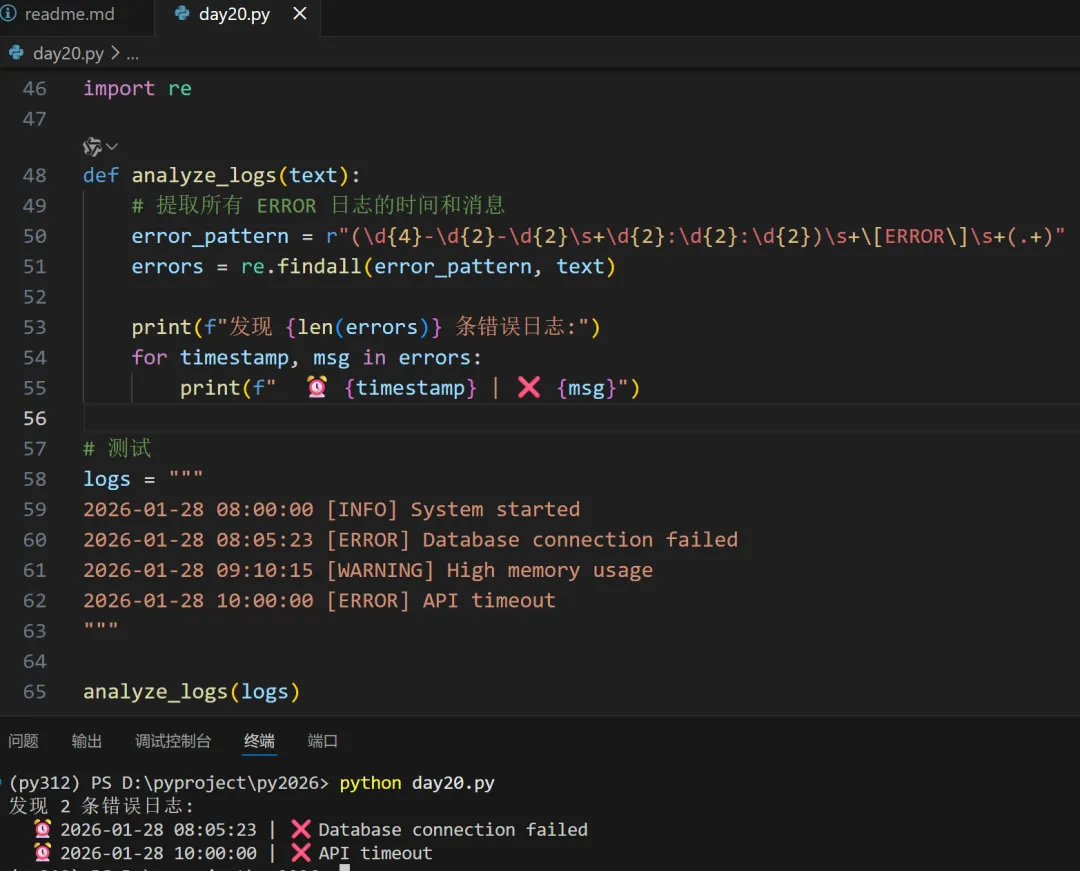
💻 综合实战:日志分析器
✅ 今日小任务
1、用 re.findall()提取字符串 "价格: ¥199, 折扣: ¥29" 中的所有数字 → [199, 29]2、写一个正则 匹配 URL(如 https://www.example.com/path)# 任务1import retext = "价格: ¥199, 折扣: ¥29"prices = [int(x) for x in re.findall(r"\d+", text)]print(f"价格: {prices[0]}, 折扣: {prices[1]}")# 任务2(简化版)url = "https://www.example.com/page?id=123&name=Alice"url_pattern = r"https?://[^\s]+"urls = re.findall(url_pattern, url)print(urls)
📝 小结:正则表达式最佳实践
| |
|---|
| 简单匹配 | |
| 提取数据 | |
| 验证格式 | |
| 复杂需求 | 分组 () + 命名分组 (?P<name>...) |
| 性能敏感 | 预编译正则:pattern = re.compile(r"...") |
⚠️ 注意:
- 正则不是万能的(如解析 HTML 请用
BeautifulSoup) - 复杂邮箱/URL 验证建议用专用库(如
email-validator)
🎉 恭喜完成第20天!你已掌握 文本处理的核心利器,能高效提取结构化信息!
继续加油,你的数据处理能力越来越强了!🔍✨
 10个月宝宝每天需要喝多少奶粉?