Python LangChain-Core源码解析(Message、Generation、BaseLanguageModel、BaseLLMOutputParser)
LangChain-Core 的 Message模块是整个 LangChain 生态的消息基础层,定义了与大模型交互的标准化消息格式(如HumanMessage、AIMessage、SystemMessage等),所有与大模型的对话交互都基于这些 Message 类实现,保证了不同组件间的兼容性。# 消息标识 id: str | None = Field(default=None, coerce_numbers_to_str=True)# 消息类型 type: str# 消息名称 name: str | None = None# 消息内容 content: str | list[str | dict]"""The contents of the message."""# 附加参数 additional_kwargs: dict = Field(default_factory=dict)"""Reserved for additional payload data associated with the message."""# 响应元数据 response_metadata: dict = Field(default_factory=dict)"""Examples: response headers, logprobs, token counts, model name."""# Pydantic模型行为配置model_config = ConfigDict( extra="allow",)"""A TypedDict for configuring Pydantic behaviour."""
# 拼接运算符重载 def __add__(self, other: Any) -> ChatPromptTemplate: """Concatenate this message with another message."""# Message合并工具 def merge_content( first_content: str | list[str | dict], *contents: str | list[str | dict],) -> str | list[str | dict]: """Merge multiple message contents.
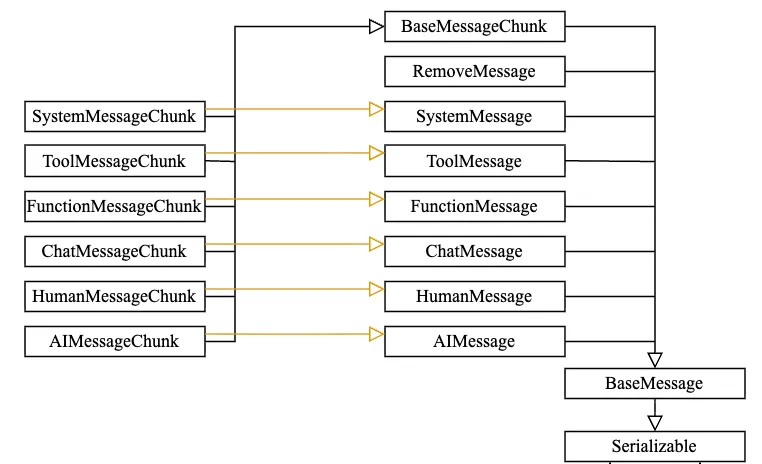
① HumanMessage (用户问题,代表用户发送的消息。)② SystemMessage(系统提示词,设定AI行为、角色、规则、上下文)③ AIMessage(模型回复,代表AI生产的回复。)- 构建多轮对话历史时,和HumanMessage交替使用。
④ ChatMessage(灵活角色类,自定义角色的消息 role:xxx)- 适合多角色场景:客服、讲师、面试官、游戏NPC等。
⑤ FunctionMessage(函数调用类,存放函数调用结果,回传给模型)- 配合OpenAI function_call体系使用。
⑥ ToolMessage(工具调用类,新版LangChain中,工具执行结果的标准消息)- Agent、Tool优先使用它,替代FunctionMessage。
⑦ RemoveMessage(删除消息,在历史消息管理中,标记要删除的消息)
⑧ BaseMessageChunk(流式消息输出,流式输出的消息片段)- 流式接口返回的都是chunk,可通过 += 拼接。
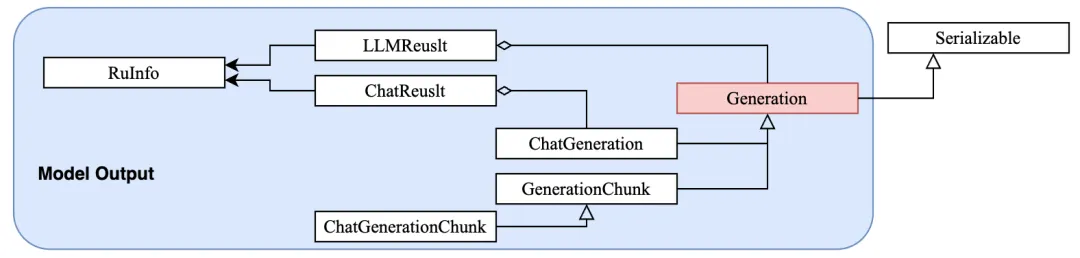
(1)BaseMessage与Generation的关系:BaseMessage构建模型的输入(对话上下文),Generation接收模型的输出(生成结果)。Generation的子类(ChatGeneration/ChatGenerationChunk)会持有BaseMessage及其子类的实例。-> user_input # 用户输入-> HumanMessage # 封装Message-> ChatModel # 模型-> ChatGeneration # 模型输出-> AIMessage # 获取模型Message
Generation是所有生成结果的基类,ChatGeneration是其对话场景的子类;GenerationChunk和 ChatGenerationChunk则是对应流式输出的片段类。- 输出LLMResult,包含Generation。
- 输出ChatResult,包含ChatGeneration。
- ChatGenerationChunk,最终拼接成完整的Generation或ChatGneration。
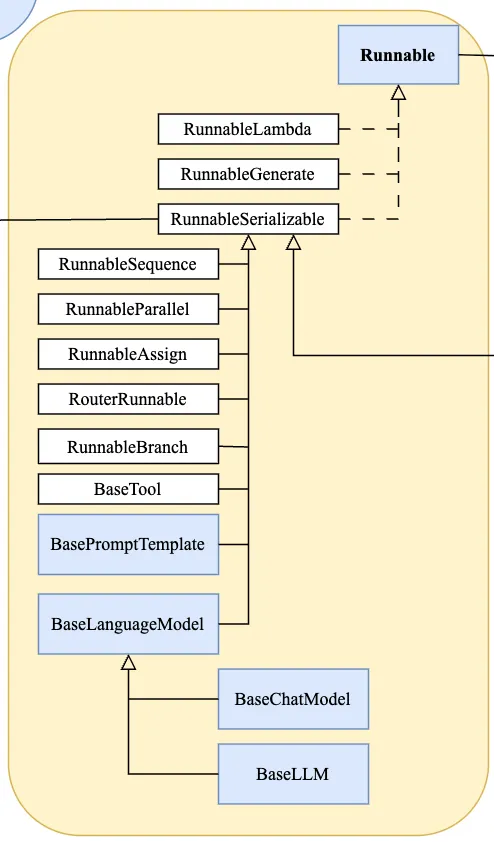
BaseLanguageModel是LangChain-Core中所有语言模型(LLM/Chat Modek)的顶层抽象基类,定义了与大模型交互的标准化接口,目的是屏蔽不同大模型的调用差异,让你能使用统一的方式调用任意LLM,同时支持流式输出、批量调用、异步调用等核心能力。- LanguageModelInput:模型输入类型,支持str、ChatMessage列表、PromptValue等;
- RunnableConfig:配置项,支持设置temperature、max_tokens、timeout等模型参数,以及tags、metadata等追踪信息。
四、BaseLLMOutputParser(模型结构化输出) BaseLLMOutputParser是 LangChain-Core 中所有 LLM 输出解析器的抽象基类,定义了解析 LLM 原始文本输出为结构化数据的核心接口,目的是将大模型返回的无结构文本(如 JSON 字符串、自然语言)转换为可直接使用的 Python 对象(字典、Pydantic 模型、自定义类等),解决 LLM 输出 “不可控、难复用” 的问题。场景 1:解析为 JSON(基础结构化)
使用 JsonOutputParser(BaseLLMOutputParser的子类)将 LLM 输出解析为 Python 字典:
from langchain_core.output_parsers import JsonOutputParserfrom langchain_core.prompts import PromptTemplatefrom langchain_openai import ChatOpenAI# 1. 初始化解析器json_parser = JsonOutputParser()# 2. 构建提示词(加入格式说明,确保LLM输出JSON)prompt = PromptTemplate( template="回答以下问题,并严格输出JSON格式:{question}\n{format_instructions}", input_variables=["question"], partial_variables={"format_instructions": json_parser.get_format_instructions()})# 3. 初始化LLM并调用llm = ChatOpenAI(model="gpt-3.5-turbo", temperature=0)chain = prompt | llm | json_parser# 4. 执行并获取结构化结果result = chain.invoke({"question": "介绍苹果公司:名称、成立时间、创始人"})print(type(result)) # <class 'dict'>print(result)# 示例输出:{"名称": "苹果公司", "成立时间": "1976年4月1日", "创始人": "史蒂夫·乔布斯、史蒂夫·沃兹尼亚克、罗纳德·韦恩"}
场景 2:解析为 Pydantic 模型(强类型结构化)
这是最佳实践核心,通过 Pydantic 模型定义结构化 schema,确保解析结果的类型安全:
from pydantic import BaseModel, Fieldfrom langchain_core.output_parsers import PydanticOutputParser# 1. 定义Pydantic模型(强类型schema)class CompanyInfo(BaseModel): name: str = Field(description="公司名称") founded: str = Field(description="成立时间") founders: list[str] = Field(description="创始人列表")# 2. 初始化解析器(自动生成格式说明)parser = PydanticOutputParser(pydantic_object=CompanyInfo)# 3. 构建提示词prompt = PromptTemplate( template="回答以下问题,严格按照指定格式输出:{question}\n格式要求:{format_instructions}", input_variables=["question"], partial_variables={"format_instructions": parser.get_format_instructions()})# 4. 执行链llm = ChatOpenAI(model="gpt-3.5-turbo", temperature=0)chain = prompt | llm | parser# 5. 解析结果(直接得到Pydantic对象)result = chain.invoke({"question": "介绍苹果公司:名称、成立时间、创始人"})print(type(result)) # <class '__main__.CompanyInfo'>print(result.name) # 苹果公司print(result.founders) # ["史蒂夫·乔布斯", "史蒂夫·沃兹尼亚克", "罗纳德·韦恩"]
场景 3:使用StructuredOutputParser
对于多字段、复杂结构,可使用 StructuredOutputParser简化 schema 定义:
from langchain_core.output_parsers import StructuredOutputParser, ResponseSchema# 定义响应schemaresponse_schemas = [ ResponseSchema(name="name", description="公司名称"), ResponseSchema(name="founded", description="成立时间"), ResponseSchema(name="founders", description="创始人列表,用数组表示")]parser = StructuredOutputParser.from_response_schemas(response_schemas)# 后续用法与Pydantic解析器一致
场景 4:自定义解析器(适配特殊输出格式)
若 LLM 输出非标准格式(如 “键值对:xxx”),可继承 BaseLLMOutputParser实现自定义解析:
from langchain_core.output_parsers import BaseLLMOutputParserfrom langchain_core.exceptions import OutputParserException# 自定义解析器:解析 "名称:苹果;成立时间:1976;创始人:乔布斯" 格式class CustomKVParser(BaseLLMOutputParser): def parse(self, text: str) -> dict: try: result = {} # 按分号分割键值对 pairs = text.strip().split(";") for pair in pairs: if ":" in pair: key, value = pair.split(":", 1) result[key.strip()] = value.strip() return result except Exception as e: raise OutputParserException(f"解析失败:{e},原始文本:{text}")# 使用自定义解析器parser = CustomKVParser()llm = ChatOpenAI(model="gpt-3.5-turbo", temperature=0)chain = PromptTemplate.from_template("用【键:值;】格式介绍苹果公司:名称、成立时间、创始人") | llm | parserresult = chain.invoke({})print(result) # {"名称": "苹果公司", "成立时间": "1976年4月1日", "创始人": "乔布斯"}
* 实际开发中优先使用 PydanticOutputParser/StructuredOutputParser,保证类型安全和可维护性;* 关键最佳实践:提示词中明确格式要求 + 捕获解析异常 + 增加容错逻辑,避免因 LLM 输出不稳定导致程序崩溃。
 10个月宝宝每天需要喝多少奶粉?