Python节点教程:tk.Treeview节点的用法(增删修改+保存+加载)
- 2026-09-04 05:28:04
Python节点教程:tk.Treeview节点的用法(增删修改+保存+加载)

★★★★★博文创作不易,我的博文不需要打赏,也不需要知识付费,可以白嫖学习编程小技巧。使用代码的过程中,如有疑问的地方,欢迎大家指正留言交流。喜欢的老铁可以多多点赞+收藏分享+置顶,小红牛在此表示感谢。★★★★★ 1.增删改功能 添加根节点:通过按钮弹出输入框,在顶级插入新节点。 添加子节点:需先选中一个节点作为父节点,然后输入子节点名称。 删除节点:选中节点后点击删除,会弹出确认框,删除该节点及其所有子节点(Treeview 自动处理级联删除)。 修改节点名称:双击任意节点,弹出对话框显示原名称,输入新名称后更新。 2.启动后全部展开:插入初始节点时均设置 open=True,并通过 expand_all() 方法递归展开所有节点,确保无论嵌套多深都能完全展开。 3.隐藏表格标题:创建 Treeview 时指定 show='tree',这样默认的列标题行会被隐藏,只显示树形结构。 如果后续需要添加多列数据,只需在创建 Treeview 时设置 columns 并保持 show='tree',数据列会正常显示但标题仍隐藏。 4.用户体验优化:添加了“全部展开”和“全部折叠”按钮,方便管理大量节点。删除前确认,避免误操作。双击修改时保留原名称作为默认值。 5.运行效果:启动后窗口显示初始的树节点(我的电脑、文档等),所有节点处于展状态。通过底部按钮可自由添加根节点、在选中节点下添加子节点、删除节点。 双击节点可修改名称。 整个界面无标题栏,简洁明了。 此代码可直接运行,满足您提出的所有要求。如有其他定制需求(如增加图标、右键菜单等),可在当前基础上扩展。 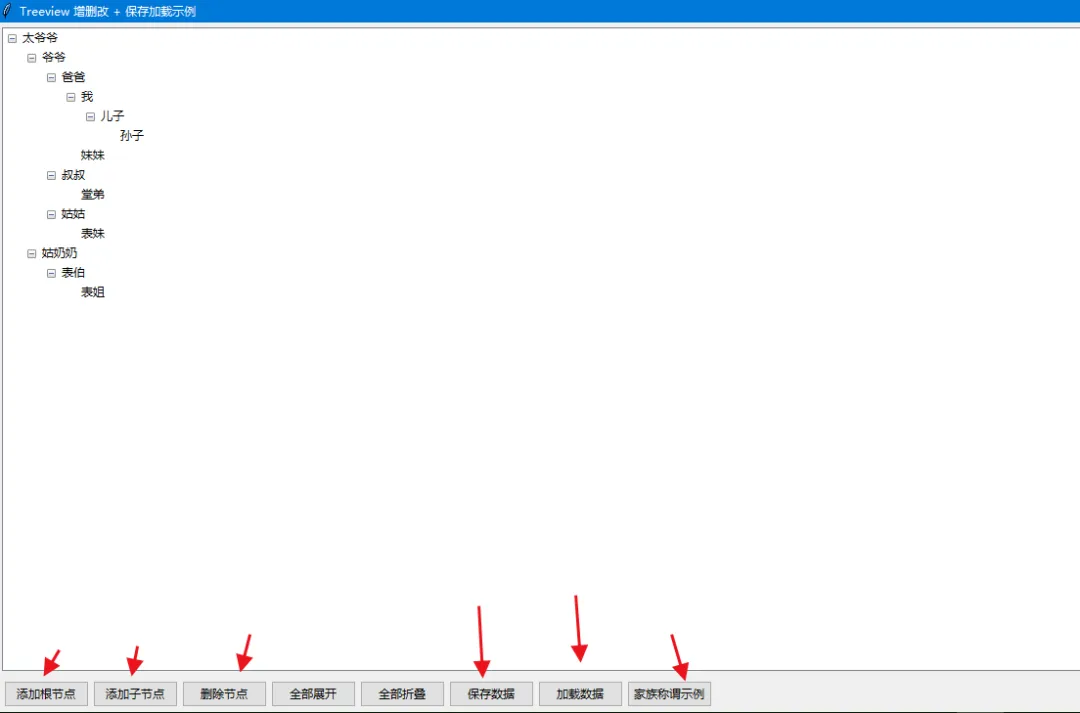


Python,速成心法
敲代码,查资料,问Ai
练习,探索,总结,优化
Python项目90:人物的社交网络分析示例(NetworkX+Matplotlib)
Python项目91:绘制红楼梦人物关系图(NetworkX+Matplotlib)
Python项目92:绘制神雕侠侣中人物的4种社交图(NetworkX+Matplotlib)
Python项目97:Tkinter+NetworkX图编辑器1.0
↓ 完整源码如下 ↓
# -*- coding: utf-8 -*-# @Author : 小红牛# 微信公众号:wdPythonimport tkinter as tkfrom tkinter import ttk, simpledialog, messagebox, filedialogimport jsonclass TreeviewDemo:def __init__(self, root):self.root = rootself.root.title("Treeview 增删改 + 保存加载示例")self.root.geometry("400x500")# 创建 Treeview,隐藏标题栏self.tree = ttk.Treeview(root, show='tree')self.tree.pack(fill=tk.BOTH, expand=True, padx=5, pady=5)# 插入初始数据(默认示例)self.init_tree()# 绑定双击事件(修改节点名称)self.tree.bind('<Double-1>', self.on_double_click)# 按钮框架btn_frame = ttk.Frame(root)btn_frame.pack(fill=tk.X, padx=5, pady=5)ttk.Button(btn_frame, text="添加根节点", command=self.add_root_node).pack(side=tk.LEFT, padx=2)ttk.Button(btn_frame, text="添加子节点", command=self.add_child_node).pack(side=tk.LEFT, padx=2)ttk.Button(btn_frame, text="删除节点", command=self.delete_node).pack(side=tk.LEFT, padx=2)ttk.Button(btn_frame, text="全部展开", command=self.expand_all).pack(side=tk.LEFT, padx=2)ttk.Button(btn_frame, text="全部折叠", command=self.collapse_all).pack(side=tk.LEFT, padx=2)ttk.Button(btn_frame, text="保存数据", command=self.save_tree).pack(side=tk.LEFT, padx=2)ttk.Button(btn_frame, text="加载数据", command=self.load_tree).pack(side=tk.LEFT, padx=2)# 标准家族树示例按钮(固定称谓)ttk.Button(btn_frame, text="家族称谓示例", command=self.standard_family).pack(side=tk.LEFT, padx=2)def init_tree(self):"""插入初始节点,全部展开"""root_node = self.tree.insert('', 'end', text='我的电脑', open=True)self.tree.insert(root_node, 'end', text='C盘', open=True)self.tree.insert(root_node, 'end', text='D盘', open=True)doc_node = self.tree.insert('', 'end', text='文档', open=True)self.tree.insert(doc_node, 'end', text='工作报告.docx', open=True)self.tree.insert(doc_node, 'end', text='照片.png', open=True)self.expand_all()# ---------- 增删改功能 ----------def add_root_node(self):new_name = simpledialog.askstring("添加根节点", "请输入根节点名称:")if new_name:self.tree.insert('', 'end', text=new_name, open=True)def add_child_node(self):selected = self.tree.selection()if not selected:messagebox.showwarning("提示", "请先选中一个父节点")returnparent = selected[0]new_name = simpledialog.askstring("添加子节点", "请输入子节点名称:")if new_name:self.tree.insert(parent, 'end', text=new_name, open=True)def delete_node(self):selected = self.tree.selection()if not selected:messagebox.showwarning("提示", "请先选中要删除的节点")returnitem = selected[0]item_text = self.tree.item(item, 'text')if messagebox.askyesno("确认删除", f"确定要删除节点 '{item_text}' 及其所有子节点吗?"):self.tree.delete(item)def on_double_click(self, event):item = self.tree.identify_row(event.y)if not item:returnold_name = self.tree.item(item, 'text')new_name = simpledialog.askstring("修改名称", "请输入新的节点名称:", initialvalue=old_name)if new_name and new_name != old_name:self.tree.item(item, text=new_name)def expand_all(self):for item in self.tree.get_children():self._expand_all(item)def _expand_all(self, item):self.tree.item(item, open=True)for child in self.tree.get_children(item):self._expand_all(child)def collapse_all(self):for item in self.tree.get_children():self._collapse_all(item)def _collapse_all(self, item):self.tree.item(item, open=False)for child in self.tree.get_children(item):self._collapse_all(child)# ---------- 保存和加载 ----------def save_tree(self):file_path = filedialog.asksaveasfilename(defaultextension=".json",filetypes=[("JSON files", "*.json"), ("All files", "*.*")])if not file_path:returndef collect_nodes(parent_id):nodes = []for child_id in self.tree.get_children(parent_id):text = self.tree.item(child_id, 'text')open_state = self.tree.item(child_id, 'open')children = collect_nodes(child_id)nodes.append({'text': text,'open': open_state,'children': children})return nodesdata = {'root_nodes': collect_nodes('')}try:with open(file_path, 'w', encoding='utf-8') as f:json.dump(data, f, ensure_ascii=False, indent=2)messagebox.showinfo("保存成功", f"树结构已保存到:{file_path}")except Exception as e:messagebox.showerror("保存失败", f"发生错误:{e}")def load_tree(self):file_path = filedialog.askopenfilename(filetypes=[("JSON files", "*.json"), ("All files", "*.*")])if not file_path:returntry:with open(file_path, 'r', encoding='utf-8') as f:data = json.load(f)except Exception as e:messagebox.showerror("加载失败", f"读取文件错误:{e}")return# 清空当前树for item in self.tree.get_children():self.tree.delete(item)def insert_nodes(parent, nodes):for node_data in nodes:node_id = self.tree.insert(parent, 'end',text=node_data['text'],open=node_data.get('open', True))insert_nodes(node_id, node_data.get('children', []))insert_nodes('', data.get('root_nodes', []))messagebox.showinfo("加载成功", "树结构已加载完成。")# ---------- 标准家族树(固定称谓,完整结构) ----------def standard_family(self):"""生成一个固定的、标准的家族称谓树"""# 清空当前树for item in self.tree.get_children():self.tree.delete(item)# 定义固定家族树结构(嵌套字典,每个节点包含text和children)family_tree = {'text': '太爷爷','children': [{'text': '爷爷','children': [{'text': '爸爸','children': [{'text': '我','children': [{'text': '儿子','children': [{'text': '孙子', 'children': []}]}]},{'text': '妹妹', 'children': []}]},{'text': '叔叔','children': [{'text': '堂弟', 'children': []}]},{'text': '姑姑','children': [{'text': '表妹', 'children': []}]}]},{'text': '姑奶奶','children': [{'text': '表伯','children': [{'text': '表姐', 'children': []}]}]}]}# 递归插入节点def insert_node(parent_id, node):node_id = self.tree.insert(parent_id, 'end', text=node['text'], open=True)for child in node.get('children', []):insert_node(node_id, child)insert_node('', family_tree)self.expand_all()messagebox.showinfo("标准家族", "已生成固定结构的标准家族树。")if __name__ == "__main__":root = tk.Tk()app = TreeviewDemo(root)root.mainloop()
完毕!!感谢您的收看
------★★历史博文集合★★------
本文来自网友投稿或网络内容,如有侵犯您的权益请联系我们删除,联系邮箱:596563534@qq.com 。
随机文章
-
 10个月宝宝每天需要喝多少奶粉?
- Python数据分析三周邪修速成大法
- Python进阶,17个必须掌握的炫酷操作
- 基于Python技术处理国土空间数据的审计方法
- 【教学方案】Python-ArcGIS分析核心技术:从站点到区域的蒸散发与植被生产力估算
- 企业邮箱被禁用了“自动转发”?几十行 Python 代码教你完美破解!
- C++合集-Windows、Linux 跨平台企业项目实战-Oracle数据库-34、多表查询中自连接
- 牛马必备:Python自动化办公神器—PyAutoGUI
- 仅需4步,轻松安装好Kali Linux5新系统(By:Kali与编程)
- 练完这170道Python,你就是高手了!
- Linux 防火墙与端口测试工具速览