打工人的痛点:邮箱太多,看不过来!
作为一个现代打工人/斜杠青年,谁手里没个三四个邮箱?公司的阿里云/腾讯云企业邮箱、自己接活用的网易邮箱、国外的 Gmail……
为了不错过重要邮件,我们通常的完美解决方案是:把所有次要/工作邮箱的邮件,全部「自动转发」到自己的主用邮箱(比如 QQ 邮箱)。
为什么大家都爱转到 QQ 邮箱?
- 1. 推送极其及时: 依托微信/QQ的常驻后台,新邮件秒级提醒,绝不漏掉老板的夺命连环 Call。
- 2. 容量大且无限扩容: 免费送超大网盘,当作所有邮件的“终极备份库”再合适不过。
- 3. 统一管理: 每天只查一个邮箱,告别各个App来回切的烦恼。
遇到拦路虎:管理员禁用了自动转发!
理想很丰满,现实很骨感。当你兴冲冲地跑到公司邮箱后台准备设置时,却经常会看到这样一行冷冰冰的提示:
❌ “抱歉,出于安全考虑,企业管理员已禁用邮件自动转发功能。”
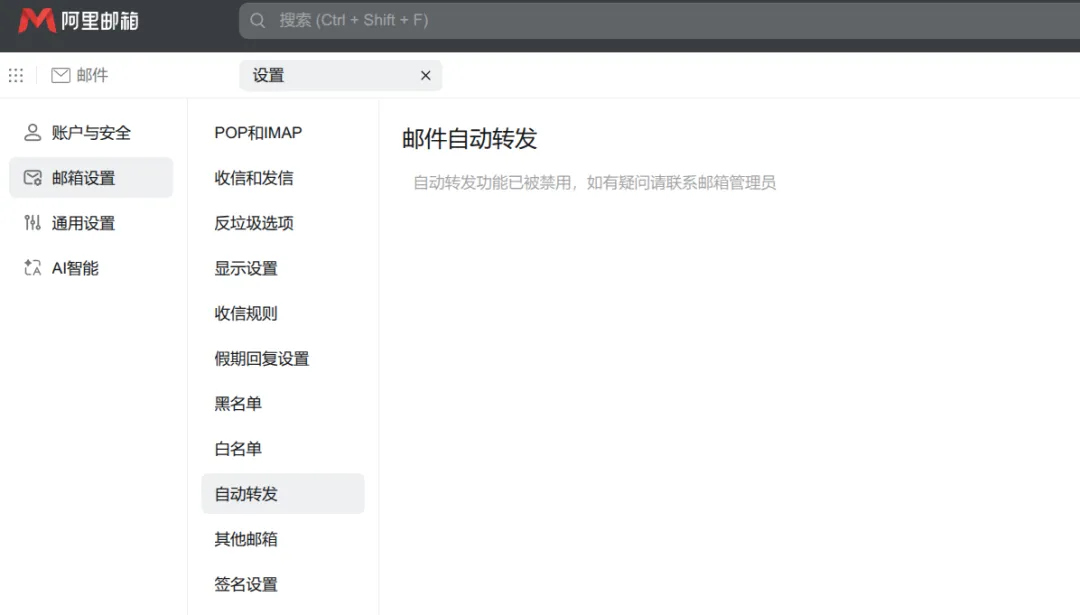
很多公司为了防止员工将内部资料泄露到外部个人邮箱,直接在系统层面切断了自动转发的入口。
难道我们只能乖乖安装那个臃肿的企业邮箱客户端,每天忍受它时不时的掉线和延迟吗?当然不是!如果前端路不通,我们就用代码走后门! 👨💻
破局神器:用 Python 打造私人邮件转发机器人
既然系统不让我们用“自动转发”规则,那我们就模拟人工操作:“找个机器人,每隔几秒钟看一眼收件箱,发现新邮件,就原封不动地手动发送到我的 QQ 邮箱。”
今天,我们就以限制最严的阿里云企业邮箱为例,分享一段轻量级的 Python 脚本。它不仅能绕过管理员的限制,还能实现**“无损转发”**!
直接上硬核干货代码:(建议在电脑端复制或转发到微信文件助手)
import imaplibimport smtplibimport sslimport timeimport jsonimport loggingimport emailfrom email.utils import formatdate, parseaddrfrom email.header import decode_header# ==========================# 第一步:配置你的专属参数# ==========================IMAP_HOST = "imap.mxhichina.com" # 阿里云IMAP服务器(其他邮箱请自行更改)SMTP_HOST = "smtp.mxhichina.com" # 阿里云SMTP服务器EMAIL_ACCOUNT = "your-enterprise@yourdomain.com" # 你的企业邮箱账号EMAIL_PASSWORD = "your-app-password" # 邮箱密码 或 应用专用密码(强烈建议使用应用密码)TARGET_EMAIL = "your-personal-email@qq.com" # 接收转发的个人主邮箱(如QQ邮箱)CHECK_INTERVAL = 5 # 轮询间隔(秒),即每5秒检查一次新邮件UID_STORE_FILE = "forwarded_uids.json" # 本地记录已转发邮件的记忆文件# ==========================# 日志配置(让你清楚看到代码在干嘛)# ==========================logging.basicConfig( level=logging.INFO, format="%(asctime)s - %(levelname)s - %(message)s")# --- 以下为核心处理逻辑,新手无需修改,直接运行即可 ---# ==========================# UID 持久化# ==========================def load_forwarded_uids(): try: with open(UID_STORE_FILE, "r") as f: return set(json.load(f)) except: return set()def save_forwarded_uids(uids): with open(UID_STORE_FILE, "w") as f: json.dump(list(uids), f)# ==========================# IMAP 操作# ==========================def connect_imap(first_connect=False): mail = imaplib.IMAP4_SSL(IMAP_HOST, 993) if first_connect: logging.info(f"✅ 成功连接到 IMAP 服务器: {IMAP_HOST}:993") mail.login(EMAIL_ACCOUNT, EMAIL_PASSWORD) if first_connect: logging.info("✅ IMAP 登录成功") mail.select("INBOX", readonly=True) return maildef fetch_unseen_uids(mail): status, response = mail.uid("search", None, "UNSEEN") if status != "OK": return [] return response[0].split()def fetch_raw_email(mail, uid): status, data = mail.uid("fetch", uid, "(BODY.PEEK[])") if status != "OK": return None return data[0][1]# ==========================# 邮件解析# ==========================def decode_mime_words(text): decoded = "" for part, encoding in decode_header(text): if isinstance(part, bytes): decoded += part.decode(encoding or "utf-8", errors="ignore") else: decoded += part return decodeddef parse_email_info(raw_email_bytes): msg = email.message_from_bytes(raw_email_bytes) subject = decode_mime_words(msg.get("Subject", "")) name, addr = parseaddr(msg.get("From", "")) if name: name = decode_mime_words(name) from_display = f"{name} <{addr}>" else: from_display = addr return subject, from_displaydef count_attachments(raw_email_bytes): msg = email.message_from_bytes(raw_email_bytes) count = 0 for part in msg.walk(): if part.get_content_disposition() == "attachment": count += 1 return count# ==========================# Resent 转发,核心逻辑:伪装成系统重发,保持邮件排版不乱!# ==========================def build_resent_message(raw_email_bytes): split_index = raw_email_bytes.find(b"\r\n\r\n") if split_index == -1: return None original_headers = raw_email_bytes[:split_index] original_body = raw_email_bytes[split_index:] # 注入 Resent 协议头,实现无损转发 resent_headers = ( f"Resent-From: {EMAIL_ACCOUNT}\r\n" f"Resent-To: {TARGET_EMAIL}\r\n" f"Resent-Date: {formatdate(localtime=True)}\r\n" f"Sender: {EMAIL_ACCOUNT}\r\n" ).encode("utf-8") return resent_headers + original_headers + original_bodydef send_raw_email(raw_message): context = ssl.create_default_context() try: with smtplib.SMTP(SMTP_HOST, 587) as server: server.starttls(context=context) server.login(EMAIL_ACCOUNT, EMAIL_PASSWORD) server.sendmail(EMAIL_ACCOUNT, TARGET_EMAIL, raw_message) logging.info("📤 邮件发送成功") return True except Exception as e: logging.error(f"❌ 邮件发送失败: {e}") return False# ==========================# 主程序# ==========================def main(): logging.info("🚀 阿里云企业邮箱邮件转发器已启动") if not all([IMAP_HOST, SMTP_HOST, EMAIL_ACCOUNT, EMAIL_PASSWORD, TARGET_EMAIL]): logging.error("❌ 配置项缺失") return logging.info("✅ 所有配置项验证通过") logging.info(f"⏱️ 定时检测间隔: {CHECK_INTERVAL} 秒") logging.info(f"📬 源邮箱: {EMAIL_ACCOUNT} ➡️ 📤 目标邮箱: {TARGET_EMAIL}") logging.info("🔁 循环执行中...按 Ctrl+C 停止") forwarded_uids = load_forwarded_uids() first_connect = True try: while True: try: mail = connect_imap(first_connect) first_connect = False all_uids = fetch_unseen_uids(mail) # 只过滤需要转发的 pending_uids = [ uid for uid in all_uids if uid.decode() not in forwarded_uids ] if pending_uids: logging.info(f"📬 本轮检测到 {len(pending_uids)} 封新邮件需要转发") else: mail.logout() time.sleep(CHECK_INTERVAL) continue for index, uid in enumerate(pending_uids, start=1): uid_str = uid.decode() raw_email = fetch_raw_email(mail, uid) if not raw_email: continue subject, from_display = parse_email_info(raw_email) logging.info( f"📄 正在处理第 {index}/{len(pending_uids)} 封邮件: " f"'{subject}' 来自 {from_display}" ) attachment_count = count_attachments(raw_email) logging.info(f"📎 提取到 {attachment_count} 个附件") resent_message = build_resent_message(raw_email) if not resent_message: logging.error("❌ 邮件解析失败") continue if send_raw_email(resent_message): forwarded_uids.add(uid_str) save_forwarded_uids(forwarded_uids) logging.info("✅ 转发完成") else: logging.error("📤 转发失败,跳过下一封") mail.logout() logging.info("🔒 IMAP 连接已安全关闭") except Exception as e: logging.error(f"❌ 本轮异常: {e}") logging.info(f"⏸️ 等待 {CHECK_INTERVAL} 秒后进行下一次检测...") time.sleep(CHECK_INTERVAL) except KeyboardInterrupt: logging.info("👋 用户中断,程序正常退出")if __name__ == "__main__": main()
这段代码牛在哪里?(内行看门道)
普通的手动转发往往会把原邮件变成一个“引用的附件”,或者破坏原来的 HTML 排版。
但这段代码使用了邮件底层的 Resent-* 头协议(RFC 2822)!它并没有改变原邮件的内容,而是像邮局一样在信封外面贴了一层“改签”条(Resent-From)。最终效果: 转发到 QQ 邮箱里的邮件,看起来和原发件人直接发给你的一模一样!排版原汁原味,附件一个不少,还可以直接在 QQ 邮箱里点击“回复”给真正的发件人!
如何让它跑起来?
- 1. 准备环境: 电脑或服务器安装好 Python (不需要额外安装第三方库,全用系统自带!)。
- 2. 生成授权码: 出于安全考虑,大部分企业邮箱(包括阿里云)不支持直接使用登录密码。你需要在企业邮箱的“设置-安全”中,生成一个**应用专用密码(授权码)**填入代码中。
- 3. 后台挂机: 你可以在自己一直不关机的办公电脑上运行,或者丢到家里的 NAS、几十块钱的云服务器(比如阿里云轻量应用服务器)上,使用
nohup python forwarder.py & 让它 24 小时默默为你打工。
转发效果图: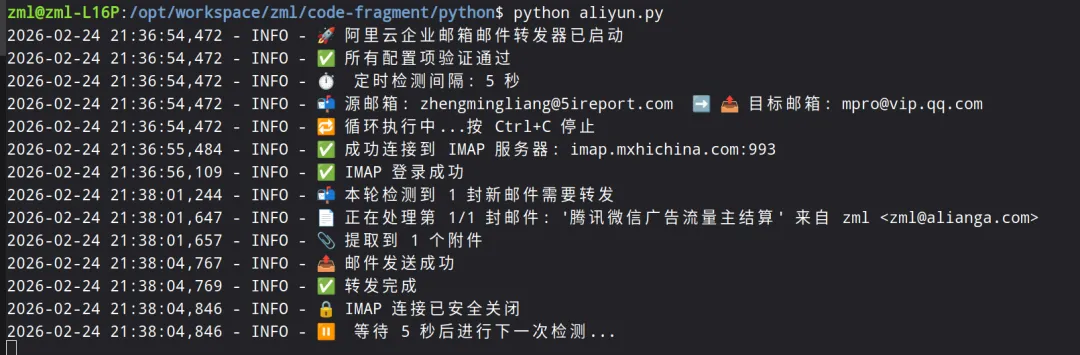
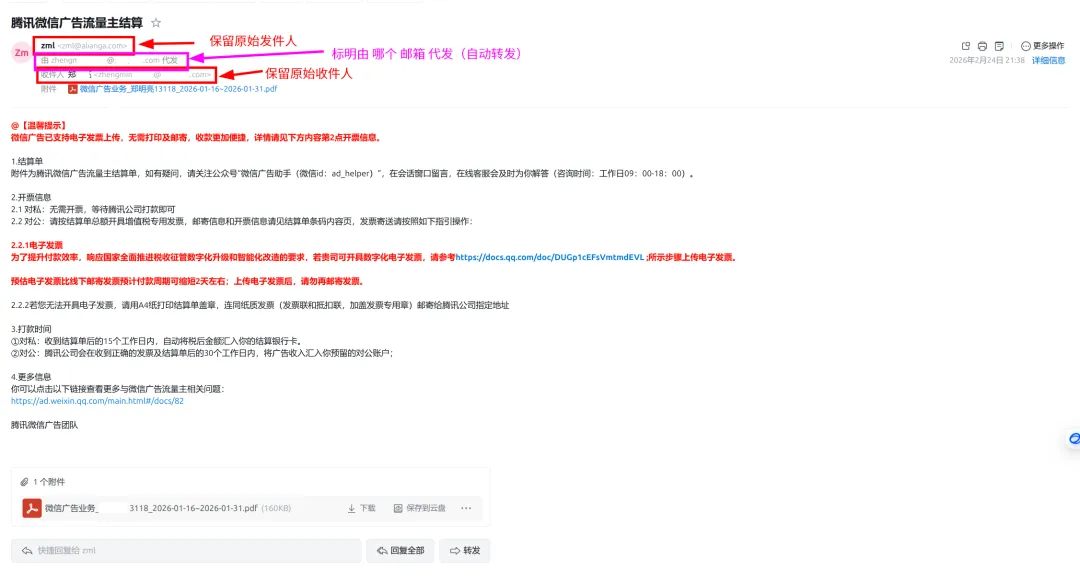
⚠️ 友情提示(求生欲):技术无罪,但请遵守公司规章制度! 如果你们公司的保密级别极高(比如涉密单位、金融核心岗),请不要试图将敏感数据转发到外部网络哦,避免惹上不必要的麻烦!
如果你觉得这个小工具拯救了你的效率,别忘了点个 “收藏” 和 “赞”!欢迎在评论区留言:你平时最喜欢用哪个邮箱作为主力? 我们评论区见!👇
