使用 Python 查询 Sentinel-2 数据,绘制查询结果范围并下载数据
- 2026-09-18 15:28:17
使用 Python 查询 Sentinel-2 数据,绘制查询结果范围并下载数据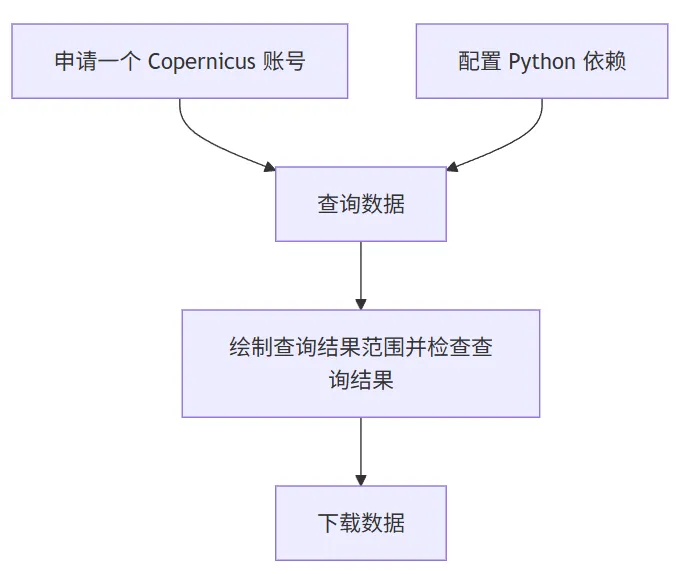
使用 Python 批量查询和下载 Sentinel-1 轨道数据 使用 Python 查询 Sentinel-1 数据(从NASA),绘制查询结果范围并下载数据 使用 Python 查询 Sentinel-1 数据,绘制查询结果范围并下载数据
本文主要介绍通过 Python 从 哥白尼数据空间生态系统 下载哨兵2(Sentinel-2)号 MSIL2A 产品数据。整体流程如下:
本例以查询和下载2026年2月10日至2026年2月15日洛阳市宜阳县 Sentinel-2 S2MSI2A 数据为例。
1 申请一个 Copernicus 账号
申请地址: https://dataspace.copernicus.eu/按步操作,不再赘述: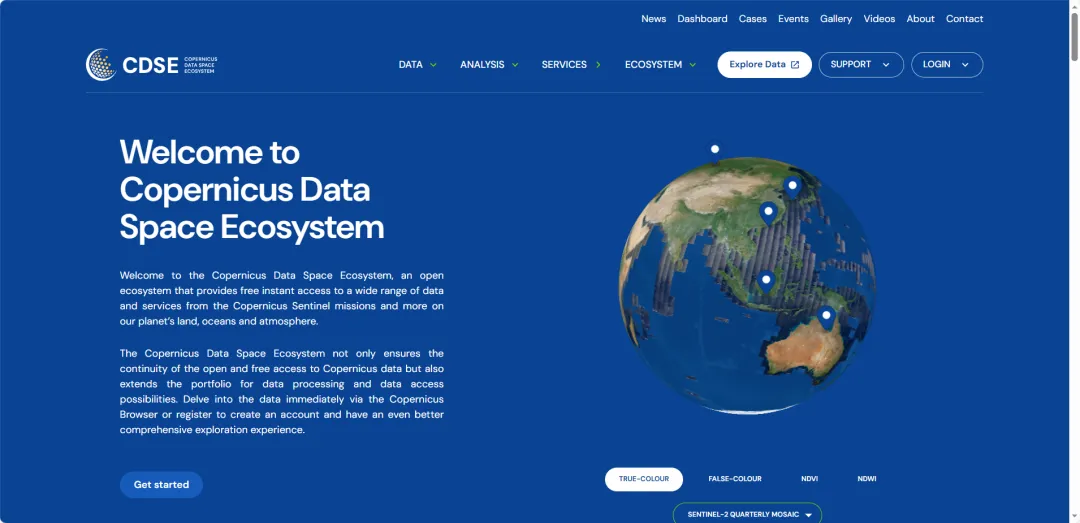
2 配置 Python 依赖
目前,gma 3 的 alpha 版已经发布,本例用于测试 gma 3 的相关功能
Python: 3.12
安装以下库(内置库或关联库已忽略):
gma: 3.0.0a6(下载:https://pypi.org/project/gma/) 或更高
requests: 2.32.3
tqdm: 4.67.1
3 查询数据
本例使用的基础省、市、县三级行政区矢量数据来源于锐多宝。下载地址: https://www.shengshixian.com/。
注:查询数据不需要账号
import requestsimport numpy as npimport datetime as dtfrom gma import gioxian = gio.open_vector("T2024年初县级.shp")# 从县级里筛选出 宜阳县,也可以根据需求自行筛选或打开其他矢量文件lyname = "宜阳县"sel_ly = xian.select(f'地名 = "{name}"')ely = sel_ly.extent()ext_geom = ely[0].geomstime = dt.datetime(2026, 2, 10)etime = dt.datetime(2026, 2, 15)defquery_s2_res(geom, stime, etime):# 查询函数 polygon = geom.to_str() s_stime = stime.strftime('%Y-%m-%d') s_etime = etime.strftime('%Y-%m-%d') filters = ["Collection/Name eq 'SENTINEL-2'",f"OData.CSC.Intersects(area=geography'SRID=4326;{polygon}')", "Attributes/OData.CSC.StringAttribute/any(att:att/Name eq 'productType' and att/OData.CSC.StringAttribute/Value eq 'S2MSI2A')",f"ContentDate/Start gt {s_stime}T00:00:00.000Z",f"ContentDate/End lt {s_etime}T00:00:00.000Z", ] query_res = requests.get("https://catalogue.dataspace.copernicus.eu/odata/v1/Products?"f"$filter={' and '.join(filters)}&""$orderby=ContentDate/Start&""$top=1000").json()['value']return query_resquery_res = query_s2_res(ext_geom, stime, etime)query_res 为一个列表,包含每一景查询到的数据信息,每一景信息为一个字典,结果如下: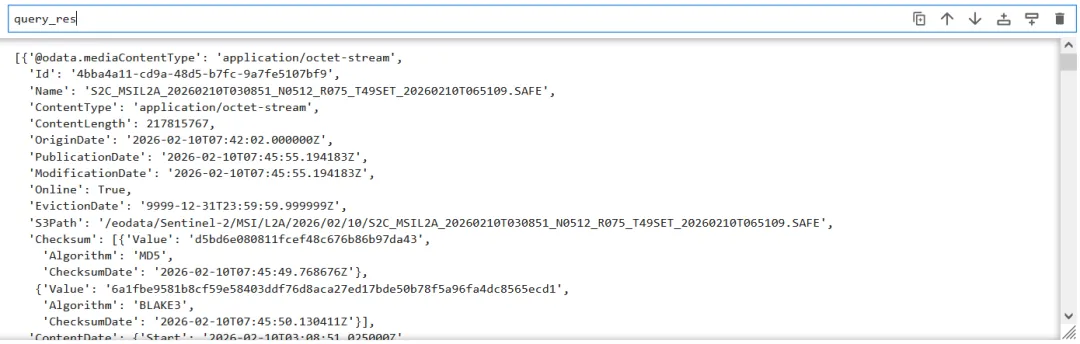
4 绘制查询结果范围
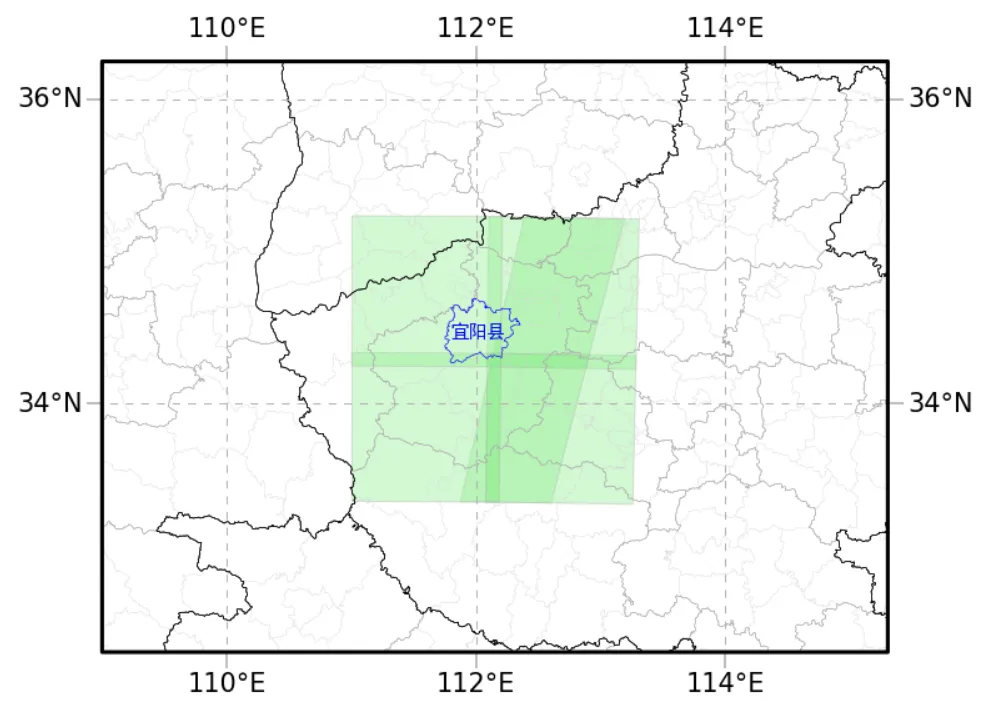
import matplotlib.pyplot as pltfrom gmapy.carto import inres, plotplt.figure(dpi = 150)## 读取省、市图层shi = gio.open_vector('T2024年初地级.shp')sheng = gio.open_vector('T2024年初省级.shp')## 将影像范围 wkt 字符串转换为 gma 几何(Geometry)geoms = [gio.Geometry(res['Footprint'].split(';')[-1][:-1], crs = 4326) for res in query_res]## 根据查询的得到的数据范围,设置一个绘图范围bous = np.array([geom.bounds for geom in geoms])extent = bous[:, 0].min() - 2, bous[:, 1].min() - 1, bous[:, 2].max() + 2, bous[:, 3].max() + 1## 绘制查询结果范围mf = plot.MapFrame(crs = 3857, bounds = extent)### 添加所有查询结果for geom in geoms: mlyi = mf.add_vector(geom, facecolors = 'lightgreen', linewidths = 0.5, alpha = 0.4)### 添加省市县图层mly1 = mf.add_vector(xian, facecolors = 'none', edgecolors = 'lightgray', linewidths = 0.1)mly2 = mf.add_vector(shi, facecolors = 'none', edgecolors = 'darkgray', linewidths = 0.2)mly3 = mf.add_vector(sheng, facecolors = 'none', edgecolors = 'black', linewidths = 0.3)mly4 = mf.add_vector(sel_ly, facecolors = 'none', edgecolors = 'blue', linewidths = 0.3)mly4.add_labels(name, family = 'SimHei', size = 7, color = 'blue')## 设置经纬网gl = mf.add_graticule(lon_range = range(100, 130, 2), lat_range = range(26, 46, 2), lw = 0.5, ls = (6, (6, 6)))ol = gl.set_outline()tk = gl.set_ticks(lw = 0.8)lb = gl.set_labels()可见查询结果范围正常,均覆盖宜阳县
5 下载数据
注:下载数据需要账号
## 根据用户账户获取 tokendefget_access_token(username, password): token_https = 'https://identity.dataspace.copernicus.eu/auth/realms/CDSE/protocol/openid-connect/token' data = {"username":username,"password":password, "grant_type":"password", "client_id":"cdse-public"} r = requests.post(token_https, data = data) r.raise_for_status()return r.json()['access_token']import tqdm## 下载数据### 下载地址的基础 url 模版url = "https://download.dataspace.copernicus.eu/odata/v1/Products(%s)/$value"out_path = r"D:\下载"# 文件保存路径chunk_size = 8192# 下载时分块大小for i, d in enumerate(query_res): Id = d["Id"] name = d["Name"] out_file = f"{out_path}\\{name[:-5]}.zip"if os.path.exists(out_file): print(f'跳过已存在的下载({i + 1}/{len(query_res)}):{out_file}')continue## token会失效,每次获取一个避免失效(反正数据很大每一个数据也要下载很长时间) access_token = get_access_token("你的用户名", "你的密码") headers = {"Authorization": f"Bearer {access_token}"} session = requests.Session() session.headers.update(headers) data_url = url % Id response = session.get(data_url, stream=True)##if response.status_code == 200:## 创建进度条 print(f'当前下载({i + 1}/{len(query_res)}):{out_file}') total_size = int(response.headers.get('content-length', 0)) # 数据总大小 total = int(np.ceil(total_size / chunk_size)) # 分块数量with open(out_file, "wb") as file: # 分块下载for chunk in tqdm.tqdm(response.iter_content(chunk_size = chunk_size), total = total):if chunk: file.write(chunk)else: print(f"Error: {response.status_code}. {response.text}")下载过程示例:
本文来自网友投稿或网络内容,如有侵犯您的权益请联系我们删除,联系邮箱:596563534@qq.com 。
随机文章
-
 10个月宝宝每天需要喝多少奶粉?
- 2025AI大模型赋能Python长时序植被遥感:物候精准提取、时空归因及RSEI评估实战
- 数据分析 | 29 为什么说函数是Python世界里的“乐高积木”?——浅谈模块化编程的艺术
- 26个让你高效办公的Python自动化项目
- 小白学python第81天之Python内置模块
- 10 个值得关注的 Python 冷门库,让自动化脚本更高效
- 这三个Python可视化绘图工具真的好看,强烈推荐~
- 我的Python100天打卡:60/100 Numpy数组的扁平化/旋转翻转/堆叠/重复
- 掌握这30个Python函数,搞定80%工作
- Python 不用类编程,还能用什么
- Python 爬虫自学5 Selenium模拟浏览器