当前位置:首页>python>Python从入门到精通day47

Python从入门到精通day47

  • 2026-03-23 16:25:17
Python从入门到精通day47

Cookie和Session:Django 用户登录认证实战

在上一章节中,我们完成了静态资源配置和 Ajax 无刷新投票功能,本节课将聚焦用户登录认证核心场景,通过 Cookie 和 Session 实现用户跟踪,限制仅登录用户可投票,完整实现 “登录 - 投票 - 注销” 的权限控制链路。

一、用户登录功能准备

1. 正向工程创建用户模型

不同于之前的 “反向工程(数据表→模型)”,本次通过正向工程(模型→数据表) 创建用户模型,定义用户核心字段:

```Pythonclass User(models.Model):    """用户"""    no = models.AutoField(primary_key=True, verbose_name='编号')    username = models.CharField(max_length=20, unique=True, verbose_name='用户名')    password = models.CharField(max_length=32, verbose_name='密码')    tel = models.CharField(max_length=20, verbose_name='手机号')    reg_date = models.DateTimeField(auto_now_add=True, verbose_name='注册时间')    last_visit = models.DateTimeField(null=True, verbose_name='最后登录时间')    class Meta:        db_table = 'tb_user'        verbose_name = '用户'        verbose_name_plural = '用户'```

2.模型迁移生成数据表

执行以下命令,将 User 模型转换为数据库中的tb_user表:

```Bashpython manage.py makemigrations pollspython manage.py migrate polls```

3. 插入测试用户数据

为避免明文存储密码,先将密码转换为MD5摘要(128 位哈希值,32 位 16 进制字符串),再插入测试数据:

```SQLinsert into `tb_user`    (`username`, `password`, `tel`, `reg_date`)values    ('wangdachui', '1c63129ae9db9c60c3e8aa94d3e00495', '13122334455', now()),    ('hellokitty', 'c6f8cf68e5f68b0aa4680e089ee4742c', '13890006789', now());```> **说明**:上面创建的两个用户`wangdachui`和`hellokitty`密码分别是`1qaz2wsx`和`Abc123!!`。

4. 编写 MD5 加密工具函数

polls/utils.py中封装 MD5 加密函数,用于密码加密和验证:

```Pythonimport hashlibdef gen_md5_digest(content):    return hashlib.md5(content.encode()).hexdigest()```

5. 编写登录视图与模板

(1)登录视图函数(基础版)

```Pythondef login(request: HttpRequest) -> HttpResponse:    hint = ''    return render(request, 'login.html', {'hint': hint})```

(2)登录模板页(login.html)

```HTML<!DOCTYPE html><html lang="en"><head>    <meta charset="UTF-8">    <title>用户登录</title>    <style>        #container {            width: 520px;            margin: 10px auto;        }        .input {            margin: 20px 0;            width: 460px;            height: 40px;        }        .input>label {            display: inline-block;            width: 140px;            text-align: right;        }        .input>img {            width: 150px;            vertical-align: middle;        }        input[name=captcha] {            vertical-align: middle;        }        form+div {            margin-transform: translateY( 20px;        }        form+div>a {            text-decoration: none;            color: darkcyan;            font-size: 1.2em);        }        .button {            width: 500px;            text-align: center;            margin-transform: translateY( 20px;        }        .hint {            color: red;            font-size: 12px;        }    </style></head><body>    <div id="container">        <h1>用户登录</h1>        <hr>        <p class="hint">{{ hint }}</p>        <form action="/login/" method="post">            {% csrf_token %}            <fieldset>                <legend>用户信息</legend>                <div class="input">                    <label>用户名:</label>                    <input type="text" name="username">                </div>                <div class="input">                    <label>密码:</label>                    <input type="password" name="password">                </div>                <div class="input">                    <label>验证码:</label>                    <input type="text" name="captcha">                    <img id="code" src="/captcha/" alt="" width="150" height="40">                </div>            </fieldset>            <div class="button">                <input type="submit" value="登录">                <input type="reset" value="重置">            </div>        </form>        <div>            <a href="/">返回首页</a>            <a href="/register/">注册新用户</a>        </div>    </div></body></html>```注意,在上面的表单中,我们使用了模板指令`{% csrf_token %}`为表单添加一个隐藏域(大家可以在浏览器中显示网页源代码就可以看到这个指令生成的`type`属性为`hidden`的`input`标签),它的作用是在表单中生成一个随机令牌(token)来防范[跨站请求伪造](<https://zh.wikipedia.org/wiki/%E8%B7%A8%E7%AB%99%E8%AF%B7%E6%B1%82%E4%BC%AA%E9%80%A0>)(简称为CSRF),这也是Django在提交表单时的硬性要求。如果我们的表单中没有这样的令牌,那么提交表单时,Django框架会产生一个响应状态码为`403`的响应(禁止访问),除非我们设置了免除CSRF令牌。下图是一个关于CSRF简单生动的例子。![](./res/csrf-simple.png)

接下来,我们可以编写提供验证码和实现用户登录的视图函数,在此之前,我们先说说一个Web应用实现用户跟踪的方式以及Django框架对实现用户跟踪所提供的支持。对一个Web应用来说,用户登录成功后必然要让服务器能够记住该用户已经登录,这样服务器才能为这个用户提供更好的服务,而且上面说到的CSRF也是通过钓鱼网站来套取用户登录信息进行恶意操作的攻击手段,这些都是以用户跟踪技术为基础的。在理解了这些背景知识后,我们就清楚用户登录时到底需要执行哪些操作。

二、用户跟踪核心原理

1. HTTP 协议的局限性

HTTP 是无连接、无状态协议:

  • • 无连接:服务器响应后立即断开连接;
  • • 无状态:服务器无法识别多次请求是否来自同一用户。

2. Session 与 Cookie 的协作机制

为实现 “记住用户”(用户跟踪),需通过Session(服务端)+ Cookie(客户端) 协作

  1. 1. 服务器为每个用户创建Session对象(存储用户信息),生成唯一sessionid
  2. 2. 服务器将sessionid写入浏览器 Cookie;
  3. 3. 后续请求时,浏览器自动携带 Cookie 中的sessionid,服务器据此找到对应 Session;
  4. 4. 服务器从 Session 中读取用户信息,实现身份识别。

3.常见用户跟踪方式

  1. 1. URL重写。所谓URL重写就是在URL中携带sessionid,例如:http://www.example.com/index.html?sessionid=123456,服务器通过获取sessionid参数的值来取到与之对应的session对象。
  2. 2. 隐藏域(隐式表单域)。在提交表单的时候,可以通过在表单中设置隐藏域向服务器发送额外的数据。例如:<input type="hidden" name="sessionid" value="123456">
  3. 3. 本地存储。现在的浏览器都支持多种本地存储方案,包括:cookie、localStorage、sessionStorage、IndexedDB等。在这些方案中,cookie是历史最为悠久也是被诟病得最多的一种方案,也是我们接下来首先为大家讲解的一种方案。简单的说,cookie是一种以键值对方式保存在浏览器临时文件中的数据,每次请求时,请求头中会携带本站点的cookie到服务器,那么只要将sessionid写入cookie,下次请求时服务器只要读取请求头中的cookie就能够获得这个sessionid,如下图所示。
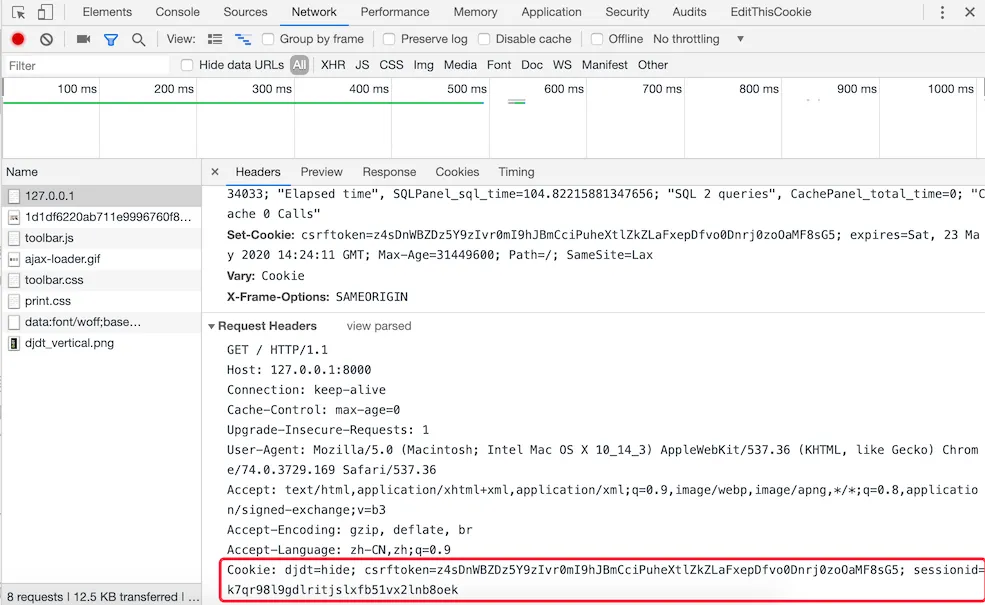
    在HTML5时代要,除了cookie,还可以使用新的本地存储API来保存数据,就是刚才提到的localStorage、sessionStorage、IndexedDB等技术,如下图所示。

总结一下,要实现用户跟踪,服务器端可以为每个用户会话创建一个session对象并将session对象的ID写入到浏览器的cookie中;用户下次请求服务器时,浏览器会在HTTP请求头中携带该网站保存的cookie信息,这样服务器就可以从cookie中找到session对象的ID并根据此ID获取到之前创建的session对象;由于session对象可以用键值对的方式保存用户数据,这样之前保存在session对象中的信息可以悉数取出,服务器也可以根据这些信息判定用户身份和了解用户偏好,为用户提供更好的个性化服务。

三、Django 对 Session 的原生支持

Django 默认激活SessionMiddleware中间件,提供以下核心能力:

  • • request.session:类似字典的对象,可直接读写用户数据;
  • • 自动管理 Cookie 中的sessionid
  • • 默认将 Session 数据序列化(JSON)后存储在数据库django_session表中。

四、完整实现用户登录认证

1. 生成验证码(防暴力破解)

(1)验证码工具函数(polls/utils.py

import randomALL_CHARS = '0123456789abcdefghijklmnopqrstuvwxyzABCDEFGHIJKLMNOPQRSTUVWXYZ'defgen_random_code(length=4):return''.join(random.choices(ALL_CHARS, k=length))

(2)验证码图片生成类(polls/utils.py

"""图片验证码"""import osimport randomfrom io import BytesIOfrom PIL import Imagefrom PIL import ImageFilterfrom PIL.ImageDraw import Drawfrom PIL.ImageFont import truetypeclassBezier:"""贝塞尔曲线"""def__init__(self):self.tsequence = tuple([t / 20.0for t inrange(21)])self.beziers = {}defmake_bezier(self, n):"""绘制贝塞尔曲线"""try:returnself.beziers[n]except KeyError:            combinations = pascal_row(n - 1)            result = []for t inself.tsequence:                tpowers = (t ** i for i inrange(n))                upowers = ((1 - t) ** i for i inrange(n - 1, -1, -1))                coefs = [c * a * b for c, a, b inzip(combinations,                                                      tpowers, upowers)]                result.append(coefs)self.beziers[n] = resultreturn resultclassCaptcha:"""验证码"""def__init__(self, width, height, fonts=None, color=None):self._image = Noneself._fonts = fonts if fonts else \            [os.path.join(os.path.dirname(__file__), 'fonts', font)for font in ['Arial.ttf''Georgia.ttf''Action.ttf']]self._color = color if color else random_color(0200, random.randint(220255))self._width, self._height = width, height    @classmethoddefinstance(cls, width=200, height=75):"""用于获取Captcha对象的类方法"""        prop_name = f'_instance_{width}_{height}'ifnothasattr(cls, prop_name):setattr(cls, prop_name, cls(width, height))returngetattr(cls, prop_name)def_background(self):"""绘制背景"""        Draw(self._image).rectangle([(00), self._image.size],                                    fill=random_color(230255))def_smooth(self):"""平滑图像"""returnself._image.filter(ImageFilter.SMOOTH)def_curve(self, width=4, number=6, color=None):"""绘制曲线"""        dx, height = self._image.size        dx /= number        path = [(dx * i, random.randint(0, height))for i inrange(1, number)]        bcoefs = Bezier().make_bezier(number - 1)        points = []for coefs in bcoefs:            points.append(tuple(sum([coef * p for coef, p inzip(coefs, ps)])for ps inzip(*path)))        Draw(self._image).line(points, fill=color if color elseself._color, width=width)def_noise(self, number=50, level=2, color=None):"""绘制扰码"""        width, height = self._image.size        dx, dy = width / 10, height / 10        width, height = width - dx, height - dy        draw = Draw(self._image)for i inrange(number):            x = int(random.uniform(dx, width))            y = int(random.uniform(dy, height))            draw.line(((x, y), (x + level, y)),                      fill=color if color elseself._color, width=level)def_text(self, captcha_text, fonts, font_sizes=None, drawings=None, squeeze_factor=0.75, color=None):"""绘制文本"""        color = color if color elseself._color        fonts = tuple([truetype(name, size)for name in fontsfor size in font_sizes or (657075)])        draw = Draw(self._image)        char_images = []for c in captcha_text:            font = random.choice(fonts)            c_width, c_height = draw.textsize(c, font=font)            char_image = Image.new('RGB', (c_width, c_height), (000))            char_draw = Draw(char_image)            char_draw.text((00), c, font=font, fill=color)            char_image = char_image.crop(char_image.getbbox())for drawing in drawings:                d = getattr(self, drawing)                char_image = d(char_image)            char_images.append(char_image)        width, height = self._image.size        offset = int((width - sum(int(i.size[0] * squeeze_factor)for i in char_images[:-1]) -                      char_images[-1].size[0]) / 2)for char_image in char_images:            c_width, c_height = char_image.size            mask = char_image.convert('L').point(lambda i: i * 1.97)self._image.paste(char_image,                              (offset, int((height - c_height) / 2)),                              mask)            offset += int(c_width * squeeze_factor)    @staticmethoddef_warp(image, dx_factor=0.3, dy_factor=0.3):"""图像扭曲"""        width, height = image.size        dx = width * dx_factor        dy = height * dy_factor        x1 = int(random.uniform(-dx, dx))        y1 = int(random.uniform(-dy, dy))        x2 = int(random.uniform(-dx, dx))        y2 = int(random.uniform(-dy, dy))        warp_image = Image.new('RGB',            (width + abs(x1) + abs(x2), height + abs(y1) + abs(y2)))        warp_image.paste(image, (abs(x1), abs(y1)))        width2, height2 = warp_image.sizereturn warp_image.transform(            (width, height),            Image.QUAD,            (x1, y1, -x1, height2 - y2, width2 + x2, height2 + y2, width2 - x2, -y1))    @staticmethoddef_offset(image, dx_factor=0.1, dy_factor=0.2):"""图像偏移"""        width, height = image.size        dx = int(random.random() * width * dx_factor)        dy = int(random.random() * height * dy_factor)        offset_image = Image.new('RGB', (width + dx, height + dy))        offset_image.paste(image, (dx, dy))return offset_image    @staticmethoddef_rotate(image, angle=25):"""图像旋转"""return image.rotate(random.uniform(-angle, angle),                            Image.BILINEAR, expand=1)defgenerate(self, captcha_text='', fmt='PNG'):"""生成验证码(文字和图片)        :param captcha_text: 验证码文字        :param fmt: 生成的验证码图片格式        :return: 验证码图片的二进制数据        """self._image = Image.new('RGB', (self._width, self._height), (255255255))self._background()self._text(captcha_text, self._fonts,                   drawings=['_warp''_rotate''_offset'])self._curve()self._noise()self._smooth()        image_bytes = BytesIO()self._image.save(image_bytes, format=fmt)return image_bytes.getvalue()defpascal_row(n=0):"""生成毕达哥拉斯三角形(杨辉三角)"""    result = [1]    x, numerator = 1, nfor denominator inrange(1, n // 2 + 1):        x *= numerator        x /= denominator        result.append(x)        numerator -= 1if n & 1 == 0:        result.extend(reversed(result[:-1]))else:        result.extend(reversed(result))return resultdefrandom_color(start=0, end=255, opacity=255):"""获得随机颜色"""    red = random.randint(start, end)    green = random.randint(start, end)    blue = random.randint(start, end)if opacity isNone:return red, green, bluereturn red, green, blue, opacity

说明:上面的代码中用到了三个字体文件,字体文件位于polls/fonts目录下,大家可以自行添加字体文件,但是需要注意字体文件的文件名跟上面代码的第45行保持一致。

(3)验证码视图函数

defget_captcha(request: HttpRequest) -> HttpResponse:"""验证码"""    captcha_text = gen_random_code()    request.session['captcha'] = captcha_text    image_data = Captcha.instance().generate(captcha_text)return HttpResponse(image_data, content_type='image/png')

2. 完整登录验证逻辑

deflogin(request: HttpRequest) -> HttpResponse:    hint = ''if request.method == 'POST':        username = request.POST.get('username')        password = request.POST.get('password')if username and password:            password = gen_md5_digest(password)            user = User.objects.filter(username=username, password=password).first()if user:                request.session['userid'] = user.no                request.session['username'] = user.usernamereturn redirect('/')else:                hint = '用户名或密码错误'else:            hint = '请输入有效的用户名和密码'return render(request, 'login.html', {'hint': hint})

说明:上面的代码没有对用户名和密码没有进行验证,实际项目中建议使用正则表达式验证用户输入信息,否则有可能将无效的数据交给数据库进行处理或者造成其他安全方面的隐患。

3. 登录状态展示(首页改造)

创建header.html模板片段,根据 Session 中的用户信息展示不同内容:

<divclass="user">    {% if request.session.userid %}<span>{{ request.session.username }}</span><ahref="/logout">注销</a>    {% else %}<ahref="/login">登录</a>&nbsp;&nbsp;    {% endif %}<ahref="/register">注册</a></div>

4. 用户注销功能

deflogout(request):"""注销"""    request.session.flush()return redirect('/')

5. 限制仅登录用户可投票

改造投票视图函数,增加登录验证:

defpraise_or_criticize(request: HttpRequest) -> HttpResponse:if request.session.get('userid'):try:            tno = int(request.GET.get('tno'))            teacher = Teacher.objects.get(no=tno)if request.path.startswith('/praise/'):                teacher.good_count += 1                count = teacher.good_countelse:                teacher.bad_count += 1                count = teacher.bad_count            teacher.save()            data = {'code'20000'mesg''投票成功''count': count}except (ValueError, Teacher.DoesNotExist):            data = {'code'20001'mesg''投票失败'}else:        data = {'code'20002'mesg''请先登录'}return JsonResponse(data)

当然,在修改了视图函数后,teachers.html也需要进行调整,用户如果没有登录,就将用户引导至登录页,登录成功再返回到投票页,此处不再赘述。

五、在视图函数中读写cookie

下面我们对如何使用cookie做一个更为细致的说明以便帮助大家在Web项目中更好地使用这项技术。Django封装的HttpRequestHttpResponse对象分别提供了读写cookie的操作。

HttpRequest封装的属性和方法:

  1. 1. COOKIES属性 - 该属性包含了HTTP请求携带的所有cookie。
  2. 2. get_signed_cookie方法 - 获取带签名的cookie,如果签名验证失败,会产生BadSignature异常。

HttpResponse封装的方法:

  1. 1. set_cookie方法 - 该方法可以设置一组键值对并将其最终将写入浏览器。
  2. 2. set_signed_cookie方法 - 跟上面的方法作用相似,但是会对cookie进行签名来达到防篡改的作用。因为如果篡改了cookie中的数据,在不知道密钥的情况下是无法生成有效的签名,这样服务器在读取cookie时会发现数据与签名不一致从而产生BadSignature异常。需要说明的是,这里所说的密钥就是我们在Django项目配置文件中指定的SECRET_KEY,而盐是程序中设定的一个字符串,你愿意设定为什么都可以,只要是一个有效的字符串。

上面提到的方法,如果不清楚它们的具体用法,可以自己查阅一下Django的官方文档,没有什么资料比官方文档能够更清楚的告诉你这些方法到底如何使用。

刚才我们说过了,激活SessionMiddleware之后,每个HttpRequest对象都会绑定一个session属性,它是一个类似字典的对象,除了保存用户数据之外还提供了检测浏览器是否支持cookie的方法,包括:

  1. 1. set_test_cookie方法 - 设置用于测试的cookie。
  2. 2. test_cookie_worked方法 - 检测测试cookie是否工作。
  3. 3. delete_test_cookie方法 - 删除用于测试的cookie。
  4. 4. set_expiry方法 - 设置会话的过期时间。
  5. 5. get_expire_age/get_expire_date方法 - 获取会话的过期时间。
  6. 6. clear_expired方法 - 清理过期的会话。

下面是在执行登录之前检查浏览器是否支持cookie的代码。通常情况下,浏览器默认开启了对cookie的支持,但是可能因为某种原因,用户禁用了浏览器的cookie功能,遇到这种情况我们可以在视图函数中提供一个检查功能,如果检查到用户浏览器不支持cookie,可以给出相应的提示。

deflogin(request):if request.method == 'POST':if request.session.test_cookie_worked():            request.session.delete_test_cookie()# Add your code to perform login process hereelse:return HttpResponse("Please enable cookies and try again.")    request.session.set_test_cookie()return render_to_response('login.html')

六、Cookie的替代品

对于现代浏览器,可使用 HTML5 存储 API 替代 Cookie:

  • • localStorage:永久存储,除非手动删除;
  • • sessionStorage:会话级存储,关闭浏览器即清空;
  • • IndexedDB:大容量结构化存储。

七、小结

本次实战完成了:

  1. 1. 正向工程创建用户模型,实现密码 MD5 加密存储;
  2. 2. 基于 Session+Cookie 的用户跟踪,完成登录 / 注销功能;
  3. 3. 验证码生成与验证,防范暴力破解;
  4. 4. 投票权限控制,仅登录用户可操作;
  5. 5. Cookie/Session 的高级配置与优化。

八、AI工具,提高学习,工作效率神器

国内直接使用顶级AI工具

谷歌浏览器访问:

https://www.nezhasoft.cloud/r/vMPJZr
最新文章

随机文章

基本 文件 流程 错误 SQL 调试
  1. 请求信息 : 2026-03-27 13:04:43 HTTP/2.0 GET : https://f.mffb.com.cn/a/479462.html
  2. 运行时间 : 0.247834s [ 吞吐率:4.03req/s ] 内存消耗:5,204.99kb 文件加载:140
  3. 缓存信息 : 0 reads,0 writes
  4. 会话信息 : SESSION_ID=fb140d01838977721767d8fd5c413088
  1. /yingpanguazai/ssd/ssd1/www/f.mffb.com.cn/public/index.php ( 0.79 KB )
  2. /yingpanguazai/ssd/ssd1/www/f.mffb.com.cn/vendor/autoload.php ( 0.17 KB )
  3. /yingpanguazai/ssd/ssd1/www/f.mffb.com.cn/vendor/composer/autoload_real.php ( 2.49 KB )
  4. /yingpanguazai/ssd/ssd1/www/f.mffb.com.cn/vendor/composer/platform_check.php ( 0.90 KB )
  5. /yingpanguazai/ssd/ssd1/www/f.mffb.com.cn/vendor/composer/ClassLoader.php ( 14.03 KB )
  6. /yingpanguazai/ssd/ssd1/www/f.mffb.com.cn/vendor/composer/autoload_static.php ( 4.90 KB )
  7. /yingpanguazai/ssd/ssd1/www/f.mffb.com.cn/vendor/topthink/think-helper/src/helper.php ( 8.34 KB )
  8. /yingpanguazai/ssd/ssd1/www/f.mffb.com.cn/vendor/topthink/think-validate/src/helper.php ( 2.19 KB )
  9. /yingpanguazai/ssd/ssd1/www/f.mffb.com.cn/vendor/topthink/think-orm/src/helper.php ( 1.47 KB )
  10. /yingpanguazai/ssd/ssd1/www/f.mffb.com.cn/vendor/topthink/think-orm/stubs/load_stubs.php ( 0.16 KB )
  11. /yingpanguazai/ssd/ssd1/www/f.mffb.com.cn/vendor/topthink/framework/src/think/Exception.php ( 1.69 KB )
  12. /yingpanguazai/ssd/ssd1/www/f.mffb.com.cn/vendor/topthink/think-container/src/Facade.php ( 2.71 KB )
  13. /yingpanguazai/ssd/ssd1/www/f.mffb.com.cn/vendor/symfony/deprecation-contracts/function.php ( 0.99 KB )
  14. /yingpanguazai/ssd/ssd1/www/f.mffb.com.cn/vendor/symfony/polyfill-mbstring/bootstrap.php ( 8.26 KB )
  15. /yingpanguazai/ssd/ssd1/www/f.mffb.com.cn/vendor/symfony/polyfill-mbstring/bootstrap80.php ( 9.78 KB )
  16. /yingpanguazai/ssd/ssd1/www/f.mffb.com.cn/vendor/symfony/var-dumper/Resources/functions/dump.php ( 1.49 KB )
  17. /yingpanguazai/ssd/ssd1/www/f.mffb.com.cn/vendor/topthink/think-dumper/src/helper.php ( 0.18 KB )
  18. /yingpanguazai/ssd/ssd1/www/f.mffb.com.cn/vendor/symfony/var-dumper/VarDumper.php ( 4.30 KB )
  19. /yingpanguazai/ssd/ssd1/www/f.mffb.com.cn/vendor/topthink/framework/src/think/App.php ( 15.30 KB )
  20. /yingpanguazai/ssd/ssd1/www/f.mffb.com.cn/vendor/topthink/think-container/src/Container.php ( 15.76 KB )
  21. /yingpanguazai/ssd/ssd1/www/f.mffb.com.cn/vendor/psr/container/src/ContainerInterface.php ( 1.02 KB )
  22. /yingpanguazai/ssd/ssd1/www/f.mffb.com.cn/app/provider.php ( 0.19 KB )
  23. /yingpanguazai/ssd/ssd1/www/f.mffb.com.cn/vendor/topthink/framework/src/think/Http.php ( 6.04 KB )
  24. /yingpanguazai/ssd/ssd1/www/f.mffb.com.cn/vendor/topthink/think-helper/src/helper/Str.php ( 7.29 KB )
  25. /yingpanguazai/ssd/ssd1/www/f.mffb.com.cn/vendor/topthink/framework/src/think/Env.php ( 4.68 KB )
  26. /yingpanguazai/ssd/ssd1/www/f.mffb.com.cn/app/common.php ( 0.03 KB )
  27. /yingpanguazai/ssd/ssd1/www/f.mffb.com.cn/vendor/topthink/framework/src/helper.php ( 18.78 KB )
  28. /yingpanguazai/ssd/ssd1/www/f.mffb.com.cn/vendor/topthink/framework/src/think/Config.php ( 5.54 KB )
  29. /yingpanguazai/ssd/ssd1/www/f.mffb.com.cn/config/app.php ( 0.95 KB )
  30. /yingpanguazai/ssd/ssd1/www/f.mffb.com.cn/config/cache.php ( 0.78 KB )
  31. /yingpanguazai/ssd/ssd1/www/f.mffb.com.cn/config/console.php ( 0.23 KB )
  32. /yingpanguazai/ssd/ssd1/www/f.mffb.com.cn/config/cookie.php ( 0.56 KB )
  33. /yingpanguazai/ssd/ssd1/www/f.mffb.com.cn/config/database.php ( 2.48 KB )
  34. /yingpanguazai/ssd/ssd1/www/f.mffb.com.cn/vendor/topthink/framework/src/think/facade/Env.php ( 1.67 KB )
  35. /yingpanguazai/ssd/ssd1/www/f.mffb.com.cn/config/filesystem.php ( 0.61 KB )
  36. /yingpanguazai/ssd/ssd1/www/f.mffb.com.cn/config/lang.php ( 0.91 KB )
  37. /yingpanguazai/ssd/ssd1/www/f.mffb.com.cn/config/log.php ( 1.35 KB )
  38. /yingpanguazai/ssd/ssd1/www/f.mffb.com.cn/config/middleware.php ( 0.19 KB )
  39. /yingpanguazai/ssd/ssd1/www/f.mffb.com.cn/config/route.php ( 1.89 KB )
  40. /yingpanguazai/ssd/ssd1/www/f.mffb.com.cn/config/session.php ( 0.57 KB )
  41. /yingpanguazai/ssd/ssd1/www/f.mffb.com.cn/config/trace.php ( 0.34 KB )
  42. /yingpanguazai/ssd/ssd1/www/f.mffb.com.cn/config/view.php ( 0.82 KB )
  43. /yingpanguazai/ssd/ssd1/www/f.mffb.com.cn/app/event.php ( 0.25 KB )
  44. /yingpanguazai/ssd/ssd1/www/f.mffb.com.cn/vendor/topthink/framework/src/think/Event.php ( 7.67 KB )
  45. /yingpanguazai/ssd/ssd1/www/f.mffb.com.cn/app/service.php ( 0.13 KB )
  46. /yingpanguazai/ssd/ssd1/www/f.mffb.com.cn/app/AppService.php ( 0.26 KB )
  47. /yingpanguazai/ssd/ssd1/www/f.mffb.com.cn/vendor/topthink/framework/src/think/Service.php ( 1.64 KB )
  48. /yingpanguazai/ssd/ssd1/www/f.mffb.com.cn/vendor/topthink/framework/src/think/Lang.php ( 7.35 KB )
  49. /yingpanguazai/ssd/ssd1/www/f.mffb.com.cn/vendor/topthink/framework/src/lang/zh-cn.php ( 13.70 KB )
  50. /yingpanguazai/ssd/ssd1/www/f.mffb.com.cn/vendor/topthink/framework/src/think/initializer/Error.php ( 3.31 KB )
  51. /yingpanguazai/ssd/ssd1/www/f.mffb.com.cn/vendor/topthink/framework/src/think/initializer/RegisterService.php ( 1.33 KB )
  52. /yingpanguazai/ssd/ssd1/www/f.mffb.com.cn/vendor/services.php ( 0.14 KB )
  53. /yingpanguazai/ssd/ssd1/www/f.mffb.com.cn/vendor/topthink/framework/src/think/service/PaginatorService.php ( 1.52 KB )
  54. /yingpanguazai/ssd/ssd1/www/f.mffb.com.cn/vendor/topthink/framework/src/think/service/ValidateService.php ( 0.99 KB )
  55. /yingpanguazai/ssd/ssd1/www/f.mffb.com.cn/vendor/topthink/framework/src/think/service/ModelService.php ( 2.04 KB )
  56. /yingpanguazai/ssd/ssd1/www/f.mffb.com.cn/vendor/topthink/think-trace/src/Service.php ( 0.77 KB )
  57. /yingpanguazai/ssd/ssd1/www/f.mffb.com.cn/vendor/topthink/framework/src/think/Middleware.php ( 6.72 KB )
  58. /yingpanguazai/ssd/ssd1/www/f.mffb.com.cn/vendor/topthink/framework/src/think/initializer/BootService.php ( 0.77 KB )
  59. /yingpanguazai/ssd/ssd1/www/f.mffb.com.cn/vendor/topthink/think-orm/src/Paginator.php ( 11.86 KB )
  60. /yingpanguazai/ssd/ssd1/www/f.mffb.com.cn/vendor/topthink/think-validate/src/Validate.php ( 63.20 KB )
  61. /yingpanguazai/ssd/ssd1/www/f.mffb.com.cn/vendor/topthink/think-orm/src/Model.php ( 23.55 KB )
  62. /yingpanguazai/ssd/ssd1/www/f.mffb.com.cn/vendor/topthink/think-orm/src/model/concern/Attribute.php ( 21.05 KB )
  63. /yingpanguazai/ssd/ssd1/www/f.mffb.com.cn/vendor/topthink/think-orm/src/model/concern/AutoWriteData.php ( 4.21 KB )
  64. /yingpanguazai/ssd/ssd1/www/f.mffb.com.cn/vendor/topthink/think-orm/src/model/concern/Conversion.php ( 6.44 KB )
  65. /yingpanguazai/ssd/ssd1/www/f.mffb.com.cn/vendor/topthink/think-orm/src/model/concern/DbConnect.php ( 5.16 KB )
  66. /yingpanguazai/ssd/ssd1/www/f.mffb.com.cn/vendor/topthink/think-orm/src/model/concern/ModelEvent.php ( 2.33 KB )
  67. /yingpanguazai/ssd/ssd1/www/f.mffb.com.cn/vendor/topthink/think-orm/src/model/concern/RelationShip.php ( 28.29 KB )
  68. /yingpanguazai/ssd/ssd1/www/f.mffb.com.cn/vendor/topthink/think-helper/src/contract/Arrayable.php ( 0.09 KB )
  69. /yingpanguazai/ssd/ssd1/www/f.mffb.com.cn/vendor/topthink/think-helper/src/contract/Jsonable.php ( 0.13 KB )
  70. /yingpanguazai/ssd/ssd1/www/f.mffb.com.cn/vendor/topthink/think-orm/src/model/contract/Modelable.php ( 0.09 KB )
  71. /yingpanguazai/ssd/ssd1/www/f.mffb.com.cn/vendor/topthink/framework/src/think/Db.php ( 2.88 KB )
  72. /yingpanguazai/ssd/ssd1/www/f.mffb.com.cn/vendor/topthink/think-orm/src/DbManager.php ( 8.52 KB )
  73. /yingpanguazai/ssd/ssd1/www/f.mffb.com.cn/vendor/topthink/framework/src/think/Log.php ( 6.28 KB )
  74. /yingpanguazai/ssd/ssd1/www/f.mffb.com.cn/vendor/topthink/framework/src/think/Manager.php ( 3.92 KB )
  75. /yingpanguazai/ssd/ssd1/www/f.mffb.com.cn/vendor/psr/log/src/LoggerTrait.php ( 2.69 KB )
  76. /yingpanguazai/ssd/ssd1/www/f.mffb.com.cn/vendor/psr/log/src/LoggerInterface.php ( 2.71 KB )
  77. /yingpanguazai/ssd/ssd1/www/f.mffb.com.cn/vendor/topthink/framework/src/think/Cache.php ( 4.92 KB )
  78. /yingpanguazai/ssd/ssd1/www/f.mffb.com.cn/vendor/psr/simple-cache/src/CacheInterface.php ( 4.71 KB )
  79. /yingpanguazai/ssd/ssd1/www/f.mffb.com.cn/vendor/topthink/think-helper/src/helper/Arr.php ( 16.63 KB )
  80. /yingpanguazai/ssd/ssd1/www/f.mffb.com.cn/vendor/topthink/framework/src/think/cache/driver/File.php ( 7.84 KB )
  81. /yingpanguazai/ssd/ssd1/www/f.mffb.com.cn/vendor/topthink/framework/src/think/cache/Driver.php ( 9.03 KB )
  82. /yingpanguazai/ssd/ssd1/www/f.mffb.com.cn/vendor/topthink/framework/src/think/contract/CacheHandlerInterface.php ( 1.99 KB )
  83. /yingpanguazai/ssd/ssd1/www/f.mffb.com.cn/app/Request.php ( 0.09 KB )
  84. /yingpanguazai/ssd/ssd1/www/f.mffb.com.cn/vendor/topthink/framework/src/think/Request.php ( 55.78 KB )
  85. /yingpanguazai/ssd/ssd1/www/f.mffb.com.cn/app/middleware.php ( 0.25 KB )
  86. /yingpanguazai/ssd/ssd1/www/f.mffb.com.cn/vendor/topthink/framework/src/think/Pipeline.php ( 2.61 KB )
  87. /yingpanguazai/ssd/ssd1/www/f.mffb.com.cn/vendor/topthink/think-trace/src/TraceDebug.php ( 3.40 KB )
  88. /yingpanguazai/ssd/ssd1/www/f.mffb.com.cn/vendor/topthink/framework/src/think/middleware/SessionInit.php ( 1.94 KB )
  89. /yingpanguazai/ssd/ssd1/www/f.mffb.com.cn/vendor/topthink/framework/src/think/Session.php ( 1.80 KB )
  90. /yingpanguazai/ssd/ssd1/www/f.mffb.com.cn/vendor/topthink/framework/src/think/session/driver/File.php ( 6.27 KB )
  91. /yingpanguazai/ssd/ssd1/www/f.mffb.com.cn/vendor/topthink/framework/src/think/contract/SessionHandlerInterface.php ( 0.87 KB )
  92. /yingpanguazai/ssd/ssd1/www/f.mffb.com.cn/vendor/topthink/framework/src/think/session/Store.php ( 7.12 KB )
  93. /yingpanguazai/ssd/ssd1/www/f.mffb.com.cn/vendor/topthink/framework/src/think/Route.php ( 23.73 KB )
  94. /yingpanguazai/ssd/ssd1/www/f.mffb.com.cn/vendor/topthink/framework/src/think/route/RuleName.php ( 5.75 KB )
  95. /yingpanguazai/ssd/ssd1/www/f.mffb.com.cn/vendor/topthink/framework/src/think/route/Domain.php ( 2.53 KB )
  96. /yingpanguazai/ssd/ssd1/www/f.mffb.com.cn/vendor/topthink/framework/src/think/route/RuleGroup.php ( 22.43 KB )
  97. /yingpanguazai/ssd/ssd1/www/f.mffb.com.cn/vendor/topthink/framework/src/think/route/Rule.php ( 26.95 KB )
  98. /yingpanguazai/ssd/ssd1/www/f.mffb.com.cn/vendor/topthink/framework/src/think/route/RuleItem.php ( 9.78 KB )
  99. /yingpanguazai/ssd/ssd1/www/f.mffb.com.cn/route/app.php ( 1.72 KB )
  100. /yingpanguazai/ssd/ssd1/www/f.mffb.com.cn/vendor/topthink/framework/src/think/facade/Route.php ( 4.70 KB )
  101. /yingpanguazai/ssd/ssd1/www/f.mffb.com.cn/vendor/topthink/framework/src/think/route/dispatch/Controller.php ( 4.74 KB )
  102. /yingpanguazai/ssd/ssd1/www/f.mffb.com.cn/vendor/topthink/framework/src/think/route/Dispatch.php ( 10.44 KB )
  103. /yingpanguazai/ssd/ssd1/www/f.mffb.com.cn/app/controller/Index.php ( 4.81 KB )
  104. /yingpanguazai/ssd/ssd1/www/f.mffb.com.cn/app/BaseController.php ( 2.05 KB )
  105. /yingpanguazai/ssd/ssd1/www/f.mffb.com.cn/vendor/topthink/think-orm/src/facade/Db.php ( 0.93 KB )
  106. /yingpanguazai/ssd/ssd1/www/f.mffb.com.cn/vendor/topthink/think-orm/src/db/connector/Mysql.php ( 5.44 KB )
  107. /yingpanguazai/ssd/ssd1/www/f.mffb.com.cn/vendor/topthink/think-orm/src/db/PDOConnection.php ( 52.47 KB )
  108. /yingpanguazai/ssd/ssd1/www/f.mffb.com.cn/vendor/topthink/think-orm/src/db/Connection.php ( 8.39 KB )
  109. /yingpanguazai/ssd/ssd1/www/f.mffb.com.cn/vendor/topthink/think-orm/src/db/ConnectionInterface.php ( 4.57 KB )
  110. /yingpanguazai/ssd/ssd1/www/f.mffb.com.cn/vendor/topthink/think-orm/src/db/builder/Mysql.php ( 16.58 KB )
  111. /yingpanguazai/ssd/ssd1/www/f.mffb.com.cn/vendor/topthink/think-orm/src/db/Builder.php ( 24.06 KB )
  112. /yingpanguazai/ssd/ssd1/www/f.mffb.com.cn/vendor/topthink/think-orm/src/db/BaseBuilder.php ( 27.50 KB )
  113. /yingpanguazai/ssd/ssd1/www/f.mffb.com.cn/vendor/topthink/think-orm/src/db/Query.php ( 15.71 KB )
  114. /yingpanguazai/ssd/ssd1/www/f.mffb.com.cn/vendor/topthink/think-orm/src/db/BaseQuery.php ( 45.13 KB )
  115. /yingpanguazai/ssd/ssd1/www/f.mffb.com.cn/vendor/topthink/think-orm/src/db/concern/TimeFieldQuery.php ( 7.43 KB )
  116. /yingpanguazai/ssd/ssd1/www/f.mffb.com.cn/vendor/topthink/think-orm/src/db/concern/AggregateQuery.php ( 3.26 KB )
  117. /yingpanguazai/ssd/ssd1/www/f.mffb.com.cn/vendor/topthink/think-orm/src/db/concern/ModelRelationQuery.php ( 20.07 KB )
  118. /yingpanguazai/ssd/ssd1/www/f.mffb.com.cn/vendor/topthink/think-orm/src/db/concern/ParamsBind.php ( 3.66 KB )
  119. /yingpanguazai/ssd/ssd1/www/f.mffb.com.cn/vendor/topthink/think-orm/src/db/concern/ResultOperation.php ( 7.01 KB )
  120. /yingpanguazai/ssd/ssd1/www/f.mffb.com.cn/vendor/topthink/think-orm/src/db/concern/WhereQuery.php ( 19.37 KB )
  121. /yingpanguazai/ssd/ssd1/www/f.mffb.com.cn/vendor/topthink/think-orm/src/db/concern/JoinAndViewQuery.php ( 7.11 KB )
  122. /yingpanguazai/ssd/ssd1/www/f.mffb.com.cn/vendor/topthink/think-orm/src/db/concern/TableFieldInfo.php ( 2.63 KB )
  123. /yingpanguazai/ssd/ssd1/www/f.mffb.com.cn/vendor/topthink/think-orm/src/db/concern/Transaction.php ( 2.77 KB )
  124. /yingpanguazai/ssd/ssd1/www/f.mffb.com.cn/vendor/topthink/framework/src/think/log/driver/File.php ( 5.96 KB )
  125. /yingpanguazai/ssd/ssd1/www/f.mffb.com.cn/vendor/topthink/framework/src/think/contract/LogHandlerInterface.php ( 0.86 KB )
  126. /yingpanguazai/ssd/ssd1/www/f.mffb.com.cn/vendor/topthink/framework/src/think/log/Channel.php ( 3.89 KB )
  127. /yingpanguazai/ssd/ssd1/www/f.mffb.com.cn/vendor/topthink/framework/src/think/event/LogRecord.php ( 1.02 KB )
  128. /yingpanguazai/ssd/ssd1/www/f.mffb.com.cn/vendor/topthink/think-helper/src/Collection.php ( 16.47 KB )
  129. /yingpanguazai/ssd/ssd1/www/f.mffb.com.cn/vendor/topthink/framework/src/think/facade/View.php ( 1.70 KB )
  130. /yingpanguazai/ssd/ssd1/www/f.mffb.com.cn/vendor/topthink/framework/src/think/View.php ( 4.39 KB )
  131. /yingpanguazai/ssd/ssd1/www/f.mffb.com.cn/vendor/topthink/framework/src/think/Response.php ( 8.81 KB )
  132. /yingpanguazai/ssd/ssd1/www/f.mffb.com.cn/vendor/topthink/framework/src/think/response/View.php ( 3.29 KB )
  133. /yingpanguazai/ssd/ssd1/www/f.mffb.com.cn/vendor/topthink/framework/src/think/Cookie.php ( 6.06 KB )
  134. /yingpanguazai/ssd/ssd1/www/f.mffb.com.cn/vendor/topthink/think-view/src/Think.php ( 8.38 KB )
  135. /yingpanguazai/ssd/ssd1/www/f.mffb.com.cn/vendor/topthink/framework/src/think/contract/TemplateHandlerInterface.php ( 1.60 KB )
  136. /yingpanguazai/ssd/ssd1/www/f.mffb.com.cn/vendor/topthink/think-template/src/Template.php ( 46.61 KB )
  137. /yingpanguazai/ssd/ssd1/www/f.mffb.com.cn/vendor/topthink/think-template/src/template/driver/File.php ( 2.41 KB )
  138. /yingpanguazai/ssd/ssd1/www/f.mffb.com.cn/vendor/topthink/think-template/src/template/contract/DriverInterface.php ( 0.86 KB )
  139. /yingpanguazai/ssd/ssd1/www/f.mffb.com.cn/runtime/temp/067d451b9a0c665040f3f1bdd3293d68.php ( 11.98 KB )
  140. /yingpanguazai/ssd/ssd1/www/f.mffb.com.cn/vendor/topthink/think-trace/src/Html.php ( 4.42 KB )
  1. CONNECT:[ UseTime:0.000420s ] mysql:host=127.0.0.1;port=3306;dbname=f_mffb;charset=utf8mb4
  2. SHOW FULL COLUMNS FROM `fenlei` [ RunTime:0.000591s ]
  3. SELECT * FROM `fenlei` WHERE `fid` = 0 [ RunTime:0.000976s ]
  4. SELECT * FROM `fenlei` WHERE `fid` = 63 [ RunTime:0.002429s ]
  5. SHOW FULL COLUMNS FROM `set` [ RunTime:0.000589s ]
  6. SELECT * FROM `set` [ RunTime:0.000744s ]
  7. SHOW FULL COLUMNS FROM `article` [ RunTime:0.000664s ]
  8. SELECT * FROM `article` WHERE `id` = 479462 LIMIT 1 [ RunTime:0.012846s ]
  9. UPDATE `article` SET `lasttime` = 1774587883 WHERE `id` = 479462 [ RunTime:0.001468s ]
  10. SELECT * FROM `fenlei` WHERE `id` = 66 LIMIT 1 [ RunTime:0.000516s ]
  11. SELECT * FROM `article` WHERE `id` < 479462 ORDER BY `id` DESC LIMIT 1 [ RunTime:0.002249s ]
  12. SELECT * FROM `article` WHERE `id` > 479462 ORDER BY `id` ASC LIMIT 1 [ RunTime:0.007626s ]
  13. SELECT * FROM `article` WHERE `id` < 479462 ORDER BY `id` DESC LIMIT 10 [ RunTime:0.014175s ]
  14. SELECT * FROM `article` WHERE `id` < 479462 ORDER BY `id` DESC LIMIT 10,10 [ RunTime:0.019120s ]
  15. SELECT * FROM `article` WHERE `id` < 479462 ORDER BY `id` DESC LIMIT 20,10 [ RunTime:0.031679s ]
0.249501s