大家好,我是专注 PHP 实战干货的博主。
做开发时,加密/验签是保障数据安全的核心:用户密码不能明文存、接口传输要防篡改、敏感数据要加密、第三方对接要验签… 但新手常踩坑:用 MD5 存密码不加盐、AES 加密模式选错导致数据泄露、RSA 公私钥乱用…
今天一次性讲透 PHP 中 MD5/SHA256/HMAC/AES/RSA 5 种常用加密/验签方式:明确「什么时候用哪种」,给出可直接复制的安全示例,总结全网最全避坑点,PHP7+ 直接上线。
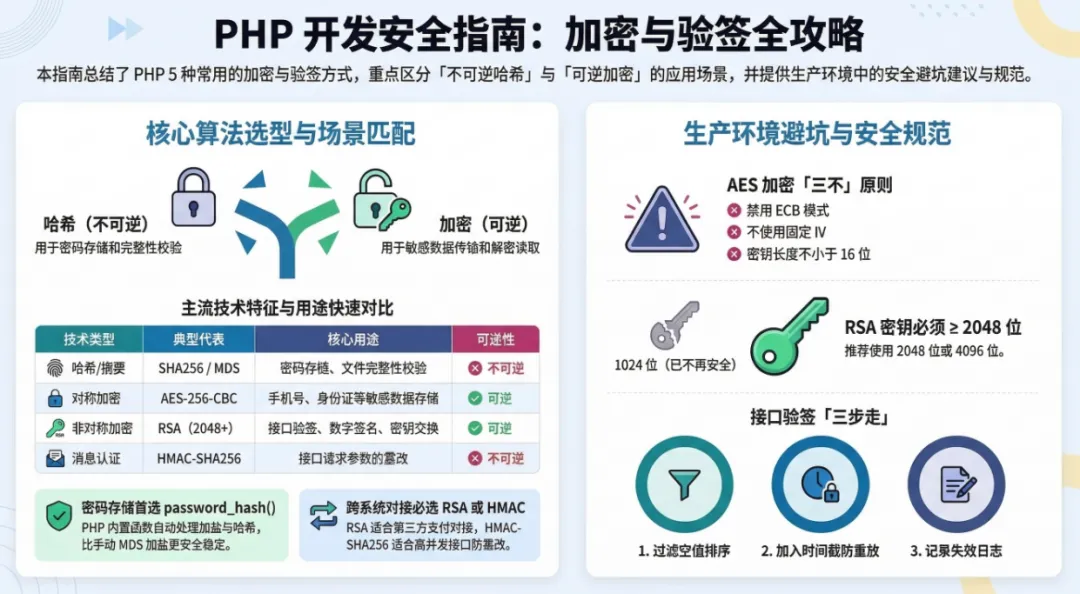
一、先搞懂:加密/哈希/验签的核心区别
二、每种加密/验签的使用场景+安全示例
1. MD5:仅用于「非核心数据哈希」(谨慎使用)
✅ 适用场景
- 兼容老系统的密码存储(必须加盐,不推荐新系统用)。
❌ 不适用场景
安全示例(MD5+盐,避免裸哈希)
<?php/** * MD5 安全使用示例(加盐+多次哈希) * @param string $data 要哈希的数据 * @param string $salt 盐值(项目固定+用户唯一,比如用户ID) * @return string */functionmd5Secure(string$data, string$salt): string{ // 盐值必须唯一:项目固定盐 + 用户唯一标识(比如用户ID) $fixedSalt = 'your_project_fixed_salt_2026'; // 项目固定盐,不要泄露 $mixSalt = $fixedSalt . $salt; // 多次哈希,提升破解难度 return md5(md5($data . $mixSalt) . $mixSalt);}// 使用示例:存储用户密码$password = '123456';$userId = '1001'; // 用户唯一标识(盐值)$hashPwd = md5Secure($password, (string)$userId);echo "MD5哈希结果:{$hashPwd}\n";// 验证密码$inputPwd = '123456';if(md5Secure($inputPwd, $userId) === $hashPwd) { echo "密码验证通过\n";}
2. SHA256/HMAC-SHA256:「核心数据哈希/接口验签」首选
✅ 适用场景
❌ 不适用场景
安全示例1:SHA256 存储密码(加盐)
<?php/** * SHA256 安全存储密码(推荐) * @param string $password 明文密码 * @return array [哈希值, 盐值] */functionsha256Password(string$password): array{ // 生成随机盐值(每个用户不同) $salt = bin2hex(random_bytes(16)); // SHA256 哈希(密码+盐) $hash = hash('sha256', $password . $salt); return [$hash, $salt];}// 使用示例:存储密码$password = '123456';[$hashPwd, $salt] = sha256Password($password);// 存数据库:hash_pwd = $hashPwd, salt = $salt// 验证密码$inputPwd = '123456';$dbHash = $hashPwd; // 从数据库取$dbSalt = $salt; // 从数据库取if(hash('sha256', $inputPwd . $dbSalt) === $dbHash) { echo "密码验证通过\n";}
安全示例2:HMAC-SHA256 接口验签(防篡改)
<?php/** * HMAC-SHA256 生成签名(接口请求用) * @param array $params 请求参数(不含sign) * @param string $secret 接口密钥(前后端/跨系统约定) * @return string */functionhmacSign(array$params, string$secret): string{ // 1. 参数排序(避免参数顺序不同导致签名不一致) ksort($params); // 2. 拼接参数(key=value&key=value) $paramStr = http_build_query($params); // 3. HMAC-SHA256 生成签名 $sign = hash_hmac('sha256', $paramStr, $secret); return $sign;}// 示例:客户端生成签名$params = [ 'user_id' => 1001, 'order_id' => 20001, 'timestamp' => time()];$secret = 'your_api_secret_2026'; // 前后端约定,不要泄露$sign = hmacSign($params, $secret);$params['sign'] = $sign; // 加入请求参数// 示例:服务端验证签名$serverSecret = 'your_api_secret_2026';$serverParams = $_POST; // 接收的参数$serverSign = $serverParams['sign'];unset($serverParams['sign']); // 移除sign再验签if(hmacSign($serverParams, $serverSecret) === $serverSign) { echo "签名验证通过,处理业务\n";} else { echo "签名验证失败,拒绝请求\n";}
3. AES:「敏感数据传输/存储」首选(对称加密)
✅ 适用场景
❌ 不适用场景
安全示例:AES-256-CBC 加密/解密(PHP7+ 通用)
<?php/** * AES 256 CBC 加密/解密类(安全版) * 特性:随机IV、密钥验证、防止padding攻击 */classAesTool{ // 加密算法:AES-256-CBC(256位密钥,兼容PHP7+/8+) private const CIPHER = 'aes-256-cbc'; private $secretKey; // 密钥(32位,256位) public function__construct(string$secretKey) { // 密钥必须32位(256位),不足补全,超出截断 $this->secretKey = substr(hash('sha256', $secretKey), 0, 32); } /** * AES加密 * @param string $data 明文 * @return string 加密后(base64编码,方便传输) */ public functionencrypt(string$data): string { // 生成随机IV(初始化向量,16位) $iv = random_bytes(openssl_cipher_iv_length(self::CIPHER)); // 加密(PKCS7填充,防止padding攻击) $encrypted = openssl_encrypt( $data, self::CIPHER, $this->secretKey, OPENSSL_RAW_DATA, $iv ); // IV+加密数据拼接,base64编码(方便传输) return base64_encode($iv . $encrypted); } /** * AES解密 * @param string $encryptedData 加密后的数据(base64编码) * @return string 明文 * @throws Exception */ public functiondecrypt(string$encryptedData): string { // 解码 $decoded = base64_decode($encryptedData); if($decoded === false) { throw new Exception("加密数据格式错误"); } // 拆分IV和加密数据 $ivLength = openssl_cipher_iv_length(self::CIPHER); $iv = substr($decoded, 0, $ivLength); $encrypted = substr($decoded, $ivLength); // 解密 $decrypted = openssl_decrypt( $encrypted, self::CIPHER, $this->secretKey, OPENSSL_RAW_DATA, $iv ); if($decrypted === false) { throw new Exception("解密失败,密钥或数据错误"); } return $decrypted; }}// 使用示例$aes = new AesTool('your_aes_secret_key_2026'); // 自定义密钥// 加密敏感数据(比如手机号)$mobile = '13800138000';$encryptedMobile = $aes->encrypt($mobile);echo "加密后:{$encryptedMobile}\n";// 解密try { $decryptedMobile = $aes->decrypt($encryptedMobile); echo "解密后:{$decryptedMobile}\n"; // 输出 13800138000} catch(Exception $e) { echo "解密失败:{$e->getMessage()}\n";}
4. RSA:「跨系统对接/数字签名」首选(非对称加密)
✅ 适用场景
❌ 不适用场景
安全示例:RSA 生成密钥+加密/解密+验签
步骤1:生成RSA公私钥(终端执行)
# 生成私钥(2048位,推荐)openssl genrsa -out rsa_private.pem 2048# 从私钥生成公钥openssl rsa -in rsa_private.pem -pubout -out rsa_public.pem
步骤2:PHP RSA 加密/解密/验签代码
<?php/** * RSA 非对称加密/验签类(安全版) * 支持:加密/解密、签名/验签,兼容2048位密钥 */classRsaTool{ private $privateKey; // 私钥内容 private $publicKey; // 公钥内容 public function__construct(string$privateKeyPath = '', string$publicKeyPath = '') { // 加载私钥(可选,验签时不需要) if($privateKeyPath && file_exists($privateKeyPath)) { $this->privateKey = openssl_get_privatekey(file_get_contents($privateKeyPath)); if(!$this->privateKey) { throw new Exception("私钥加载失败"); } } // 加载公钥 if($publicKeyPath && file_exists($publicKeyPath)) { $this->publicKey = openssl_get_publickey(file_get_contents($publicKeyPath)); if(!$this->publicKey) { throw new Exception("公钥加载失败"); } } } /** * 公钥加密(客户端/第三方用) * @param string $data 明文 * @return string 加密后(base64编码) */ public functionpublicEncrypt(string$data): string { if(!$this->publicKey) { throw new Exception("公钥未加载"); } $encrypted = ''; // 分段加密(RSA加密长度有限制,2048位密钥最多加密245字节) $chunkSize = 245; $dataLen = strlen($data); for($i = 0; $i < $dataLen; $i += $chunkSize) { $chunk = substr($data, $i, $chunkSize); openssl_public_encrypt($chunk, $encryptChunk, $this->publicKey); $encrypted .= $encryptChunk; } return base64_encode($encrypted); } /** * 私钥解密(服务端用) * @param string $encryptedData 加密后的数据(base64编码) * @return string 明文 */ public functionprivateDecrypt(string$encryptedData): string { if(!$this->privateKey) { throw new Exception("私钥未加载"); } $decoded = base64_decode($encryptedData); $decrypted = ''; // 分段解密 $chunkSize = 256; // 2048位密钥解密块大小256字节 $dataLen = strlen($decoded); for($i = 0; $i < $dataLen; $i += $chunkSize) { $chunk = substr($decoded, $i, $chunkSize); openssl_private_decrypt($chunk, $decryptChunk, $this->privateKey); $decrypted .= $decryptChunk; } return $decrypted; } /** * 私钥签名(服务端/己方用) * @param string $data 要签名的数据 * @return string 签名(base64编码) */ public functionprivateSign(string$data): string { if(!$this->privateKey) { throw new Exception("私钥未加载"); } openssl_sign($data, $sign, $this->privateKey, OPENSSL_ALGO_SHA256); return base64_encode($sign); } /** * 公钥验签(客户端/第三方用) * @param string $data 原始数据 * @param string $sign 签名(base64编码) * @return bool */ public functionpublicVerify(string$data, string$sign): bool { if(!$this->publicKey) { throw new Exception("公钥未加载"); } $decodedSign = base64_decode($sign); $result = openssl_verify($data, $decodedSign, $this->publicKey, OPENSSL_ALGO_SHA256); return $result === 1; // 1=验签通过,0=失败,-1=错误 }}// 使用示例// 1. 初始化(加载公私钥)$rsa = new RsaTool('./rsa_private.pem', './rsa_public.pem');// 2. 公钥加密(比如第三方加密数据传给我们)$data = '需要加密的敏感数据';$encrypted = $rsa->publicEncrypt($data);echo "RSA加密后:{$encrypted}\n";// 3. 私钥解密$decrypted = $rsa->privateDecrypt($encrypted);echo "RSA解密后:{$decrypted}\n";// 4. 私钥签名(我们给数据签名,第三方验签)$sign = $rsa->privateSign($data);echo "RSA签名:{$sign}\n";// 5. 公钥验签(第三方验证签名)$verify = $rsa->publicVerify($data, $sign);echo $verify ? "验签通过\n" : "验签失败\n";
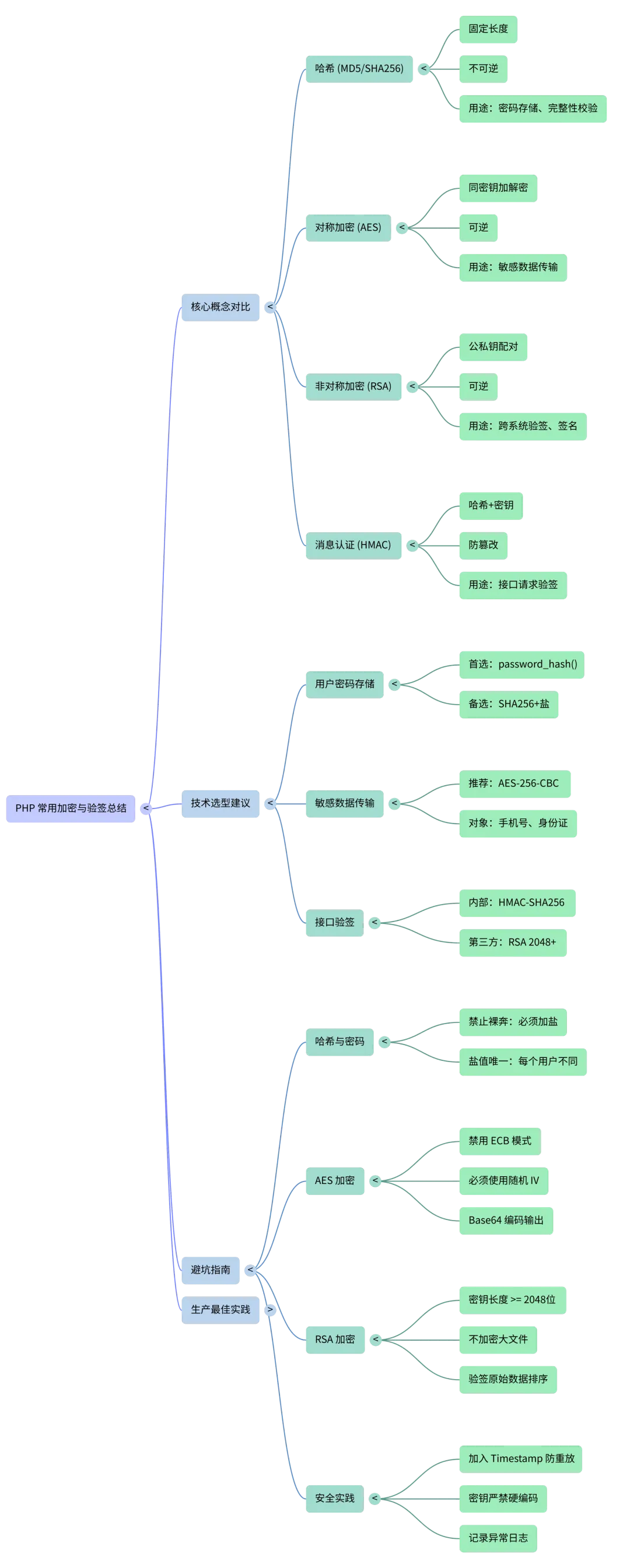
三、全网最全避坑指南(生产必看)
1. 哈希/密码存储避坑
- ❌ 不要裸用 MD5/SHA256 存密码:必须加盐,且盐值「项目固定+用户唯一」;
- ❌ 不要用固定盐:每个用户盐值必须不同(比如用户ID+随机字符串);
- ✅ 新系统优先用
password_hash()(PHP内置,自动加盐+哈希):
// 存储密码$hash = password_hash('123456', PASSWORD_DEFAULT);// 验证密码if(password_verify('123456', $hash)) { /* 验证通过 */ }
2. AES 加密避坑
- ❌ 不要用 ECB 模式:无IV,相同明文加密结果相同,易被破解;
- ❌ 不要用固定IV:必须每次加密生成随机IV(示例中已实现);
- ❌ 密钥不要小于16位:AES-256 用32位密钥,AES-128 用16位;
- ✅ 加密后数据用 base64 编码:避免二进制数据传输乱码。
3. RSA 加密避坑
- ❌ 不要用1024位密钥:至少2048位,推荐4096位;
- ❌ 不要加密大量数据:RSA 适合加密小数据(比如AES密钥),大量数据用AES;
- ❌ 私钥不要泄露:私钥只存服务端,公钥可对外暴露;
- ✅ 验签时一定要用原始数据:不要修改参数顺序/格式。
4. 接口验签避坑
- ❌ 不要忽略 timestamp:加入时间戳,限制请求有效期(比如5分钟),防重放攻击;
- ❌ 不要明文传输密钥:密钥只在前后端/跨系统约定,不随请求传输;
- ✅ 验签前先过滤参数:移除空值、sign字段,再排序拼接;
- ✅ 记录验签失败日志:包含IP、参数、时间,便于排查攻击。
四、选型总结(什么时候用哪种)
| | |
|---|
| password_hash() / SHA256+盐 | |
| | |
| | |
| | |
| | |
| | |
五、生产环境最佳实践
- 密钥管理密钥不要硬编码在代码里,放在配置文件(非git仓库),生产环境加密存储;
- 算法升级
- 日志监控记录加密/解密/验签失败日志,对接告警(企业微信/钉钉);
- 性能优化RSA 加密大量数据时,先用AES加密数据,再用RSA加密AES密钥;
- 合规要求敏感数据加密后存储,符合《网络安全法》《个人信息保护法》。
关注我,后续我会继续分享:PHP 开发规范、框架实战、架构思路、运维技巧、效率工具。关注我,每天 5 分钟,提升开发效率。
欢迎在留言区告诉我:你项目中遇到过哪些加密/验签的坑?比如签名验证失败、加密数据解密不了,我们一起交流解决方案!
总结
- 哈希(MD5/SHA256)不可逆,适合密码存储和数据校验,必须加盐;AES 对称加密可逆,适合敏感数据传输,要使用随机IV和安全模式;RSA 非对称加密适合跨系统验签,需用2048位以上密钥。
- 接口验签优先用 HMAC-SHA256,需加入时间戳防重放攻击,验签前要排序过滤参数。
- 生产环境密钥要单独管理,避免硬编码,定期更换;密码存储优先用 PHP 内置的
password_hash(),安全性更高。