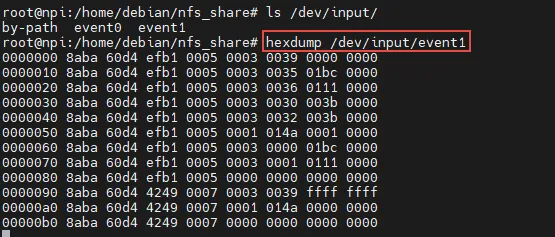
hexdump /dev/input/eventX数据,其实调用evdev_read函数。static const struct file_operations evdev_fops = { .owner = THIS_MODULE, .read = evdev_read, .write = evdev_write, .poll = evdev_poll, .open = evdev_open, .release = evdev_release, .unlocked_ioctl = evdev_ioctl,#ifdef CONFIG_COMPAT .compat_ioctl = evdev_ioctl_compat,#endif .fasync = evdev_fasync, .flush = evdev_flush, .llseek = no_llseek,};static ssize_t evdev_read(structfile *file, char __user *buffer, size_t count, loff_t *ppos){ while (read + input_event_size() <= count && evdev_fetch_next_event(client, &event)) {if (input_event_to_user(buffer + read, &event))return -EFAULT; read += input_event_size(); }}
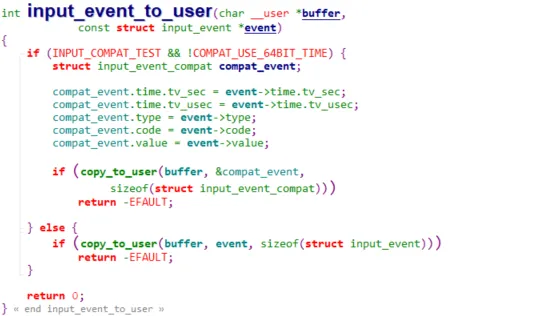
而input_event_to_user函数
最后调用的函数是copy_to_user()用来上传给用户层的函数,其中buffer是函数参数,指向用户层,数据就是struct input_event event,hexdump eventX读出来的数据是struct input_event 成员数值。
struct input_event {struct timeval time; //事件发生的时间 __u16 type; // 哪类事件, 比如键盘事件 __u16 code; // 对应的事件里支持的哪个变量,比如按键K __s32 value; // 对应的变量里的数值, 比如松开按键则是1,反之为0};//把input_event 的time里成员展开后:struct input_event { long tv_sec; /* seconds */ //秒 long tv_usec; /* microseconds */ //微妙 __u16 type; // 哪类事件, 比如键盘事件 __u16 code; // 对应的事件里支持的哪个变量,比如按键K __s32 value; // 对应的变量里的数值, 比如松开按键则是1,反之为0};
hexdump 默认以「16 字节为一行」输出(每行 8 个 16 进制数,每个占 2 字节),正好对应 input_event 的总长度(16 字节:8 字节时间(秒和微秒) + 2 字节 type + 2 字节 code + 4 字节 value)。注:hexdump 默认是小端序(低字节在前),解析时需要先反转每个 2 字节组的顺序。
数据含义
假设按一下「音量 +」按键,hexdump /dev/input/event1 会输出两行核心数据(按下 + 松开):
0000000 8f67 5ff9 8a49 0007 0001 0183 0001 00000000010 8f67 5ff9 8a49 0007 0000 0000 0000 00000000020 8f67 5ff9 9012 0007 0001 0183 0000 00000000030 8f67 5ff9 9012 0007 0000 0000 0000 0000
逐字段解析(以第一行为例)
把第一行 8f67 5ff9 8a49 0007 0001 0183 0001 0000 拆分为 input_event 的字段:
| | | | |
|---|
| | | | 事件秒数(Unix 时间戳,可通过 date -d @$((0x5ff98f67)) 转换为具体时间) |
| | | | 事件微秒数(0x00078a49 = 494665 微秒) |
| | | | |
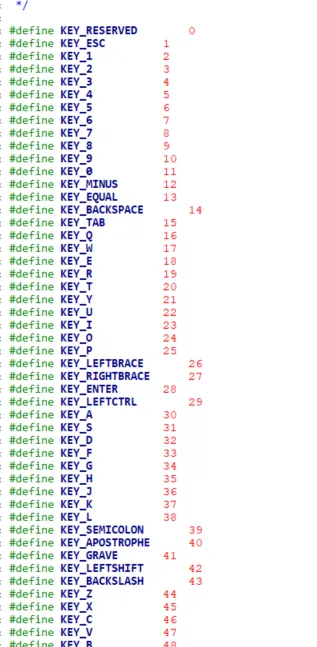
| | | | 按键编码:0x0183 = 387 → 对应 KEY_VOLUMEUP(可查 input-event-codes.h) |
| | | | |
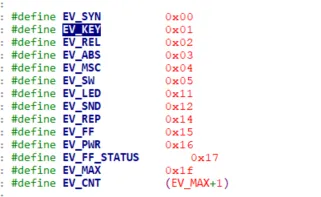
第二行 8f67 5ff9 8a49 0007 0000 0000 0000 0000 是「同步事件」:type=0000(EV_SYN):同步事件,告诉上层「一组完整的按键事件已发送,可处理」;code=0000、value=0000:固定值,无实际含义,仅做同步标记。
第三行是按键松开事件:
type=0001(EV_KEY)、code=0183(KEY_VOLUMEUP)、value=0000 → 按键松开(release);
关键字段的取值与含义
1. type(事件类型):__u16
最常见的取值:
2. code(事件编码):__u16
针对 EV_KEY 类型,code 对应具体按键,定义在 kernel/include/uapi/linux/input.h:
3. value(事件值):__s32
针对 EV_KEY 类型,value 表示按键状态:
编写脚本
自定义脚本解析 hexdump 输出,可写简单脚本转换小端序并解析:
import structimport sysfrom datetime import datetime# 读取hexdump输出的一行(如"8f67 5ff9 8a49 0007 0001 0183 0001 0000")line = sys.argv[1].replace(' ', '')# 转换为16字节二进制数据(小端序)data = bytes.fromhex(line)# 解析为input_event结构体(格式:LLHHI → L=8字节long, H=2字节short, I=4字节int)tv_sec, tv_usec, type_, code, value = struct.unpack('<LLHHI', data)# 映射常见type和codetype_map = {0: 'EV_SYN', 1: 'EV_KEY', 2: 'EV_REL', 3: 'EV_ABS'}key_map = {387: 'KEY_VOLUMEUP', 388: 'KEY_VOLUMEDOWN', 116: 'KEY_POWER'}# 输出解析结果print(f"时间: {datetime.fromtimestamp(tv_sec)}.{tv_usec:06d}")print(f"事件类型: {type_map.get(type_, f'未知({type_})')}")print(f"按键编码: {code} ({key_map.get(code, '未知')})")print(f"事件值: {value} ({'按下'if value==1else'松开'if value==0else'重复'})")
运行示例:
python parse_event.py "8f67 5ff9 8a49 0007 0001 0183 0001 0000"输出:时间: 2026-04-21 10:16:45.494665事件类型: EV_KEY按键编码: 387 (KEY_VOLUMEUP)事件值: 1 (按下)
再来个具体解释,加深牢固

# hexdump /dev/event1 //按键键盘驱动
/*按下时:*///hexdump序列号 秒 微妙 键盘事件 code=KEY_L value=1(按下)0000000 07c6 0000 faa2 000b 0001 0026 0001 0000//hexdump序列号 秒 微妙 同步事件 code value=0 0000010 07c6 0000 faac 000b 0000 0000 0000 0000/*松开时:*///hexdump序列号 秒 微妙 键盘事件 code=0x26 value=0(松开) 0000020 07c6 0000 cf67 000d 0001 0026 0000 0000//hexdump序列号 秒 微妙 同步事件 code value=0 0000030 07c6 0000 cf70 000d 0000 0000 0000 0000
调试触摸屏
/dev/event0 //触摸屏驱动
# hexdump /dev/event0 //hexdump序列号 秒 微妙 绝对坐标事件 code=ABS_X X坐标值 0000000 0412 0000 6ef0 000c 0003 0000 0239 0000//hexdump序列号 秒 微妙 绝对坐标事件 code=ABS_Y Y坐标值0000010 0412 0000 6f08 000c 0003 0001 01ae 0000//hexdump序列号 秒 微妙 绝对坐标事件 code=压力 压力值0000020 0412 0000 6f0c 000c 0003 0018 0001 0000//hexdump序列号 秒 微妙 键盘事件 code=触摸按键 value=1(按下)0000030 0412 0000 6f10 000c 0001 014a 0001 0000//hexdump序列号 秒 微妙 同步事件 0000040 0412 0000 6f13 000c 0000 0000 0000 0000//hexdump序列号 秒 微妙 绝对坐标事件 code=压力 压力值00000b0 023b 0000 872d 000c 0003 0018 0000 0000//hexdump序列号 秒 微妙 键盘事件 code=触摸按键 value=0(松开)00000b0 0412 0000 1f5b 000d 0001 014a 0000 0000//hexdump序列号 秒 微妙 同步事件 00000c0 0412 0000 1f70 000d 0000 0000 0000 0000
总结
hexdump /dev/input/event1 输出的核心含义可总结为 3 个关键点:
- 数据结构每行 16 字节对应
input_event,顺序为「8 字节时间戳 + 2 字节类型 + 2 字节编码 + 4 字节值」; - 小端序转换
hexdump 输出是低字节在前,解析时需反转每个 2 字节组的顺序; - 核心字段
type=1value=1type=0(EV_SYN)是同步事件,标记一组按键事件结束。
 10个月宝宝每天需要喝多少奶粉?