2.2 Linux启动流程-2
- 2026-09-02 19:39:05
2.2 Linux启动流程-2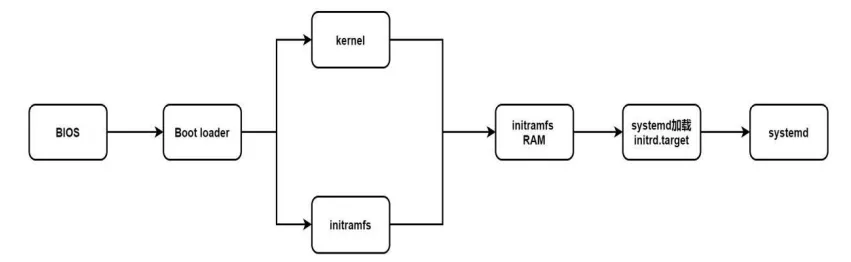
2、 7版本启动流程
2.1 启动流程图
启动过程中名词解释
BIOS:加电自检,第一次硬件检测MBR:该磁盘最前面可安装的boot loader区块 boot loader:启动引导程序,来解决内核文件,加载文件 存在于启动设备的第一个扇区之中加载内核检测硬件与initramfs 内核通常在boot分区中,为/boot/vmlinuz*将内核解压到内存,利用内核检测设备:CPU、内存、硬盘、网卡等 第二次硬盘检测非必要内核功能变成模块,内核不能读取,如SATA等 虚拟文件系统,模拟成为一个根目录,在内存中提供程序,加载启动中所需要的内核模块重新调用systemd,开始后续正常启动2.2 管理服务状态
[root@localhost ~]# systemctl list-unit-files #显示状态UNIT FILE STATE proc-sys-fs-binfmt_misc.automount static dev-hugepages.mount static dev-mqueue.mount static proc-sys-fs-binfmt_misc.mount static sys-fs-fuse-connections.mount static sys-kernel-config.mount static sys-kernel-debug.mount static tmp.mount disabled• loaded:Unit 配置文件已处理
• active(running):一次或多次持续处理的运行
• active(exited):成功完成一次性的配置
• active(waiting):运行中,等待一个事件
• inactive:不运行
• enabled:开机启动
• disabled:开机不启动
• static:开机不启动,但可被另一个启用的服务激活
2.3 运行级别
[root@localhost ~]# ll /usr/lib/systemd/system/*.target|grep runleve #查看系统运行级别lrwxrwxrwx. 1 root root 15 8月 23 00:55 /usr/lib/systemd/system/runlevel0.target -> poweroff.targetlrwxrwxrwx. 1 root root 13 8月 23 00:55 /usr/lib/systemd/system/runlevel1.target -> rescue.targetlrwxrwxrwx. 1 root root 17 8月 23 00:55 /usr/lib/systemd/system/runlevel2.target -> multi-user.targetlrwxrwxrwx. 1 root root 17 8月 23 00:55 /usr/lib/systemd/system/runlevel3.target -> multi-user.targetlrwxrwxrwx. 1 root root 17 8月 23 00:55 /usr/lib/systemd/system/runlevel4.target -> multi-user.targetlrwxrwxrwx. 1 root root 16 8月 23 00:55 /usr/lib/systemd/system/runlevel5.target -> graphical.targetlrwxrwxrwx. 1 root root 13 8月 23 00:55 /usr/lib/systemd/system/runlevel6.target -> reboot.targetinit 0 ——》 systemctl pweroff #关机init 1 ——》 systemclt isolate rescue.target #单用户模式init 3 ——》 systemctl isolate multi-user.target #字符界面init 5 ——》 systemctl isolate graphical.target #图形化init 6 ——》 systemctl reboot #重启2.4 运行级别切换
[root@localhost ~]# systemctl set-default multi-user.target #更改默认启动级别为纯字符 init3Removed symlink /etc/systemd/system/default.target.Created symlink from /etc/systemd/system/default.target to /usr/lib/systemd/system/multi-user.target.[root@localhost ~]# systemctl get-default #查看默认启动级别multi-user.target[root@localhost ~]# systemctl set-default graphical.target #更改默认启动级别为图形化 init5Removed symlink /etc/systemd/system/default.target.Created symlink from /etc/systemd/system/default.target to /usr/lib/systemd/system/graphical.target.[root@localhost ~]# systemctl get-default #查看默认启动级别graphical.target 2.5 grub2与grub区别
七版本
[root@localhost ~]# vim /etc/default/grub GRUB_TIMEOUT=5 #默认等待时间GRUB_DISTRIBUTOR="$(sed 's, release .*$,,g' /etc/system-release)"GRUB_DEFAULT=0 #修改默认启动内核顺序GRUB_DISABLE_SUBMENU=trueGRUB_TERMINAL_OUTPUT="console"GRUB_CMDLINE_LINUX="rhgb quiet"GRUB_DISABLE_RECOVERY="true"[root@localhost ~]# grub2-mkconfig -o /boot/grub2/grub.cfg #启用Generating grub configuration file ...Found linux image: /boot/vmlinuz-3.10.0-957.el7.x86_64Found initrd image: /boot/initramfs-3.10.0-957.el7.x86_64.imgFound linux image: /boot/vmlinuz-0-rescue-51b463e7803f477d9f46aa6163e1f85eFound initrd image: /boot/initramfs-0-rescue-51b463e7803f477d9f46aa6163e1f85e.imgdone六版本
[root@localhost ~]# vim /boot/grub/grub.conf # grub.conf generated by anaconda## Note that you do not have to rerun grub after making changes to this file# NOTICE: You have a /boot partition. This means that# all kernel and initrd paths are relative to /boot/, eg.# root (hd0,0)# kernel /vmlinuz-version ro root=/dev/sda3# initrd /initrd-[generic-]version.img#boot=/dev/sdadefault=0 #修改默认启动内核顺序timeout=5 #默认等待时间 (秒)splashimage=(hd0,0)/grub/splash.xpm.gzhiddenmenutitle CentOS 6 (2.6.32-642.el6.x86_64) root (hd0,0) kernel /vmlinuz-2.6.32-642.el6.x86_64 ro root=UUID=b8391479-c2e4-4116-8166-c9da7736e758 rd_NO_LUKS KEYBOARDTYPE=pc KEYTABLE=us rd_NO_MD crashkernel=auto LANG=zh_CN.UTF-8 rd_NO_LVM rd_NO_DM rhgb quiet initrd /initramfs-2.6.32-642.el6.x86_64.img~
本文来自网友投稿或网络内容,如有侵犯您的权益请联系我们删除,联系邮箱:596563534@qq.com 。
随机文章
-
 10个月宝宝每天需要喝多少奶粉?
- 1分钟就可以拥有一个轻量的linux,牛皮!
- 笑不活了!Linux库制作竟是“代码打包神器”,新手也能秒会
- 纯 PHP 向量数据库 PHPVector
- Python Tkinter插件系统设计:让你的桌面应用具备无限扩展能力
- 不用Python不用SQL,飞书表格居然能跑实时数据分析
- 【2026中考信息】Python操作题
- 炼丹炉应用模板案例Python【5】-智能优化算法改进支持向量机SVM预测应用
- 【python学堂】python编程入门(一)第一个程序"hello world"
- 统计学入门合集(基于Python)8——偏差-方差分解
- 学Python 必背单词