各位兄弟,昨天分享了python巡检交换机并记录到文本文档,今天再次改造下,将巡检记录发送到邮箱,方便手机邮箱可以查看。from netmiko import ConnectHandler
from concurrent.futures import ThreadPoolExecutor
import datetime
import smtplib
from email.mime.text import MIMEText
from email.mime.multipart import MIMEMultipart
from email.mime.base import MIMEBase
from email import encoders
# -------------------------- 交换机列表 --------------------------
switch_list = [
{
'device_type': 'hp_comware',
'host': '10.0.0.21',
'port': 22,
'username': 'admin',
'password': '**************',
'timeout': 15,
},
{
'device_type': 'hp_comware',
'host': '10.0.0.9',
'port': 22,
'username': 'admin',
'password': '*************',
'timeout': 15,
},
{
'device_type': 'hp_comware',
'host': '10.0.0.20',
'port': 22,
'username': 'admin',
'password': '***************',
'timeout': 15,
},
{
'device_type': 'hp_comware',
'host': '10.0.0.27',
'port': 22,
'username': 'admin',
'password': '**************',
'timeout': 15,
},
{
'device_type': 'hp_comware',
'host': '10.0.0.16',
'port': 22,
'username': 'admin',
'password': '*************',
'timeout': 15,
},
{
'device_type': 'hp_comware',
'host': '10.0.0.25',
'port': 22,
'username': 'admin',
'password': '************',
'timeout': 15,
},
{
'device_type': 'hp_comware',
'host': '10.0.0.19',
'port': 22,
'username': 'admin',
'password': '**********',
'timeout': 15,
},
{
'device_type': 'hp_comware',
'host': '10.0.0.10',
'port': 22,
'username': 'admin',
'password': '***********',
'timeout': 15,
},
]
# -------------------------- 邮箱配置(请修改这里!) --------------------------
EMAIL_CONFIG = {
# 发件人邮箱
'sender_email': "*********@qq.com",邮箱名称自己配置
# 发件人授权码(不是邮箱密码!)
'sender_password': "towlgkyjqfdudggh",
# 收件人邮箱(可多个,用逗号分隔)
'receiver_email': "**********@qq.com",
# SMTP服务器(QQ邮箱默认smtp.qq.com,163是smtp.163.com)
'smtp_server': "smtp.qq.com",
# SMTP端口(QQ/163默认465)
'smtp_port': 465
}
# -------------------------- 执行函数 --------------------------
def run_command_on_switch(switch):
ip = switch['host']
print(f"\n▶ 正在连接交换机:{ip}")
try:
with ConnectHandler(**switch) as net_connect:
result = f"\n{'=' * 60}\n📌 交换机 IP: {ip}\n{'=' * 60}\n"
# net_connect.send_command("system-view", expect_string=r']')
net_connect.send_command("quit", expect_string=r'>')
# ========== CPU 双命令兼容判断 ==========
try:
cpu_output = net_connect.send_command("display cpu-usage")
if not cpu_output or "%" not in cpu_output:
cpu_output = net_connect.send_command("display cpu")
except:
cpu_output = "获取失败"
# ========== 内存 双命令兼容判断 ==========
try:
mem_output = net_connect.send_command("display memory")
if not mem_output:
mem_output = net_connect.send_command("display memory-usage")
except:
mem_output = "获取失败"
result += f"\n🔹 命令: CPU 利用率\n{cpu_output}\n"
result += f"\n🔹 命令: 内存利用率\n{mem_output}\n"
print(f"✅ 交换机 {ip} 执行完成")
return result
except Exception as e:
error_msg = f"❌ 交换机 {ip} 执行失败: {str(e)}"
print(error_msg)
return f"\n{'=' * 60}\n{error_msg}\n{'=' * 60}\n"
# -------------------------- 发送邮件函数 --------------------------
# -------------------------- 发送邮件函数 --------------------------
def send_email_with_report(filename):
try:
# 创建邮件对象
msg = MIMEMultipart()
msg['From'] = EMAIL_CONFIG['sender_email']
msg['To'] = EMAIL_CONFIG['receiver_email']
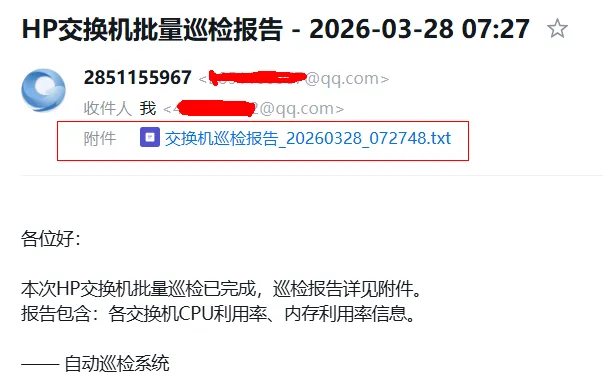
msg['Subject'] = f"HP交换机批量巡检报告 - {datetime.datetime.now().strftime('%Y-%m-%d %H:%M')}"
# 邮件正文
body = """
各位好:
本次HP交换机批量巡检已完成,巡检报告详见附件。
报告包含:各交换机CPU利用率、内存利用率信息。—— 自动巡检系统"""
msg.attach(MIMEText(body, 'plain', 'utf-8'))
# ✅ 添加txt附件
with open(filename, 'r', encoding='utf-8') as f:
txt_part = MIMEText(f.read(), 'plain', 'utf-8')
# 关键:指定filename为txttxt_part.add_header('Content-Disposition', 'attachment', filename=filename)
msg.attach(txt_part)
# 发送邮件
with smtplib.SMTP_SSL(EMAIL_CONFIG['smtp_server'], EMAIL_CONFIG['smtp_port']) as server:
server.login(EMAIL_CONFIG['sender_email'], EMAIL_CONFIG['sender_password'])
server.sendmail(EMAIL_CONFIG['sender_email'], EMAIL_CONFIG['receiver_email'].split(','), msg.as_string())
print(f"\n📧 邮件发送成功!已发送至:{EMAIL_CONFIG['receiver_email']}")
except Exception as e:
print(f"\n❌ 邮件发送失败:{str(e)}")
# -------------------------- 主程序 --------------------------
if __name__ == "__main__":
start_time = datetime.datetime.now()
print("=" * 60)
print(f"开始批量巡检 HP Comware 交换机 | 开始时间: {start_time.strftime('%Y-%m-%d %H:%M:%S')}")
print("=" * 60)
# 多线程执行巡检
with ThreadPoolExecutor(max_workers=10) as executor:
all_results = executor.map(run_command_on_switch, switch_list)
# 生成报告内容
final_output = f"交换机批量巡检报告\n生成时间: {start_time.strftime('%Y-%m-%d %H:%M:%S')}\n{'=' * 60}\n"
for res in all_results:
final_output += res
# 保存报告文件
filename = f"交换机巡检报告_{start_time.strftime('%Y%m%d_%H%M%S')}.txt"
with open(filename, 'w', encoding='utf-8') as f:
f.write(final_output)
# 统计耗时
end_time = datetime.datetime.now()
use_time = (end_time - start_time).total_seconds()
print("\n" + "=" * 60)
print(f"✅ 所有交换机执行完成!")
print(f"⏱️ 总耗时: {use_time:.2f} 秒")
print(f"📄 报告已保存至: {filename}")
print("=" * 60)
# 发送邮件
send_email_with_report(filename)
D:\python\pythonProject3\.venv\Scripts\python.exe D:\python\pythonProject3\批量巡检交换机加邮件发送.py
============================================================
开始批量巡检 HP Comware 交换机 | 开始时间: 2026-03-28 07:27:48
============================================================
▶ 正在连接交换机:10.0.0.21
▶ 正在连接交换机:10.0.0.9
▶ 正在连接交换机:10.0.0.20
▶ 正在连接交换机:10.0.0.27
▶ 正在连接交换机:10.0.0.16
▶ 正在连接交换机:10.0.0.25
▶ 正在连接交换机:10.0.0.19
▶ 正在连接交换机:10.0.0.10
✅ 交换机 10.0.0.16 执行完成
✅ 交换机 10.0.0.10 执行完成
✅ 交换机 10.0.0.19 执行完成✅ 交换机 10.0.0.20 执行完成
✅ 交换机 10.0.0.21 执行完成
✅ 交换机 10.0.0.27 执行完成
✅ 交换机 10.0.0.25 执行完成
✅ 交换机 10.0.0.9 执行完成
============================================================
✅ 所有交换机执行完成!
⏱️ 总耗时: 3.71 秒
📄 报告已保存至: 交换机巡检报告_20260328_072748.txt
============================================================
📧 邮件发送成功!已发送至:********@qq.com
进程已结束,退出代码为 0
最后我们看邮件是否收到,打开邮箱:
好,今天就分享到这里,我们还可以接着完善,让它形成任务计划,自动执行,大家可以自行考虑。

 10个月宝宝每天需要喝多少奶粉?