python环境管理工具:UV常用命令
- 2026-10-11 11:49:34
python环境管理工具:UV常用命令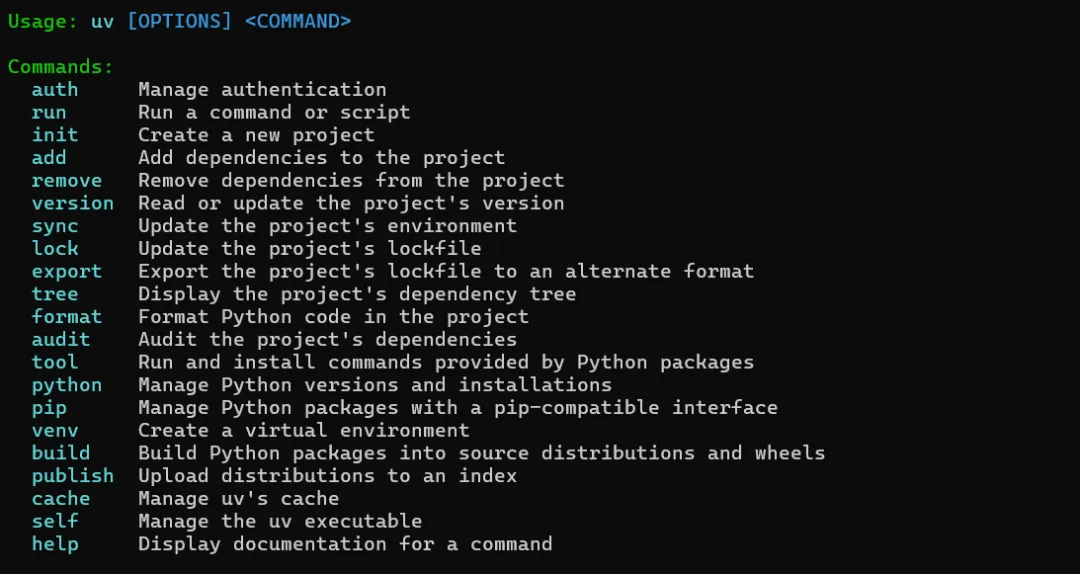
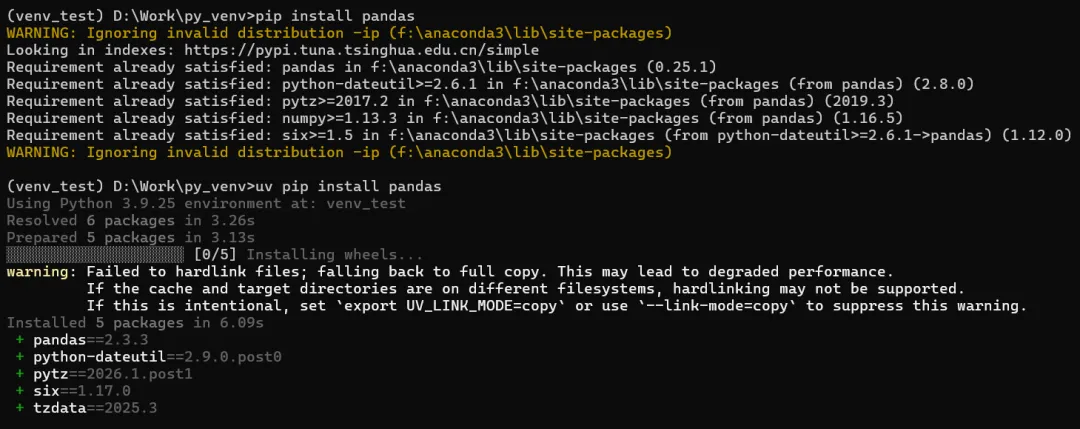
-END-
uv 是 Rust 编写的新一代极速 Python 环境/包管理工具,兼容 pip/venv 语法且速度提升 10-100 倍,以下是全场景命令汇总和避坑指南,覆盖环境创建、包管理、依赖锁定等核心场景,适配 Windows/macOS/Linux。另外,为了便于pip用户迁移,安装包时使用uv pip install,另外也推荐使用uv add 安装依赖,uv remove卸载依赖。
一、核心命令分类汇总
1. 环境管理(venv)
uv venv | uv venv | .venv 文件夹,自动匹配系统 Python | |
uv venv <路径> | uv venv .venv_ct | .venv_ct),避免同名覆盖 | |
uv venv --python <版本> | uv venv .venv_311 --python 3.11 | 3.8/3.10/3.12 等 | |
uv venv --system-site-packages | uv venv .venv --system-site-packages | ||
uv venv --clear <路径> | uv venv --clear .venv |
激活环境(Windows):
# 激活默认环境
.venv\Scripts\Activate
# 激活自定义环境
venv_test  \Scripts\Activate
# 退出环境
deactivate
2. 包安装/卸载(pip)
uv pip 完全兼容 pip 语法,且速度远快于 pip,核心命令:
uv pip install <包名> | uv pip install opencv-python==4.1.0 | ==/>=/<) | |
uv pip install -r requirements.txt | uv pip install -r requirements.txt | ||
uv pip install . | uv pip install . | ||
uv pip install --editable . | uv pip install -e . | ||
uv pip uninstall <包名> | uv pip uninstall opencv-python | -y 跳过确认:uv pip uninstall -y opencv-python | |
uv pip list | uv pip list | ||
uv pip show <包名> | uv pip show opencv-python | ||
uv pip freeze | uv pip freeze > requirements.txt | ||
uv pip cache purge | uv pip cache purge |
3. 依赖锁定(lock)
uv 支持生成锁文件(类似 poetry/pipenv),确保环境一致性:
uv lock | uv lock | ||
uv lock --requirements <文件> | uv lock --requirements requirements.txt | ||
uv sync | uv sync |
4. 全局配置/工具命令
uv --version | uv --version | ||
uv config get | uv config get | ||
uv config set <键> <值> | uv config set registry.index-url https://pypi.tuna.tsinghua.edu.cn/simple | ||
uv cache dir | uv cache dir | C:\Users\<用户名>\AppData\Local\uv\cache | |
uv python list | uv python list | ||
uv python install <版本> | uv python install 3.10 |
二、配置及运行单个脚本
初始化脚本项目
uv init --script analyze.py

添加脚本依赖
uv add pandas --script analyze.py

运行脚本(自动处理依赖)
uv run analyze.py
三、uv python命令
uv python list
#List the available Python installations

uv python install
#Download and install Python versions

uv python upgrade
#Upgrade installed Python versions

uv python find
#Search for a Python installation

uv python pin
#Pin to a specific Python version

uv python dir
#Show the uv Python installation directory

uv python uninstall
#Uninstall Python versions

uv python update-shell
#Ensure that the Python executable directory is on the PATH
四、关键注意事项(避坑指南)
1. 环境创建与激活
❌ 避免在同一目录重复创建 .venv:若提示「环境已存在」,要么复用(选择现有解释器),要么改名创建(如.venv_ct),不要直接覆盖。❌ Windows 激活报错「禁止运行脚本」:以管理员身份打开 PowerShell,执行 Set-ExecutionPolicy RemoteSigned -Scope CurrentUser,输入Y确认。✅ 建议按功能命名环境:如 .venv_ct(CT 图像处理)、.venv_ml(机器学习),便于区分。
2. 包安装兼容性
❌ 不要混用 uv pip和pip:同一环境中用 uv 安装后,再用 pip 可能导致依赖冲突,全程用uv pip。
❌ 安装旧版包(如 opencv-python==4.1.0)时,若提示找不到版本:检查 Python 版本兼容性(如 4.1.0 不支持 Python 3.12),需指定对应 Python 版本创建环境。 ✅ 安装本地包时,确保目录有 pyproject.toml/setup.py,否则会报错。
3. 镜像源配置(解决下载慢)
默认使用官方 PyPI,国内建议配置清华/阿里镜像:
# 临时使用(单次安装)
uv pip install opencv-python -i https://pypi.tuna.tsinghua.edu.cn/simple

# 全局配置(永久生效)
uv config set registry.index-url https://pypi.tuna.tsinghua.edu.cn/simple
4. Python 版本管理
uv 自动下载的 Python 版本存储在独立目录,不影响系统 Python,可通过 uv python list查看。创建环境时指定的 Python 版本若未安装,uv 会自动下载,但需保证网络通畅(可配置国内镜像加速)。 Windows 下若提示「Python 版本找不到」:检查环境变量,或手动执行 uv python install <版本>预安装。
5. 与 PyCharm 集成
添加解释器时,选择「现有环境」,路径指向 <环境目录>\Scripts\python.exe(Windows)。切换环境后,PyCharm 可能需要几秒加载依赖,耐心等待「索引完成」。 若 PyCharm 识别不到 uv 环境:重启 PyCharm,或手动刷新解释器列表。
6. 缓存与清理
uv 缓存默认占空间较小,但若需清理,执行 uv pip cache purge即可。旧环境可直接删除文件夹(如 .venv_old),无残留(区别于 conda)。
五、常用场景速查表
uv venv .venv_ct --python 3.11 | |
uv pip install opencv-python==4.1.0 | |
uv pip freeze > requirements.txt | |
uv venv .venv && uv pip install -r requirements.txt | |
uv config set registry.index-url https://pypi.tuna.tsinghua.edu.cn/simple |
六、总结
uv 核心优势是「极速+兼容」: uv venv替代python -m venv,uv pip替代pip,语法完全兼容且速度大幅提升;环境管理关键是「自定义命名+避免覆盖」,包管理需「全程用 uv pip、不混用 pip」; 国内使用必配镜像源,Windows 需解决 PowerShell 执行策略问题,与 PyCharm 集成时指向正确的 Python 可执行文件。
本文来自网友投稿或网络内容,如有侵犯您的权益请联系我们删除,联系邮箱:596563534@qq.com 。
