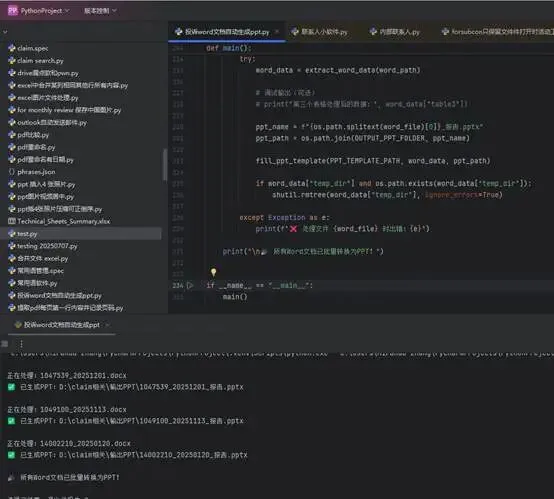
Python 批量将同样模板的word内容转换成ppt(代码都有AI生成,思路自己的)
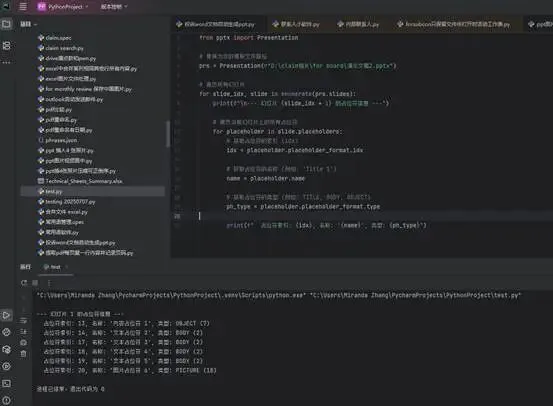
1.利用python找出ppt模板的所有占位符
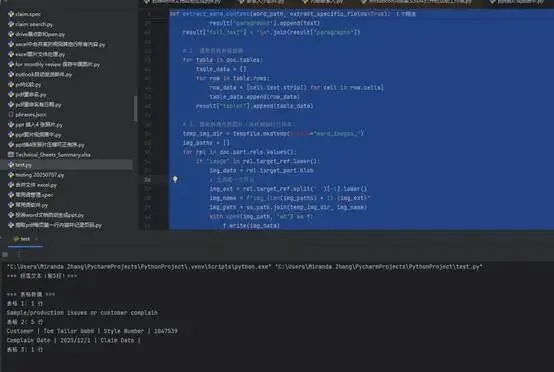
2.利用python解析所有word的内容
3.用AI写的代码批量生成ppt-过程中出现内容重复3遍的问题,AI死活找不到原因,还是自己找到的原因(word模板合并3个单元格合并为一个的原因)解决的
代码如下
Ppt解析
from pptx import Presentation
# 替换为你的模板文件路径
prs = Presentation(r"D:\claim相关\for board\演示文稿2.pptx")
# 遍历所有幻灯片
for slide_idx, slide in enumerate(prs.slides):
print(f"\n--- 幻灯片 {slide_idx + 1} 的占位符信息 ---")
# 遍历当前幻灯片上的所有占位符
for placeholder in slide.placeholders:
# 获取占位符的索引 (idx)
idx = placeholder.placeholder_format.idx
# 获取占位符的名称 (例如: 'Title 1')
name = placeholder.name
# 获取占位符的类型 (例如: TITLE, BODY, OBJECT)
ph_type = placeholder.placeholder_format.type
print(f" 占位符索引: {idx}, 名称: '{name}', 类型: {ph_type}")
Word 解析
import os
import tempfile
import shutil
from docx import Document
from docx.table import Table
from docx.text.paragraph import Paragraph
def extract_word_content(word_path, extract_specific_fields=True):
"""
从 Word 文档中提取所有内容:文本、表格、图片。
参数:
word_path: Word 文件路径
extract_specific_fields: 是否提取特定的质检字段(客户、款号等),默认为 True
返回:
dict 包含:
- full_text: 所有段落文本(按顺序,用换行分隔)
- paragraphs: 段落文本列表
- tables: 表格数据列表(每个表格是一个二维列表)
- images: 提取的图片临时文件路径列表
- specific_fields: (可选) 字典,包含 customer, style_number 等字段
"""
doc = Document(word_path)
# 存储结果
result = {
"full_text": "",
"paragraphs": [],
"tables": [],
"images": []
}
# 1. 提取所有段落文本(保持顺序)
for para in doc.paragraphs:
text = para.text.strip()
if text: # 只保留非空段落
result["paragraphs"].append(text)
result["full_text"] = "\n".join(result["paragraphs"])
# 2. 提取所有表格数据
for table in doc.tables:
table_data = []
for row in table.rows:
row_data = [cell.text.strip() for cell in row.cells]
table_data.append(row_data)
result["tables"].append(table_data)
# 3. 提取所有内嵌图片(保存到临时文件夹)
temp_img_dir = tempfile.mkdtemp(prefix="word_images_")
img_paths = []
for rel in doc.part.rels.values():
if "image" in rel.target_ref.lower():
img_data = rel.target_part.blob
# 生成唯一文件名
img_ext = rel.target_ref.split('.')[-1].lower()
img_name = f"img_{len(img_paths) + 1}.{img_ext}"
img_path = os.path.join(temp_img_dir, img_name)
with open(img_path, "wb") as f:
f.write(img_data)
img_paths.append(img_path)
result["images"] = img_paths
# 注意:临时目录需要调用者自行清理(使用 shutil.rmtree)
# 4. 提取特定质检字段(可选)
if extract_specific_fields:
specific = {
"customer": "",
"style_number": "",
"complain_date": "",
"main_issue": "",
"reason": "",
"corrective_action": ""
}
# 遍历所有表格,查找关键词
for table_data in result["tables"]:
for row in table_data:
if len(row) < 2:
continue
key, value = row[0], row[1]
key_lower = key.lower()
if "customer" in key_lower:
specific["customer"] = value
elif "style number" in key_lower:
specific["style_number"] = value
elif "complain date" in key_lower:
specific["complain_date"] = value
elif "main issue" in key_lower:
specific["main_issue"] = value
elif "reason" in key_lower:
specific["reason"] = value
elif "corrective action" in key_lower:
specific["corrective_action"] = value
result["specific_fields"] = specific
# 附加原始 doc 对象(可选,用于更高级的操作)
result["_doc"] = doc
return result
# 使用示例
if __name__ == "__main__":
word_file = r"D:\claim相关\for board\新建文件夹\1047539_20251201.docx"
content = extract_word_content(word_file)
print("=== 段落文本(前5段)===")
for i, para in enumerate(content["paragraphs"][:5]):
print(f"{i + 1}. {para}")
print("\n=== 表格数据 ===")
for tidx, table in enumerate(content["tables"]):
print(f"表格 {tidx + 1}: {len(table)} 行")
for row in table[:2]: # 只打印前两行
print(" | ".join(row))
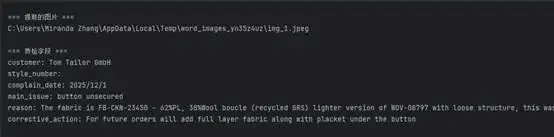
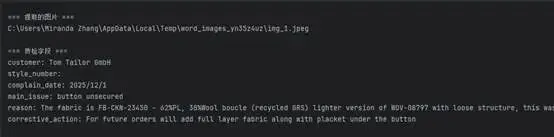
print("\n=== 提取的图片 ===")
for img in content["images"]:
print(img)
if "specific_fields" in content:
print("\n=== 质检字段 ===")
for k, v in content["specific_fields"].items():
print(f"{k}: {v}")
# 清理临时图片文件夹(根据需要)
if content["images"]:
img_dir = os.path.dirname(content["images"][0])
shutil.rmtree(img_dir, ignore_errors=True)
Word 转化为ppt
import os
import tempfile
import shutil
from docx import Document
from pptx import Presentation
from pptx.util import Pt
from PIL import Image
# ======================== 配置参数 ========================
PPT_TEMPLATE_PATH = r"D:\claim相关\for board\演示文稿2.pptx"
WORD_FOLDER_PATH = r"D:\claim相关\for board\新建文件夹"
OUTPUT_PPT_FOLDER = r"D:\claim相关\输出PPT"
# 占位符索引(根据你的模板实际情况调整)
IMG_PLACEHOLDER_IDX = 20 # 图片占位符
TABLE2_PLACEHOLDER_IDX = 24 # Word第2个表格内容占位符
TABLE3_PLACEHOLDER_IDX = 13 # Word第3个表格内容占位符
# ======================== 工具函数 ========================
def extract_table_with_merged_cells(table):
"""
从Word表格中提取数据,正确处理合并单元格。
返回二维列表,每个单元格只出现一次(合并后的单元格内容填充到起始位置,其余位置为空字符串)。
"""
# 获取表格的最大行列数(通过遍历所有行和单元格,记录最大列数)
rows = []
max_cols = 0
for row in table.rows:
cells = row.cells
max_cols = max(max_cols, len(cells))
rows.append([cell.text.strip() for cell in cells])
# 补全每行列数(不够的用空字符串填充)
for row in rows:
while len(row) < max_cols:
row.append("")
# 解析合并信息:水平合并(gridSpan)和垂直合并(vMerge)
# 由于 python-docx 不直接提供合并信息,需要通过底层XML获取
tbl_xml = table._tbl
namespaces = {'w': 'http://schemas.openxmlformats.org/wordprocessingml/2006/main'}
# 记录被合并覆盖的单元格(行,列)
covered = set()
# 获取所有单元格的合并属性
for row_idx, row in enumerate(table.rows):
for col_idx, cell in enumerate(row.cells):
tc = cell._tc
tcPr = tc.find('.//w:tcPr', namespaces=namespaces)
if tcPr is not None:
# 水平合并:gridSpan
grid_span = tcPr.find('.//w:gridSpan', namespaces=namespaces)
if grid_span is not None:
span = int(grid_span.get('{http://schemas.openxmlformats.org/wordprocessingml/2006/main}val', 1))
# 标记被合并的后续列
for i in range(1, span):
covered.add((row_idx, col_idx + i))
# 垂直合并:vMerge
v_merge = tcPr.find('.//w:vMerge', namespaces=namespaces)
if v_merge is not None:
val = v_merge.get('{http://schemas.openxmlformats.org/wordprocessingml/2006/main}val', 'continue')
if val == 'continue':
# 当前单元格是垂直合并的后续部分,标记为覆盖
covered.add((row_idx, col_idx))
# 构建最终数据,跳过被覆盖的单元格
final_data = []
for row_idx in range(len(rows)):
new_row = []
for col_idx in range(max_cols):
if (row_idx, col_idx) in covered:
continue # 跳过被合并的单元格
# 获取单元格文本(可能来自上一行的合并起始单元格,但起始单元格的文本已在对应位置)
if col_idx < len(rows[row_idx]):
new_row.append(rows[row_idx][col_idx])
else:
new_row.append("")
final_data.append(new_row)
# 删除全空的行
final_data = [row for row in final_data if any(cell.strip() for cell in row)]
return final_data
def extract_word_data(word_path):
"""从Word提取图片、第二个表格、第三个表格(正确处理合并单元格)"""
doc = Document(word_path)
# 1. 提取第一张图片
image_path = None
temp_img_dir = tempfile.mkdtemp(prefix="word_img_")
for rel in doc.part.rels.values():
if "image" in rel.target_ref.lower():
img_data = rel.target_part.blob
ext = rel.target_ref.split('.')[-1].lower()
img_filename = f"img_{os.path.basename(word_path).split('.')[0]}.{ext}"
img_path = os.path.join(temp_img_dir, img_filename)
with open(img_path, "wb") as f:
f.write(img_data)
image_path = img_path
break
# 2. 提取所有表格(使用合并单元格处理函数)
tables_data = []
for table in doc.tables:
table_content = extract_table_with_merged_cells(table)
tables_data.append(table_content)
# 第二个表格(索引1),取前5行
table2_content = []
if len(tables_data) >= 2:
table2_content = tables_data[1][:5]
# 第三个表格(索引2),取全部行
table3_content = []
if len(tables_data) >= 3:
table3_content = tables_data[2]
return {
"image_path": image_path,
"temp_dir": temp_img_dir,
"table2": table2_content,
"table3": table3_content
}
def format_table_as_text(table_data, cell_separator="\t", row_separator="\n"):
"""将二维表格数据格式化为纯文本"""
if not table_data:
return "(无数据)"
lines = [cell_separator.join(row) for row in table_data]
return row_separator.join(lines)
def add_picture_with_ratio(slide, image_path, placeholder_idx):
"""插入图片并保持原始比例,完全填充占位符区域(可能裁剪)"""
try:
placeholder = slide.placeholders[placeholder_idx]
left, top, width, height = placeholder.left, placeholder.top, placeholder.width, placeholder.height
with Image.open(image_path) as img:
img_width, img_height = img.size
ratio = max(width / img_width, height / img_height)
new_width = int(img_width * ratio)
new_height = int(img_height * ratio)
left_offset = left + (width - new_width) // 2
top_offset = top + (height - new_height) // 2
sp = placeholder._sp
sp.getparent().remove(sp)
slide.shapes.add_picture(image_path, left_offset, top_offset, new_width, new_height)
return True
except KeyError:
print(f"警告:占位符索引 {placeholder_idx} 不存在,图片插入失败")
return False
except Exception as e:
print(f"图片插入异常:{e}")
return False
def set_placeholder_text(slide, placeholder_idx, text):
"""设置占位符文本,先清空原有内容"""
try:
placeholder = slide.placeholders[placeholder_idx]
text_frame = placeholder.text_frame
text_frame.clear()
p = text_frame.paragraphs[0] if text_frame.paragraphs else text_frame.add_paragraph()
p.text = text
p.font.size = Pt(12)
return True
except KeyError:
print(f"警告:占位符索引 {placeholder_idx} 不存在,文本设置失败")
return False
except Exception as e:
print(f"设置文本异常:{e}")
return False
def fill_ppt_template(template_path, word_data, output_path):
"""填充PPT模板"""
prs = Presentation(template_path)
slide = prs.slides[0]
if word_data["image_path"] and os.path.exists(word_data["image_path"]):
add_picture_with_ratio(slide, word_data["image_path"], IMG_PLACEHOLDER_IDX)
table2_text = format_table_as_text(word_data["table2"])
set_placeholder_text(slide, TABLE2_PLACEHOLDER_IDX, table2_text)
table3_text = format_table_as_text(word_data["table3"])
set_placeholder_text(slide, TABLE3_PLACEHOLDER_IDX, table3_text)
prs.save(output_path)
print(f"✅ 已生成PPT:{output_path}")
# ======================== 主程序 ========================
def main():
os.makedirs(OUTPUT_PPT_FOLDER, exist_ok=True)
for word_file in os.listdir(WORD_FOLDER_PATH):
if not word_file.endswith(".docx") or word_file.startswith("~$"):
continue
word_path = os.path.join(WORD_FOLDER_PATH, word_file)
print(f"\n正在处理:{word_file}")
try:
word_data = extract_word_data(word_path)
# 调试输出(可选)
# print("第三个表格处理后的数据:", word_data["table3"])
ppt_name = f"{os.path.splitext(word_file)[0]}_报告.pptx"
ppt_path = os.path.join(OUTPUT_PPT_FOLDER, ppt_name)
fill_ppt_template(PPT_TEMPLATE_PATH, word_data, ppt_path)
if word_data["temp_dir"] and os.path.exists(word_data["temp_dir"]):
shutil.rmtree(word_data["temp_dir"], ignore_errors=True)
except Exception as e:
print(f"❌ 处理文件 {word_file} 时出错:{e}")
print("\n🎉 所有Word文档已批量转换为PPT!")
if __name__ == "__main__":
main()