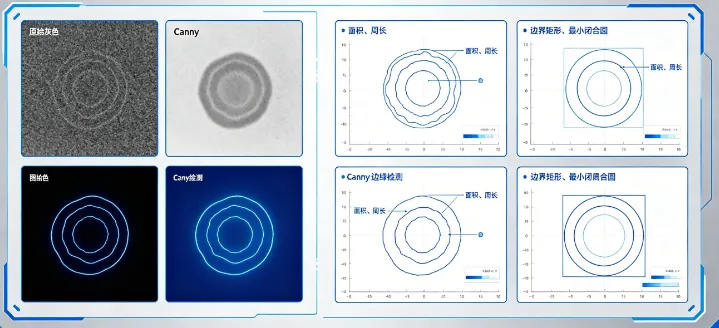
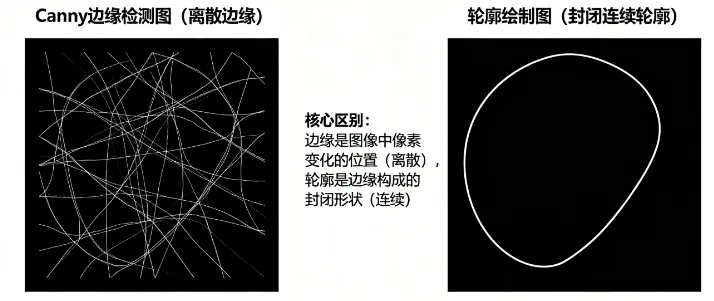
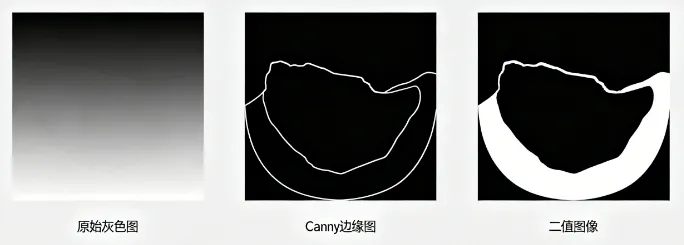
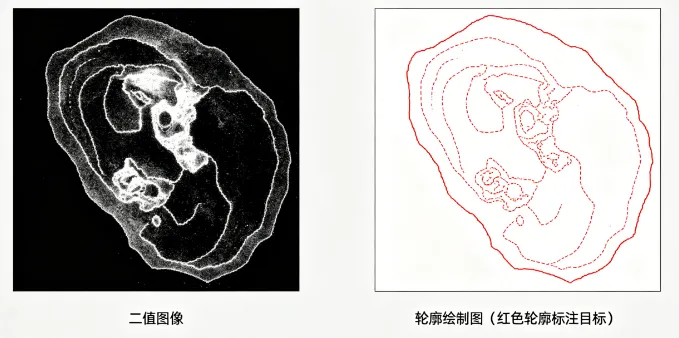
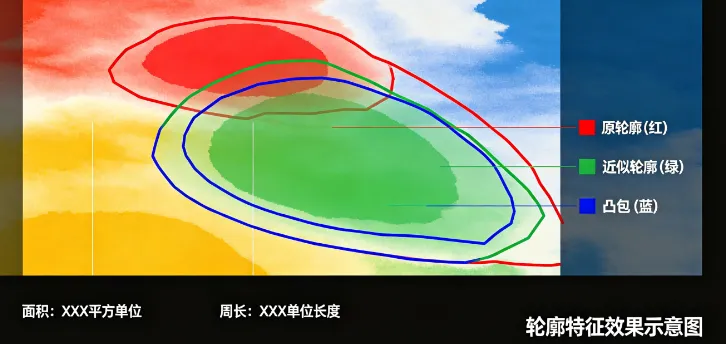
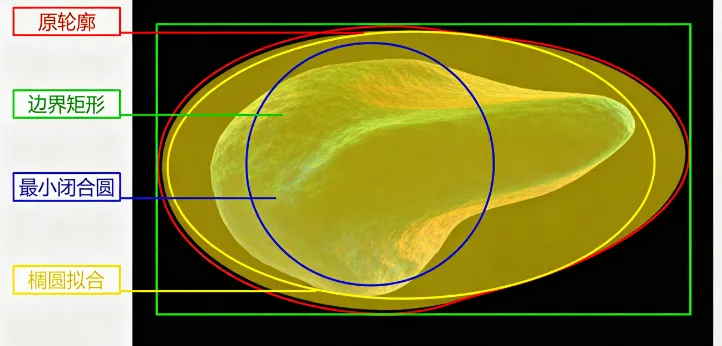
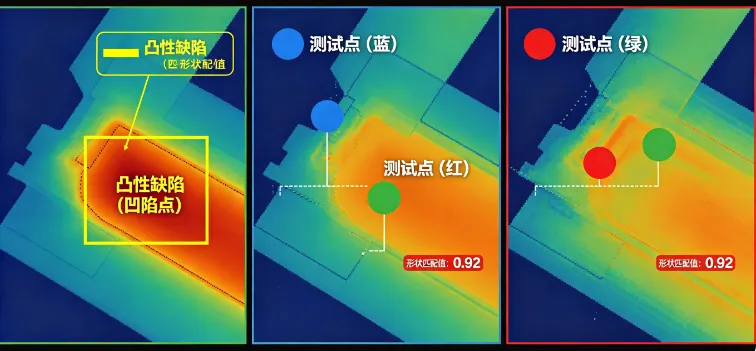
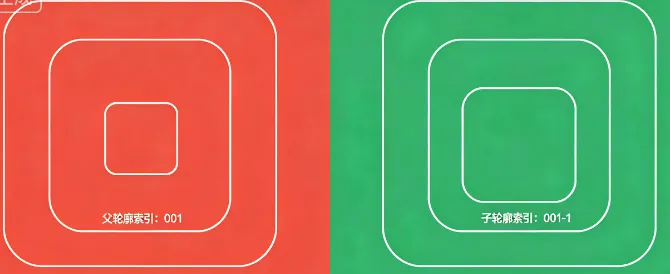
pythonimport cv2import numpy as npimport matplotlib.pyplot as plt# 1. 环境验证(可选)print("OpenCV版本:", cv2.__version__)# 2. 读取并预处理图像(主图像,非嵌套)img = cv2.imread("test.jpg", 0) # 替换为自己的图像路径img_blur = cv2.GaussianBlur(img, (3, 3), sigmaX=1)canny = cv2.Canny(img_blur, 50, 100)_, binary = cv2.threshold(canny, 127, 255, cv2.THRESH_BINARY)# 3. 轮廓发现(最外层轮廓)contours, _ = cv2.findContours(binary, cv2.RETR_EXTERNAL, cv2.CHAIN_APPROX_SIMPLE)if len(contours) == 0:print("未找到轮廓,请检查二值图像!")else:contour = contours[0]# 4. 轮廓特征(面积、周长、近似、凸包)area = cv2.contourArea(contour)perimeter = cv2.arcLength(contour, closed=True)epsilon = 0.02 * perimeterapprox_contour = cv2.approxPolyDP(contour, epsilon, closed=True)hull = cv2.convexHull(contour)# 5. 轮廓属性(边界矩形、最小闭合圆、椭圆拟合)x, y, w, h = cv2.boundingRect(contour)(x_circle, y_circle), radius = cv2.minEnclosingCircle(contour)ellipse = cv2.fitEllipse(contour) if len(contour) >= 5 else None# 6. 进阶操作(凸性缺陷、点多边形测试、形状匹配)hull_idx = cv2.convexHull(contour, returnPoints=False)defects = cv2.convexityDefects(contour, hull_idx) if hull_idx is not None else Nonepoint_inner = (int(contour[:, 0, 0].mean()), int(contour[:, 0, 1].mean()))point_outer = (50, 50)dist_inner = cv2.pointPolygonTest(contour, point_inner, True)dist_outer = cv2.pointPolygonTest(contour, point_outer, True)match_score = cv2.matchShapes(contour, approx_contour, cv2.CONTOURS_MATCH_I1, 0.0)# 7. 绘制所有效果(主图像)img_color = cv2.cvtColor(img, cv2.COLOR_GRAY2BGR)# 绘制轮廓相关cv2.drawContours(img_color, [contour], -1, (0, 0, 255), 2)cv2.drawContours(img_color, [approx_contour], -1, (0, 255, 0), 2)cv2.drawContours(img_color, [hull], -1, (255, 0, 0), 2)# 绘制轮廓属性cv2.rectangle(img_color, (x, y), (x+w, y+h), (0, 255, 255), 2)cv2.circle(img_color, (int(x_circle), int(y_circle)), int(radius), (128, 0, 128), 2)if ellipse is not None:cv2.ellipse(img_color, ellipse, (255, 255, 0), 2)# 绘制凸性缺陷if defects is not None:for i in range(defects.shape[0]):s, e, f, d = defects[i][0]cv2.circle(img_color, tuple(contour[f][0]), 5, (0, 0, 255), -1)# 绘制测试点cv2.circle(img_color, point_inner, 5, (0, 255, 0), -1)cv2.circle(img_color, point_outer, 5, (255, 0, 0), -1)# 标注信息cv2.putText(img_color, f"Area: {area:.0f}", (10, 30), cv2.FONT_HERSHEY_SIMPLEX, 0.8, (0, 0, 255), 2)cv2.putText(img_color, f"Match: {match_score:.4f}", (10, 70), cv2.FONT_HERSHEY_SIMPLEX, 0.8, (0, 255, 255), 2)cv2.putText(img_color, "Inner", (point_inner[0]+10, point_inner[1]), cv2.FONT_HERSHEY_SIMPLEX, 0.8, (0, 255, 0), 2)cv2.putText(img_color, "Outer", (point_outer[0]+10, point_outer[1]), cv2.FONT_HERSHEY_SIMPLEX, 0.8, (255, 0, 0), 2)# 8. 轮廓分层演示(嵌套图像)img_nested = cv2.imread("nested_contour.jpg", 0) # 替换为嵌套轮廓图像路径_, binary_nested = cv2.threshold(img_nested, 127, 255, cv2.THRESH_BINARY_INV)contours_nested, hierarchy_nested = cv2.findContours(binary_nested, cv2.RETR_TREE, cv2.CHAIN_APPROX_SIMPLE)img_nested_color = cv2.cvtColor(img_nested, cv2.COLOR_GRAY2BGR)for i, cnt in enumerate(contours_nested):if hierarchy_nested[0][i][3] == -1:cv2.drawContours(img_nested_color, [cnt], -1, (0, 0, 255), 2)cv2.putText(img_nested_color, f"Parent {i}", tuple(cnt[0][0]), cv2.FONT_HERSHEY_SIMPLEX, 0.8, (0, 0, 255), 2)else:cv2.drawContours(img_nested_color, [cnt], -1, (0, 255, 0), 2)cv2.putText(img_nested_color, f"Child {i}", tuple(cnt[0][0]), cv2.FONT_HERSHEY_SIMPLEX, 0.8, (0, 255, 0), 2)# 9. 统一显示所有效果plt.figure(figsize=(15, 10))# 主轮廓效果plt.subplot(2, 2, 1)plt.imshow(cv2.cvtColor(img_color, cv2.COLOR_BGR2RGB))plt.title("轮廓特征+属性+进阶操作")plt.axis("off")# 二值图像plt.subplot(2, 2, 2)plt.imshow(binary, cmap="gray")plt.title("二值图像")plt.axis("off")# 嵌套轮廓分层plt.subplot(2, 2, 3)plt.imshow(cv2.cvtColor(img_nested_color, cv2.COLOR_BGR2RGB))plt.title("轮廓分层结构")plt.axis("off")# 轮廓近似对比plt.subplot(2, 2, 4)plt.imshow(cv2.cvtColor(cv2.drawContours(cv2.cvtColor(img, cv2.COLOR_GRAY2BGR), [contour, approx_contour], -1, (0,0,255, 0,255,0), 2), cv2.COLOR_BGR2RGB))plt.title("原轮廓(红)vs 近似轮廓(绿)")plt.axis("off")plt.tight_layout()plt.show()# 10. 保存结果(可选)cv2.imwrite("contour_all.jpg", img_color)cv2.imwrite("contour_nested.jpg", img_nested_color) |
 10个月宝宝每天需要喝多少奶粉?