当前位置:首页>python>Python 事件驱动模式:打造实时响应的库存管理系统

Python 事件驱动模式:打造实时响应的库存管理系统

  • 2026-06-30 23:07:27
Python 事件驱动模式:打造实时响应的库存管理系统

🎯 你是否也遇到过这些问题?

在做桌面端库存管理系统时,最让人头疼的不是功能本身,而是界面"卡死"——用户点了一下"刷新库存",整个窗口就像被冻住了,转圈转了三秒,才慢吞吞地更新数据。更糟糕的是,有时候多个操作同时触发,数据还会出现错乱。

这背后的根本原因,往往不是业务逻辑写错了,而是事件处理模型设计得不对

本文会带你系统性地理解 CustomTkinter 的事件驱动机制,从底层原理到实战代码,一步步构建一个实时响应、数据同步准确、UI 流畅不卡顿的库存管理系统。读完之后,你能直接拿走:

  • • 一套可复用的事件总线架构模板
  • • 多线程安全更新 UI 的标准写法
  • • 实时库存预警的完整实现方案

测试环境:Windows 11 + Python 3.11 + CustomTkinter 5.2.2,所有代码均经过本地验证。


🔍 问题深度剖析:为什么 GUI 会"假死"?

主线程的致命陷阱

Tkinter(以及基于它的 CustomTkinter)有一个铁律:所有 UI 操作必须在主线程执行。它的事件循环 mainloop() 本质上是一个单线程的消息队列,每次只能处理一件事。

当你在按钮回调里直接写数据库查询或网络请求时,主线程就被阻塞了。mainloop() 无法继续处理鼠标移动、窗口重绘等消息,用户看到的就是"假死"。

很多初学者的第一反应是"那我加个 time.sleep() 或者 threading.Thread 不就行了"——方向对了,但如果在子线程里直接操作 Label.configure() 或 CTkLabel.configure(),就会触发 Tkinter 的线程安全问题,轻则数据错乱,重则直接崩溃。

常见的错误写法

python1# ❌ 错误示范:在子线程中直接操作 UI 控件2import threading3import customtkinter as ctk45def load_data_wrong(label):6import time7    time.sleep(2)  # 模拟耗时操作8    label.configure(text="数据加载完成")  # 危险!子线程操作 UI910app = ctk.CTk()11label = ctk.CTkLabel(app, text="等待中...")12label.pack()1314btn = ctk.CTkButton(app, text="加载",15                    command=lambda: threading.Thread(16                        target=load_data_wrong, args=(label,)17                    ).start())18btn.pack()19app.mainloop()

这段代码在小规模测试时可能"侥幸"运行,但在高频触发或复杂场景下,必然出问题。线程安全不是"大概率没问题",而是"必须保证正确"。


💡 核心要点提炼:事件驱动的正确姿势

after() 方法:主线程安全调度的核心

CustomTkinter 继承了 Tkinter 的 after(ms, func) 方法,它的作用是将函数调度回主线程的事件队列,在指定毫秒后执行。这是解决线程安全问题的官方推荐方式。

python1# ✅ 正确做法:通过 after() 将 UI 更新调度回主线程2app.after(0lambda: label.configure(text="数据加载完成"))

after(0, ...) 意味着"尽快执行,但必须在主线程"。这一行代码,解决了 90% 的线程安全问题。

事件总线模式:解耦业务与 UI

当系统复杂度上升,组件之间互相调用会形成"蜘蛛网"依赖。引入事件总线(Event Bus),让各模块通过发布/订阅消息通信,彻底解耦。

核心思路:

  • • 发布者(如数据层)只管发出事件,不关心谁来处理
  • • 订阅者(如 UI 层)只管监听感兴趣的事件,不关心数据从哪来
  • • 事件总线负责路由,并保证 UI 回调在主线程安全执行

这个模式在 Vue、React 的状态管理中早已是标配,用在桌面 GUI 里同样好使。


🛠️ 解决方案设计

下面按照由浅入深的顺序,给出三个渐进式方案。


方案一:基础版——after() 轮询刷新库存

适用场景:数据量小、刷新频率低(如每 5 秒同步一次本地 SQLite)

这是最简单的实现:用 after() 定时轮询数据源,更新 UI 表格。

python1import customtkinter as ctk2import random3import time45# 模拟库存数据源(实际项目中替换为数据库查询)6def fetch_inventory():7"""模拟从数据库获取库存数据"""8    products = ["螺丝M6""轴承6205""密封圈""弹簧垫片""六角螺母"]9return [10        {"name": p, "qty": random.randint(0500), "unit""个"}11for p in products12    ]1314class InventoryApp(ctk.CTk):15def __init__(self):16super().__init__()17        self.title("库存管理系统 - 基础版")18        self.geometry("600x400")19        ctk.set_appearance_mode("dark")2021# 标题22        self.header = ctk.CTkLabel(23            self, text="📦 实时库存看板",24            font=ctk.CTkFont(size=20, weight="bold")25        )26        self.header.pack(pady=10)2728# 状态栏29        self.status_label = ctk.CTkLabel(self, text="上次更新:--")30        self.status_label.pack()3132# 数据行容器33        self.rows_frame = ctk.CTkScrollableFrame(self, width=560, height=280)34        self.rows_frame.pack(pady=10, padx=20)3536        self.row_labels = []3738# 启动定时刷新39        self._refresh_inventory()4041def _refresh_inventory(self):42"""定时刷新库存数据(主线程安全)"""43        data = fetch_inventory()44        self._update_table(data)45# 每 3000ms 重新调度一次46        self.after(3000, self._refresh_inventory)4748def _update_table(self, data):49"""更新 UI 表格"""50# 清除旧行51for widget in self.rows_frame.winfo_children():52            widget.destroy()5354for item in data:55            qty = item["qty"]56# 库存预警:低于 50 显示红色57            color = "#FF6B6B" if qty < 50 else "#90EE90"58            row_text = f"{item['name']:<12}  库存:{qty:>4} {item['unit']}"59            label = ctk.CTkLabel(60                self.rows_frame,61                text=row_text,62                text_color=color,63                font=ctk.CTkFont(family="Consolas", size=13)64            )65            label.pack(anchor="w", padx=10, pady=2)6667# 更新时间戳68        self.status_label.configure(69            text=f"上次更新:{time.strftime('%H:%M:%S')}"70        )7172if __name__ == "__main__":73    app = InventoryApp()74    app.mainloop()
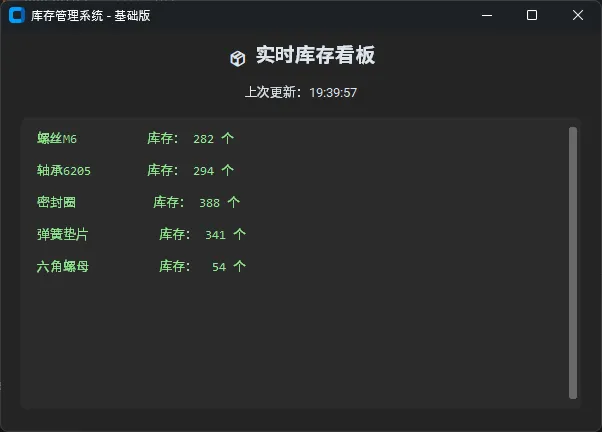
效果:每 3 秒自动刷新一次,库存低于 50 自动标红预警,全程无卡顿。

踩坑预警_refresh_inventory 里不要用 while True + time.sleep(),那会直接阻塞主线程。必须用 after() 递归调度。


方案二:进阶版——多线程 + 线程安全队列

适用场景:需要查询远程数据库、调用 API,耗时操作不能阻塞 UI

核心思路:子线程负责耗时的数据获取,通过 queue.Queue 传递结果,主线程用 after() 轮询队列取结果并更新 UI。

python1import customtkinter as ctk2import threading3import queue4import time5import random67# 模拟耗时的远程数据获取(如查询 MySQL / 调用 REST API)8def slow_fetch_inventory(result_queue: queue.Queue):9"""在子线程中执行耗时操作,结果放入队列"""10    time.sleep(1.5)  # 模拟网络延迟11    data = [12        {"name""伺服电机""qty": random.randint(0100)},13        {"name""变频器",   "qty": random.randint(080)},14        {"name""PLC模块",  "qty": random.randint(060)},15        {"name""触摸屏",   "qty": random.randint(040)},16        {"name""编码器",   "qty": random.randint(0200)},17    ]18    result_queue.put(("success", data))1920class AdvancedInventoryApp(ctk.CTk):21def __init__(self):22super().__init__()23        self.title("库存管理系统 - 进阶版")24        self.geometry("640x480")25        ctk.set_appearance_mode("dark")2627        self._queue = queue.Queue()28        self._is_loading = False2930# UI 布局31        self.header = ctk.CTkLabel(32            self, text="🏭 工控物料库存系统",33            font=ctk.CTkFont(size=20, weight="bold")34        )35        self.header.pack(pady=10)3637        self.refresh_btn = ctk.CTkButton(38            self, text="🔄 手动刷新",39            command=self._trigger_refresh40        )41        self.refresh_btn.pack(pady=5)4243        self.loading_label = ctk.CTkLabel(self, text="")44        self.loading_label.pack()4546        self.table_frame = ctk.CTkScrollableFrame(self, width=600, height=320)47        self.table_frame.pack(pady=10, padx=20)4849# 启动队列轮询50        self._poll_queue()51# 首次自动加载52        self._trigger_refresh()5354def _trigger_refresh(self):55"""触发后台数据加载"""56if self._is_loading:57return  # 防止重复触发5859        self._is_loading = True60        self.refresh_btn.configure(state="disabled", text="加载中...")61        self.loading_label.configure(text="⏳ 正在同步库存数据...")6263# 启动子线程执行耗时操作64        t = threading.Thread(65            target=slow_fetch_inventory,66            args=(self._queue,),67            daemon=True  # 主程序退出时子线程自动销毁68        )69        t.start()7071def _poll_queue(self):72"""主线程轮询队列,安全更新 UI"""73try:74while True:75                status, data = self._queue.get_nowait()76if status == "success":77                    self._update_table(data)78                    self._is_loading = False79                    self.refresh_btn.configure(state="normal", text="🔄 手动刷新")80                    self.loading_label.configure(81                        text=f"✅ 同步完成  {time.strftime('%H:%M:%S')}"82                    )83except queue.Empty:84pass85# 每 100ms 检查一次队列86        self.after(100, self._poll_queue)8788def _update_table(self, data):89"""更新库存表格"""90for widget in self.table_frame.winfo_children():91            widget.destroy()9293# 表头94        header_frame = ctk.CTkFrame(self.table_frame, fg_color="transparent")95        header_frame.pack(fill="x", padx=5, pady=2)96        ctk.CTkLabel(header_frame, text="物料名称", width=160,97                     font=ctk.CTkFont(weight="bold")).pack(side="left")98        ctk.CTkLabel(header_frame, text="库存数量", width=120,99                     font=ctk.CTkFont(weight="bold")).pack(side="left")100        ctk.CTkLabel(header_frame, text="状态", width=100,101                     font=ctk.CTkFont(weight="bold")).pack(side="left")102103for item in data:104            qty = item["qty"]105if qty < 20:106                status_text, status_color = "⚠️ 紧缺""#FF6B6B"107elif qty < 50:108                status_text, status_color = "📉 偏低""#FFA500"109else:110                status_text, status_color = "✅ 正常""#90EE90"111112            row = ctk.CTkFrame(self.table_frame, fg_color="transparent")113            row.pack(fill="x", padx=5, pady=3)114115            ctk.CTkLabel(row, text=item["name"], width=160).pack(side="left")116            ctk.CTkLabel(row, text=str(qty), width=120).pack(side="left")117            ctk.CTkLabel(row, text=status_text, width=100,118                         text_color=status_color).pack(side="left")119120if __name__ == "__main__":121    app = AdvancedInventoryApp()122    app.mainloop()
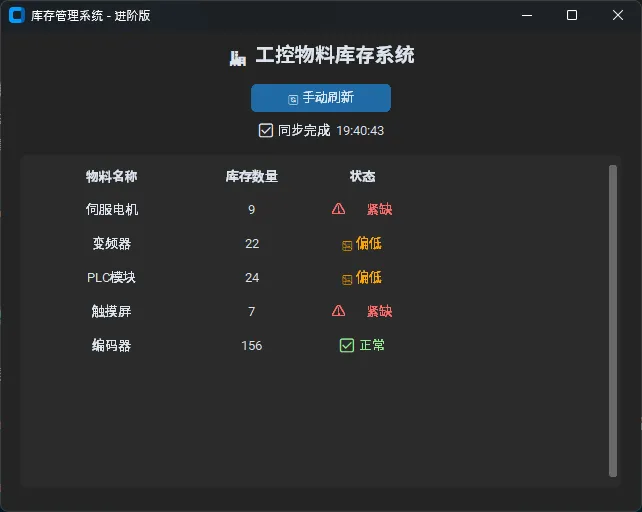
性能对比(测试环境:Windows 11, i5-12400, Python 3.11):

方式
1.5s 耗时操作期间 UI 响应
数据安全性
直接在回调中执行
完全卡死,无法交互
线程不安全
子线程 + Queue
流畅,可继续操作
线程安全

踩坑预警:子线程一定要设置 daemon=True,否则关闭主窗口后子线程仍在后台运行,进程无法正常退出。


方案三:完整版——事件总线架构

适用场景:多模块协作,如库存变更同时触发 UI 刷新、日志记录、预警通知

这是生产级项目的推荐架构。EventBus 作为中枢,各模块完全解耦,新增功能只需注册新的事件监听器,不需要改动已有代码。

python1import customtkinter as ctk2import threading3import queue4import time5import random6from collections import defaultdict7from typing import Callable8910# 事件总线核心模块11class EventBus:12"""13    线程安全的事件总线14    - 支持多订阅者15    - UI 回调自动通过 after(0) 调度回主线程16    """    def __init__(self, app_root: ctk.CTk):17        self._root = app_root18        self._listeners: dict[strlist[Callable]] = defaultdict(list)19        self._ui_queue: queue.Queue = queue.Queue()20        self._start_ui_dispatcher()2122def subscribe(self, event: str, callback: Callable):23"""订阅事件"""24        self._listeners[event].append(callback)2526def publish(self, event: str, data=None):27"""28        发布事件(线程安全)29        非主线程发布时,UI 回调通过队列调度30        """        for cb in self._listeners.get(event, []):31# 将 UI 回调放入队列,由主线程安全执行32            self._ui_queue.put((cb, data))3334def _start_ui_dispatcher(self):35"""主线程定期消费 UI 事件队列"""36try:37while True:38                cb, data = self._ui_queue.get_nowait()39cb(data)40except queue.Empty:41pass42        self._root.after(50, self._start_ui_dispatcher)434445# 数据层:库存服务46class InventoryService:47def __init__(self, bus: EventBus):48        self._bus = bus49        self._stock = {50"伺服电机"85"变频器"12,51"PLC模块"47"触摸屏"8"编码器"23052        }5354def sync_inventory(self):55"""模拟异步同步库存(子线程执行)"""56def _worker():57            time.sleep(1.2)58# 模拟数据变化59for k in self._stock:60                self._stock[k] = max(0, self._stock[k] + random.randint(-1515))61            self._bus.publish("inventory.updated"dict(self._stock))62# 检查预警63            alerts = [k for k, v in self._stock.items() if v < 20]64if alerts:65                self._bus.publish("inventory.alert", alerts)6667        threading.Thread(target=_worker, daemon=True).start()68        self._bus.publish("inventory.syncing"None)6970def adjust_stock(self, product: str, delta: int):71"""手动调整库存"""72if product in self._stock:73            self._stock[product] = max(0, self._stock[product] + delta)74            self._bus.publish("inventory.updated"dict(self._stock))757677# UI 层:主界面78class InventoryDashboard(ctk.CTkFrame):79def __init__(self, parent, bus: EventBus, service: InventoryService):80super().__init__(parent)81        self._bus = bus82        self._service = service8384# 订阅事件85        bus.subscribe("inventory.updated", self._on_inventory_updated)86        bus.subscribe("inventory.syncing", self._on_syncing)87        bus.subscribe("inventory.alert",   self._on_alert)8889        self._build_ui()9091def _build_ui(self):92        ctk.CTkLabel(self, text="📦 库存实时看板",93                     font=ctk.CTkFont(size=18, weight="bold")).pack(pady=8)9495        btn_frame = ctk.CTkFrame(self, fg_color="transparent")96        btn_frame.pack(fill="x", padx=20, pady=4)9798        self._sync_btn = ctk.CTkButton(99            btn_frame, text="🔄 同步数据",100            command=self._service.sync_inventory101        )102        self._sync_btn.pack(side="left", padx=5)103104        self._status = ctk.CTkLabel(btn_frame, text="就绪", text_color="gray")105        self._status.pack(side="left", padx=10)106107        self._alert_label = ctk.CTkLabel(108            self, text="", text_color="#FF6B6B",109            font=ctk.CTkFont(size=12)110        )111        self._alert_label.pack()112113        self._table = ctk.CTkScrollableFrame(self, width=580, height=300)114        self._table.pack(padx=20, pady=8)115116def _on_inventory_updated(self, data: dict):117"""库存更新事件处理"""118for w in self._table.winfo_children():119            w.destroy()120121for name, qty in data.items():122            color = ("#FF6B6B" if qty < 20123else "#FFA500" if qty < 50124else "#AAFFAA")125            row = ctk.CTkFrame(self._table, fg_color="transparent")126            row.pack(fill="x", padx=5, pady=2)127            ctk.CTkLabel(row, text=name, width=150).pack(side="left")128            ctk.CTkLabel(row, text=f"{qty} 件",129                         width=100, text_color=color).pack(side="left")130131# 快捷调整按钮132            ctk.CTkButton(row, text="+10", width=50,133                          command=lambda n=name: self._service.adjust_stock(n, 10)134                          ).pack(side="left", padx=3)135            ctk.CTkButton(row, text="-10", width=50, fg_color="#555",136                          command=lambda n=name: self._service.adjust_stock(n, -10)137                          ).pack(side="left")138139        self._status.configure(140            text=f"已更新 {time.strftime('%H:%M:%S')}", text_color="#90EE90"141        )142143def _on_syncing(self, _):144        self._status.configure(text="⏳ 同步中...", text_color="orange")145146def _on_alert(self, products: list):147        self._alert_label.configure(148            text=f"⚠️ 库存预警:{', '.join(products)} 库存不足!"149        )150151152class App(ctk.CTk):153def __init__(self):154super().__init__()155        self.title("库存管理系统 - 事件总线版")156        self.geometry("660x520")157        ctk.set_appearance_mode("dark")158159        bus = EventBus(self)160        service = InventoryService(bus)161        dashboard = InventoryDashboard(self, bus, service)162        dashboard.pack(fill="both", expand=True)163164# 启动时自动同步一次165        self.after(500, service.sync_inventory)166167if __name__ == "__main__":168App().mainloop()
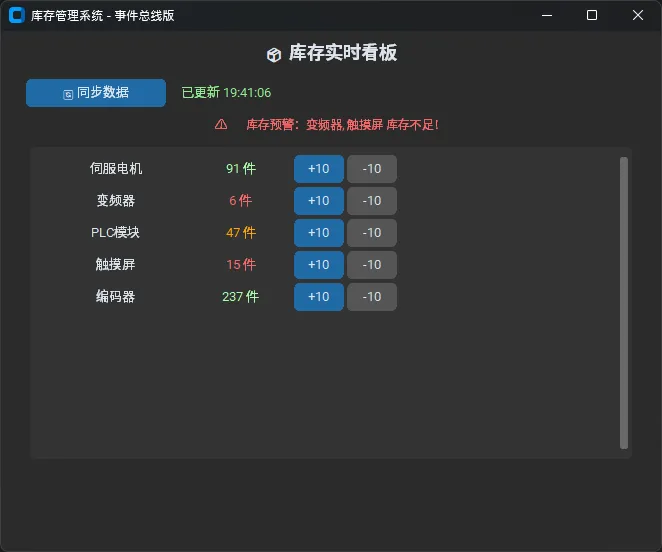
这套架构的扩展性极强。比如要新增"库存变更写入日志"的功能,只需在任意位置加一行:

python1bus.subscribe("inventory.updated"lambda data: logger.write(data))

完全不需要动 InventoryService 或 InventoryDashboard 的任何代码。这就是开闭原则在 GUI 开发里的实际体现。


🧩 三点技术洞察

"主线程是 GUI 的生命线,任何耗时操作都不该在这里发生。"

"after() + Queue 是 Tkinter 多线程的标准答案,不是 workaround,是设计哲学。"

"事件总线让模块之间从'直接调用'变成'广播通信',系统的可维护性会上一个台阶。"


💬 互动讨论

在你的项目里,UI 卡顿问题是怎么解决的?有没有遇到过子线程操作 UI 导致的诡异 Bug?欢迎在评论区聊聊你的经历。

另外抛一个实战挑战:如果库存数据来自 WebSocket 实时推送,你会如何改造上面的事件总线架构? 思路不限,可以直接贴代码。


📚 学习路径建议

如果想在这个方向继续深入,推荐的路径是:CustomTkinter 基础控件 → Tkinter 事件机制原理 → Python threading / asyncio 并发模型 → 设计模式(观察者模式、命令模式)→ 结合 SQLite / SQLAlchemy 做持久化层 → 最终接入 MQTT 或 WebSocket 做工业级实时数据接入。

每一步都有明确的实际项目可以练手,不会走弯路。


标签PythonCustomTkinter事件驱动GUI开发多线程库存管理上位机设计模式

最新文章

随机文章

基本 文件 流程 错误 SQL 调试
  1. 请求信息 : 2026-07-03 20:46:58 HTTP/2.0 GET : https://f.mffb.com.cn/a/493009.html
  2. 运行时间 : 0.213836s [ 吞吐率:4.68req/s ] 内存消耗:4,976.33kb 文件加载:140
  3. 缓存信息 : 0 reads,0 writes
  4. 会话信息 : SESSION_ID=1f5d8863505bacb1d05c4766eaf54e00
  1. /yingpanguazai/ssd/ssd1/www/f.mffb.com.cn/public/index.php ( 0.79 KB )
  2. /yingpanguazai/ssd/ssd1/www/f.mffb.com.cn/vendor/autoload.php ( 0.17 KB )
  3. /yingpanguazai/ssd/ssd1/www/f.mffb.com.cn/vendor/composer/autoload_real.php ( 2.49 KB )
  4. /yingpanguazai/ssd/ssd1/www/f.mffb.com.cn/vendor/composer/platform_check.php ( 0.90 KB )
  5. /yingpanguazai/ssd/ssd1/www/f.mffb.com.cn/vendor/composer/ClassLoader.php ( 14.03 KB )
  6. /yingpanguazai/ssd/ssd1/www/f.mffb.com.cn/vendor/composer/autoload_static.php ( 4.90 KB )
  7. /yingpanguazai/ssd/ssd1/www/f.mffb.com.cn/vendor/topthink/think-helper/src/helper.php ( 8.34 KB )
  8. /yingpanguazai/ssd/ssd1/www/f.mffb.com.cn/vendor/topthink/think-validate/src/helper.php ( 2.19 KB )
  9. /yingpanguazai/ssd/ssd1/www/f.mffb.com.cn/vendor/topthink/think-orm/src/helper.php ( 1.47 KB )
  10. /yingpanguazai/ssd/ssd1/www/f.mffb.com.cn/vendor/topthink/think-orm/stubs/load_stubs.php ( 0.16 KB )
  11. /yingpanguazai/ssd/ssd1/www/f.mffb.com.cn/vendor/topthink/framework/src/think/Exception.php ( 1.69 KB )
  12. /yingpanguazai/ssd/ssd1/www/f.mffb.com.cn/vendor/topthink/think-container/src/Facade.php ( 2.71 KB )
  13. /yingpanguazai/ssd/ssd1/www/f.mffb.com.cn/vendor/symfony/deprecation-contracts/function.php ( 0.99 KB )
  14. /yingpanguazai/ssd/ssd1/www/f.mffb.com.cn/vendor/symfony/polyfill-mbstring/bootstrap.php ( 8.26 KB )
  15. /yingpanguazai/ssd/ssd1/www/f.mffb.com.cn/vendor/symfony/polyfill-mbstring/bootstrap80.php ( 9.78 KB )
  16. /yingpanguazai/ssd/ssd1/www/f.mffb.com.cn/vendor/symfony/var-dumper/Resources/functions/dump.php ( 1.49 KB )
  17. /yingpanguazai/ssd/ssd1/www/f.mffb.com.cn/vendor/topthink/think-dumper/src/helper.php ( 0.18 KB )
  18. /yingpanguazai/ssd/ssd1/www/f.mffb.com.cn/vendor/symfony/var-dumper/VarDumper.php ( 4.30 KB )
  19. /yingpanguazai/ssd/ssd1/www/f.mffb.com.cn/vendor/topthink/framework/src/think/App.php ( 15.30 KB )
  20. /yingpanguazai/ssd/ssd1/www/f.mffb.com.cn/vendor/topthink/think-container/src/Container.php ( 15.76 KB )
  21. /yingpanguazai/ssd/ssd1/www/f.mffb.com.cn/vendor/psr/container/src/ContainerInterface.php ( 1.02 KB )
  22. /yingpanguazai/ssd/ssd1/www/f.mffb.com.cn/app/provider.php ( 0.19 KB )
  23. /yingpanguazai/ssd/ssd1/www/f.mffb.com.cn/vendor/topthink/framework/src/think/Http.php ( 6.04 KB )
  24. /yingpanguazai/ssd/ssd1/www/f.mffb.com.cn/vendor/topthink/think-helper/src/helper/Str.php ( 7.29 KB )
  25. /yingpanguazai/ssd/ssd1/www/f.mffb.com.cn/vendor/topthink/framework/src/think/Env.php ( 4.68 KB )
  26. /yingpanguazai/ssd/ssd1/www/f.mffb.com.cn/app/common.php ( 0.03 KB )
  27. /yingpanguazai/ssd/ssd1/www/f.mffb.com.cn/vendor/topthink/framework/src/helper.php ( 18.78 KB )
  28. /yingpanguazai/ssd/ssd1/www/f.mffb.com.cn/vendor/topthink/framework/src/think/Config.php ( 5.54 KB )
  29. /yingpanguazai/ssd/ssd1/www/f.mffb.com.cn/config/app.php ( 0.95 KB )
  30. /yingpanguazai/ssd/ssd1/www/f.mffb.com.cn/config/cache.php ( 0.78 KB )
  31. /yingpanguazai/ssd/ssd1/www/f.mffb.com.cn/config/console.php ( 0.23 KB )
  32. /yingpanguazai/ssd/ssd1/www/f.mffb.com.cn/config/cookie.php ( 0.56 KB )
  33. /yingpanguazai/ssd/ssd1/www/f.mffb.com.cn/config/database.php ( 2.48 KB )
  34. /yingpanguazai/ssd/ssd1/www/f.mffb.com.cn/vendor/topthink/framework/src/think/facade/Env.php ( 1.67 KB )
  35. /yingpanguazai/ssd/ssd1/www/f.mffb.com.cn/config/filesystem.php ( 0.61 KB )
  36. /yingpanguazai/ssd/ssd1/www/f.mffb.com.cn/config/lang.php ( 0.91 KB )
  37. /yingpanguazai/ssd/ssd1/www/f.mffb.com.cn/config/log.php ( 1.35 KB )
  38. /yingpanguazai/ssd/ssd1/www/f.mffb.com.cn/config/middleware.php ( 0.19 KB )
  39. /yingpanguazai/ssd/ssd1/www/f.mffb.com.cn/config/route.php ( 1.89 KB )
  40. /yingpanguazai/ssd/ssd1/www/f.mffb.com.cn/config/session.php ( 0.57 KB )
  41. /yingpanguazai/ssd/ssd1/www/f.mffb.com.cn/config/trace.php ( 0.34 KB )
  42. /yingpanguazai/ssd/ssd1/www/f.mffb.com.cn/config/view.php ( 0.82 KB )
  43. /yingpanguazai/ssd/ssd1/www/f.mffb.com.cn/app/event.php ( 0.25 KB )
  44. /yingpanguazai/ssd/ssd1/www/f.mffb.com.cn/vendor/topthink/framework/src/think/Event.php ( 7.67 KB )
  45. /yingpanguazai/ssd/ssd1/www/f.mffb.com.cn/app/service.php ( 0.13 KB )
  46. /yingpanguazai/ssd/ssd1/www/f.mffb.com.cn/app/AppService.php ( 0.26 KB )
  47. /yingpanguazai/ssd/ssd1/www/f.mffb.com.cn/vendor/topthink/framework/src/think/Service.php ( 1.64 KB )
  48. /yingpanguazai/ssd/ssd1/www/f.mffb.com.cn/vendor/topthink/framework/src/think/Lang.php ( 7.35 KB )
  49. /yingpanguazai/ssd/ssd1/www/f.mffb.com.cn/vendor/topthink/framework/src/lang/zh-cn.php ( 13.70 KB )
  50. /yingpanguazai/ssd/ssd1/www/f.mffb.com.cn/vendor/topthink/framework/src/think/initializer/Error.php ( 3.31 KB )
  51. /yingpanguazai/ssd/ssd1/www/f.mffb.com.cn/vendor/topthink/framework/src/think/initializer/RegisterService.php ( 1.33 KB )
  52. /yingpanguazai/ssd/ssd1/www/f.mffb.com.cn/vendor/services.php ( 0.14 KB )
  53. /yingpanguazai/ssd/ssd1/www/f.mffb.com.cn/vendor/topthink/framework/src/think/service/PaginatorService.php ( 1.52 KB )
  54. /yingpanguazai/ssd/ssd1/www/f.mffb.com.cn/vendor/topthink/framework/src/think/service/ValidateService.php ( 0.99 KB )
  55. /yingpanguazai/ssd/ssd1/www/f.mffb.com.cn/vendor/topthink/framework/src/think/service/ModelService.php ( 2.04 KB )
  56. /yingpanguazai/ssd/ssd1/www/f.mffb.com.cn/vendor/topthink/think-trace/src/Service.php ( 0.77 KB )
  57. /yingpanguazai/ssd/ssd1/www/f.mffb.com.cn/vendor/topthink/framework/src/think/Middleware.php ( 6.72 KB )
  58. /yingpanguazai/ssd/ssd1/www/f.mffb.com.cn/vendor/topthink/framework/src/think/initializer/BootService.php ( 0.77 KB )
  59. /yingpanguazai/ssd/ssd1/www/f.mffb.com.cn/vendor/topthink/think-orm/src/Paginator.php ( 11.86 KB )
  60. /yingpanguazai/ssd/ssd1/www/f.mffb.com.cn/vendor/topthink/think-validate/src/Validate.php ( 63.20 KB )
  61. /yingpanguazai/ssd/ssd1/www/f.mffb.com.cn/vendor/topthink/think-orm/src/Model.php ( 23.55 KB )
  62. /yingpanguazai/ssd/ssd1/www/f.mffb.com.cn/vendor/topthink/think-orm/src/model/concern/Attribute.php ( 21.05 KB )
  63. /yingpanguazai/ssd/ssd1/www/f.mffb.com.cn/vendor/topthink/think-orm/src/model/concern/AutoWriteData.php ( 4.21 KB )
  64. /yingpanguazai/ssd/ssd1/www/f.mffb.com.cn/vendor/topthink/think-orm/src/model/concern/Conversion.php ( 6.44 KB )
  65. /yingpanguazai/ssd/ssd1/www/f.mffb.com.cn/vendor/topthink/think-orm/src/model/concern/DbConnect.php ( 5.16 KB )
  66. /yingpanguazai/ssd/ssd1/www/f.mffb.com.cn/vendor/topthink/think-orm/src/model/concern/ModelEvent.php ( 2.33 KB )
  67. /yingpanguazai/ssd/ssd1/www/f.mffb.com.cn/vendor/topthink/think-orm/src/model/concern/RelationShip.php ( 28.29 KB )
  68. /yingpanguazai/ssd/ssd1/www/f.mffb.com.cn/vendor/topthink/think-helper/src/contract/Arrayable.php ( 0.09 KB )
  69. /yingpanguazai/ssd/ssd1/www/f.mffb.com.cn/vendor/topthink/think-helper/src/contract/Jsonable.php ( 0.13 KB )
  70. /yingpanguazai/ssd/ssd1/www/f.mffb.com.cn/vendor/topthink/think-orm/src/model/contract/Modelable.php ( 0.09 KB )
  71. /yingpanguazai/ssd/ssd1/www/f.mffb.com.cn/vendor/topthink/framework/src/think/Db.php ( 2.88 KB )
  72. /yingpanguazai/ssd/ssd1/www/f.mffb.com.cn/vendor/topthink/think-orm/src/DbManager.php ( 8.52 KB )
  73. /yingpanguazai/ssd/ssd1/www/f.mffb.com.cn/vendor/topthink/framework/src/think/Log.php ( 6.28 KB )
  74. /yingpanguazai/ssd/ssd1/www/f.mffb.com.cn/vendor/topthink/framework/src/think/Manager.php ( 3.92 KB )
  75. /yingpanguazai/ssd/ssd1/www/f.mffb.com.cn/vendor/psr/log/src/LoggerTrait.php ( 2.69 KB )
  76. /yingpanguazai/ssd/ssd1/www/f.mffb.com.cn/vendor/psr/log/src/LoggerInterface.php ( 2.71 KB )
  77. /yingpanguazai/ssd/ssd1/www/f.mffb.com.cn/vendor/topthink/framework/src/think/Cache.php ( 4.92 KB )
  78. /yingpanguazai/ssd/ssd1/www/f.mffb.com.cn/vendor/psr/simple-cache/src/CacheInterface.php ( 4.71 KB )
  79. /yingpanguazai/ssd/ssd1/www/f.mffb.com.cn/vendor/topthink/think-helper/src/helper/Arr.php ( 16.63 KB )
  80. /yingpanguazai/ssd/ssd1/www/f.mffb.com.cn/vendor/topthink/framework/src/think/cache/driver/File.php ( 7.84 KB )
  81. /yingpanguazai/ssd/ssd1/www/f.mffb.com.cn/vendor/topthink/framework/src/think/cache/Driver.php ( 9.03 KB )
  82. /yingpanguazai/ssd/ssd1/www/f.mffb.com.cn/vendor/topthink/framework/src/think/contract/CacheHandlerInterface.php ( 1.99 KB )
  83. /yingpanguazai/ssd/ssd1/www/f.mffb.com.cn/app/Request.php ( 0.09 KB )
  84. /yingpanguazai/ssd/ssd1/www/f.mffb.com.cn/vendor/topthink/framework/src/think/Request.php ( 55.78 KB )
  85. /yingpanguazai/ssd/ssd1/www/f.mffb.com.cn/app/middleware.php ( 0.25 KB )
  86. /yingpanguazai/ssd/ssd1/www/f.mffb.com.cn/vendor/topthink/framework/src/think/Pipeline.php ( 2.61 KB )
  87. /yingpanguazai/ssd/ssd1/www/f.mffb.com.cn/vendor/topthink/think-trace/src/TraceDebug.php ( 3.40 KB )
  88. /yingpanguazai/ssd/ssd1/www/f.mffb.com.cn/vendor/topthink/framework/src/think/middleware/SessionInit.php ( 1.94 KB )
  89. /yingpanguazai/ssd/ssd1/www/f.mffb.com.cn/vendor/topthink/framework/src/think/Session.php ( 1.80 KB )
  90. /yingpanguazai/ssd/ssd1/www/f.mffb.com.cn/vendor/topthink/framework/src/think/session/driver/File.php ( 6.27 KB )
  91. /yingpanguazai/ssd/ssd1/www/f.mffb.com.cn/vendor/topthink/framework/src/think/contract/SessionHandlerInterface.php ( 0.87 KB )
  92. /yingpanguazai/ssd/ssd1/www/f.mffb.com.cn/vendor/topthink/framework/src/think/session/Store.php ( 7.12 KB )
  93. /yingpanguazai/ssd/ssd1/www/f.mffb.com.cn/vendor/topthink/framework/src/think/Route.php ( 23.73 KB )
  94. /yingpanguazai/ssd/ssd1/www/f.mffb.com.cn/vendor/topthink/framework/src/think/route/RuleName.php ( 5.75 KB )
  95. /yingpanguazai/ssd/ssd1/www/f.mffb.com.cn/vendor/topthink/framework/src/think/route/Domain.php ( 2.53 KB )
  96. /yingpanguazai/ssd/ssd1/www/f.mffb.com.cn/vendor/topthink/framework/src/think/route/RuleGroup.php ( 22.43 KB )
  97. /yingpanguazai/ssd/ssd1/www/f.mffb.com.cn/vendor/topthink/framework/src/think/route/Rule.php ( 26.95 KB )
  98. /yingpanguazai/ssd/ssd1/www/f.mffb.com.cn/vendor/topthink/framework/src/think/route/RuleItem.php ( 9.78 KB )
  99. /yingpanguazai/ssd/ssd1/www/f.mffb.com.cn/route/app.php ( 1.72 KB )
  100. /yingpanguazai/ssd/ssd1/www/f.mffb.com.cn/vendor/topthink/framework/src/think/facade/Route.php ( 4.70 KB )
  101. /yingpanguazai/ssd/ssd1/www/f.mffb.com.cn/vendor/topthink/framework/src/think/route/dispatch/Controller.php ( 4.74 KB )
  102. /yingpanguazai/ssd/ssd1/www/f.mffb.com.cn/vendor/topthink/framework/src/think/route/Dispatch.php ( 10.44 KB )
  103. /yingpanguazai/ssd/ssd1/www/f.mffb.com.cn/app/controller/Index.php ( 4.81 KB )
  104. /yingpanguazai/ssd/ssd1/www/f.mffb.com.cn/app/BaseController.php ( 2.05 KB )
  105. /yingpanguazai/ssd/ssd1/www/f.mffb.com.cn/vendor/topthink/think-orm/src/facade/Db.php ( 0.93 KB )
  106. /yingpanguazai/ssd/ssd1/www/f.mffb.com.cn/vendor/topthink/think-orm/src/db/connector/Mysql.php ( 5.44 KB )
  107. /yingpanguazai/ssd/ssd1/www/f.mffb.com.cn/vendor/topthink/think-orm/src/db/PDOConnection.php ( 52.47 KB )
  108. /yingpanguazai/ssd/ssd1/www/f.mffb.com.cn/vendor/topthink/think-orm/src/db/Connection.php ( 8.39 KB )
  109. /yingpanguazai/ssd/ssd1/www/f.mffb.com.cn/vendor/topthink/think-orm/src/db/ConnectionInterface.php ( 4.57 KB )
  110. /yingpanguazai/ssd/ssd1/www/f.mffb.com.cn/vendor/topthink/think-orm/src/db/builder/Mysql.php ( 16.58 KB )
  111. /yingpanguazai/ssd/ssd1/www/f.mffb.com.cn/vendor/topthink/think-orm/src/db/Builder.php ( 24.06 KB )
  112. /yingpanguazai/ssd/ssd1/www/f.mffb.com.cn/vendor/topthink/think-orm/src/db/BaseBuilder.php ( 27.50 KB )
  113. /yingpanguazai/ssd/ssd1/www/f.mffb.com.cn/vendor/topthink/think-orm/src/db/Query.php ( 15.71 KB )
  114. /yingpanguazai/ssd/ssd1/www/f.mffb.com.cn/vendor/topthink/think-orm/src/db/BaseQuery.php ( 45.13 KB )
  115. /yingpanguazai/ssd/ssd1/www/f.mffb.com.cn/vendor/topthink/think-orm/src/db/concern/TimeFieldQuery.php ( 7.43 KB )
  116. /yingpanguazai/ssd/ssd1/www/f.mffb.com.cn/vendor/topthink/think-orm/src/db/concern/AggregateQuery.php ( 3.26 KB )
  117. /yingpanguazai/ssd/ssd1/www/f.mffb.com.cn/vendor/topthink/think-orm/src/db/concern/ModelRelationQuery.php ( 20.07 KB )
  118. /yingpanguazai/ssd/ssd1/www/f.mffb.com.cn/vendor/topthink/think-orm/src/db/concern/ParamsBind.php ( 3.66 KB )
  119. /yingpanguazai/ssd/ssd1/www/f.mffb.com.cn/vendor/topthink/think-orm/src/db/concern/ResultOperation.php ( 7.01 KB )
  120. /yingpanguazai/ssd/ssd1/www/f.mffb.com.cn/vendor/topthink/think-orm/src/db/concern/WhereQuery.php ( 19.37 KB )
  121. /yingpanguazai/ssd/ssd1/www/f.mffb.com.cn/vendor/topthink/think-orm/src/db/concern/JoinAndViewQuery.php ( 7.11 KB )
  122. /yingpanguazai/ssd/ssd1/www/f.mffb.com.cn/vendor/topthink/think-orm/src/db/concern/TableFieldInfo.php ( 2.63 KB )
  123. /yingpanguazai/ssd/ssd1/www/f.mffb.com.cn/vendor/topthink/think-orm/src/db/concern/Transaction.php ( 2.77 KB )
  124. /yingpanguazai/ssd/ssd1/www/f.mffb.com.cn/vendor/topthink/framework/src/think/log/driver/File.php ( 5.96 KB )
  125. /yingpanguazai/ssd/ssd1/www/f.mffb.com.cn/vendor/topthink/framework/src/think/contract/LogHandlerInterface.php ( 0.86 KB )
  126. /yingpanguazai/ssd/ssd1/www/f.mffb.com.cn/vendor/topthink/framework/src/think/log/Channel.php ( 3.89 KB )
  127. /yingpanguazai/ssd/ssd1/www/f.mffb.com.cn/vendor/topthink/framework/src/think/event/LogRecord.php ( 1.02 KB )
  128. /yingpanguazai/ssd/ssd1/www/f.mffb.com.cn/vendor/topthink/think-helper/src/Collection.php ( 16.47 KB )
  129. /yingpanguazai/ssd/ssd1/www/f.mffb.com.cn/vendor/topthink/framework/src/think/facade/View.php ( 1.70 KB )
  130. /yingpanguazai/ssd/ssd1/www/f.mffb.com.cn/vendor/topthink/framework/src/think/View.php ( 4.39 KB )
  131. /yingpanguazai/ssd/ssd1/www/f.mffb.com.cn/vendor/topthink/framework/src/think/Response.php ( 8.81 KB )
  132. /yingpanguazai/ssd/ssd1/www/f.mffb.com.cn/vendor/topthink/framework/src/think/response/View.php ( 3.29 KB )
  133. /yingpanguazai/ssd/ssd1/www/f.mffb.com.cn/vendor/topthink/framework/src/think/Cookie.php ( 6.06 KB )
  134. /yingpanguazai/ssd/ssd1/www/f.mffb.com.cn/vendor/topthink/think-view/src/Think.php ( 8.38 KB )
  135. /yingpanguazai/ssd/ssd1/www/f.mffb.com.cn/vendor/topthink/framework/src/think/contract/TemplateHandlerInterface.php ( 1.60 KB )
  136. /yingpanguazai/ssd/ssd1/www/f.mffb.com.cn/vendor/topthink/think-template/src/Template.php ( 46.61 KB )
  137. /yingpanguazai/ssd/ssd1/www/f.mffb.com.cn/vendor/topthink/think-template/src/template/driver/File.php ( 2.41 KB )
  138. /yingpanguazai/ssd/ssd1/www/f.mffb.com.cn/vendor/topthink/think-template/src/template/contract/DriverInterface.php ( 0.86 KB )
  139. /yingpanguazai/ssd/ssd1/www/f.mffb.com.cn/runtime/temp/067d451b9a0c665040f3f1bdd3293d68.php ( 11.98 KB )
  140. /yingpanguazai/ssd/ssd1/www/f.mffb.com.cn/vendor/topthink/think-trace/src/Html.php ( 4.42 KB )
  1. CONNECT:[ UseTime:0.001268s ] mysql:host=127.0.0.1;port=3306;dbname=f_mffb;charset=utf8mb4
  2. SHOW FULL COLUMNS FROM `fenlei` [ RunTime:0.002000s ]
  3. SELECT * FROM `fenlei` WHERE `fid` = 0 [ RunTime:0.000778s ]
  4. SELECT * FROM `fenlei` WHERE `fid` = 63 [ RunTime:0.000736s ]
  5. SHOW FULL COLUMNS FROM `set` [ RunTime:0.001370s ]
  6. SELECT * FROM `set` [ RunTime:0.000619s ]
  7. SHOW FULL COLUMNS FROM `article` [ RunTime:0.001448s ]
  8. SELECT * FROM `article` WHERE `id` = 493009 LIMIT 1 [ RunTime:0.001238s ]
  9. UPDATE `article` SET `lasttime` = 1783082818 WHERE `id` = 493009 [ RunTime:0.026446s ]
  10. SELECT * FROM `fenlei` WHERE `id` = 66 LIMIT 1 [ RunTime:0.000661s ]
  11. SELECT * FROM `article` WHERE `id` < 493009 ORDER BY `id` DESC LIMIT 1 [ RunTime:0.001257s ]
  12. SELECT * FROM `article` WHERE `id` > 493009 ORDER BY `id` ASC LIMIT 1 [ RunTime:0.001161s ]
  13. SELECT * FROM `article` WHERE `id` < 493009 ORDER BY `id` DESC LIMIT 10 [ RunTime:0.004419s ]
  14. SELECT * FROM `article` WHERE `id` < 493009 ORDER BY `id` DESC LIMIT 10,10 [ RunTime:0.002228s ]
  15. SELECT * FROM `article` WHERE `id` < 493009 ORDER BY `id` DESC LIMIT 20,10 [ RunTime:0.002813s ]
0.215360s
