HyperView Python 二次开发 告别手动调整曲线表头Header字体大小(附完整源码)
- 2026-10-11 07:52:52
HyperView Python 二次开发 告别手动调整曲线表头Header字体大小(附完整源码)
往期文章 Hyperview云图显示各个零件屈服,断后延伸率,应力与屈服比值(应力归一化),失效应变归一化 CAE仿真 有限元分析的"天生误差"
HyperView Python 二次开发 自动调整曲线legend字体大小
HyperView 基于Tcl 二次开发常用功能合集
CAE仿真,3节点线性三角形单元为何是常应变单元
HyperMesh Python二次开发-自动修改Component名字
HyperMesh Python二次开发 自动替换Component名中的特定字符。
「CAE仿真记」
愿与您一同,用代码提升效率!
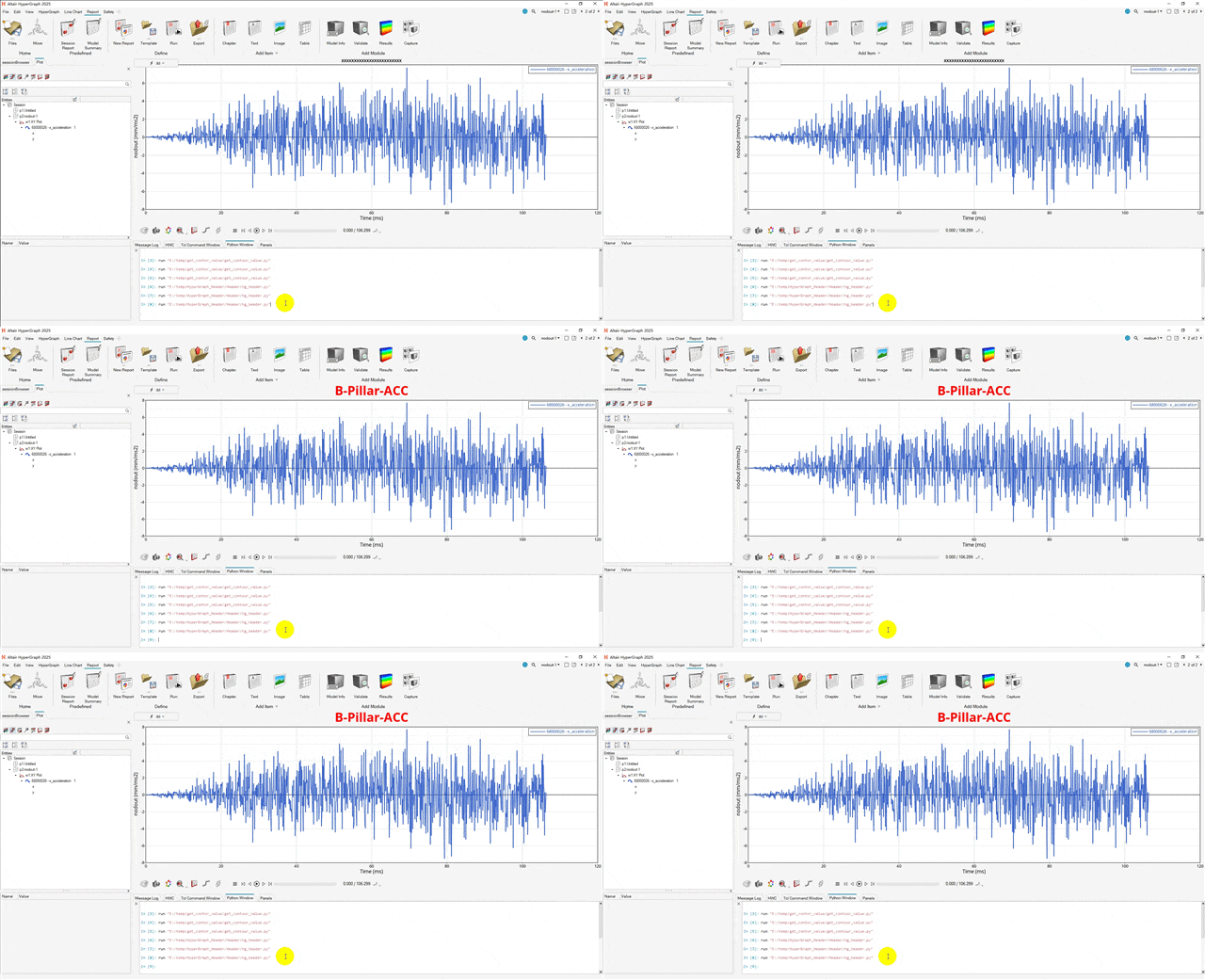
日常报告截图前,一般都会调整曲线图表头字体大小,图片数量较多时候,每个表头都点击调整一次浪费大量时间,还不能保证每次设置的字体大小相同,使用二次开发脚本1秒搞定。
此篇是学会怎样在hyperview中使用二次开发功能自动调整曲线表头字体大小。
HyperView基于Python语言实现方法:
def modify_Header_font (headerlabel,fontsize,fontstyle,fontfamily):# 模块导入 import hw import hw.hg as hg#========================# 依据RGB值 创建color #======================== color = hw.Color(rgb=(255,0,0))#========================# 创建字体#======================== font = hw.Font(size=fontsize,style=fontstyle,family=fontfamily)# ses = hw.Session() win = ses.get(hw.Window) header = ses.get(hg.Header)# 设置名子 header.text = str(headerlabel)# 设置header 位置left, right, center header.alignment = "center"# 设置字体和颜色 header.fontPrimary = font header.color =color# 显示标题 True or False header.visibility = True win.update()modify_Header_font("B-Pillar-ACC",30,"bold","Noto Sans")💡提示
如有问题,欢迎留言指正与交流。 本文已收录进合集,进入文末合集可查看更多笔记。
本文来自网友投稿或网络内容,如有侵犯您的权益请联系我们删除,联系邮箱:596563534@qq.com 。
随机文章
-
 10个月宝宝每天需要喝多少奶粉?
- 虚拟内存深度剖析:页表、TLB 与 Linux 内核机制(卷三)
- 2026年Linux到底需要多少内存?
- 《码上仿真:Abaqus Python API》Vol.19 Dialog Box 写一个会让老板也点赞的界面
- 【Python 代码分享】跨国供应链存续技术构建关系稳定性新指标
- 利用Linux集群技术实现MySQL数据库的高可用性
- ICode Python 五级训练场 综合练习(6)
- 用 Python 做一个超有趣的猜数字游戏!
- 一文搞懂Python数据类型,再也不懵圈!
- 【python3.7.0】python3.7.0完整安装激活步骤及python安装包下载
- 【教程】最新AI与Python近红外光谱数据智能分析高阶实践技术应用