Python项目104:窗口探测系统1.0(tkinter+pywin32)
- 2026-10-11 07:47:51


Python,速成心法
敲代码,查资料,问Ai
练习,探索,总结,优化

★★★★★博文创作不易,源码使用过程中,如有疑问的地方,欢迎大家指正留言交流。喜欢的老铁可以多多点赞+收藏分享+置顶,小红牛在此表示感谢。★★★★★
------★Python练手项目源码★------
Python项目102:Tkinter实现电脑屏幕锁屏,输入正确密码才能解锁
Python项目99:Tkinter十六进制颜色对照表2.0(140种颜色)
Python项目94:全球疫情模拟数据可视化大屏(dash+plotly+pandas)
Python项目91:绘制红楼梦人物关系图(NetworkX+Matplotlib)
Python项目89:NetworkX最短路径规划(城市交通)
Python项目88:文件备份与压缩系统2.0(tkinter+shutil+zipfile)
Python项目86:增强版画板2.0(tk.Canvas)
Python项目81:Excel工作表批量重命名工具1.0(tkinter+openpyxl)
Python项目78:学生成绩分析系统(Tkinter+SQLite3)
Python项目77:模拟炒股训练系统3.0(Mplfinance+tkinter)
Python项目76:员工排班表系统1.0(tkinter+sqlite3+tkcalendar)
Python项目74:多线程数据可视化工具2.0(tkinter+matplotlib+mplcursors)
Python项目73:自动化文件备份系统1.0(tkinter)
Python项目源码71:药品管理系统1.0(tkinter+sqlite3)
Python项目源码69:Excel数据筛选器1.0(tkinter+sqlite3+pandas)
Python项目源码63:病历管理系统1.0(tkinter+sqlite3+matplotlib)
Python源码62:酒店住房管理系统1.0(tkinter+sqlite3)
Python项目源码57:数据格式转换工具1.0(csv+json+excel+sqlite3)
Python项目源码56:食堂饭卡管理系统1.0(tkinter+splite3)
Python项目源码54:员工信息管理系统2.0(tkinter+sqlite3)
Python项目源码52:模拟银行卡系统1.0(账户管理、存款、取款、转账和交易记录查询)
Python项目源码50:理发店会员管理系统1.0(tkinter+sqlite3)
Python项目源码48:正则表达式调试工具3.0(tkinter+re+requests)
Python项目源码44:图书管理系统1.0(tkinter+sqlite3)
Python项目源码42:仓库商品管理系统1.0(tkinter+sqlite3+Excel)
Python项目源码40:字符串处理工具(tkinter+入门练习)
Python项目源码39:学生积分管理系统1.0(命令行界面+Json)
Python项目源码35:音乐播放器2.0(Tkinter+mutagen)
Python项目源码33:待办事项列表应用2.0(命令行界面+Json+类)
Python项目32:订单销售额管理系统1.0(Tkinter+CSV)
Python项目源码29:学生缴费管理系统(Tkinter+CSV)
Python项目28:设计日志管理系统2.0(Tkinter+Json)
需要安装的模块
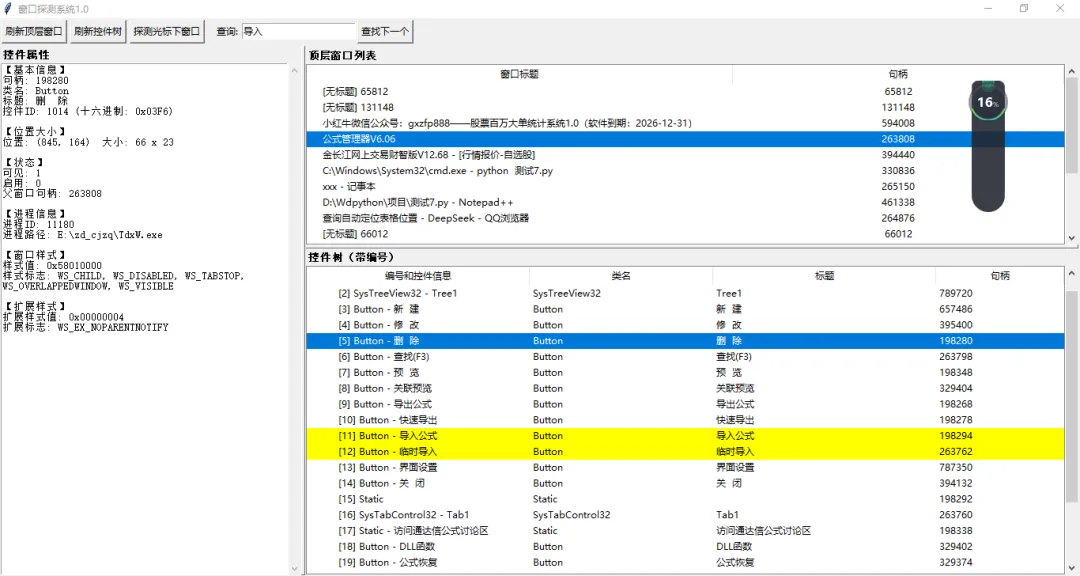
pip install pywin32本工具基于 tkinter 和 pywin32 开发,用于实时枚举Windows窗口及控件,支持可视化查看窗口层次结构、控件属性,并提供智能搜索与高亮定位功能。主要特性如下:
1. 顶层窗口管理:自动列出所有可见顶层窗口(标题与句柄),支持手动刷新顶层窗口列表。点击窗口列表项,即可在下方的控件树中加载该窗口的完整控件结构。
↓ 完整源码如下 ↓
# -*- coding: utf-8 -*-# @Author : 小红牛# 微信公众号:wdPythonimport tkinter as tkfrom tkinter import ttk, scrolledtextimport win32guiimport win32conimport win32apiimport win32processimport win32fileclass WindowExplorer:def __init__(self, root):self.root = rootself.root.title("窗口探测系统1.0")self.root.geometry("1100x750")self.hwnd_to_item = {}self.item_to_hwnd = {}self.next_control_id = 1self.last_search_item = Noneself.last_search_keyword = ""self.create_widgets()self.refresh_top_windows()def create_widgets(self):toolbar = tk.Frame(self.root)toolbar.pack(side=tk.TOP, fill=tk.X, pady=2)tk.Button(toolbar, text="刷新顶层窗口", command=self.refresh_top_windows).pack(side=tk.LEFT, padx=2)tk.Button(toolbar, text="刷新控件树", command=self.refresh_control_tree).pack(side=tk.LEFT, padx=2)tk.Button(toolbar, text="探测光标下窗口", command=self.pick_window_from_cursor).pack(side=tk.LEFT, padx=2)query_frame = tk.Frame(toolbar)query_frame.pack(side=tk.LEFT, padx=10)tk.Label(query_frame, text="查询:").pack(side=tk.LEFT)self.query_entry = tk.Entry(query_frame, width=20)self.query_entry.pack(side=tk.LEFT, padx=2)tk.Button(query_frame, text="查找下一个", command=self.search_control).pack(side=tk.LEFT)main_pane = tk.PanedWindow(self.root, orient=tk.HORIZONTAL, sashrelief=tk.RAISED, sashwidth=5)main_pane.pack(fill=tk.BOTH, expand=True)left_frame = tk.Frame(main_pane)main_pane.add(left_frame, width=380)tk.Label(left_frame, text="控件属性", font=("Arial", 10, "bold")).pack(anchor=tk.W)self.info_text = scrolledtext.ScrolledText(left_frame, height=20, wrap=tk.WORD)self.info_text.pack(fill=tk.BOTH, expand=True)right_frame = tk.Frame(main_pane)main_pane.add(right_frame, width=650)right_pane = tk.PanedWindow(right_frame, orient=tk.VERTICAL, sashrelief=tk.RAISED, sashwidth=5)right_pane.pack(fill=tk.BOTH, expand=True)top_frame = tk.Frame(right_pane)right_pane.add(top_frame, height=250)tk.Label(top_frame, text="顶层窗口列表", font=("Arial", 10, "bold")).pack(anchor=tk.W)top_tree_frame = tk.Frame(top_frame)top_tree_frame.pack(fill=tk.BOTH, expand=True)self.window_tree = ttk.Treeview(top_tree_frame, columns=("handle",), show="tree headings")self.window_tree.heading("#0", text="窗口标题")self.window_tree.heading("handle", text="句柄")self.window_tree.column("handle", width=80, anchor=tk.CENTER)vscroll1 = tk.Scrollbar(top_tree_frame, orient=tk.VERTICAL, command=self.window_tree.yview)self.window_tree.configure(yscrollcommand=vscroll1.set)vscroll1.pack(side=tk.RIGHT, fill=tk.Y)self.window_tree.pack(side=tk.LEFT, fill=tk.BOTH, expand=True)self.window_tree.bind("<<TreeviewSelect>>", self.on_window_selected)bottom_frame = tk.Frame(right_pane)right_pane.add(bottom_frame, height=400)tk.Label(bottom_frame, text="控件树(带编号)", font=("Arial", 10, "bold")).pack(anchor=tk.W)bottom_tree_frame = tk.Frame(bottom_frame)bottom_tree_frame.pack(fill=tk.BOTH, expand=True)self.control_tree = ttk.Treeview(bottom_tree_frame, columns=("class", "text", "handle"), show="tree headings")self.control_tree.heading("#0", text="编号和控件信息")self.control_tree.heading("class", text="类名")self.control_tree.heading("text", text="标题")self.control_tree.heading("handle", text="句柄")self.control_tree.column("class", width=150)self.control_tree.column("text", width=200)self.control_tree.column("handle", width=80)vscroll2 = tk.Scrollbar(bottom_tree_frame, orient=tk.VERTICAL, command=self.control_tree.yview)self.control_tree.configure(yscrollcommand=vscroll2.set)vscroll2.pack(side=tk.RIGHT, fill=tk.Y)self.control_tree.pack(side=tk.LEFT, fill=tk.BOTH, expand=True)self.control_tree.bind("<<TreeviewSelect>>", self.on_control_selected)self.control_tree.tag_configure('highlight', background='yellow')def get_visible_windows(self):windows = []def enum_callback(hwnd, _):if win32gui.IsWindowVisible(hwnd):title = win32gui.GetWindowText(hwnd)windows.append((hwnd, title))return Truewin32gui.EnumWindows(enum_callback, None)return windowsdef refresh_top_windows(self):for item in self.window_tree.get_children():self.window_tree.delete(item)windows = self.get_visible_windows()for hwnd, title in windows:display_title = title if title else f"[无标题] {hwnd}"self.window_tree.insert("", tk.END, text=display_title, values=(hwnd,), tags=(hwnd,))def refresh_control_tree(self):selected = self.window_tree.selection()if not selected:returnhwnd = self.window_tree.item(selected[0], "values")[0]self.build_control_tree(hwnd)def build_control_tree(self, parent_hwnd):for item in self.control_tree.get_children():self.control_tree.delete(item)self.hwnd_to_item.clear()self.item_to_hwnd.clear()self.next_control_id = 1self.last_search_item = Noneself.last_search_keyword = ""root_id = self.next_control_idself.next_control_id += 1try:class_name = win32gui.GetClassName(parent_hwnd)window_text = win32gui.GetWindowText(parent_hwnd)except:class_name = "无法获取"window_text = "无法获取"display_text = f"[{root_id}] {class_name} - {window_text[:30]}" if window_text else f"[{root_id}] {class_name}"node = self.control_tree.insert("", tk.END, text=display_text,values=(class_name, window_text, parent_hwnd))self.hwnd_to_item[parent_hwnd] = nodeself.item_to_hwnd[node] = parent_hwndself.enumerate_child_windows(parent_hwnd, node)self.control_tree.item(node, open=True)def enumerate_child_windows(self, parent_hwnd, parent_node):def enum_child_callback(child_hwnd, _):if win32gui.IsWindowVisible(child_hwnd):cid = self.next_control_idself.next_control_id += 1try:class_name = win32gui.GetClassName(child_hwnd)window_text = win32gui.GetWindowText(child_hwnd)except:class_name = "未知"window_text = ""display_text = f"[{cid}] {class_name} - {window_text[:30]}" if window_text else f"[{cid}] {class_name}"node = self.control_tree.insert(parent_node, tk.END, text=display_text,values=(class_name, window_text, child_hwnd))self.hwnd_to_item[child_hwnd] = nodeself.item_to_hwnd[node] = child_hwndself.enumerate_child_windows(child_hwnd, node)return Truetry:win32gui.EnumChildWindows(parent_hwnd, enum_child_callback, None)except Exception as e:print(f"枚举子窗口出错: {e}")def highlight_matches(self, keyword):for item in self.control_tree.get_children():self._remove_highlight_recursive(item)if not keyword:returnfor item in self.control_tree.get_children():self._add_highlight_recursive(item, keyword)def _remove_highlight_recursive(self, item):tags = list(self.control_tree.item(item, "tags"))if 'highlight' in tags:tags.remove('highlight')self.control_tree.item(item, tags=tags)for child in self.control_tree.get_children(item):self._remove_highlight_recursive(child)def _add_highlight_recursive(self, item, keyword):if self._match_item(item, keyword):tags = list(self.control_tree.item(item, "tags"))if 'highlight' not in tags:tags.append('highlight')self.control_tree.item(item, tags=tags)for child in self.control_tree.get_children(item):self._add_highlight_recursive(child, keyword)def search_control(self):keyword = self.query_entry.get().strip()self.highlight_matches(keyword)if not keyword:self.last_search_item = Noneself.last_search_keyword = ""returnif keyword != self.last_search_keyword:self.last_search_item = Noneself.last_search_keyword = keywordroot_items = self.control_tree.get_children()if not root_items:self.info_text.delete(1.0, tk.END)self.info_text.insert(tk.END, "控件树为空,请先选择一个顶层窗口。")returnall_items = []def dfs(item):all_items.append(item)for child in self.control_tree.get_children(item):dfs(child)for r in root_items:dfs(r)start_idx = 0if self.last_search_item and self.last_search_item in all_items:start_idx = all_items.index(self.last_search_item) + 1found_item = Nonefor i in range(start_idx, len(all_items)):if self._match_item(all_items[i], keyword):found_item = all_items[i]breakif not found_item and self.last_search_item is not None:for i in range(0, start_idx - 1):if self._match_item(all_items[i], keyword):found_item = all_items[i]breakif found_item:self.last_search_item = found_itemself._reveal_and_select(found_item)else:self.info_text.delete(1.0, tk.END)self.info_text.insert(tk.END, f"未找到匹配项: {keyword}")self.last_search_item = Nonedef _match_item(self, item, keyword):text = self.control_tree.item(item, "text")values = self.control_tree.item(item, "values")class_name = values[0] if values else ""title = values[1] if len(values) > 1 else ""return (keyword.lower() in text.lower() orkeyword.lower() in class_name.lower() orkeyword.lower() in title.lower())def _reveal_and_select(self, item):# 收集所有祖先节点(从根到目标)ancestors = []node = itemwhile node:ancestors.append(node)node = self.control_tree.parent(node)# 从根到目标依次展开并滚动for node in reversed(ancestors):if node != item: # 非目标节点只需展开self.control_tree.item(node, open=True)self.control_tree.see(node) # 滚动到当前节点# 最后选中目标节点,并强制刷新界面使滚动条同步self.control_tree.selection_set(item)self.control_tree.focus(item)self.control_tree.see(item)self.control_tree.update_idletasks() # 关键:立即更新界面self.on_control_selected(None)def on_window_selected(self, event):self.refresh_control_tree()def on_control_selected(self, event):selected = self.control_tree.selection()if not selected:returnnode = selected[0]hwnd = self.item_to_hwnd.get(node)if not hwnd:returntry:class_name = win32gui.GetClassName(hwnd)window_text = win32gui.GetWindowText(hwnd)rect = win32gui.GetWindowRect(hwnd)left, top, right, bottom = rectwidth = right - leftheight = bottom - topis_enabled = win32gui.IsWindowEnabled(hwnd)is_visible = win32gui.IsWindowVisible(hwnd)control_id = win32gui.GetDlgCtrlID(hwnd)parent = win32gui.GetParent(hwnd)_, pid = win32process.GetWindowThreadProcessId(hwnd)try:process_handle = win32api.OpenProcess(win32con.PROCESS_QUERY_INFORMATION | win32con.PROCESS_VM_READ, False, pid)exe_path = win32process.GetModuleFileNameEx(process_handle, 0)win32api.CloseHandle(process_handle)except:exe_path = "无法获取"style = win32gui.GetWindowLong(hwnd, win32con.GWL_STYLE)exstyle = win32gui.GetWindowLong(hwnd, win32con.GWL_EXSTYLE)style_flags = self._parse_style(style)exstyle_flags = self._parse_exstyle(exstyle)info = f"""【基本信息】句柄: {hwnd}类名: {class_name}标题: {window_text}控件ID: {control_id} (十六进制: 0x{control_id:04X})【位置大小】位置: ({left}, {top}) 大小: {width} x {height}【状态】可见: {is_visible}启用: {is_enabled}父窗口句柄: {parent}【进程信息】进程ID: {pid}进程路径: {exe_path}【窗口样式】样式值: 0x{style:08X}样式标志: {', '.join(style_flags) if style_flags else'无'}【扩展样式】扩展样式值: 0x{exstyle:08X}扩展标志: {', '.join(exstyle_flags) if exstyle_flags else'无'}"""self.info_text.delete(1.0, tk.END)self.info_text.insert(tk.END, info)except Exception as e:self.info_text.delete(1.0, tk.END)self.info_text.insert(tk.END, f"获取属性失败: {e}")def _parse_style(self, style):flags = []style_map = {win32con.WS_BORDER: "WS_BORDER",win32con.WS_CAPTION: "WS_CAPTION",win32con.WS_CHILD: "WS_CHILD",win32con.WS_CLIPCHILDREN: "WS_CLIPCHILDREN",win32con.WS_CLIPSIBLINGS: "WS_CLIPSIBLINGS",win32con.WS_DISABLED: "WS_DISABLED",win32con.WS_DLGFRAME: "WS_DLGFRAME",win32con.WS_GROUP: "WS_GROUP",win32con.WS_HSCROLL: "WS_HSCROLL",win32con.WS_ICONIC: "WS_ICONIC",win32con.WS_MAXIMIZE: "WS_MAXIMIZE",win32con.WS_MAXIMIZEBOX: "WS_MAXIMIZEBOX",win32con.WS_MINIMIZE: "WS_MINIMIZE",win32con.WS_MINIMIZEBOX: "WS_MINIMIZEBOX",win32con.WS_OVERLAPPED: "WS_OVERLAPPED",win32con.WS_OVERLAPPEDWINDOW: "WS_OVERLAPPEDWINDOW",win32con.WS_POPUP: "WS_POPUP",win32con.WS_POPUPWINDOW: "WS_POPUPWINDOW",win32con.WS_SIZEBOX: "WS_SIZEBOX",win32con.WS_SYSMENU: "WS_SYSMENU",win32con.WS_TABSTOP: "WS_TABSTOP",win32con.WS_THICKFRAME: "WS_THICKFRAME",win32con.WS_VISIBLE: "WS_VISIBLE",win32con.WS_VSCROLL: "WS_VSCROLL",}for mask, name in style_map.items():if style & mask:flags.append(name)return flagsdef _parse_exstyle(self, exstyle):flags = []ex_map = {win32con.WS_EX_ACCEPTFILES: "WS_EX_ACCEPTFILES",win32con.WS_EX_APPWINDOW: "WS_EX_APPWINDOW",win32con.WS_EX_CLIENTEDGE: "WS_EX_CLIENTEDGE",win32con.WS_EX_CONTEXTHELP: "WS_EX_CONTEXTHELP",win32con.WS_EX_CONTROLPARENT: "WS_EX_CONTROLPARENT",win32con.WS_EX_DLGMODALFRAME: "WS_EX_DLGMODALFRAME",win32con.WS_EX_LAYERED: "WS_EX_LAYERED",win32con.WS_EX_LEFT: "WS_EX_LEFT",win32con.WS_EX_LEFTSCROLLBAR: "WS_EX_LEFTSCROLLBAR",win32con.WS_EX_LTRREADING: "WS_EX_LTRREADING",win32con.WS_EX_MDICHILD: "WS_EX_MDICHILD",win32con.WS_EX_NOACTIVATE: "WS_EX_NOACTIVATE",win32con.WS_EX_NOINHERITLAYOUT: "WS_EX_NOINHERITLAYOUT",win32con.WS_EX_NOPARENTNOTIFY: "WS_EX_NOPARENTNOTIFY",win32con.WS_EX_OVERLAPPEDWINDOW: "WS_EX_OVERLAPPEDWINDOW",win32con.WS_EX_PALETTEWINDOW: "WS_EX_PALETTEWINDOW",win32con.WS_EX_RIGHT: "WS_EX_RIGHT",win32con.WS_EX_RIGHTSCROLLBAR: "WS_EX_RIGHTSCROLLBAR",win32con.WS_EX_RTLREADING: "WS_EX_RTLREADING",win32con.WS_EX_STATICEDGE: "WS_EX_STATICEDGE",win32con.WS_EX_TOOLWINDOW: "WS_EX_TOOLWINDOW",win32con.WS_EX_TOPMOST: "WS_EX_TOPMOST",win32con.WS_EX_TRANSPARENT: "WS_EX_TRANSPARENT",win32con.WS_EX_WINDOWEDGE: "WS_EX_WINDOWEDGE",}for mask, name in ex_map.items():if exstyle & mask:flags.append(name)return flagsdef pick_window_from_cursor(self):self.root.withdraw()self.root.update()self.root.attributes("-topmost", True)print("请点击目标窗口(5秒内),之后将自动探测...")self.root.after(1000, self._capture_mouse_click)def _capture_mouse_click(self):cursor_pos = win32gui.GetCursorPos()hwnd = win32gui.WindowFromPoint(cursor_pos)if hwnd:root_hwnd = win32gui.GetAncestor(hwnd, win32con.GA_ROOT)self.select_window_by_hwnd(root_hwnd)self.root.deiconify()self.root.attributes("-topmost", False)self.root.lift()def select_window_by_hwnd(self, hwnd):self.refresh_top_windows()for item in self.window_tree.get_children():values = self.window_tree.item(item, "values")if values and int(values[0]) == hwnd:self.window_tree.selection_set(item)self.window_tree.see(item)self.on_window_selected(None)returntry:title = win32gui.GetWindowText(hwnd)display_title = title if title else f"[无标题] {hwnd}"new_item = self.window_tree.insert("", tk.END, text=display_title, values=(hwnd,))self.window_tree.selection_set(new_item)self.on_window_selected(None)except:passif __name__ == "__main__":root = tk.Tk()app = WindowExplorer(root)root.mainloop()
完毕!!感谢您的收看
------★★历史博文集合★★------