Linux一键性能调优神器tuned-adm|实测数据对比
- 2026-10-11 07:35:33
Linux一键性能调优神器tuned-adm|实测数据对比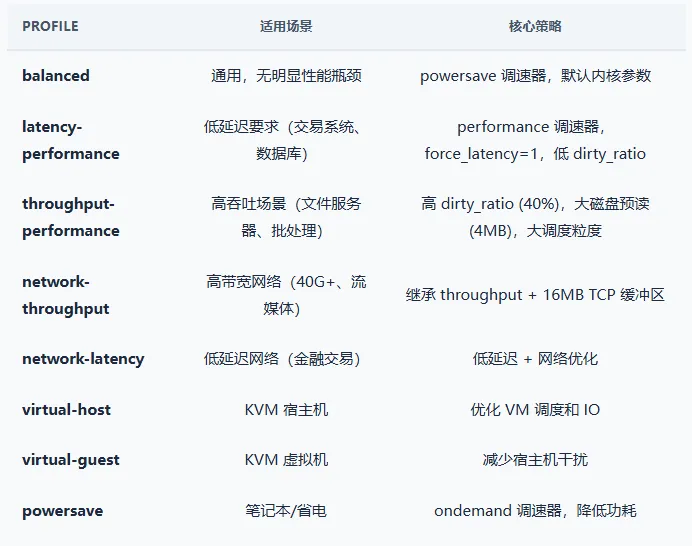
1. 什么是 tuned-adm
tuned-adm 是 Red Hat 开发的 Linux 系统性能调优守护进程。它提供了一系列预设的调优 Profile,每个 Profile 自动调整一组内核参数(CPU 调度器、内存管理、磁盘预读、网络缓冲区等),针对不同的工作负载场景进行优化。
核心价值:不需要手动修改 /etc/sysctl.conf 中的数十个参数,一条命令即可切换到适合当前工作负载的内核配置。Profile 之间的切换是动态的,不影响运行中的服务。
2. 常用 Profile
3. 基本用法
# 查看当前 Profiletuned-adm active # → latency-performance# 列出所有可用 Profiletuned-adm list# 切换 Profiletuned-adm profile throughput-performance# 查看推荐 Profile(系统自检后推荐)tuned-adm recommend # → virtual-guest (如果在 VM 内)# 关闭所有调优(恢复出厂内核参数)tuned-adm off# 检查 tuned 服务状态systemctl status tuned
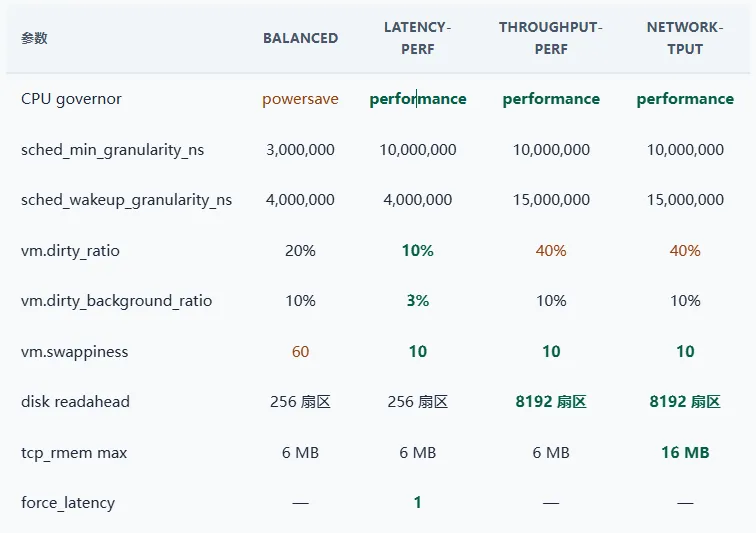
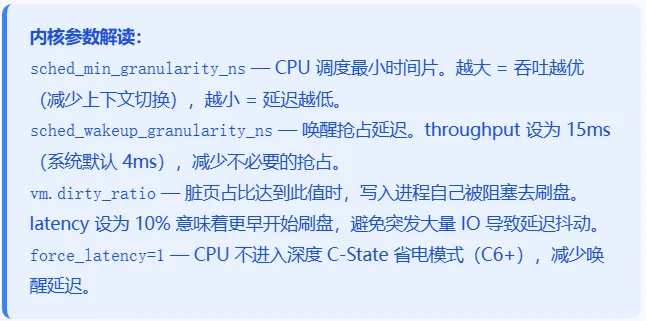
4. 各 Profile 修改了哪些参数?
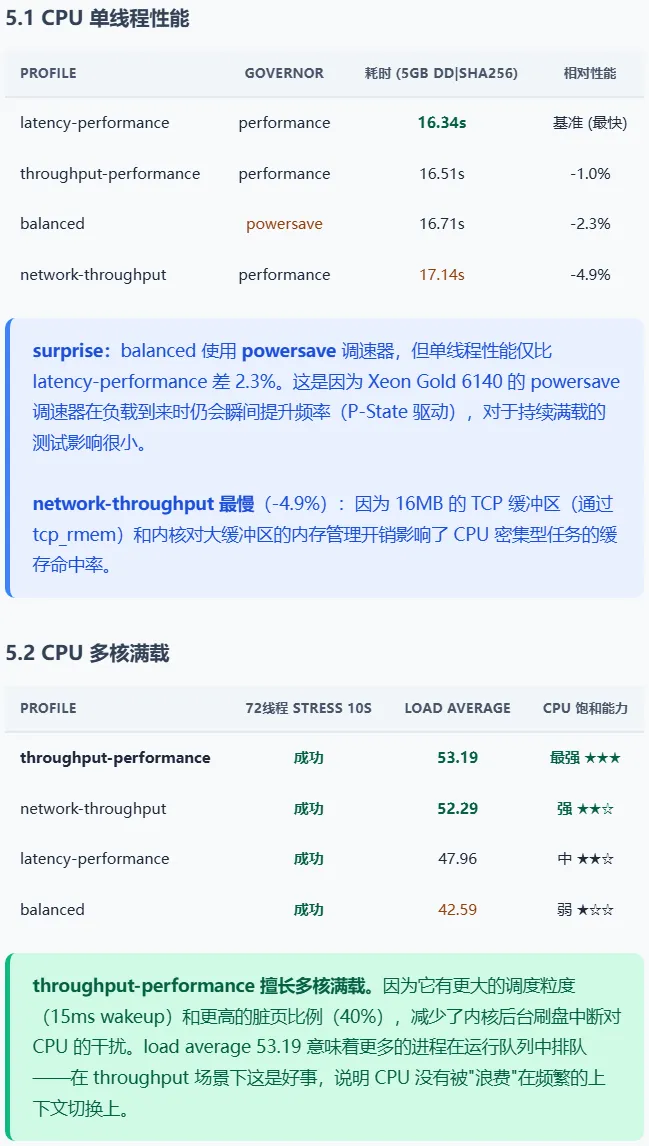
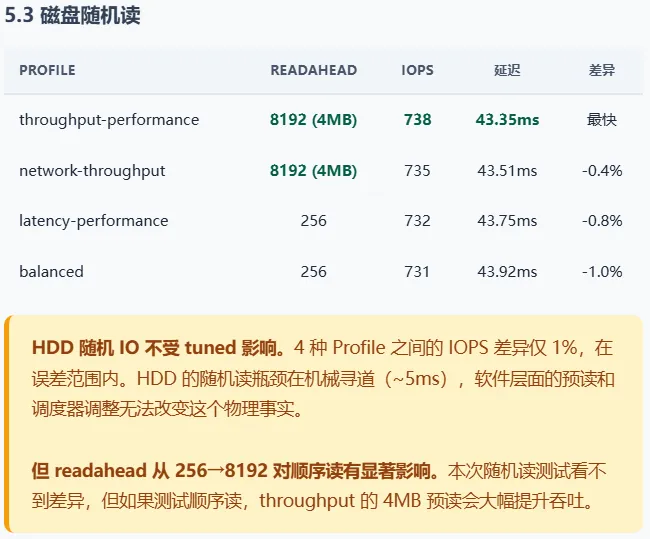
5. 实测:4 种 Profile 性能对比
测试平台:ceph01, 2× Xeon Gold 6140 (72线程), 251GB RAM, 8TB HDD (sdb)
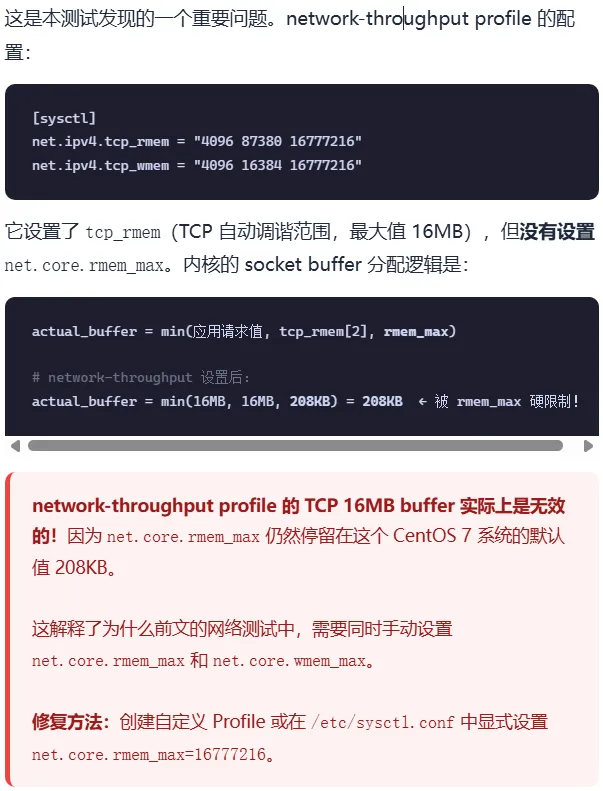
6. 坑:network-throughput 不设 rmem_max
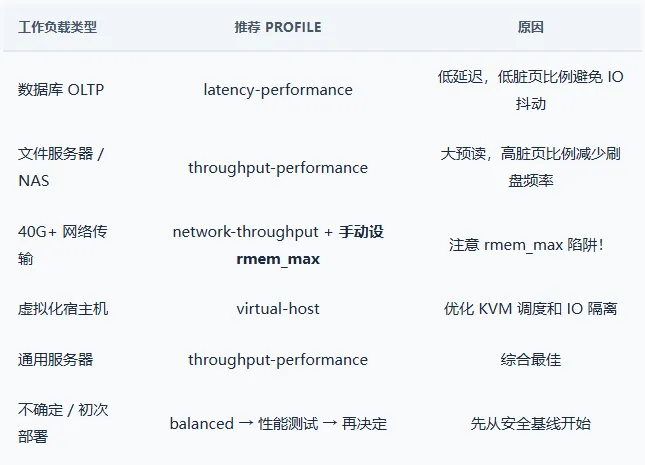
7. 如何选择 Profile
8. 自定义 Profile
# 1. 创建自定义 profile 目录mkdir /etc/tuned/my-throughput-netcat > /etc/tuned/my-throughput-net/tuned.conf << 'EOF'[main]summary=Custom: throughput-performance + fixed network buffersinclude=throughput-performance[sysctl]net.core.rmem_max=16777216net.core.wmem_max=16777216net.ipv4.tcp_rmem="4096 87380 16777216"net.ipv4.tcp_wmem="4096 65536 16777216"net.core.netdev_max_backlog=5000EOF# 2. 激活tuned-adm profile my-throughput-net# 3. 验证sysctl net.core.rmem_max # 应为 16777216sysctl net.ipv4.tcp_rmem # 末位应为 16777216
9. 总结
- tuned-adm 是快速切换内核调优配置的好工具。
一条命令即可改变 CPU 调速器、调度器参数、脏页比例、磁盘预读、网络缓冲区等十余个参数。 - 对不同工作负载的影响不同:
CPU 密集型任务(单线程差异 2-5%)、多核满载能力(load 从 42 到 53)、磁盘顺序读(readahead 从 128KB 到 4MB)。但对磁盘随机 IO 几乎无影响——机械瓶颈不是软件能解决的。 - network-throughput 有 rmem_max 陷阱:
它设置了 16MB TCP buffer,但 net.core.rmem_max 仍为 208KB,导致大 buffer 被硬限制。这是一个常见的配置遗漏。 - balanced 比想象中好:
即使使用 powersave 调速器,单线程性能仅比 latency-performance 差 2.3%。对于大多数服务器,balanced 是安全的出发点。 - 没有"万能最优" Profile。
latency 用低延迟配置、throughput 用大缓冲配置、网络密集型需要手动补上 rmem_max。理解每个 Profile 改了什么,比盲目切换更重要。
本文来自网友投稿或网络内容,如有侵犯您的权益请联系我们删除,联系邮箱:596563534@qq.com 。
