用Python实现图片文字形状生成器
- 2026-10-11 07:28:25
用Python实现图片文字形状生成器:让汉字拼出任何图案
学在坚持公众号 | 原创技术分享
开场白
你有没有想过,一张普通的猫咪剪影图片,可以变成由"喵"字密密麻麻排列而成的艺术作品?一个中国龙的轮廓,可以用"龙"字一个个堆砌出来?一朵花的形状,可以用"花开富贵"四个字循环填满?
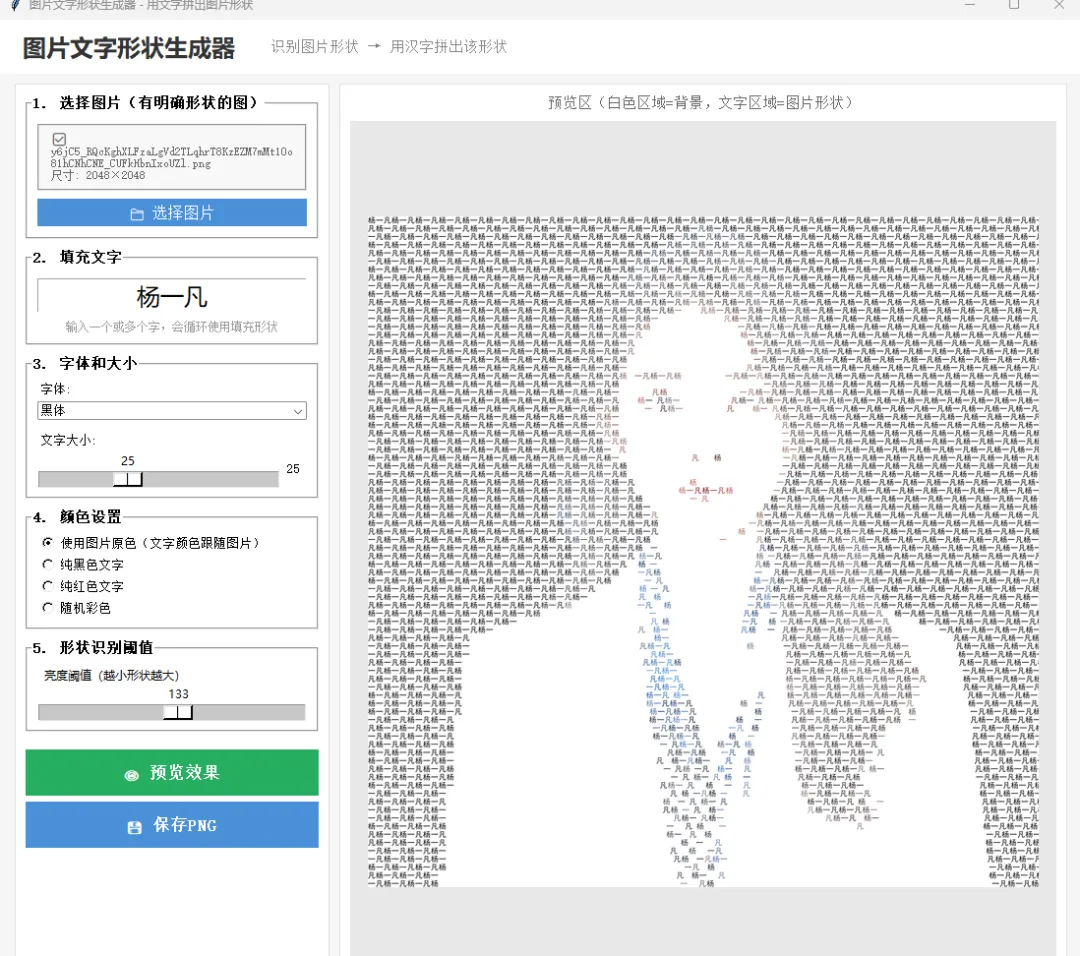
这就是"图片文字形状生成器"——一种将图像识别与文字排版艺术结合的创意工具。它的核心思路非常巧妙:首先识别出图片中物体的轮廓形状(通过亮度阈值二值化),然后在形状区域内用指定的汉字逐行逐列密集填充,最终呈现的效果是——远看是图片的形状轮廓,近看是一个个整齐排列的汉字。
这种效果在文创设计、海报制作、个性化贺卡、书法艺术展示中非常受欢迎。市面上类似的工具往往收费或功能单一,而今天我们要用 Python + Tkinter + Pillow,从零实现一个功能完整、界面精致的桌面GUI工具,支持:
上传任意图片自动识别形状轮廓 自定义填充文字(单字/多字循环) 多种字体选择(黑体/宋体/楷体/微软雅黑/仿宋) 文字大小自由调节(6-60像素) 五种颜色模式(原图取色/纯黑/纯红/随机彩色/自定义取色器) 形状识别阈值可调(适应不同亮度的图片) 实时预览效果 一键保存为透明/白底PNG 打印预览(模拟A4纸张效果) 直接调用系统打印机打印
整个工具只需要一个Python文件,依赖仅有 Pillow 一个库,代码结构清晰,适合学习图像处理、GUI编程和创意设计的结合应用。无论你是想做一个送朋友的创意礼物,还是想给公众号文章配一张独特的封面图,这个工具都能帮到你。
接下来,让我们一步步拆解这个工具的实现原理和完整代码。
一、核心原理:从图片到文字形状
1.1 形状识别原理
工具的第一步是"看懂"图片中物体的形状。我们使用的是最简单高效的方法——亮度阈值二值化:
def_create_shape_mask(self):"""从图片提取形状蒙版""" img = self.original_image.copy() gray = img.convert('L') # 转灰度 threshold = self.threshold_var.get() # 用户可调阈值# 低于阈值的像素 = 物体区域(白色255)# 高于阈值的像素 = 背景区域(黑色0) mask = gray.point(lambda x: 255if x < threshold else0, mode='L')return mask原理很直观:深色区域是物体,浅色区域是背景。阈值越小,识别出的形状越小(只有最深的部分);阈值越大,形状越大(更多区域被认为是物体)。
1.2 文字填充算法
获得蒙版后,我们逐行逐列扫描像素。当像素在形状区域内时,绘制一个汉字;在形状外时快速跳过:
char_idx = 0y = 0while y < h: x = 0while x < w:if mask_pixels[x, y] > 128: # 在形状内 char = text[char_idx % len(text)] # 循环使用文字 draw.text((x, y), char, fill=color, font=font) char_idx += 1 x += char_width + 1# 跳过一个字宽else: x += font_size // 2# 形状外快速跳过 y += font_size + 2# 下一行1.3 取色模式
最有创意的是"原图取色"模式——文字的颜色取自该位置在原图中的颜色:
if color_mode == 'original': px = original_pixels[x, y] # 读取原图该位置的像素颜色 color = (px[0], px[1], px[2], 255)这样生成的作品不仅有形状,还保留了原图的色彩,远看几乎和原图一样!
二、GUI界面设计与交互
2.1 界面布局
采用经典的左控制+右预览布局:
┌─────────────────────────────────────────────────────┐│ 图片文字形状生成器 │├────────────────┬────────────────────────────────────┤│ 1.选择图片 │ ││ 2.填充文字 │ 预览区 ││ 3.字体和大小 │ (实时显示生成效果) ││ 4.颜色设置 │ ││ ● 原图取色 │ ││ ● 纯黑/红 │ ││ ● 随机彩色 │ ││ ● 自定义取色 │ ││ 5.形状阈值 │ ││ │ ││ [预览] [保存] │ ││ [打印预览] │ ││ [直接打印] │ │└────────────────┴────────────────────────────────────┘2.2 取色器实现
调用系统原生取色对话框,实时显示选中的颜色:
def_pick_color(self):from tkinter import colorchooser color = colorchooser.askcolor(initialcolor=self.custom_color, title="选择文字颜色")if color[1]: self.custom_color = color[1] self.color_hex_var.set(color[1]) self.color_preview.config(bg=color[1]) # 色块实时更新2.3 打印预览
弹出独立窗口,模拟A4纸张白色背景,居中展示生成的作品:
def_print_preview(self): preview_win = tk.Toplevel(self.root) preview_win.title("打印预览")# 模拟A4纸张 paper_frame = tk.Frame(preview_win, bg='white', width=680, height=850)# 缩放图片到纸张区域...# 底部:[确认打印] [关闭]2.4 系统打印
跨平台调用系统打印功能:
def_print(self): tmp_path = os.path.join(tempfile.gettempdir(), 'print_text_shape.png') self.result_image.save(tmp_path, 'PNG')if sys.platform == 'win32': os.startfile(tmp_path, 'print') # Windows打印对话框elif sys.platform == 'darwin': subprocess.run(['lpr', tmp_path]) # macOSelse: subprocess.run(['lp', tmp_path]) # Linux三、完整源代码
"""图片文字形状生成器功能:识别图片中物体的轮廓形状,用输入的汉字密集填充渲染成该形状效果:文字排列成图片的形状轮廓"""import tkinter as tkfrom tkinter import ttk, filedialog, messageboxfrom PIL import Image, ImageDraw, ImageFont, ImageTk, ImageFilterimport osimport randomimport mathclassImageShapeTextGenerator:def__init__(self): self.root = tk.Tk() self.root.title("图片文字形状生成器 - 用文字拼出图片形状") self.root.geometry("1100x750") self.root.configure(bg='#f5f5f5') self.image_path = None self.original_image = None self.mask_image = None self.result_image = None self.preview_photo = None self._create_ui()def_create_ui(self): top = tk.Frame(self.root, bg='#fff', height=55) top.pack(fill=tk.X) top.pack_propagate(False) tk.Label(top, text="图片文字形状生成器", font=('Microsoft YaHei', 18, 'bold'), bg='#fff', fg='#333').pack(side=tk.LEFT, padx=20, pady=10) tk.Label(top, text="识别图片形状 → 用汉字拼出该形状", font=('', 11), bg='#fff', fg='#888').pack(side=tk.LEFT, padx=10) main = tk.Frame(self.root, bg='#f5f5f5') main.pack(fill=tk.BOTH, expand=True, padx=15, pady=10) left = tk.Frame(main, bg='#fff', width=320, highlightbackground='#e0e0e0', highlightthickness=1) left.pack(side=tk.LEFT, fill=tk.Y, padx=(0, 10)) left.pack_propagate(False) s1 = tk.LabelFrame(left, text="1. 选择图片", font=('', 11, 'bold'), bg='#fff', padx=10, pady=8) s1.pack(fill=tk.X, padx=10, pady=(10, 5)) self.img_info = tk.Label(s1, text="建议:轮廓清晰的图片效果最好\n如:动物剪影、Logo、简笔画", font=('', 9), bg='#f8f8f8', fg='#666', justify='left', wraplength=250, relief='groove', padx=8, pady=8) self.img_info.pack(fill=tk.X, pady=5) tk.Button(s1, text="选择图片", font=('', 12), bg='#4a90d9', fg='white', relief='flat', cursor='hand2', command=self._select_image).pack(fill=tk.X, pady=3) s2 = tk.LabelFrame(left, text="2. 填充文字", font=('', 11, 'bold'), bg='#fff', padx=10, pady=8) s2.pack(fill=tk.X, padx=10, pady=5) self.text_var = tk.StringVar(value="龙") tk.Entry(s2, textvariable=self.text_var, font=('Microsoft YaHei', 18), justify='center').pack(fill=tk.X, pady=5) tk.Label(s2, text="输入一个或多个字,会循环使用填充形状", font=('', 9), bg='#fff', fg='#999').pack() s3 = tk.LabelFrame(left, text="3. 字体和大小", font=('', 11, 'bold'), bg='#fff', padx=10, pady=8) s3.pack(fill=tk.X, padx=10, pady=5) tk.Label(s3, text="字体:", font=('', 10), bg='#fff').pack(anchor='w') self.font_names = ['黑体', '宋体', '楷体', '微软雅黑', '仿宋'] self.font_files = ['simhei.ttf', 'simsun.ttc', 'simkai.ttf', 'msyh.ttc', 'simfang.ttf'] self.font_combo = ttk.Combobox(s3, values=self.font_names, state='readonly', font=('', 10)) self.font_combo.current(0) self.font_combo.pack(fill=tk.X, pady=3) tk.Label(s3, text="文字大小:", font=('', 10), bg='#fff').pack(anchor='w', pady=(8, 0)) self.size_var = tk.IntVar(value=14) size_f = tk.Frame(s3, bg='#fff') size_f.pack(fill=tk.X) tk.Scale(size_f, from_=6, to=60, orient=tk.HORIZONTAL, variable=self.size_var, bg='#fff', highlightthickness=0).pack(side=tk.LEFT, fill=tk.X, expand=True) tk.Label(size_f, textvariable=self.size_var, font=('', 10), bg='#fff', width=3).pack(side=tk.RIGHT) s4 = tk.LabelFrame(left, text="4. 颜色设置", font=('', 11, 'bold'), bg='#fff', padx=10, pady=8) s4.pack(fill=tk.X, padx=10, pady=5) self.color_mode = tk.StringVar(value='original') tk.Radiobutton(s4, text="使用图片原色", variable=self.color_mode, value='original', font=('', 10), bg='#fff').pack(anchor='w') tk.Radiobutton(s4, text="纯黑色文字", variable=self.color_mode, value='black', font=('', 10), bg='#fff').pack(anchor='w') tk.Radiobutton(s4, text="纯红色文字", variable=self.color_mode, value='red', font=('', 10), bg='#fff').pack(anchor='w') tk.Radiobutton(s4, text="随机彩色", variable=self.color_mode, value='random', font=('', 10), bg='#fff').pack(anchor='w') tk.Radiobutton(s4, text="自定义颜色(取色器)", variable=self.color_mode, value='custom', font=('', 10), bg='#fff').pack(anchor='w') color_pick_f = tk.Frame(s4, bg='#fff') color_pick_f.pack(fill=tk.X, pady=4) self.custom_color = '#333333' self.color_preview = tk.Label(color_pick_f, text=" ", bg=self.custom_color, width=4, height=1, relief='solid', borderwidth=1) self.color_preview.pack(side=tk.LEFT, padx=(20, 5)) self.color_hex_var = tk.StringVar(value=self.custom_color) tk.Entry(color_pick_f, textvariable=self.color_hex_var, width=8, font=('', 10)).pack(side=tk.LEFT, padx=2) tk.Button(color_pick_f, text="选色", font=('', 9), command=self._pick_color, bg='#eee', relief='flat', cursor='hand2').pack(side=tk.LEFT, padx=4) s5 = tk.LabelFrame(left, text="5. 形状识别阈值", font=('', 11, 'bold'), bg='#fff', padx=10, pady=8) s5.pack(fill=tk.X, padx=10, pady=5) self.threshold_var = tk.IntVar(value=128) tk.Scale(s5, from_=10, to=245, orient=tk.HORIZONTAL, variable=self.threshold_var, bg='#fff', highlightthickness=0, label="亮度阈值(越小形状越大)").pack(fill=tk.X) btn_f = tk.Frame(left, bg='#fff') btn_f.pack(fill=tk.X, padx=10, pady=10) tk.Button(btn_f, text="预览效果", font=('', 13, 'bold'), bg='#27ae60', fg='white', relief='flat', cursor='hand2', height=2, command=self._preview).pack(fill=tk.X, pady=3) tk.Button(btn_f, text="保存PNG", font=('', 13, 'bold'), bg='#4a90d9', fg='white', relief='flat', cursor='hand2', height=2, command=self._save).pack(fill=tk.X, pady=3) tk.Button(btn_f, text="打印预览", font=('', 12), bg='#8e44ad', fg='white', relief='flat', cursor='hand2', height=1, command=self._print_preview).pack(fill=tk.X, pady=3) tk.Button(btn_f, text="直接打印", font=('', 12), bg='#555', fg='white', relief='flat', cursor='hand2', height=1, command=self._print).pack(fill=tk.X, pady=3) right = tk.Frame(main, bg='#fff', highlightbackground='#e0e0e0', highlightthickness=1) right.pack(side=tk.RIGHT, fill=tk.BOTH, expand=True) tk.Label(right, text="预览区", font=('', 11), bg='#fff', fg='#666').pack(pady=8) self.canvas = tk.Canvas(right, bg='#e8e8e8', highlightthickness=0) self.canvas.pack(fill=tk.BOTH, expand=True, padx=10, pady=(0, 10))def_select_image(self): path = filedialog.askopenfilename(title="选择图片", filetypes=[("图片", "*.png;*.jpg;*.jpeg;*.bmp;*.webp"), ("所有", "*.*")])if path: self.image_path = path self.original_image = Image.open(path).convert('RGBA') name = os.path.basename(path) w, h = self.original_image.size self.img_info.config(text=f"已选择: {name}\n尺寸: {w} x {h}")def_get_font(self, size): idx = self.font_combo.current() font_file = self.font_files[idx] paths = [f"C:/Windows/Fonts/{font_file}", f"/usr/share/fonts/truetype/{font_file}", font_file]for p in paths:if os.path.exists(p):try: return ImageFont.truetype(p, size)except: passtry: return ImageFont.truetype("C:/Windows/Fonts/simhei.ttf", size)except: return ImageFont.load_default()def_create_shape_mask(self):ifnot self.original_image: returnNone gray = self.original_image.convert('L') threshold = self.threshold_var.get() mask = gray.point(lambda x: 255if x < threshold else0, mode='L')return maskdef_generate(self):ifnot self.original_image: messagebox.showinfo("提示", "请先选择图片"); returnNone text = self.text_var.get().strip()ifnot text: messagebox.showinfo("提示", "请输入文字"); returnNone mask = self._create_shape_mask()ifnot mask: returnNone w, h = mask.size font_size = self.size_var.get() font = self._get_font(font_size) color_mode = self.color_mode.get() result = Image.new('RGBA', (w, h), (255, 255, 255, 255)) draw = ImageDraw.Draw(result) original_pixels = self.original_image.load() mask_pixels = mask.load() char_idx = 0 y = 0while y < h: x = 0while x < w:if x < w and y < h and mask_pixels[x, y] > 128: char = text[char_idx % len(text)] char_idx += 1if color_mode == 'original': px = original_pixels[min(x, w-1), min(y, h-1)] color = (px[0], px[1], px[2], 255)elif color_mode == 'black': color = (0, 0, 0, 255)elif color_mode == 'red': color = (200, 30, 30, 255)elif color_mode == 'custom': hex_c = self.custom_color.lstrip('#') r, g, b = int(hex_c[0:2], 16), int(hex_c[2:4], 16), int(hex_c[4:6], 16) color = (r, g, b, 255)else: color = (random.randint(30,220), random.randint(30,220), random.randint(30,220), 255) draw.text((x, y), char, fill=color, font=font) bbox = font.getbbox(char) x += (bbox[2] - bbox[0]) + 1else: x += font_size // 2 y += font_size + 2 self.result_image = resultreturn resultdef_preview(self): result = self._generate()ifnot result: return canvas_w = self.canvas.winfo_width() or650 canvas_h = self.canvas.winfo_height() or550 img_w, img_h = result.size scale = min(canvas_w / img_w, canvas_h / img_h, 1.0) * 0.95 display = result.resize((int(img_w*scale), int(img_h*scale)), Image.LANCZOS) self.preview_photo = ImageTk.PhotoImage(display) self.canvas.delete("all") self.canvas.create_image(canvas_w//2, canvas_h//2, image=self.preview_photo)def_pick_color(self):from tkinter import colorchooser color = colorchooser.askcolor(initialcolor=self.custom_color, title="选择文字颜色")if color[1]: self.custom_color = color[1] self.color_hex_var.set(color[1]) self.color_preview.config(bg=color[1])def_print_preview(self):ifnot self.result_image: self._generate()ifnot self.result_image: return preview_win = tk.Toplevel(self.root) preview_win.title("打印预览") preview_win.geometry("750x900") preview_win.configure(bg='#666') paper = tk.Frame(preview_win, bg='white', width=680, height=850) paper.pack(pady=15); paper.pack_propagate(False) tk.Label(paper, text="打印预览(A4)", font=('', 10), bg='white', fg='#999').pack(pady=5) img = self.result_image.copy() iw, ih = img.size scale = min(640/iw, 780/ih, 1.0) display = img.resize((int(iw*scale), int(ih*scale)), Image.LANCZOS) self._pp_photo = ImageTk.PhotoImage(display) tk.Label(paper, image=self._pp_photo, bg='white').pack(expand=True) bf = tk.Frame(preview_win, bg='#666'); bf.pack(fill=tk.X, pady=5) tk.Button(bf, text="确认打印", font=('', 12, 'bold'), bg='#27ae60', fg='white', relief='flat', command=lambda:(self._print(), preview_win.destroy())).pack(side=tk.LEFT, padx=20) tk.Button(bf, text="关闭", font=('', 12), bg='#e74c3c', fg='white', relief='flat', command=preview_win.destroy).pack(side=tk.RIGHT, padx=20)def_print(self):ifnot self.result_image: self._generate()ifnot self.result_image: returnimport tempfile, subprocess, sys tmp = os.path.join(tempfile.gettempdir(), 'print_text_shape.png') self.result_image.save(tmp, 'PNG')try:if sys.platform == 'win32': os.startfile(tmp, 'print')elif sys.platform == 'darwin': subprocess.run(['lpr', tmp])else: subprocess.run(['lp', tmp]) messagebox.showinfo("打印", "已发送到打印机")except Exception as e: messagebox.showerror("打印失败", f"{e}\n图片已保存到: {tmp}")def_save(self):ifnot self.result_image: self._generate()ifnot self.result_image: return path = filedialog.asksaveasfilename(title="保存PNG", defaultextension=".png", filetypes=[("PNG", "*.png")], initialfile=f"文字形状_{self.text_var.get()}.png")if path: self.result_image.save(path, 'PNG') messagebox.showinfo("成功", f"已保存: {path}")defrun(self): self.root.mainloop()if __name__ == '__main__': app = ImageShapeTextGenerator() app.run()四、知识点总结
4.1 图像处理知识
img.convert('L') | |
gray.point(lambda x: 255 if x < threshold else 0) | |
img.load() | |
ImageDraw.text() | |
ImageFont.truetype() | |
4.2 GUI编程知识
4.3 其他知识
C:/Windows/Fonts/ | |
x += font_size // 2) |
五、拓展场景与测试步骤
5.1 测试步骤
5.2 推荐测试素材
动物剪影(纯黑底白图最佳) 汉字书法图片(用文字填充文字,双重艺术效果) Logo图标(简洁轮廓) 国旗/地图轮廓 简笔画
5.3 拓展应用场景
5.4 可优化方向
支持文字旋转角度随机化(更自然) 支持文字大小随机化(大小混排) 支持多行文本(一段话循环填充) 支持边缘检测(Canny算法)替代简单阈值 支持导出SVG矢量格式 支持批量处理多张图片
学在坚持公众号 | 用代码创造艺术,让技术更有温度
