Python 实战 | 自己造数据:一键生成带GPS经纬度的测试图片
- 2026-10-11 06:35:44
Python 实战 | 自己造数据:一键生成带GPS经纬度的测试图片,支持全球任意坐标
开场白
做地图类应用开发时,你一定遇到过这个头疼的问题——手头没有带 GPS 信息的测试照片。
想测试照片定位功能,你需要一张包含精确经纬度的 EXIF 图片。但现实是:截图没有 GPS、微信传来的照片 EXIF 被剥离、网上下载的图大多也被清除了地理信息。你当然可以掏出手机跑到楼下拍一张,但如果你想要一张"位于巴黎埃菲尔铁塔"或"悉尼歌剧院"的测试图呢?难道要买张机票飞过去?
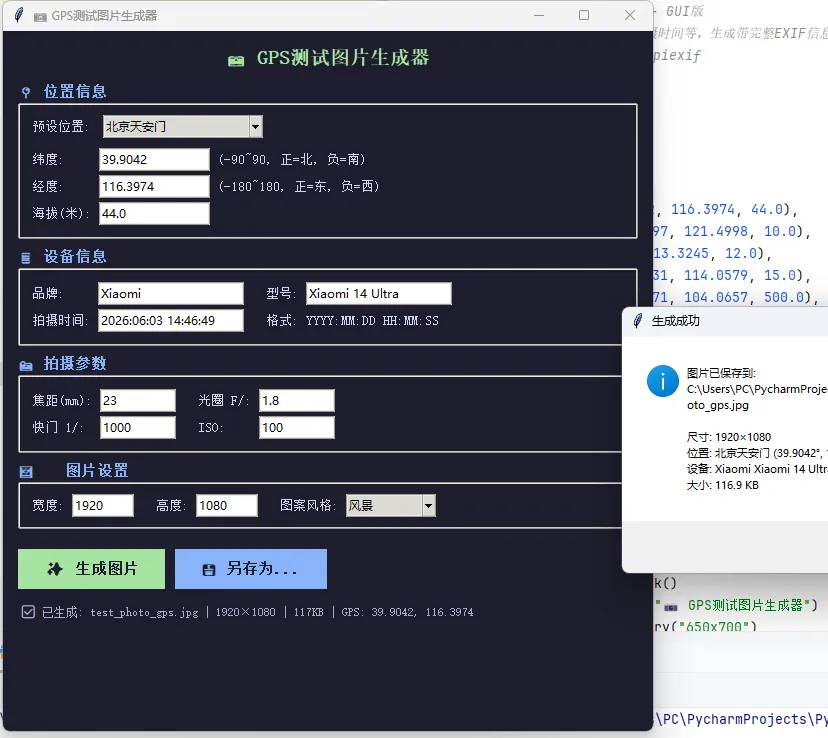
今天我们用 Python + Tkinter + Pillow + piexif 打造一款 GPS 测试图片生成器。这不是一个简陋的脚本工具,而是一个拥有完整图形界面的桌面应用——你可以通过下拉框选择全球 11 个地标位置(北京天安门、上海东方明珠、巴黎铁塔、纽约自由女神...),也可以手动输入任意经纬度坐标;可以自定义拍摄设备品牌和型号、拍摄时间、光圈快门 ISO 等参数;还能选择 5 种不同风格的图片样式(风景、城市、纯色、渐变、随机噪点)。
点击"生成"按钮,一张带有完整 EXIF 元数据(GPS 坐标、设备信息、拍摄参数等)的 JPG 图片就出现在你的目录下了。用任何 EXIF 查看工具打开它,都能读到你设定的经纬度和拍摄信息。
这个工具的核心价值在于:让你不再依赖真实拍摄的照片来做测试。无论是开发照片定位功能、验证坐标转换算法、还是制作演示 Demo,都可以用它批量生成任意位置的测试数据。整个工具不到 200 行核心代码,依赖仅需 Pillow 和 piexif,跨平台可运行。
接下来,我们从 EXIF 写入原理、GUI 交互设计、图片生成算法 三个维度详细解析实现过程。
一、工具效果预览
┌──────────────────────────────────────────────────────────┐
│            📷 GPS测试图片生成器                            │
├──────────────────────────────────────────────────────────┤
│                                                          │
│  ┌─ 📍 位置信息 ───────────────────────────────────────┐ │
│  │  预设位置: [北京天安门 ▼]                            │ │
│  │  纬度: [39.9042]    (-90~90, 正=北, 负=南)          │ │
│  │  经度: [116.3974]   (-180~180, 正=东, 负=西)        │ │
│  │  海拔: [44.0] 米                                    │ │
│  └──────────────────────────────────────────────────────┘ │
│                                                          │
│  ┌─ 📱 设备信息 ───────────────────────────────────────┐ │
│  │  品牌: [Xiaomi]        型号: [Xiaomi 14 Ultra]      │ │
│  │  拍摄时间: [2024:06:03 15:30:00]                    │ │
│  └──────────────────────────────────────────────────────┘ │
│                                                          │
│  ┌─ 📸 拍摄参数 ───────────────────────────────────────┐ │
│  │  焦距: [23]mm    光圈: F/[1.8]                      │ │
│  │  快门: 1/[1000]  ISO: [100]                         │ │
│  └──────────────────────────────────────────────────────┘ │
│                                                          │
│  ┌─ 🖼️ 图片设置 ───────────────────────────────────────┐ │
│  │  宽度: [1920]  高度: [1080]  风格: [风景 ▼]         │ │
│  └──────────────────────────────────────────────────────┘ │
│                                                          │
│         [✨ 生成图片]      [💾 另存为...]                 │
│                                                          │
│  ✅ 已生成: test_photo_gps.jpg | 1920×1080 | GPS: ...   │
└──────────────────────────────────────────────────────────┘
核心功能:
二、核心技术解析
2.1 piexif 写入 EXIF 数据
piexif 是一个纯 Python 的 EXIF 读写库,可以在不依赖外部工具的情况下向 JPEG 文件写入完整的 EXIF 元数据。
EXIF 数据按 IFD(Image File Directory)分组:
GPS 坐标需要以有理数元组格式写入(度、分、秒各一个分数):
defto_rational(value):
"""将十进制度数转为 EXIF 有理数格式"""
    value = abs(value)
    d = int(value)
    m = int((value - d) * 60)
    s = int(((value - d) * 60 - m) * 60 * 10000)
return ((d, 1), (m, 1), (s, 10000))

# 写入GPS
gps_ifd = {
    piexif.GPSIFD.GPSLatitudeRef: 'N'if lat >= 0else'S',
    piexif.GPSIFD.GPSLatitude: to_rational(lat),
    piexif.GPSIFD.GPSLongitudeRef: 'E'if lon >= 0else'W',
    piexif.GPSIFD.GPSLongitude: to_rational(lon),
    piexif.GPSIFD.GPSAltitude: (int(alt * 100), 100),
}
最终通过 piexif.dump() 序列化,然后在 Image.save() 时传入 exif= 参数写入文件。
2.2 程序化图片生成
我们使用 Pillow 的 Image 和 ImageDraw 来生成不同风格的测试图片:
# 风景风格:上半部分天空渐变 + 下半部分绿地
if style == "风景":
for y in range(height):
if y < height * 0.6:
# 天空:从浅蓝渐变到深蓝
            r = 80 + int(y / height * 100)
            g = 140 + int(y / height * 60)
            b = 200 + int(y / height * 40)
else:
# 地面:绿色渐深
            prog = (y - height * 0.6) / (height * 0.4)
            r, g, b = int(80 - prog*30), int(160 - prog*50), int(60 - prog*20)

# 城市风格:深色背景 + 随机建筑轮廓 + 窗户灯光
elif style == "城市":
for i in range(15):
        bw = random.randint(width//20, width//8)  # 建筑宽度
        bh = random.randint(height//4, height*3//4)  # 建筑高度
        draw.rectangle([bx, height-bh, bx+bw, height], fill=(color, color, color+20))
# 随机亮灯的窗户
        draw.rectangle([wx, wy, wx+8, wy+12], fill=(255, 240, 150))
同时在图片上叠加 GPS 坐标和设备名称的文字水印,方便视觉确认。
2.3 预设位置系统
内置 11 个全球知名地标的精确坐标,通过下拉框选择后自动填充经纬度和海拔:
PRESETS = {
"北京天安门": (39.9042, 116.3974, 44.0),
"上海东方明珠": (31.2397, 121.4998, 10.0),
"广州塔": (23.1066, 113.3245, 12.0),
"深圳市民中心": (22.5431, 114.0579, 15.0),
"成都天府广场": (30.6571, 104.0657, 500.0),
"杭州西湖": (30.2421, 120.1480, 8.0),
"西安钟楼": (34.2609, 108.9426, 410.0),
"纽约自由女神": (40.6892, -74.0445, 10.0),
"巴黎埃菲尔铁塔": (48.8584, 2.2945, 35.0),
"东京塔": (35.6586, 139.7454, 20.0),
"悉尼歌剧院": (-33.8568, 151.2153, 5.0),
}
南半球纬度为负数、西半球经度为负数,程序会自动处理 LatitudeRef (N/S) 和 LongitudeRef (E/W) 的方向标识。
三、完整代码
以下是完整可运行代码,复制保存为 create_test_image_gui.py 即可使用:
"""
带GPS经纬度的测试图片生成器 - GUI版
可自定义经纬度、设备信息、拍摄时间等,生成带完整EXIF信息的JPG图片
依赖:pip install Pillow piexif
"""
import tkinter as tk
from tkinter import ttk, filedialog, messagebox
from PIL import Image, ImageDraw, ImageFont, ImageTk
import piexif
import os
import random
from datetime import datetime


PRESETS = {
"北京天安门": (39.9042, 116.3974, 44.0),
"上海东方明珠": (31.2397, 121.4998, 10.0),
"广州塔": (23.1066, 113.3245, 12.0),
"深圳市民中心": (22.5431, 114.0579, 15.0),
"成都天府广场": (30.6571, 104.0657, 500.0),
"杭州西湖": (30.2421, 120.1480, 8.0),
"西安钟楼": (34.2609, 108.9426, 410.0),
"纽约自由女神": (40.6892, -74.0445, 10.0),
"巴黎埃菲尔铁塔": (48.8584, 2.2945, 35.0),
"东京塔": (35.6586, 139.7454, 20.0),
"悉尼歌剧院": (-33.8568, 151.2153, 5.0),
"自定义位置": (0, 0, 0),
}


classTestImageGeneratorApp:
def__init__(self):
        self.root = tk.Tk()
        self.root.title("GPS测试图片生成器")
        self.root.geometry("650x700")
        self.root.configure(bg='#1e1e2e')
        self._build_ui()

def_build_ui(self):
        style = ttk.Style()
        style.theme_use('clam')
        style.configure('TFrame', background='#1e1e2e')
        style.configure('TLabel', background='#1e1e2e', foreground='#cdd6f4', font=('', 10))
        style.configure('TLabelframe', background='#1e1e2e', foreground='#89b4fa')
        style.configure('TLabelframe.Label', background='#1e1e2e', foreground='#89b4fa',
                        font=('', 11, 'bold'))
        style.configure('Header.TLabel', font=('', 14, 'bold'), foreground='#a6e3a1')

        main = ttk.Frame(self.root, padding=15)
        main.pack(fill=tk.BOTH, expand=True)

        ttk.Label(main, text="GPS测试图片生成器", style='Header.TLabel').pack(pady=(0, 15))

# 位置信息
        loc_frame = ttk.LabelFrame(main, text="位置信息", padding=10)
        loc_frame.pack(fill=tk.X, pady=(0, 10))

        preset_row = ttk.Frame(loc_frame)
        preset_row.pack(fill=tk.X, pady=(0, 8))
        ttk.Label(preset_row, text="预设位置:").pack(side=tk.LEFT)
        self.preset_var = tk.StringVar(value="北京天安门")
        preset_combo = ttk.Combobox(preset_row, textvariable=self.preset_var,
                                     values=list(PRESETS.keys()), state='readonly', width=20)
        preset_combo.pack(side=tk.LEFT, padx=(10, 0))
        preset_combo.bind('<<ComboboxSelected>>', self._on_preset_change)

        coord_row = ttk.Frame(loc_frame)
        coord_row.pack(fill=tk.X, pady=2)
        ttk.Label(coord_row, text="纬度:").grid(row=0, column=0, sticky=tk.W)
        self.lat_var = tk.StringVar(value="39.9042")
        ttk.Entry(coord_row, textvariable=self.lat_var, width=15).grid(row=0, column=1, padx=5)
        ttk.Label(coord_row, text="经度:").grid(row=1, column=0, sticky=tk.W, pady=4)
        self.lon_var = tk.StringVar(value="116.3974")
        ttk.Entry(coord_row, textvariable=self.lon_var, width=15).grid(row=1, column=1, padx=5, pady=4)
        ttk.Label(coord_row, text="海拔(米):").grid(row=2, column=0, sticky=tk.W)
        self.alt_var = tk.StringVar(value="44.0")
        ttk.Entry(coord_row, textvariable=self.alt_var, width=15).grid(row=2, column=1, padx=5)

# 设备信息
        device_frame = ttk.LabelFrame(main, text="设备信息", padding=10)
        device_frame.pack(fill=tk.X, pady=(0, 10))
        dev_grid = ttk.Frame(device_frame)
        dev_grid.pack(fill=tk.X)
        ttk.Label(dev_grid, text="品牌:").grid(row=0, column=0, sticky=tk.W)
        self.make_var = tk.StringVar(value="Xiaomi")
        ttk.Entry(dev_grid, textvariable=self.make_var, width=20).grid(row=0, column=1, padx=5, pady=2)
        ttk.Label(dev_grid, text="型号:").grid(row=0, column=2, sticky=tk.W, padx=(15, 0))
        self.model_var = tk.StringVar(value="Xiaomi 14 Ultra")
        ttk.Entry(dev_grid, textvariable=self.model_var, width=20).grid(row=0, column=3, padx=5, pady=2)
        ttk.Label(dev_grid, text="拍摄时间:").grid(row=1, column=0, sticky=tk.W)
        self.datetime_var = tk.StringVar(value=datetime.now().strftime("%Y:%m:%d %H:%M:%S"))
        ttk.Entry(dev_grid, textvariable=self.datetime_var, width=20).grid(row=1, column=1, padx=5, pady=2)

# 拍摄参数
        param_frame = ttk.LabelFrame(main, text="拍摄参数", padding=10)
        param_frame.pack(fill=tk.X, pady=(0, 10))
        param_grid = ttk.Frame(param_frame)
        param_grid.pack(fill=tk.X)
        ttk.Label(param_grid, text="焦距(mm):").grid(row=0, column=0, sticky=tk.W)
        self.focal_var = tk.StringVar(value="23")
        ttk.Entry(param_grid, textvariable=self.focal_var, width=10).grid(row=0, column=1, padx=5)
        ttk.Label(param_grid, text="光圈 F/:").grid(row=0, column=2, sticky=tk.W, padx=(15, 0))
        self.fnum_var = tk.StringVar(value="1.8")
        ttk.Entry(param_grid, textvariable=self.fnum_var, width=10).grid(row=0, column=3, padx=5)
        ttk.Label(param_grid, text="快门 1/:").grid(row=1, column=0, sticky=tk.W)
        self.shutter_var = tk.StringVar(value="1000")
        ttk.Entry(param_grid, textvariable=self.shutter_var, width=10).grid(row=1, column=1, padx=5)
        ttk.Label(param_grid, text="ISO:").grid(row=1, column=2, sticky=tk.W, padx=(15, 0))
        self.iso_var = tk.StringVar(value="100")
        ttk.Entry(param_grid, textvariable=self.iso_var, width=10).grid(row=1, column=3, padx=5)

# 图片设置
        img_frame = ttk.LabelFrame(main, text="图片设置", padding=10)
        img_frame.pack(fill=tk.X, pady=(0, 10))
        img_grid = ttk.Frame(img_frame)
        img_grid.pack(fill=tk.X)
        ttk.Label(img_grid, text="宽度:").grid(row=0, column=0, sticky=tk.W)
        self.width_var = tk.StringVar(value="1920")
        ttk.Entry(img_grid, textvariable=self.width_var, width=8).grid(row=0, column=1, padx=5)
        ttk.Label(img_grid, text="高度:").grid(row=0, column=2, sticky=tk.W, padx=(15, 0))
        self.height_var = tk.StringVar(value="1080")
        ttk.Entry(img_grid, textvariable=self.height_var, width=8).grid(row=0, column=3, padx=5)
        ttk.Label(img_grid, text="风格:").grid(row=0, column=4, sticky=tk.W, padx=(15, 0))
        self.style_var = tk.StringVar(value="风景")
        ttk.Combobox(img_grid, textvariable=self.style_var,
                     values=["风景", "城市", "纯色", "渐变", "随机噪点"],
                     state='readonly', width=10).grid(row=0, column=5, padx=5)

# 按钮
        btn_frame = ttk.Frame(main)
        btn_frame.pack(fill=tk.X, pady=10)
        tk.Button(btn_frame, text="✨ 生成图片", command=self.generate_image,
                  bg='#a6e3a1', fg='#1e1e2e', font=('', 11, 'bold'),
                  padx=20, pady=8, relief=tk.FLAT).pack(side=tk.LEFT, padx=(0, 10))
        tk.Button(btn_frame, text="💾 另存为...", command=self.save_as,
                  bg='#89b4fa', fg='#1e1e2e', font=('', 11, 'bold'),
                  padx=20, pady=8, relief=tk.FLAT).pack(side=tk.LEFT)

        self.status_var = tk.StringVar(value="就绪")
        ttk.Label(main, textvariable=self.status_var, font=('', 9),
                  foreground='#a6adc8').pack(fill=tk.X, pady=(5, 0))

def_on_preset_change(self, event=None):
        name = self.preset_var.get()
if name in PRESETS:
            lat, lon, alt = PRESETS[name]
            self.lat_var.set(str(lat))
            self.lon_var.set(str(lon))
            self.alt_var.set(str(alt))

def_create_image(self, w, h, style):
        img = Image.new('RGB', (w, h))
        draw = ImageDraw.Draw(img)
if style == "风景":
for y in range(h):
for x in range(w):
if y < h * 0.6:
                        r = min(80 + int(y / h * 100), 255)
                        g = min(140 + int(y / h * 60), 255)
                        b = min(200 + int(y / h * 40), 255)
else:
                        prog = (y - h * 0.6) / (h * 0.4)
                        r = max(int(80 - prog * 30), 20)
                        g = max(int(160 - prog * 50), 60)
                        b = max(int(60 - prog * 20), 20)
                    img.putpixel((x, y), (r, g, b))
elif style == "城市":
            img.paste((40, 50, 80), (0, 0, w, h))
for i in range(15):
                bw = random.randint(w // 20, w // 8)
                bh = random.randint(h // 4, h * 3 // 4)
                bx = random.randint(0, w - bw)
                color = random.randint(50, 120)
                draw.rectangle([bx, h - bh, bx + bw, h], fill=(color, color, color + 20))
for wy in range(h - bh + 10, h - 10, 20):
for wx in range(bx + 5, bx + bw - 5, 15):
if random.random() > 0.3:
                            draw.rectangle([wx, wy, wx + 8, wy + 12], fill=(255, 240, 150))
elif style == "纯色":
            colors = [(52, 152, 219), (46, 204, 113), (231, 76, 60), (155, 89, 182)]
            img.paste(random.choice(colors), (0, 0, w, h))
elif style == "渐变":
for y in range(h):
                r = int(255 * y / h)
                g = int(100 + 155 * (1 - y / h))
                b = int(200 * (1 - y / h))
                draw.line([(0, y), (w, y)], fill=(r, g, b))
elif style == "随机噪点":
            pixels = img.load()
for y in range(h):
for x in range(w):
                    pixels[x, y] = (random.randint(0, 255), random.randint(0, 255), random.randint(0, 255))
try:
            font = ImageFont.truetype("arial.ttf", max(w // 30, 16))
except (IOError, OSError):
            font = ImageFont.load_default()
        draw.text((20, 20), f"GPS: {self.lat_var.get()}, {self.lon_var.get()}", fill=(255, 255, 255), font=font)
        draw.text((20, 50), f"{self.make_var.get()}{self.model_var.get()}", fill=(200, 200, 200), font=font)
return img

def_build_exif(self):
        lat = float(self.lat_var.get())
        lon = float(self.lon_var.get())
        alt = float(self.alt_var.get())

defto_rational(value):
            value = abs(value)
            d = int(value)
            m = int((value - d) * 60)
            s = int(((value - d) * 60 - m) * 60 * 10000)
return ((d, 1), (m, 1), (s, 10000))

        gps_ifd = {
            piexif.GPSIFD.GPSLatitudeRef: 'N'if lat >= 0else'S',
            piexif.GPSIFD.GPSLatitude: to_rational(lat),
            piexif.GPSIFD.GPSLongitudeRef: 'E'if lon >= 0else'W',
            piexif.GPSIFD.GPSLongitude: to_rational(lon),
            piexif.GPSIFD.GPSAltitudeRef: 0if alt >= 0else1,
            piexif.GPSIFD.GPSAltitude: (int(abs(alt) * 100), 100),
        }
        exif_ifd = {
            piexif.ExifIFD.DateTimeOriginal: self.datetime_var.get(),
            piexif.ExifIFD.FocalLength: (int(self.focal_var.get()), 1),
            piexif.ExifIFD.FNumber: (int(float(self.fnum_var.get()) * 10), 10),
            piexif.ExifIFD.ExposureTime: (1, int(self.shutter_var.get())),
            piexif.ExifIFD.ISOSpeedRatings: int(self.iso_var.get()),
        }
        zeroth_ifd = {
            piexif.ImageIFD.Make: self.make_var.get(),
            piexif.ImageIFD.Model: self.model_var.get(),
            piexif.ImageIFD.Software: 'GPS Test Image Generator',
            piexif.ImageIFD.DateTime: self.datetime_var.get(),
        }
return piexif.dump({'0th': zeroth_ifd, 'Exif': exif_ifd, 'GPS': gps_ifd})

defgenerate_image(self):
try:
            w, h = int(self.width_var.get()), int(self.height_var.get())
            float(self.lat_var.get()); float(self.lon_var.get())
except ValueError:
            messagebox.showerror("错误", "请检查输入参数"); return

        img = self._create_image(w, h, self.style_var.get())
        exif_bytes = self._build_exif()
        output_path = os.path.join(os.path.dirname(__file__), 'test_photo_gps.jpg')
        img.save(output_path, 'JPEG', exif=exif_bytes, quality=95)
        filesize = os.path.getsize(output_path) / 1024
        self.status_var.set(f"✅ 已生成: {os.path.basename(output_path)} | {w}×{h} | {filesize:.0f}KB")
        messagebox.showinfo("成功", f"图片已保存到:\n{output_path}")

defsave_as(self):
try:
            w, h = int(self.width_var.get()), int(self.height_var.get())
            float(self.lat_var.get()); float(self.lon_var.get())
except ValueError:
            messagebox.showerror("错误", "请检查输入参数"); return
        filepath = filedialog.asksaveasfilename(title="保存", defaultextension=".jpg",
                                                 filetypes=[("JPEG", "*.jpg")])
ifnot filepath: return
        img = self._create_image(w, h, self.style_var.get())
        img.save(filepath, 'JPEG', exif=self._build_exif(), quality=95)
        messagebox.showinfo("成功", f"已保存到:\n{filepath}")

defrun(self):
        self.root.mainloop()


if __name__ == '__main__':
    app = TestImageGeneratorApp()
    app.run()
四、知识点总结
五、拓展场景与测试步骤
5.1 测试步骤
# 1. 安装依赖
pip install Pillow piexif

# 2. 运行生成器
python create_test_image_gui.py

# 3. 测试操作
# - 选择预设位置(如"巴黎埃菲尔铁塔")→ 观察经纬度自动填充
# - 修改设备品牌为 "Apple",型号为 "iPhone 15 Pro"
# - 选择风格为"城市"
# - 点击「生成图片」
# - 用 gui_app.py 打开生成的图片 → 验证 GPS 坐标是否正确显示在法国巴黎

# 4. 验证 EXIF 是否完整写入
python -c "
import exifread
with open('test_photo_gps.jpg', 'rb') as f:
    tags = exifread.process_file(f)
    for k, v in sorted(tags.items()):
        if 'GPS' in k or 'Make' in k or 'Model' in k:
            print(f'{k}: {v}')
"
5.2 可拓展方向
有了这个工具,测试地图功能再也不用满世界找带 GPS 的照片了。复制代码,跑起来就能用。
