【生信分析】Python-1.序列比对-基于Needleman-Wunsch动态规划算法的全局比对
- 2026-10-11 07:12:27

生物信息学分析(生信分析)是结合生物学、计算机科学和统计学,对生物数据进行处理、挖掘和解释的多学科领域。其核心思想是通过计算手段从海量数据(如基因组、转录组、蛋白质组数据)中提取生物学洞见,从而解决疾病机制、基因功能、进化关系等问题。

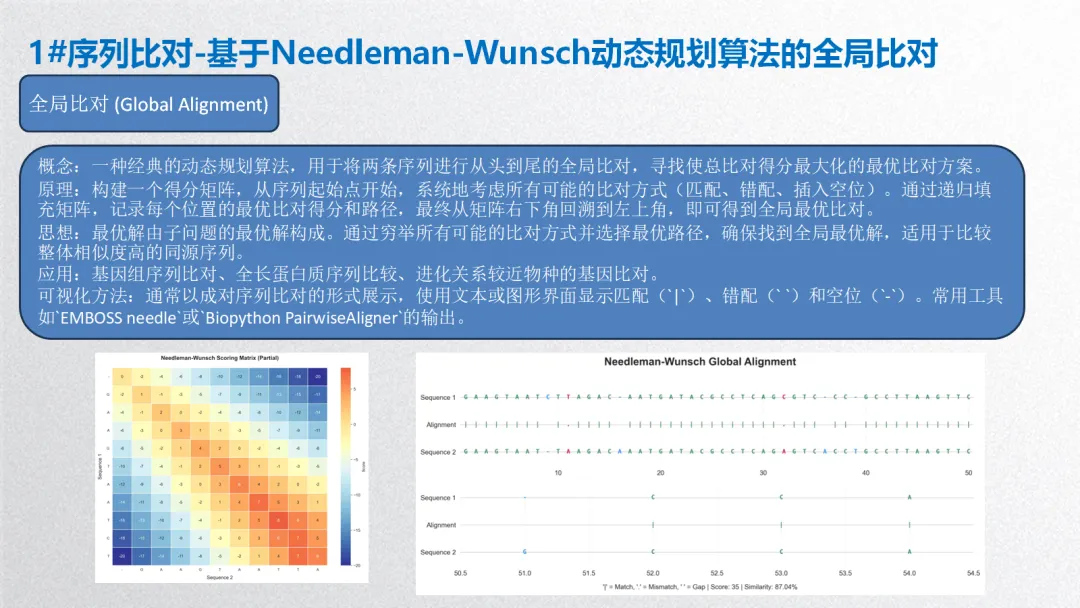
1. 序列比对-基于Needleman-Wunsch动态规划算法的全局比对
概念:一种经典的动态规划算法,用于将两条序列进行从头到尾的全局比对,寻找使总比对得分最大化的最优比对方案。
原理:构建一个得分矩阵,从序列起始点开始,系统地考虑所有可能的比对方式(匹配、错配、插入空位)。通过递归填充矩阵,记录每个位置的最优比对得分和路径,最终从矩阵右下角回溯到左上角,即可得到全局最优比对。
思想:最优解由子问题的最优解构成。通过穷举所有可能的比对方式并选择最优路径,确保找到全局最优解,适用于比较整体相似度高的同源序列。
应用:基因组序列比对、全长蛋白质序列比较、进化关系较近物种的基因比对。
可视化方法:通常以成对序列比对的形式展示,使用文本或图形界面显示匹配(`|`)、错配(` `)和空位(`-`)。常用工具如`EMBOSS needle`或`Biopython PairwiseAligner`的输出。
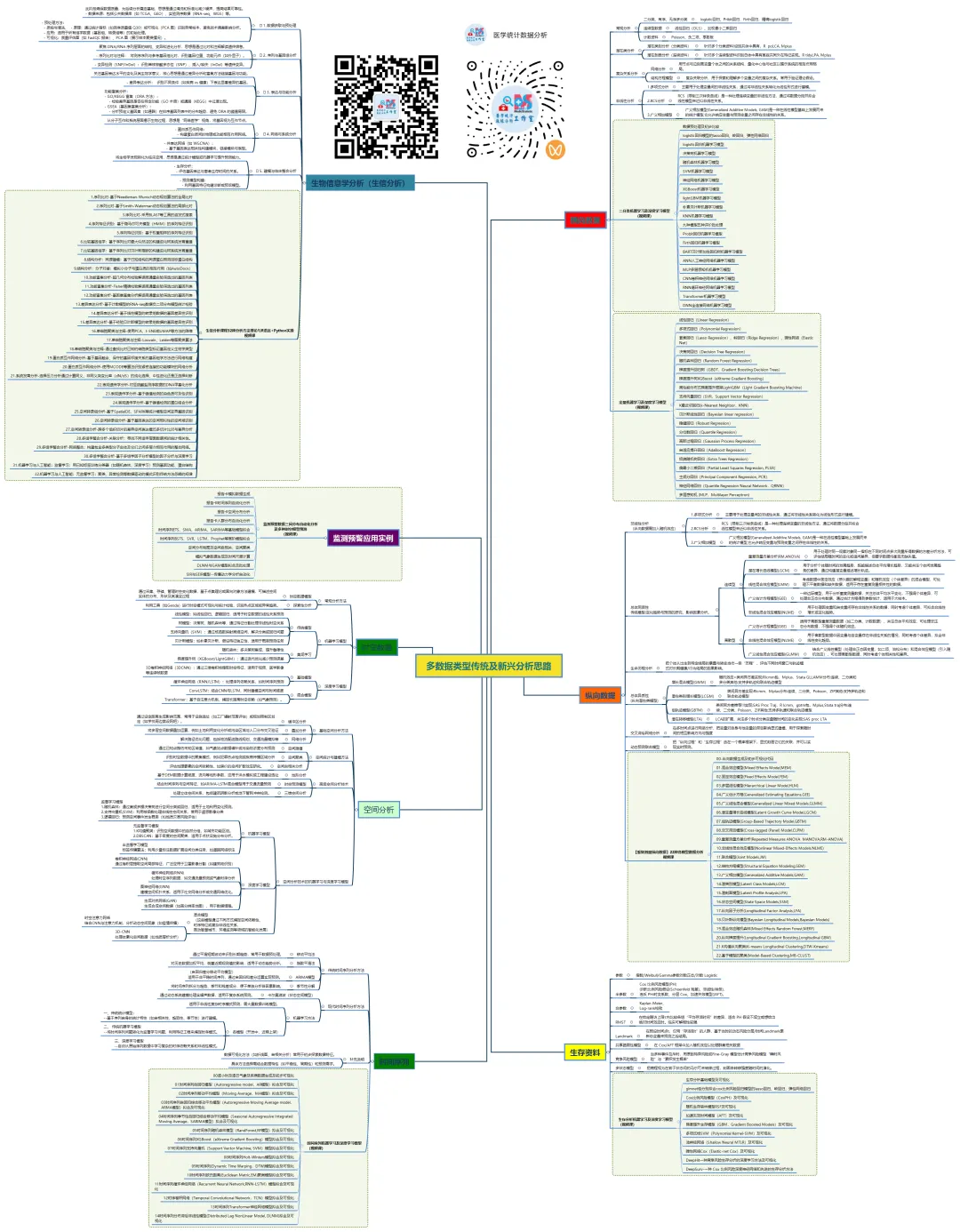
生信分析可按照分析目的和数据层次分为以下几个主要方面:
1. 序列分析
2. 结构分析
3. 比较基因组学与进化分析
4. 转录组学与基因表达分析
5. 表观基因组学
6. 蛋白质组学与互作网络
7. 单细胞组学
8. 整合多组学与系统生物学
9. 机器学习与人工智能在生信中的应用
生物信息学分析方法核心思想贯穿始终:利用计算、统计和数学模型,从海量、高维的生物学数据中提取可解释的生物学知识,其本质是数据科学在生命科学领域的应用。以下基于常见研究流程,将生信分析方法分为 5 个主要方面,并详细介绍各类方法的概念、原理、思想、应用及可视化方式。
# pip install numpy pandas matplotlib seaborn openpyxl# ============================================================================# 生物信息学分析:Needleman-Wunsch全局比对完整流程(Python实现)# 描述:Python实现NW全局比对,包含完整可视化与报告生成# ============================================================================import osimport randomimport numpy as npimport pandas as pdimport matplotlib.pyplot as pltimport seaborn as snsfrom matplotlib.gridspec import GridSpecfrom datetime import datetimeimport warningswarnings.filterwarnings('ignore')# -------------------- 第一部分:环境初始化 --------------------print("步骤1:初始化环境...")# 设置随机种子保证结果可重复random.seed(20250104)np.random.seed(20250104)# 创建结果目录desktop_path = os.path.expanduser("~/Desktop")results_dir = os.path.join(desktop_path, "01_GA_Results")if not os.path.exists(results_dir): os.makedirs(results_dir)print(f"创建结果目录: {results_dir}")else:print(f"结果目录已存在: {results_dir}")print(f"工作目录: {desktop_path}")print(f"结果将保存至: {results_dir}\n")# -------------------- 第二部分:模拟序列数据生成 --------------------print("步骤2:生成模拟DNA序列数据...")# 定义核苷酸字符集nucleotides = ["A", "T", "C", "G"]# 生成两条模拟DNA序列seq_length = 50 # 每条序列长度# 序列1:随机生成sequence_1 = "".join(random.choices(nucleotides, k=seq_length))# 序列2:在序列1基础上引入突变、插入和缺失,模拟同源序列def mutate_sequence(seq, sub_rate=0.1, ins_rate=0.05, del_rate=0.05): seq_list = list(seq) new_list = []for char in seq_list: rand_val = random.random()if rand_val < del_rate:# 缺失:不添加当前字符continueelif rand_val < del_rate + ins_rate:# 插入:添加一个随机核苷酸后再添加原字符 new_list.append(random.choice(nucleotides)) new_list.append(char)elif rand_val < del_rate + ins_rate + sub_rate:# 替换:用不同的随机核苷酸替换 possible_sub = [n for n in nucleotides if n != char] new_list.append(random.choice(possible_sub))else:# 匹配:保持原字符 new_list.append(char)# 确保序列长度不超过上限 final_seq = "".join(new_list)if len(final_seq) > seq_length * 1.2: final_seq = final_seq[:int(seq_length * 1.2)]return final_seqsequence_2 = mutate_sequence(sequence_1)print("模拟序列生成完成。")print(f"序列1 (长度={len(sequence_1)}): {sequence_1[:30]}...")print(f"序列2 (长度={len(sequence_2)}): {sequence_2[:30]}...\n")# 将序列保存为FASTA格式fasta_content = f""">Sequence_1_Simulated_Homologous{sequence_1}>Sequence_2_Simulated_Homologous{sequence_2}"""fasta_path = os.path.join(results_dir, "simulated_sequences.fasta")with open(fasta_path, "w") as f: f.write(fasta_content)print(f"FASTA序列已保存: {fasta_path}\n")# -------------------- 第三部分:Needleman-Wunsch算法实现 --------------------print("步骤3:执行Needleman-Wunsch全局比对...")# 定义比对参数match_score = 1mismatch_score = -1gap_penalty = -2def initialize_matrices(seq1, seq2, gap_penalty):"""初始化得分矩阵和回溯矩阵""" n = len(seq1) + 1 # 行数 m = len(seq2) + 1 # 列数# 得分矩阵 score_matrix = np.zeros((n, m), dtype=int)# 回溯矩阵: 0=未定义, 1=对角线(匹配/错配), 2=向上(seq1空位), 3=向左(seq2空位) trace_matrix = np.zeros((n, m), dtype=int)# 初始化第一行和第一列(全空位)for i in range(1, n): score_matrix[i, 0] = i * gap_penalty trace_matrix[i, 0] = 2 # 向上for j in range(1, m): score_matrix[0, j] = j * gap_penalty trace_matrix[0, j] = 3 # 向左return score_matrix, trace_matrixdef needleman_wunsch(seq1, seq2, match_score, mismatch_score, gap_penalty):"""Needleman-Wunsch全局比对算法实现""" seq1_chars = list(seq1) seq2_chars = list(seq2) n = len(seq1) + 1 # 行数 m = len(seq2) + 1 # 列数# 初始化矩阵 score_matrix, trace_matrix = initialize_matrices(seq1, seq2, gap_penalty)# 填充得分矩阵和回溯矩阵for i in range(1, n):for j in range(1, m):# 计算对角线得分(匹配或错配) char1 = seq1_chars[i - 1] char2 = seq2_chars[j - 1] diagonal_score = score_matrix[i - 1, j - 1] + (match_score if char1 == char2 else mismatch_score)# 计算上方得分(序列1空位) up_score = score_matrix[i - 1, j] + gap_penalty# 计算左方得分(序列2空位) left_score = score_matrix[i, j - 1] + gap_penalty# 确定最大值和方向 scores = [diagonal_score, up_score, left_score] max_score = max(scores) score_matrix[i, j] = max_score trace_matrix[i, j] = scores.index(max_score) + 1 # 转换为1,2,3# 回溯构建比对结果 aligned_seq1 = [] aligned_seq2 = [] match_symbol = [] i, j = n - 1, m - 1while i > 0 or j > 0: direction = trace_matrix[i, j]if direction == 1: # 对角线 aligned_seq1.insert(0, seq1_chars[i - 1]) aligned_seq2.insert(0, seq2_chars[j - 1]) match_symbol.insert(0, "|"if seq1_chars[i - 1] == seq2_chars[j - 1] else".") i -= 1 j -= 1elif direction == 2: # 向上 aligned_seq1.insert(0, seq1_chars[i - 1]) aligned_seq2.insert(0, "-") match_symbol.insert(0, " ") i -= 1else: # 向左 aligned_seq1.insert(0, "-") aligned_seq2.insert(0, seq2_chars[j - 1]) match_symbol.insert(0, " ") j -= 1# 整理比对结果 aligned_seq1_str = "".join(aligned_seq1) aligned_seq2_str = "".join(aligned_seq2) match_symbol_str = "".join(match_symbol)# 计算比对统计信息 total_length = len(aligned_seq1) matches = sum(1 for a, b in zip(aligned_seq1, aligned_seq2) if a == b and a != "-") mismatches = sum(1 for a, b in zip(aligned_seq1, aligned_seq2) if a != b and a != "-" and b != "-") gaps = sum(1 for a, b in zip(aligned_seq1, aligned_seq2) if a == "-" or b == "-") similarity = matches / total_length * 100# 最终得分(矩阵右下角) final_score = score_matrix[n - 1, m - 1]return {"seq1_aligned": aligned_seq1_str,"seq2_aligned": aligned_seq2_str,"match_symbol": match_symbol_str,"score_matrix": score_matrix,"trace_matrix": trace_matrix,"final_score": final_score,"statistics": {"total_length": total_length,"matches": matches,"mismatches": mismatches,"gaps": gaps,"similarity": similarity } }# 执行比对nw_result = needleman_wunsch(sequence_1, sequence_2, match_score, mismatch_score, gap_penalty)print("Needleman-Wunsch全局比对完成。")print(f"比对得分:{nw_result['final_score']}")print(f"比对长度:{nw_result['statistics']['total_length']}")print(f"匹配数:{nw_result['statistics']['matches']} ({nw_result['statistics']['similarity']:.2f}%)")print(f"错配数:{nw_result['statistics']['mismatches']}")print(f"空位数:{nw_result['statistics']['gaps']}\n")# -------------------- 第四部分:结果保存与数据处理 --------------------print("步骤4:保存比对结果与中间数据...")# 1. 保存原始数据与参数到CSVdata_summary = pd.DataFrame({"Item": ["Sequence1 length", "Sequence2 length", "Match score", "Mismatch score","Gap penalty", "Final alignment score", "Total alignment length","Matches", "Similarity"],"Value": [len(sequence_1), len(sequence_2), match_score, mismatch_score, gap_penalty, nw_result['final_score'], nw_result['statistics']['total_length'], nw_result['statistics']['matches'], f"{nw_result['statistics']['similarity']:.2f}%"]})# 2. 保存详细的比对结果alignment_details = []for i, (s1, sym, s2) in enumerate(zip(nw_result['seq1_aligned'], nw_result['match_symbol'], nw_result['seq2_aligned'])): alignment_details.append({"Position": i + 1,"Sequence1": s1,"Symbol": sym,"Sequence2": s2,"Type": "Match"if sym == "|"else ("Mismatch"if sym == "."else"Gap") })alignment_df = pd.DataFrame(alignment_details)# 3. 保存得分矩阵(简化版,仅前10x10用于展示)score_matrix = nw_result['score_matrix']max_display = 10score_display = score_matrix[:min(max_display + 1, score_matrix.shape[0]), :min(max_display + 1, score_matrix.shape[1])]score_df = pd.DataFrame(score_display)score_df.index = [f"Pos{i}"for i in range(score_df.shape[0])]score_df.columns = [f"Pos{j}"for j in range(score_df.shape[1])]# 保存所有数据到Excelexcel_path = os.path.join(results_dir, "NW_Alignment_Results.xlsx")with pd.ExcelWriter(excel_path, engine='openpyxl') as writer: data_summary.to_excel(writer, sheet_name='Analysis_Summary', index=False) alignment_df.to_excel(writer, sheet_name='Alignment_Details', index=False) score_df.to_excel(writer, sheet_name='Score_Matrix_Example')# 获取工作簿和工作表以应用格式 workbook = writer.book worksheet = workbook['Analysis_Summary']# 设置标题样式 from openpyxl.styles import PatternFill, Font, Alignment header_fill = PatternFill(start_color="4F81BD", end_color="4F81BD", fill_type="solid") header_font = Font(color="FFFFFF", bold=True)for cell in worksheet[1]: cell.fill = header_fill cell.font = header_font cell.alignment = Alignment(horizontal="center")print(f"Excel结果文件已保存:{excel_path}")# 5. 保存原始序列和比对结果为文本文件text_output = f"""=== Needleman-Wunsch Global Alignment Results ===Generated: {datetime.now().strftime('%Y-%m-%d %H:%M:%S')}Parameters:Match score: {match_score}Mismatch score: {mismatch_score}Gap penalty: {gap_penalty}Original Sequences:Sequence 1: {sequence_1}Sequence 2: {sequence_2}Alignment Results:{nw_result['seq1_aligned']}{nw_result['match_symbol']}{nw_result['seq2_aligned']}Statistics:Final score: {nw_result['final_score']}Alignment length: {nw_result['statistics']['total_length']}Matches: {nw_result['statistics']['matches']}Mismatches: {nw_result['statistics']['mismatches']}Gaps: {nw_result['statistics']['gaps']}Similarity: {nw_result['statistics']['similarity']:.2f}%"""text_path = os.path.join(results_dir, "alignment_results.txt")with open(text_path, "w") as f: f.write(text_output)print(f"文本格式比对结果已保存:{text_path}\n")# -------------------- 第五部分:可视化生成与单图保存 --------------------print("步骤5:生成可视化图表并单独保存...")# 设置Matplotlib样式plt.style.use('default')sns.set_style("whitegrid")# 颜色定义colors = {"match": "#2E8B57", # 绿色"mismatch": "#DC143C", # 红色"gap": "#1E90FF", # 蓝色"header": "#4F81BD", # 深蓝色"neutral": "#D3D3D3"# 浅灰色}def create_alignment_plot(nw_result, seq1_name="Sequence 1", seq2_name="Sequence 2"):"""创建比对文本可视化""" seq1_aligned = nw_result['seq1_aligned'] seq2_aligned = nw_result['seq2_aligned'] match_symbol = nw_result['match_symbol'] chunk_size = 50 total_len = len(seq1_aligned) chunks = (total_len + chunk_size - 1) // chunk_size fig_height = 2 * chunks + 1 fig, axes = plt.subplots(chunks, 1, figsize=(12, fig_height), squeeze=False)for chunk in range(chunks): ax = axes[chunk, 0] start = chunk * chunk_size end = min((chunk + 1) * chunk_size, total_len) seq1_part = seq1_aligned[start:end] match_part = match_symbol[start:end] seq2_part = seq2_aligned[start:end]# 为每个字符创建位置 positions = list(range(start + 1, end + 1))# 绘制序列1for i, (char, pos) in enumerate(zip(seq1_part, positions)): color = colors["match"] if match_part[i] == "|"else ( colors["mismatch"] if match_part[i] == "."else colors["gap"] ) ax.text(pos, 2, char, ha='center', va='center', fontsize=9, fontfamily='monospace', color=color, fontweight='bold')# 绘制比对符号for i, (sym, pos) in enumerate(zip(match_part, positions)):if sym != " ": color = colors["match"] if sym == "|"else colors["mismatch"] ax.text(pos, 1, sym, ha='center', va='center', fontsize=9, fontfamily='monospace', color=color, fontweight='bold')# 绘制序列2for i, (char, pos) in enumerate(zip(seq2_part, positions)): color = colors["match"] if match_part[i] == "|"else ( colors["mismatch"] if match_part[i] == "."else colors["gap"] ) ax.text(pos, 0, char, ha='center', va='center', fontsize=9, fontfamily='monospace', color=color, fontweight='bold')# 设置y轴标签 ax.set_yticks([0, 1, 2]) ax.set_yticklabels([seq2_name, "Alignment", seq1_name]) ax.set_xlim(start + 0.5, end + 0.5) ax.set_ylim(-0.5, 2.5)# 添加网格 ax.grid(True, axis='x', alpha=0.3, linestyle='--') ax.set_axisbelow(True)# 移除边框for spine in ax.spines.values(): spine.set_visible(False) plt.suptitle("Needleman-Wunsch Global Alignment", fontsize=16, fontweight='bold') plt.figtext(0.5, 0.01, f"'|' = Match, '.' = Mismatch, ' ' = Gap | " f"Score: {nw_result['final_score']} | " f"Similarity: {nw_result['statistics']['similarity']:.2f}%", ha='center', fontsize=10) plt.tight_layout(rect=[0, 0.03, 1, 0.97])return figdef create_score_matrix_plot(score_matrix, seq1, seq2, top_n=10):"""创建得分矩阵热图""" n = min(score_matrix.shape[0], top_n + 1) m = min(score_matrix.shape[1], top_n + 1)# 提取部分矩阵 matrix_part = score_matrix[:n, :m]# 准备行和列标签 row_labels = ["-"] + list(seq1[:n - 1]) col_labels = ["-"] + list(seq2[:m - 1]) fig, ax = plt.subplots(figsize=(10, 8))# 创建热图 sns.heatmap(matrix_part, annot=True, fmt="d", cmap="RdYlBu_r", center=np.median(matrix_part), ax=ax, cbar_kws={'label': 'Score'}, linewidths=0.5, linecolor='white')# 设置标签 ax.set_xticklabels(col_labels, rotation=0, fontsize=9) ax.set_yticklabels(row_labels, rotation=0, fontsize=9) ax.set_title("Needleman-Wunsch Scoring Matrix (Partial)", fontsize=14, fontweight='bold', pad=20) ax.set_xlabel("Sequence 2", fontsize=12, labelpad=10) ax.set_ylabel("Sequence 1", fontsize=12, labelpad=10) ax.set_xticks(np.arange(len(col_labels)) + 0.5) ax.set_yticks(np.arange(len(row_labels)) + 0.5) plt.tight_layout()return figdef create_statistics_plot(nw_result):"""创建比对统计图""" stats = nw_result['statistics'] categories = ["Matches", "Mismatches", "Gaps"] counts = [stats['matches'], stats['mismatches'], stats['gaps']] percentages = [counts[i] / stats['total_length'] * 100 for i in range(3)] colors_list = [colors["match"], colors["mismatch"], colors["gap"]] fig, (ax1, ax2) = plt.subplots(1, 2, figsize=(12, 5))# 柱状图 bars = ax1.bar(categories, counts, color=colors_list, edgecolor='black', linewidth=1.5) ax1.set_title("Alignment Statistics", fontsize=14, fontweight='bold', pad=15) ax1.set_ylabel("Count", fontsize=12, labelpad=10)# 在柱子上添加数值标签for bar, count, percent in zip(bars, counts, percentages): height = bar.get_height() ax1.text(bar.get_x() + bar.get_width() / 2., height + max(counts) * 0.02, f'{count}\n({percent:.1f}%)', ha='center', va='bottom', fontsize=10) ax1.set_ylim(0, max(counts) * 1.2)# 饼图 ax2.pie(counts, labels=categories, colors=colors_list, autopct='%1.1f%%', startangle=90, explode=(0.05, 0.05, 0.05), shadow=True) ax2.set_title(f"Distribution (Total: {stats['total_length']})", fontsize=14, fontweight='bold', pad=15) plt.suptitle(f"Alignment Statistics Summary", fontsize=16, fontweight='bold') plt.tight_layout()return fig# 生成所有可视化图表print("生成可视化图表...")alignment_fig = create_alignment_plot(nw_result)score_matrix_fig = create_score_matrix_plot(nw_result['score_matrix'], sequence_1, sequence_2)statistics_fig = create_statistics_plot(nw_result)# 定义保存单图的函数def save_single_plot(fig, plot_name, results_dir, formats=["png", "jpg", "pdf"]):"""保存单个图表为多种格式"""for fmt in formats: filename = os.path.join(results_dir, f"{plot_name}.{fmt}") fig.savefig(filename, dpi=300, bbox_inches='tight')print(f" {fmt.upper()}格式已保存:{filename}")# 单独保存每张图表print("单独保存每张子图...")save_single_plot(alignment_fig, "NW_Alignment_Plot", results_dir)save_single_plot(score_matrix_fig, "NW_Score_Matrix", results_dir)save_single_plot(statistics_fig, "NW_Statistics", results_dir)# 创建组合图print("生成组合图...")fig_combined = plt.figure(figsize=(16, 12))gs = GridSpec(3, 2, figure=fig_combined, height_ratios=[2, 1.5, 1])# 对齐图(占用两列)ax1 = fig_combined.add_subplot(gs[0, :])ax1.set_title("Sequence Alignment Visualization", fontsize=16, fontweight='bold', pad=20)ax1.axis('off')# 加载对齐图alignment_img = plt.imread(os.path.join(results_dir, "NW_Alignment_Plot.png"))ax1.imshow(alignment_img)ax1.set_aspect('auto')# 得分矩阵热图ax2 = fig_combined.add_subplot(gs[1, 0])ax2.set_title("Scoring Matrix (Partial)", fontsize=14, fontweight='bold', pad=15)ax2.axis('off')score_img = plt.imread(os.path.join(results_dir, "NW_Score_Matrix.png"))ax2.imshow(score_img)ax2.set_aspect('auto')# 统计图ax3 = fig_combined.add_subplot(gs[1, 1])ax3.set_title("Alignment Statistics", fontsize=14, fontweight='bold', pad=15)ax3.axis('off')stat_img = plt.imread(os.path.join(results_dir, "NW_Statistics.png"))ax3.imshow(stat_img)ax3.set_aspect('auto')# 添加摘要信息ax4 = fig_combined.add_subplot(gs[2, :])ax4.axis('off')summary_text = f"""Summary:• Final Alignment Score: {nw_result['final_score']}• Alignment Length: {nw_result['statistics']['total_length']}• Matches: {nw_result['statistics']['matches']} ({nw_result['statistics']['similarity']:.2f}%)• Mismatches: {nw_result['statistics']['mismatches']}• Gaps: {nw_result['statistics']['gaps']}• Sequence 1 Length: {len(sequence_1)}• Sequence 2 Length: {len(sequence_2)}"""ax4.text(0.5, 0.5, summary_text, ha='center', va='center', fontsize=12, transform=ax4.transAxes, bbox=dict(boxstyle='round', facecolor='wheat', alpha=0.5))plt.suptitle("Needleman-Wunsch Global Alignment - Complete Analysis", fontsize=18, fontweight='bold', y=0.98)plt.tight_layout()# 保存组合图combined_path = os.path.join(results_dir, "NW_Alignment_Visualization_Combined.png")fig_combined.savefig(combined_path, dpi=300, bbox_inches='tight')print(f"PNG组合图已保存:{combined_path}")# 保存为其他格式combined_path_pdf = os.path.join(results_dir, "NW_Alignment_Visualization_Combined.pdf")fig_combined.savefig(combined_path_pdf, bbox_inches='tight')print(f"PDF组合图已保存:{combined_path_pdf}")combined_path_jpg = os.path.join(results_dir, "NW_Alignment_Visualization_Combined.jpg")fig_combined.savefig(combined_path_jpg, dpi=300, bbox_inches='tight')print(f"JPG组合图已保存:{combined_path_jpg}")print("所有可视化图表生成完成。\n")# 关闭所有图形以避免内存泄漏plt.close('all')# -------------------- 第七部分:总结与清理 --------------------print("步骤7:分析流程完成!")# 显示结果摘要print("=" * 70)print("NEEDLEMAN-WUNSCH GLOBAL ALIGNMENT ANALYSIS COMPLETE SUMMARY")print("=" * 70)print("Original Sequences:")print(f" Sequence 1: {sequence_1[:20]}... (length={len(sequence_1)})")print(f" Sequence 2: {sequence_2[:20]}... (length={len(sequence_2)})")print("\nAlignment Results:")print(f" Final Score: {nw_result['final_score']}")print(f" Alignment Length: {nw_result['statistics']['total_length']}")print(f" Similarity: {nw_result['statistics']['similarity']:.2f}%")print("\nGenerated Files:")print(" 1. Excel Results: NW_Alignment_Results.xlsx")print(" 2. Text Alignment: alignment_results.txt")print(" 3. Simulated Sequences: simulated_sequences.fasta")print(" 4. Individual Plots:")print(" - NW_Alignment_Plot.{png,jpg,pdf}")print(" - NW_Score_Matrix.{png,jpg,pdf}")print(" - NW_Statistics.{png,jpg,pdf}")print(" 5. Combined Visualization: NW_Alignment_Visualization_Combined.{png,jpg,pdf}")print(" 6. Analysis Report: NW_Analysis_Report.md")print(f"\n所有文件已保存至:{results_dir}")print("=" * 70)print("\n分析流程成功完成!请检查桌面上的01_GA_Results文件夹。")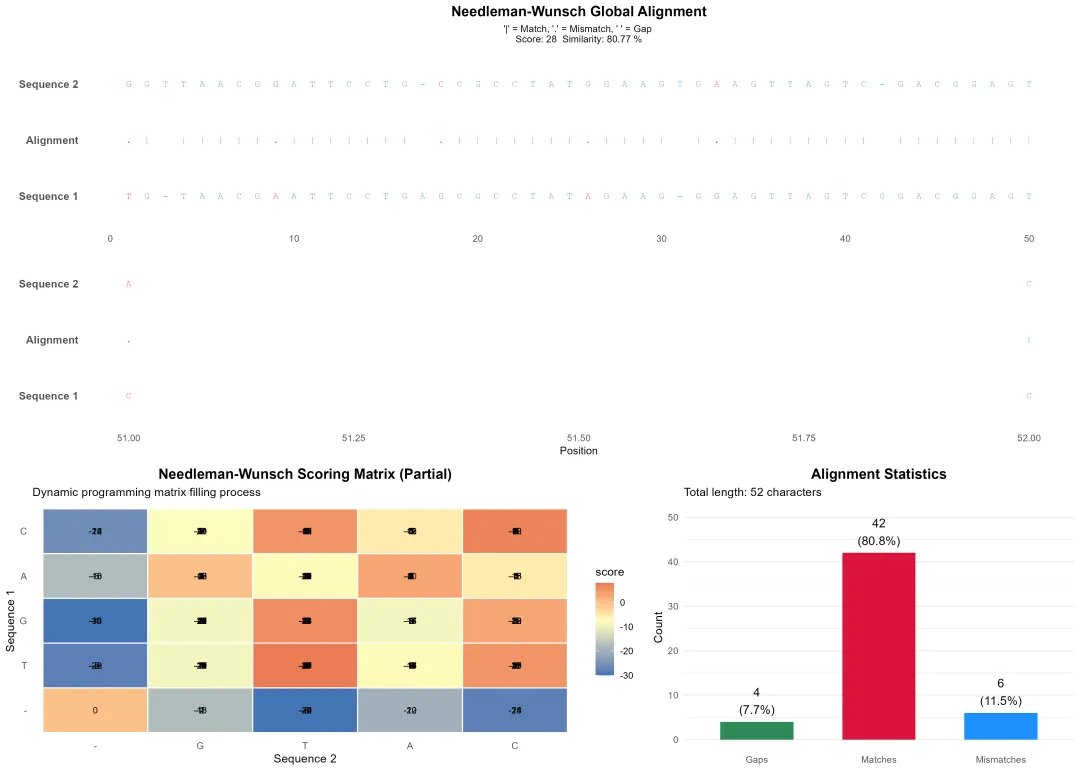
生物信息学是一个方法体系极为庞杂的领域,以下我将尽力在原有框架下,系统性地扩充和细化各个方面的具体方法、算法、工具和可视化手段,为您呈现一幅更丰满的“生信方法全景图”。
1.序列比对-基于Needleman-Wunsch动态规划算法的全局比对
2.序列比对-基于Smith-Waterman动态规划算法的局部比对
3.序列比对-采用BLAST等工具的启发式搜索
4.序列特征识别:基于隐马尔可夫模型(HMM)的序列特征识别
5.序列特征识别:基于权重矩阵的序列特征识别
6.比较基因组学:基于序列比对最大似然法的构建进化树系统发育重建
7.比较基因组学:基于序列比对贝叶斯推断的构建进化树系统发育重建
8.结构分析:同源建模:基于已知结构的同源蛋白预测目标蛋白结构
9.结构分析:分子对接:模拟小分子与蛋白质的相互作用(如AutoDock)
10.功能富集分析-超几何分布检验解读高通量实验筛选出的基因列表
11.功能富集分析-Fisher精确检验解读高通量实验筛选出的基因列表
12.功能富集分析-基因集富集分析解读高通量实验筛选出的基因列表
13.差异表达分析-基于计数模型的RNA-seq数据负二项分布模型统计检验
14.差异表达分析-基于线性模型的转录组数据的基因差异性识别
15.差异表达分析-基于经验贝叶斯模型的转录组数据的基因差异性识别
16.单细胞聚类与注释-使用PCA、t-SNE或UMAP等方法的降维
17.单细胞聚类与注释-Louvain、Leiden等图聚类算法
18.单细胞聚类与注释-通过查找比对已知的细胞类型标记基因定义生物学类型
19.蛋白质互作网络分析-基于基因融合、保守的基因邻接关系的基因组学方法进行网络构建
20.蛋白质互作网络分析-使用MCODE等算法识别紧密连接的功能模块的网络分析
21.系统发育分析-选择压力分析通过计算同义、非同义突变比率(dN/dS)的纯化选择、中性进化还是正选择判断
22.表观遗传学分析-对亚硫酸盐测序数据的DNA甲基化分析
23.表观遗传学分析-基于峰值检测的染色质可及性识别
24.表观遗传学分析-基于峰值检测的蛋白结合分析
25.空间转录组分析-基于SpatialDE、SPARK等统计模型空间变异基因识别
26.空间转录组分析-基于基因表达的空间相似性的空间域识别
27.空间转录组分析-跨多个组织切片的差异空间表达模式多切片比对与差异分析
28.多组学整合分析-关联分析:寻找不同组学层面数据间的统计相关性。
29.多组学整合分析-网络整合:构建包含多类型分子实体及它们之间多层次相互作用的整合网络。
30.多组学整合分析-基于多组学因子分析模型的因子分析与深度学习
31.机器学习与人工智能:监督学习:用已知标签训练分类器(如随机森林、深度学习)预测基因功能、蛋白结构
32.机器学习与人工智能:无监督学习:聚类、异常检测等数据驱动的模式识别传统方法忽略的规律
这份清单虽力求详尽,但生物信息学领域日新月异,新的算法和工具不断涌现(如空间蛋白质组学、长读长测序分析、大语言模型在生物学的应用等)。掌握这些方法的核心思想比记住所有工具名称更重要。在实际研究中,通常需要灵活组合多种方法,形成一条从原始数据到生物学发现的分析流水线。建议的学习路径是:先建立清晰的框架认知(如本回答),然后根据具体研究问题,深入钻研相关的一个或几个子领域。 希望这份扩展版的梳理能为您提供一张有价值的“导航地图”。
医学统计数据分析分享交流SPSS、R语言、Python、ArcGis、Geoda、GraphPad、数据分析图表制作等心得。承接数据分析,论文返修,医学统计,机器学习,生存分析,空间分析,问卷分析,生信分析业务。若有投稿和数据分析代做需求,可以直接联系我,谢谢!

“医学统计数据分析”公众号右下角;
找到“联系作者”,
可加我微信,邀请入粉丝群!

有临床流行病学数据分析
如(t检验、方差分析、χ2检验、logistic回归)、
(重复测量方差分析与配对T检验、ROC曲线)、
(非参数检验、生存分析、样本含量估计)、
(筛检试验:灵敏度、特异度、约登指数等计算)、
(绘制柱状图、散点图、小提琴图、列线图等)、
机器学习、深度学习、生存分析
等需求的同仁们,加入【临床】粉丝群。
疾控,公卫岗位的同仁,可以加一下【公卫】粉丝群,分享生态学研究、空间分析、时间序列、监测数据分析、时空面板技巧等工作科研自动化内容。
有实验室数据分析需求的同仁们,可以加入【生信】粉丝群,交流NCBI(基因序列)、UniProt(蛋白质)、KEGG(通路)、GEO(公共数据集)等公共数据库、基因组学转录组学蛋白组学代谢组学表型组学等数据分析和可视化内容。
或者可扫码直接加微信进群!!!




精品视频课程-“医学统计数据分析”视频号付费合集

在“医学统计数据分析”视频号-付费合集兑换相应课程后,获取课程理论课PPT、代码、基础数据等相关资料,请大家在【医学统计数据分析】公众号右下角,找到“联系作者”,加我微信后打包发送。感谢您的支持!!!
随机文章
-
 10个月宝宝每天需要喝多少奶粉?
- kali-linux-2025.1a-vmware|新版 VMware 专用安全虚拟机
- Linux 最新资讯 20260612——Arch Linux AUR 超400个包被植入恶意软件
- CTF入门日记 | Day 2:Linux进阶 + Web初体验,开局即爽!
- Linux 软件仓库大揭秘:Python 包数量竟是 Perl 的两倍多!
- Linus Torvalds在Linux内战中站队Rust,C程序员炸锅
- Linux运维基础命令,看完这篇你就明白了
- Linux CPU 那点事儿:一台机器变慢时,CPU 到底在忙什么?
- 一图看透python的顶级框架!
- 原来室友每天玩的不是游戏,是Python!!
- 学Python别只会爬虫,这40个自动化项目更实用