当前位置:首页>python>中篇Python(ODOO)篇 第四章 ODOO项目优化(六)报表制作

中篇Python(ODOO)篇 第四章 ODOO项目优化(六)报表制作

  • 2026-09-02 15:52:01
中篇Python(ODOO)篇 第四章 ODOO项目优化(六)报表制作
报表对于商业应用程序来说是非常宝贵的功能,ODOO使用基于Qweb、Twitter Bootstrap 和Wkhtmltopdf的报表引擎。我们可使用Qweb模版设计报表来生成HTML文档,然后可以将其转换为PDF格式。
  1. 首先在peijia目录下新建reports目录,用来存放各种报表。
  2. 在reports目录新建报表文件teacher_appointment_report.xml。
  3. 在__manifest__.py文件的data段最后一行添加对该文件的引用。
teacher_appointment_report.xml代码:
<?xml version="1.0"?><odoo>    <report        id="action_teacher_appointment_report"        model="nebula.teacher.appointment"        string="教练预约单"        name="peijia.report_teacher_appointment"        file="peijia.report_teacher_appointment"        report_type="qweb-html" />    <templateid = "report_teacher_appointment">        <tt-call="web.html_container">            <tt-foreach="docs"t-as="doc">                <tt-call="web.external_layout">                    <divclass="page">                        <h2t-field="doc.name"/>                        <h3>预约明细:</h3>                        <u1>                            <tt-foreach="doc.order_line"t-as="attendee">                                <li><spant-field="attendee.appointment_name"/> </li>                            </t>                        </u1>                    </div>                </t>            </t>        </t>    </template></odoo>
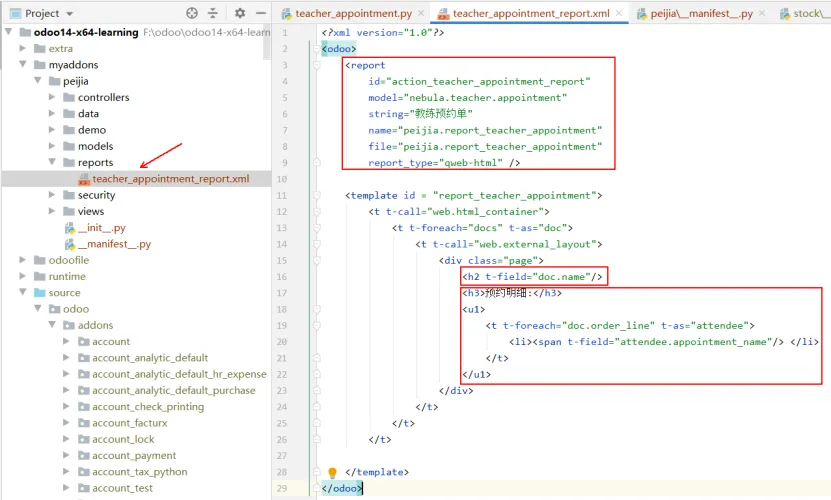
report文件截图见下方:
这里最重要的元素是使用标准报表结构的t-call 指令。打印模板支持 HTML 文档的基本设置,大家如果对HTML和bootstrap不太熟悉的话,可以看看相关资料。
report部分声明了报表的一些参数,report_type=qweb-html的意思是打印出来的是html。ODOO会在界面显示打印按钮,点击打印会传入选定的记录到打印模版,report有以下参数。
    id:生成的数据的id。
    name (必填):报表名,用于查找及描述
    model (必填):报表记录所对应的模型
    report_type (必填):qweb-pdf或者 qweb-html
    report_name:输出pdf时文件名。
    groups:用于指定可以查看、使用该报表的用户组。
    attachment_use:为true时,该报表会以记录的附件的形式保存,一般用于一次生成、多次使用的报表
    attachment:用于定义报表名的python表达式,使记录可以通过object对象访问。
    paperformat:用于打印报表的文件格式的外部id(默认是公司的格式)(可以自定义格式)
template部分是报表模版,这里docs是从context发送过来的变量,代表报表内容记录。比如你在界面上选定了几条相关模型的记录,然后可以通过docs访问这些记录数据,相当于模型方法中的recordset赋值给 docs = self,然后可以在qweb里读取。
这里先做个简单报表,后续再完善,让我们重启ODOO服务,更新陪驾应用,看看效果展示。
我们可以多选记录,然后再选择打印。
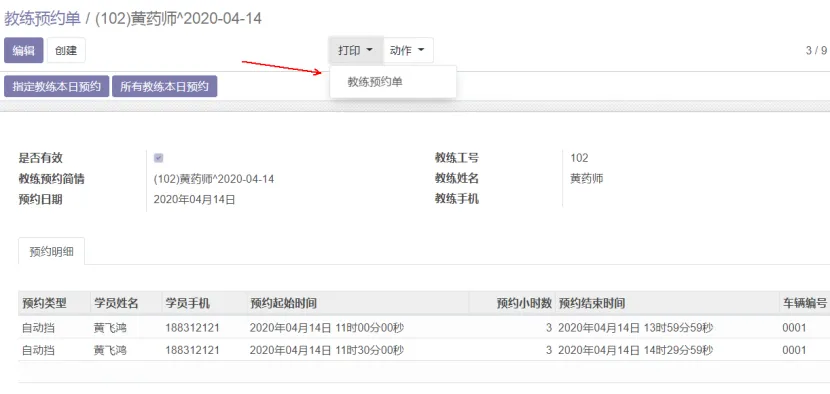
我们也可以进入一条记录后,选择打印。
我们选择一条记录,然后点击打印,再选择要打印的报表名称,会按照打印模版设置的样式以html方式展示,因为我们报表类型选择的是qweb-html。
在设计报表时,我们可能更倾向为report_type=”qweb-html”然后在完成时再修改为 qweb-pdf 文件。这样在 QWeb 模板中可更快速地生成报表并且更易于检查 HTML 结果。
我们可以看到,因为之前我们只让显示陪驾单名称,明细表记录的陪驾单名称全部显示了。
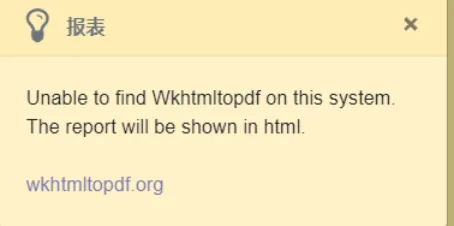
这里有个问题,就是再点击打印,应该出来pdf文件的,但是失败了。现在来解决这个问题。
其实还是配置文件的路径问题,我们将odoo.conf路径修改如下,即可。
addons_path = source\odoo\addons,myaddonsbin_path = runtime\win64\wkhtmltopdf\bin,runtime/win64/nodejs
Bootstrap 提供了一套响应式、移动设备优先的流式网格系统,随着屏幕(viewport)尺寸的增加,系统会自动分为最多12列。我们可使用来添加行。每行中还有多个单元格,分别占用不同列数,每个单元格可通过 来进行定义,其中 N 表示占用列的数量。
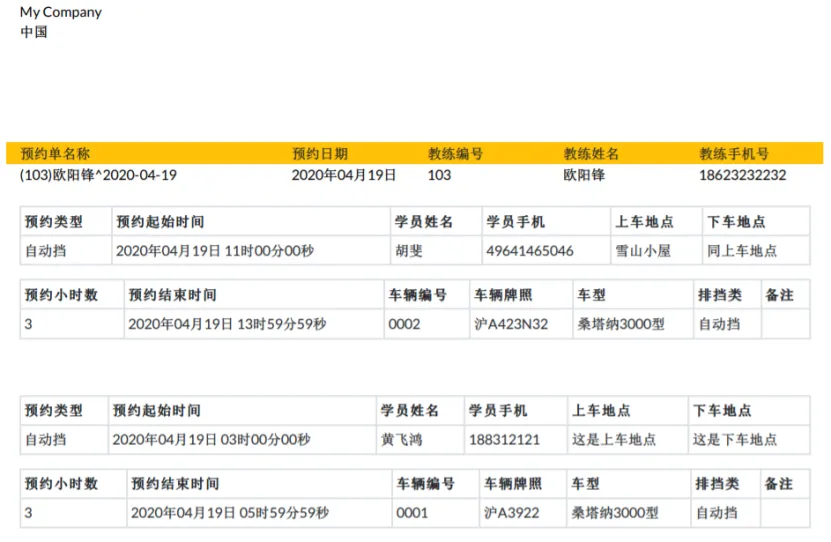
下面,我们继续完善该报表,最终效果见下图:
代码如下。

teacher_appointment.py

from datetime import datetime, timedeltafrom odoo import fields, models, apiclass NebulaTeacherAppointment(models.Model):    _name = "nebula.teacher.appointment"    _description = "教练预约单"    _order = 'name'    active = fields.Boolean('是否有效', default=True)    name = fields.Char('教练预约简情', size=30)    # TODO: 预约时间不得小于当天,未做处理    appointment_date = fields.Date('预约日期', default=datetime.now())    teacher_name = fields.Many2one('nebula.teacher', string='教练工号',                                   size=8, required=True,                                   domain=[('active', '=', True)])    teacher_full_name = fields.Char('教练姓名', related='teacher_name.full_name',                                    store=True)    teacher_mobile = fields.Char('教练手机', related='teacher_name.mobile')    date_docket = fields.Datetime('单据日期', required=True, readonly=True,                                  index=True, default=fields.Datetime.now)    user_id = fields.Many2one('res.users', string='创建人', index=True,                              readonly=True, default=lambda self: self.env.user)    order_line = fields.One2many('nebula.teacher.appointment.line', 'order_id',                                 string='预约明细', auto_join=True)    _sql_constraints = [('check_uniq_name', 'unique(appointment_date, name)', '一个教练一个日期预约单')]    @api.onchange('teacher_name', 'appointment_date')    def _onchange_name_date(self):        if self.appointment_date and self.teacher_name:            self.name = _make_name(self.appointment_date, self.teacher_name.name, self.teacher_name.full_name)    def button_teacher_time(self):        """            功能: 生成指定教练本日预约。                  从传入的self中得到指定的教练和日期,删除旧子表,再创建新子表            1.调插入子表程序        """        # todo : 应该有时间判断,大于等于今天才能操作,未写        _insert_line_table(self, self.id, self.appointment_date, self.teacher_name.id)    def button_all_time(self):  # 所有教练本日预约        # todo : 应该有时间判断,大于等于今天才能操作,未写        """            功能: 生成所有教练本日预约。                  从传入的self中得到指定的教练和日期,生成所有教练本日预约单。            1. 删除除了传入的教练外所有本日主表,子表会自动删除删除。            2.查找本日预约表中所有教练,循环生成除了本教练外主表,            3.查找教练预约表本日所有记录,遍历生成子表        """        # 1. 删除除了传入的教练外所有本日主表,子表会自动删除删除。        appointment_date = self.appointment_date        domain = [('teacher_name', '!=', self.teacher_name.id),  # 教练排除                  ('active', '=', True),                  ('appointment_date', '=', appointment_date)]        self.env['nebula.teacher.appointment'].search(domain).unlink()        # 2. 查找本日预约表中所有教练,生成主表        begin_time = datetime.strftime(appointment_date, "%Y-%m-%d 00:00:00")        end_time = datetime.strftime(appointment_date, "%Y-%m-%d 23:59:59")        domain = [('active', '=', True),                  ('appointment_begin_date', '>=', begin_time),                  ('appointment_begin_date', '<=', end_time),                  ('teacher_name', '!=', self.teacher_name.id),                  ('complete_begin_date', '=', None)]        field_names = ['teacher_name', 'teacher_full_name']        records = self.env['nebula.appointment'].search_read(domain, field_names, order='teacher_name desc')        old_name = ''        for record in records:            record_name = _make_name(self.appointment_date, record['teacher_name'][1], record['teacher_full_name'])            if old_name != record_name:  # 不是重名                old_name = record_name                new_record = {                    'teacher_name': record['teacher_name'][0],                    'appointment_date': self.appointment_date,                    'name': record_name,                }                self.env['nebula.teacher.appointment'].create(new_record)        # 3.查找教练预约表本日所有记录,遍历生成子表        domain = [('active', '=', True),                  ('appointment_date', '=', appointment_date)]        field_names = ['teacher_name']        records = self.env['nebula.teacher.appointment'].search_read(domain, field_names)        for record in records:            order_id = record['id']            teacher_id = record['teacher_name'][0]            _insert_line_table(self, order_id, appointment_date, teacher_id)def _make_name(appointment_date, teacher_name, teacher_full_name):    # 传入参数,生成默认name    order_date = appointment_date + timedelta(hours=8)    order_text = datetime.strftime(order_date, "%Y-%m-%d")    record_name = '(' + teacher_name + ')'    record_name += teacher_full_name + '^'    record_name += order_text    return record_namedef _insert_line_table(self, order_id, appointment_date, teacher_id):    """        功能:传入主表,然后生成子表        1.传入主表        2.删除主表对应的子表        3.查询预约表本教练所有预约情况        4. 逐条插入到子表    """    domain = [('order_id', '=', order_id)]    self.env['nebula.teacher.appointment.line'].search(domain).unlink()    begin_time = datetime.strftime(appointment_date, "%Y-%m-%d 00:00:00")    end_time = datetime.strftime(appointment_date, "%Y-%m-%d 23:59:59")    domain = [('active', '=', True),              ('appointment_begin_date', '>=', begin_time),              ('appointment_begin_date', '<=', end_time),              ('teacher_name', '=', teacher_id),              ('complete_begin_date', '=', None)]    field_names = ['name']    items = self.env['nebula.appointment'].search_read(domain, field_names)    for item in items:        new_record = {            'order_id': order_id, # 主表ID            'appointment_name': item['id'],  # 子表预约单ID        }        self.env['nebula.teacher.appointment.line'].create(new_record)class TeacherAppointmentLine(models.Model):    _name = 'nebula.teacher.appointment.line'    _description = '预约明细'    @api.model    def _select_car_type(self):        records = self.env['nebula.car.type'].search([('active', '=', True)])        return [(r.name, r.name_type) for r in records]    def _select_auto_type(self):        records = self.env['nebula.auto.type'].search([])        return [(r.name, r.name_type) for r in records]    @api.depends('complete_begin_date', 'complete_hours')    def _calc_complete_end_date(self):        for order in self:            if order.complete_begin_date:                begin_date = order.complete_begin_date                add_hours = order.complete_hours                begin_date += timedelta(hours=add_hours)                begin_date -= timedelta(seconds=1)                order.complete_end_date = begin_date    order_id = fields.Many2one('nebula.teacher.appointment', string='教练预约单ID',                               required=True,                               ondelete='cascade', copy=False)    appointment_name = fields.Many2one('nebula.appointment', string='预约单',                                       size=8, readonly=True)    auto_type_name = fields.Selection(selection='_select_auto_type',                                      string='预约类型', related='appointment_name.auto_type_name')    student_name = fields.Many2one('nebula.student', string='学员姓名',                                   size=8, related='appointment_name.student_name')    student_mobile = fields.Char('学员手机', related='student_name.mobile')    appointment_begin_date = fields.Datetime('预约起始时间',                                             related='appointment_name.appointment_begin_date',                                             index=True)    appointment_hours = fields.Integer('预约小时数', related='appointment_name.appointment_hours')    appointment_end_date = fields.Datetime('预约结束时间', related='appointment_name.appointment_end_date')    complete_begin_date = fields.Datetime('实际起始时间')  # TODO: 当写该值的时候回写预约表    complete_hours = fields.Integer('实际小时数')  # TODO: 当写该值的时候回写预约表    complete_end_date = fields.Datetime('实际结束时间', compute='_calc_complete_end_date',                                        store=True)  # TODO: 当写该值的时候回写预约表    car_name = fields.Many2one('nebula.car', string='车辆编号',                               size=8, related='appointment_name.car_name',                               domain=[('active', '=', True)])    license_plate = fields.Char('车辆牌照', related='car_name.license_plate')    car_type_name = fields.Selection(selection='_select_car_type', string='车型',                                     related='car_name.car_type_name')    car_auto_type_name = fields.Selection(selection='_select_auto_type',                                          string='排挡类',                                          related='car_name.auto_type_name')    work_charge_hour = fields.Integer('每小时收费', related='appointment_name.work_charge_hour')    deposit = fields.Integer('学员缴费')  # TODO: 当写该值的时候回写预约表    begin_address = fields.Text('上车地点', related='appointment_name.begin_address')    end_address = fields.Text('下车地点', related='appointment_name.end_address')    note = fields.Text('备注', related='appointment_name.note')
teacher_appointment_report.xml
<?xml version="1.0"?><odoo>    <report            id="action_teacher_appointment_report"            model="nebula.teacher.appointment"            string="教练预约单"            name="peijia.report_teacher_appointment"            file="peijia.report_teacher_appointment"            print_report_name="'Teacher Appointment - %s' % (object.name)"            report_type="qweb-html"/>    <templateid="report_teacher_appointment">        <tt-call="web.html_container">            <tt-call="web.external_layout">                <divclass="page">                    <!-- 报表头文件内容 Report header contend -->                    <tt-foreach="docs"t-as="doc">                        <divclass="row bg-warning">                            <divclass="col-4">预约单名称</div>                            <divclass="col-2">预约日期</div>                            <divclass="col-2">教练编号</div>                            <divclass="col-2">教练姓名</div>                            <divclass="col-2">教练手机号</div>                        </div>                        <divclass="row">                            <!-- 报表主表文件内容 Report row contend -->                            <divclass="col-4">                                <spant-field="doc.name"/>                            </div>                            <divclass="col-2">                                <spant-field="doc.appointment_date"                                      t-options="{'widget':'date'}"/>                            </div>                            <divclass="col-2">                                <spant-field="doc.teacher_name"/>                            </div>                            <divclass="col-2">                                <spant-field="doc.teacher_full_name"/>                            </div>                            <divclass="col-2">                                <spant-field="doc.teacher_mobile"/>                            </div>                        </div>                        <tt-foreach="doc.order_line"t-as="line">                            <br/>                            <tableclass="table table-bordered table-sm">                                <thread>                                    <tr>                                        <th>预约类型</th>                                        <th>预约起始时间</th>                                        <th>学员姓名</th>                                        <th>学员手机</th>                                        <th>上车地点</th>                                        <th>下车地点</th>                                    </tr>                                </thread>                                <body>                                    <td>                                        <spant-field="line.auto_type_name"/>                                    </td>                                    <td>                                        <spant-field="line.appointment_begin_date"                                              t-options="{'widget':'datetime'}"/>                                    </td>                                    <td>                                        <spant-field="line.student_name"/>                                    </td>                                    <td>                                        <spant-field="line.student_mobile"/>                                    </td>                                    <td>                                        <spant-field="line.begin_address"/>                                    </td>                                    <td>                                        <spant-field="line.end_address"/>                                    </td>                                </body>                            </table>                            <tableclass="table table-bordered table-sm">                                <thread>                                    <tr>                                        <th>预约小时数</th>                                        <th>预约结束时间</th>                                         <th>车辆编号</th>                                        <th>车辆牌照</th>                                        <th>车型</th>                                        <th>排挡类</th>                                        <th>备注</th>                                    </tr>                                </thread>                                <body>                                    <td>                                        <spant-field="line.appointment_hours"/>                                    </td>                                    <td>                                        <spant-field="line.appointment_end_date"                                              t-options="{'widget':'datetime'}"/>                                    </td>                                    <td>                                        <spant-field="line.car_name"/>                                    </td>                                    <td>                                        <spant-field="line.license_plate"/>                                    </td>                                    <td>                                        <spant-field="line.car_type_name"/>                                    </td>                                    <td>                                        <spant-field="line.car_auto_type_name"/>                                    </td>                                    <td>                                        <spant-field="line.note"/>                                    </td>                                </body>                            </table>                            <br/>                        </t>                    </t>                    <!-- 报表脚内容 Report footer contend-->                </div>            </t>        </t>    </template></odoo>
teacher_appointment_views.xml
<?xml version="1.0" encoding="utf-8"?><odoo>    <data>        <recordmodel="ir.ui.view"id="peijia.form_teacher_appointment_views">            <fieldname="name">peijia.teacher.appointment.form</field>            <fieldname="model">nebula.teacher.appointment</field>            <fieldname="arch"type="xml">                <formstring="表单">                    <header>                        <buttonname="button_teacher_time"type="object"                                string="指定教练本日预约" class="oe_highlight"/>                        <buttonname="button_all_time"type="object"                                string="所有教练本日预约" class="oe_highlight"/>                    </header>                    <sheet>                        <divclass="oe_button_box"name="button_box"/>                        <groupname="group_top">                            <groupname="group_left">                                <fieldname="active"/>                                <fieldname="name"/>                                <fieldname="appointment_date"/>                            </group>                            <groupname="group_right">                                <fieldname="teacher_name"options="{'no_open': True, 'no_create': True}"/>                                <fieldname="teacher_full_name"/>                                <fieldname="teacher_mobile"/>                            </group>                        </group>                        <notebookcolspan="4">                            <pagestring="预约明细"name="order_lines"autofocus="autofocus">                                <formstring="预约明细">                                    <sheet>                                        <fieldname="order_line"colspan="4"nolabel="1"/>                                    </sheet>                                </form>                            </page>                        </notebook>                        <groupname="group_bottom">                            <fieldname="date_docket"/>                            <fieldname="user_id"/>                        </group>                    </sheet>                </form>            </field>        </record>        <recordmodel="ir.ui.view"id="peijia.tree_teacher_appointment_views">            <fieldname="name">peijia.teacher.appointment.tree</field>            <fieldname="model">nebula.teacher.appointment</field>            <fieldname="priority">1</field>            <fieldname="arch"type="xml">                <treestring="列表">                    <fieldname="active"/>                    <fieldname="name"/>                    <fieldname="appointment_date"/>                    <fieldname="teacher_name"/>                    <fieldname="teacher_full_name"/>                </tree>            </field>        </record>        <recordmodel="ir.actions.act_window"id="peijia.action_teacher_appointment_views">            <fieldname="name">教练预约单</field>            <fieldname="res_model">nebula.teacher.appointment</field>            <fieldname="view_mode">tree,form</field>        </record>    </data></odoo>
teacher_appointment_lines_views.xml
<?xml version="1.0" encoding="utf-8"?><odoo>    <data>        <recordmodel="ir.ui.view"id="peijia.form_teacher_appointment_line_views">            <fieldname="name">peijia.teacher.appointment.lines.form</field>            <fieldname="model">nebula.teacher.appointment.line</field>            <fieldname="arch"type="xml">                <formstring="表单">                    <sheet>                        <divclass="oe_button_box"name="button_box"/>                        <groupname="group_top">                            <groupname="group_left">                                <fieldname="appointment_name"options="{'no_open': True, 'no_create': True}" />                                <fieldname="auto_type_name"/>                                <fieldname="note"/>                            </group>                            <groupname="group_right">                                <fieldname="appointment_begin_date"/>                                <fieldname="appointment_hours"/>                                <fieldname="appointment_end_date"/>                            </group>                        </group>                        <groupname="group_bottom">                            <groupname="group_teacher">                                <fieldname="student_name"options="{'no_open': True, 'no_create': True}"/>                                <fieldname="student_mobile"/>                                <fieldname="begin_address"/>                                <fieldname="end_address"/>                            </group>                            <groupname="group_complete">                                <fieldname="complete_begin_date"/>                                <fieldname="complete_hours"/>                                <fieldname="complete_end_date"/>                            </group>                            <groupname="group_car">                                <fieldname="car_name"options="{'no_open': True, 'no_create': True}"/>                                <fieldname="license_plate"/>                                <fieldname="car_type_name"/>                            </group>                            <groupname="group_charge">                                <fieldname="work_charge_hour"/>                                <fieldname="deposit"/>                                <fieldname="car_auto_type_name"/>                            </group>                        </group>                    </sheet>                </form>            </field>        </record>        <recordmodel="ir.ui.view"id="peijia.tree_teacher_appointment_line_views">            <fieldname="name">peijia.teacher.appointment.lines.tree</field>            <fieldname="model">nebula.teacher.appointment.line</field>            <fieldname="priority">1</field>            <fieldname="arch"type="xml">                <treestring="列表"create="false"delete="false">                    <fieldname="auto_type_name"/>                    <fieldname="student_name"/>                    <fieldname="student_mobile"/>                    <fieldname="appointment_begin_date"/>                    <fieldname="appointment_hours"/>                    <fieldname="appointment_end_date"/>                    <fieldname="car_name"/>                </tree>            </field>        </record>        <recordmodel="ir.actions.act_window"id="peijia.action_teacher_appointment_line_views">            <fieldname="name">预约明细</field>            <fieldname="res_model">nebula.teacher.appointment.line</field>            <fieldname="view_mode">tree,form</field>        </record>    </data></odoo>
(一)中篇未结束的话
本书写到这里,整个陪驾系统主功能已基本完工,剩下的就是大量的报表,还有就是根据实际情况进行各种修改,相信读者跟着笔者一步一步做到这里的话,剩下的事情就是熟能生巧了,后面也就是些重复造轮子的事情,有兴趣的可以继续完善陪驾系统,如果读者有自己的项目等着做,那么可以开始动手了,预祝大家成功!

最新文章

随机文章