目录
1.知识回顾
2.waitpid的options参数
WNOHANG
3.进程的程序替换
最简单的程序替换:单进程版
execl函数
exec系列的函数并没有执行新的子进程
子进程进行程序替换不影响父进程的代码段和数据段
如何找到代码段的入口地址
execlp函数
execv函数
execvp函数
execle函数
execvpe函数
exec系列函数的命名规则
exec系列函数总结的表格
1.知识回顾
参见OS24.【Linux】进程等待 (上)文章
2.waitpid的options参数
pid_t waitpid(pid_t pid, int *_Nullable wstatus, int options);
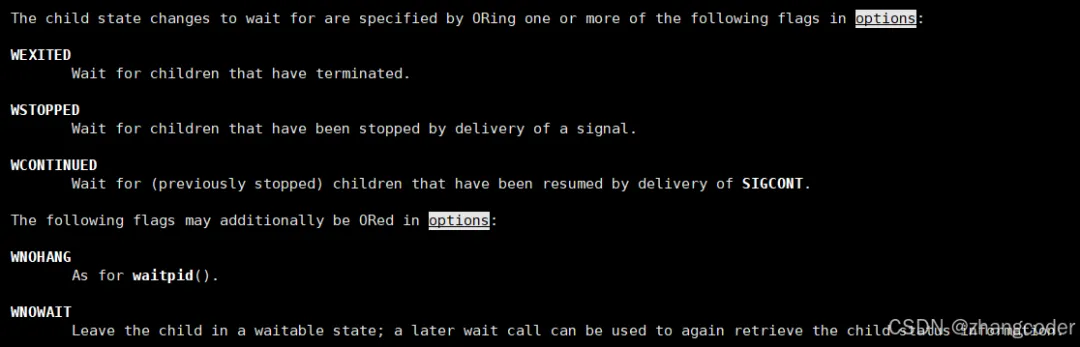
options表示等待方式,0表示阻塞等待,其他选项可以用宏来表示
这里只讲WNOHANG
WNOHANG
WNOHANG指的是非阻塞轮询,HANG指的是悬挂,也称宕机
非阻塞轮询:不是想options==0那样一直在询问,而是隔一段时间询问,那么父进程可以利用两次询问中间空出来的时间执行其他任务
如果waitpid返回0,表示子进程还没有结束,意味着父进程需要继续等待,不算waitpid调用失败
例如: 若waitpid设置WNOHANG后,没有子进程退出则返回值为0
例如以下代码:
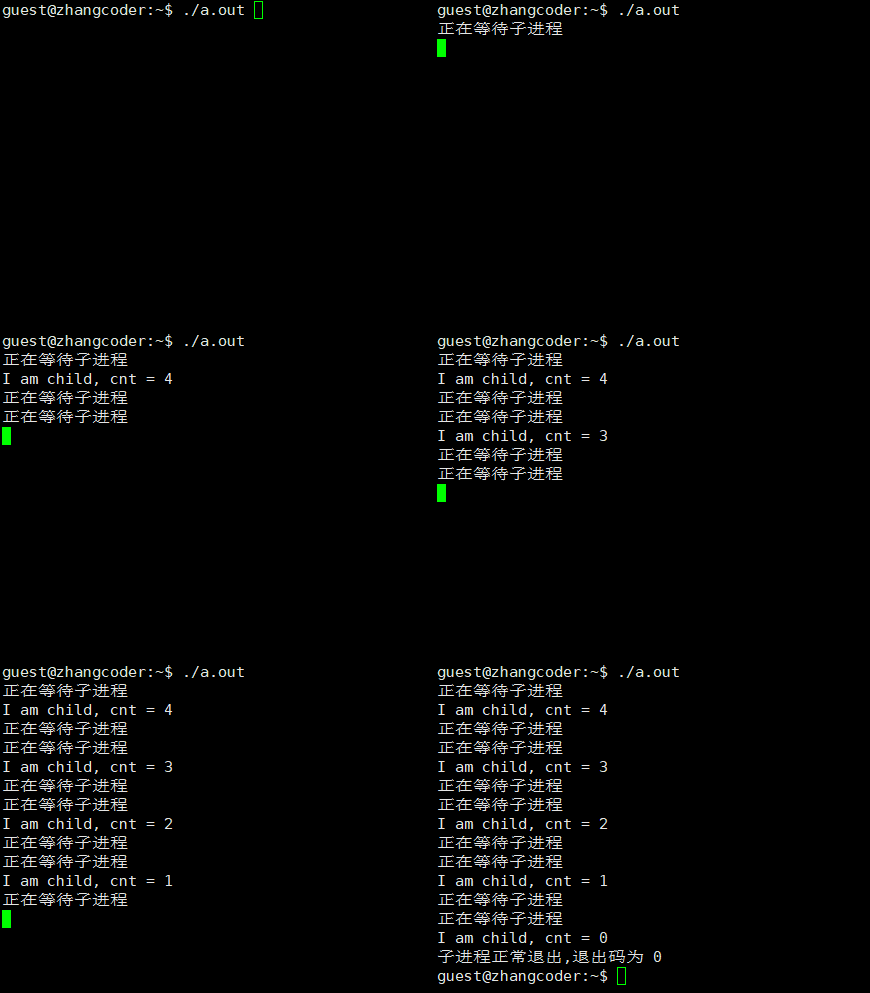
#include<stdio.h>#include<unistd.h>#include<stdlib.h>#include<sys/wait.h>intmain(){ pid_t id = fork(); if(id < 0) { perror("fork failed"); return 1; } else if(id == 0) //子进程执行 { int cnt = 5; while(cnt--) { sleep(2); printf("I am child, cnt = %d\n", cnt); } exit(0); } else//父进程执行 { for (;;) { sleep(1); int wstatus; pid_t ret = waitpid(id,&wstatus,WNOHANG); if(ret < 0) { perror("wait failed"); break; } if (ret > 0) { if (WIFEXITED(wstatus)) //不考虑信号杀死 { printf("子进程正常退出,退出码为 %d\n", WEXITSTATUS(wstatus)); break; } else { printf("子进程异常退出\n"); break; } } else//ret==0 { printf("正在等待子进程\n"); } } } return 0;}
运行结果:
上方代码的父进程并没有利用两次询问中间空出来的时间执行其他任务
当然可以修改else中的内容让父进程执行完(不是两次询问中间空出来的时间)任务后再问询子进程是否结束
else//ret==0{ printf("正在等待子进程\n");}
可以设置一个父进程的执行队列,往里面添加要执行的函数,然后通过循环全部执行
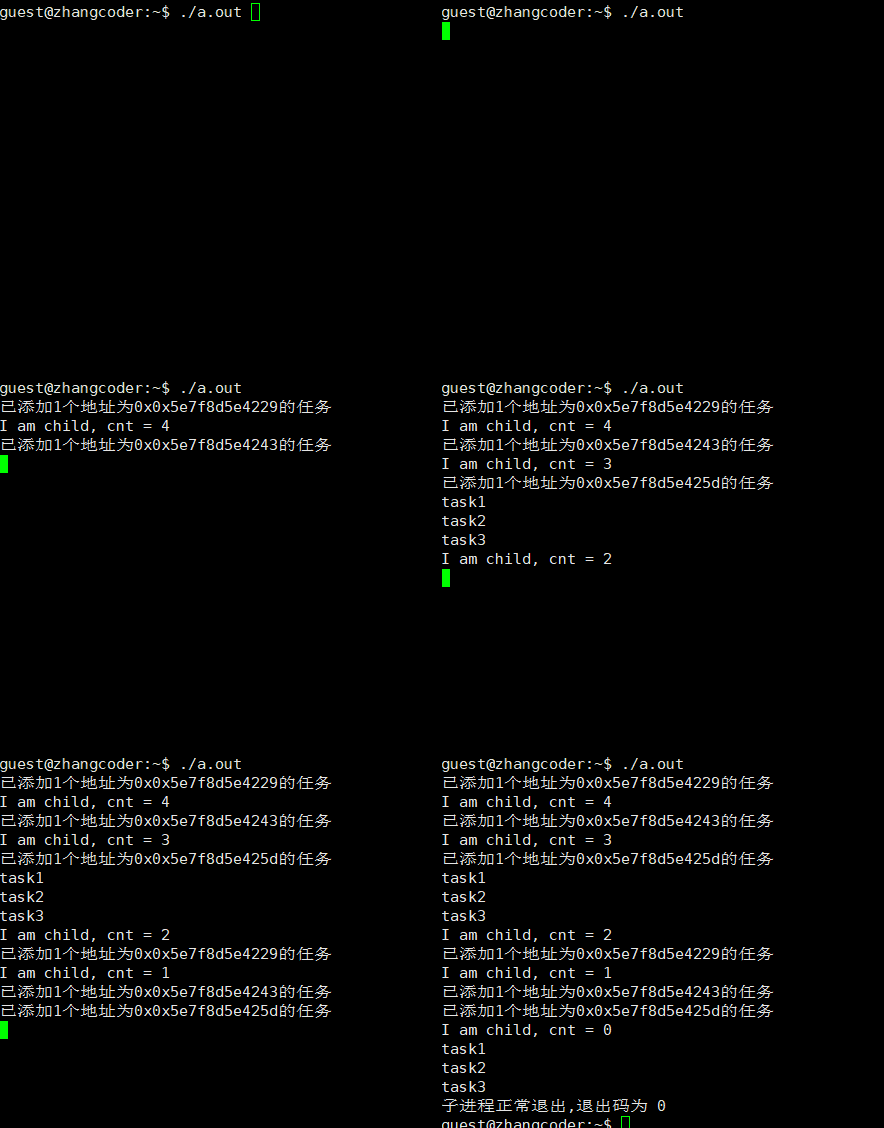
#include<stdio.h>#include<unistd.h>#include<stdlib.h>#include<sys/wait.h>#define TASK_NUM 3typedefvoid(*task_type)();task_type tasks[TASK_NUM];voidtask1(){ printf("task1\n");}voidtask2(){ printf("task2\n");}voidtask3(){ printf("task3\n");}voidinit_tasks(){ for (int i=0;i<TASK_NUM;i++) { tasks[i] = NULL; }}voidadd_task(task_type task){ int i=0; for (;i<TASK_NUM;i++) { if (tasks[i]==NULL) { tasks[i]=task; printf("已添加1个地址为0x%p的任务\n",task); sleep(1); break; } } if (i==TASK_NUM) { printf("添加任务失败\n"); sleep(1); }}voidexecute_task(){ for (int i=0;i<TASK_NUM;i++) { if (tasks[i]) { tasks[i](); } else continue; } }voidrun_tasks(){ init_tasks(); add_task(&task1); add_task(&task2); add_task(&task3); execute_task();}intmain(){ pid_t id = fork(); if(id < 0) { perror("fork failed"); return 1; } else if(id == 0) //子进程执行 { int cnt = 5; while(cnt--) { sleep(2); printf("I am child, cnt = %d\n", cnt); } exit(0); } else//父进程执行 { for (;;) { sleep(1); int wstatus; pid_t ret = waitpid(id,&wstatus,WNOHANG); if(ret < 0) { perror("wait failed"); break; } if (ret > 0) { if (WIFEXITED(wstatus)) //不考虑信号杀死 { printf("子进程正常退出,退出码为 %d\n", WEXITSTATUS(wstatus)); break; } else { printf("子进程异常退出\n"); break; } } else//ret==0 { sleep(1); run_tasks(); } } } return 0;}
注:这样写有缺陷:等待子进程退出比父进程执行非等待子进程的任务要重要, 非等待子进程的任务不建议过长,因为还要等待子进程退出
不管调度器如何调度,父进程必须最后退出
运行结果:
3.进程的程序替换
子进程要执行和父进程完全不同的代码可以使用进程的程序替换
最简单的程序替换:单进程版
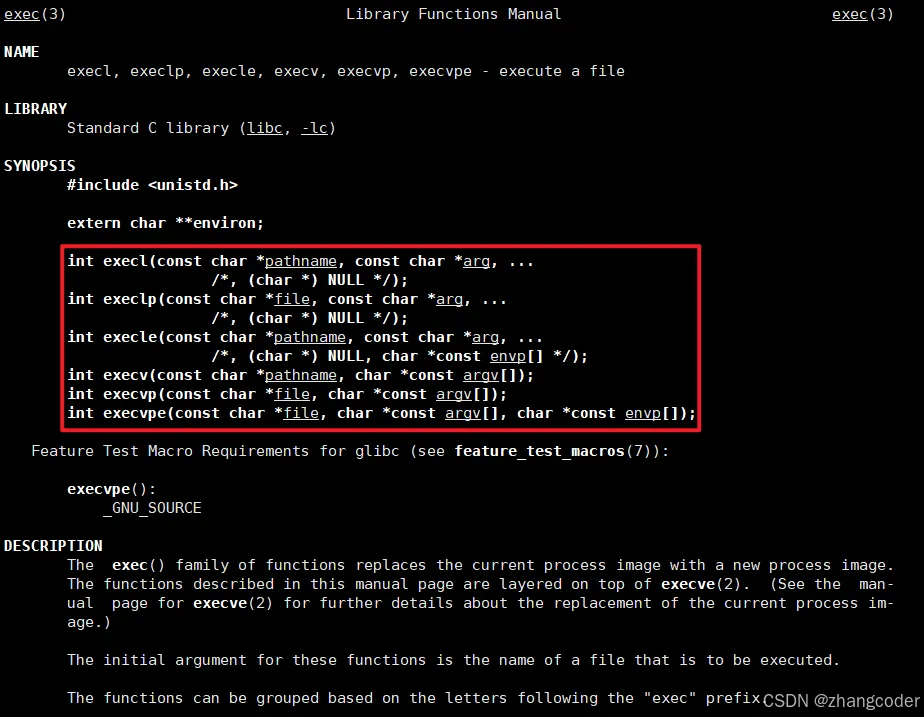
程序替换需要使用exec系列的库函数,它们的作用都是执行可执行文件
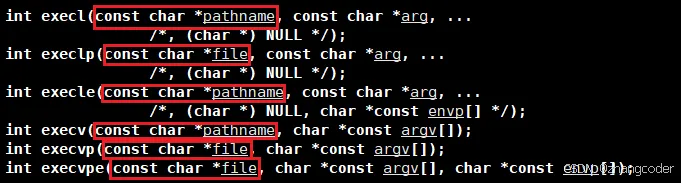
观察可知:Exec系列函数的第一个参数的任务都是如何找到要执行的程序
execl函数
int execl(const char *pathname, const char *arg, ... /*, (char *) NULL */);参数必须以NULL结尾
execl的l表示list,pathname是程序路径,arg为程序传的参数,…表示可变参数列表,可以传多个参数,在命令行中怎么写就怎么传参.例如以下代码:
*有可变参数列表,但无法统计可变参数的个数,只好以NULL结尾
#include<stdio.h>#include<unistd.h>intmain(){ printf("即将执行execl\n"); //可变参数列表: 在命令行中怎么写就怎么传参 execl("/usr/bin/ls","ls","-a","-l","-F",NULL); printf("execl已经执行完了\n"); return 0;}
找到这个程序"/usr/bin/ls",然后传参"ls","-a","-l","-F",NULL,需要执行哪些功能
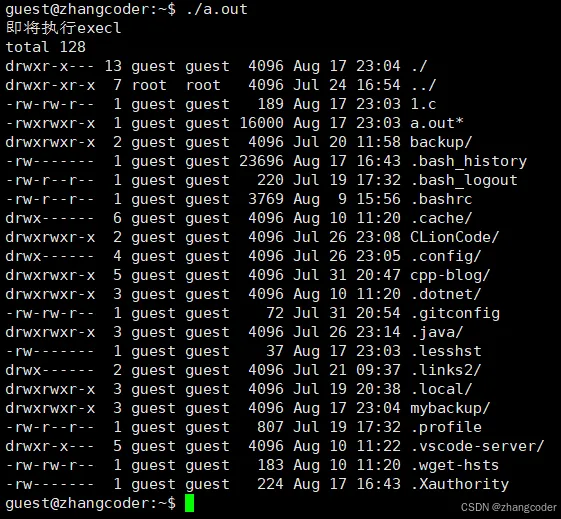
运行结果:打印了"即将执行execl\n",执行了ls -a -l -F,但是没有打印"execl已经执行完了\n"
没有打印"execl已经执行完了\n"是因为进程的程序替换
结论: 从运行结果可以看出,进程的程序替换是执行替换后的代码,父进程原来的代码不继续执行
exec系列的函数并没有执行新的子进程
以execl("/usr/bin/ls","ls","-a","-l","-F",NULL);为例说明:
对于单进程而言,用/usr/bin/ls对应的代码替换了原来了的代码(底层改了页表和物理内存,即改了代码段对应的数据) 然后从0开始执行,ls的main函数的argv参数是由可变参数列表传入的
结论: exec系列的函数只对代码和数据进行替换,并没有创建新进程
子进程进行程序替换不影响父进程的代码段和数据段
#include<stdio.h>#include<unistd.h>#include<sys/wait.h>intmain(){ pid_t id1=fork(); if (id1==0) { printf("即将执行execl\n"); execl("/usr/bin/ls","ls","-a","-l","-F",NULL); printf("execl已经执行完了\n"); } else if (id1>0) { pid_t id2=wait(NULL); printf("成功等待子进程,wait函数返回值为%d\n",id2); } else { perror("fork failed"); return -1; } return 0;}
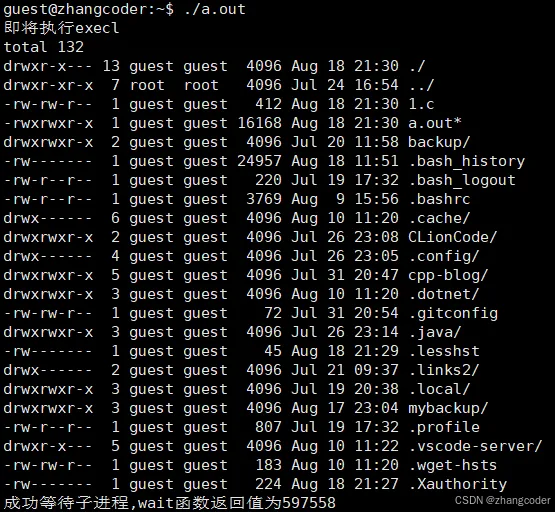
运行结果:子进程执行代码替换,会发现父进程仍然在执行自己的代码
过程: 子进程一开始执行的是父进程的代码,执行execl时,发生代码的写时拷贝,不会覆盖原来父进程和子进程的代码
两个原因: 1.父进程需要执行原来的代码 2.代码段只读,无法修改
用fork创建子进程后执行的是和父进程相同的程序(但有可能执行不同的代码分支),子进程往往要调用一种exec函数以执行另一个程序.当进程调用一种exec函数时,该进程的用户空间代码和数据完全被新程序替换,从新程序的启动例程开始执行. 调用exec并不创建新进程,所以调用exec前后该进程的id并未改变
证明了exec系列的函数并没有执行新的子进程,只进行进程的代码段和数据段的替换工作
如果exec系列的函数执行失败,那么才能执行原来代码中exec系列的函数后面的内容,而且exec系列的函数只有执行失败时才有返回值
如何找到代码段的入口地址
替换原来的代码段需要找到代码段的入口地址,这在ELF(全称Executable and Linkable Format file)文件的文件头中有说明
(摘自baeldung executable-and-linkable-format-file)
下面给出完整的文件头的内容,便于查阅:
| |
|---|
| These are the first bytes in the ELF header. They identify the file as an ELF and contain information that processors can use to interpret the file. |
| The value in the class field indicates the architecture of the file. As such the ELF can either be 32-bit or 64-bit. |
| This field specifies the data encoding. This is important to help processors interpret incoming instructions. The most common data encodings are little-endian and big-endian. |
| Identifies the ELF file version (set to 1) |
| ABI is short for Application Binary Interface. In this case, it defines how functions and data structures can be accessed in the program. |
| This field specifies the ABI version. |
| The value in this field specifies the object file type. For instance, 2 is for an executable, 3 is for a shared object, and 4 is for a core file. |
| This specifies the architecture needed for the file. |
| Identifies the object file version. |
| This indicates the address where the program should start executing. In the case that the file is not an executable file, the value in this field is set to 0. |
| This is the offset on the file where the program headers start. |
| This is an offset that indicates where the section headers start. |
| This contains flags for the file. |
| This specifies how big the ELF header is. |
| The value in this field specifies how big an individual program header is. |
| Number of program headers | This indicates how many program headers there are. |
| The value in this field shows how big an individual section header is. |
| Number of section headers | This indicates how many section headers there are. |
| Section header string table index | The section table index of the entry representing the section name string table |
(摘自baeldung executable-and-linkable-format-file)
execlp函数
int execlp(const char *file, const char *arg, ... /*, (char *) NULL */);
execlp的l是list,p是path,指环境变量PATH,和execl不同,execlp会默认到PATH环境变量中去查找可执行程序,因此可以不用带路径
找到要进行替换的程序有两种方法: 1.给具体路径 2.不给具体路径,去环境变量中查找
例如以下代码:
#include<stdio.h>#include<unistd.h>intmain(){ printf("即将执行execl\n"); execlp("ls","ls","-a","-l","-F",NULL);//ls没有带路径 printf("execl已经执行完了\n"); return 0;}
execlp("ls","ls","-a","-l","-F",NULL)的2个"ls"的含义不一样,第1个"ls"是程序名称,第2个"ls"是传个ls进程的第一个参数
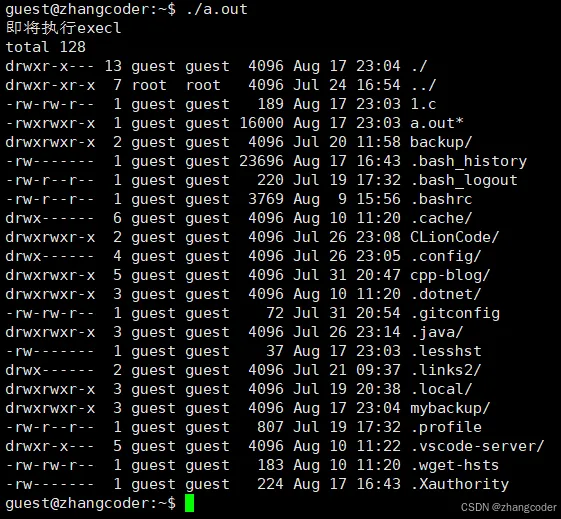
运行结果:
execv函数
int execv(const char *pathname, char *const argv[]); 第二个参数要传二级指针
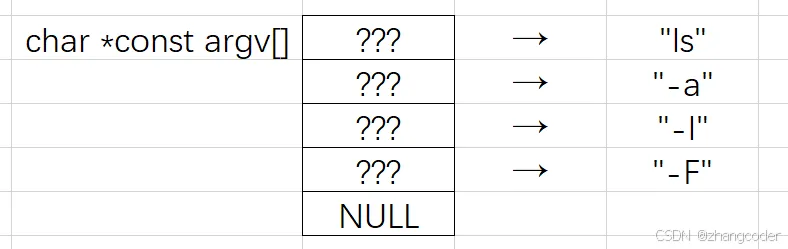
execv的v指的是vector,传给要替换程序的参数可以通过字符串指针数组char *const argv[]的形式获取,其中const表示argv数组的元素不能改,例如下图:
那么可以写成:
char *const argv[]={"ls","-a","-l","-F",NULL};//必须以NULL结尾//argv是二级指针,argv[]是一级指针execv("/usr/bin/ls",argv);
execvp函数
int execvp(const char *file, char *const argv[]); 第二个参数要传二级指针
execvp=exec+v+p,v指的是vector,p指的是path,按照前面的讲解,可以这样用:
char *const argv[]={"ls","-a","-l","-F",NULL};//必须以NULL结尾//argv是二级指针,argv[]是一级指针execvp("ls",argv);
execle函数
int execle(const char *pathname, const char *arg, ... /*, (char *) NULL, char *constenvp[] */);
execle=exec+l+e,l指的是list,e指的是environment
注意:char *constenvp[]是给替换进程的环境变量
按照前面的讲解,可以这样用:
extern char** environ;execle("/usr/bin/ls","ls","-a","-l","-F",NULL,environ);
注意:第一个ls必须带路径,因为environ不帮助execle找到需要的可执行文件,而是是给替换进程的环境变量
execvpe函数
int execvpe(const char *file, char *const argv[], char *const envp[]);
execvpe用法同理,这里省略
exec系列函数的命名规则
exec是execute的缩写
l(list): 表示参数采用列表 v(vector): 参数用数组 p(path): 有p自动搜索环境变量PATH e(env): 表示自己维护环境变量
l和v不能同时出现在函数名中
exec系列函数总结的表格
intexecl(constchar *path, constchar *arg, ...);intexeclp(constchar *file, constchar *arg, ...); intexecle(constchar *path, constchar *arg, ..., char * const envp[]);intexecv(constchar *path, char *const argv[]);intexecvp(constchar *file, char *const argv[]);intexecve(constchar *path, char *const argv[], char *const envp[]);


 10个月宝宝每天需要喝多少奶粉?