个人公众号:yk 坤帝
后台回复 自动发邮箱 获取全部源代码
“每天重复手动发送报告邮件?需要同时通知多个渠道?本文教你用Python实现全自动化的日报/周报系统,解放双手!”
- ✅ 敏感信息安全管理(dotenv)
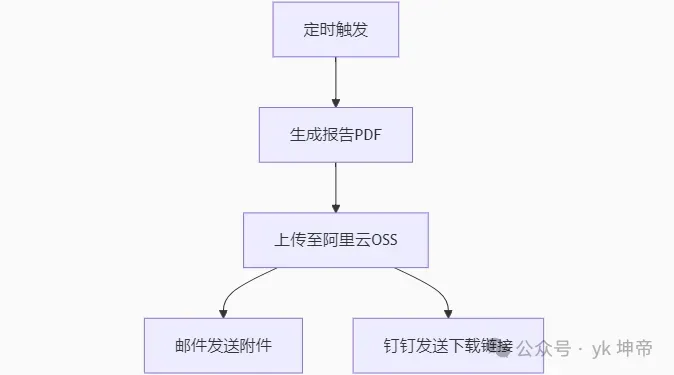
完整代码 automated_report_system.py
import os
import time
import schedule
import smtplib
import requests
import oss2
from email.mime.multipart import MIMEMultipart
from email.mime.text import MIMEText
from email.mime.application import MIMEApplication
from dotenv import load_dotenv
# ---------------------- 1. 邮件发送模块 ----------------------
def send_email_with_attachment(
    sender_email=os.getenv("SMTP_EMAIL"),
    sender_pwd=os.getenv("SMTP_AUTH_CODE"),
    receiver_email=os.getenv("RECEIVER_EMAIL").split(","),
    subject="自动化报告",
    content="请查收附件",
    file_path="./report.pdf",
    smtp_server="smtp.qq.com",
    smtp_port=465
):
    msg = MIMEMultipart()
    msg["From"] = sender_email
    msg["To"] = ", ".join(receiver_email)
    msg["Subject"] = subject

    # 添加正文和附件
    msg.attach(MIMEText(content, "plain", "utf-8"))
    with open(file_path, "rb") as f:
        attachment = MIMEApplication(f.read(), Name=os.path.basename(file_path))
        attachment["Content-Disposition"] = f'attachment; filename="{os.path.basename(file_path)}"'
        msg.attach(attachment)

    try:
        with smtplib.SMTP_SSL(smtp_server, smtp_port) as server:
            server.login(sender_email, sender_pwd)
            server.sendmail(sender_email, receiver_email, msg.as_string())
        print("[邮件] 发送成功")
        return True
    except Exception as e:
        print(f"[邮件] 发送失败: {e}")
        return False
# ---------------------- 2. 阿里云OSS上传模块 ----------------------
def upload_to_oss(file_path, oss_object_name=None):
    auth = oss2.Auth(os.getenv("OSS_ACCESS_KEY"), os.getenv("OSS_SECRET_KEY"))
    bucket = oss2.Bucket(auth, os.getenv("OSS_ENDPOINT"), os.getenv("OSS_BUCKET"))

    if not oss_object_name:
        oss_object_name = f"reports/{time.strftime('%Y%m%d')}_{os.path.basename(file_path)}"

    try:
        bucket.put_object_from_file(oss_object_name, file_path)
        print(f"[OSS] 文件已上传: {oss_object_name}")
        return f"https://{os.getenv('OSS_BUCKET')}.{os.getenv('OSS_ENDPOINT').replace('https://', '')}/{oss_object_name}"
    except Exception as e:
        print(f"[OSS] 上传失败: {e}")
        return None
# ---------------------- 3. 钉钉机器人通知模块 ----------------------
def dingtalk_notify(file_url=None, text=""):
    webhook = os.getenv("DINGTALK_WEBHOOK")
    headers = {"Content-Type": "application/json"}

    # 如果无文件URL,只发送文本
    if not file_url:
        data = {"msgtype": "text", "text": {"content": text}}
    else:
        data = {
            "msgtype": "markdown",
            "markdown": {
                "title": "自动化报告通知",
                "text": f"{text}\n\n[点击下载报告]({file_url})"
            }
        }

    try:
        resp = requests.post(webhook, headers=headers, json=data)
        if resp.json().get("errcode") == 0:
            print("[钉钉] 通知发送成功")
            return True
        else:
            print(f"[钉钉] 发送失败: {resp.text}")
            return False
    except Exception as e:
        print(f"[钉钉] 连接异常: {e}")
        return False
# ---------------------- 4. 模拟报告生成(实际替换为你的生成逻辑) ----------------------
def generate_report(output_path):
    # 示例:生成一个包含当前时间的模拟PDF(实际使用时替换为真实报告生成逻辑)
    from fpdf import FPDF  # 需要安装:pip install fpdf2

    pdf = FPDF()
    pdf.add_page()
    pdf.set_font("Arial", size=12)
    pdf.cell(200, 10, txt=f"每日自动化报告 - {time.strftime('%Y-%m-%d %H:%M:%S')}", ln=True)
    pdf.cell(200, 10, txt="这是自动生成的报告内容示例", ln=True)
    pdf.output(output_path)
    print(f"[报告] 已生成到 {output_path}")
# ---------------------- 5. 主任务整合 ----------------------
def daily_task():
    report_path = f"./daily_report_{time.strftime('%Y%m%d')}.pdf"

    # 1. 生成报告
    generate_report(report_path)

    # 2. 上传OSS并获取URL
    oss_url = upload_to_oss(report_path)

    # 3. 邮件发送
    send_email_with_attachment(
        file_path=report_path,
        content=f"今日报告已生成,OSS下载链接:{oss_url}" if oss_url else "报告生成失败"
    )

    # 4. 钉钉通知
    dingtalk_notify(
        file_url=oss_url,
        text=f"每日报告已就绪\n生成时间:{time.strftime('%Y-%m-%d %H:%M')}"
    )
# ---------------------- 定时任务设置 ----------------------
if __name__ == "__main__":
    # 立即测试一次
    print("----- 首次测试运行 -----")
    daily_task()

    # 设置每天9点定时执行
    schedule.every().day.at("09:00").do(daily_task)
    print("定时任务已启动,每天 09:00 自动运行...")

    while True:
        schedule.run_pending()
        time.sleep(60)
配套文件 .env(需与代码同目录)
# SMTP邮件配置
SMTP_EMAIL=your_email@qq.com
SMTP_AUTH_CODE=your_qq_auth_code  # QQ邮箱需用授权码
RECEIVER_EMAIL=target1@example.com,target2@example.com

# 阿里云OSS配置
OSS_ACCESS_KEY=your_access_key_id
OSS_SECRET_KEY=your_access_key_secret
OSS_ENDPOINT=https://oss-cn-hangzhou.aliyuncs.com
OSS_BUCKET=your-bucket-name

# 钉钉机器人
DINGTALK_WEBHOOK=https://oapi.dingtalk.com/robot/send?access_token=xxx
安装依赖:
pip install oss2 schedule requests python-dotenv fpdf2
配置环境:
修改 .env 文件中的配置项
确保有正确的文件读写权限
运行系统:
python automated_report_system.py
扩展建议:
实际报告生成:替换 generate_report() 中的逻辑(如用 Pandas 生成数据分析报告)
异常通知:添加邮件/钉钉的失败报警
日志记录:使用 logging 模块记录运行日志
个人公众号:yk 坤帝
后台回复 自动发邮箱 获取全部源代码
