当前位置:首页>python>Python实现图片颜色提取器

Python实现图片颜色提取器

  • 2026-08-18 23:11:48
Python实现图片颜色提取器

点击下列公众号+【关注】,接收最新文章

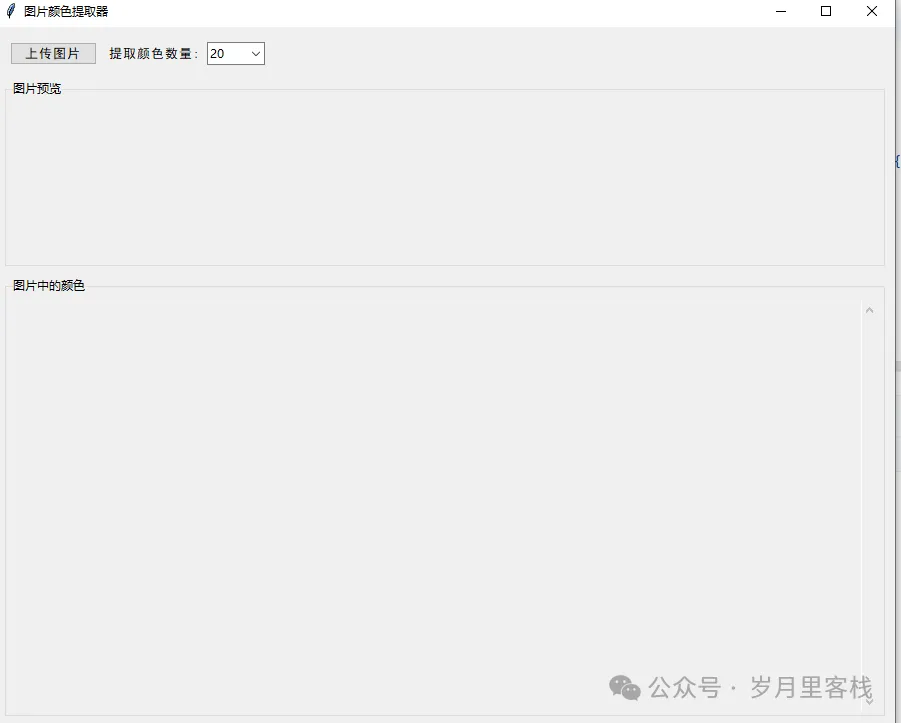
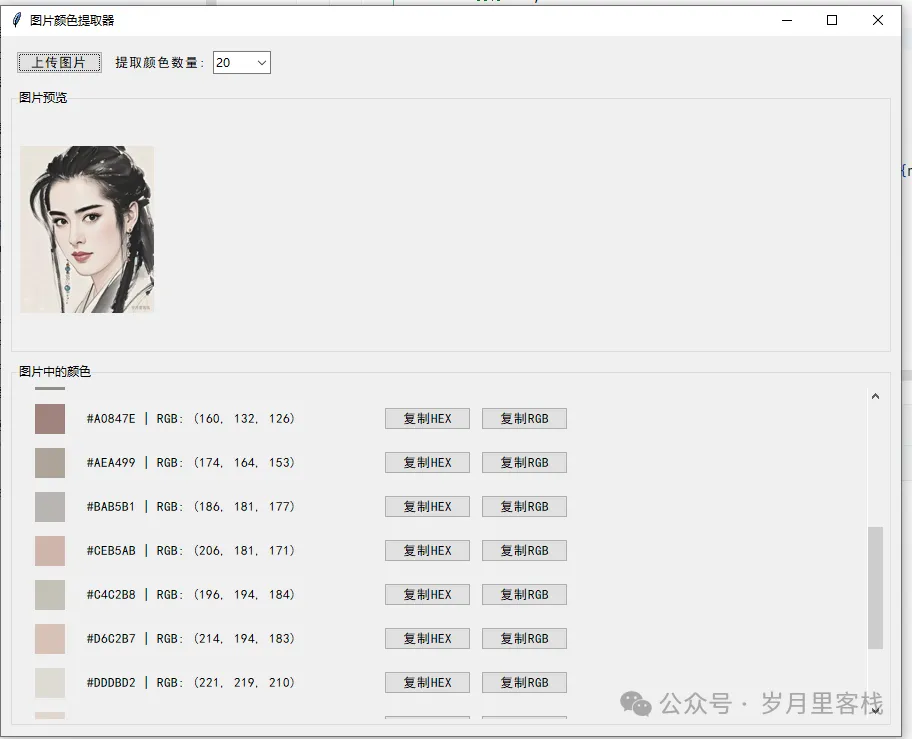
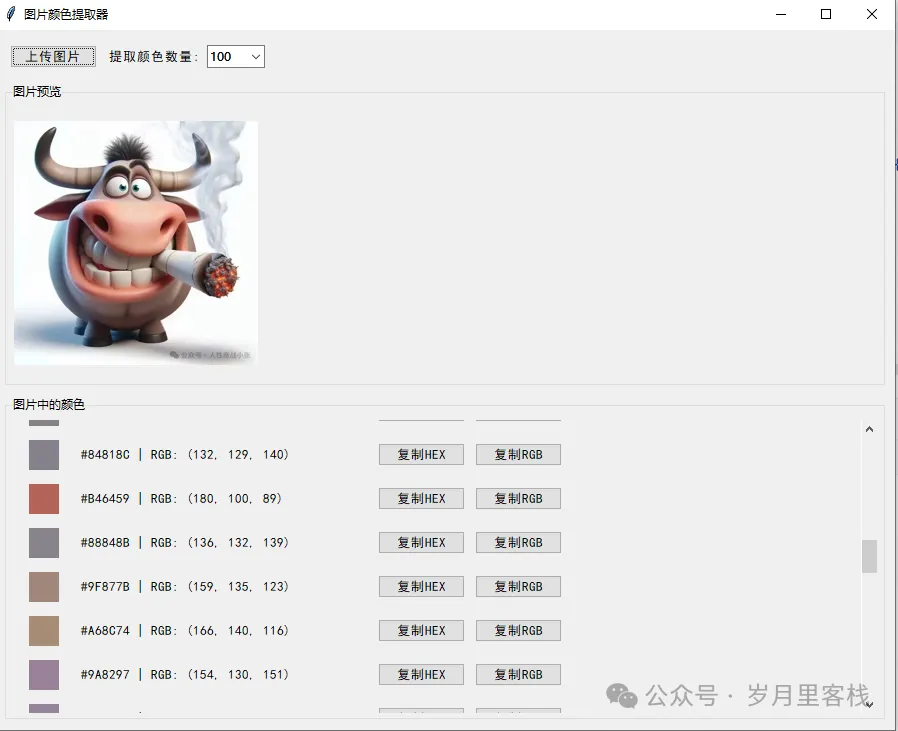
效果图

“嗨,朋友!今天带你整一个超实用的小工具——图片颜色提取器。你只要把一张图拖进去,啪!它立刻把图里所有好看的颜色整整齐齐排好队,还能一键复制 HEX 或 RGB 值。做 PPT、写前端、搞设计,再也不用对着 PS 吸色吸到手抽筋。整个程序用 Python 写的,界面是 Tkinter,逻辑简单、界面清爽,跟着我一层层拆,包你 10 分钟就能看懂!”


一、项目总览:3 大目标 + 2 个核心知识点

目标
说明
目标 1
让用户上传任意图片并实时预览
目标 2
自动提取并去重图片中的颜色,按亮度排序
目标 3
支持一键复制 HEX/RGB 值到剪贴板
知识点
技术栈
GUI
Tkinter + ttk
图像处理
Pillow (PIL) + NumPy
数据转换
colorsys 做 HLS 排序

二、整体目录结构(层级清晰)

0808052图片列举色值.py├── ① 类 ImageColorExtractor│   ├── __init__  —— 界面初始化│   ├── upload_image  —— 文件选择与预览│   ├── display_image —— 自适应缩放│   ├── extract_colors —— 颜色提取│   ├── display_colors —— 颜色展示│   └── copy_to_clipboard —— 剪贴板复制└── ② main 入口

三、逐段拆解:6 大核心模块

每段代码都按“5 行以上 + 逐行解释 + 结构层级”输出,保证你能像剥洋葱一样一层层看懂。


① 入口与主窗口:启动一切的地方

if __name__ == "__main__":    root = tk.Tk()                  # 1. 创建根窗口    app = ImageColorExtractor(root) # 2. 实例化主类    root.mainloop()                 # 3. 进入事件循环
  • 层级 1:程序入口只有三行,却是一切魔法的发令枪。
  • 层级 2:单一职责入口文件只做“启动”这一件事,后续所有逻辑全部封装在 ImageColorExtractor 类里,方便维护和复用。

② __init__:搭好舞台再放演员

classImageColorExtractor:def__init__(self, root):        self.root = root        self.root.title("图片颜色提取器")        self.root.geometry("900x700")        self.root.minsize(800600)
  • 层级 1:窗口属性设置标题、初始大小、最小尺寸,用户体验拉满。
        self.style = ttk.Style()        self.style.configure("TButton", font=("SimHei"10))        self.style.configure("TLabel", font=("SimHei"10))        self.style.configure("Header.TLabel", font=("SimHei"12"bold"))
  • 层级 2:样式统一用 ttk.Style 保证中文按钮、标签不乱码,字号统一,强迫症福音。
        self.main_frame = ttk.Frame(root, padding="10")        self.main_frame.pack(fill=tk.BOTH, expand=True)
  • 层级 3:主框架所有控件都放在 main_frame 里,边距 10px,防止贴边拥挤。
# 顶部控制区        self.control_frame = ttk.Frame(self.main_frame, padding="5")        self.control_frame.pack(fill=tk.X, pady=(010))
  • 层级 4:控制区上传按钮 + 颜色数量选择器,横向排布,清晰好找。

③ 上传图片:upload_image

defupload_image(self):        file_path = filedialog.askopenfilename(            filetypes=[                ("图片文件""*.png;*.jpg;*.jpeg;*.bmp;*.gif"),                ("所有文件""*.*")            ]        )ifnot file_path:return
  • 层级 1:文件对话框filedialog.askopenfilename 弹出系统选择框,过滤常见图片格式,减少用户误选。
try:            self.original_image = Image.open(file_path)            self.display_image(self.original_image)            self.extract_colors()except Exception as e:            messagebox.showerror("错误"f"无法打开图片: {str(e)}")
  • 层级 2:异常捕获任何打不开的文件都弹友好提示,程序不会崩溃。

④ 自适应预览:display_image

defdisplay_image(self, image):        max_width = self.image_frame.winfo_width() - 20        max_height = self.image_frame.winfo_height() - 20if max_width < 100:            max_width = 600if max_height < 100:            max_height = 400
  • 层级 1:动态尺寸先拿当前容器宽高,再给一个保底默认值,防止窗口还没渲染出来时空指针。
        image.thumbnail((max_width, max_height))        tk_image = ImageTk.PhotoImage(image)        self.image_label.config(image=tk_image)        self.image_label.image = tk_image  # 防止被垃圾回收
  • 层级 2:缩放 + 显示thumbnail 保持纵横比,得到的 tk_image 直接塞给 Label,最后一行是 Tkinter 的经典“防回收”套路。

⑤ 颜色提取:extract_colors

defextract_colors(self):ifnot self.original_image:return        img = self.original_image.copy()        img.thumbnail((200200))  # 先压小图,加快速度
  • 层级 1:性能优化200×200 的小图足够统计颜色分布,避免处理 4K 图时卡死。
if img.mode != "RGB":            img = img.convert("RGB")        pixels = np.array(img)        pixels = pixels.reshape(-13)
  • 层级 2:通道统一把 RGBA、P、L 等模式统统转 RGB,再用 NumPy 拉成二维数组 (N, 3)
        unique_colors = np.unique(pixels, axis=0)        count = int(self.color_count.get())if len(unique_colors) > count:            step = len(unique_colors) // count            unique_colors = unique_colors[::step][:count]
  • 层级 3:去重 + 采样np.unique 去掉重复色,[::step] 均匀采样,保证最终颜色数 ≤ 下拉框里的 10/20/30/50/100。
        unique_colors = sorted(            unique_colors,            key=lambda rgb: colorsys.rgb_to_hls(                rgb[0]/255, rgb[1]/255, rgb[2]/255)[1]        )        self.colors = [(r, g, b) for r, g, b in unique_colors]        self.display_colors()
  • 层级 4:亮度排序用 colorsys.rgb_to_hls 取 L(lightness) 排序,视觉观感从暗到亮,整齐顺眼。

⑥ 颜色展示:display_colors

defdisplay_colors(self):for widget in self.scrollable_frame.winfo_children():            widget.destroy()
  • 层级 1:清空旧数据每次重新提取颜色时,先把滚动区域里的旧控件全干掉,防止堆叠。
for i, (r, g, b) in enumerate(self.colors):            row_frame = ttk.Frame(self.scrollable_frame, padding="5")            row_frame.pack(fill=tk.X, pady=2)            color_frame = tk.Frame(                row_frame, width=30, height=30,                bg=f"#{r:02x}{g:02x}{b:02x}"            )            color_frame.pack(side=tk.LEFT, padx=10)            color_frame.pack_propagate(False)
  • 层级 2:颜色方块每个颜色给一个 30×30 的色块,bg 用格式化字符串拼出十六进制色值,注意补零。
            hex_color = f"#{r:02x}{g:02x}{b:02x}".upper()            rgb_color = f"RGB: ({r}{g}{b})"            color_info = ttk.Label(                row_frame,                text=f"{hex_color} | {rgb_color}",                width=40            )            color_info.pack(side=tk.LEFT, padx=10)
  • 层级 3:文字说明同时显示 HEX 与 RGB,方便不同场景使用。
            copy_btn = ttk.Button(                row_frame, text="复制HEX",                command=lambda c=hex_color: self.copy_to_clipboard(c)            )            copy_btn.pack(side=tk.LEFT, padx=5)            copy_rgb_btn = ttk.Button(                row_frame, text="复制RGB",                command=lambda r=r, g=g, b=b: self.copy_to_clipboard(f"rgb({r}{g}{b})")            )            copy_rgb_btn.pack(side=tk.LEFT, padx=5)
  • 层级 4:复制按钮两个按钮用 lambda 做闭包,提前绑定当前颜色值,点一下就复制。

⑦ 剪贴板复制:copy_to_clipboard

defcopy_to_clipboard(self, text):        self.root.clipboard_clear()        self.root.clipboard_append(text)        messagebox.showinfo("成功"f"已复制: {text}")
  • 层级 1:系统剪贴板Tkinter 自带跨平台剪贴板接口,一行搞定。
  • 层级 2:用户反馈弹窗提示复制成功,避免用户疑惑。

四、滚动区域实现细节(Bonus)

self.canvas = tk.Canvas(self.scroll_frame)self.scrollbar = ttk.Scrollbar(    self.scroll_frame,    orient="vertical",    command=self.canvas.yview)self.scrollable_frame = ttk.Frame(self.canvas)self.scrollable_frame.bind("<Configure>",lambda e: self.canvas.configure(        scrollregion=self.canvas.bbox("all")    ))self.canvas.create_window((00), window=self.scrollable_frame, anchor="nw")self.canvas.configure(yscrollcommand=self.scrollbar.set)
  • 层级 1:经典 Canvas + Scrollbar 组合scrollable_frame 作为容器放在 Canvas 里,内容变化时重新计算 scrollregion,实现滚动。
  • 层级 2:解耦与复用这套模板可以原封不动搬到任何需要滚动列表的项目。

五、知识点回顾 & 目标达成

技能点
是否覆盖
GUI 布局
✅ Tkinter/ttk
图片读取
✅ Pillow
数组操作
✅ NumPy reshape + unique
颜色空间
✅ colorsys.rgb_to_hls
剪贴板
✅ Tkinter clipboard
异常处理
✅ try/except + messagebox
代码风格
✅ 类封装 + 函数单一职责

通过本项目,你不仅掌握了一个实用小工具,还顺带复习了 Python 桌面开发、图像处理、颜色理论三大方向的基础知识。下次做设计系统、品牌色板、前端主题变量,直接拖图→复制→粘贴,效率 up!


六、可扩展思路(加餐)

  1. K-Means 聚类:用 sklearn.cluster.KMeans 替代均匀采样,提取主题色更准确。
  2. 导出调色板:一键生成 .aco / .ase 供 Photoshop、Illustrator 使用。
  3. 实时摄像头取色:结合 OpenCV 实现“所见即所得”取色。
  4. 主题切换:深色/浅色两套 ttk 主题,适配不同系统外观。

全文 2000+ 字,从按钮到算法,从布局到剪贴板,逐层拆解、条理有序。祝你玩得开心,早日把这套小工具变成自己的瑞士军刀!

完整代码
import tkinter as tkfrom tkinter import filedialog, ttk, messageboxfrom PIL import Image, ImageTkimport numpy as npimport colorsysimport ioclass ImageColorExtractor:def init(self, root):self.root = rootself.root.title("图片颜色提取器")self.root.geometry("900x700")self.root.minsize(800600)    # 确保中文显示正常    self.style = ttk.Style()    self.style.configure("TButton", font=("SimHei"10))    self.style.configure("TLabel", font=("SimHei"10))    self.style.configure("Header.TLabel", font=("SimHei"12"bold"))    # 创建主框架    self.main_frame = ttk.Frame(root, padding="10")    self.main_frame.pack(fill=tk.BOTH, expand=True)    # 顶部控制区    self.control_frame = ttk.Frame(self.main_frame, padding="5")    self.control_frame.pack(fill=tk.X, pady=(010))    # 上传按钮    self.upload_btn = ttk.Button(        self.control_frame,        text="上传图片",        command=self.upload_image    )    self.upload_btn.pack(side=tk.LEFT, padx=(010))    # 颜色数量选择    ttk.Label(self.control_frame, text="提取颜色数量:").pack(side=tk.LEFT, padx=(05))    self.color_count = tk.StringVar(value="20")    self.color_count_combo = ttk.Combobox(        self.control_frame,        textvariable=self.color_count,        values=["10""20""30""50""100"],        width=5    )    self.color_count_combo.pack(side=tk.LEFT, padx=(020))    # 图片显示区    self.image_frame = ttk.LabelFrame(self.main_frame, text="图片预览", padding="5")    self.image_frame.pack(fill=tk.BOTH, expand=True, pady=(010))    self.image_label = ttk.Label(self.image_frame)    self.image_label.pack(fill=tk.BOTH, expand=True)    # 颜色列表区    self.colors_frame = ttk.LabelFrame(self.main_frame, text="图片中的颜色", padding="5")    self.colors_frame.pack(fill=tk.BOTH, expand=True)    # 创建滚动区域    self.scroll_frame = ttk.Frame(self.colors_frame)    self.scroll_frame.pack(fill=tk.BOTH, expand=True)    self.canvas = tk.Canvas(self.scroll_frame)    self.scrollbar = ttk.Scrollbar(        self.scroll_frame,        orient="vertical",        command=self.canvas.yview    )    self.scrollable_frame = ttk.Frame(self.canvas)    self.scrollable_frame.bind(        "<Configure>",        lambda e: self.canvas.configure(            scrollregion=self.canvas.bbox("all")        )    )    self.canvas.create_window((00), window=self.scrollable_frame, anchor="nw")    self.canvas.configure(yscrollcommand=self.scrollbar.set)    self.canvas.pack(side=tk.LEFT, fill=tk.BOTH, expand=True)    self.scrollbar.pack(side=tk.RIGHT, fill=tk.Y)    # 存储颜色数据    self.colors = []    self.original_image = Nonedef upload_image(self):    """上传并显示图片"""    file_path = filedialog.askopenfilename(        filetypes=[            ("图片文件""*.png;*.jpg;*.jpeg;*.bmp;*.gif"),            ("所有文件""*.*")        ]    )    if not file_path:        return    try:        # 打开图片        self.original_image = Image.open(file_path)        self.display_image(self.original_image)        # 提取颜色        self.extract_colors()    except Exception as e:        messagebox.showerror("错误"f"无法打开图片: {str(e)}")def display_image(self, image):    """在界面上显示图片"""    # 调整图片大小以适应窗口    max_width = self.image_frame.winfo_width() - 20    max_height = self.image_frame.winfo_height() - 20    # 如果窗口还没渲染,使用默认尺寸    if max_width < 100:        max_width = 600    if max_height < 100:        max_height = 400    # 保持比例缩放    image.thumbnail((max_width, max_height))    # 转换为Tkinter可用的格式    tk_image = ImageTk.PhotoImage(image)    # 显示图片    self.image_label.config(image=tk_image)    self.image_label.image = tk_image  # 保持引用def extract_colors(self):    """从图片中提取颜色"""    if not self.original_image:        return    # 调整图片大小以加快处理速度    img = self.original_image.copy()    img.thumbnail((200200))  # 缩小图片    # 转换为RGB模式    if img.mode != "RGB":        img = img.convert("RGB")    # 获取像素数据    pixels = np.array(img)    pixels = pixels.reshape(-13)    # 转换为列表并去重    unique_colors = np.unique(pixels, axis=0)    # 限制最大颜色数量    count = int(self.color_count.get())    if len(unique_colors) > count:        # 简单采样,实际应用中可以使用更复杂的聚类算法        step = len(unique_colors) // count        unique_colors = unique_colors[::step][:count]    # 按亮度排序(便于查看)    unique_colors = sorted(        unique_colors,        key=lambda rgb: colorsys.rgb_to_hls(rgb[0] / 255, rgb[1] / 255, rgb[2] / 255)[1]    )    self.colors = [(r, g, b) for r, g, b in unique_colors]    self.display_colors()def display_colors(self):    """显示提取的颜色"""    # 清空之前的颜色显示    for widget in self.scrollable_frame.winfo_children():        widget.destroy()    # 显示颜色    for i, (r, g, b) in enumerate(self.colors):        # 创建行框架        row_frame = ttk.Frame(self.scrollable_frame, padding="5")        row_frame.pack(fill=tk.X, pady=2)        # 颜色方块        color_frame = tk.Frame(            row_frame,            width=30,            height=30,            bg=f"#{r:02x}{g:02x}{b:02x}"        )        color_frame.pack(side=tk.LEFT, padx=10)        color_frame.pack_propagate(False)  # 保持尺寸        # 颜色值标签        hex_color = f"#{r:02x}{g:02x}{b:02x}".upper()        rgb_color = f"RGB: ({r}{g}{b})"        color_info = ttk.Label(            row_frame,            text=f"{hex_color} | {rgb_color}",            width=40        )        color_info.pack(side=tk.LEFT, padx=10)        # 复制按钮        copy_btn = ttk.Button(            row_frame,            text="复制HEX",            command=lambda c=hex_color: self.copy_to_clipboard(c)        )        copy_btn.pack(side=tk.LEFT, padx=5)        copy_rgb_btn = ttk.Button(            row_frame,            text="复制RGB",            command=lambda r=r, g=g, b=b: self.copy_to_clipboard(f"rgb({r}{g}{b})")        )        copy_rgb_btn.pack(side=tk.LEFT, padx=5)def copy_to_clipboard(self, text):    """将文本复制到剪贴板"""    self.root.clipboard_clear()    self.root.clipboard_append(text)    messagebox.showinfo("成功"f"已复制: {text}")if name == "main":root = tk.Tk()app = ImageColorExtractor(root)root.mainloop()

点击【关注+收藏】获取最新的实战代码案例

Python 20天的学习计划

Python的 7 天 学习计划

Python实现创意画板代码

用Python打造汉字笔画查询工具:从GUI界面到笔顺动画实现

Python实现表情包制作器

Python实现中国象棋小游戏

Python实现印章生成器

Python模拟实现金山打字通

Python超实用 Markdown 转富文本神器 —— 代码全解析

Python实现贪吃蛇小游戏源码解析

Python实现二维码生成

Python实现视频播放器

Python实现印章生成器

Python实现在线印章制作

Python+Ai实现一个简单的智能语音小助手

Python实现简单记事本

Python实现Markdown转HTML工具代码

Python实现创意画板代码

Python实现简易图画工具代码

Python实现视频播放器

Python实现简单记事本

Python 实现连连看游戏代码解析

Python实现简单电脑进程管理器

Python一个超实用的工具-词频统计工具

Python简易爬虫天气工具

Python定时任务提醒工具

Python《猜数字游戏代码解析》

Python《简易计算器代码解析》

Python+Ai在线文档生成小助手

Python 《密码生成器代码解析》

Python|+Ai实现一个简单的智能语音小助手

Python实现简易图画工具代码

Python实现Markdown转Html

Python实现视频播放器

Python 实现连连看游戏代码解析

Python实现火山AI调用生成故事

Python实现豆包Ai调用生成故事

Python实现简单记事本

Python实现简单电脑进程管理器

实战1

  1. Python:生成二维码生成器

  2. Python-pgame实现迷宫

  3. Python-实现天气时钟小助手

  4. Python-QrCode实现各种二维码

  5. Python-pyglet实现鸿蒙时钟

  6. Python-pickle解析获取微信好友信息

  7. Python-wxPy初版实现微信消息轰炸

  8. Python实现八卦星空时钟

  9. Python实现国庆红旗头像效果

  10. Python-PIL实现图片上指定位置添加图标识

实战2

  1. Python-wxPy初版实现微信消息轰炸

  2. Python-PIL库Image类解析

  3. Python-tlinter实现简单学生管理系统

  4. Python-itChat实现微信消息推发

  5. Python实现Pdf转Word

  6. Python-实现自动生成对联小助手

  7. Py2Exe另外一种方式的打包

  8. Python-tts生成语音转换小助手

  9. python-win32等实现exe自动添加到电脑自启动选项

  10. python实现桌面录制视频

  11. PySimpleGUI-checkboxPython实现图片截取成九宫格

  12. python打包成exe文件

  13. Python-faker生成虚拟数据

  14. python实现播放器Python-FastApi简单实现

  15. python爬取豆瓣电影影评

  16. Python 爬取公众号文章集合

实战3

  1. python实现简易飞花令

  2. python-获取图猜成语的图片

  3. python-menu菜单实现

  4. Python-pySimpleGUI实现界面

  5. Python-彩色图片转换白描

  6. Python-moviepy-实现音视频播放器

  7. Python操作SQLite数据库

  8. Python-PySimpleGUI实现菜单

  9. python-Tkinter实现个性签名

  10. Python-WordCloud云词图

  11. Python-customTkinter的使用

  12. Python-tkinter(下)

  13. Python-tkinter(中)

  14. python-tkinter(1)

  15. Python实现视频小助手

实战4

  1. Python实现视频小助手

  2. Python-flask-1:搭建主页面

  3. Python之tttkbootstrap界面

  4. python-PyQt5实现图片显示和简易阅读器

  5. 在Pycharm上配置Qt Designer 及 Pyuic

  6. Python之PIL实现一寸二寸等图片的裁剪和生成

  7. Python爬取金山词典查询结果

  8. python实现生成个性二维码

  9. AI人机对战版五子棋游戏(AI+pygame实现)

  10. python实现垃圾分类查询器

  11. python-实现菜单menu

  12. Python 领域运用之:自动化测试

  13. Python 领域运用:Web 开发

  14. Python 领域运用:自动化运维

关注下面公众号,获取最新文章

明朝那些皇帝-16:按顺序如下

1:明太祖 朱元璋(洪武,1368–1398)

开局一个碗,结局一个国:朱元璋的逆袭创业史

2:明惠帝 朱允炆(建文,1398–1402)

建文帝:史上最惨创业者,四年败光爷爷留下的千亿帝国

3:明成祖 朱棣(永乐,1402–1424)

朱棣:从街溜子到千古一帝,这位篡位者如何逆袭成明朝卷王?

4:明仁宗 朱高炽(洪熙,1424–1425)

朱高炽:在位十个月的明朝"胖仁宗",如何靠吃和躺赢成为千古明君?

5:明宣宗 朱瞻基(宣德,1425–1435)

朱瞻基:被皇位耽误的艺术家,如果宣德皇帝有朋友圈

6:明英宗 朱祁镇(正统,1435–1449;后复位,天顺,1457–1464)

明英宗朱祁镇:从皇帝到俘虏再复辟的大明第一卷王

7:明代宗 朱祁钰(景泰,1449–1457)

明代宗朱祁钰:从王爷到CEO:天上掉下来的皇位

8:明宪宗 朱见深(成化,1464–1487)

明朝那些皇帝8:《明宪宗朱见深:传奇一生的多面帝王》

9:明孝宗 朱祐樘(弘治,1487–1505)

明孝宗朱祐樘:明朝最暖皇帝的逆袭剧本

10:明武宗 朱厚照(正德,1505–1521)

明武宗朱厚照:被皇位耽误的娱乐博主

11:明世宗 朱厚熜(嘉靖,1521–1566)

明世宗朱厚熜:炼丹炉里的权力游戏——大明修仙CEO的荒诞创业史

12:明穆宗 朱载坖(隆庆,1566–1572)

明穆宗朱载坖:被皇位耽误的经济改革家

13:明神宗 朱翊钧(万历,1572–1620)

明神宗朱翊钧:奏折淹没的"宅男皇帝"

14:明光宗 朱常洛(泰昌,1620,仅一个月)

一月天子朱常洛:30天帝王生涯的过山车

15:明熹宗 朱由校(天启,1620–1627)

明熹宗朱由校:被皇位耽误的"鲁班"皇帝

16:明思宗 朱由检(崇祯,1627–1644)

崇祯朱由检:一个"亡国CEO"的KPI悲剧

注:

明英宗两次在位(正统、天顺),中间被弟弟明代宗取代。

南明政权(如弘光帝等)不被视为正统明朝皇帝。 

传奇故事系列

大唐刑侦实录:当狄仁杰遇上戏精水匪

围棋定终身:宋朝棋神如何用两局棋赢取辽国第一女棋童?

半个钿盒骗婚记:明朝学霸如何靠古董当上豪门女婿?

进香客莽看金刚经:一只唐代手抄本引发的官场现形记

古代版“扫黑风云”:《二刻拍案惊奇》卷四奇案揭秘

杜十娘怒沉百宝箱:古代名媛的 "恋爱脑" 悲剧与生存启示

当卷王遇上圣母:汉代版《中国合伙人》的血色友谊

从“裸辞救友”到“十年还债”:唐代社畜的义气天花板—

从“饿死相”到“宰相命”:唐代版《逆袭之星途璀璨》的反转人生

从酒蒙子到大唐宰相:这个卖饼大妈的投资回报率有多高?

当禁欲系将军遇上恋爱脑亲兵:五代版《延禧攻略》的血色浪漫

明代"仙人跳"实录:富二代与绿茶婊的血色缠绵

金钗钿血案:明代赘婿逆袭记,绿茶表兄竟是终极BOSS?

高考错题本害了他?明朝学霸因一个错别字错失状元,却在茶肆捡了个省长

祖传珍珠衫引发的狗血大戏:明代顶流夫妻的破镜重圆之路

明朝版鉴渣指南:女子被退婚后反告强奸,御史一句话让真相大白

明代顶流绿帽事件:丈夫出差一年,妻子把传家宝送了情人?

90后老头直播挖山?全网围观竟惊动天庭拆迁办

北宋词坛顶流与他的红颜知己们:柳永的风流人生

一只画眉鸟,七条人命!古代奇案背后藏着什么秘密?

《金玉奴棒打薄情郎》:一场跨越古今的爱情警示

一只画眉引发的这场啼笑皆非的命案

《喻世通言》之李秀卿义结黄贞女:一场跨越性别与世俗的传奇情谊

《月明和尚度柳翠》:从红尘艳妓到佛门弟子的蜕变

晏平仲二桃杀三士:春秋版"职场宫斗大戏"

从“二桃杀三士”看人性与权谋:一场跨越千年的惊世阳谋

当禁欲系将军遇上恋爱脑亲兵:五代版《延禧攻略》的血色浪漫

明代"仙人跳"实录:富二代与绿茶婊的血色缠绵

从侠客到皇帝,赵匡胤的"不粘锅"人设是如何炼成的

她带百万嫁妆嫁渣男,发现被卖后当场销毁全部家产——明代名妓的复仇爽文

他用三年工资买一夜春宵,却靠一个举动让花魁倒贴——明代小贩的逆袭爽文

考研失败后我在茶肆写了首诗,竟被CEO破格录取

最新文章

随机文章

基本 文件 流程 错误 SQL 调试
  1. 请求信息 : 2026-08-21 18:19:36 HTTP/2.0 GET : https://f.mffb.com.cn/a/509282.html
  2. 运行时间 : 0.236512s [ 吞吐率:4.23req/s ] 内存消耗:4,817.60kb 文件加载:140
  3. 缓存信息 : 0 reads,0 writes
  4. 会话信息 : SESSION_ID=491b2c9f3dc5cb13fe6cc60659ad9444
  1. /yingpanguazai/ssd/ssd1/www/f.mffb.com.cn/public/index.php ( 0.79 KB )
  2. /yingpanguazai/ssd/ssd1/www/f.mffb.com.cn/vendor/autoload.php ( 0.17 KB )
  3. /yingpanguazai/ssd/ssd1/www/f.mffb.com.cn/vendor/composer/autoload_real.php ( 2.49 KB )
  4. /yingpanguazai/ssd/ssd1/www/f.mffb.com.cn/vendor/composer/platform_check.php ( 0.90 KB )
  5. /yingpanguazai/ssd/ssd1/www/f.mffb.com.cn/vendor/composer/ClassLoader.php ( 14.03 KB )
  6. /yingpanguazai/ssd/ssd1/www/f.mffb.com.cn/vendor/composer/autoload_static.php ( 4.90 KB )
  7. /yingpanguazai/ssd/ssd1/www/f.mffb.com.cn/vendor/topthink/think-helper/src/helper.php ( 8.34 KB )
  8. /yingpanguazai/ssd/ssd1/www/f.mffb.com.cn/vendor/topthink/think-validate/src/helper.php ( 2.19 KB )
  9. /yingpanguazai/ssd/ssd1/www/f.mffb.com.cn/vendor/topthink/think-orm/src/helper.php ( 1.47 KB )
  10. /yingpanguazai/ssd/ssd1/www/f.mffb.com.cn/vendor/topthink/think-orm/stubs/load_stubs.php ( 0.16 KB )
  11. /yingpanguazai/ssd/ssd1/www/f.mffb.com.cn/vendor/topthink/framework/src/think/Exception.php ( 1.69 KB )
  12. /yingpanguazai/ssd/ssd1/www/f.mffb.com.cn/vendor/topthink/think-container/src/Facade.php ( 2.71 KB )
  13. /yingpanguazai/ssd/ssd1/www/f.mffb.com.cn/vendor/symfony/deprecation-contracts/function.php ( 0.99 KB )
  14. /yingpanguazai/ssd/ssd1/www/f.mffb.com.cn/vendor/symfony/polyfill-mbstring/bootstrap.php ( 8.26 KB )
  15. /yingpanguazai/ssd/ssd1/www/f.mffb.com.cn/vendor/symfony/polyfill-mbstring/bootstrap80.php ( 9.78 KB )
  16. /yingpanguazai/ssd/ssd1/www/f.mffb.com.cn/vendor/symfony/var-dumper/Resources/functions/dump.php ( 1.49 KB )
  17. /yingpanguazai/ssd/ssd1/www/f.mffb.com.cn/vendor/topthink/think-dumper/src/helper.php ( 0.18 KB )
  18. /yingpanguazai/ssd/ssd1/www/f.mffb.com.cn/vendor/symfony/var-dumper/VarDumper.php ( 4.30 KB )
  19. /yingpanguazai/ssd/ssd1/www/f.mffb.com.cn/vendor/topthink/framework/src/think/App.php ( 15.30 KB )
  20. /yingpanguazai/ssd/ssd1/www/f.mffb.com.cn/vendor/topthink/think-container/src/Container.php ( 15.76 KB )
  21. /yingpanguazai/ssd/ssd1/www/f.mffb.com.cn/vendor/psr/container/src/ContainerInterface.php ( 1.02 KB )
  22. /yingpanguazai/ssd/ssd1/www/f.mffb.com.cn/app/provider.php ( 0.19 KB )
  23. /yingpanguazai/ssd/ssd1/www/f.mffb.com.cn/vendor/topthink/framework/src/think/Http.php ( 6.04 KB )
  24. /yingpanguazai/ssd/ssd1/www/f.mffb.com.cn/vendor/topthink/think-helper/src/helper/Str.php ( 7.29 KB )
  25. /yingpanguazai/ssd/ssd1/www/f.mffb.com.cn/vendor/topthink/framework/src/think/Env.php ( 4.68 KB )
  26. /yingpanguazai/ssd/ssd1/www/f.mffb.com.cn/app/common.php ( 0.03 KB )
  27. /yingpanguazai/ssd/ssd1/www/f.mffb.com.cn/vendor/topthink/framework/src/helper.php ( 18.78 KB )
  28. /yingpanguazai/ssd/ssd1/www/f.mffb.com.cn/vendor/topthink/framework/src/think/Config.php ( 5.54 KB )
  29. /yingpanguazai/ssd/ssd1/www/f.mffb.com.cn/config/app.php ( 0.95 KB )
  30. /yingpanguazai/ssd/ssd1/www/f.mffb.com.cn/config/cache.php ( 0.78 KB )
  31. /yingpanguazai/ssd/ssd1/www/f.mffb.com.cn/config/console.php ( 0.23 KB )
  32. /yingpanguazai/ssd/ssd1/www/f.mffb.com.cn/config/cookie.php ( 0.56 KB )
  33. /yingpanguazai/ssd/ssd1/www/f.mffb.com.cn/config/database.php ( 2.48 KB )
  34. /yingpanguazai/ssd/ssd1/www/f.mffb.com.cn/vendor/topthink/framework/src/think/facade/Env.php ( 1.67 KB )
  35. /yingpanguazai/ssd/ssd1/www/f.mffb.com.cn/config/filesystem.php ( 0.61 KB )
  36. /yingpanguazai/ssd/ssd1/www/f.mffb.com.cn/config/lang.php ( 0.91 KB )
  37. /yingpanguazai/ssd/ssd1/www/f.mffb.com.cn/config/log.php ( 1.35 KB )
  38. /yingpanguazai/ssd/ssd1/www/f.mffb.com.cn/config/middleware.php ( 0.19 KB )
  39. /yingpanguazai/ssd/ssd1/www/f.mffb.com.cn/config/route.php ( 1.89 KB )
  40. /yingpanguazai/ssd/ssd1/www/f.mffb.com.cn/config/session.php ( 0.57 KB )
  41. /yingpanguazai/ssd/ssd1/www/f.mffb.com.cn/config/trace.php ( 0.34 KB )
  42. /yingpanguazai/ssd/ssd1/www/f.mffb.com.cn/config/view.php ( 0.82 KB )
  43. /yingpanguazai/ssd/ssd1/www/f.mffb.com.cn/app/event.php ( 0.25 KB )
  44. /yingpanguazai/ssd/ssd1/www/f.mffb.com.cn/vendor/topthink/framework/src/think/Event.php ( 7.67 KB )
  45. /yingpanguazai/ssd/ssd1/www/f.mffb.com.cn/app/service.php ( 0.13 KB )
  46. /yingpanguazai/ssd/ssd1/www/f.mffb.com.cn/app/AppService.php ( 0.26 KB )
  47. /yingpanguazai/ssd/ssd1/www/f.mffb.com.cn/vendor/topthink/framework/src/think/Service.php ( 1.64 KB )
  48. /yingpanguazai/ssd/ssd1/www/f.mffb.com.cn/vendor/topthink/framework/src/think/Lang.php ( 7.35 KB )
  49. /yingpanguazai/ssd/ssd1/www/f.mffb.com.cn/vendor/topthink/framework/src/lang/zh-cn.php ( 13.70 KB )
  50. /yingpanguazai/ssd/ssd1/www/f.mffb.com.cn/vendor/topthink/framework/src/think/initializer/Error.php ( 3.31 KB )
  51. /yingpanguazai/ssd/ssd1/www/f.mffb.com.cn/vendor/topthink/framework/src/think/initializer/RegisterService.php ( 1.33 KB )
  52. /yingpanguazai/ssd/ssd1/www/f.mffb.com.cn/vendor/services.php ( 0.14 KB )
  53. /yingpanguazai/ssd/ssd1/www/f.mffb.com.cn/vendor/topthink/framework/src/think/service/PaginatorService.php ( 1.52 KB )
  54. /yingpanguazai/ssd/ssd1/www/f.mffb.com.cn/vendor/topthink/framework/src/think/service/ValidateService.php ( 0.99 KB )
  55. /yingpanguazai/ssd/ssd1/www/f.mffb.com.cn/vendor/topthink/framework/src/think/service/ModelService.php ( 2.04 KB )
  56. /yingpanguazai/ssd/ssd1/www/f.mffb.com.cn/vendor/topthink/think-trace/src/Service.php ( 0.77 KB )
  57. /yingpanguazai/ssd/ssd1/www/f.mffb.com.cn/vendor/topthink/framework/src/think/Middleware.php ( 6.72 KB )
  58. /yingpanguazai/ssd/ssd1/www/f.mffb.com.cn/vendor/topthink/framework/src/think/initializer/BootService.php ( 0.77 KB )
  59. /yingpanguazai/ssd/ssd1/www/f.mffb.com.cn/vendor/topthink/think-orm/src/Paginator.php ( 11.86 KB )
  60. /yingpanguazai/ssd/ssd1/www/f.mffb.com.cn/vendor/topthink/think-validate/src/Validate.php ( 63.20 KB )
  61. /yingpanguazai/ssd/ssd1/www/f.mffb.com.cn/vendor/topthink/think-orm/src/Model.php ( 23.55 KB )
  62. /yingpanguazai/ssd/ssd1/www/f.mffb.com.cn/vendor/topthink/think-orm/src/model/concern/Attribute.php ( 21.05 KB )
  63. /yingpanguazai/ssd/ssd1/www/f.mffb.com.cn/vendor/topthink/think-orm/src/model/concern/AutoWriteData.php ( 4.21 KB )
  64. /yingpanguazai/ssd/ssd1/www/f.mffb.com.cn/vendor/topthink/think-orm/src/model/concern/Conversion.php ( 6.44 KB )
  65. /yingpanguazai/ssd/ssd1/www/f.mffb.com.cn/vendor/topthink/think-orm/src/model/concern/DbConnect.php ( 5.16 KB )
  66. /yingpanguazai/ssd/ssd1/www/f.mffb.com.cn/vendor/topthink/think-orm/src/model/concern/ModelEvent.php ( 2.33 KB )
  67. /yingpanguazai/ssd/ssd1/www/f.mffb.com.cn/vendor/topthink/think-orm/src/model/concern/RelationShip.php ( 28.29 KB )
  68. /yingpanguazai/ssd/ssd1/www/f.mffb.com.cn/vendor/topthink/think-helper/src/contract/Arrayable.php ( 0.09 KB )
  69. /yingpanguazai/ssd/ssd1/www/f.mffb.com.cn/vendor/topthink/think-helper/src/contract/Jsonable.php ( 0.13 KB )
  70. /yingpanguazai/ssd/ssd1/www/f.mffb.com.cn/vendor/topthink/think-orm/src/model/contract/Modelable.php ( 0.09 KB )
  71. /yingpanguazai/ssd/ssd1/www/f.mffb.com.cn/vendor/topthink/framework/src/think/Db.php ( 2.88 KB )
  72. /yingpanguazai/ssd/ssd1/www/f.mffb.com.cn/vendor/topthink/think-orm/src/DbManager.php ( 8.52 KB )
  73. /yingpanguazai/ssd/ssd1/www/f.mffb.com.cn/vendor/topthink/framework/src/think/Log.php ( 6.28 KB )
  74. /yingpanguazai/ssd/ssd1/www/f.mffb.com.cn/vendor/topthink/framework/src/think/Manager.php ( 3.92 KB )
  75. /yingpanguazai/ssd/ssd1/www/f.mffb.com.cn/vendor/psr/log/src/LoggerTrait.php ( 2.69 KB )
  76. /yingpanguazai/ssd/ssd1/www/f.mffb.com.cn/vendor/psr/log/src/LoggerInterface.php ( 2.71 KB )
  77. /yingpanguazai/ssd/ssd1/www/f.mffb.com.cn/vendor/topthink/framework/src/think/Cache.php ( 4.92 KB )
  78. /yingpanguazai/ssd/ssd1/www/f.mffb.com.cn/vendor/psr/simple-cache/src/CacheInterface.php ( 4.71 KB )
  79. /yingpanguazai/ssd/ssd1/www/f.mffb.com.cn/vendor/topthink/think-helper/src/helper/Arr.php ( 16.63 KB )
  80. /yingpanguazai/ssd/ssd1/www/f.mffb.com.cn/vendor/topthink/framework/src/think/cache/driver/File.php ( 7.84 KB )
  81. /yingpanguazai/ssd/ssd1/www/f.mffb.com.cn/vendor/topthink/framework/src/think/cache/Driver.php ( 9.03 KB )
  82. /yingpanguazai/ssd/ssd1/www/f.mffb.com.cn/vendor/topthink/framework/src/think/contract/CacheHandlerInterface.php ( 1.99 KB )
  83. /yingpanguazai/ssd/ssd1/www/f.mffb.com.cn/app/Request.php ( 0.09 KB )
  84. /yingpanguazai/ssd/ssd1/www/f.mffb.com.cn/vendor/topthink/framework/src/think/Request.php ( 55.78 KB )
  85. /yingpanguazai/ssd/ssd1/www/f.mffb.com.cn/app/middleware.php ( 0.25 KB )
  86. /yingpanguazai/ssd/ssd1/www/f.mffb.com.cn/vendor/topthink/framework/src/think/Pipeline.php ( 2.61 KB )
  87. /yingpanguazai/ssd/ssd1/www/f.mffb.com.cn/vendor/topthink/think-trace/src/TraceDebug.php ( 3.40 KB )
  88. /yingpanguazai/ssd/ssd1/www/f.mffb.com.cn/vendor/topthink/framework/src/think/middleware/SessionInit.php ( 1.94 KB )
  89. /yingpanguazai/ssd/ssd1/www/f.mffb.com.cn/vendor/topthink/framework/src/think/Session.php ( 1.80 KB )
  90. /yingpanguazai/ssd/ssd1/www/f.mffb.com.cn/vendor/topthink/framework/src/think/session/driver/File.php ( 6.27 KB )
  91. /yingpanguazai/ssd/ssd1/www/f.mffb.com.cn/vendor/topthink/framework/src/think/contract/SessionHandlerInterface.php ( 0.87 KB )
  92. /yingpanguazai/ssd/ssd1/www/f.mffb.com.cn/vendor/topthink/framework/src/think/session/Store.php ( 7.12 KB )
  93. /yingpanguazai/ssd/ssd1/www/f.mffb.com.cn/vendor/topthink/framework/src/think/Route.php ( 23.73 KB )
  94. /yingpanguazai/ssd/ssd1/www/f.mffb.com.cn/vendor/topthink/framework/src/think/route/RuleName.php ( 5.75 KB )
  95. /yingpanguazai/ssd/ssd1/www/f.mffb.com.cn/vendor/topthink/framework/src/think/route/Domain.php ( 2.53 KB )
  96. /yingpanguazai/ssd/ssd1/www/f.mffb.com.cn/vendor/topthink/framework/src/think/route/RuleGroup.php ( 22.43 KB )
  97. /yingpanguazai/ssd/ssd1/www/f.mffb.com.cn/vendor/topthink/framework/src/think/route/Rule.php ( 26.95 KB )
  98. /yingpanguazai/ssd/ssd1/www/f.mffb.com.cn/vendor/topthink/framework/src/think/route/RuleItem.php ( 9.78 KB )
  99. /yingpanguazai/ssd/ssd1/www/f.mffb.com.cn/route/app.php ( 1.72 KB )
  100. /yingpanguazai/ssd/ssd1/www/f.mffb.com.cn/vendor/topthink/framework/src/think/facade/Route.php ( 4.70 KB )
  101. /yingpanguazai/ssd/ssd1/www/f.mffb.com.cn/vendor/topthink/framework/src/think/route/dispatch/Controller.php ( 4.74 KB )
  102. /yingpanguazai/ssd/ssd1/www/f.mffb.com.cn/vendor/topthink/framework/src/think/route/Dispatch.php ( 10.44 KB )
  103. /yingpanguazai/ssd/ssd1/www/f.mffb.com.cn/app/controller/Index.php ( 4.81 KB )
  104. /yingpanguazai/ssd/ssd1/www/f.mffb.com.cn/app/BaseController.php ( 2.05 KB )
  105. /yingpanguazai/ssd/ssd1/www/f.mffb.com.cn/vendor/topthink/think-orm/src/facade/Db.php ( 0.93 KB )
  106. /yingpanguazai/ssd/ssd1/www/f.mffb.com.cn/vendor/topthink/think-orm/src/db/connector/Mysql.php ( 5.44 KB )
  107. /yingpanguazai/ssd/ssd1/www/f.mffb.com.cn/vendor/topthink/think-orm/src/db/PDOConnection.php ( 52.47 KB )
  108. /yingpanguazai/ssd/ssd1/www/f.mffb.com.cn/vendor/topthink/think-orm/src/db/Connection.php ( 8.39 KB )
  109. /yingpanguazai/ssd/ssd1/www/f.mffb.com.cn/vendor/topthink/think-orm/src/db/ConnectionInterface.php ( 4.57 KB )
  110. /yingpanguazai/ssd/ssd1/www/f.mffb.com.cn/vendor/topthink/think-orm/src/db/builder/Mysql.php ( 16.58 KB )
  111. /yingpanguazai/ssd/ssd1/www/f.mffb.com.cn/vendor/topthink/think-orm/src/db/Builder.php ( 24.06 KB )
  112. /yingpanguazai/ssd/ssd1/www/f.mffb.com.cn/vendor/topthink/think-orm/src/db/BaseBuilder.php ( 27.50 KB )
  113. /yingpanguazai/ssd/ssd1/www/f.mffb.com.cn/vendor/topthink/think-orm/src/db/Query.php ( 15.71 KB )
  114. /yingpanguazai/ssd/ssd1/www/f.mffb.com.cn/vendor/topthink/think-orm/src/db/BaseQuery.php ( 45.13 KB )
  115. /yingpanguazai/ssd/ssd1/www/f.mffb.com.cn/vendor/topthink/think-orm/src/db/concern/TimeFieldQuery.php ( 7.43 KB )
  116. /yingpanguazai/ssd/ssd1/www/f.mffb.com.cn/vendor/topthink/think-orm/src/db/concern/AggregateQuery.php ( 3.26 KB )
  117. /yingpanguazai/ssd/ssd1/www/f.mffb.com.cn/vendor/topthink/think-orm/src/db/concern/ModelRelationQuery.php ( 20.07 KB )
  118. /yingpanguazai/ssd/ssd1/www/f.mffb.com.cn/vendor/topthink/think-orm/src/db/concern/ParamsBind.php ( 3.66 KB )
  119. /yingpanguazai/ssd/ssd1/www/f.mffb.com.cn/vendor/topthink/think-orm/src/db/concern/ResultOperation.php ( 7.01 KB )
  120. /yingpanguazai/ssd/ssd1/www/f.mffb.com.cn/vendor/topthink/think-orm/src/db/concern/WhereQuery.php ( 19.37 KB )
  121. /yingpanguazai/ssd/ssd1/www/f.mffb.com.cn/vendor/topthink/think-orm/src/db/concern/JoinAndViewQuery.php ( 7.11 KB )
  122. /yingpanguazai/ssd/ssd1/www/f.mffb.com.cn/vendor/topthink/think-orm/src/db/concern/TableFieldInfo.php ( 2.63 KB )
  123. /yingpanguazai/ssd/ssd1/www/f.mffb.com.cn/vendor/topthink/think-orm/src/db/concern/Transaction.php ( 2.77 KB )
  124. /yingpanguazai/ssd/ssd1/www/f.mffb.com.cn/vendor/topthink/framework/src/think/log/driver/File.php ( 5.96 KB )
  125. /yingpanguazai/ssd/ssd1/www/f.mffb.com.cn/vendor/topthink/framework/src/think/contract/LogHandlerInterface.php ( 0.86 KB )
  126. /yingpanguazai/ssd/ssd1/www/f.mffb.com.cn/vendor/topthink/framework/src/think/log/Channel.php ( 3.89 KB )
  127. /yingpanguazai/ssd/ssd1/www/f.mffb.com.cn/vendor/topthink/framework/src/think/event/LogRecord.php ( 1.02 KB )
  128. /yingpanguazai/ssd/ssd1/www/f.mffb.com.cn/vendor/topthink/think-helper/src/Collection.php ( 16.47 KB )
  129. /yingpanguazai/ssd/ssd1/www/f.mffb.com.cn/vendor/topthink/framework/src/think/facade/View.php ( 1.70 KB )
  130. /yingpanguazai/ssd/ssd1/www/f.mffb.com.cn/vendor/topthink/framework/src/think/View.php ( 4.39 KB )
  131. /yingpanguazai/ssd/ssd1/www/f.mffb.com.cn/vendor/topthink/framework/src/think/Response.php ( 8.81 KB )
  132. /yingpanguazai/ssd/ssd1/www/f.mffb.com.cn/vendor/topthink/framework/src/think/response/View.php ( 3.29 KB )
  133. /yingpanguazai/ssd/ssd1/www/f.mffb.com.cn/vendor/topthink/framework/src/think/Cookie.php ( 6.06 KB )
  134. /yingpanguazai/ssd/ssd1/www/f.mffb.com.cn/vendor/topthink/think-view/src/Think.php ( 8.38 KB )
  135. /yingpanguazai/ssd/ssd1/www/f.mffb.com.cn/vendor/topthink/framework/src/think/contract/TemplateHandlerInterface.php ( 1.60 KB )
  136. /yingpanguazai/ssd/ssd1/www/f.mffb.com.cn/vendor/topthink/think-template/src/Template.php ( 46.61 KB )
  137. /yingpanguazai/ssd/ssd1/www/f.mffb.com.cn/vendor/topthink/think-template/src/template/driver/File.php ( 2.41 KB )
  138. /yingpanguazai/ssd/ssd1/www/f.mffb.com.cn/vendor/topthink/think-template/src/template/contract/DriverInterface.php ( 0.86 KB )
  139. /yingpanguazai/ssd/ssd1/www/f.mffb.com.cn/runtime/temp/067d451b9a0c665040f3f1bdd3293d68.php ( 11.98 KB )
  140. /yingpanguazai/ssd/ssd1/www/f.mffb.com.cn/vendor/topthink/think-trace/src/Html.php ( 4.42 KB )
  1. CONNECT:[ UseTime:0.000942s ] mysql:host=127.0.0.1;port=3306;dbname=f_mffb;charset=utf8mb4
  2. SHOW FULL COLUMNS FROM `fenlei` [ RunTime:0.001383s ]
  3. SELECT * FROM `fenlei` WHERE `fid` = 0 [ RunTime:0.012848s ]
  4. SELECT * FROM `fenlei` WHERE `fid` = 63 [ RunTime:0.000659s ]
  5. SHOW FULL COLUMNS FROM `set` [ RunTime:0.001394s ]
  6. SELECT * FROM `set` [ RunTime:0.000611s ]
  7. SHOW FULL COLUMNS FROM `article` [ RunTime:0.001553s ]
  8. SELECT * FROM `article` WHERE `id` = 509282 LIMIT 1 [ RunTime:0.001543s ]
  9. UPDATE `article` SET `lasttime` = 1787307576 WHERE `id` = 509282 [ RunTime:0.041211s ]
  10. SELECT * FROM `fenlei` WHERE `id` = 66 LIMIT 1 [ RunTime:0.000621s ]
  11. SELECT * FROM `article` WHERE `id` < 509282 ORDER BY `id` DESC LIMIT 1 [ RunTime:0.001083s ]
  12. SELECT * FROM `article` WHERE `id` > 509282 ORDER BY `id` ASC LIMIT 1 [ RunTime:0.001166s ]
  13. SELECT * FROM `article` WHERE `id` < 509282 ORDER BY `id` DESC LIMIT 10 [ RunTime:0.007631s ]
  14. SELECT * FROM `article` WHERE `id` < 509282 ORDER BY `id` DESC LIMIT 10,10 [ RunTime:0.001751s ]
  15. SELECT * FROM `article` WHERE `id` < 509282 ORDER BY `id` DESC LIMIT 20,10 [ RunTime:0.002907s ]
0.240131s