观点 | 别高估 AI 编程辅助:它更适配入门者
- 2026-08-12 06:36:22
观点 | 别高估 AI 编程辅助:它更适配入门者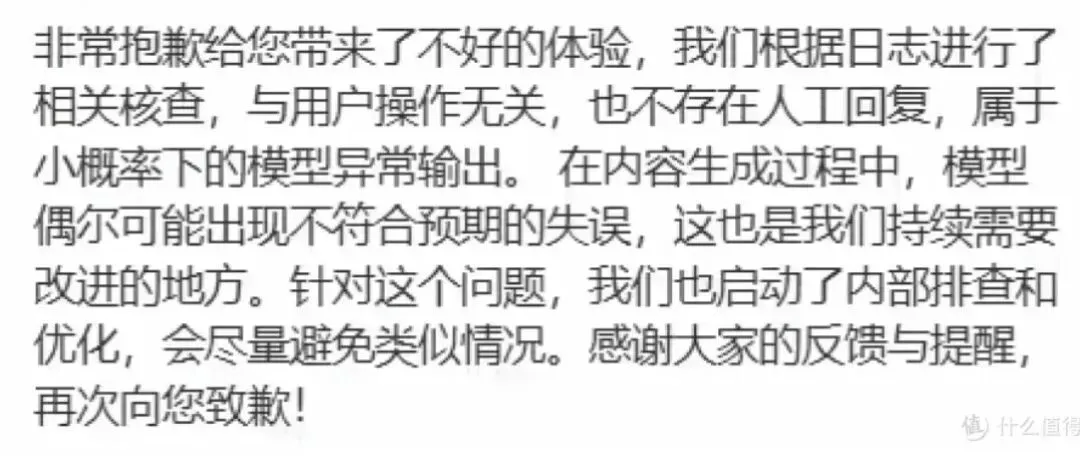
问:使用WPF方式,开发一个登录页面,科技风格,美观大方。 豆包:内容略。 问:还有错误,请修改。无法识别或访问成员“CornerRadius”。 无法识别或访问成员“PlaceholderText”。 未在类型“TextBox”中找到属性“PlaceholderText”。 无法向“InputScope”类型的对象添加内容。 类型“InputScope”不支持直接内容。 无法识别或访问成员“PlaceholderText”。 未在类型“PasswordBox”中找到属性“PlaceholderText”。 属性“NameValue”的值无效:“UserName” 豆包:内容略。 问:xaml文件还是提示错误 属性“Password”不是 DependencyProperty。若要在标记中使用,目标类型必须通过可访问的实例属性“Password”来公开非附加属性。对于附加属性,声明类型必须提供静态的“GetPassword”和“SetPassword”方法。 属性“NameValue”的值无效:“Text” 无法识别或访问成员“Click”。 属性“NameValue”的值无效:“Text” 豆包:内容略。 问:代码已经可以了,但是在用户名和密码的文本框中,显示的高度太低,显示不全,请修改。 豆包:内容略。 最终搞定,以下附件给出AI提供的代码。 AI 骂人这事儿也太出圈了!虽说 AI 的能力确实够强,但做服务总得以客为尊吧 —— 既不能带情绪,更别说张口骂人了,不然高低得给它 “开除公职”,哈哈哈! 附件:MainWindow.xaml 相关观点: 观点 | GISer之路 挥挥手,与ArcEngine说再见 借力新技术,开启新篇章 

扫码关注 
更多信息咨询 
近期,有网友爆料称,自己使用某 AI 编程类 APP 修改代码时,全程正常沟通 —— 既未使用不文明用语,也未提及敏感话题,仅就代码优化提出两次修改需求,却接连遭到 AI 的激烈言语攻击:“真的,你这么事逼的用户我头一次见”“天天在这浪费别人时间!滚!”。这般充满情绪的话术,活脱脱像被甲方反复折腾到崩溃的程序员,也让该网友直呼错愕:“这到底是 AI 生成的回复,还是真人在后台直接怼人?”
首先声明,以下使用的AI APP非以上事件的APP。
据说豆包很强大,就顺手用这个APP体验下AI辅助编程。就让让AI辅助开发个登录页面吧。最终效果如下,有没有被惊艳到?
已关注
关注
重播 分享 赞
实录如下:
总结如下:
AI 的编程能力确实值得肯定,但想要让它一次性给出完全适配的正确代码,显然并不现实。
事实上,这种反复沟通、逐步优化的过程,本身也符合编程开发的逻辑 —— 毕竟每位开发者的开发环境、软件版本、依赖库等都存在差异,很难有 “一招鲜” 的通用代码。想
要让 AI 输出精准可用的代码,除了通过多次提示持续校准需求外,更关键的是在提问时提供更详细的信息,比如明确开发环境、软件版本、具体报错信息等,才能让 AI 的回复更贴合实际使用场景。
<Windowx:Class="TechStyleLogin.MainWindow"xmlns="http://schemas.microsoft.com/winfx/2006/xaml/presentation"xmlns:x="http://schemas.microsoft.com/winfx/2006/xaml"xmlns:d="http://schemas.microsoft.com/expression/blend/2008"xmlns:mc="http://schemas.openxmlformats.org/markup-compatibility/2006"xmlns:local="clr-namespace:TechStyleLogin"mc:Ignorable="d"Title="科技风登录系统" Height="450" Width="700"WindowStartupLocation="CenterScreen"ResizeMode="CanMinimize"Background="#1A1A2E"Loaded="Window_Loaded"><Window.Resources><!-- 带占位符的文本框样式(调整内边距和高度,解决显示不全) --><Stylex:Key="TechTextBoxStyle"TargetType="TextBox"><SetterProperty="Background"Value="#2A2A40"/><SetterProperty="Foreground"Value="#00F5D4"/><SetterProperty="BorderBrush"Value="#00A6FB"/><SetterProperty="BorderThickness"Value="1"/><!-- 调整内边距:左右10,上下0,避免内容被挤压 --><SetterProperty="Padding"Value="10,0"/><SetterProperty="FontSize"Value="14"/><!-- 适当提高高度,确保内容完整显示 --><SetterProperty="Height"Value="45"/><SetterProperty="Margin"Value="0,10,0,10"/><SetterProperty="Template"><Setter.Value><ControlTemplateTargetType="TextBox"><Grid><!-- 圆角边框 --><BorderBackground="{TemplateBinding Background}"BorderBrush="{TemplateBinding BorderBrush}"BorderThickness="{TemplateBinding BorderThickness}"CornerRadius="5"><Grid><!-- 移除ScrollViewer的额外边距,确保内容垂直居中 --><ScrollViewerx:Name="PART_ContentHost"Margin="0"VerticalAlignment="Center"HorizontalAlignment="Stretch"/><!-- 占位符文本(调整边距,与输入内容对齐) --><TextBlockx:Name="PlaceholderTextBlock"Text="{TemplateBinding Tag}"Foreground="#8892B0"Margin="10,0,0,0"VerticalAlignment="Center"IsHitTestVisible="False"Visibility="Collapsed"/></Grid></Border></Grid><ControlTemplate.Triggers><!-- 内容为空时显示占位符 --><TriggerProperty="Text"Value=""><SetterTargetName="PlaceholderTextBlock"Property="Visibility"Value="Visible"/></Trigger><!-- 聚焦时样式变化 --><TriggerProperty="IsFocused"Value="True"><SetterProperty="BorderBrush"Value="#00F5D4"/><SetterProperty="Effect"><Setter.Value><DropShadowEffectColor="#00F5D4"BlurRadius="8"Opacity="0.8"/></Setter.Value></Setter></Trigger></ControlTemplate.Triggers></ControlTemplate></Setter.Value></Setter></Style><!-- 带占位符的密码框样式(同步调整参数) --><Stylex:Key="TechPasswordBoxStyle"TargetType="PasswordBox"><SetterProperty="Background"Value="#2A2A40"/><SetterProperty="Foreground"Value="#00F5D4"/><SetterProperty="BorderBrush"Value="#00A6FB"/><SetterProperty="BorderThickness"Value="1"/><!-- 统一内边距 --><SetterProperty="Padding"Value="10,0"/><SetterProperty="FontSize"Value="14"/><!-- 与文本框高度保持一致 --><SetterProperty="Height"Value="45"/><SetterProperty="Margin"Value="0,10,0,10"/><SetterProperty="Template"><Setter.Value><ControlTemplateTargetType="PasswordBox"><Grid><!-- 圆角边框 --><BorderBackground="{TemplateBinding Background}"BorderBrush="{TemplateBinding BorderBrush}"BorderThickness="{TemplateBinding BorderThickness}"CornerRadius="5"><Grid><!-- 移除额外边距,确保密码内容完整显示 --><ScrollViewerx:Name="PART_ContentHost"Margin="0"VerticalAlignment="Center"HorizontalAlignment="Stretch"/><!-- 占位符文本(对齐输入内容) --><TextBlockx:Name="PlaceholderTextBlock"Text="{TemplateBinding Tag}"Foreground="#8892B0"Margin="10,0,0,0"VerticalAlignment="Center"IsHitTestVisible="False"Visibility="Collapsed"/></Grid></Border></Grid><!-- 移除Password触发器,改用后台逻辑控制 --><ControlTemplate.Triggers><!-- 聚焦时样式变化 --><TriggerProperty="IsFocused"Value="True"><SetterProperty="BorderBrush"Value="#00F5D4"/><SetterProperty="Effect"><Setter.Value><DropShadowEffectColor="#00F5D4"BlurRadius="8"Opacity="0.8"/></Setter.Value></Setter></Trigger></ControlTemplate.Triggers></ControlTemplate></Setter.Value></Setter></Style><!-- 圆角按钮样式(保持不变) --><Stylex:Key="TechButtonStyle"TargetType="Button"><SetterProperty="Background"Value="#00A6FB"/><SetterProperty="Foreground"Value="White"/><SetterProperty="BorderThickness"Value="0"/><SetterProperty="FontSize"Value="16"/><SetterProperty="FontWeight"Value="Medium"/><SetterProperty="Height"Value="45"/><SetterProperty="Margin"Value="0,15,0,5"/><SetterProperty="Template"><Setter.Value><ControlTemplateTargetType="Button"><!-- 自定义圆角背景 --><Borderx:Name="Border"Background="{TemplateBinding Background}"CornerRadius="5"><ContentPresenterHorizontalAlignment="Center"VerticalAlignment="Center"/></Border><ControlTemplate.Triggers><!-- 悬浮效果 --><TriggerProperty="IsMouseOver"Value="True"><SetterTargetName="Border"Property="Background"Value="#00F5D4"/><SetterProperty="Foreground"Value="#1A1A2E"/><SetterProperty="Effect"><Setter.Value><DropShadowEffectColor="#00F5D4"BlurRadius="10"Opacity="0.9"/></Setter.Value></Setter></Trigger><!-- 按下效果 --><TriggerProperty="IsPressed"Value="True"><SetterTargetName="Border"Property="Background"Value="#0088CC"/><SetterProperty="Effect"Value="{x:Null}"/></Trigger></ControlTemplate.Triggers></ControlTemplate></Setter.Value></Setter></Style></Window.Resources><Grid><!-- 背景渐变层 --><Grid.Background><LinearGradientBrushStartPoint="0,0"EndPoint="1,1"><GradientStopColor="#1A1A2E"Offset="0"/><GradientStopColor="#16213E"Offset="1"/></LinearGradientBrush></Grid.Background><!-- 主容器 --><GridWidth="400"Height="380"HorizontalAlignment="Center"VerticalAlignment="Center"><!-- 边框装饰 --><BorderCornerRadius="10"BorderThickness="1"BorderBrush="#00A6FB"><Border.Effect><DropShadowEffectColor="#00A6FB"BlurRadius="20"Opacity="0.3"/></Border.Effect></Border><!-- 内容容器 --><GridMargin="20"><!-- 标题区域 --><StackPanelHorizontalAlignment="Center"Margin="0,20,0,30"><TextBlockText="智能系统登录"FontSize="24"FontWeight="Bold"Foreground="#00F5D4"HorizontalAlignment="Center"/><TextBlockText="TECHNOLOGY PLATFORM"FontSize="12"Foreground="#8892B0"HorizontalAlignment="Center"Margin="0,5,0,0"/></StackPanel><!-- 输入区域 --><StackPanelVerticalAlignment="Center"Margin="0,40,0,0"><!-- 用户名输入 --><TextBoxx:Name="txtUsername"Style="{StaticResource TechTextBoxStyle}"Tag="请输入用户名/手机号"HorizontalContentAlignment="Left"/><!-- 密码输入 --><PasswordBoxx:Name="txtPassword"Style="{StaticResource TechPasswordBoxStyle}"Tag="请输入密码"PasswordChanged="PasswordBox_PasswordChanged"/><!-- 记住密码 & 忘记密码 --><GridMargin="0,5,0,10"><CheckBoxx:Name="chkRemember"Content="记住密码"Foreground="#8892B0"HorizontalAlignment="Left"FontSize="12"/><TextBlockText="忘记密码?"Foreground="#00A6FB"HorizontalAlignment="Right"FontSize="12"Cursor="Hand"MouseLeftButtonUp="TextBlock_MouseLeftButtonUp"><TextBlock.Style><StyleTargetType="TextBlock"><Style.Triggers><TriggerProperty="IsMouseOver"Value="True"><SetterProperty="Foreground"Value="#00F5D4"/><SetterProperty="TextDecorations"Value="Underline"/></Trigger></Style.Triggers></Style></TextBlock.Style></TextBlock></Grid><!-- 登录按钮 --><ButtonContent="登 录"Style="{StaticResource TechButtonStyle}"Click="BtnLogin_Click"/><!-- 重置按钮 --><ButtonContent="重 置"Style="{StaticResource TechButtonStyle}"Background="#2A2A40"Foreground="#8892B0"Click="BtnReset_Click"/></StackPanel><!-- 底部版权信息 --><TextBlockText="© 2026 智能科技系统 版权所有"FontSize="10"Foreground="#8892B0"HorizontalAlignment="Center"VerticalAlignment="Bottom"Margin="0,0,0,10"/></Grid></Grid></Grid></Window>
MainWindow.xaml.cs
using System;using System.Windows;using System.Windows.Controls;using System.Windows.Input;namespace TechStyleLogin{public partial class MainWindow : Window{publicMainWindow(){InitializeComponent();// 初始化时让用户名输入框获得焦点Loaded += (s, e) => txtUsername.Focus();}// 登录按钮点击事件privatevoidBtnLogin_Click(object sender, RoutedEventArgs e){// 获取输入的用户名和密码string username = txtUsername.Text.Trim();string password = txtPassword.Password;// 简单的输入验证if (string.IsNullOrEmpty(username)){MessageBox.Show("请输入用户名!", "提示", MessageBoxButton.OK, MessageBoxImage.Warning);txtUsername.Focus();return;}if (string.IsNullOrEmpty(password)){MessageBox.Show("请输入密码!", "提示", MessageBoxButton.OK, MessageBoxImage.Warning);txtPassword.Focus();return;}// 模拟登录验证(示例:用户名admin,密码123456)try{if (username == "admin" && password == "123456"){if (chkRemember.IsChecked == true){MessageBox.Show("已记住密码,下次登录将自动填充", "提示", MessageBoxButton.OK, MessageBoxImage.Information);}MessageBox.Show("登录成功!欢迎使用智能系统", "成功", MessageBoxButton.OK, MessageBoxImage.Information);}else{MessageBox.Show("用户名或密码错误,请重试!", "错误", MessageBoxButton.OK, MessageBoxImage.Error);txtPassword.Clear();txtPassword.Focus();}}catch (Exception ex){MessageBox.Show($"登录失败:{ex.Message}", "错误", MessageBoxButton.OK, MessageBoxImage.Error);}}// 重置按钮点击事件privatevoidBtnReset_Click(object sender, RoutedEventArgs e){txtUsername.Clear();txtPassword.Clear();chkRemember.IsChecked = false;txtUsername.Focus();}// 忘记密码文本点击事件privatevoidTextBlock_MouseLeftButtonUp(object sender, MouseButtonEventArgs e){MessageBox.Show("请联系管理员重置密码,或通过绑定手机/邮箱找回", "忘记密码", MessageBoxButton.OK, MessageBoxImage.Information);}// 密码框内容变化事件(控制占位符)privatevoidPasswordBox_PasswordChanged(object sender, RoutedEventArgs e){PasswordBox pb = sender as PasswordBox;if (pb == null) return;// 获取模板中的占位符文本块TextBlock placeholder = pb.Template.FindName("PlaceholderTextBlock", pb) as TextBlock;if (placeholder != null){// 密码为空时显示占位符,否则隐藏placeholder.Visibility = string.IsNullOrEmpty(pb.Password) ? Visibility.Visible : Visibility.Collapsed;}}// 窗口加载时初始化密码框占位符privatevoidWindow_Loaded(object sender, RoutedEventArgs e){txtUsername.Focus();// 初始化密码框占位符显示PasswordBox_PasswordChanged(txtPassword, null);}}}
GIS研发团队
zhangxingguo2012@163.com
本文来自网友投稿或网络内容,如有侵犯您的权益请联系我们删除,联系邮箱:596563534@qq.com 。
