“量化交易不再是专业机构的专利,今天我们用100行Python代码,教你搭建一个功能完整的币安期货交易机器人。
前言
随着加密货币市场的快速发展,越来越多的开发者开始关注量化交易。相比手动交易,程序化交易具有执行速度快、不受情绪影响、可以24小时运行等优势。
今天,我们将从零开始,使用Python和币安API,打造一个支持多种订单类型的期货交易机器人。这个项目不仅适合学习量化交易,也可以作为实际交易工具的基础框架。
项目概述
核心功能
本项目实现了一个币安期货交易机器人,具备以下特性:
✅ 多种订单类型支持
- 止损市价单(STOP_MARKET):价格触发止损价时以市价成交
- 止盈市价单(TAKE_PROFIT_MARKET):价格触发止盈价时以市价成交
- 止损市价单(STOP_LOSS_MARKET):用于平仓止损
✅ 双模式操作
✅ 完善的日志系统
技术栈
- python-binance:币安API官方Python库
- Tkinter:Python内置GUI库,无需额外安装
环境搭建
1. 安装依赖
首先,我们需要安装必要的Python包:
pip install python-binance
或者使用requirements.txt:
pip install -r requirements.txt
注意:如果遇到 urllib3 版本兼容性问题,可以执行:
pip uninstall -y urllib3pip install "urllib3<2.0" requests python-binance
2. 获取币安API密钥
安全提示:
3. 配置文件
创建 config.py 文件,填入你的API信息:
API_KEY = "your_testnet_api_key"API_SECRET = "your_testnet_api_secret"BASE_URL = "https://testnet.binancefuture.com"# 测试网地址
核心代码解析
1. 交易机器人类(BasicBot)
这是整个项目的核心类,封装了与币安API的交互逻辑:
from binance.client import Clientfrom config import API_KEY, API_SECRET, BASE_URLimport loggingclassBasicBot:def__init__(self): self.client = Client(API_KEY, API_SECRET) self.client.FUTURES_URL = BASE_URL + "/fapi" self.client.API_URL = BASE_URL + "/fapi" print("✅ Connected to Binance Futures Testnet")
关键点解析:
Client 是 python-binance 库的核心类,用于与币安API通信- 通过设置
FUTURES_URL 和 API_URL,我们指定使用期货API端点
2. 下单功能实现
下单功能支持多种订单类型,我们来看看核心实现:
defplace_order(self, symbol, side, order_type, quantity, price=None, stop_price=None):try:if order_type == "MARKET": order = self.client.futures_create_order( symbol=symbol, side=side, type="MARKET", quantity=quantity )elif order_type == "LIMIT": order = self.client.futures_create_order( symbol=symbol, side=side, type="LIMIT", timeInForce="GTC", # Good Till Cancel quantity=quantity, price=price )elif order_type == "STOP_MARKET": order = self.client.futures_create_order( symbol=symbol, side=side, type="STOP_MARKET", stopPrice=stop_price if stop_price else price, timeInForce="GTC", quantity=quantity, priceProtect=True# 价格保护 )# ... 其他订单类型return orderexcept Exception as e: logging.error(f"Error placing order: {e}")returnNone
技术要点:
订单类型选择:根据不同的交易策略选择合适的订单类型
timeInForce:订单有效期,"GTC" 表示直到取消priceProtect:价格保护,防止异常价格成交
异常处理:使用 try-except 捕获可能的错误,并记录到日志
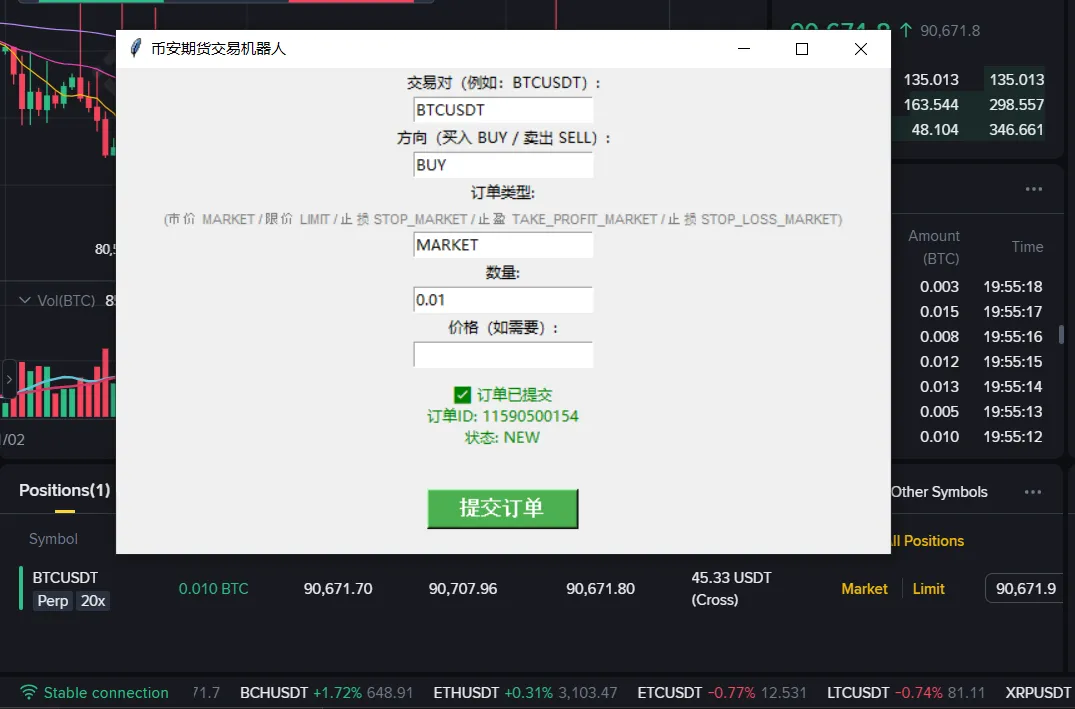
3. 图形界面实现
使用Tkinter创建用户友好的图形界面:
import tkinter as tkfrom binance.client import Clientfrom config import API_KEY, API_SECRET, BASE_URL# 创建主窗口window = tk.Tk()window.title("币安期货交易机器人")window.geometry("450x500")# 输入字段tk.Label(window, text="交易对(例如:BTCUSDT):").pack()symbol_entry = tk.Entry(window)symbol_entry.pack()# ... 其他输入字段# 下单函数defplace_order(): symbol = symbol_entry.get().upper() side = side_entry.get().upper() order_type = order_type_entry.get().upper() quantity = float(quantity_entry.get())try: order = client.futures_create_order( symbol=symbol, side=side, type=order_type, quantity=quantity ) result_label.config(text=f"✅ 订单已提交\n订单ID: {order['orderId']}")except Exception as e: result_label.config(text=f"❌ 错误: {str(e)}", fg="red")# 提交按钮submit_btn = tk.Button(window, text="提交订单", command=place_order)submit_btn.pack(pady=20)window.mainloop()
界面设计要点:
界面效果图:
图形界面运行效果,支持多种订单类型和实时反馈
使用教程
方式一:命令行模式
运行命令行版本:
python bot.py
按照提示输入:
方式二:图形界面模式
运行GUI版本:
python gui_test_cn.py
在图形界面中:
实战案例
案例1:市价买入BTC
假设当前BTC价格为50000 USDT,你想立即买入0.01 BTC:
bot = BasicBot()order = bot.place_order( symbol="BTCUSDT", side="BUY", order_type="MARKET", quantity=0.01)
案例2:限价卖出ETH
假设ETH当前价格为3000 USDT,你想在3100 USDT时卖出:
order = bot.place_order( symbol="ETHUSDT", side="SELL", order_type="LIMIT", quantity=0.1, price=3100)
案例3:设置止损
假设你持有BTC多单,想在价格跌至48000时止损:
order = bot.place_order( symbol="BTCUSDT", side="SELL", order_type="STOP_LOSS_MARKET", quantity=0.01, stop_price=48000)
常见问题与解决方案
1. 代理连接错误
问题:ProxyError: Cannot connect to proxy
解决方案:
2. API密钥错误
问题:Invalid API-key
解决方案:
3. 余额不足
问题:Insufficient balance
解决方案:
进阶扩展
这个基础框架可以进一步扩展:
1. 添加技术指标
集成TA-Lib或其他技术分析库,实现基于指标的自动交易:
import talibdefcheck_rsi(symbol):# 获取K线数据 klines = client.futures_klines(symbol=symbol, interval='1h', limit=14) closes = [float(k[4]) for k in klines] rsi = talib.RSI(closes, timeperiod=14)return rsi[-1]
2. 策略回测
添加历史数据回测功能,验证交易策略的有效性:
defbacktest_strategy(symbol, start_date, end_date):# 获取历史数据# 模拟交易# 计算收益pass
3. 风险控制
添加仓位管理、止损止盈自动设置等功能:
defcalculate_position_size(account_balance, risk_percent, stop_loss_price, entry_price): risk_amount = account_balance * risk_percent price_diff = abs(entry_price - stop_loss_price) position_size = risk_amount / price_diffreturn position_size
4. 实时监控
添加WebSocket连接,实时监控价格和订单状态:
from binance.websocket.futures_socket import FuturesSocketManagerdefprocess_message(msg): print(f"Price update: {msg}")ws = FuturesSocketManager()ws.start_symbol_ticker_socket('btcusdt', process_message)
安全建议
总结
通过这个项目,我们学习了:
- Python GUI开发:使用Tkinter创建图形界面
这个交易机器人虽然简单,但包含了量化交易的核心要素。你可以在此基础上:
重要提醒:
⚠️ 量化交易存在风险,请充分了解市场风险后再进行实盘交易 ⚠️ 本文仅供学习交流,不构成投资建议 ⚠️ 建议先在测试网充分测试,再考虑实盘使用
结束语
量化交易是一个需要不断学习和实践的领域。这个项目只是一个起点,真正的量化交易系统需要考虑更多因素:
希望这篇文章能帮助你入门币安量化交易,如果你有任何问题或建议,欢迎关注"超哥量化",作者会持续分享实用的技术干货。