科技数码龙第五天--Linux之文件IO(二)
- 2026-10-21 13:29:16
科技数码龙第五天--Linux之文件IO(二)
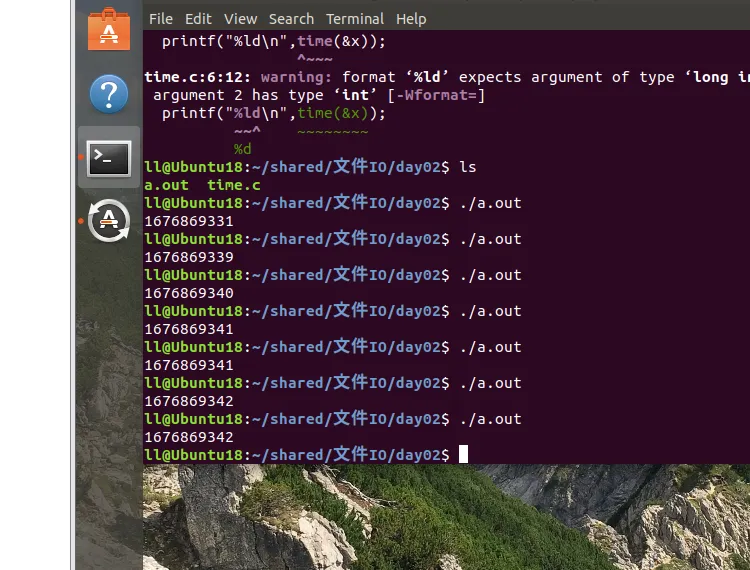
测试结果如下: 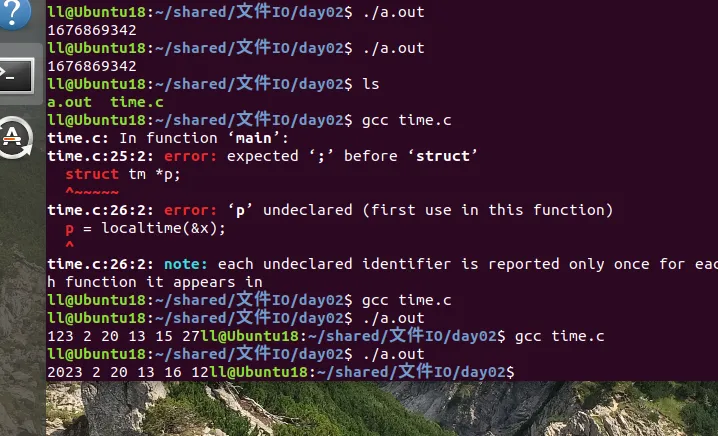
#include
time_t time(time_t *tloc);
功能:获取系统标准时间
参数:tloc:保存秒数的变量地址
成功返回获取到的秒数,失败则返回-1;
int main(){
long t,ret;
ret=time(&t);
printf("t=%ld\n",ret);
return 0;
}
得到的是从1970年0时0分到现在的秒数。观看性不佳。
若需要更好的观看效果,则需要调用以下这个结构体函数
3>将标准时间转化为自定义格式的本地时间localtime #include <time.h>
头文件如上
结构体说明:
struct tm *localtime(const time_t *timep);
功能:标准时间转化为自定义格式的本地时间
参数: timep;以秒为单位的时间指针
返回值: 成功返回结构体指针:struct tm *
失败返回:NULL
结构体详情如下
struct tm {int tm_sec; /* Seconds (0-60) */秒数int tm_min; /* Minutes (0-59) */分钟int tm_hour; /* Hours (0-23) */小时int tm_mday; /* Day of the month (1-31) */号int tm_mon; /* Month (0-11) */月 要+1int tm_year; /* Year - 1900 */年 加上1900int tm_wday; /* Day of the week (0-6, Sunday = 0) */ 周几 int tm_yday; /* Day in the year (0-365, 1 Jan = 0) */一年中第几天int tm_isdst; /* Daylight saving time */夏令时};
测试程序如下
#include#includeint main(){long x,y;x = time(&y);struct tm *p;p = localtime(&x);//将结构体和程序关联if((p=localtime(&x))==NULL){perror("localtime");return 0;}printf("%d%d%d%d%d%d" ,p->tm_year+1900,p->tm_mon+1,p->tm_mday,p->tm_hour,p->tm_min,p->tm_sec);return 0;}
注意,使用的时候年要加上1900 ,月份要加一。
常见使用案例
#include#include#include#include#includeint main(int argc,char*argv[]){if(argc<3){printf("User:%s\n",argv[0]);return 0;}int fr,fw;fr = open(argv[1],O_RDONLY);fw = open(argv[2],O_WRONLY);if(fr < 0||fw < 0){perror("open");return 0;}char buf[1090];int ret;while(1){ret = read(fr,buf,sizeof(buf)-1);if(ret<=0){perror("read");break;}}write(fw,buf,strlen(buf));return 0;}
判定条件一定要加上,不然会报错的。
本文来自网友投稿或网络内容,如有侵犯您的权益请联系我们删除,联系邮箱:596563534@qq.com 。
随机文章
-
 10个月宝宝每天需要喝多少奶粉?
- Kali Linux操作系统快速安装指南:让你5分钟就能用上300多种安全工具系统
- [python]第15期-Python自动化办公利器:python-docx技术全解析
- 25个Linux命令,运维都在推荐!!
- Python办公自动化超实用的十个脚本
- 活久见!连Linux之父等“顽固派”大佬,都在用AI编程了
- Python常用的七个数据分析工具
- Linux vmstat命令实战:3分钟判断服务器是否负载过高
- 用 Python 开发 APP?别慌!这篇手把手把你从 “小白” 薅成 “大佬”
- Linux 之父,也在 vibe coding
- Windows、Mac、Linux 都能用的投屏工具