用python实现四个完整游戏开发小项目
- 2026-09-30 09:11:33
1、2048
1. 游戏简介
2048 是一款比较流行的数字游戏。游戏规则:每次可按上、下、左、右方向键滑动数字,每滑动一次,所有数字都会往滑动方向靠拢,同时在空白位置随机出现一个数字,相同数字在靠拢时会相加。不断叠加最终拼出 2048 这个数字算成功。
2048 最早于 2014年3月20日发行。原版 2048 首先在 GitHub 上发布,原作者是 Gabriele Cirulli,后被移植到各个平台。
本例难度为初级,适合具有 Python 基础和 Pygame 编程知识的用户学习。
2. 设计原理
这个游戏的本质是二维列表,就以 4*4 的二位列表来分析关键的逻辑以及实现。二维列表如下图: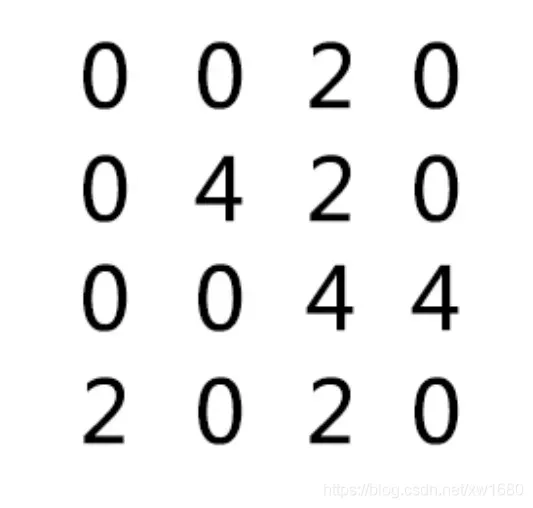
所有的操作都是对这个二维列表的数据的操作。分为上下左右四个方向。先说向左的方向(如图)。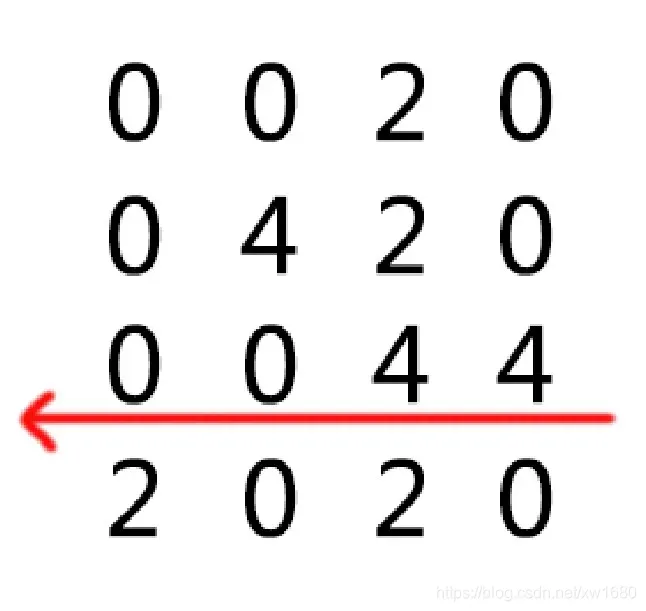
向左操作的结果如下图;当向左的方向是,所有的数据沿着水平方向向左跑。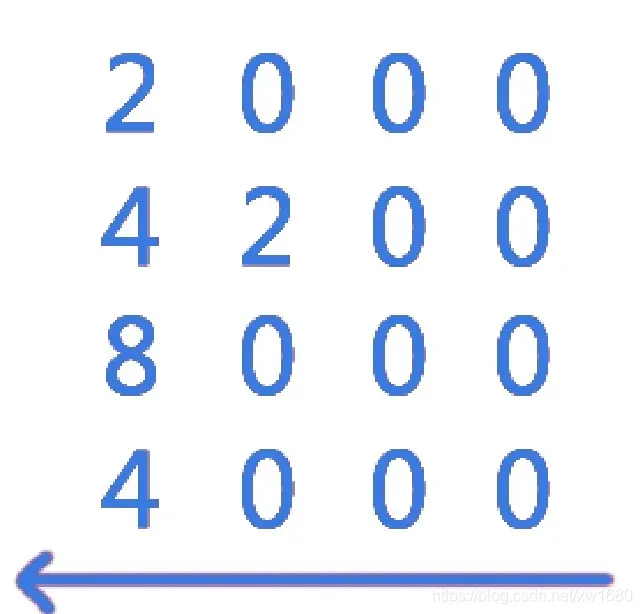
水平说明操作的是二维列表的一行,而垂直操作的则是二位列表的一列。这样就可以将二维列表的操作变成遍历后对一维列表的操作。向左说明数据的优先考虑的位置是从左开始的。这样就确定了一维列表的遍历开始的位置。
上面第 2 个图共四行,每一个行都能得到一个列表。
list1:[0,0,2,0]list2:[0,4,2,0]list3:[0,0,4,4]list4:[2,0,2,0]
这样一来向左的方向就变成。从上到下获得每一行的列表,方向向左。参数(row,left)。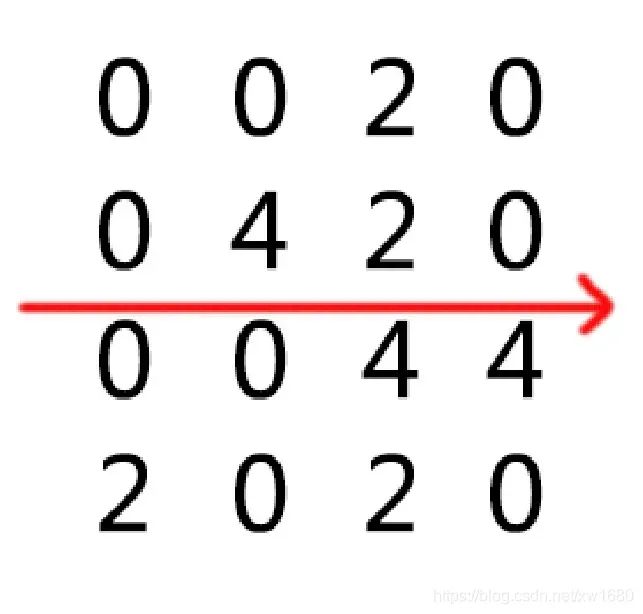
其他的三个方向在开始的时候记住是怎样获得以为列表的,等操作完才放回去这样就能实现了。
3. 示例效果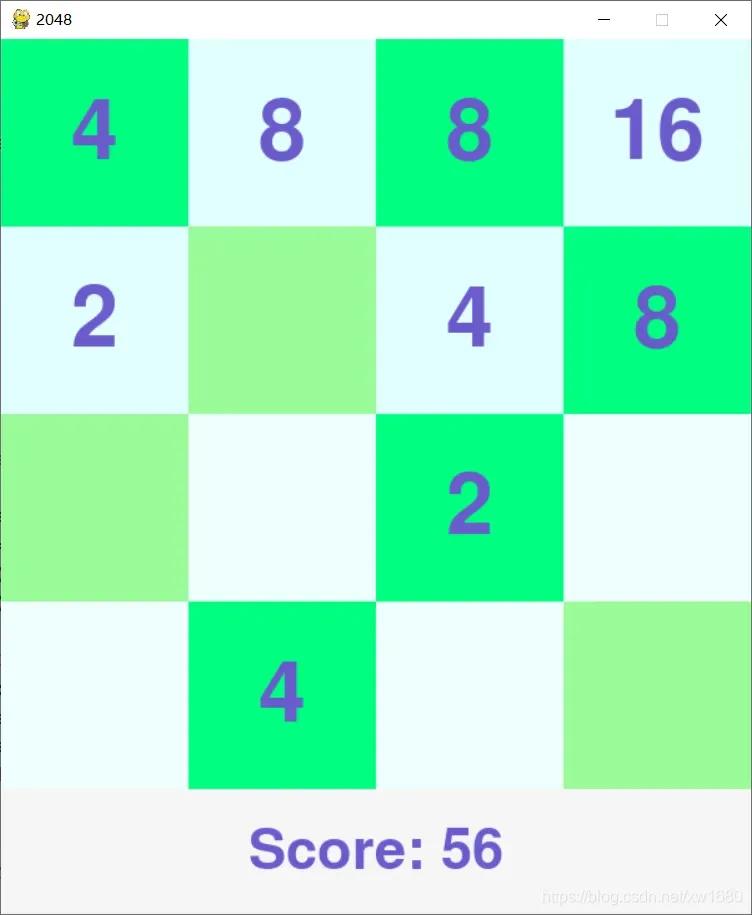
4. 示例源码
import randomimport sysimport pygamefrom pygame.locals import *PIXEL = 150SCORE_PIXEL = 100SIZE = 4# 地图的类classMap:def__init__(self, size):self.size = sizeself.score = 0self.map = [[0 for i in range(size)] for i in range(size)]self.add()self.add()# 新增2或4,有1/4概率产生4defadd(self):while True:p = random.randint(0, self.size * self.size - 1)if self.map[int(p / self.size)][int(p % self.size)] == 0:x = random.randint(0, 3) > 0 and 2 or 4self.map[int(p / self.size)][int(p % self.size)] = xself.score += xbreak# 地图向左靠拢,其他方向的靠拢可以通过适当旋转实现,返回地图是否更新defadjust(self):changed = Falsefor a in self.map:b = []last = 0for v in a:if v != 0:if v == last:b.append(b.pop() << 1)last = 0else:b.append(v)last = vb += [0] * (self.size - len(b))for i in range(self.size):if a[i] != b[i]:changed = Truea[:] = breturn changed# 逆时针旋转地图90度defrotate90(self):self.map = [[self.map[c][r]for c in range(self.size)] for r in reversed(range(self.size))]# 判断游戏结束defover(self):for r in range(self.size):for c in range(self.size):if self.map[r][c] == 0:return Falsefor r in range(self.size):for c in range(self.size - 1):if self.map[r][c] == self.map[r][c + 1]:return Falsefor r in range(self.size - 1):for c in range(self.size):if self.map[r][c] == self.map[r + 1][c]:return Falsereturn TruedefmoveUp(self):self.rotate90()if self.adjust():self.add()self.rotate90()self.rotate90()self.rotate90()defmoveRight(self):self.rotate90()self.rotate90()if self.adjust():self.add()self.rotate90()self.rotate90()defmoveDown(self):self.rotate90()self.rotate90()self.rotate90()if self.adjust():self.add()self.rotate90()defmoveLeft(self):if self.adjust():self.add()# 更新屏幕defshow(map):for i in range(SIZE):for j in range(SIZE):# 背景颜色块screen.blit(map.map[i][j] == 0 and block[(i + j) % 2]or block[2 + (i + j) % 2], (PIXEL * j, PIXEL * i))# 数值显示if map.map[i][j] != 0:map_text = map_font.render(str(map.map[i][j]), True, (106, 90, 205))text_rect = map_text.get_rect()text_rect.center = (PIXEL * j + PIXEL / 2,PIXEL * i + PIXEL / 2)screen.blit(map_text, text_rect)# 分数显示screen.blit(score_block, (0, PIXEL * SIZE))score_text = score_font.render((map.over() and "Game over with score " or "Score: ") + str(map.score), True, (106, 90, 205))score_rect = score_text.get_rect()score_rect.center = (PIXEL * SIZE / 2, PIXEL * SIZE + SCORE_PIXEL / 2)screen.blit(score_text, score_rect)pygame.display.update()map = Map(SIZE)pygame.init()screen = pygame.display.set_mode((PIXEL * SIZE, PIXEL * SIZE + SCORE_PIXEL))pygame.display.set_caption("2048")block = [pygame.Surface((PIXEL, PIXEL)) for i in range(4)]# 设置颜色block[0].fill((152, 251, 152))block[1].fill((240, 255, 255))block[2].fill((0, 255, 127))block[3].fill((225, 255, 255))score_block = pygame.Surface((PIXEL * SIZE, SCORE_PIXEL))score_block.fill((245, 245, 245))# 设置字体map_font = pygame.font.Font(None, int(PIXEL * 2 / 3))score_font = pygame.font.Font(None, int(SCORE_PIXEL * 2 / 3))clock = pygame.time.Clock()show(map)while not map.over():# 12为实验参数clock.tick(12)for event in pygame.event.get():if event.type == QUIT:sys.exit()# 接收玩家操作pressed_keys = pygame.key.get_pressed()if pressed_keys[K_w] or pressed_keys[K_UP]:map.moveUp()elif pressed_keys[K_s] or pressed_keys[K_DOWN]:map.moveDown()elif pressed_keys[K_a] or pressed_keys[K_LEFT]:map.moveLeft()elif pressed_keys[K_d] or pressed_keys[K_RIGHT]:map.moveRight()show(map)# 游戏结束pygame.time.delay(3000)
2、贪吃蛇
1. 案例介绍
贪吃蛇是一款经典的益智游戏,简单又耐玩。该游戏通过控制蛇头方向吃蛋,从而使得蛇变得越来越长。
通过上下左右方向键控制蛇的方向,寻找吃的东西,每吃一口就能得到一定的积分,而且蛇的身子会越吃越长,身子越长玩的难度就越大,不能碰墙,不能咬到自己的身体,更不能咬自己的尾巴,等到了一定的分数,就能过关,然后继续玩下一关。
本例难度为中级,适合具有 Python 基础和 Pygame 编程知识的用户学习。
2. 设计要点
游戏是基于 PyGame 框架制作的,程序核心逻辑如下:
游戏界面分辨率是 640*480,蛇和食物都是由 1 个或多个 20*20 像素的正方形块儿(为了方便,下文用点表示 20*20 像素的正方形块儿) 组成,这样共有 32*24 个点,使用 pygame.draw.rect 来绘制每一个点;
初始化时蛇的长度是 3,食物是 1 个点,蛇初始的移动的方向是右,用一个数组代表蛇,数组的每个元素是蛇每个点的坐标,因此数组的第一个坐标是蛇尾,最后一个坐标是蛇头;游戏开始后,根据蛇的当前移动方向,将蛇运动方向的前方的那个点 append 到蛇数组的末位,再把蛇尾去掉,蛇的坐标数组就相当于往前挪了一位;如果蛇吃到了食物,即蛇头的坐标等于食物的坐标,那么在第 2 点中蛇尾就不用去掉,就产生了蛇长度增加的效果;食物被吃掉后,随机在空的位置(不能与蛇的身体重合) 再生成一个;通过 PyGame 的 event 监控按键,改变蛇的方向,例如当蛇向右时,下一次改变方向只能向上或者向下;当蛇撞上自身或墙壁,游戏结束,蛇头装上自身,那么蛇坐标数组里就有和舌头坐标重复的数据,撞上墙壁则是蛇头坐标超过了边界,都很好判断;其他细节:做了个开始的欢迎界面;食物的颜色随机生成;吃到实物的时候有声音提示等。
3. 示例效果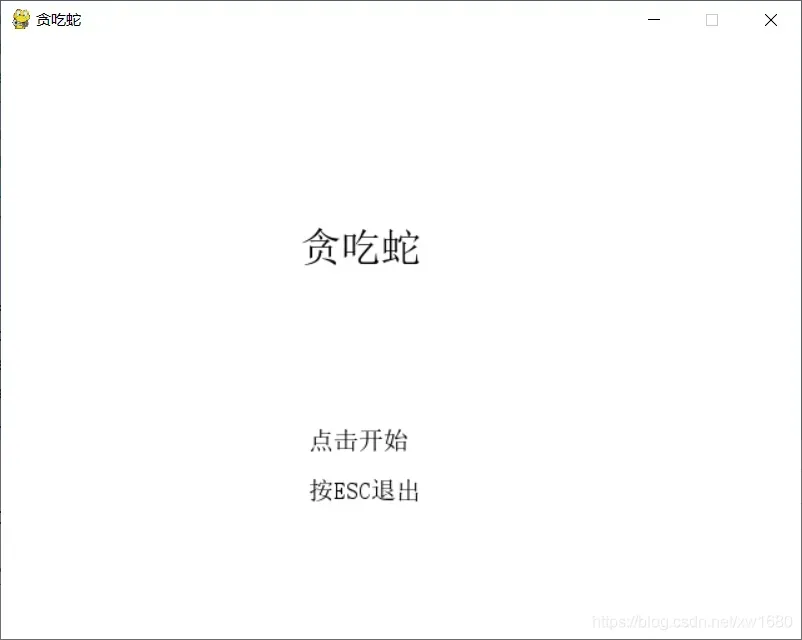
4. 示例源码
import pygamefrom os import pathfrom sys import exitfrom time import sleepfrom random import choicefrom itertools import productfrom pygame.locals import QUIT, KEYDOWNdefdirection_check(moving_direction, change_direction):directions = [['up', 'down'], ['left', 'right']]if moving_direction in directions[0] and change_direction in directions[1]:return change_directionelif moving_direction in directions[1] and change_direction in directions[0]:return change_directionreturn moving_directionclassSnake:colors = list(product([0, 64, 128, 192, 255], repeat=3))[1:-1]def__init__(self):self.map = {(x, y): 0 for x in range(32) for y in range(24)}self.body = [[100, 100], [120, 100], [140, 100]]self.head = [140, 100]self.food = []self.food_color = []self.moving_direction = 'right'self.speed = 4self.generate_food()self.game_started = Falsedefcheck_game_status(self):if self.body.count(self.head) > 1:return Trueif self.head[0] < 0 or self.head[0] > 620 or self.head[1] < 0 or self.head[1] > 460:return Truereturn Falsedefmove_head(self):moves = {'right': (20, 0),'up': (0, -20),'down': (0, 20),'left': (-20, 0)}step = moves[self.moving_direction]self.head[0] += step[0]self.head[1] += step[1]defgenerate_food(self):self.speed = len(self.body) // 16 if len(self.body) // 16 > 4 else self.speedfor seg in self.body:x, y = segself.map[x // 20, y // 20] = 1empty_pos = [pos for pos in self.map.keys() if not self.map[pos]]result = choice(empty_pos)self.food_color = list(choice(self.colors))self.food = [result[0] * 20, result[1] * 20]defmain():key_direction_dict = {119: 'up', # W115: 'down', # S97: 'left', # A100: 'right', # D273: 'up', # UP274: 'down', # DOWN276: 'left', # LEFT275: 'right', # RIGHT}fps_clock = pygame.time.Clock()pygame.init()pygame.mixer.init()snake = Snake()sound = Falseif path.exists('eat.wav'):sound_wav = pygame.mixer.Sound("eat.wav")sound = Truetitle_font = pygame.font.SysFont('simsunnsimsun', 32)welcome_words = title_font.render('贪吃蛇', True, (0, 0, 0), (255, 255, 255))tips_font = pygame.font.SysFont('simsunnsimsun', 20)start_game_words = tips_font.render('点击开始', True, (0, 0, 0), (255, 255, 255))close_game_words = tips_font.render('按ESC退出', True, (0, 0, 0), (255, 255, 255))gameover_words = title_font.render('游戏结束', True, (205, 92, 92), (255, 255, 255))win_words = title_font.render('蛇很长了,你赢了!', True, (0, 0, 205), (255, 255, 255))screen = pygame.display.set_mode((640, 480), 0, 32)pygame.display.set_caption('贪吃蛇')new_direction = snake.moving_directionwhile 1:for event in pygame.event.get():if event.type == QUIT:exit()elif event.type == KEYDOWN:if event.key == 27:exit()if snake.game_started and event.key in key_direction_dict:direction = key_direction_dict[event.key]new_direction = direction_check(snake.moving_direction, direction)elif (not snake.game_started) and event.type == pygame.MOUSEBUTTONDOWN:x, y = pygame.mouse.get_pos()if 213 <= x <= 422 and 304 <= y <= 342:snake.game_started = Truescreen.fill((255, 255, 255))if snake.game_started:snake.moving_direction = new_direction # 在这里赋值,而不是在event事件的循环中赋值,避免按键太快snake.move_head()snake.body.append(snake.head[:])if snake.head == snake.food:if sound:sound_wav.play()snake.generate_food()else:snake.body.pop(0)for seg in snake.body:pygame.draw.rect(screen, [0, 0, 0], [seg[0], seg[1], 20, 20], 0)pygame.draw.rect(screen, snake.food_color, [snake.food[0], snake.food[1], 20, 20], 0)if snake.check_game_status():screen.blit(gameover_words, (241, 310))pygame.display.update()snake = Snake()new_direction = snake.moving_directionsleep(3)elif len(snake.body) == 512:screen.blit(win_words, (33, 210))pygame.display.update()snake = Snake()new_direction = snake.moving_directionsleep(3)else:screen.blit(welcome_words, (240, 150))screen.blit(start_game_words, (246, 310))screen.blit(close_game_words, (246, 350))pygame.display.update()fps_clock.tick(snake.speed)if __name__ == '__main__':main()
3、俄罗斯方块
1. 案例介绍
俄罗斯方块是由 4 个小方块组成不同形状的板块,随机从屏幕上方落下,按方向键调整板块的位置和方向,在底部拼出完整的一行或几行。这些完整的横条会消失,给新落下来的板块腾出空间,并获得分数奖励。没有被消除掉的方块不断堆积,一旦堆到顶端,便告输,游戏结束。
本例难度为高级,适合具有 Python 进阶和 Pygame 编程技巧的用户学习。
2. 设计要点
边框――由 15*25 个空格组成,方块就落在这里面。
盒子――组成方块的其中小方块,是组成方块的基本单元。
方块――从边框顶掉下的东西,游戏者可以翻转和改变位置。每个方块由 4 个盒子组成。
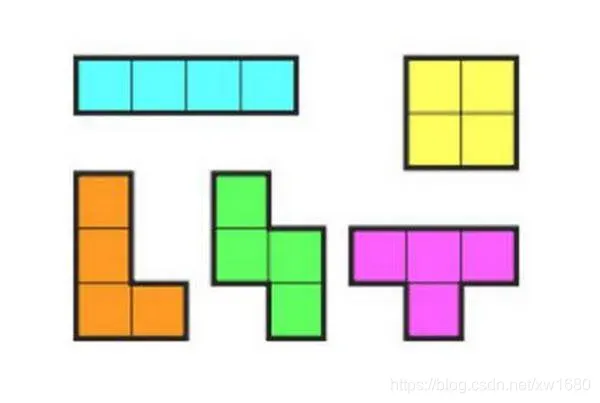
形状――不同类型的方块。这里形状的名字被叫做 T, S, Z ,J, L, I , O。如下图所示:
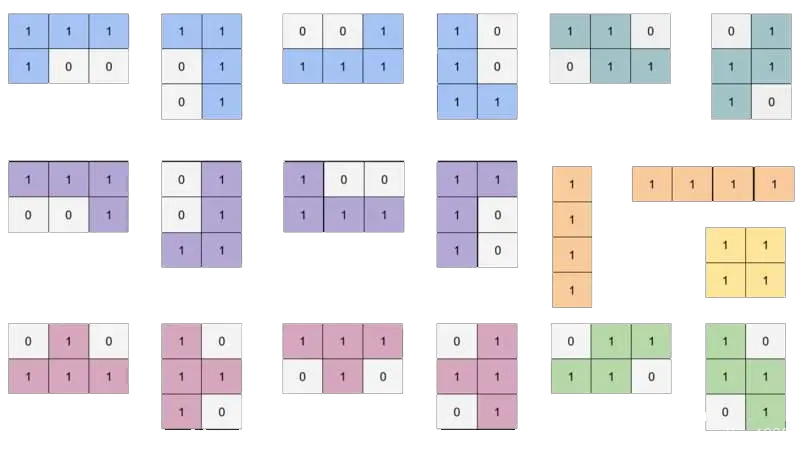
模版――用一个列表存放形状被翻转后的所有可能样式。全部存放在变量里,变量名字如 S or J。
着陆――当一个方块到达边框的底部或接触到在其他的盒子话,就说这个方块着陆了。那样的话,另一个方块就会开始下落。
3. 示例效果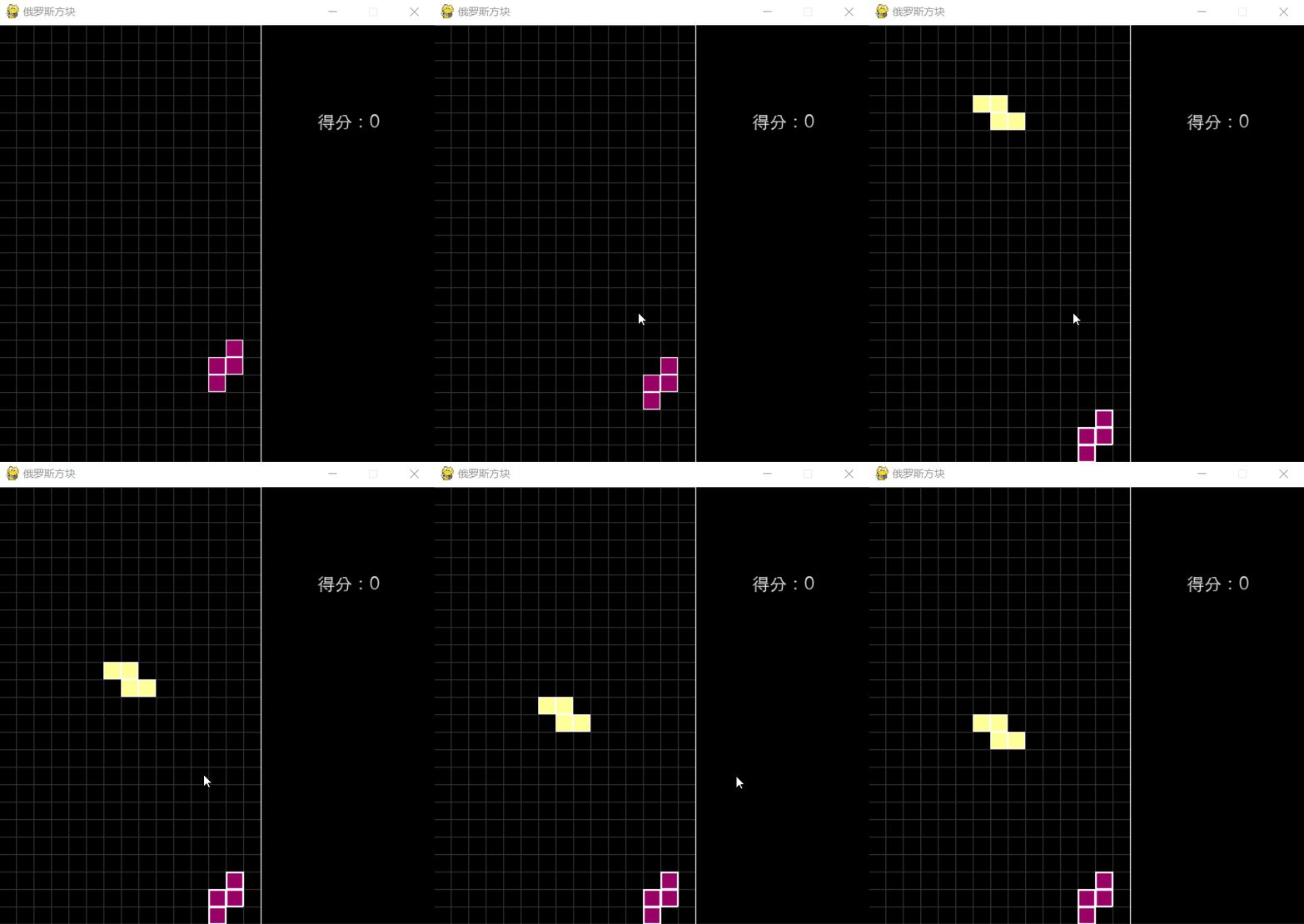
4. 示例源码
import pygameimport randomimport ospygame.init()GRID_WIDTH = 20GRID_NUM_WIDTH = 15GRID_NUM_HEIGHT = 25WIDTH, HEIGHT = GRID_WIDTH * GRID_NUM_WIDTH, GRID_WIDTH * GRID_NUM_HEIGHTSIDE_WIDTH = 200SCREEN_WIDTH = WIDTH + SIDE_WIDTHWHITE = (0xff, 0xff, 0xff)BLACK = (0, 0, 0)LINE_COLOR = (0x33, 0x33, 0x33)CUBE_COLORS = [(0xcc, 0x99, 0x99), (0xff, 0xff, 0x99), (0x66, 0x66, 0x99),(0x99, 0x00, 0x66), (0xff, 0xcc, 0x00), (0xcc, 0x00, 0x33),(0xff, 0x00, 0x33), (0x00, 0x66, 0x99), (0xff, 0xff, 0x33),(0x99, 0x00, 0x33), (0xcc, 0xff, 0x66), (0xff, 0x99, 0x00)]screen = pygame.display.set_mode((SCREEN_WIDTH, HEIGHT))pygame.display.set_caption("俄罗斯方块")clock = pygame.time.Clock()FPS = 30score = 0level = 1screen_color_matrix = [[None] * GRID_NUM_WIDTH for i in range(GRID_NUM_HEIGHT)]# 设置游戏的根目录为当前文件夹base_folder = os.path.dirname(__file__)defshow_text(surf, text, size, x, y, color=WHITE):font_name = os.path.join(base_folder, 'font/font.ttc')font = pygame.font.Font(font_name, size)text_surface = font.render(text, True, color)text_rect = text_surface.get_rect()text_rect.midtop = (x, y)surf.blit(text_surface, text_rect)classCubeShape(object):SHAPES = ['I', 'J', 'L', 'O', 'S', 'T', 'Z']I = [[(0, -1), (0, 0), (0, 1), (0, 2)],[(-1, 0), (0, 0), (1, 0), (2, 0)]]J = [[(-2, 0), (-1, 0), (0, 0), (0, -1)],[(-1, 0), (0, 0), (0, 1), (0, 2)],[(0, 1), (0, 0), (1, 0), (2, 0)],[(0, -2), (0, -1), (0, 0), (1, 0)]]L = [[(-2, 0), (-1, 0), (0, 0), (0, 1)],[(1, 0), (0, 0), (0, 1), (0, 2)],[(0, -1), (0, 0), (1, 0), (2, 0)],[(0, -2), (0, -1), (0, 0), (-1, 0)]]O = [[(0, 0), (0, 1), (1, 0), (1, 1)]]S = [[(-1, 0), (0, 0), (0, 1), (1, 1)],[(1, -1), (1, 0), (0, 0), (0, 1)]]T = [[(0, -1), (0, 0), (0, 1), (-1, 0)],[(-1, 0), (0, 0), (1, 0), (0, 1)],[(0, -1), (0, 0), (0, 1), (1, 0)],[(-1, 0), (0, 0), (1, 0), (0, -1)]]Z = [[(0, -1), (0, 0), (1, 0), (1, 1)],[(-1, 0), (0, 0), (0, -1), (1, -1)]]SHAPES_WITH_DIR = {'I': I, 'J': J, 'L': L, 'O': O, 'S': S, 'T': T, 'Z': Z}def__init__(self):self.shape = self.SHAPES[random.randint(0, len(self.SHAPES) - 1)]# 骨牌所在的行列self.center = (2, GRID_NUM_WIDTH // 2)self.dir = random.randint(0, len(self.SHAPES_WITH_DIR[self.shape]) - 1)self.color = CUBE_COLORS[random.randint(0, len(CUBE_COLORS) - 1)]defget_all_gridpos(self, center=None):curr_shape = self.SHAPES_WITH_DIR[self.shape][self.dir]if center is None:center = [self.center[0], self.center[1]]return [(cube[0] + center[0], cube[1] + center[1])for cube in curr_shape]defconflict(self, center):for cube in self.get_all_gridpos(center):# 超出屏幕之外,说明不合法if cube[0] < 0 or cube[1] < 0 or cube[0] >= GRID_NUM_HEIGHT or \cube[1] >= GRID_NUM_WIDTH:return True# 不为None,说明之前已经有小方块存在了,也不合法if screen_color_matrix[cube[0]][cube[1]] is not None:return Truereturn Falsedefrotate(self):new_dir = self.dir + 1new_dir %= len(self.SHAPES_WITH_DIR[self.shape])old_dir = self.dirself.dir = new_dirif self.conflict(self.center):self.dir = old_dirreturn Falsedefdown(self):# import pdb; pdb.set_trace()center = (self.center[0] + 1, self.center[1])if self.conflict(center):return Falseself.center = centerreturn Truedefleft(self):center = (self.center[0], self.center[1] - 1)if self.conflict(center):return Falseself.center = centerreturn Truedefright(self):center = (self.center[0], self.center[1] + 1)if self.conflict(center):return Falseself.center = centerreturn Truedefdraw(self):for cube in self.get_all_gridpos():pygame.draw.rect(screen, self.color,(cube[1] * GRID_WIDTH, cube[0] * GRID_WIDTH,GRID_WIDTH, GRID_WIDTH))pygame.draw.rect(screen, WHITE,(cube[1] * GRID_WIDTH, cube[0] * GRID_WIDTH,GRID_WIDTH, GRID_WIDTH),1)defdraw_grids():for i in range(GRID_NUM_WIDTH):pygame.draw.line(screen, LINE_COLOR,(i * GRID_WIDTH, 0), (i * GRID_WIDTH, HEIGHT))for i in range(GRID_NUM_HEIGHT):pygame.draw.line(screen, LINE_COLOR,(0, i * GRID_WIDTH), (WIDTH, i * GRID_WIDTH))pygame.draw.line(screen, WHITE,(GRID_WIDTH * GRID_NUM_WIDTH, 0),(GRID_WIDTH * GRID_NUM_WIDTH, GRID_WIDTH * GRID_NUM_HEIGHT))defdraw_matrix():for i, row in zip(range(GRID_NUM_HEIGHT), screen_color_matrix):for j, color in zip(range(GRID_NUM_WIDTH), row):if color is not None:pygame.draw.rect(screen, color,(j * GRID_WIDTH, i * GRID_WIDTH,GRID_WIDTH, GRID_WIDTH))pygame.draw.rect(screen, WHITE,(j * GRID_WIDTH, i * GRID_WIDTH,GRID_WIDTH, GRID_WIDTH), 2)defdraw_score():show_text(screen, u'得分:{}'.format(score), 20, WIDTH + SIDE_WIDTH // 2, 100)defremove_full_line():global screen_color_matrixglobal scoreglobal levelnew_matrix = [[None] * GRID_NUM_WIDTH for i in range(GRID_NUM_HEIGHT)]index = GRID_NUM_HEIGHT - 1n_full_line = 0for i in range(GRID_NUM_HEIGHT - 1, -1, -1):is_full = Truefor j in range(GRID_NUM_WIDTH):if screen_color_matrix[i][j] is None:is_full = Falsecontinueif not is_full:new_matrix[index] = screen_color_matrix[i]index -= 1else:n_full_line += 1score += n_full_linelevel = score // 20 + 1screen_color_matrix = new_matrixdefshow_welcome(screen):show_text(screen, u'俄罗斯方块', 30, WIDTH / 2, HEIGHT / 2)show_text(screen, u'按任意键开始游戏', 20, WIDTH / 2, HEIGHT / 2 + 50)running = Truegameover = Truecounter = 0live_cube = Nonewhile running:clock.tick(FPS)for event in pygame.event.get():if event.type == pygame.QUIT:running = Falseelif event.type == pygame.KEYDOWN:if gameover:gameover = Falselive_cube = CubeShape()breakif event.key == pygame.K_LEFT:live_cube.left()elif event.key == pygame.K_RIGHT:live_cube.right()elif event.key == pygame.K_DOWN:live_cube.down()elif event.key == pygame.K_UP:live_cube.rotate()elif event.key == pygame.K_SPACE:while live_cube.down() == True:passremove_full_line()# level 是为了方便游戏的难度,level 越高 FPS // level 的值越小# 这样屏幕刷新的就越快,难度就越大if gameover is False and counter % (FPS // level) == 0:# down 表示下移骨牌,返回False表示下移不成功,可能超过了屏幕或者和之前固定的# 小方块冲突了if live_cube.down() == False:for cube in live_cube.get_all_gridpos():screen_color_matrix[cube[0]][cube[1]] = live_cube.colorlive_cube = CubeShape()if live_cube.conflict(live_cube.center):gameover = Truescore = 0live_cube = Nonescreen_color_matrix = [[None] * GRID_NUM_WIDTH for i in range(GRID_NUM_HEIGHT)]# 消除满行remove_full_line()counter += 1# 更新屏幕screen.fill(BLACK)draw_grids()draw_matrix()draw_score()if live_cube is not None:live_cube.draw()if gameover:show_welcome(screen)pygame.display.update()
4、连连看
1. 案例介绍
连连看是一款曾经非常流行的小游戏。游戏规则:
点击选中两个相同的方块。
两个选中的方块之间连接线的折点不超过两个(接线由X轴和Y轴的平行线组成)。
每找出一对,它们就会自动消失。
连线不能从尚未消失的图案上经过。
把所有的图案全部消除即可获得胜利。
2. 设计思路
生成成对的图片元素。
将图片元素打乱排布。
定义什么才算
相连(两张图片的连线不多于3跟直线,或者说转角不超过2个)。实现
相连判断算法。消除图片元素并判断是否消除完毕。
3. 示例效果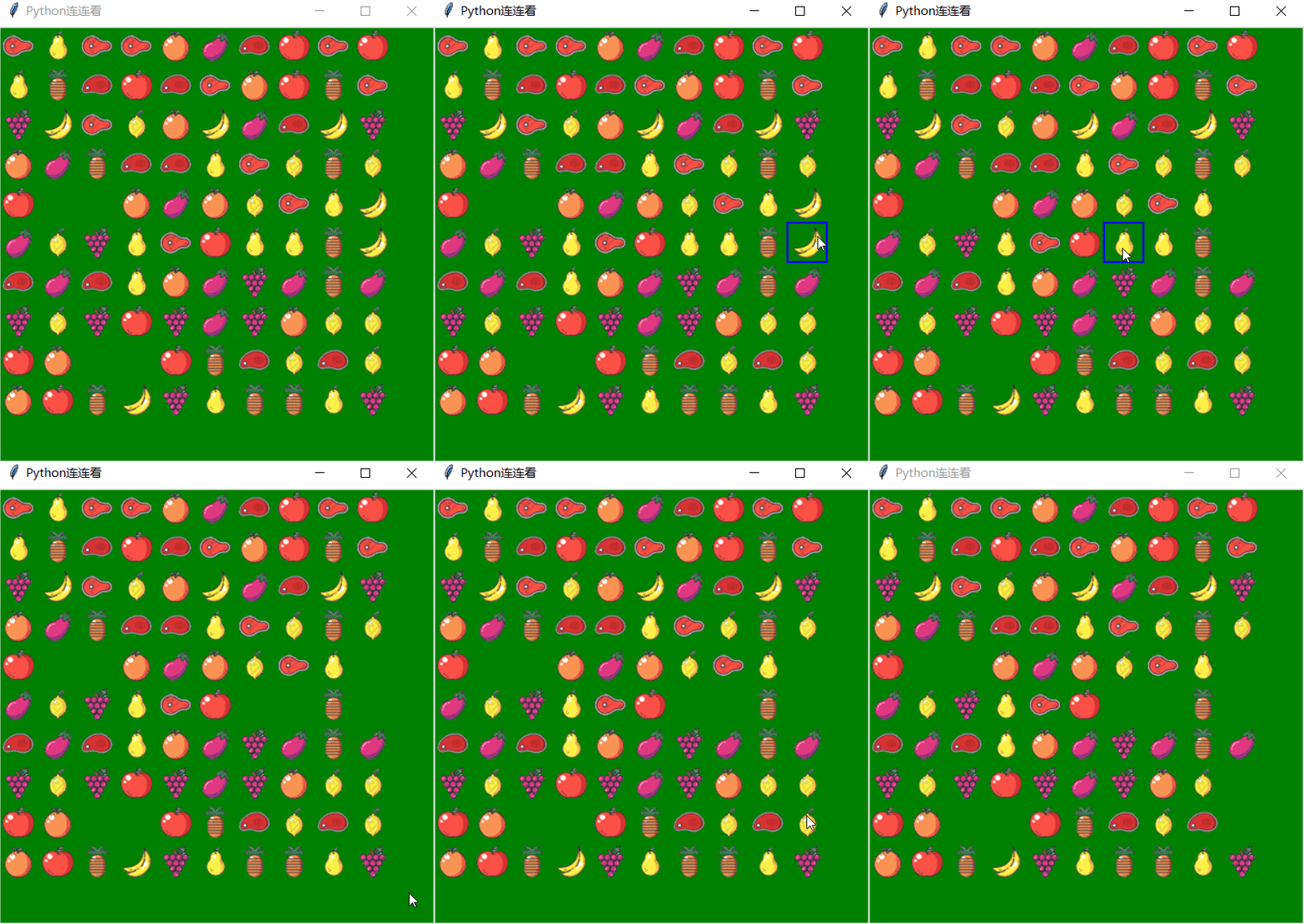
4. 示例源码
from tkinter import *from tkinter.messagebox import *from threading import Timerimport timeimport randomclassPoint:# 点类def__init__(self, x, y):self.x = xself.y = y# --------------------------------------'''判断选中的两个方块是否可以消除'''defIsLink(p1, p2):if lineCheck(p1, p2):return Trueif OneCornerLink(p1, p2): # 一个转弯(折点)的联通方式return Trueif TwoCornerLink(p1, p2): # 两个转弯(折点)的联通方式return Truereturn False# ---------------------------defIsSame(p1, p2):if map[p1.x][p1.y] == map[p2.x][p2.y]:print("clicked at IsSame")return Truereturn Falsedefcallback(event): # 鼠标左键事件代码global Select_first, p1, p2global firstSelectRectId, SecondSelectRectId# print ("clicked at", event.x, event.y,turn)x = (event.x) // 40 # 换算棋盘坐标y = (event.y) // 40print("clicked at", x, y)if map[x][y] == " ":showinfo(title="提示", message="此处无方块")else:if Select_first == False:p1 = Point(x, y)# 画选定(x1,y1)处的框线firstSelectRectId = cv.create_rectangle(x * 40, y * 40, x * 40 + 40, y * 40 + 40, width=2, outline="blue")Select_first = Trueelse:p2 = Point(x, y)# 判断第二次点击的方块是否已被第一次点击选取,如果是则返回。if (p1.x == p2.x) and (p1.y == p2.y):return# 画选定(x2,y2)处的框线print('第二次点击的方块', x, y)# SecondSelectRectId=cv.create_rectangle(100,20,x*40+40,y*40+40,width=2,outline="yellow")SecondSelectRectId = cv.create_rectangle(x * 40, y * 40, x * 40 + 40, y * 40 + 40, width=2,outline="yellow")print('第二次点击的方块', SecondSelectRectId)cv.pack()# 判断是否连通if IsSame(p1, p2) and IsLink(p1, p2):print('连通', x, y)Select_first = False# 画选中方块之间连接线drawLinkLine(p1, p2)# clearTwoBlock()# time.sleep(0.6)# clearFlag=Truet = Timer(timer_interval, delayrun) # 定时函数t.start()else: # 重新选定第一个方块# 清除第一个选定框线cv.delete(firstSelectRectId)cv.delete(SecondSelectRectId)# print('清除第一个选定框线')# firstSelectRectId=SecondSelectRectId# p1=Point(x,y) #设置重新选定第一个方块的坐标Select_first = Falsetimer_interval = 0.3 # 0.3秒# --------------------------------------defdelayrun():clearTwoBlock() # 清除连线及方块defclearTwoBlock(): # 清除连线及方块# 延时0.1秒# time.sleep(0.1)# 清除第一个选定框线cv.delete(firstSelectRectId)# 清除第2个选定框线cv.delete(SecondSelectRectId)# 清空记录方块的值map[p1.x][p1.y] = " "cv.delete(image_map[p1.x][p1.y])map[p2.x][p2.y] = " "cv.delete(image_map[p2.x][p2.y])Select_first = FalseundrawConnectLine() # 清除选中方块之间连接线defdrawQiPan(): # 画棋盘for i in range(0, 15):cv.create_line(20, 20 + 40 * i, 580, 20 + 40 * i, width=2)for i in range(0, 15):cv.create_line(20 + 40 * i, 20, 20 + 40 * i, 580, width=2)cv.pack()defprint_map(): # 输出map地图global image_mapfor x in range(0, Width): # 0--14for y in range(0, Height): # 0--14if (map[x][y] != ' '):img1 = imgs[int(map[x][y])]id = cv.create_image((x * 40 + 20, y * 40 + 20), image=img1)image_map[x][y] = idcv.pack()for y in range(0, Height): # 0--14for x in range(0, Width): # 0--14print(map[x][y], end=' ')print(",", y)'''* 同行同列情况消除方法 原理:如果两个相同的被消除元素之间的 空格数spaceCount等于他们的(行/列差-1)则 两者可以联通消除* x代表列,y代表行* param p1 第一个保存上次选中点坐标的点对象* param p2 第二个保存上次选中点坐标的点对象'''# 直接连通deflineCheck(p1, p2):absDistance = 0spaceCount = 0if (p1.x == p2.x or p1.y == p2.y): # 同行同列的情况吗?print("同行同列的情况------")# 同列的情况if (p1.x == p2.x and p1.y != p2.y):print("同列的情况")# 绝对距离(中间隔着的空格数)absDistance = abs(p1.y - p2.y) - 1# 正负值if p1.y - p2.y > 0:zf = -1else:zf = 1for i in range(1, absDistance + 1):if (map[p1.x][p1.y + i * zf] == " "):# 空格数加1spaceCount += 1else:break; # 遇到阻碍就不用再探测了# 同行的情况elif (p1.y == p2.y and p1.x != p2.x):print(" 同行的情况")absDistance = abs(p1.x - p2.x) - 1# 正负值if p1.x - p2.x > 0:zf = -1else:zf = 1for i in range(1, absDistance + 1):if (map[p1.x + i * zf][p1.y] == " "):# 空格数加1spaceCount += 1else:break; # 遇到阻碍就不用再探测了if (spaceCount == absDistance):# 可联通print(absDistance, spaceCount)print("行/列可直接联通")return Trueelse:print("行/列不能消除!")return Falseelse:# 不是同行同列的情况所以直接返回falsereturn False;# --------------------------------------# 第二种,直角连通'''直角连接,即X,Y坐标都不同的,可以用这个方法尝试连接param first:选中的第一个点param second:选中的第二个点'''defOneCornerLink(p1, p2):# 第一个直角检查点,如果这里为空则赋予相同值供检查checkP = Point(p1.x, p2.y)# 第二个直角检查点,如果这里为空则赋予相同值供检查checkP2 = Point(p2.x, p1.y);# 第一个直角点检测if (map[checkP.x][checkP.y] == " "):if (lineCheck(p1, checkP) and lineCheck(checkP, p2)):linePointStack.append(checkP)print("直角消除ok", checkP.x, checkP.y)return True# 第二个直角点检测if (map[checkP2.x][checkP2.y] == " "):if (lineCheck(p1, checkP2) and lineCheck(checkP2, p2)):linePointStack.append(checkP2)print("直角消除ok", checkP2.x, checkP2.y)return Trueprint("不能直角消除")return False;# -----------------------------------------'''#第三种,双直角连通双直角联通判定可分两步走:1. 在p1点周围4个方向寻找空格checkP2. 调用OneCornerLink(checkP, p2)3. 即遍历 p1 4 个方向的空格,使之成为 checkP,然后调用 OneCornerLink(checkP,p2)判定是否为真,如果为真则可以双直角连同,否则当所有的空格都遍历完而没有找到一个checkP使OneCornerLink(checkP, p2)为真,则两点不能连同具体代码:双直角连接方法@param p1 第一个点@param p2 第二个点'''defTwoCornerLink(p1, p2):checkP = Point(p1.x, p1.y)# 四向探测开始for i in range(0, 4):checkP.x = p1.xcheckP.y = p1.y# 向下if (i == 3):checkP.y += 1while ((checkP.y < Height) and map[checkP.x][checkP.y] == " "):linePointStack.append(checkP)if (OneCornerLink(checkP, p2)):print("下探测OK")return Trueelse:linePointStack.pop()checkP.y += 1print("ssss", checkP.y, Height - 1)# 补充两个折点都在游戏区域底侧外部if checkP.y == Height: # 出了底部,则仅需判断p2能否也达到底部边界z = Point(p2.x, Height - 1) # 底部边界点if lineCheck(z, p2): # 两个折点在区域外部的底侧linePointStack.append(Point(p1.x, Height))linePointStack.append(Point(p2.x, Height))print("下探测到游戏区域外部OK")return True# 向右elif (i == 2):checkP.x += 1while ((checkP.x < Width) and map[checkP.x][checkP.y] == " "):linePointStack.append(checkP)if (OneCornerLink(checkP, p2)):print("右探测OK")return Trueelse:linePointStack.pop()checkP.x += 1# 补充两个折点都在游戏区域右侧外部if checkP.x == Width: # 出了右侧,则仅需判断p2能否也达到右部边界z = Point(Width - 1, p2.y) # 右部边界点if lineCheck(z, p2): # 两个折点在区域外部的底侧linePointStack.append(Point(Width, p1.y))linePointStack.append(Point(Width, p2.y))print("右探测到游戏区域外部OK")return True# 向左elif (i == 1):checkP.x -= 1while ((checkP.x >= 0) and map[checkP.x][checkP.y] == " "):linePointStack.append(checkP)if (OneCornerLink(checkP, p2)):print("左探测OK")return Trueelse:linePointStack.pop()checkP.x -= 1# 向上elif (i == 0):checkP.y -= 1while ((checkP.y >= 0) and map[checkP.x][checkP.y] == " "):linePointStack.append(checkP)if (OneCornerLink(checkP, p2)):print("上探测OK")return Trueelse:linePointStack.pop()checkP.y -= 1# 四个方向都寻完都没找到适合的checkP点print("两直角连接没找到适合的checkP点")return False;# ---------------------------# 画连接线defdrawLinkLine(p1, p2):if (len(linePointStack) == 0):Line_id.append(drawLine(p1, p2))else:print(linePointStack, len(linePointStack))if (len(linePointStack) == 1):z = linePointStack.pop()print("一折连通点z", z.x, z.y)Line_id.append(drawLine(p1, z))Line_id.append(drawLine(p2, z))if (len(linePointStack) == 2):z1 = linePointStack.pop()print("2折连通点z1", z1.x, z1.y)Line_id.append(drawLine(p2, z1))z2 = linePointStack.pop()print("2折连通点z2", z2.x, z2.y)Line_id.append(drawLine(z1, z2))Line_id.append(drawLine(p1, z2))# 删除连接线defundrawConnectLine():while len(Line_id) > 0:idpop = Line_id.pop()cv.delete(idpop)defdrawLine(p1, p2):print("drawLine p1,p2", p1.x, p1.y, p2.x, p2.y)# cv.create_line( 40+20, 40+20,200,200,width=5,fill='red')id = cv.create_line(p1.x * 40 + 20, p1.y * 40 + 20, p2.x * 40 + 20, p2.y * 40 + 20, width=5, fill='red')# cv.pack()return id# --------------------------------------defcreate_map(): # 产生map地图global map# 生成随机地图# 将所有匹配成对的动物物种放进一个临时的地图中tmpMap = []m = (Width) * (Height) // 10print('m=', m)for x in range(0, m):for i in range(0, 10): # 每种方块有10个tmpMap.append(x)random.shuffle(tmpMap)for x in range(0, Width): # 0--14for y in range(0, Height): # 0--14map[x][y] = tmpMap[x * Height + y]# --------------------------------------deffind2Block(event): # 自动查找global firstSelectRectId, SecondSelectRectIdm_nRoW = Heightm_nCol = WidthbFound = False;# 第一个方块从地图的0位置开始for i in range(0, m_nRoW * m_nCol):# 找到则跳出循环if (bFound):break# 算出对应的虚拟行列位置x1 = i % m_nColy1 = i // m_nColp1 = Point(x1, y1)# 无图案的方块跳过if (map[x1][y1] == ' '):continue# 第二个方块从前一个方块的后面开始for j in range(i + 1, m_nRoW * m_nCol):# 算出对应的虚拟行列位置x2 = j % m_nColy2 = j // m_nColp2 = Point(x2, y2)# 第二个方块不为空 且与第一个方块的动物相同if (map[x2][y2] != ' ' and IsSame(p1, p2)):# 判断是否可以连通if (IsLink(p1, p2)):bFound = Truebreak# 找到后自动消除if (bFound): # p1(x1,y1)与p2(x2,y2)连通print('找到后', p1.x, p1.y, p2.x, p2.y)# 画选定(x1,y1)处的框线firstSelectRectId = cv.create_rectangle(x1 * 40, y1 * 40, x1 * 40 + 40, y1 * 40 + 40, width=2, outline="red")# 画选定(x2,y2)处的框线secondSelectRectId = cv.create_rectangle(x2 * 40, y2 * 40, x2 * 40 + 40, y2 * 40 + 40, width=2, outline="red")# t=Timer(timer_interval,delayrun)#定时函数# t.start()return bFound# 游戏主逻辑root = Tk()root.title("Python连连看 ")imgs = [PhotoImage(file='images\\bar_0' + str(i) + '.gif') for i in range(0, 10)] # 所有图标图案Select_first = False # 是否已经选中第一块firstSelectRectId = -1 # 被选中第一块地图对象SecondSelectRectId = -1 # 被选中第二块地图对象clearFlag = FalselinePointStack = []Line_id = []Height = 10Width = 10map = [[" " for y in range(Height)] for x in range(Width)]image_map = [[" " for y in range(Height)] for x in range(Width)]cv = Canvas(root, bg='green', width=440, height=440)# drawQiPan( )cv.bind("<Button-1>", callback) # 鼠标左键事件cv.bind("<Button-3>", find2Block) # 鼠标右键事件cv.pack()create_map() # 产生map地图print_map() # 打印map地图root.mainloop()
如果本文对你有帮助的话,请给我点赞,点在看!谢谢~
低价卡永久QQ绿钻黄钻超级会员会员,永久爱奇艺腾讯会员,网红商城-短视频加热助手、抖音快手大大提升上热门概率、空间人气、说说赞、QQ大会员、超级会员、全民K歌鲜花、QQ钻,
真人拼多多砍价,拆红包,现金大转盘等各种助力等。超多各种低价业务,欢迎收藏!500人帮砍!
自助下单地址:http://tj.dy13.love/l91gt
