asyncio 在 I/O 密集型操作上的真正优势在于能够并发运行多个任务。对于独立的、需反复执行的查询,正是应用并发提升性能的好场景。为了演示这一点,假设我们是一家成功的电商平台,拥有 10 万个不同的 SKU 和 1000 个品牌。
我们还假设通过合作伙伴销售商品。这些合作伙伴会通过我们搭建的批处理流程,在同一时间请求成千上万种商品。如果串行执行所有查询,速度会很慢。我们希望创建一个能并发执行查询的应用,以确保快速响应体验。
由于这只是个示例,我们没有 10 万个真实 SKU,所以先在数据库中创建一些假的品项和 SKU 记录。我们将随机生成 10 万个随机品牌的随机商品的 SKU,以此作为查询基础。
由于我们不想手动列出品牌、产品和 SKU,我们将随机生成它们。我们从 1000 个最常用英文单词中随机选取名字。为方便起见,假设我们有一个包含这些词的文本文件,名为 common_words.txt。你可以从本书的 GitHub 数据仓库下载:https://github.com/concurrency-in-python-with-asyncio/data(https://github.com/concurrency-in-python-with-asyncio/data)。
第一步是插入品牌,因为产品表依赖于 brand_id 作为外键。我们使用 connection.executemany 协程来编写参数化 SQL 插入这些品牌。这允许我们写一条 SQL 语句,传入一个参数列表,而不是为每个品牌写一条 INSERT 语句。
executemany 协程接收一条 SQL 语句和一个包含要插入值的元组列表。我们可以用 $1, $2 ... $N 语法对 SQL 语句进行参数化。美元符号后的每个数字代表我们想要在 SQL 语句中使用的元组索引。例如,如果我们写 INSERT INTO table VALUES($1, $2),并传入元组列表 [('a', 'b'), ('c', 'd')],这将为我们执行两次插入:
INSERT INTO table ('a', 'b')INSERT INTO table ('c', 'd')
我们首先从常见词列表中生成 100 个随机品牌名。我们将其返回为一个包含单个元素元组的列表,以便在 executemany 协程中使用。创建这个列表后,只需将参数化的 INSERT 语句和元组列表一起传递即可。
import asyncpgimport asynciofrom typing import List, Tuple, Unionfrom random import sampledef load_common_words() -> List[str]: with open('common_words.txt') as common_words: return common_words.readlines()def generate_brand_names(words: List[str]) -> List[Tuple[Union[str, ]]]: return [(words[index],) for index in sample(range(100), 100)]async def insert_brands(common_words, connection) -> int: brands = generate_brand_names(common_words) insert_brands = "INSERT INTO brand VALUES(DEFAULT, $1)" return await connection.executemany(insert_brands, brands)async def main(): common_words = load_common_words() connection = await asyncpg.connect(host='127.0.0.1', port=5432, user='postgres', database='products', password='password') await insert_brands(common_words, connection)asyncio.run(main())
内部,executemany 会遍历我们的品牌列表,为每个品牌生成一条 INSERT 语句,然后一次性执行所有 insert 语句。这种参数化方法还能防止 SQL 注入攻击,因为输入数据会被清理。运行后,系统中应有 100 个随机命名的品牌。
现在我们学会了插入随机品牌,接下来用相同技术插入产品和 SKU。对于产品,我们创建 10 个随机单词组成的描述和一个随机品牌 ID。对于 SKU,我们随机选择一个尺寸、颜色和产品。我们假设品牌 ID 从 1 到 100。
import asyncioimport asyncpgfrom random import randint, samplefrom typing import List, Tuplefrom chapter_05.listing_5_5 import load_common_wordsdef gen_products(common_words: List[str], brand_id_start: int, brand_id_end: int, products_to_create: int) -> List[Tuple[str, int]]: products = [] for _ in range(products_to_create): description = [common_words[index] for index in sample(range(1000), 10)] brand_id = randint(brand_id_start, brand_id_end) products.append((" ".join(description), brand_id)) return productsdef gen_skus(product_id_start: int, product_id_end: int, skus_to_create: int) -> List[Tuple[int, int, int]]: skus = [] for _ in range(skus_to_create): product_id = randint(product_id_start, product_id_end) size_id = randint(1, 3) color_id = randint(1, 2) skus.append((product_id, size_id, color_id)) return skusasync def main(): common_words = load_common_words() connection = await asyncpg.connect(host='127.0.0.1', port=5432, user='postgres', database='products', password='password') product_tuples = gen_products(common_words, brand_id_start=1, brand_id_end=100, products_to_create=1000) await connection.executemany("INSERT INTO product VALUES(DEFAULT, $1, $2)", product_tuples) sku_tuples = gen_skus(product_id_start=1, product_id_end=1000, skus_to_create=100000) await connection.executemany("INSERT INTO sku VALUES(DEFAULT, $1, $2, $3)", sku_tuples) await connection.close()asyncio.run(main())
运行此代码后,我们应该得到一个包含 1000 个产品和 10 万个 SKU 的数据库。根据你的机器性能,这可能需要几秒钟。有了几个关联,我们现在可以查询某个特定产品的所有可用 SKU。我们来看看查询 product id 100 的样子:
product_query = \"""SELECTp.product_id,p.product_name,p.brand_id,s.sku_id,pc.product_color_name,ps.product_size_nameFROM product as pJOIN sku as s on s.product_id = p.product_idJOIN product_color as pc on pc.product_color_id = s.product_color_idJOIN product_size as ps on ps.product_size_id = s.product_size_idWHERE p.product_id = 100"""
当我们执行此查询时,将为每个产品的每个 SKU 返回一行,并且我们还会得到正确的英文颜色和尺寸名称,而不是仅仅一个 ID。假设我们需要在短时间内查询大量产品 ID,这就为我们提供了应用并发的好机会。我们可能会天真地尝试用 asyncio.gather 与现有连接结合,如下所示:
async def main(): connection = await asyncpg.connect(host='127.0.0.1', port=5432, user='postgres', database='products', password='password') print('正在创建产品数据库...') queries = [connection.execute(product_query), connection.execute(product_query)] results = await asyncio.gather(*queries)
RuntimeError: readexactly() called while another coroutine is already waiting for incoming data
为什么会这样?在 SQL 世界里,一个连接意味着与数据库的一个套接字连接。因为我们只有一个连接,却试图同时读取多个查询的结果,所以会出错。解决办法是创建多个数据库连接,每个连接执行一个查询。由于创建连接资源开销大,缓存它们以便需要时使用是合理的。这通常被称为连接池。
由于每个连接一次只能运行一个查询,我们需要一种机制来创建和管理多个连接。连接池正是为此而生。你可以把连接池想象成一个数据库实例的现有连接缓存。它包含有限数量的连接,当需要运行查询时,我们可以访问它们。
使用连接池时,我们获取连接来运行查询。获取连接意味着我们问池:“当前是否有可用连接?如果有,请给我一个,让我运行查询。” 连接池促进了这些连接的重用以执行查询。换句话说,一旦从池中获取连接运行查询并完成,我们就将其返回给池,供他人使用。这一点很重要,因为建立数据库连接是耗时的操作。如果每个查询都要新建连接,应用性能会迅速下降。
由于连接池的连接数量有限,我们可能需要等待一段时间才能获得一个可用连接,因为其他连接可能正在使用中。这意味着获取连接是一个可能耗时的操作。如果池中有 10 个连接,且全部被占用,而我们请求另一个连接,就必须等到 10 个连接中的一个释放出来,才能执行查询。
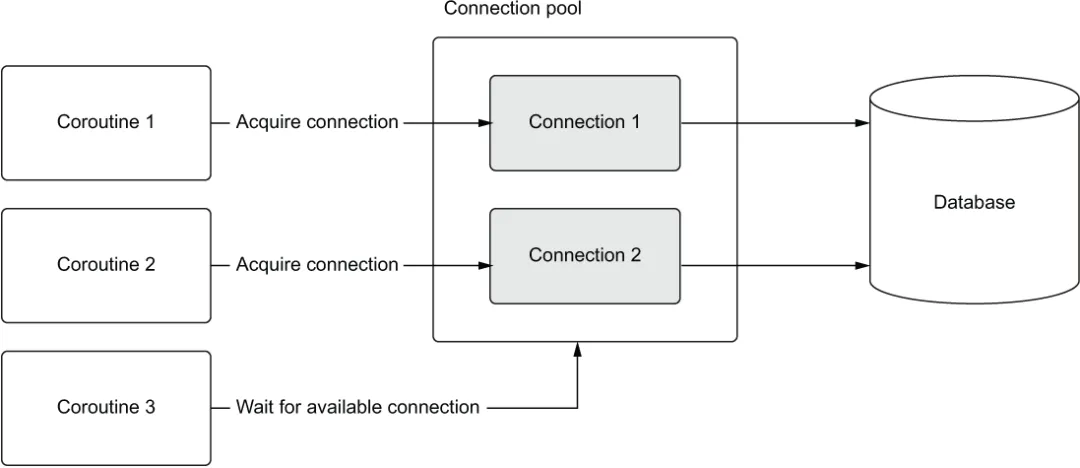
为了说明 asyncio 中的工作原理,想象一下连接池中有两个连接。再想象有三个协程,每个都运行一个查询。我们将这三个协程作为任务并发运行。在这种设置下,前两个尝试运行查询的协程将获取两个可用连接并开始运行查询。此时,第三个协程将等待连接可用。当第一个或第二个协程中的任意一个完成查询后,它将释放连接并归还给池。这使得第三个协程可以获取该连接并开始运行其查询(见图 5.2)。
图 5.2 协程 1 和 2 获取连接运行查询,而协程 3 等待连接。当协程 1 或 2 任一完成时,协程 3 可以使用刚释放的连接并执行其查询。
在这个模型中,最多可以同时运行两个查询。通常,连接池会更大以支持更多并发。在我们的例子中,我们使用 6 个连接的池,但实际使用多少连接取决于你的数据库和应用硬件。你需要基准测试来确定最佳大小。记住,不是越大越好,但这又是另一个话题了。
现在我们理解了连接池的工作原理,如何用 asyncpg 创建一个呢?asyncpg 提供了一个名为 create_pool 的协程来完成此操作。我们使用它代替之前用来建立数据库连接的 connect 函数。调用 create_pool 时,我们指定池中希望创建的连接数量。这通过 min_size 和 max_size 参数完成。min_size 参数指定连接池中的最小连接数。这意味着一旦设置好池,就保证已有这么多连接处于建立状态。max_size 参数指定池中希望的最大连接数,决定了最大连接数。如果没有足够的连接可用,池会在不超过 max_size 设置值的前提下创建新连接。在第一个例子中,我们将这两个值都设为 6。这保证了我们始终有 6 个连接可用。
asyncpg 池是异步上下文管理器,这意味着我们必须使用 async with 语法来创建池。建立池后,我们可以使用 acquire 协程获取连接。该协程会暂停执行,直到有连接可用。一旦有连接,我们就可以用它执行任何想要的 SQL 查询。获取连接也是一个异步上下文管理器,使用完毕后会将连接返回给池,因此我们也需要使用 async with 语法,就像我们创建池时一样。利用这一点,我们可以重写代码以并发运行多个查询。
import asyncioimport asyncpgproduct_query = \ """SELECTp.product_id,p.product_name,p.brand_id,s.sku_id,pc.product_color_name,ps.product_size_nameFROM product as pJOIN sku as s on s.product_id = p.product_idJOIN product_color as pc on pc.product_color_id = s.product_color_idJOIN product_size as ps on ps.product_size_id = s.product_size_idWHERE p.product_id = 100"""async def query_product(pool): async with pool.acquire() as connection: return await connection.fetchrow(product_query)async def main(): async with asyncpg.create_pool(host='127.0.0.1', port=5432, user='postgres', password='password', database='products', min_size=6, max_size=6) as pool: # ❶ await asyncio.gather(query_product(pool), query_product(pool)) # ❷asyncio.run(main())
❶ 创建一个包含 6 个连接的连接池。❷ 并发执行两个产品查询。
在上述代码中,我们首先创建一个包含 6 个连接的连接池。然后创建两个查询协程对象,并使用 asyncio.gather 将它们调度为并发运行。在 query_product 协程中,我们首先通过 pool.acquire() 从池中获取连接。该协程将暂停执行,直到连接池中有可用连接。我们在 async with 块中执行此操作;这将确保离开该块时,连接会被返回给池。这一点非常重要,因为如果不这样做,可能会耗尽连接,导致应用程序永远挂起,等待永远不会可用的连接。获取连接后,我们可以像之前一样运行查询。
我们可以将这个例子扩展为运行 10,000 个查询,创建 10,000 个不同的查询协程对象。为了使其有趣,我们编写一个同步版本并比较耗时。
import asyncioimport asyncpgfrom util import async_timedproduct_query = \ """SELECTp.product_id,p.product_name,p.brand_id,s.sku_id,pc.product_color_name,ps.product_size_nameFROM product as pJOIN sku as s on s.product_id = p.product_idJOIN product_color as pc on pc.product_color_id = s.product_color_idJOIN product_size as ps on ps.product_size_id = s.product_size_idWHERE p.product_id = 100"""async def query_product(pool): async with pool.acquire() as connection: return await connection.fetchrow(product_query)@async_timed()async def query_products_synchronously(pool, queries): return [await query_product(pool) for _ in range(queries)]@async_timed()async def query_products_concurrently(pool, queries): queries = [query_product(pool) for _ in range(queries)] return await asyncio.gather(*queries)async def main(): async with asyncpg.create_pool(host='127.0.0.1', port=5432, user='postgres', password='password', database='products', min_size=6, max_size=6) as pool: await query_products_synchronously(pool, 10000) await query_products_concurrently(pool, 10000)asyncio.run(main())
在 query_products_synchronously 中,我们在列表推导中加入 await,这会强制每次调用 query_product 串行执行。而在 query_products_concurrently 中,我们创建一个协程列表并用 gather 并发运行它们。在主协程中,我们分别运行同步和并发版本,各执行 10,000 次查询。尽管具体结果因硬件而异,但并发版本比串行版本快近五倍:
starting <function query_products_synchronously at 0x1219ea1f0> with args (<asyncpg.pool.Pool object at 0x12164a400>, 10000) {}finished <function query_products_synchronously at 0x1219ea1f0> in 21.8274 second(s)starting <function query_products_concurrently at 0x1219ea310> with args (<asyncpg.pool.Pool object at 0x12164a400>, 10000) {}finished <function query_products_concurrently at 0x1219ea310> in 4.8464 second(s)
这样的性能提升非常显著,但如果我们还需要更高的吞吐量,还有更多优化空间。由于我们的查询相对较快,这段代码混合了 CPU 密集型和 I/O 密集型操作。在第 6 章中,我们将看到如何进一步榨干这套架构的性能。
到目前为止,我们假设插入数据时不会失败。但如果在插入产品过程中发生故障怎么办?我们不希望数据库处于不一致状态,这时就要用到数据库事务。接下来,我们将学习如何使用异步上下文管理器来获取和管理事务。

 10个月宝宝每天需要喝多少奶粉?