Linux 怎么使用 tcpdump 工具来抓USB数据
- 2026-09-02 17:02:35
Linux 怎么使用 tcpdump 工具来抓USB数据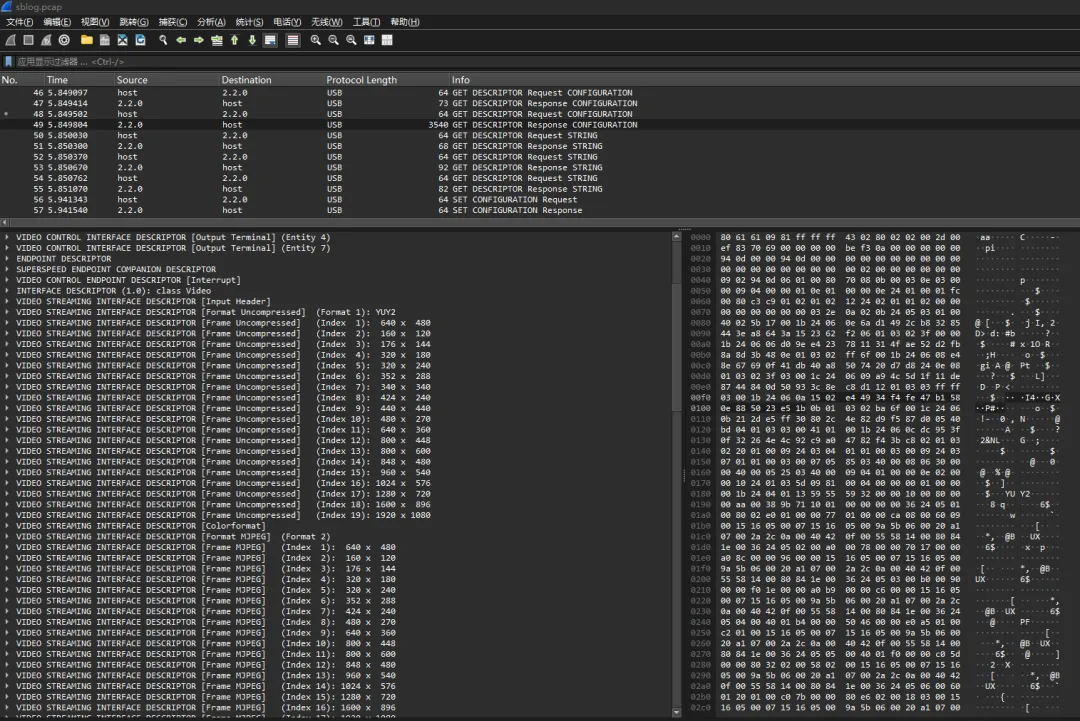
Linux 怎么使用 tcpdump 工具来抓USB数据
tcpdump 是一个强大的命令行网络抓包工具,广泛用于捕获和分析网络流量,下面介绍配合usbmon进行usb数据抓包分析。
1.tcpdump -D
# tcpdump -D
1.dummy0 [Up, Running]
2.any (Pseudo-device that captures on all interfaces) [Up, Running]
3.lo [Up, Running, Loopback]
4.eth1 [Up, Disconnected]
5.eth0 [Up, Disconnected]
6.wlan0 [Wireless]
7.ip6tnl0 [none]
8.sit0 [none]
9.ip6_vti0 [none]
10.ip_vti0 [none]
11.ifb1 [none]
12.ifb0 [none]
13.nflog (Linux netfilter log (NFLOG) interface) [none]
14.nfqueue (Linux netfilter queue (NFQUEUE) interface) [none]
如果没有usbmon需要挂载devtmpfs 和确认有usb总线,lsusb可以看到usb总线。
2.mount -t devtmpfs devtmpfs /dev/
# mount -t devtmpfs devtmpfs /dev/
# tcpdump -D
1.dummy0 [Up, Running]
2.any (Pseudo-device that captures on all interfaces) [Up, Running]
3.lo [Up, Running, Loopback]
4.eth1 [Up, Disconnected]
5.eth0 [Up, Disconnected]
6.wlan0 [Wireless]
7.ip6tnl0 [none]
8.sit0 [none]
9.ip6_vti0 [none]
10.ip_vti0 [none]
11.ifb1 [none]
12.ifb0 [none]
13.usbmon2 (Raw USB traffic, bus number 2)
14.usbmon1 (Raw USB traffic, bus number 1)
15.usbmon0 (Raw USB traffic, all USB buses) [none]
16.nflog (Linux netfilter log (NFLOG) interface) [none]
17.nfqueue (Linux netfilter queue (NFQUEUE) interface) [none]
注意:如果挂载devtmpfs后,还是没有usbmon提示,要先确认libpcap支持usb,如果没有支持需要格外打开。
diff --git a/pcap.c b/pcap.c
index ef1bbb71..0bd6a5d5 100644
--- a/pcap.c
+++ b/pcap.c
@@ -93,6 +93,7 @@ struct rtentry;        /* declarations in <net/if.h> */
 #include "pcap-tc.h"
 #endif /* HAVE_TC_API */

+#define PCAP_SUPPORT_LINUX_USBMON
 #ifdef PCAP_SUPPORT_LINUX_USBMON
 #include "pcap-usb-linux.h"
 #endif
3.tcpdump -i usbmon2 -w /data/sblog.pcap
# tcpdump -i usbmon2 -w /data/sblog.pcap
tcpdump: listening on usbmon2, link-type USB_LINUX_MMAPPED (USB with padded Linux header), snapshot length 245824 bytes
[  229.965607][  T122] usb 2-1: new SuperSpeed USB device number 2 using xhci-hcd
[  229.987853][  T122] usb 2-1: New USB device found, idVendor=046d, idProduct=085e, bcdDevice= 3.17
[  229.987956][  T122] usb 2-1: New USB device strings: Mfr=0, Product=2, SerialNumber=3
[  229.987987][  T122] usb 2-1: Product: Logitech BRIO
[  229.988014][  T122] usb 2-1: SerialNumber: CB2A68F1
[  229.998451][  T200] ueventd: Cannot set 'u:object_r:usb_device:s0' SELinux label on '/dev/bus/usb/002/002' device: Permission denied
[  229.998821][  T286] type=1400 audit(1768980999.961:160): avc:  denied  { relabelfrom } for  comm="ueventd" name="002" dev="devtmpfs" ino=210 scontext=u:r:ueventd:s0 tcontext=u:object_r:device:s0 tclass=chr_file permissive=0
[  230.073563][  T122] usb 2-1: Found UVC 1.00 device Logitech BRIO (046d:085e)
[  230.093116][  T200] ueventd: Cannot set 'u:object_r:video_device:s0' SELinux label on '/dev/video25' device: Permission denied
[  230.093595][  T286] type=1400 audit(1768981000.053:161): avc:  denied  { relabelfrom } for  comm="ueventd" name="video25" dev="devtmpfs" ino=211 scontext=u:r:ueventd:s0 tcontext=u:object_r:device:s0 tclass=chr_file permissive=0
[  230.098197][  T122] input: Logitech BRIO as /devices/platform/23400000.usb/xhci-hcd.0.auto/usb2/2-1/2-1:1.0/input/input11
[  230.110405][  T200] ueventd: Cannot set 'u:object_r:video_device:s0' SELinux label on '/dev/video26' device: Permission denied
[  230.110788][  T286] type=1400 audit(1768981000.073:162): avc:  denied  { relabelfrom } for  comm="ueventd" name="video26" dev="devtmpfs" ino=212 scontext=u:r:ueventd:s0 tcontext=u:object_r:device:s0 tclass=chr_file permissive=0
[  230.117845][  T200] ueventd: Cannot set 'u:object_r:video_device:s0' SELinux label on '/dev/video27' device: Permission denied
[  230.118171][  T286] type=1400 audit(1768981000.081:163): avc:  denied  { relabelfrom } for  comm="ueventd" name="video27" dev="devtmpfs" ino=213 scontext=u:r:ueventd:s0 tcontext=u:object_r:device:s0 tclass=chr_file permissive=0
[  230.124958][  T200] ueventd: Cannot set 'u:object_r:video_device:s0' SELinux label on '/dev/video28' device: Permission denied
[  230.125329][  T286] type=1400 audit(1768981000.085:164): avc:  denied  { relabelfrom } for  comm="ueventd" name="video28" dev="devtmpfs" ino=214 scontext=u:r:ueventd:s0 tcontext=u:object_r:device:s0 tclass=chr_file permissive=0
[  230.130582][  T200] audit: audit_lost=40 audit_rate_limit=5 audit_backlog_limit=64
[  230.130746][  T200] audit: rate limit exceeded
[  230.130864][  T200] ueventd: Cannot set 'u:object_r:video_device:s0' SELinux label on '/dev/media3' device: Permission denied
[  230.140074][  T200] ueventd: Cannot set 'u:object_r:input_device:s0' SELinux label on '/dev/input/event11' device: Permission denied
[  230.206511][  T122] usb 2-1: current rate 16000 is different from the runtime rate 24000
[  230.270768][  T122] usb 2-1: current rate 16000 is different from the runtime rate 32000
[  230.334980][  T122] usb 2-1: current rate 16000 is different from the runtime rate 48000
[  230.409977][  T122] input: Logitech BRIO Consumer Control as /devices/platform/23400000.usb/xhci-hcd.0.auto/usb2/2-1/2-1:1.5/0003:046D:085E.0001/input/input12
[  230.417666][  T200] ueventd: Cannot set 'u:object_r:audio_device:s0' SELinux label on '/dev/snd/pcmC3D0c' device: Permission denied
[  230.422246][  T200] ueventd: Cannot set 'u:object_r:audio_device:s0' SELinux label on '/dev/snd/controlC3' device: Permission denied
[  230.439602][  T200] ueventd: Cannot set 'u:object_r:input_device:s0' SELinux label on '/dev/input/event12' device: Permission denied
[  230.471360][  T122] hid-generic 0003:046D:085E.0001: input,hidraw0: USB HID v1.11 Device [Logitech BRIO] on usb-xhci-hcd.0.auto-1/input5
[  230.482125][  T200] ueventd: Cannot set 'u:object_r:hidraw_device:s0' SELinux label on '/dev/hidraw0' device: Permission denied
以ctrl+c结束,可以看到提示抓了多少包数据。
4.使用wireshark分析sblog.pcap
本文来自网友投稿或网络内容,如有侵犯您的权益请联系我们删除,联系邮箱:596563534@qq.com 。
随机文章
-
 10个月宝宝每天需要喝多少奶粉?
- 零基础实战学Python|一笑师兄趣味绘图系列01
- 面了个28K的候选人,简历写精通Linux/Shell.我让他现场写个命令:乡统计Nginx日志里访问量Top10的IP.憋了半天写了个cat',然后就没有了
- 为什么NOAI人工智能奥赛必学Python? 1月31日人大NOAI金牌教练直播为你指路!
- 「0834-数据结构(python)」电子版+学习笔记+知识点总结+期末考试重点+复习资料+考试重点基础题+知识总结+高清PDF可打印+免费分享!
- 运维珍藏!600条能用到“退休”的Linux命令!
- 实战学Python程序清单(2026年1月更新)
- 网络延迟的元凶:Linux内核协议栈排查实战
- 限时福利丨Linux运维110G学习大礼包+纸质书免费送
- macOS 好用,还是 Linux 好用?
- 108个Python核心概念,用大白话讲明白