redis-py 现已支持集群模式,并为 Redis 集群提供客户端支持。该集群客户端基于 Grokzen 的 redis-py-cluster 实现,在修复若干缺陷后现已取代原有库。
连接集群
redis-py 连接到 Redis 集群实例时,至少需要一个节点用于集群发现。创建集群实例有多种方式:
1.使用 host 和 ip 参数
>>> from redis.cluster import RedisCluster as Redis>>> rc = Redis(host='192.168.137.3', port=6379,password="pw")>>> print(rc.get_nodes())[[host=127.0.0.1,port=6379,name=127.0.0.1:6379,server_type=primary,redis_connection=<redis.client.Redis(<redis.connection.ConnectionPool(<redis.connection.Connection(db=0,username=None,password=pw,socket_timeout=None,encoding=utf-8,encoding_errors=strict,decode_responses=False,retry_on_error=[],retry=<redis.retry.Retry object at 0x7f9bcdc60fd0>,health_check_interval=0,client_name=None,lib_name=redis-py,lib_version=7.0.1,redis_connect_func=<bound method RedisCluster.on_connect of <redis.cluster.RedisCluster object at 0x7f9bcdc49fd0>>,credential_provider=None,protocol=2,host=127.0.0.1,port=6379,socket_connect_timeout=None,socket_keepalive=None,socket_keepalive_options=None)>)>)>], [host=192.168.137.4,port=6380,name=192.168.137.4:6380,server_type=replica,redis_connection=<redis.client.Redis(<redis.connection.ConnectionPool(<redis.connection.Connection(db=0,username=None,password=pw,socket_timeout=None,encoding=utf-8,encoding_errors=strict,decode_responses=False,retry_on_error=[],retry=<redis.retry.Retry object at 0x7f9bcdae5700>,health_check_interval=0,client_name=None,lib_name=redis-py,lib_version=7.0.1,redis_connect_func=<bound method RedisCluster.on_connect of <redis.cluster.RedisCluster object at 0x7f9bcdc49fd0>>,credential_provider=None,protocol=2,host=192.168.137.4,port=6380,socket_connect_timeout=None,socket_keepalive=None,socket_keepalive_options=None)>)>)>], [host=192.168.137.5,port=6379,name=192.168.137.5:6379,server_type=primary,redis_connection=<redis.client.Redis(<redis.connection.ConnectionPool(<redis.connection.Connection(db=0,username=None,password=pw,socket_timeout=None,encoding=utf-8,encoding_errors=strict,decode_responses=False,retry_on_error=[],retry=<redis.retry.Retry object at 0x7f9bcdae5df0>,health_check_interval=0,client_name=None,lib_name=redis-py,lib_version=7.0.1,redis_connect_func=<bound method RedisCluster.on_connect of <redis.cluster.RedisCluster object at 0x7f9bcdc49fd0>>,credential_provider=None,protocol=2,host=192.168.137.5,port=6379,socket_connect_timeout=None,socket_keepalive=None,socket_keepalive_options=None)>)>)>], [host=127.0.0.1,port=6380,name=127.0.0.1:6380,server_type=replica,redis_connection=<redis.client.Redis(<redis.connection.ConnectionPool(<redis.connection.Connection(db=0,username=None,password=pw,socket_timeout=None,encoding=utf-8,encoding_errors=strict,decode_responses=False,retry_on_error=[],retry=<redis.retry.Retry object at 0x7f9bcdaee520>,health_check_interval=0,client_name=None,lib_name=redis-py,lib_version=7.0.1,redis_connect_func=<bound method RedisCluster.on_connect of <redis.cluster.RedisCluster object at 0x7f9bcdc49fd0>>,credential_provider=None,protocol=2,host=127.0.0.1,port=6380,socket_connect_timeout=None,socket_keepalive=None,socket_keepalive_options=None)>)>)>], [host=192.168.137.4,port=6379,name=192.168.137.4:6379,server_type=primary,redis_connection=<redis.client.Redis(<redis.connection.ConnectionPool(<redis.connection.Connection(db=0,username=None,password=pw,socket_timeout=None,encoding=utf-8,encoding_errors=strict,decode_responses=False,retry_on_error=[],retry=<redis.retry.Retry object at 0x7f9bcdaeec10>,health_check_interval=0,client_name=None,lib_name=redis-py,lib_version=7.0.1,redis_connect_func=<bound method RedisCluster.on_connect of <redis.cluster.RedisCluster object at 0x7f9bcdc49fd0>>,credential_provider=None,protocol=2,host=192.168.137.4,port=6379,socket_connect_timeout=None,socket_keepalive=None,socket_keepalive_options=None)>)>)>], [host=192.168.137.5,port=6380,name=192.168.137.5:6380,server_type=replica,redis_connection=<redis.client.Redis(<redis.connection.ConnectionPool(<redis.connection.Connection(db=0,username=None,password=pw,socket_timeout=None,encoding=utf-8,encoding_errors=strict,decode_responses=False,retry_on_error=[],retry=<redis.retry.Retry object at 0x7f9bcdafa340>,health_check_interval=0,client_name=None,lib_name=redis-py,lib_version=7.0.1,redis_connect_func=<bound method RedisCluster.on_connect of <redis.cluster.RedisCluster object at 0x7f9bcdc49fd0>>,credential_provider=None,protocol=2,host=192.168.137.5,port=6380,socket_connect_timeout=None,socket_keepalive=None,socket_keepalive_options=None)>)>)>]]>>>
如果使用从节点呢?也是同样的效果
>>> from redis.cluster import RedisCluster as Redis>>> rc = Redis(host='192.168.137.3', port=6380,password="pw")>>> print(rc.get_nodes())[[host=127.0.0.1,port=6379,name=127.0.0.1:6379,server_type=primary,redis_connection=<redis.client.Redis(<redis.connection.ConnectionPool(<redis.connection.Connection(db=0,username=None,password=pw,socket_timeout=None,encoding=utf-8,encoding_errors=strict,decode_responses=False,retry_on_error=[],retry=<redis.retry.Retry object at 0x7f0cbfd1cfd0>,health_check_interval=0,client_name=None,lib_name=redis-py,lib_version=7.0.1,redis_connect_func=<bound method RedisCluster.on_connect of <redis.cluster.RedisCluster object at 0x7f0cbfd05fd0>>,credential_provider=None,protocol=2,host=127.0.0.1,port=6379,socket_connect_timeout=None,socket_keepalive=None,socket_keepalive_options=None)>)>)>], [host=192.168.137.4,port=6380,name=192.168.137.4:6380,server_type=replica,redis_connection=<redis.client.Redis(<redis.connection.ConnectionPool(<redis.connection.Connection(db=0,username=None,password=pw,socket_timeout=None,encoding=utf-8,encoding_errors=strict,decode_responses=False,retry_on_error=[],retry=<redis.retry.Retry object at 0x7f0cbfba1700>,health_check_interval=0,client_name=None,lib_name=redis-py,lib_version=7.0.1,redis_connect_func=<bound method RedisCluster.on_connect of <redis.cluster.RedisCluster object at 0x7f0cbfd05fd0>>,credential_provider=None,protocol=2,host=192.168.137.4,port=6380,socket_connect_timeout=None,socket_keepalive=None,socket_keepalive_options=None)>)>)>], [host=192.168.137.5,port=6379,name=192.168.137.5:6379,server_type=primary,redis_connection=<redis.client.Redis(<redis.connection.ConnectionPool(<redis.connection.Connection(db=0,username=None,password=pw,socket_timeout=None,encoding=utf-8,encoding_errors=strict,decode_responses=False,retry_on_error=[],retry=<redis.retry.Retry object at 0x7f0cbfba1df0>,health_check_interval=0,client_name=None,lib_name=redis-py,lib_version=7.0.1,redis_connect_func=<bound method RedisCluster.on_connect of <redis.cluster.RedisCluster object at 0x7f0cbfd05fd0>>,credential_provider=None,protocol=2,host=192.168.137.5,port=6379,socket_connect_timeout=None,socket_keepalive=None,socket_keepalive_options=None)>)>)>], [host=192.168.137.3,port=6380,name=192.168.137.3:6380,server_type=replica,redis_connection=<redis.client.Redis(<redis.connection.ConnectionPool(<redis.connection.Connection(db=0,username=None,password=pw,socket_timeout=None,encoding=utf-8,encoding_errors=strict,decode_responses=False,retry_on_error=[],retry=<redis.retry.Retry object at 0x7f0cbfbaa520>,health_check_interval=0,client_name=None,lib_name=redis-py,lib_version=7.0.1,redis_connect_func=<bound method RedisCluster.on_connect of <redis.cluster.RedisCluster object at 0x7f0cbfd05fd0>>,credential_provider=None,protocol=2,host=192.168.137.3,port=6380,socket_connect_timeout=None,socket_keepalive=None,socket_keepalive_options=None)>)>)>], [host=192.168.137.4,port=6379,name=192.168.137.4:6379,server_type=primary,redis_connection=<redis.client.Redis(<redis.connection.ConnectionPool(<redis.connection.Connection(db=0,username=None,password=pw,socket_timeout=None,encoding=utf-8,encoding_errors=strict,decode_responses=False,retry_on_error=[],retry=<redis.retry.Retry object at 0x7f0cbfbaac10>,health_check_interval=0,client_name=None,lib_name=redis-py,lib_version=7.0.1,redis_connect_func=<bound method RedisCluster.on_connect of <redis.cluster.RedisCluster object at 0x7f0cbfd05fd0>>,credential_provider=None,protocol=2,host=192.168.137.4,port=6379,socket_connect_timeout=None,socket_keepalive=None,socket_keepalive_options=None)>)>)>], [host=192.168.137.5,port=6380,name=192.168.137.5:6380,server_type=replica,redis_connection=<redis.client.Redis(<redis.connection.ConnectionPool(<redis.connection.Connection(db=0,username=None,password=pw,socket_timeout=None,encoding=utf-8,encoding_errors=strict,decode_responses=False,retry_on_error=[],retry=<redis.retry.Retry object at 0x7f0cbfbb6340>,health_check_interval=0,client_name=None,lib_name=redis-py,lib_version=7.0.1,redis_connect_func=<bound method RedisCluster.on_connect of <redis.cluster.RedisCluster object at 0x7f0cbfd05fd0>>,credential_provider=None,protocol=2,host=192.168.137.5,port=6380,socket_connect_timeout=None,socket_keepalive=None,socket_keepalive_options=None)>)>)>]]>>>
2.使用 Redis URL 说明
>>> from redis.cluster import RedisCluster as Redis>>> rc1 = Redis.from_url("redis://:pw@localhost:6379/0")>>> print(rc1.get_nodes())[[host=192.168.137.3,port=6379,name=192.168.137.3:6379,server_type=primary,redis_connection=<redis.client.Redis(<redis.connection.ConnectionPool(<redis.connection.Connection(password=pw,db=0,redis_connect_func=<bound method RedisCluster.on_connect of <redis.cluster.RedisCluster object at 0x7fb5f7c8ae20>>,host=192.168.137.3,port=6379,retry=<redis.retry.Retry object at 0x7fb5f7c368e0>)>)>)>], [host=192.168.137.4,port=6380,name=192.168.137.4:6380,server_type=replica,redis_connection=<redis.client.Redis(<redis.connection.ConnectionPool(<redis.connection.Connection(password=pw,db=0,redis_connect_func=<bound method RedisCluster.on_connect of <redis.cluster.RedisCluster object at 0x7fb5f7c8ae20>>,host=192.168.137.4,port=6380,retry=<redis.retry.Retry object at 0x7fb5f7c62520>)>)>)>], [host=192.168.137.5,port=6379,name=192.168.137.5:6379,server_type=primary,redis_connection=<redis.client.Redis(<redis.connection.ConnectionPool(<redis.connection.Connection(password=pw,db=0,redis_connect_func=<bound method RedisCluster.on_connect of <redis.cluster.RedisCluster object at 0x7fb5f7c8ae20>>,host=192.168.137.5,port=6379,retry=<redis.retry.Retry object at 0x7fb5f7c58bb0>)>)>)>], [host=192.168.137.3,port=6380,name=192.168.137.3:6380,server_type=replica,redis_connection=<redis.client.Redis(<redis.connection.ConnectionPool(<redis.connection.Connection(password=pw,db=0,redis_connect_func=<bound method RedisCluster.on_connect of <redis.cluster.RedisCluster object at 0x7fb5f7c8ae20>>,host=192.168.137.3,port=6380,retry=<redis.retry.Retry object at 0x7fb5f7be6340>)>)>)>], [host=192.168.137.4,port=6379,name=192.168.137.4:6379,server_type=primary,redis_connection=<redis.client.Redis(<redis.connection.ConnectionPool(<redis.connection.Connection(password=pw,db=0,redis_connect_func=<bound method RedisCluster.on_connect of <redis.cluster.RedisCluster object at 0x7fb5f7c8ae20>>,host=192.168.137.4,port=6379,retry=<redis.retry.Retry object at 0x7fb5f7be8610>)>)>)>], [host=192.168.137.5,port=6380,name=192.168.137.5:6380,server_type=replica,redis_connection=<redis.client.Redis(<redis.connection.ConnectionPool(<redis.connection.Connection(password=pw,db=0,redis_connect_func=<bound method RedisCluster.on_connect of <redis.cluster.RedisCluster object at 0x7fb5f7c8ae20>>,host=192.168.137.5,port=6380,retry=<redis.retry.Retry object at 0x7fb5f7aa2670>)>)>)>]]>>>
3.直接通过 ClusterNode 类
>>> from redis.cluster import RedisCluster as Redis>>> from redis.cluster import ClusterNode>>> nodes = [ClusterNode('localhost', 6379), ClusterNode('localhost', 6380)]>>> rc = Redis(startup_nodes=nodes, password='pw')>>> print(rc.get_nodes())[[host=127.0.0.1,port=6379,name=127.0.0.1:6379,server_type=primary,redis_connection=<redis.client.Redis(<redis.connection.ConnectionPool(<redis.connection.Connection(db=0,username=None,password=pw,socket_timeout=None,encoding=utf-8,encoding_errors=strict,decode_responses=False,retry_on_error=[],retry=<redis.retry.Retry object at 0x7f24c02a1f40>,health_check_interval=0,client_name=None,lib_name=redis-py,lib_version=7.0.1,redis_connect_func=<bound method RedisCluster.on_connect of <redis.cluster.RedisCluster object at 0x7f24c100a340>>,credential_provider=None,protocol=2,host=127.0.0.1,port=6379,socket_connect_timeout=None,socket_keepalive=None,socket_keepalive_options=None)>)>)>], [host=192.168.137.4,port=6380,name=192.168.137.4:6380,server_type=replica,redis_connection=<redis.client.Redis(<redis.connection.ConnectionPool(<redis.connection.Connection(db=0,username=None,password=pw,socket_timeout=None,encoding=utf-8,encoding_errors=strict,decode_responses=False,retry_on_error=[],retry=<redis.retry.Retry object at 0x7f24c0108670>,health_check_interval=0,client_name=None,lib_name=redis-py,lib_version=7.0.1,redis_connect_func=<bound method RedisCluster.on_connect of <redis.cluster.RedisCluster object at 0x7f24c100a340>>,credential_provider=None,protocol=2,host=192.168.137.4,port=6380,socket_connect_timeout=None,socket_keepalive=None,socket_keepalive_options=None)>)>)>], [host=192.168.137.5,port=6379,name=192.168.137.5:6379,server_type=primary,redis_connection=<redis.client.Redis(<redis.connection.ConnectionPool(<redis.connection.Connection(db=0,username=None,password=pw,socket_timeout=None,encoding=utf-8,encoding_errors=strict,decode_responses=False,retry_on_error=[],retry=<redis.retry.Retry object at 0x7f24c0108d60>,health_check_interval=0,client_name=None,lib_name=redis-py,lib_version=7.0.1,redis_connect_func=<bound method RedisCluster.on_connect of <redis.cluster.RedisCluster object at 0x7f24c100a340>>,credential_provider=None,protocol=2,host=192.168.137.5,port=6379,socket_connect_timeout=None,socket_keepalive=None,socket_keepalive_options=None)>)>)>], [host=127.0.0.1,port=6380,name=127.0.0.1:6380,server_type=replica,redis_connection=<redis.client.Redis(<redis.connection.ConnectionPool(<redis.connection.Connection(db=0,username=None,password=pw,socket_timeout=None,encoding=utf-8,encoding_errors=strict,decode_responses=False,retry_on_error=[],retry=<redis.retry.Retry object at 0x7f24c0110490>,health_check_interval=0,client_name=None,lib_name=redis-py,lib_version=7.0.1,redis_connect_func=<bound method RedisCluster.on_connect of <redis.cluster.RedisCluster object at 0x7f24c100a340>>,credential_provider=None,protocol=2,host=127.0.0.1,port=6380,socket_connect_timeout=None,socket_keepalive=None,socket_keepalive_options=None)>)>)>], [host=192.168.137.4,port=6379,name=192.168.137.4:6379,server_type=primary,redis_connection=<redis.client.Redis(<redis.connection.ConnectionPool(<redis.connection.Connection(db=0,username=None,password=pw,socket_timeout=None,encoding=utf-8,encoding_errors=strict,decode_responses=False,retry_on_error=[],retry=<redis.retry.Retry object at 0x7f24c0110b80>,health_check_interval=0,client_name=None,lib_name=redis-py,lib_version=7.0.1,redis_connect_func=<bound method RedisCluster.on_connect of <redis.cluster.RedisCluster object at 0x7f24c100a340>>,credential_provider=None,protocol=2,host=192.168.137.4,port=6379,socket_connect_timeout=None,socket_keepalive=None,socket_keepalive_options=None)>)>)>], [host=192.168.137.5,port=6380,name=192.168.137.5:6380,server_type=replica,redis_connection=<redis.client.Redis(<redis.connection.ConnectionPool(<redis.connection.Connection(db=0,username=None,password=pw,socket_timeout=None,encoding=utf-8,encoding_errors=strict,decode_responses=False,retry_on_error=[],retry=<redis.retry.Retry object at 0x7f24c011c2b0>,health_check_interval=0,client_name=None,lib_name=redis-py,lib_version=7.0.1,redis_connect_func=<bound method RedisCluster.on_connect of <redis.cluster.RedisCluster object at 0x7f24c100a340>>,credential_provider=None,protocol=2,host=192.168.137.5,port=6380,socket_connect_timeout=None,socket_keepalive=None,socket_keepalive_options=None)>)>)>]]>>>
创建 RedisCluster 实例时,首先尝试连接提供的启动节点的其中一个。若所有启动节点均不可达,则抛出 "RedisClusterException" 异常。成功连接集群节点后,RedisCluster 实例将通过以下 3 个缓存完成初始化:
·槽位缓存,将16384个槽位分别映射至负责处理的节点;
·节点缓存,包含集群所有节点的 ClusterNode 对象(含名称、主机、端口及 Redis 连接信息);
·命令缓存,存储通过 Redis 'COMMAND' 输出获取的所有服务器支持命令。
RedisCluster 实例可直接用于执行 Redis 命令。当通过集群实例执行命令时,将在内部自动确定目标节点。使用基于键的命令时,目标节点即为持有该键槽位的节点。集群管理命令及其他非基于键的命令有一个名为 "target_nodes" 的参数,可用于指定命令的执行节点。若未指定 target_nodes,命令将默认在集群默认节点上执行。集群实例初始化时,默认节点会从集群主节点中随机选取,并在重新初始化时更新。可通过 r.get_default_node() 获取集群默认节点,或使用 "set_default_node" 方法进行修改。
>>> # target-nodes: the node that holds 'foo1's key slot>>> rc.set('foo1', 'bar1')>>> # target-nodes: the node that holds 'foo2's key slot>>> rc.set('foo2', 'bar2')>>> # target-nodes: the node that holds 'foo1's key slot>>> print(rc.get('foo1'))b'bar'>>> # target-node: default-node>>> print(rc.keys())[b'foo1']>>> # target-node: default-node>>> rc.ping()
指定目标节点
如上所述,所有非基于键的 RedisCluster 命令均接受可选参数 target_nodes,用于指定应执行命令的目标节点。最佳实践是使用 RedisCluster 类的节点标志来指定目标节点:PRIMARIES(主节点)、REPLICAS(副本节点)、ALL_NODES(所有节点)、RANDOM(随机节点)。当节点标志与命令一同传递时,系统会内部解析为相关节点。若命令执行期间集群节点拓扑发生变化,客户端将根据新拓扑重新解析节点标志并尝试重试命令执行。
>>> from redis.cluster import RedisCluster as Redis>>> rc = Redis(host='localhost', port=6379,password="pw")>>> rc.cluster_meet('127.0.0.1', 6379, target_nodes=Redis.ALL_NODES){'127.0.0.1:6379': True, '192.168.137.4:6380': True, '192.168.137.5:6379': True, '127.0.0.1:6380': True, '192.168.137.4:6379': True, '192.168.137.5:6380': True}>>> # ping all replicas>>> rc.ping(target_nodes=Redis.REPLICAS)True>>> # ping a random node>>> rc.ping(target_nodes=Redis.RANDOM)True>>> # get the keys from all cluster nodes>>> rc.keys(target_nodes=Redis.ALL_NODES)[]>>> # execute bgsave in all primaries>>> rc.bgsave(Redis.PRIMARIES)True>>>
若需在特定节点/节点组上执行命令(该节点组未被 nodes 标志覆盖),也可直接传递 ClusterNodes。但需注意:若因集群拓扑变更导致命令执行失败,系统将不会重试,因为传递的目标节点可能已失效,此时将返回相应的集群或连接错误。
>>> node = rc.get_node('localhost', 6379)>>> # Get the keys only for that specific node>>> rc.keys(target_nodes=node)>>> # get Redis info from a subset of primaries>>> subset_primaries = [node for node in rc.get_primaries() if node.port > 6378]>>> rc.info(target_nodes=subset_primaries)
此外,RedisCluster实例可查询特定节点的Redis实例,并直接在该节点上执行命令。但Redis客户端不处理集群故障和重试机制。
>>> cluster_node = rc.get_node(host='localhost', port=6379)>>> print(cluster_node)[host=127.0.0.1,port=6379,name=127.0.0.1:6379,server_type=primary,redis_connection=Redis<ConnectionPool<Connection<host=127.0.0.1,port=6379,db=0>>>]>>> r = cluster_node.redis_connection>>> r.client_list()[{'id': '276', 'addr': '127.0.0.1:64108', 'fd': '16', 'name': '', 'age': '0', 'idle': '0', 'flags': 'N', 'db': '0', 'sub': '0', 'psub': '0', 'multi': '-1', 'qbuf': '26', 'qbuf-free': '32742', 'argv-mem': '10', 'obl': '0', 'oll': '0', 'omem': '0', 'tot-mem': '54298', 'events': 'r', 'cmd': 'client', 'user': 'default'}]>>> # Get the keys only for that specific node>>> r.keys()[b'foo1']
多键命令
在集群模式下,Redis支持多键命令,例如集合类型的并集或交集操作、mset和mget命令,前提是所有键都哈希到同一槽位。通过 RedisCluster 客户端,可使用已知函数(如 mget、mset)执行原子性多键操作。但必须确保所有键映射到相同槽位,否则将抛出 RedisClusterException 异常。Redis 集群实现了哈希标签机制,可强制特定键存储于同一哈希槽位。对于部分多键操作,也可使用非原子模式,并传递未映射至相同槽位的键。此时客户端会将键映射至相关槽位,并将命令发送至槽位节点所有者。非原子操作会根据哈希值对键进行分批处理,然后将每批键分别发送至对应槽位的所有者。
# Atomic operations can be used when all keys are mapped to the same slot>>> rc.mset({'{foo}1': 'bar1', '{foo}2': 'bar2'})>>> rc.mget('{foo}1', '{foo}2')[b'bar1', b'bar2']# Non-atomic multi-key operations splits the keys into different slots>>> rc.mset_nonatomic({'foo': 'value1', 'bar': 'value2', 'zzz': 'value3')>>> rc.mget_nonatomic('foo', 'bar', 'zzz')[b'value1', b'value2', b'value3']
集群发布订阅
当创建ClusterPubSub实例时若未指定节点,系统将在首次命令执行时自动为PubSub连接选择单个节点。节点选择机制如下:
1. 对请求中的通道名称进行哈希运算以获取其键槽位置
2. 选择处理该键槽的节点:若read_from_replicas设置为true或提供了load_balancing_strategy参数,则可选择副本节点。
PubSub 限制
由于键槽机制,模式订阅和发布功能目前无法正常工作。若对 fo* 模式进行哈希处理,将获得该字符串的键槽,但基于此模式的channel名称存在无限可能——无法预先确定。该功能未被禁用,但当前不建议使用相关命令。
>>> p1 = rc.pubsub()# p1 connection will be set to the node that holds 'foo' keyslot>>> p1.subscribe('foo')# p2 connection will be set to node 'localhost:6379'>>> p2 = rc.pubsub(rc.get_node('localhost', 6379))
只读模式
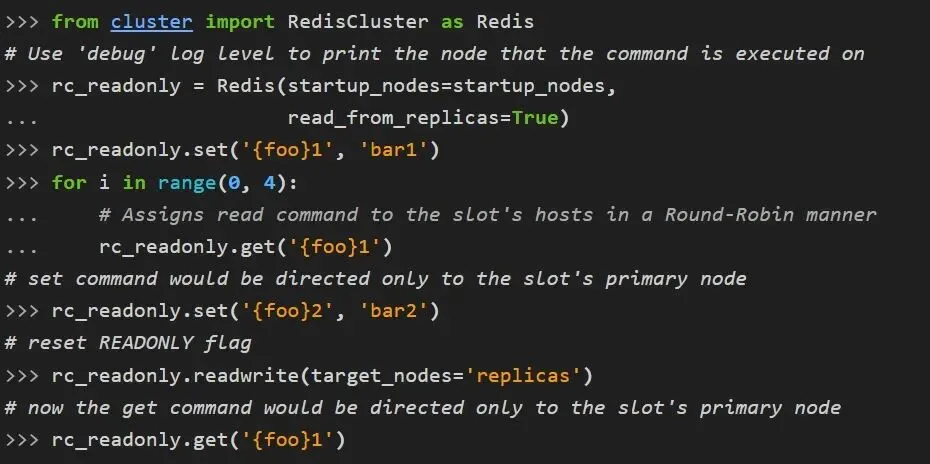
默认情况下,访问副本节点时Redis集群始终返回MOVE重定向响应。可通过开启 READONLY 模式来突破此限制并扩展读取命令。
启用 READONLY 模式需向 RedisCluster 构造函数传递 read_from_replicas=True 参数,或定义load_balancing_strategy 策略。当 read_from_replicas 设为true时,读取命令将以轮询方式分配给主节点及其副本。通过load_balancing_strategy可自定义读取命令分配策略,将命令分配至副本节点和主节点。
运行时可通过调用 readonly() 方法并传入 target_nodes='replicas' 参数设置只读模式,调用readwrite() 方法即可恢复读写访问权限。
 10个月宝宝每天需要喝多少奶粉?