当前位置:首页>python>笔记:Python基础语法

笔记:Python基础语法

  • 2026-02-07 13:23:36
笔记:Python基础语法

print("welcome to shanxi university children free aduct need")

age=input("please enter your age\n")

ifage>=18:

print("you are aduct please give me ten yuan")

print("happy you go")

Python
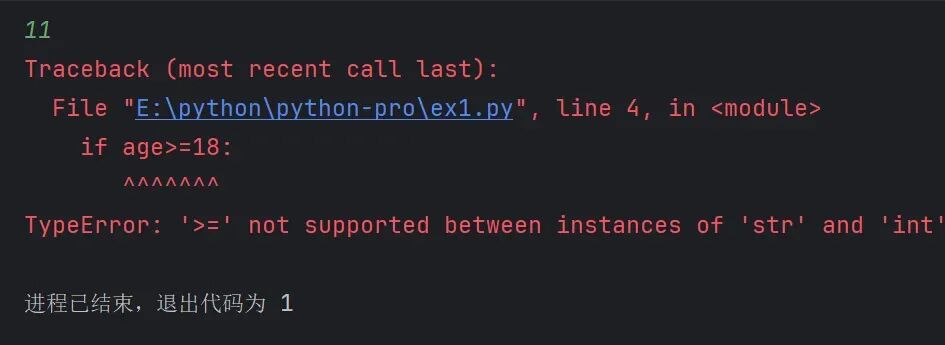
错误原因是:在比较操作中,一个字符串(str)类型与一个整数(int)类型使用了>=比较运算符,而这是Python不支持的。
根据文档中关于input语句的说明,input()默认获取的是字符串类型。因此,当代码中从输入获取age时,它实际上是字符串类型,但后续代码却直接用它和整数18进行比较,导致了类型错误。
解决方案: 如文档中“五类型转化”部分所述,你需要使用int(x)进行类型转换,将输入的字符串转换为整数,然后进行比较。
正确示范:

print("welcome to shanxi university children free aduct need")

age=int(input("please enter your age\n"))

ifage>=18:

print("you are aduct please give me ten yuan")

print("happy you go")

Python

3.if else语句

if 条件:
else:(依旧必须加冒号)
else先不要判断条件,if不满则执行else
else所执行的语句之前同样需要有缩进

4.if elif else语句进行多条件判断

if 条件1:
elif 条件2:
elif 条件N:
else:
所有条件都不满足
注意
1elif可以写多个
2判断是互斥并且有顺序 1满足则不会理会23
3else可以不写,同等于三个if语句

5判断语句的嵌套使用(多条件多层次的判断)

if 条件1:
if条件2:
通过缩进完成语句之间的层次关系

二 python循环语句

1.while循环

1.基础语法

i=0

whilei<100:

print("I love you")

i+=1

Python
注意:空格缩进
eg.1猜数字游戏(不使用break的方法)
import random
num=random.randint(1,100)
count=0
Flag=True
while Flag:
print("请输入数字:")
guess=int(input())
count+=1
if guess==num:
print("恭喜你猜对了!")
Flag=False
else:
if guess>num:
print("你猜的数字太大了")
else:
print("你猜的数字太小了")
print(f"你一共猜了{count}次")
Python

2while的嵌套使用

同样基于空格缩进
i=0
while i <10:
print(f"今天是第{i}天")
j=0
while j<10:
print(f"送给她第{j}朵玫瑰")
j+=1
print("给她一个拥抱")
i+=1
print(f"坚持到{i}天,成功")
Python

2for循环

1基础语法

for 临时变量 in 待处理数据集(序列类型)
name = "Mike"
for x in name:
print(x)
Python
for循环就是将字符串的内容依次取出,所以for循环也被称以为:遍历循环
只能从被待理的数据集中遍历取出,无法定义循环条件

2range语句

语法1 range(num)
获取一个从0开始,到num结束的数字序列(不含num本身)
#语法1
for x inrange(10):
print(x)
Python
语法2 rang(num1,num2)
获得一个从num1开始,到num2结束的数字序列(不含num2本身)
#语法2
for x inrange(5,10):
print(x)
Python
语法3 rang(num1,num2,step)
获取一个从num1开始,到num2结束的数字序列(不含num2本身)
数字之间的步长,以step为准(step默认为1)
#语法3
for x inrange(5,10,2):
print(x)
Python
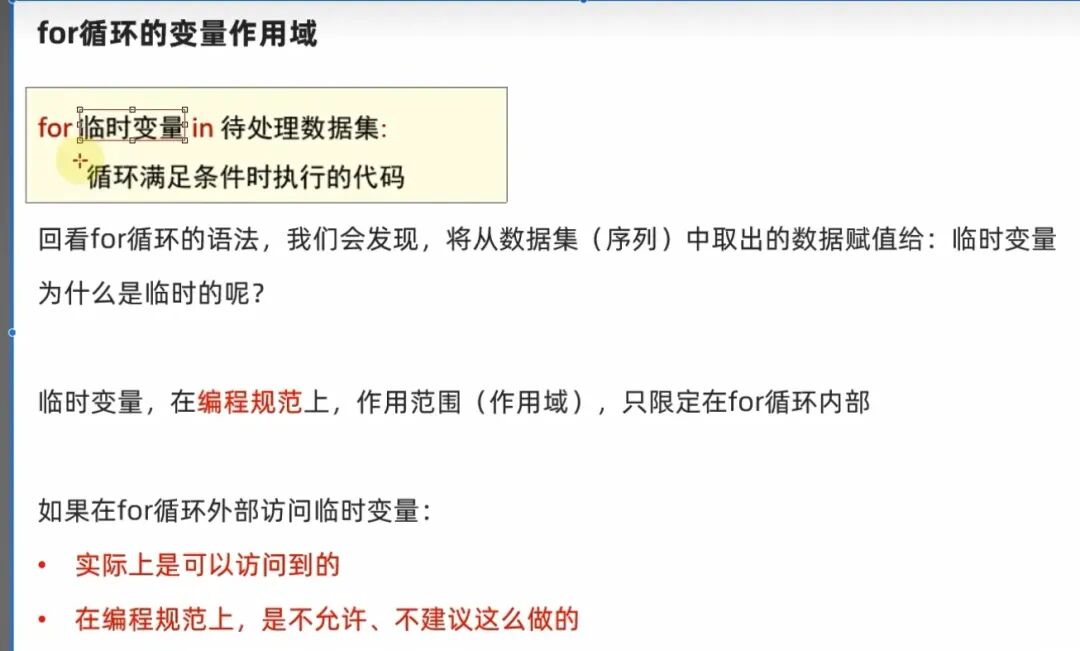
3for循环的变量作用域

4for循环的嵌套使用

控制好空格缩进
x=0
for x inrange(1,101):
print(f"今天是第{x}天")
for j inrange(1,11):
print(f"这是第{j}朵玫瑰")
print("我喜欢你")
print(f"第{x}天,表白成功")
Python

5break和continue关键字

5.1continue

结束当次循环,进入下一次
for i inrange(1, 10):
print("语句一")
continue
print("语句二")
Python
并且只跳出当前循环,不影响外层循环
for i inrange(1, 5):
print("语句一")
for j inrange(1, 5 ):
print("语句二")
continue
print("语句三")
Python

5.2break

直接结束循环
for i inrange(1, 101):
print("语句一")
break
print("语句二")
print("语句三")
Python

三 函数

是组织好,可重复使用的代码块

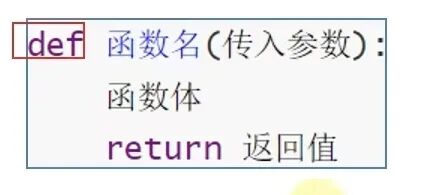
3.1函数的定义语法

(传入参数)和return 返回值均可以省略
##函数定义
defsay_hi():
print("Hi")
#函数调用,让定义的函数开始工作
say_hi()
Python
先定义函数,后调用函数

3.2函数的传入参数

defadd(x,y):#形式参数
result=x+y
print(f"{x}+{y}的结果是{result}")
add(1,2)#实际参数
Python
1.定义中提供形参,函数声明时提供实参
2.传入参数的数量不限,使用逗号分隔开
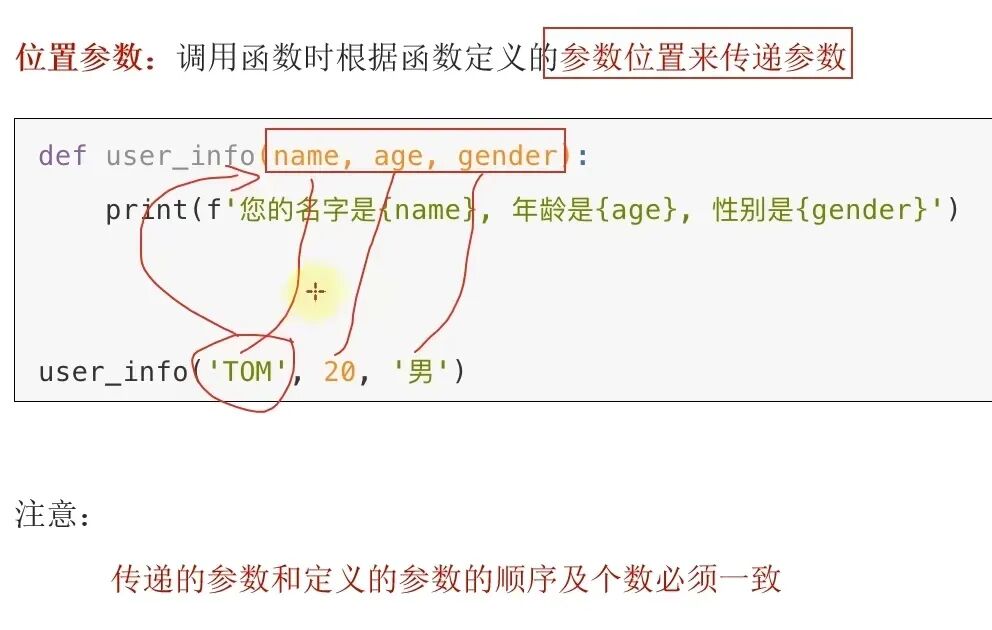
3.传入参数时,要和形参一一对应,逗号分隔开

3.3函数返回值

3.3.1基础定义

defadd(a,b):
result =a+b
return result
end=add(1,2)
print(end)
Python

注意 return后面的语句不会执行

defadd(a,b):
result =a+b
return result
print("end")
end=add(1,2)
print(end)
Python

3.3.2None类型

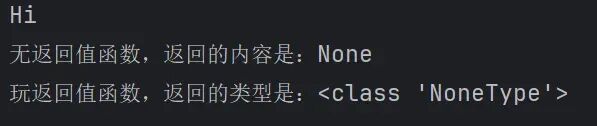
无返回值的函数,相当于返回了None,类型
defsay_hi():
print("Hi")
result=say_hi()
print(f"无返回值函数,返回的内容是:{result}")
print(f"玩返回值函数,返回的类型是:{type(result)}")
Python
1.在if判断中,None等同于False 用于函数中主动返回None 配合if判断做出相关的处理
defcheck_age(age):
if age>18:
return"success"
result=check_age(16)
ifnot result:
print("Sorry, you are not old enough")
Python
2.None用于声明无初始内容的变量

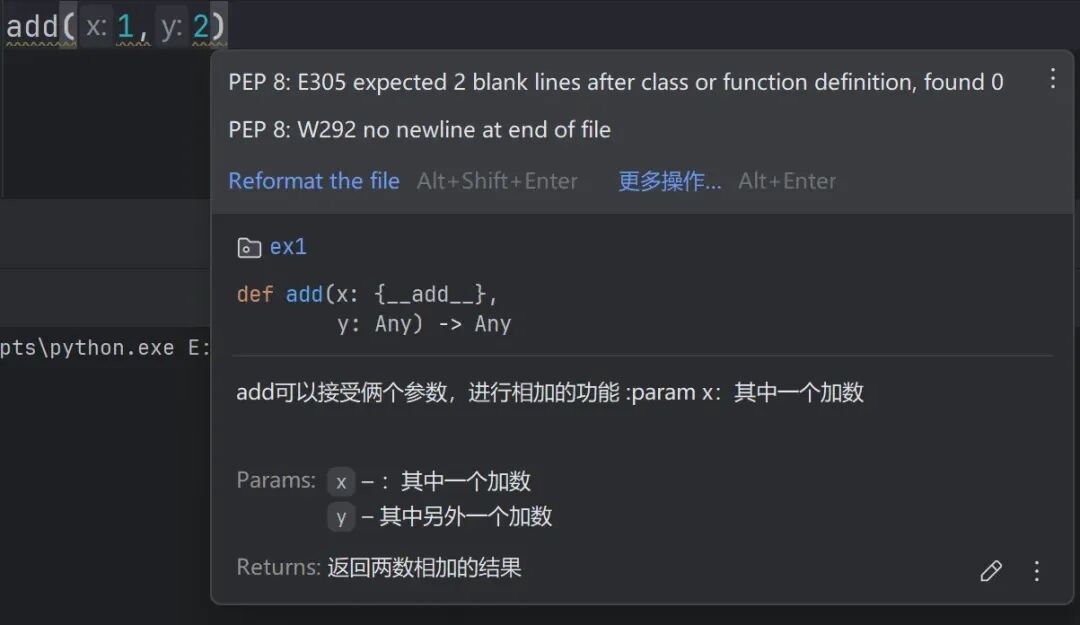
3.4函数的说明文档

辅助理解函数的作用
defadd(x,y):
"""
add可以接受俩个参数,进行相加的功能
:param x:其中一个加数
:param y: 其中另外一个加数
:return: 返回两数相加的结果
"""
result=x+y
print(f"两束数的和为{result}")
return result
add(1,2)
Python
param解释参数,return解释返回值
鼠标放在实参上时可以显示注释
3.5函数的嵌套调用

在一个函数内调用另外一个函数
deffun_b():
print("---2---")
deffun_a():
print("---1---")
fun_b()
print("---3---")
fun_a()
Python
先把函数B中的任务执行完才会回到上次函数A执行的位置

3.6函数的变量作用域

3.6.1局部变量

只在函数体内部生效,函数运行时临时保存数据
deftest_a():
num=100
print(num)
test_a()
print(num)
Python

3.6.2全局变量

将变量定义在函数外
num=200
deftest_a():
print(f"test_a",num)
deftest_b():
print(f"test_b",num)
test_a()
test_b()
print(num
Python

3.6.3global关键字

num=200
deftest_a():
print(f"test_a",num)
deftest_b():
global num
num=500
print(f"test_b",num)
test_a()
test_b()
print(num)
Python
global +变量 使函数内定义的变量成为全局变量

3.7函数的多返回值

类型不受限制
但要注意对位,第一个变量对应第一个值
defrerurn_num():
return1,"hello"
a,b = rerurn_num()
print(a)
print(b)
Python

3.8函数多种参数传递方式

1位置参数
2 关键字参数
调用时:键=值,形式传递参数
defuser_into(name,age,gender):
print(f"你的名字是{name},年龄是{age},性别是{gender}")
user_into(name="小明",age=20,gender="男")
Python
可以不按照固定的顺序
defuser_into(name,age,gender):
print(f"你的名字是{name},年龄是{age},性别是{gender}")
user_into(age=20,name="小明",gender="男")
Python
可以和位置参数混用,位置参数必须在前,且匹配参数顺序
defuser_into(name,age,gender):
print(f"你的名字是{name},年龄是{age},性别是{gender}")
user_into("小明",age=20,gender="男")
Python

函数调用时,如果有位置参数时,位置参数必须在关键字参数前,但关键字参数之间不存在先后顺序

3缺省参数

defuser_into(name,age,gender='男'):
print(f"你的名字是{name},年龄是{age},性别是{gender}")
user_into("小明",age=20)
Python
设置默认值,不传参时使用默认值,默认值必须写道最后面

4.不定长参数

4.1通过位置的不定长

defuser_input(*args):
print(args)
user_input("TOM,19")
Python
传进的所有参数都会被args变量收集,它会根据传进参数的位置合并成一个元组,args是元组类型,这就是位置传递

4.2通过关键字的不定长

defuser_input(**kwargs):
print(f"内容是{kwargs}")
user_input(name="小王",age=18,sex="男")
Python

3.9函数作为参数传递

调用函数cumpute作为参数,传入test_func函数中使用
deftest_func(computer):
result=computer(1,2)
print(result)
defcumputer(a,b):
return a+b
test_func(cumputer)
Python
计算逻辑的传递,而发数据的传递

3.10lambda匿名函数

只能使用一次
语法:lambda 传入参数:函数体(一行代码)
函数体只能写一行 无法写多行代码
deftest_func(computer):
result=computer(1,2)
print(result)
test_func(lambda x,y:x+y)
Python
四.数据容器

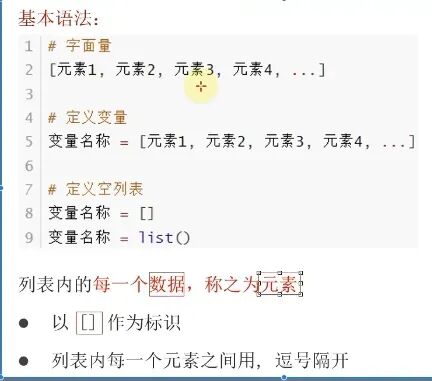
4.1列表  List

4.1.1列表的定义与性质

4.1.1.1定义

性质
1.列表一次可以存储多个数据,且可以为不同数据类型
my_list=['python',666,True]
Python
2.可以进行嵌套
my_list2=[[1,2,3],[4,5,6]]
Python
3,数据有序存储(有下标序号)
4.允许重复数据的存在
5.可修改(增加或删除元素)

4.1.2列表的下标索引

4.1.2.1单层索引

name_list=["张三","李四","王五"]
print(name_list[0])#正向取
print(name_list[-3])#逆向取
Python
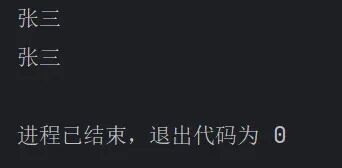
两者的输出结果相同 但注意列表索引不要超出范围

4.1.2.2多层索引

my_list2=[[1,2,3],[4,5,6]]
print(my_list2[0][2])
Python

4.1.3列表的常用功能

4.1.3.1列表的查询功能(方法)

语法:列表.index(元素)
功能:查找指定元素在列表的下标,如果找不到报错ValueError
my_list=['it','is', 'a', 'test']
index=my_list.index('is')
print(f"下标索引是{index}")
Python
错误示范:
my_list=['it','is', 'a', 'test']
index=my_list.index('hello')
print(f"下标索引是{index}")
Python

4.1.3.2列表修改的功能(方法)

更改
语法:列表[下标]=值
my_list=['it','is', 'a', 'test']
my_list[0]='This'
print(f"修改后是{my_list}")
Python
插入 insert
语法:列表.insert(下标,元素)指定位置插入
my_list=['it','is', 'a', 'test']
my_list.insert(3,'best')
print(f"插入元素后是{my_list}")
Python
追加 append
语法:列表.append(元素)最后追加
my_list=['it','is', 'a', 'test']
my_list.append('list')
print(f"追加元素后是{my_list}")
Python
追加一批元素 extend
语法:列表.extend(其它数据容器) 将其它数据容器的内容取出,依次追加到尾部
my_list=['it','is', 'a', 'test']
my_list2=[1,2,3]
my_list.extend(my_list2)
print(f"追加批量元素后是{my_list}")
Python
删除 del/pop/remove
语法1 del列表[下标]
my_list=['it','is', 'a', 'test']
del my_list[2]
print(f"删除元素后是{my_list}")
Python
语法2 列表.pop(下标)
与del区别:pop可以取出此元素并返回
my_list=['it','is', 'a', 'test']
element=my_list.pop(2)
print(f"删除元素后是{my_list},取出的元素是{element}")
Python
语法3 列表.remove(元素)
my_list=['it','is', 'a', 'test','a']
my_list.remove('a')
print(f"删除元素后是{my_list}")
Python
从前到后搜索,第一个元素被删除
清空列表 clear
语法:列表.clear()
my_list=['it','is', 'a', 'test','a']
my_list.clear()
print(f"清空后是{my_list}")
Python
统计数量.出现了几次 count
语法: 列表.count(元素)
my_list=['it','is', 'a', 'test','a']
count=my_list.count('a')
print(f"'a'有{count}个")
Python
统计数量.一共有多少元素 len
语法:len(列表)
my_list=['it','is', 'a', 'test','a']
count=len(my_list)
print(f"列表的元素个数一共有{count}个")
Python
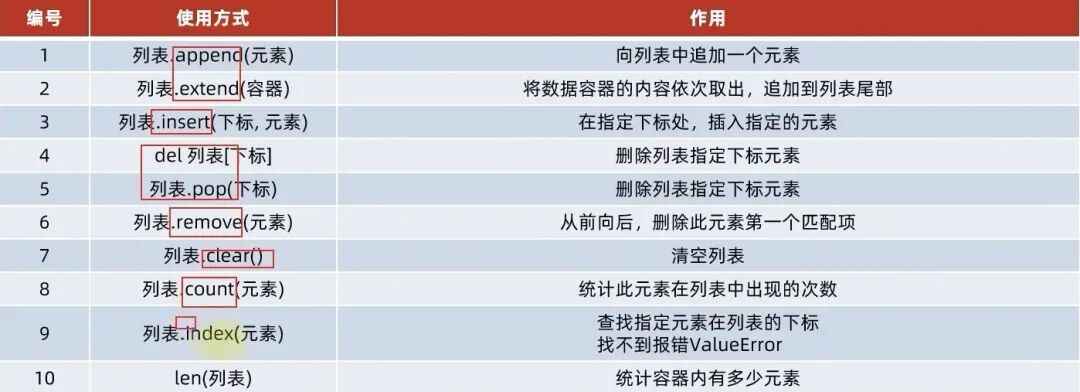
列表修改方法的总结
4.1.3.3列表的遍历

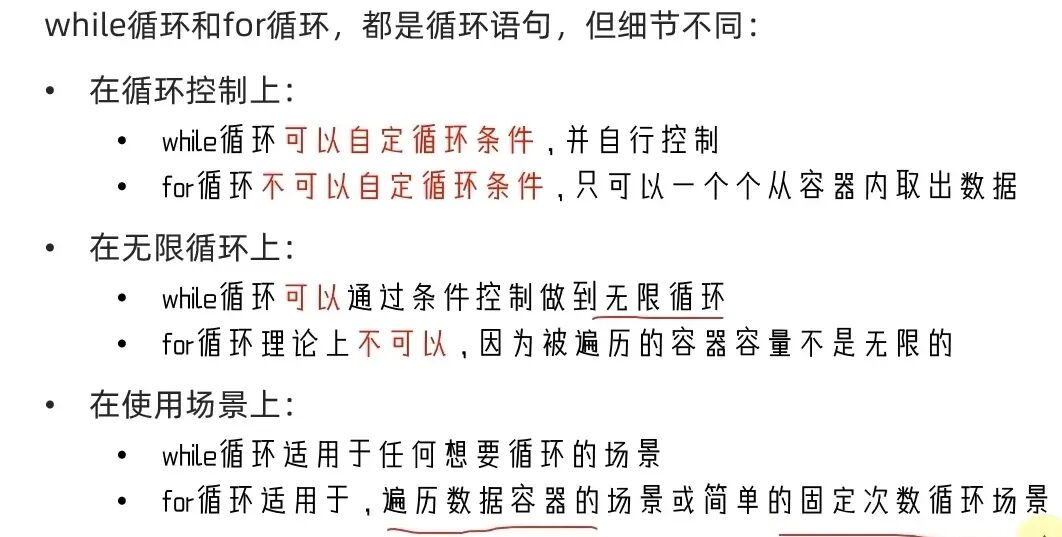
while循环的遍历
my_list=[21,25,21,23,22,20]
index=0
while index
print(my_list[index])
index+=1
Python
for循环的遍历
语法:for 临时遍历 in 数据容器:
对临时变量进行处理
my_list=[21,25,21,23,22,20]
for element in my_list:
print(f"列表的元素是{element}")
Python
其二的区别
4.2元组  tuple

4.2.1元组的特点:

可以存储多个,不同类型的元素,但是不可以修改 防止被篡改

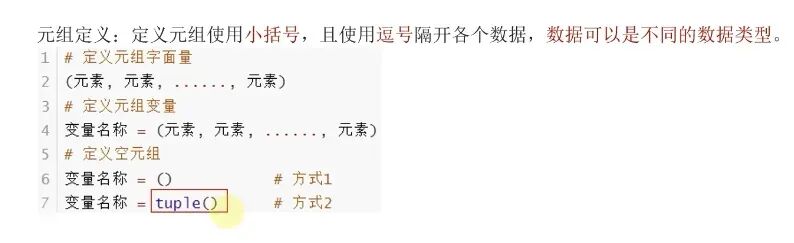
4.2.2元组的定义:

区别:列表是[]   元组是()
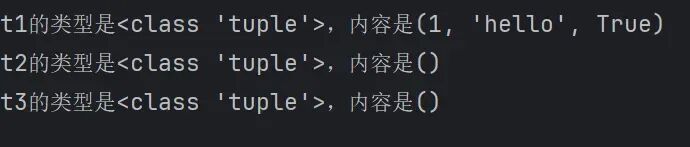
t1=(1,'hello',True)
t2=()
t3=tuple()
print(f"t1的类型是{type(t1)},内容是{t1}")
print(f"t2的类型是{type(t2)},内容是{t2}")
print(f"t3的类型是{type(t3)},内容是{t3}")
Python
定义单个元组类型时,必须在后面加逗号

t4=("hello")
print(f"t4的类型是{type(t4)}")
t5=("hello",)
print(f"t5的类型是{type(t5)}")
Python

4.2.3元组的嵌套

t5=((1,2,3),(4,5,6))
print(f"t5的类型是:{type(t5)},内容是:{t5}")
Python

4.2.4元组的操作

下标索引
t5=((1,2,3),(4,5,6))
print(f"t5的类型是:{type(t5)},内容是:{t5}")
num=t5[1][2]
print(f"从嵌套列表中获取的元素是:{num}")
Python
与list一模一样
查找 index
t6=('zhangsan','lisi','wangwu')
index=t6.index('lisi')
print(f"lisi在t6中的索引是:{index}")
Python
统计 count
t6=('zhangsan','lisi','wangwu','lisi')
count=t6.count('lisi')
print(f"t6中lisi出现的次数是:{count}")
Python
统计总长度
t6=('zhangsan','lisi','wangwu','lisi')
num=len(t6)
print(num)
Python

4.2.5元组的遍历

while的遍历
t6=('zhangsan','lisi','wangwu','lisi')
index=0
while index
print(f"元组内的元素有{t6[index]}")
index+=1
Python
for的遍历
t6=('zhangsan','lisi','wangwu','lisi')
index=0
for i in t6:
print(f"元组中的元素有{i}")
Python

4.2.6元组不可修改

t6=('zhangsan','lisi','wangwu','lisi')
t6[2]='shanxi'
Python

特例:元组内包含列表可修改列表中的元素
t6=('zhangsan','lisi','wangwu','lisi',['zhangsan','lisi'])
t6[4][0]='lisi'
print(f"修改后的t6为:{t6}")
Python

4.3字符串 str

4.3.1特点

1字符串同元组一样,是一个无法修改的数据容器,修改,移除,追加等操作均无法完成,如果必须做,只能得到一共全新的字符串,
2.只能存储字符串

4.3.2操作功能

下标索引
my_str="shanxi university is in shanxi"
value=my_str[2]
value2=my_str[-16]
print(f"从字符串{my_str}中取出的字符是{value}和{value2}")
Python
查找 index
字符串.index(元素)
my_str="shanxi university is in shanxi"
value=my_str.index("in")
print(f"查找的字符串在字符串中的索引为:{value}")
Python
字符串的替换 replace
语法:字符串.repla(字符串1,字符串2)
功能:将字符串的全部内容字符串1换成字符串2
注意:不是修改字符串本身,而是得到了一个全新的字符串
my_str="shanxi university is in shanxi"
new_my_str=my_str.replace("shanxi","beijing")
print(f"修改后的字符串为:{new_my_str}")
Python
字符串的分割 split
语法:字符串.spilt(分隔符字符串)
功能:按照指定的分隔符字符串,将字符串划分为多个字符串,并存放入列表对象中
注意:字符串本身不变,而是得到了一个列表对象
my_str="shanxi university is in shanxi"
my_str_list=my_str.split(" ")
print(f"将字符串{my_str}切分后得到列表为:{my_str_list}")
print(f"类型是:{type(my_str_list)}")
Python
字符串的规整操作 strip
去掉前后空格 语法:字符串.strip()
my_str="              shanxi university is in shanxi "
new_my_str=my_str.strip()
print(f"{my_str}去除首尾空格后的字符串为:{new_my_str}")
Python

去除前后指定字符串 语法:字符串.strip(元素)
my_str="12shanxi university is in shanxi21"
new_my_str=my_str.strip("12")
print(f"{my_str}去除首尾12后的字符串为:{new_my_str}")
Python

统计出现的次数 .count
my_str="12shanxi university is in shanxi21"
count=my_str.count("shanxi")
print(f"字符串中出现shanxi的次数为:{count}")
Python
统计长度 len()
my_str="12shanxi university is in shanxi21"
count=len(my_str)
print(f"字符串的长度是:{count}")
Python
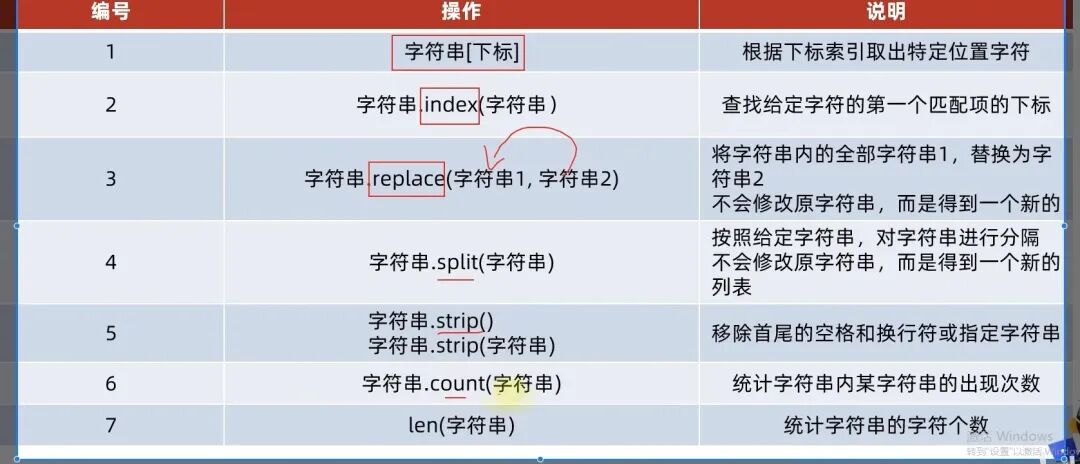
字符串操作功能的总结
4.3.3字符串的遍历

while的遍历
my_str="shanxi university is in shanxi"
index=0
while index
print(my_str[index])
index+=1
Python
for的遍历
my_str="shanxi university is in shanxi"
for i in my_str:
print(i)
Python

4.4序列与序列的切片

4.4.1概念

内容连续,有序,可使用下标索引的一类数据容器

列表,元组,字符串均可以视为序列

4.4.2切片

从大的序列取出子序列
语法:序列[起始下边:结束下标:步长]
1.起始下标表示从何处开始,可以留空,留空视作从头开始
2.结束下标(不含)表示何处结束,可以留空,留空视作截取到结尾
3.步长表示依次取元素的间隔
步长1:一个一个取
步长2:每次跳过一个取
步长N,每次跳过N-1个元素取
步长为负数:反向取(起始下标和结束下标也要反向标记)

序列切片不会影响序列本身,会得到一个新的序列(因为元组和字符串不可更改)

#对list进行切片,从1开始,4结束,步长1
my_list=[1,2,3,4,5,6]
result=my_list[1:4]
print(f"结果一;{result}")
#对tuple进行切片,从头开始,到最后结束,步长1
my_tuple=(1,2,3,4,5,6)
result2=my_tuple[:]
print(f"结果二:{result2}")
#对str进行切片,从头开始,到最后结束,步长2
my_str="01234567"
result3=my_str[::2]
print(f"结果三:{result3}")
#对str进行切片,从头开始,到最后结束,步长-1
my_str1="01234567"
result4=my_str1[::-1]#等同于反转
print(f"结果四:{result4}")
#对列表进行切片,从3开始,到1结束,步长-1
my_list2=[1,2,3,4,5,6]
result5=my_list2[3:1:-1]
print(f"结果五:{result5}")
#对元组进行切片,从头开始,到尾结束,步长-2
my_tuple2=(0,1,2,3,4,5,6)
result6=my_tuple2[::-2]
print(f"结果六:{result6}")
Python
4.5集合 set

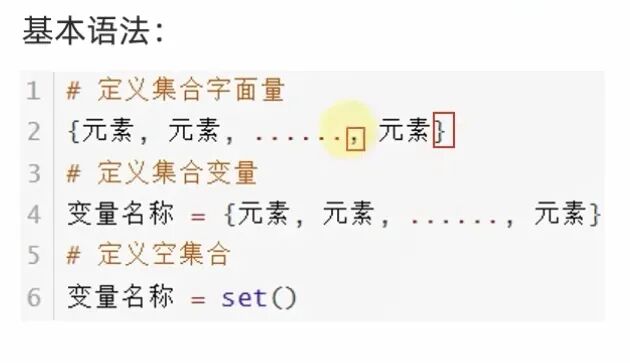
4.5.1定义

改为{}
my_set={'山西大学','计算机与信息技术学院','人工智能专业','山西大学','计算机与信息技术学院',
'人工智能专业','山西大学','计算机与信息技术学院','人工智能专业'}
my_set_empty=set()
print(f"myset的类型为:{type(my_set)}内容是:{my_set}")
print(f"myset_empty的类型为:{type(my_set_empty)}内容是:{my_set_empty}")
Python

4.5.2特征

1不支持元素的重复(自带去重)
2内部无序性
3不支持下标索引

4.5.3常用操作

1添加新元素 add
语法 集合.add(元素)
my_set={'山西大学','计算机与信息技术学院','人工智能专业','山西大学','计算机与信息技术学院',
'人工智能专业','山西大学','计算机与信息技术学院','人工智能专业'}
my_set.add(2501)
my_set.add('山西大学')
print(f"myset的内容是:{my_set}")
Python

“山西大学”没有被成功添加进去,因为集合的去重性

2移除元素 remove
语法:集合.remove(元素)
my_set={'山西大学','计算机与信息技术学院','人工智能专业','山西大学','计算机与信息技术学院',
'人工智能专业','山西大学','计算机与信息技术学院','人工智能专业'}
my_set.remove('山西大学')
print(f"myset的内容是:{my_set}")
Python
3随机取元素 pop
语法:集合.pop()
my_set={'山西大学','计算机与信息技术学院','人工智能专业'}
extend=my_set.pop()
print(f"取出来的元素是:{extend}")
print(f"myset的内容是:{my_set}")
Python

4清空集合 clear
my_set={'山西大学','计算机与信息技术学院','人工智能专业'}
my_set.clear()
print(f"myset的内容是:{my_set}")
Python

5取俩个集合差集 difference
得到一个新集合,集合1和集合2不变,取差集
set1={1,2,3}
set2={1,5,6}
set3=set1.difference(set2)
print(set3)
Python
6消除差集difference.uodate
对比集合1和2中,在集合1中删除和集合2相同的元素
结果:集合1被修改,集合2不变
set1={1,2,3}
set2={1,5,6}
set1.difference_update(set2)
print(set1)
Python
7两个集合合并为一个 union
功能:将集合1和集合2组合成新集合
结果:得到新集合,1和2不变
set1={1,2,3}
set2={1,5,6}
set3=set1.union(set2)
print(set3)
Python
8统计集合元素数量 len
set1={1,2,3}
num=len(set1)
print(num)
set2={1,2,3,1,2,3}
num2=len(set2)
print(num2)
Python
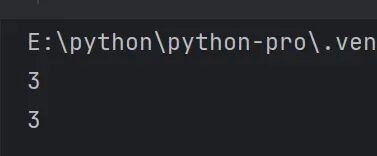
注意:结果都是3,因为集合具有去重性

4.5.4集合的遍历

集合不支持下标索引,因此不能使用while循环进行遍历

for的遍历
set1={1,2,3}
for i in set1:
print(i)
Python
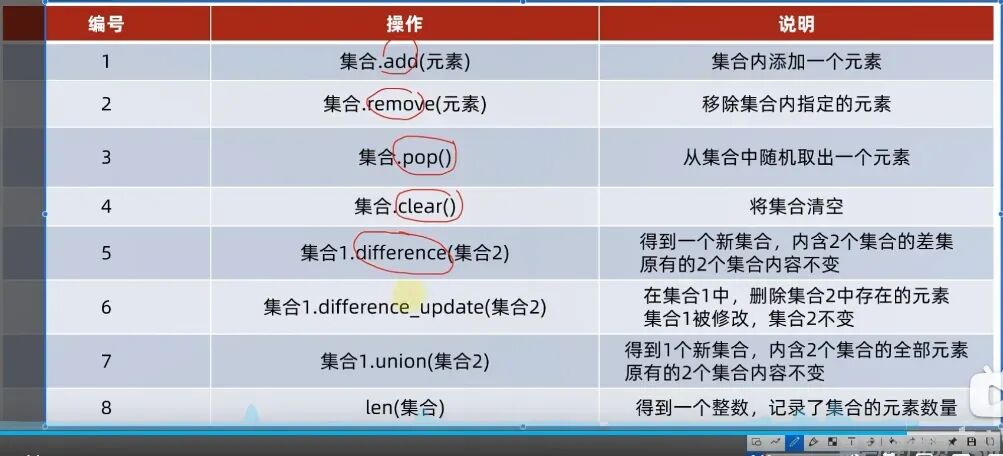
4.5.5集合操作总结

4.6字典  dict

4.6.1字典的定义

基础定义
也是使用{}但是全部为键值对
my_dict={"张三":88,"王五":90,"赵六":100}
my_dict2={}
my_dict3=dict()
print(f"字典一的内容是{my_dict}")
print(f"字典二的内容是{my_dict2}")
print(f"字典三的内容是{my_dict3}")
Python
重复定义key
my_dict={"张三":88,"王五":90,"赵六":100,"张三":120,}
print(f"字典一的内容是{my_dict}")
Python
后面的key定义会覆盖前面的

从key中获取数据

不可以使用下标索引

my_dict={"张三":88,"王五":90,"赵六":100}
score=my_dict["张三"]
print(f"张三的分数是{score}")
Python
写法与下标索引类似
字典的嵌套
规定:key不能为字典,value不受限
my_dict={"张三":{"语文":80,"数学":90,"英语":100},
"李四":{"语文":80,"数学":90,"英语":100},
"王五":{"语文":80,"数学":90,"英语":100}}
print(f"学生的考试信息是:{my_dict}")
score=my_dict["张三"]["语文"]
score2=my_dict["李四"]["英语"]
print(f"张三的语文成绩是:{score}")
print(f"李四的英语成绩是:{score2}")
Python

4.6.2字典的常用操作

修改/更新
语法:语法[key]=value
my_dict={1:"one",2:"two",3:"three"}
my_dict[4]="four"
print(f"字典经过修改后为:{my_dict}")
my_dict[1]="first"
print(f"字典经过修改后为:{my_dict}")
Python
key不存在为增加,存在为更改
删除 pop
my_dict={1:"one",2:"two",3:"three"}
score=my_dict.pop(1)
print(f"字典经过修改后为:{my_dict}")
print(f"被删除的元素为:{score}")
Python
清空 clear
my_dict={1:"one",2:"two",3:"three"}
my_dict.clear()
print(f"字典经过清空后为:{my_dict}")
Python
获取全部key  keys
my_dict={1:"one",2:"two",3:"three"}
keys=my_dict.keys()
print(f"字典的全部键为:{keys}")
Python
可以帮助我们做字典的遍历
统计元素的元素数量len
my_dict={1:"one",2:"two",3:"three"}
num=len(my_dict)
print(num)
Python
字典操作总结
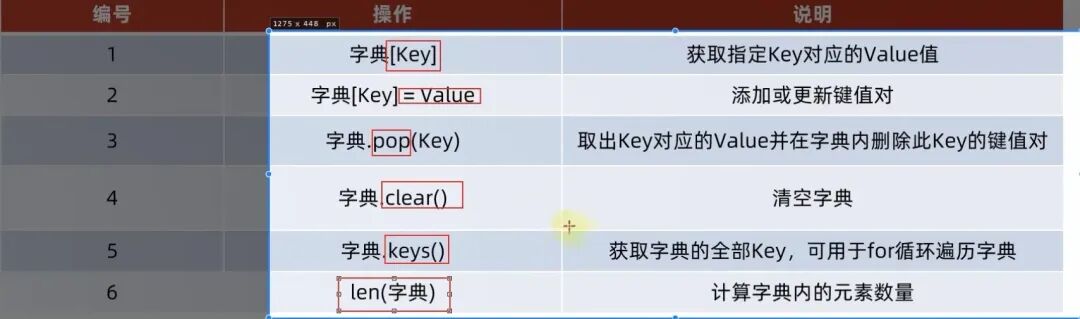
4.6.3字典的遍历

方式一:通过获取全部的key完成遍历
my_dict={1:"one",2:"two",3:"three"}
keys=my_dict.keys()
print(f"字典的全部键为:{keys}")
for key in keys:
print(f"字典的key是{key},value是{my_dict[key]}")
Python
方式二:直接对字典进行for循环,每次都是直接得到key

最新文章

随机文章

基本 文件 流程 错误 SQL 调试
  1. 请求信息 : 2026-02-07 17:08:09 HTTP/2.0 GET : https://f.mffb.com.cn/a/470946.html
  2. 运行时间 : 0.145895s [ 吞吐率:6.85req/s ] 内存消耗:4,667.03kb 文件加载:140
  3. 缓存信息 : 0 reads,0 writes
  4. 会话信息 : SESSION_ID=e0a70474f7834e17a20dfbe7232f5070
  1. /yingpanguazai/ssd/ssd1/www/f.mffb.com.cn/public/index.php ( 0.79 KB )
  2. /yingpanguazai/ssd/ssd1/www/f.mffb.com.cn/vendor/autoload.php ( 0.17 KB )
  3. /yingpanguazai/ssd/ssd1/www/f.mffb.com.cn/vendor/composer/autoload_real.php ( 2.49 KB )
  4. /yingpanguazai/ssd/ssd1/www/f.mffb.com.cn/vendor/composer/platform_check.php ( 0.90 KB )
  5. /yingpanguazai/ssd/ssd1/www/f.mffb.com.cn/vendor/composer/ClassLoader.php ( 14.03 KB )
  6. /yingpanguazai/ssd/ssd1/www/f.mffb.com.cn/vendor/composer/autoload_static.php ( 4.90 KB )
  7. /yingpanguazai/ssd/ssd1/www/f.mffb.com.cn/vendor/topthink/think-helper/src/helper.php ( 8.34 KB )
  8. /yingpanguazai/ssd/ssd1/www/f.mffb.com.cn/vendor/topthink/think-validate/src/helper.php ( 2.19 KB )
  9. /yingpanguazai/ssd/ssd1/www/f.mffb.com.cn/vendor/topthink/think-orm/src/helper.php ( 1.47 KB )
  10. /yingpanguazai/ssd/ssd1/www/f.mffb.com.cn/vendor/topthink/think-orm/stubs/load_stubs.php ( 0.16 KB )
  11. /yingpanguazai/ssd/ssd1/www/f.mffb.com.cn/vendor/topthink/framework/src/think/Exception.php ( 1.69 KB )
  12. /yingpanguazai/ssd/ssd1/www/f.mffb.com.cn/vendor/topthink/think-container/src/Facade.php ( 2.71 KB )
  13. /yingpanguazai/ssd/ssd1/www/f.mffb.com.cn/vendor/symfony/deprecation-contracts/function.php ( 0.99 KB )
  14. /yingpanguazai/ssd/ssd1/www/f.mffb.com.cn/vendor/symfony/polyfill-mbstring/bootstrap.php ( 8.26 KB )
  15. /yingpanguazai/ssd/ssd1/www/f.mffb.com.cn/vendor/symfony/polyfill-mbstring/bootstrap80.php ( 9.78 KB )
  16. /yingpanguazai/ssd/ssd1/www/f.mffb.com.cn/vendor/symfony/var-dumper/Resources/functions/dump.php ( 1.49 KB )
  17. /yingpanguazai/ssd/ssd1/www/f.mffb.com.cn/vendor/topthink/think-dumper/src/helper.php ( 0.18 KB )
  18. /yingpanguazai/ssd/ssd1/www/f.mffb.com.cn/vendor/symfony/var-dumper/VarDumper.php ( 4.30 KB )
  19. /yingpanguazai/ssd/ssd1/www/f.mffb.com.cn/vendor/topthink/framework/src/think/App.php ( 15.30 KB )
  20. /yingpanguazai/ssd/ssd1/www/f.mffb.com.cn/vendor/topthink/think-container/src/Container.php ( 15.76 KB )
  21. /yingpanguazai/ssd/ssd1/www/f.mffb.com.cn/vendor/psr/container/src/ContainerInterface.php ( 1.02 KB )
  22. /yingpanguazai/ssd/ssd1/www/f.mffb.com.cn/app/provider.php ( 0.19 KB )
  23. /yingpanguazai/ssd/ssd1/www/f.mffb.com.cn/vendor/topthink/framework/src/think/Http.php ( 6.04 KB )
  24. /yingpanguazai/ssd/ssd1/www/f.mffb.com.cn/vendor/topthink/think-helper/src/helper/Str.php ( 7.29 KB )
  25. /yingpanguazai/ssd/ssd1/www/f.mffb.com.cn/vendor/topthink/framework/src/think/Env.php ( 4.68 KB )
  26. /yingpanguazai/ssd/ssd1/www/f.mffb.com.cn/app/common.php ( 0.03 KB )
  27. /yingpanguazai/ssd/ssd1/www/f.mffb.com.cn/vendor/topthink/framework/src/helper.php ( 18.78 KB )
  28. /yingpanguazai/ssd/ssd1/www/f.mffb.com.cn/vendor/topthink/framework/src/think/Config.php ( 5.54 KB )
  29. /yingpanguazai/ssd/ssd1/www/f.mffb.com.cn/config/app.php ( 0.95 KB )
  30. /yingpanguazai/ssd/ssd1/www/f.mffb.com.cn/config/cache.php ( 0.78 KB )
  31. /yingpanguazai/ssd/ssd1/www/f.mffb.com.cn/config/console.php ( 0.23 KB )
  32. /yingpanguazai/ssd/ssd1/www/f.mffb.com.cn/config/cookie.php ( 0.56 KB )
  33. /yingpanguazai/ssd/ssd1/www/f.mffb.com.cn/config/database.php ( 2.48 KB )
  34. /yingpanguazai/ssd/ssd1/www/f.mffb.com.cn/vendor/topthink/framework/src/think/facade/Env.php ( 1.67 KB )
  35. /yingpanguazai/ssd/ssd1/www/f.mffb.com.cn/config/filesystem.php ( 0.61 KB )
  36. /yingpanguazai/ssd/ssd1/www/f.mffb.com.cn/config/lang.php ( 0.91 KB )
  37. /yingpanguazai/ssd/ssd1/www/f.mffb.com.cn/config/log.php ( 1.35 KB )
  38. /yingpanguazai/ssd/ssd1/www/f.mffb.com.cn/config/middleware.php ( 0.19 KB )
  39. /yingpanguazai/ssd/ssd1/www/f.mffb.com.cn/config/route.php ( 1.89 KB )
  40. /yingpanguazai/ssd/ssd1/www/f.mffb.com.cn/config/session.php ( 0.57 KB )
  41. /yingpanguazai/ssd/ssd1/www/f.mffb.com.cn/config/trace.php ( 0.34 KB )
  42. /yingpanguazai/ssd/ssd1/www/f.mffb.com.cn/config/view.php ( 0.82 KB )
  43. /yingpanguazai/ssd/ssd1/www/f.mffb.com.cn/app/event.php ( 0.25 KB )
  44. /yingpanguazai/ssd/ssd1/www/f.mffb.com.cn/vendor/topthink/framework/src/think/Event.php ( 7.67 KB )
  45. /yingpanguazai/ssd/ssd1/www/f.mffb.com.cn/app/service.php ( 0.13 KB )
  46. /yingpanguazai/ssd/ssd1/www/f.mffb.com.cn/app/AppService.php ( 0.26 KB )
  47. /yingpanguazai/ssd/ssd1/www/f.mffb.com.cn/vendor/topthink/framework/src/think/Service.php ( 1.64 KB )
  48. /yingpanguazai/ssd/ssd1/www/f.mffb.com.cn/vendor/topthink/framework/src/think/Lang.php ( 7.35 KB )
  49. /yingpanguazai/ssd/ssd1/www/f.mffb.com.cn/vendor/topthink/framework/src/lang/zh-cn.php ( 13.70 KB )
  50. /yingpanguazai/ssd/ssd1/www/f.mffb.com.cn/vendor/topthink/framework/src/think/initializer/Error.php ( 3.31 KB )
  51. /yingpanguazai/ssd/ssd1/www/f.mffb.com.cn/vendor/topthink/framework/src/think/initializer/RegisterService.php ( 1.33 KB )
  52. /yingpanguazai/ssd/ssd1/www/f.mffb.com.cn/vendor/services.php ( 0.14 KB )
  53. /yingpanguazai/ssd/ssd1/www/f.mffb.com.cn/vendor/topthink/framework/src/think/service/PaginatorService.php ( 1.52 KB )
  54. /yingpanguazai/ssd/ssd1/www/f.mffb.com.cn/vendor/topthink/framework/src/think/service/ValidateService.php ( 0.99 KB )
  55. /yingpanguazai/ssd/ssd1/www/f.mffb.com.cn/vendor/topthink/framework/src/think/service/ModelService.php ( 2.04 KB )
  56. /yingpanguazai/ssd/ssd1/www/f.mffb.com.cn/vendor/topthink/think-trace/src/Service.php ( 0.77 KB )
  57. /yingpanguazai/ssd/ssd1/www/f.mffb.com.cn/vendor/topthink/framework/src/think/Middleware.php ( 6.72 KB )
  58. /yingpanguazai/ssd/ssd1/www/f.mffb.com.cn/vendor/topthink/framework/src/think/initializer/BootService.php ( 0.77 KB )
  59. /yingpanguazai/ssd/ssd1/www/f.mffb.com.cn/vendor/topthink/think-orm/src/Paginator.php ( 11.86 KB )
  60. /yingpanguazai/ssd/ssd1/www/f.mffb.com.cn/vendor/topthink/think-validate/src/Validate.php ( 63.20 KB )
  61. /yingpanguazai/ssd/ssd1/www/f.mffb.com.cn/vendor/topthink/think-orm/src/Model.php ( 23.55 KB )
  62. /yingpanguazai/ssd/ssd1/www/f.mffb.com.cn/vendor/topthink/think-orm/src/model/concern/Attribute.php ( 21.05 KB )
  63. /yingpanguazai/ssd/ssd1/www/f.mffb.com.cn/vendor/topthink/think-orm/src/model/concern/AutoWriteData.php ( 4.21 KB )
  64. /yingpanguazai/ssd/ssd1/www/f.mffb.com.cn/vendor/topthink/think-orm/src/model/concern/Conversion.php ( 6.44 KB )
  65. /yingpanguazai/ssd/ssd1/www/f.mffb.com.cn/vendor/topthink/think-orm/src/model/concern/DbConnect.php ( 5.16 KB )
  66. /yingpanguazai/ssd/ssd1/www/f.mffb.com.cn/vendor/topthink/think-orm/src/model/concern/ModelEvent.php ( 2.33 KB )
  67. /yingpanguazai/ssd/ssd1/www/f.mffb.com.cn/vendor/topthink/think-orm/src/model/concern/RelationShip.php ( 28.29 KB )
  68. /yingpanguazai/ssd/ssd1/www/f.mffb.com.cn/vendor/topthink/think-helper/src/contract/Arrayable.php ( 0.09 KB )
  69. /yingpanguazai/ssd/ssd1/www/f.mffb.com.cn/vendor/topthink/think-helper/src/contract/Jsonable.php ( 0.13 KB )
  70. /yingpanguazai/ssd/ssd1/www/f.mffb.com.cn/vendor/topthink/think-orm/src/model/contract/Modelable.php ( 0.09 KB )
  71. /yingpanguazai/ssd/ssd1/www/f.mffb.com.cn/vendor/topthink/framework/src/think/Db.php ( 2.88 KB )
  72. /yingpanguazai/ssd/ssd1/www/f.mffb.com.cn/vendor/topthink/think-orm/src/DbManager.php ( 8.52 KB )
  73. /yingpanguazai/ssd/ssd1/www/f.mffb.com.cn/vendor/topthink/framework/src/think/Log.php ( 6.28 KB )
  74. /yingpanguazai/ssd/ssd1/www/f.mffb.com.cn/vendor/topthink/framework/src/think/Manager.php ( 3.92 KB )
  75. /yingpanguazai/ssd/ssd1/www/f.mffb.com.cn/vendor/psr/log/src/LoggerTrait.php ( 2.69 KB )
  76. /yingpanguazai/ssd/ssd1/www/f.mffb.com.cn/vendor/psr/log/src/LoggerInterface.php ( 2.71 KB )
  77. /yingpanguazai/ssd/ssd1/www/f.mffb.com.cn/vendor/topthink/framework/src/think/Cache.php ( 4.92 KB )
  78. /yingpanguazai/ssd/ssd1/www/f.mffb.com.cn/vendor/psr/simple-cache/src/CacheInterface.php ( 4.71 KB )
  79. /yingpanguazai/ssd/ssd1/www/f.mffb.com.cn/vendor/topthink/think-helper/src/helper/Arr.php ( 16.63 KB )
  80. /yingpanguazai/ssd/ssd1/www/f.mffb.com.cn/vendor/topthink/framework/src/think/cache/driver/File.php ( 7.84 KB )
  81. /yingpanguazai/ssd/ssd1/www/f.mffb.com.cn/vendor/topthink/framework/src/think/cache/Driver.php ( 9.03 KB )
  82. /yingpanguazai/ssd/ssd1/www/f.mffb.com.cn/vendor/topthink/framework/src/think/contract/CacheHandlerInterface.php ( 1.99 KB )
  83. /yingpanguazai/ssd/ssd1/www/f.mffb.com.cn/app/Request.php ( 0.09 KB )
  84. /yingpanguazai/ssd/ssd1/www/f.mffb.com.cn/vendor/topthink/framework/src/think/Request.php ( 55.78 KB )
  85. /yingpanguazai/ssd/ssd1/www/f.mffb.com.cn/app/middleware.php ( 0.25 KB )
  86. /yingpanguazai/ssd/ssd1/www/f.mffb.com.cn/vendor/topthink/framework/src/think/Pipeline.php ( 2.61 KB )
  87. /yingpanguazai/ssd/ssd1/www/f.mffb.com.cn/vendor/topthink/think-trace/src/TraceDebug.php ( 3.40 KB )
  88. /yingpanguazai/ssd/ssd1/www/f.mffb.com.cn/vendor/topthink/framework/src/think/middleware/SessionInit.php ( 1.94 KB )
  89. /yingpanguazai/ssd/ssd1/www/f.mffb.com.cn/vendor/topthink/framework/src/think/Session.php ( 1.80 KB )
  90. /yingpanguazai/ssd/ssd1/www/f.mffb.com.cn/vendor/topthink/framework/src/think/session/driver/File.php ( 6.27 KB )
  91. /yingpanguazai/ssd/ssd1/www/f.mffb.com.cn/vendor/topthink/framework/src/think/contract/SessionHandlerInterface.php ( 0.87 KB )
  92. /yingpanguazai/ssd/ssd1/www/f.mffb.com.cn/vendor/topthink/framework/src/think/session/Store.php ( 7.12 KB )
  93. /yingpanguazai/ssd/ssd1/www/f.mffb.com.cn/vendor/topthink/framework/src/think/Route.php ( 23.73 KB )
  94. /yingpanguazai/ssd/ssd1/www/f.mffb.com.cn/vendor/topthink/framework/src/think/route/RuleName.php ( 5.75 KB )
  95. /yingpanguazai/ssd/ssd1/www/f.mffb.com.cn/vendor/topthink/framework/src/think/route/Domain.php ( 2.53 KB )
  96. /yingpanguazai/ssd/ssd1/www/f.mffb.com.cn/vendor/topthink/framework/src/think/route/RuleGroup.php ( 22.43 KB )
  97. /yingpanguazai/ssd/ssd1/www/f.mffb.com.cn/vendor/topthink/framework/src/think/route/Rule.php ( 26.95 KB )
  98. /yingpanguazai/ssd/ssd1/www/f.mffb.com.cn/vendor/topthink/framework/src/think/route/RuleItem.php ( 9.78 KB )
  99. /yingpanguazai/ssd/ssd1/www/f.mffb.com.cn/route/app.php ( 1.72 KB )
  100. /yingpanguazai/ssd/ssd1/www/f.mffb.com.cn/vendor/topthink/framework/src/think/facade/Route.php ( 4.70 KB )
  101. /yingpanguazai/ssd/ssd1/www/f.mffb.com.cn/vendor/topthink/framework/src/think/route/dispatch/Controller.php ( 4.74 KB )
  102. /yingpanguazai/ssd/ssd1/www/f.mffb.com.cn/vendor/topthink/framework/src/think/route/Dispatch.php ( 10.44 KB )
  103. /yingpanguazai/ssd/ssd1/www/f.mffb.com.cn/app/controller/Index.php ( 4.81 KB )
  104. /yingpanguazai/ssd/ssd1/www/f.mffb.com.cn/app/BaseController.php ( 2.05 KB )
  105. /yingpanguazai/ssd/ssd1/www/f.mffb.com.cn/vendor/topthink/think-orm/src/facade/Db.php ( 0.93 KB )
  106. /yingpanguazai/ssd/ssd1/www/f.mffb.com.cn/vendor/topthink/think-orm/src/db/connector/Mysql.php ( 5.44 KB )
  107. /yingpanguazai/ssd/ssd1/www/f.mffb.com.cn/vendor/topthink/think-orm/src/db/PDOConnection.php ( 52.47 KB )
  108. /yingpanguazai/ssd/ssd1/www/f.mffb.com.cn/vendor/topthink/think-orm/src/db/Connection.php ( 8.39 KB )
  109. /yingpanguazai/ssd/ssd1/www/f.mffb.com.cn/vendor/topthink/think-orm/src/db/ConnectionInterface.php ( 4.57 KB )
  110. /yingpanguazai/ssd/ssd1/www/f.mffb.com.cn/vendor/topthink/think-orm/src/db/builder/Mysql.php ( 16.58 KB )
  111. /yingpanguazai/ssd/ssd1/www/f.mffb.com.cn/vendor/topthink/think-orm/src/db/Builder.php ( 24.06 KB )
  112. /yingpanguazai/ssd/ssd1/www/f.mffb.com.cn/vendor/topthink/think-orm/src/db/BaseBuilder.php ( 27.50 KB )
  113. /yingpanguazai/ssd/ssd1/www/f.mffb.com.cn/vendor/topthink/think-orm/src/db/Query.php ( 15.71 KB )
  114. /yingpanguazai/ssd/ssd1/www/f.mffb.com.cn/vendor/topthink/think-orm/src/db/BaseQuery.php ( 45.13 KB )
  115. /yingpanguazai/ssd/ssd1/www/f.mffb.com.cn/vendor/topthink/think-orm/src/db/concern/TimeFieldQuery.php ( 7.43 KB )
  116. /yingpanguazai/ssd/ssd1/www/f.mffb.com.cn/vendor/topthink/think-orm/src/db/concern/AggregateQuery.php ( 3.26 KB )
  117. /yingpanguazai/ssd/ssd1/www/f.mffb.com.cn/vendor/topthink/think-orm/src/db/concern/ModelRelationQuery.php ( 20.07 KB )
  118. /yingpanguazai/ssd/ssd1/www/f.mffb.com.cn/vendor/topthink/think-orm/src/db/concern/ParamsBind.php ( 3.66 KB )
  119. /yingpanguazai/ssd/ssd1/www/f.mffb.com.cn/vendor/topthink/think-orm/src/db/concern/ResultOperation.php ( 7.01 KB )
  120. /yingpanguazai/ssd/ssd1/www/f.mffb.com.cn/vendor/topthink/think-orm/src/db/concern/WhereQuery.php ( 19.37 KB )
  121. /yingpanguazai/ssd/ssd1/www/f.mffb.com.cn/vendor/topthink/think-orm/src/db/concern/JoinAndViewQuery.php ( 7.11 KB )
  122. /yingpanguazai/ssd/ssd1/www/f.mffb.com.cn/vendor/topthink/think-orm/src/db/concern/TableFieldInfo.php ( 2.63 KB )
  123. /yingpanguazai/ssd/ssd1/www/f.mffb.com.cn/vendor/topthink/think-orm/src/db/concern/Transaction.php ( 2.77 KB )
  124. /yingpanguazai/ssd/ssd1/www/f.mffb.com.cn/vendor/topthink/framework/src/think/log/driver/File.php ( 5.96 KB )
  125. /yingpanguazai/ssd/ssd1/www/f.mffb.com.cn/vendor/topthink/framework/src/think/contract/LogHandlerInterface.php ( 0.86 KB )
  126. /yingpanguazai/ssd/ssd1/www/f.mffb.com.cn/vendor/topthink/framework/src/think/log/Channel.php ( 3.89 KB )
  127. /yingpanguazai/ssd/ssd1/www/f.mffb.com.cn/vendor/topthink/framework/src/think/event/LogRecord.php ( 1.02 KB )
  128. /yingpanguazai/ssd/ssd1/www/f.mffb.com.cn/vendor/topthink/think-helper/src/Collection.php ( 16.47 KB )
  129. /yingpanguazai/ssd/ssd1/www/f.mffb.com.cn/vendor/topthink/framework/src/think/facade/View.php ( 1.70 KB )
  130. /yingpanguazai/ssd/ssd1/www/f.mffb.com.cn/vendor/topthink/framework/src/think/View.php ( 4.39 KB )
  131. /yingpanguazai/ssd/ssd1/www/f.mffb.com.cn/vendor/topthink/framework/src/think/Response.php ( 8.81 KB )
  132. /yingpanguazai/ssd/ssd1/www/f.mffb.com.cn/vendor/topthink/framework/src/think/response/View.php ( 3.29 KB )
  133. /yingpanguazai/ssd/ssd1/www/f.mffb.com.cn/vendor/topthink/framework/src/think/Cookie.php ( 6.06 KB )
  134. /yingpanguazai/ssd/ssd1/www/f.mffb.com.cn/vendor/topthink/think-view/src/Think.php ( 8.38 KB )
  135. /yingpanguazai/ssd/ssd1/www/f.mffb.com.cn/vendor/topthink/framework/src/think/contract/TemplateHandlerInterface.php ( 1.60 KB )
  136. /yingpanguazai/ssd/ssd1/www/f.mffb.com.cn/vendor/topthink/think-template/src/Template.php ( 46.61 KB )
  137. /yingpanguazai/ssd/ssd1/www/f.mffb.com.cn/vendor/topthink/think-template/src/template/driver/File.php ( 2.41 KB )
  138. /yingpanguazai/ssd/ssd1/www/f.mffb.com.cn/vendor/topthink/think-template/src/template/contract/DriverInterface.php ( 0.86 KB )
  139. /yingpanguazai/ssd/ssd1/www/f.mffb.com.cn/runtime/temp/067d451b9a0c665040f3f1bdd3293d68.php ( 11.98 KB )
  140. /yingpanguazai/ssd/ssd1/www/f.mffb.com.cn/vendor/topthink/think-trace/src/Html.php ( 4.42 KB )
  1. CONNECT:[ UseTime:0.000467s ] mysql:host=127.0.0.1;port=3306;dbname=f_mffb;charset=utf8mb4
  2. SHOW FULL COLUMNS FROM `fenlei` [ RunTime:0.000705s ]
  3. SELECT * FROM `fenlei` WHERE `fid` = 0 [ RunTime:0.000259s ]
  4. SELECT * FROM `fenlei` WHERE `fid` = 63 [ RunTime:0.000280s ]
  5. SHOW FULL COLUMNS FROM `set` [ RunTime:0.000506s ]
  6. SELECT * FROM `set` [ RunTime:0.000192s ]
  7. SHOW FULL COLUMNS FROM `article` [ RunTime:0.000580s ]
  8. SELECT * FROM `article` WHERE `id` = 470946 LIMIT 1 [ RunTime:0.046760s ]
  9. UPDATE `article` SET `lasttime` = 1770455289 WHERE `id` = 470946 [ RunTime:0.000737s ]
  10. SELECT * FROM `fenlei` WHERE `id` = 66 LIMIT 1 [ RunTime:0.000260s ]
  11. SELECT * FROM `article` WHERE `id` < 470946 ORDER BY `id` DESC LIMIT 1 [ RunTime:0.001121s ]
  12. SELECT * FROM `article` WHERE `id` > 470946 ORDER BY `id` ASC LIMIT 1 [ RunTime:0.004430s ]
  13. SELECT * FROM `article` WHERE `id` < 470946 ORDER BY `id` DESC LIMIT 10 [ RunTime:0.005707s ]
  14. SELECT * FROM `article` WHERE `id` < 470946 ORDER BY `id` DESC LIMIT 10,10 [ RunTime:0.017692s ]
  15. SELECT * FROM `article` WHERE `id` < 470946 ORDER BY `id` DESC LIMIT 20,10 [ RunTime:0.001338s ]
0.147313s