马年红包封面代码:印象跑马动作模拟
- 2026-09-04 01:13:40
马年红包封面代码:印象跑马动作模拟 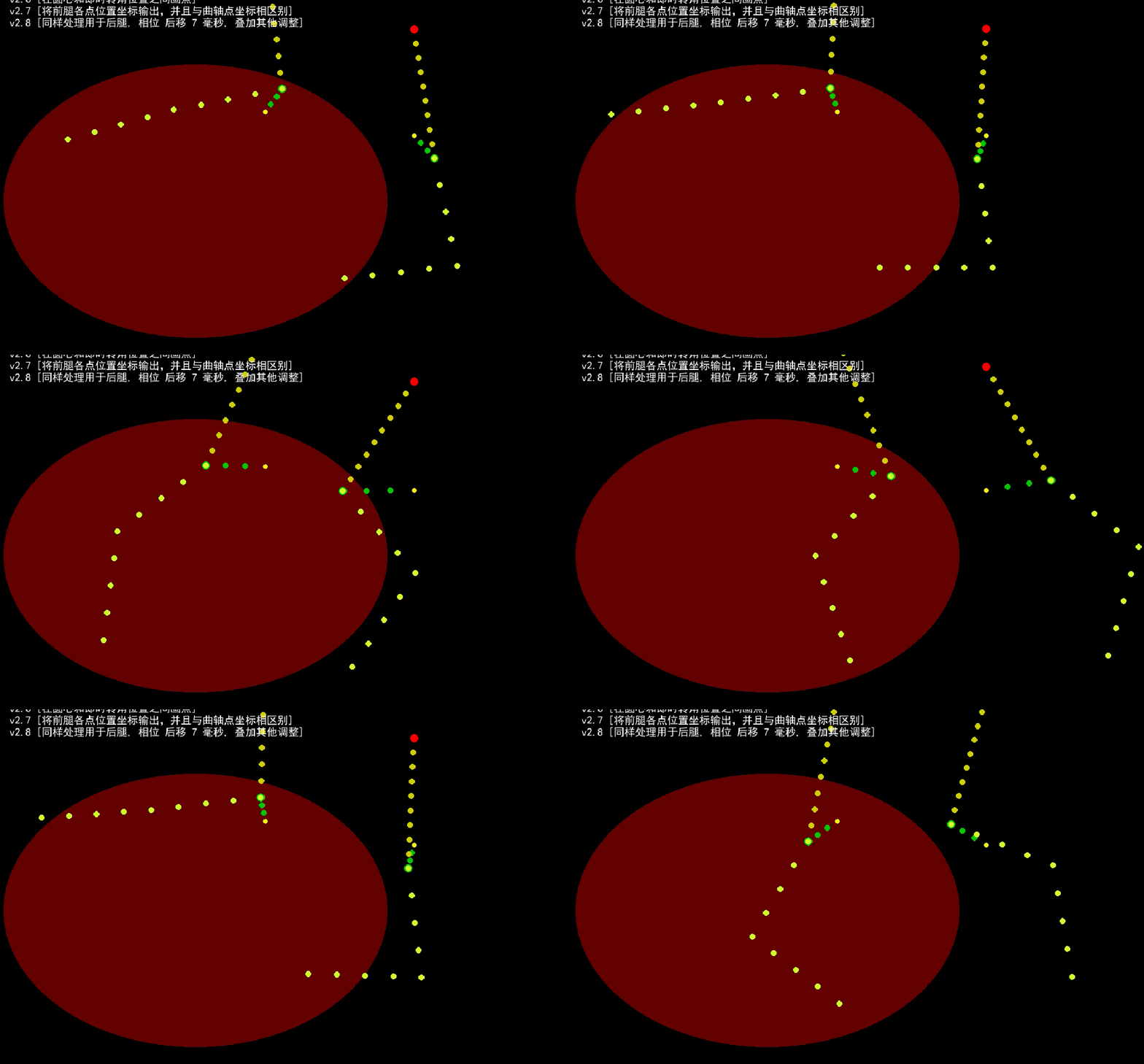

马年红包封面代码:印象跑马动作模拟
作者:年年
最近有关马年红包主题,发生了许多怪事。[*1][*2][*3][*4] 为以防万一找不到了,烦请各位朋友顺手一键三连,关注、转发、星标。
马年话马、画马、画印象马,用Python代码画印象马。
画印象马,从马儿的大长腿开始。谁说马儿的大长腿不是大长腿呢?
已关注 关注 重播 分享 赞
备注:限于资源条件,没有采取动作捕捉或类似的高科技设备或技术
# curveline-3.pyimport numpy as npimport pygame"""_xOff = 120_yOff = 40scale = 50#"""#def gen_ecllips_frontleg_beautiful_dumb# 下划线输入比较麻烦,代码中有时有省略# 先计算曲轴,再计算连杆,成功。与先计算连杆运动,再计算曲轴相比,前者更简洁。# 重新开始,先计算一个椭圆圆周运动的曲轴,再尝试曲轴顶端任意旋转,# 并将 currenttime 作为参数继续传给下一个子程序## 放弃后腿,转移至前腿,并将发力点 移至前大腿根部## 定义 beautifulfrontleg,输出beautifulfrontleg,仅绘制beautifulfrontleg# 其他非 beautifulfronleg 坐标数据不再绘制 ###### 注:本段代码中, frontleg_dots 实际上是虚拟的“椭圆曲轴连杆”,legs 是所谓的抽象马/印象马前腿点阵坐标# ##def gen_ecllipsfrontlegdeautfuldumb(currenttime: float):pygame.display.set_caption("红包封面:跑马尝试[前腿 frontleg]")xOff = 450yOff = 300angleOff = 90_L = 250_S = 100 # 椭圆长轴_S_S = 40 # 椭圆短轴frongleg_dots = []current_position = currenttime % 36a = current_position * 10 + angleOffaR = a * np.pi / 180# 曲轴顶点坐标x1 = np.cos(aR) * _Sy1 = -np.sin(aR) * _S_Sfrongleg_dots.append((x1, y1))### pygame.draw.circle(screen, (0,200,0, 50),(int(x1+xOff),int(y1+yOff)), 7)# 曲轴副属各点坐标for i in range(2):x = np.cos(aR) * _S / 3 * (i+1)y = -np.sin(aR) * _S_S / 3 * (i+1)frongleg_dots.append((x, y))### pygame.draw.circle(screen, (0,200,0, 50),(int(x+xOff),int(y+yOff)), 5)# 连杆顶点坐标x = xOffy = np.sqrt(_L**2 - abs(x1)**2) - y1# print(y)frongleg_dots.append((x, y))### pygame.draw.circle(screen, (250, 0,0, 110),(int(x),int(yOff-y)), 7)# 连杆附属各点xSeg = x1 / 9ySeg = abs(y1 + y) / 9for i in range(9):_x = (i+1) * xSeg_y = (i+1) * ySegfrongleg_dots.append((_x, _y))### pygame.draw.circle(screen, (200, 200, 0, 50), (int(xOff + _x), int(yOff-y+_y)), 5)### pygame.draw.circle(screen, (250, 250, 0, 110),(int(xOff),int(yOff)), 4)legs = []legs.append((x1+xOff, y1+yOff))newX, newY, legs2 = draw_curve_stop_at_any_dot_output(currenttime, 185, 250, 185, x1+xOff, y1+yOff)for i in range(len(legs2)):legs.append(legs2[i])newX, newY, legs2 = draw_curve_stop_at_any_dot_output(currenttime, 180, 350, 185, newX, newY)for i in range(len(legs2)):legs.append(legs2[i])screen.blit(font.render("v2.3 [曲轴 任意方向连杆]", True, (255, 255, 255)), (20, 40))screen.blit(font.render("v2.4 [椭圆 曲轴 任意方向连杆]", True, (255, 255, 255)), (20, 60))screen.blit(font.render("v2.5 [转移至前腿 调整旋转方向至左下方]", True, (255, 255, 255)), (20, 80))screen.blit(font.render("v2.6 [在圆心和即时转角位置之间画点]", True, (255, 255, 255)), (20, 100))screen.blit(font.render("v2.7 [将前腿各点位置坐标输出,并且与曲轴点坐标相区别]", True, (255, 255, 255)), (20, 120))return frongleg_dots, legs#def draw_curve_stop_at_any_dot_output()# 在任意位置按指定半径画圆,# 并在给定的 startangle, stopangle 之间根据时间输出当前即时位置, 返回时角度以当前时间而定## 并在新绘制的 当前时间转角圆周点 与 圆心 之间 以适当间隔 绘制 “圆点”## 同时保留点坐标数据,输出点坐标数据 ##def draw_curve_stop_at_any_dot_output(currenttime: float, startangle, stopangle: float, radius:float, atX: int, atY: int):_xOff = atX_yOff = atY#pygame.draw.ellipse(screen, (205,5,255), ((atX-radius,atY-radius),(2*radius,2*radius)),1)a = startangle * np.pi / 180x = np.cos(a) * radius + _xOffy = -np.sin(a) * radius + _yOff#pygame.draw.circle(screen, (0,200,0, 50),(int(x),int(y)), 5)b = stopangle * np.pi / 180x = np.cos(b) * radius + _xOffy = -np.sin(b) * radius + _yOff#pygame.draw.circle(screen, (200,0,0, 50),(int(x),int(y)), 5)legdots = []current_position = currenttime % 36aSeg = (stopangle - startangle) / 18atAngle = stopangle - abs(18-current_position) * aSegaRad = atAngle * np.pi / 180x = np.cos(aRad) * radius + atXy = -np.sin(aRad) * radius + atY#legdots.append((x, y))#pygame.draw.circle(screen, (0,200,200, 50),(int(x),int(y)), 5)#pygame.draw.line(screen, (250,0,250),(int(x),int(y)),(int(atX),int(atY)),2)xSeg = (x - atX) / 4ySeg = (y - atY) / 4for i in range(4):_x = (i+1) * xSeg_y = (i+1) * ySeglegdots.append((atX + _x, atY + _y))#pygame.draw.circle(screen, (200, 200, 0, 50), (int(atX + _x ), int(atY + _y)), 10)return x, y, legdotsdef show_legdots(currenttime: float, legdots):screen.fill((20,20,20,30))for x, y in legdots:pygame.draw.circle(screen, (200,250,50,100),(int(x),int(y)), 5)def show_legdots_flash(currenttime: float, legdots):#screen.fill((0,0,0))currentFlashPos = int(currenttime % 2)idx = -1for _x, _y in legdots:idx += 1if idx % 2 == currentFlashPos % 2:_r_, _g_, _b_ = 254, 50, 0#_r_,_g_, _b_ = 250, 100, 50else:_r_, _g_, _b_ = 200, 200, 40#_r_,_g_, _b_ = 200, 250, 20pygame.draw.circle(screen, (_r_, _g_, _b_, 100), (_x, _y), 10)#for x, y in legdots:# pygame.draw.circle(screen, (200,250,50,100),(int(x),int(y)), 5)#def show_legdots_flash_large 在最后绘制闪缩效果时,再叠加一次临时放大,重新指定 放大基点和放大系数def show_legdots_flash_large(currenttime: float, legdots, pt, scale):#screen.fill((0,0,0))cX, cY = ptcurrentFlashPos = int(currenttime % 2)idx = -1for _x, _y in legdots:xLen = _x - cXyLen = _y - cY__x = xLen * scale + cX__y = yLen * scale + cYidx += 1if idx % 2 == currentFlashPos % 2:_r_, _g_, _b_ = 254, 50, 0#_r_,_g_, _b_ = 250, 100, 50else:_r_, _g_, _b_ = 200, 200, 40#_r_,_g_, _b_ = 200, 250, 20pygame.draw.circle(screen, (_r_, _g_, _b_, 100), (int(__x), int(__y)), int(20*scale))#for x, y in legdots:# pygame.draw.circle(screen, (200,250,50,100),(int(x),int(y)), 5)pygame.init()screen = pygame.display.set_mode((1000, 720), pygame.RESIZABLE | pygame.HWSURFACE | pygame.SRCALPHA )pygame.display.set_caption("红包封面:")clock = pygame.time.Clock()font = pygame.font.SysFont("simhei", 18)speedDelta = 50scaleDelta = 6start_time = pygame.time.get_ticks() / speedDeltarunning = Truewhile running :screen.fill((0, 0, 0, 0))pygame.draw.ellipse(screen,(100, 10, 10,100),((10,220),(645,460)),0)for event in pygame.event.get():if event.type == pygame.QUIT:running = Falsenow = pygame.time.get_ticks() / speedDelta_, frontlegs = gen_ecllipsfrontlegdeautfuldumb(now-start_time)# show_legdots(now-start_time, frontlegs)# show_legdots_flash(now-start_time, frontlegs)if scaleDelta > 1:scaleDelta *= 0.995show_legdots_flash_large(now-start_time, frontlegs, (360,330),scaleDelta)pygame.draw.ellipse(screen,(0,0,0,0),((-155, 60),(973,780)),170)pygame.draw.ellipse(screen,(100,100,254,100),((10,220),(645,460)),18)pygame.draw.ellipse(screen,(254,100,100,100),((10,220),(645,460)),2)pygame.draw.ellipse(screen,(254,100,100,100),((26,236),(613,427)),2)screen.blit(font.render("图案:抽象马[印象马]", True, (255, 255, 255)), (20, 20))pygame.display.flip()clock.tick(60)pygame.quit()
利用此抽象马视频制作的红包封面视频(素材)。
已关注
关注
重播 分享 赞
完整的跑马应该至少是两条腿(单侧,前后腿)。现在已经在尝试将类似的原理运用于后腿的模拟。欢迎关注,敬请期待,谢谢支持。
年年,2026-2-5,周四,
往期回顾:
请在微信客户端打开
参考链接
[*2]微信“封杀”,元宝回应
[*4]刚刚!微信屏蔽腾讯元宝!腾讯暴跌
本文来自网友投稿或网络内容,如有侵犯您的权益请联系我们删除,联系邮箱:596563534@qq.com 。
随机文章
-
 10个月宝宝每天需要喝多少奶粉?
- 当离婚撞上加密货币:百万资产藏在一串代码里,法律怎么分?
- 2026.2.5学习资料分享(编程+工程类+施工+电力+水利+招标+考证)
- 全面蒂森TCM故障代码(3)
- 马斯克:穿梭于星际与代码之间,他的“心力充电法”藏于呼吸之间
- 摩尔线程重磅首发!国内首个AI编程智能体
- 复杂PCI获“合理补偿”!新CPT代码92930提升20% RVU,对中国医生与研发的启示
- AI编程迎来“车库乐队”时刻:普通人也能“氛围感”写代码
- 4000行代码打造个人AI助手,比Claude轻99%,却一样好用!
- 惠泉啤酒股票代码600573一麦啤酒:不添加糖浆、酒花浸膏、利尿剂、淀粉等任何工业调味剂燕京啤酒集团出品,中国人
- 阿里千问开源80B参数编程大模型Qwen3-Coder-Next