MATLAB 和 Python 画带两端尖角的colorbar:以极坐标散点密度图为例(含代码)
- 2026-08-25 10:49:44
引言
很多论文图里 colorbar 做成普通矩形,会把“超量程/溢出”的信息藏起来,读者很难一眼判断是否存在极端值。两端带尖角的 colorbar(类似 extend)是一个非常强的视觉信号:它明确告诉读者当前颜色范围是裁剪过的,低于下限或高于上限的数据并没有消失,只是被归入尖角端的“溢出区”。本文用一个极坐标散点密度图做例子:把极坐标点(θ,r) 转为
解决办法
Python 代码(极坐标密度散点 + 尖角 colorbar)
plt.colorbar(..., extend='both')直接出两端尖角。
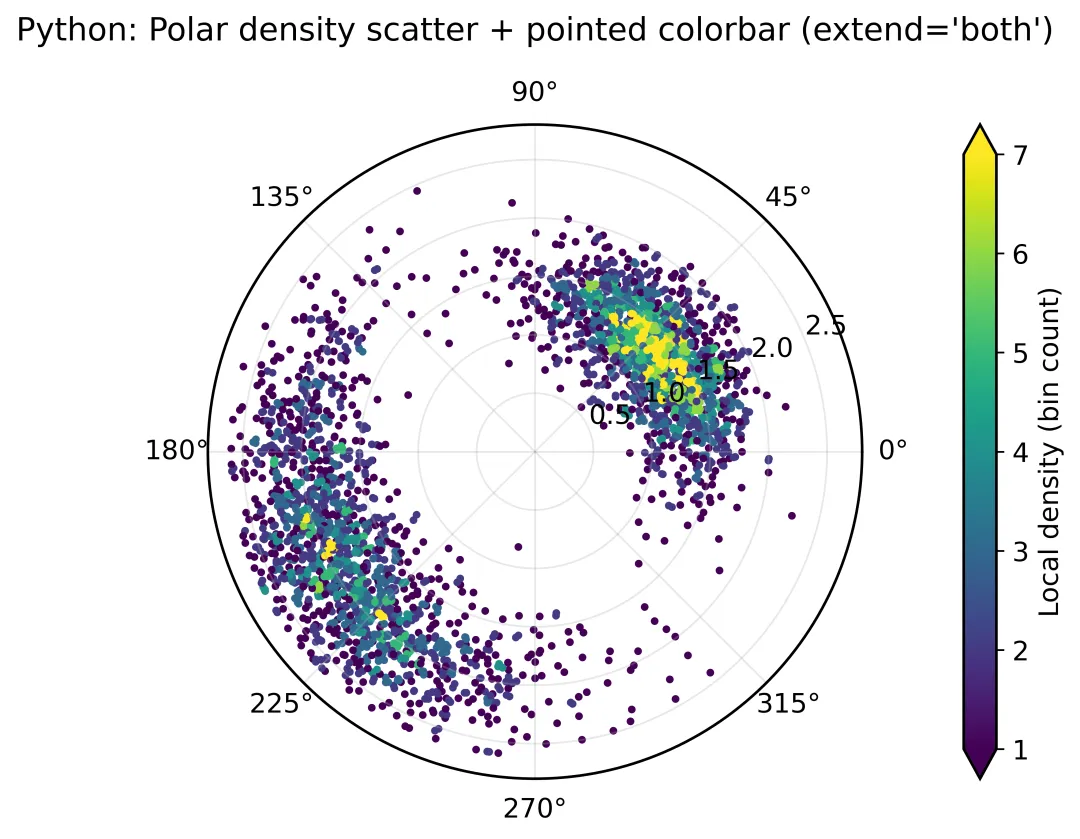
MATLAB 代码(极坐标密度散点 + 尖角 colorbar)
MATLAB 本身 colorbar 没有“一行命令两端尖角”的通用接口,所以这里用 patch 在 colorbar 上画两个三角形实现。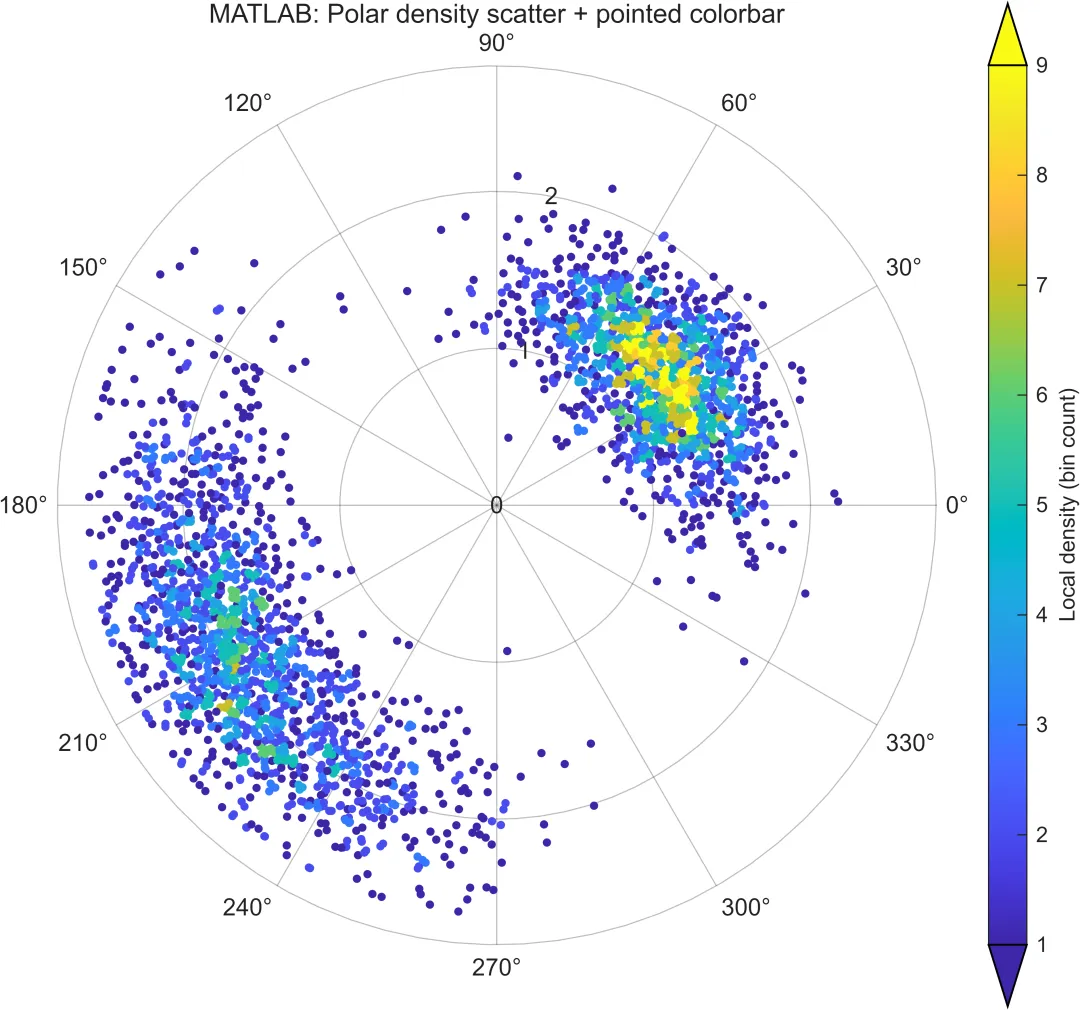
具体代码
具体Python如下:
import numpy as np
import pandas as pd
import matplotlib.pyplot as plt
#1) 生成演示数据(替换成你的 theta/r 也行)
rng = np.random.default_rng(2)
n = 3000
theta1 = rng.vonmises(mu=np.deg2rad(40), kappa=6, size=n//2)
r1 = np.clip(rng.normal(1.4, 0.25, size=n//2), 0.1, 2.4)
theta2 = rng.vonmises(mu=np.deg2rad(210), kappa=4, size=n//2)
r2 = np.clip(rng.normal(2.0, 0.30, size=n//2), 0.1, 2.6)
theta = np.concatenate([theta1, theta2]) % (2*np.pi)
r = np.concatenate([r1, r2])
x = r*np.cos(theta)
y = r*np.sin(theta)
# ========== 2) 快速密度:二维分箱计数 ==========
nb = 80
H, xedges, yedges = np.histogram2d(x, y, bins=nb)
ix = np.clip(np.searchsorted(xedges, x, side="right") - 1, 0, nb-1)
iy = np.clip(np.searchsorted(yedges, y, side="right") - 1, 0, nb-1)
dens = H[ix, iy]
# 裁色标范围到分位数,制造“溢出” -> 让尖角有意义
vmin = np.quantile(dens, 0.05)
vmax = np.quantile(dens, 0.95)
# ========== 3) 极坐标散点密度图 ==========
plt.rcParams.update({
"font.size": 12,
"axes.linewidth": 1.2,
"figure.facecolor": "white"
})
fig = plt.figure(figsize=(7.0, 5.4))
ax = fig.add_subplot(111, projection="polar")
sc = ax.scatter(theta, r, c=dens, s=12, cmap="viridis",
vmin=vmin, vmax=vmax, linewidths=0)
ax.set_title("Python: Polar density scatter + pointed colorbar (extend='both')", pad=18)
ax.set_rmax(2.8)
ax.grid(True, alpha=0.3)
cb = fig.colorbar(sc, ax=ax, pad=0.10, fraction=0.06, extend="both")
cb.set_label("Local density (bin count)")
fig.tight_layout()
fig.savefig("PY_polar_density_pointed.png", dpi=600, bbox_inches="tight")
plt.close(fig)
具体Matlab代码如下:
%% polar_density_pointed_colorbar_fix.m
clear; clc; close all;
rng(2);
n = 3000;
% --- 1) 造数据(两团方向聚集) ---
theta1 = deg2rad(40) + randn(n/2,1) * 0.35;
theta2 = deg2rad(210) + randn(n/2,1) * 0.45;
theta = mod([theta1; theta2], 2*pi);
r1 = min(max(1.4 + 0.25*randn(n/2,1), 0.1), 2.4);
r2 = min(max(2.0 + 0.30*randn(n/2,1), 0.1), 2.6);
r = [r1; r2];
x = r .* cos(theta);
y = r .* sin(theta);
% --- 2) 二维分箱密度(用 histcounts2,拿到每个点的bin) ---
nb = 80;
xe = linspace(min(x), max(x), nb+1);
ye = linspace(min(y), max(y), nb+1);
% binX/binY: 每个点落在哪个格子;0 表示落在边界外(极少)
[N,~,~,binX,binY] = histcounts2(x, y, xe, ye);
% 把边界外(=0)的点“夹”回边界内,避免全被过滤
binX(binX==0) = 1;
binY(binY==0) = 1;
binX(binX>nb) = nb;
binY(binY>nb) = nb;
dens = N(sub2ind(size(N), binX, binY)); % 注意 histcounts2 输出 N 的维度是 (nb x nb)
% 为了显示尖角:裁色标范围到分位数
vmin = quantile(dens, 0.05);
vmax = quantile(dens, 0.95);
% --- 3) 极坐标散点密度图 ---
fig = figure('Color','w','Position',[200 100 820 600]);
pax = polaraxes(fig); hold(pax,'on');
pax.RLim = [0 2.8];
pax.GridAlpha = 0.30;
title(pax, 'MATLAB: Polar density scatter + pointed colorbar');
polarscatter(pax, theta, r, 12, dens, 'filled');
colormap(pax, parula(256));
caxis(pax, [vmin vmax]);
% --- 4) colorbar + 两端尖角(在 colorbar 上叠加三角形) ---
cb = colorbar(pax);
cb.Label.String = 'Local density (bin count)';
drawnow;
cbpos = cb.Position;
ax2 = axes('Parent', fig, 'Position', cbpos, ...
'Color','none', 'XLim',[0 1], 'YLim',[0 1], ...
'XTick',[], 'YTick',[], 'Box','off');
ax2.HitTest = 'off';
th = 0.07; % 三角高度(占 colorbar 高度比例)
cm = colormap(pax);
lowc = cm(1,:);
highc = cm(end,:);
patch(ax2, [0 1 0.5], [0 0 -th], lowc, 'EdgeColor','k','LineWidth',0.8,'Clipping','off');
patch(ax2, [0 1 0.5], [1 1 1+th], highc, 'EdgeColor','k','LineWidth',0.8,'Clipping','off');
uistack(cb, 'top');
exportgraphics(fig, 'MATLAB_polar_density_pointed.png', 'Resolution', 600);
特别声明:
以上代码与文案均为网上资料整合而成,仅供广大同行们参考学习,如有侵权请联系删除。
如有其他需要,欢迎关注我的咸鱼号:pfc小姐姐

随机文章
-
 10个月宝宝每天需要喝多少奶粉?
- 从零开始学Python:第十一章“常用内置函数解析”
- Python入门,就现在!零基础系统学习之旅
- Python库巡礼--Dask
- 基于 Oracle Linux 10.1 图形化安装 Oracle AI Database 26ai
- 如何真正认识 Linux 系统结构?这篇文章告诉你!
- 在Kali Linux 中如何安装微信
- Linux内核devfs、sysfs、proc虚拟文件系统简介
- 【K230新技能点亮】K230 Linux免编译升级包直接冲!
- Adobe的垃圾代码,耽误了Linux十几年
- 得到文章大概,让你的文本主次分明﹉﹉用python来实现文章的分割.