Python+PyQt6 利用PaddleOCR3.4.0识别图片表格转 Word - 纯原生桌面应用开发指南
- 2026-09-30 23:30:27
基于 PaddleOCR 表格识别技术的 PyQt6 原生桌面应用实现,无需 Web 引擎依赖
项目简介
本项目是一个基于 PyQt6 开发的桌面应用程序,用于将包含表格的图片自动识别并转换为 Word 文档。与 Flask Web 版本不同,本应用完全使用 PyQt6 原生组件实现,无需浏览器支持,提供更好的用户体验和离线使用能力。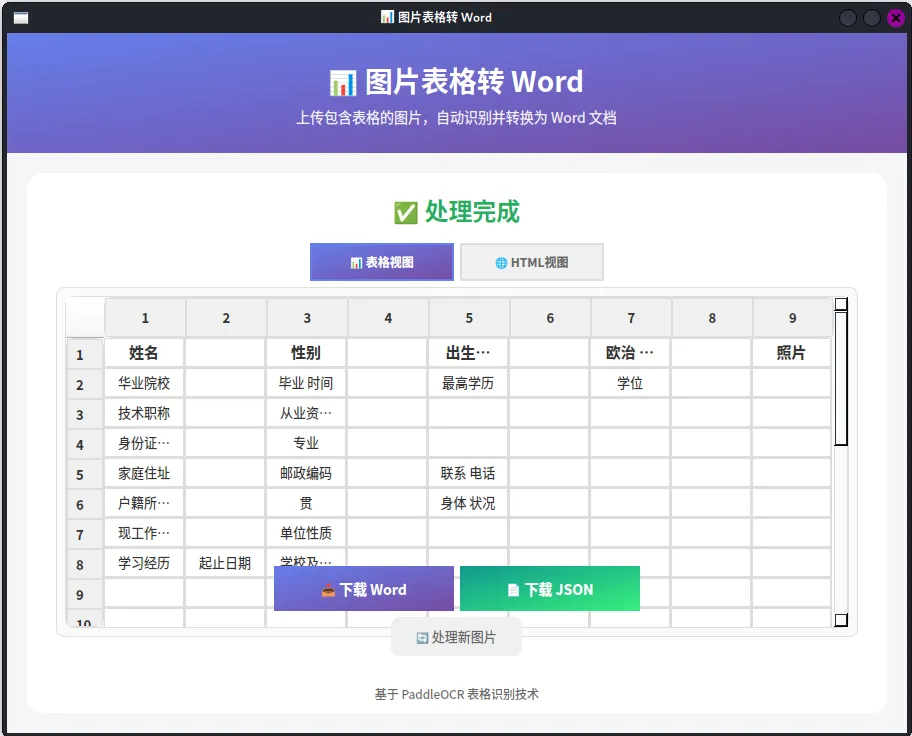
为什么选择 PyQt6 原生实现?
功能特点
🎯 核心功能
1.图片上传
拖拽上传:支持文件直接拖入窗口 点击选择:传统文件选择对话框 格式支持:JPG、PNG 大小限制:最大 16MB
2.表格识别
基于 PaddleOCR TableRecognitionPipelineV2 自动检测有线/无线表格 支持文档方向分类 CPU 推理,无需 GPU
📊 表格视图:使用 QTableWidget 展示结构化数据
🌐 HTML 视图:使用 QTextEdit 展示原始 HTML 源码
4.文档导出
📄 Word 文档 (.docx) 📄 JSON 原始数据 (.json)
🎨 UI 特性
现代化界面:渐变标题栏、圆角按钮、阴影效果
响应式布局:自适应窗口大小调整
多页面切换:上传 → 预览 → 进度 → 结果
进度反馈:实时进度条 + 状态文字
技术架构
技术栈
┌─────────────────────────────────────────┐
│           PyQt6 原生 GUI 层              │
│  QTableWidget | QTextEdit | QThread     │
├─────────────────────────────────────────┤
│           业务逻辑层                     │
│  TableRecognizer | ProcessingThread     │
├─────────────────────────────────────────┤
│           文档处理层                     │
│  python-docx | BeautifulSoup            │
├─────────────────────────────────────────┤
│           AI 推理层                      │
│  PaddleOCR | paddlepaddle               │
└─────────────────────────────────────────┘
核心组件
环境准备
系统要求
Python 3.8+ 操作系统:Windows / macOS / Linux 内存:建议 4GB+ 磁盘空间:约 2GB(含模型文件)
安装依赖
# 创建虚拟环境 建议python3.10
python -m venv venv
source venv/bin/activate  # Linux/macOS
# 或: venv\Scripts\activate  # Windows


# 安装 PyQt6
pip install PyQt6


# 安装 PaddlePaddle (CPU 版本)
pip install paddlepaddle==3.2.0  -i https://www.paddlepaddle.org.cn/packages/stable/cpu/


# 安装 PaddleX (包含 OCR 模型)
pip install paddleocr==3.4.0
按系统而定
pip install "paddle['ocr']"


# 安装文档处理库
pip install beautifulsoup4 python-docx
模型准备
首次运行会自动下载模型到 ~/.paddlex/official_models/:
所需模型清单:
PP-DocLayout-L- 文档布局分析PP-LCNet_x1_0_doc_ori- 文档方向分类PP-LCNet_x1_0_table_cls- 表格分类SLANeXt_wired/SLANeXt_wireless- 表格结构识别RT-DETR-L_wired/wireless_table_cell_det- 单元格检测PP-OCRv4_server_det/rec_doc- 文字检测与识别
核心代码解析
1. Paddle 环境配置
import os


# 必须在导入 paddle 前设置
os.environ['FLAGS_use_mkldnn'] = 'False'
os.environ['FLAGS_enable_pir_api'] = 'False'
os.environ['PADDLE_PDX_DISABLE_MODEL_SOURCE_CHECK'] = 'True'注意:这些环境变量用于禁用 MKL-DNN 加速和 PIR 新执行器,避免 Paddle 3.x 版本的兼容性问题。
2. 表格识别器(单例模式)
classTableRecognizer:
"""表格识别器 - 延迟初始化模型"""
    _instance = None
    _pipe = None

def__new__(cls):
if cls._instance isNone:
            cls._instance = super().__new__(cls)
return cls._instance

defget_pipe(self):
ifself._pipe isNone:
import paddle
            paddle.set_flags({'FLAGS_use_mkldnn': False})
            paddle.set_device('cpu')

from paddleocr import TableRecognitionPipelineV2
self._pipe = TableRecognitionPipelineV2(
                use_doc_orientation_classify=True,
                device='cpu',
            )
returnself._pipe设计要点:
使用单例模式避免重复加载模型 延迟初始化,首次使用时才加载 约 1.3GB 模型文件,加载需要一定时间
3. 后台处理线程
classProcessingThread(QThread):
"""后台处理线程"""
    progress_signal = pyqtSignal(int, str)  # 进度, 消息
    complete_signal = pyqtSignal(bool, str, str, str, str)

defrun(self):
try:
# 1. 加载模型
self.progress_signal.emit(5, "正在加载模型...")
            pipe = TableRecognizer().get_pipe()

# 2. 识别表格
self.progress_signal.emit(20, "正在识别表格...")
            results = pipe.predict(self.image_path)

# 3. 生成 Word
self.progress_signal.emit(60, "正在生成 Word 文档...")
# ... 处理逻辑

self.progress_signal.emit(100, "处理完成!")
self.complete_signal.emit(True, html, word_path, json_path, "")
except Exception as e:
self.complete_signal.emit(False, "", "", "", str(e))关键点:
继承
QThread避免阻塞主界面使用
pyqtSignal与主线程通信分阶段报告进度
4. 拖拽上传区域
classDropArea(QFrame):
"""自定义拖放区域"""
    file_dropped = pyqtSignal(str)

def__init__(self, parent=None):
super().__init__(parent)
self.setAcceptDrops(True)  # 启用拖拽

defdragEnterEvent(self, event: QDragEnterEvent):
if event.mimeData().hasUrls():
            event.acceptProposedAction()

defdropEvent(self, event: QDropEvent):
        urls = event.mimeData().urls()
if urls:
            file_path = urls[0].toLocalFile()
self.file_dropped.emit(file_path)
5. HTML 表格转 Word
defappend_html_tables_to_word(doc, html):
"""将 HTML 表格添加到 Word 文档"""
    soup = BeautifulSoup(html, "html.parser")
    table_elements = soup.find_all("table")

for table in table_elements:
        rows = list(table.find_all("tr"))
# 计算行列数
        max_row = len(rows)
        max_col = max(len(row.find_all(["td", "th"])) for row in rows)

# 创建 Word 表格
        word_table = doc.add_table(rows=max_row, cols=max_col)
        word_table.style = "Table Grid"

# 填充单元格
for r_idx, row inenumerate(rows):
            cells = row.find_all(["td", "th"])
for c_idx, cell inenumerate(cells):
                word_cell = word_table.cell(r_idx, c_idx)
                word_cell.text = cell.get_text(strip=True)
# 设置样式...
完整代码
#!/usr/bin/env python3
"""
PyQt6 图片表格识别转 Word - 纯原生 PyQt6 版本


特点:
- 完全使用 PyQt6 原生组件,无 Web 引擎依赖
- 表格预览使用 QTableWidget 原生表格
- HTML 源码使用 QTextEdit 纯文本显示


用法:
  python app2_pyqt6_native.py
"""


import os
import sys
import json
import time
import uuid
from datetime import datetime
from pathlib import Path


# 设置 PaddlePaddle 环境变量(必须在导入 paddle 前设置)
os.environ['FLAGS_use_mkldnn'] = 'False'
os.environ['FLAGS_enable_pir_api'] = 'False'
os.environ['PADDLE_PDX_DISABLE_MODEL_SOURCE_CHECK'] = 'True'
os.environ['PADDLEX_HOME'] = os.path.join(
    os.path.dirname(os.path.abspath(__file__)),
'models'
)


from PyQt6.QtWidgets import (
    QApplication, QMainWindow, QWidget, QVBoxLayout, QHBoxLayout,
    QLabel, QPushButton, QProgressBar, QTextEdit, QFileDialog,
    QMessageBox, QFrame, QTableWidget, QTableWidgetItem,
    QHeaderView, QStackedWidget
)
from PyQt6.QtCore import Qt, QThread, pyqtSignal
from PyQt6.QtGui import QFont, QDragEnterEvent, QDropEvent, QPixmap


from bs4 import BeautifulSoup
from docx import Document
from docx.shared import Pt
from docx.enum.text import WD_ALIGN_PARAGRAPH
from docx.oxml.ns import qn


# 目录配置
UPLOAD_FOLDER = 'uploads'
OUTPUT_FOLDER = 'output'
JSON_FOLDER = 'output/json'
os.makedirs(UPLOAD_FOLDER, exist_ok=True)
os.makedirs(OUTPUT_FOLDER, exist_ok=True)
os.makedirs(JSON_FOLDER, exist_ok=True)


FONT_NAME = "微软雅黑"
FONT_SIZE = 11


classTableRecognizer:
"""表格识别器 - 单例模式延迟初始化"""
    _instance = None
    _pipe = None

def__new__(cls):
if cls._instance isNone:
            cls._instance = super().__new__(cls)
return cls._instance

defget_pipe(self):
ifself._pipe isNone:
import paddle
            paddle.set_flags({'FLAGS_use_mkldnn': False})
            paddle.set_device('cpu')

from paddleocr import TableRecognitionPipelineV2
print("[系统] 正在初始化表格识别模型...")
self._pipe = TableRecognitionPipelineV2(
                use_doc_orientation_classify=True,
                device='cpu',
            )
print("[系统] 模型初始化完成")
returnself._pipe


classProcessingThread(QThread):
"""后台处理线程"""
    progress_signal = pyqtSignal(int, str)
    complete_signal = pyqtSignal(bool, str, str, str, str)

def__init__(self, image_path, output_filename):
super().__init__()
self.image_path = image_path
self.output_filename = output_filename
self.json_filename = output_filename.replace('.docx', '.json')
self.json_path = os.path.join(JSON_FOLDER, self.json_filename)
self.word_path = os.path.join(OUTPUT_FOLDER, self.output_filename)

defrun(self):
try:
self.progress_signal.emit(5, "正在加载模型...")
            pipe = TableRecognizer().get_pipe()

self.progress_signal.emit(20, "正在识别表格...")
            results = pipe.predict(self.image_path)

            result_data = None
            html_content = ""

for res in results:
ifhasattr(res, 'json'):
                    result_data = res.json
ifhasattr(res, 'html'):
                    html_data = res.html
                    html_content = html_data ifisinstance(html_data, str) elsestr(html_data)

if result_data:
withopen(self.json_path, 'w', encoding='utf-8') as f:
                        json.dump(result_data, f, ensure_ascii=False, indent=2)
break

ifnot result_data andnot html_content:
self.complete_signal.emit(False, "", "", "", "未识别到表格内容")
return

self.progress_signal.emit(60, "正在生成 Word 文档...")

            doc = Document()
            doc.styles["Normal"].font.name = FONT_NAME
            doc.styles["Normal"]._element.rPr.rFonts.set(qn("w:eastAsia"), FONT_NAME)

# 提取表格并写入
            soup = BeautifulSoup(html_content, "html.parser")
for table in soup.find_all("table"):
                rows = list(table.find_all("tr"))
ifnot rows:
continue
                max_col = max(len(row.find_all(["td", "th"])) for row in rows)
                word_table = doc.add_table(rows=len(rows), cols=max_col)
                word_table.style = "Table Grid"

for r_idx, row inenumerate(rows):
                    cells = row.find_all(["td", "th"])
for c_idx, cell inenumerate(cells):
                        word_table.cell(r_idx, c_idx).text = cell.get_text(strip=True)
                doc.add_paragraph()

            doc.save(self.word_path)

self.progress_signal.emit(100, "处理完成!")
self.complete_signal.emit(True, html_content, self.word_path, self.json_path, "")

except Exception as e:
import traceback
            traceback.print_exc()
self.complete_signal.emit(False, "", "", "", str(e))


classDropArea(QFrame):
"""拖放上传区域"""
    file_dropped = pyqtSignal(str)

def__init__(self, parent=None):
super().__init__(parent)
self.setAcceptDrops(True)
self.setMinimumHeight(200)
self.setFrameShape(QFrame.Shape.StyledPanel)
self.setStyleSheet("""
            DropArea {
                border: 3px dashed #cccccc;
                border-radius: 12px;
                background-color: #fafafa;
            }
            DropArea[dragOver="true"] {
                border-color: #667eea;
                background-color: #e8eeff;
            }
        """)

        layout = QVBoxLayout(self)
        layout.setAlignment(Qt.AlignmentFlag.AlignCenter)

self.icon_label = QLabel("📁")
self.icon_label.setStyleSheet("font-size: 48px;")
self.icon_label.setAlignment(Qt.AlignmentFlag.AlignCenter)

self.text_label = QLabel("点击或拖拽上传图片")
self.text_label.setStyleSheet("font-size: 18px; color: #555;")
self.text_label.setAlignment(Qt.AlignmentFlag.AlignCenter)

self.hint_label = QLabel("支持 JPG、PNG 格式,最大 16MB")
self.hint_label.setStyleSheet("font-size: 12px; color: #999;")
self.hint_label.setAlignment(Qt.AlignmentFlag.AlignCenter)

        layout.addWidget(self.icon_label)
        layout.addWidget(self.text_label)
        layout.addWidget(self.hint_label)

defmousePressEvent(self, event):
if event.button() == Qt.MouseButton.LeftButton:
            file_path, _ = QFileDialog.getOpenFileName(
self, "选择图片", "", "图片文件 (*.jpg *.jpeg *.png)"
            )
if file_path:
self.file_dropped.emit(file_path)

defdragEnterEvent(self, event: QDragEnterEvent):
if event.mimeData().hasUrls():
self.setProperty("dragOver", True)
self.style().unpolish(self)
self.style().polish(self)
            event.acceptProposedAction()

defdragLeaveEvent(self, event):
self.setProperty("dragOver", False)
self.style().unpolish(self)
self.style().polish(self)

defdropEvent(self, event: QDropEvent):
self.setProperty("dragOver", False)
self.style().unpolish(self)
self.style().polish(self)

        urls = event.mimeData().urls()
if urls:
            file_path = urls[0].toLocalFile()
if file_path.lower().endswith(('.jpg', '.jpeg', '.png')):
self.file_dropped.emit(file_path)


classMainWindow(QMainWindow):
"""主窗口"""

def__init__(self):
super().__init__()
self.setWindowTitle("📊 图片表格转 Word")
self.setMinimumSize(900, 700)

self.current_image_path = None
self.current_word_path = None
self.current_json_path = None
self.processing_thread = None

self.init_ui()
self.apply_styles()

definit_ui(self):
        central_widget = QWidget()
self.setCentralWidget(central_widget)

        main_layout = QVBoxLayout(central_widget)
        main_layout.setContentsMargins(0, 0, 0, 0)

# 标题栏
        header = QWidget()
        header.setFixedHeight(120)
        header.setStyleSheet("""
            background: qlineargradient(x1:0, y1:0, x2:1, y2:1,
                stop:0 #667eea, stop:1 #764ba2);
        """)
        header_layout = QVBoxLayout(header)

        title = QLabel("📊 图片表格转 Word")
        title.setStyleSheet("font-size: 28px; font-weight: bold; color: white;")
        title.setAlignment(Qt.AlignmentFlag.AlignCenter)

        subtitle = QLabel("上传包含表格的图片,自动识别并转换为 Word 文档")
        subtitle.setStyleSheet("font-size: 14px; color: rgba(255,255,255,0.9);")
        subtitle.setAlignment(Qt.AlignmentFlag.AlignCenter)

        header_layout.addWidget(title)
        header_layout.addWidget(subtitle)
        main_layout.addWidget(header)

# 内容区域
        content = QWidget()
        content.setStyleSheet("background-color: white; border-radius: 16px; margin: 20px;")
        content_layout = QVBoxLayout(content)

# 页面切换
self.preview_stack = QStackedWidget()

# 上传页面
self.upload_page = QWidget()
        upload_layout = QVBoxLayout(self.upload_page)
self.drop_area = DropArea()
self.drop_area.file_dropped.connect(self.handle_file)
        upload_layout.addStretch()
        upload_layout.addWidget(self.drop_area)
        upload_layout.addStretch()

# 预览页面
self.preview_page = QWidget()
        preview_layout = QVBoxLayout(self.preview_page)
self.preview_label = QLabel()
self.preview_label.setAlignment(Qt.AlignmentFlag.AlignCenter)
self.preview_label.setMinimumSize(400, 300)
self.preview_label.setScaledContents(True)
        preview_layout.addWidget(self.preview_label)

        btn_layout = QHBoxLayout()
        btn_layout.addStretch()
        remove_btn = QPushButton("移除图片")
        remove_btn.clicked.connect(self.reset_upload)
        process_btn = QPushButton("开始识别")
        process_btn.clicked.connect(self.start_processing)
        btn_layout.addWidget(remove_btn)
        btn_layout.addWidget(process_btn)
        btn_layout.addStretch()
        preview_layout.addLayout(btn_layout)

# 进度页面
self.progress_page = QWidget()
        progress_layout = QVBoxLayout(self.progress_page)
self.progress_bar = QProgressBar()
self.progress_text = QLabel("准备中...")
self.progress_text.setAlignment(Qt.AlignmentFlag.AlignCenter)
        progress_layout.addStretch()
        progress_layout.addWidget(self.progress_bar)
        progress_layout.addWidget(self.progress_text)
        progress_layout.addStretch()

# 结果页面
self.result_page = QWidget()
        result_layout = QVBoxLayout(self.result_page)

        success_label = QLabel("✅ 处理完成")
        success_label.setStyleSheet("font-size: 24px; color: #27ae60;")
        success_label.setAlignment(Qt.AlignmentFlag.AlignCenter)
        result_layout.addWidget(success_label)

# 切换按钮
        switch_layout = QHBoxLayout()
self.table_btn = QPushButton("📊 表格视图")
self.table_btn.setCheckable(True)
self.table_btn.setChecked(True)
self.table_btn.clicked.connect(lambda: self.switch_view("table"))

self.html_btn = QPushButton("🌐 HTML视图")
self.html_btn.setCheckable(True)
self.html_btn.clicked.connect(lambda: self.switch_view("html"))

        switch_layout.addWidget(self.table_btn)
        switch_layout.addWidget(self.html_btn)
        result_layout.addLayout(switch_layout)

# 预览区域
self.result_stack = QStackedWidget()

self.table_widget = QTableWidget()
self.table_widget.setEditTriggers(QTableWidget.EditTrigger.NoEditTriggers)

self.html_text = QTextEdit()
self.html_text.setReadOnly(True)

self.result_stack.addWidget(self.table_widget)
self.result_stack.addWidget(self.html_text)
        result_layout.addWidget(self.result_stack)

# 下载按钮
        download_layout = QHBoxLayout()
        word_btn = QPushButton("📥 下载 Word")
        word_btn.clicked.connect(self.download_word)
        json_btn = QPushButton("📄 下载 JSON")
        json_btn.clicked.connect(self.download_json)
        download_layout.addWidget(word_btn)
        download_layout.addWidget(json_btn)
        result_layout.addLayout(download_layout)

        reset_btn = QPushButton("🔄 处理新图片")
        reset_btn.clicked.connect(self.reset_all)
        result_layout.addWidget(reset_btn, alignment=Qt.AlignmentFlag.AlignCenter)

# 添加所有页面
self.preview_stack.addWidget(self.upload_page)
self.preview_stack.addWidget(self.preview_page)
self.preview_stack.addWidget(self.progress_page)
self.preview_stack.addWidget(self.result_page)

        content_layout.addWidget(self.preview_stack)
        main_layout.addWidget(content)

defapply_styles(self):
self.setStyleSheet("""
            QPushButton {
                padding: 10px 20px;
                border-radius: 20px;
                font-weight: bold;
            }
            QPushButton:checked {
                background-color: #667eea;
                color: white;
            }
            QTableWidget {
                border: 1px solid #ddd;
                gridline-color: #ddd;
            }
            QTableWidget::item {
                padding: 8px;
                color: #333;
            }
            QProgressBar {
                border-radius: 5px;
                height: 20px;
            }
        """)

defhandle_file(self, file_path):
self.current_image_path = file_path
        pixmap = QPixmap(file_path)
        scaled = pixmap.scaled(400, 300, Qt.AspectRatioMode.KeepAspectRatio)
self.preview_label.setPixmap(scaled)
self.preview_stack.setCurrentIndex(1)

defstart_processing(self):
        timestamp = datetime.now().strftime('%Y%m%d_%H%M%S')
        output_filename = f"table_{timestamp}.docx"

self.preview_stack.setCurrentIndex(2)

self.processing_thread = ProcessingThread(
self.current_image_path,
            output_filename
        )
self.processing_thread.progress_signal.connect(self.update_progress)
self.processing_thread.complete_signal.connect(self.processing_complete)
self.processing_thread.start()

defupdate_progress(self, progress, message):
self.progress_bar.setValue(progress)
self.progress_text.setText(message)

defprocessing_complete(self, success, html, word_path, json_path, error):
if success:
self.current_word_path = word_path
self.current_json_path = json_path
self.parse_html(html)
self.html_text.setPlainText(html)
self.preview_stack.setCurrentIndex(3)
else:
            QMessageBox.critical(self, "错误", error)
self.preview_stack.setCurrentIndex(0)

defparse_html(self, html):
        soup = BeautifulSoup(html, "html.parser")
        table = soup.find("table")
ifnot table:
return

        rows = table.find_all("tr")
self.table_widget.setRowCount(len(rows))
        max_cols = max(len(row.find_all(["td", "th"])) for row in rows)
self.table_widget.setColumnCount(max_cols)

for r_idx, row inenumerate(rows):
            cells = row.find_all(["td", "th"])
for c_idx, cell inenumerate(cells):
                item = QTableWidgetItem(cell.get_text(strip=True))
                item.setTextAlignment(Qt.AlignmentFlag.AlignCenter)
self.table_widget.setItem(r_idx, c_idx, item)

defswitch_view(self, mode):
if mode == "table":
self.result_stack.setCurrentIndex(0)
self.table_btn.setChecked(True)
self.html_btn.setChecked(False)
else:
self.result_stack.setCurrentIndex(1)
self.table_btn.setChecked(False)
self.html_btn.setChecked(True)

defdownload_word(self):
        save_path, _ = QFileDialog.getSaveFileName(
self, "保存 Word", "table_result.docx", "Word 文件 (*.docx)"
        )
if save_path:
import shutil
            shutil.copy(self.current_word_path, save_path)

defdownload_json(self):
        save_path, _ = QFileDialog.getSaveFileName(
self, "保存 JSON", "table_result.json", "JSON 文件 (*.json)"
        )
if save_path:
import shutil
            shutil.copy(self.current_json_path, save_path)

defreset_upload(self):
self.current_image_path = None
self.preview_label.clear()
self.preview_stack.setCurrentIndex(0)

defreset_all(self):
self.current_image_path = None
self.current_word_path = None
self.current_json_path = None
self.preview_label.clear()
self.table_widget.clear()
self.html_text.clear()
self.progress_bar.setValue(0)
self.preview_stack.setCurrentIndex(0)


defmain():
    app = QApplication(sys.argv)
    window = MainWindow()
    window.show()
    sys.exit(app.exec())


if __name__ == '__main__':
    main()
使用说明
启动应用
# 激活环境
source venv/bin/activate


# 运行应用
python app2_pyqt6_native.py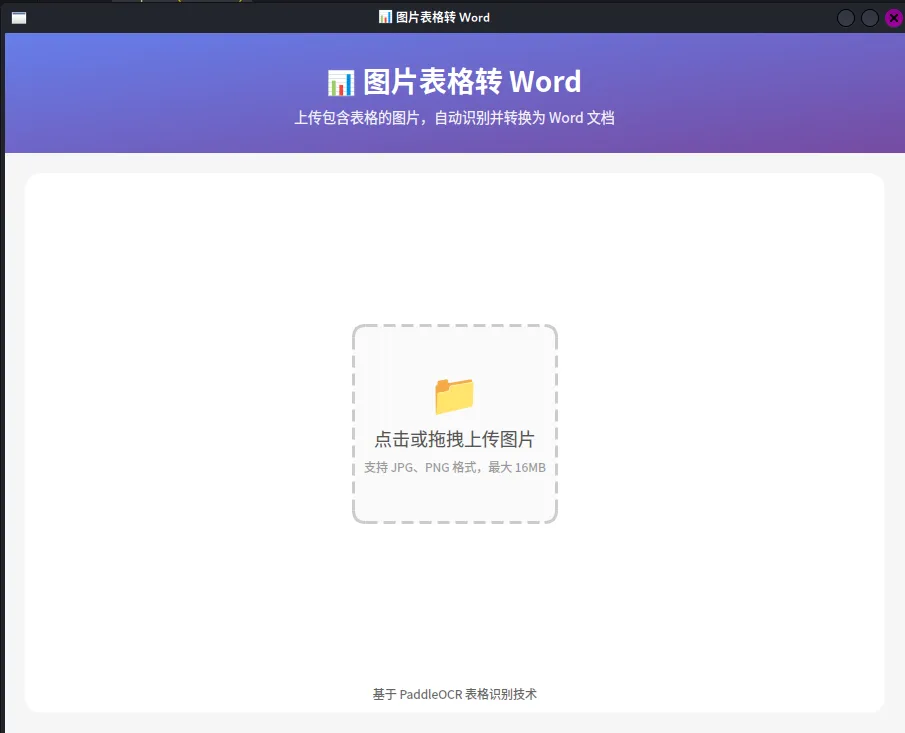
操作流程
1.上传图片
拖拽图片到虚线框区域 或点击区域选择文件
查看图片预览 点击"开始识别"
观察进度条 模型首次加载约需 10-30 秒
切换"表格视图"查看结构化数据 切换"HTML 视图"查看原始代码
下载 Word 文档 或下载 JSON 数据
常见问题
Q1: 启动时提示缺少模型?
首次使用会自动下载模型到 ~/.paddlex/official_models/,确保网络畅通。或者手动复制模型到项目目录。
Q2: 识别速度慢?
首次加载模型较慢,后续使用会快很多 CPU 推理速度取决于硬件性能 大图片会先缩放再处理
Q3: 表格识别不准确?
确保图片清晰度足够 表格边框应尽量完整 复杂表格可能需要手动调整
Q4: 如何打包为可执行文件?
使用 PyInstaller:
pip install pyinstaller
...
方法省略了
请参考我的另一篇文章
https://mp.weixin.qq.com/s/QgrilA66q5VCOqzL0hBfUQ
注意:打包时需要包含模型文件和依赖库。
总结
本文介绍了如何使用 PyQt6 原生组件开发一个图片表格识别桌面应用。关键技术点包括:
PaddleOCR 集成 - 处理 onednn 兼容性,延迟加载模型
QThread 多线程 - 避免 UI 卡顿,实时进度反馈
自定义组件 - DropArea 实现拖拽上传
多页面切换 - QStackedWidget 管理不同状态页面
文档生成 - python-docx 生成标准 Word 文档
完整代码已提供,可以直接运行使用。
