AutoCAD | Python 实例应用 CAD 表格导出到 Excel
- 2026-09-21 15:53:21
AutoCAD | Python 实例应用 CAD 表格导出到 Excel
参考文献: [1]. AutoCAD ActiveX 二次开发技术. 编辑:335工作室 排版:335工作室 校对:335工作室 
关联阅读: 335工作室 | 效率,自由的基础! 软件下载 AutoCAD | Python 教程系列汇总篇 AutoCAD | Python 高级应用 CAD事件响应
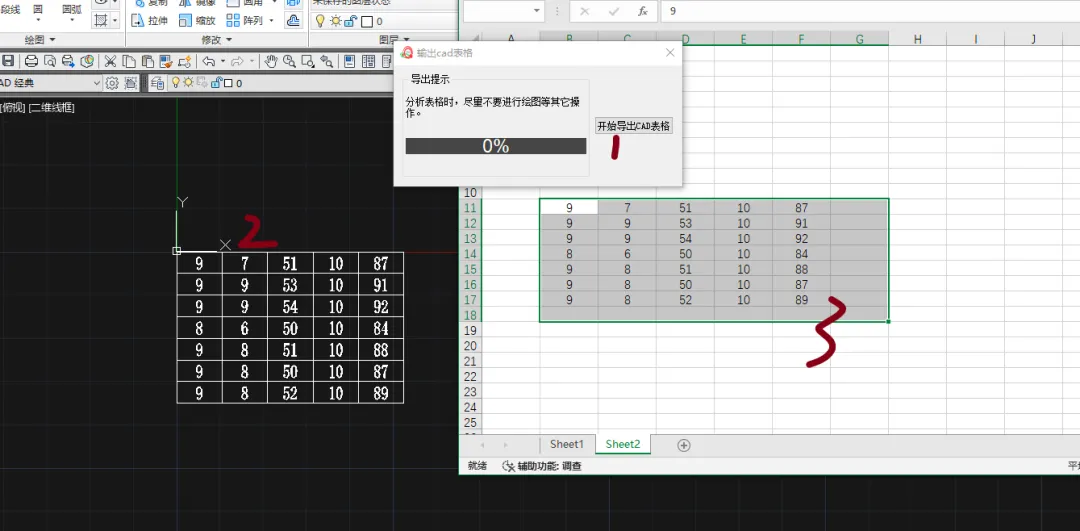
把335工具箱中CAD 表格导出到 Excel程序源代码分享给大家(下载链接见文末):
点击开始导出表格,在cad中选择需要导出的表格,即可在当前运行excel程序中输出对应表格。
整体思路
1. 连接 AutoCAD 与 Excel
通过 COM 接口连接 AutoCAD 和 Excel,实现对图形元素和单元格的读写操作。
2. 提取表格的线条
从 CAD 中筛选出线段和多段线,区分横线与竖线,为后续计算表格网格做准备。
3. 计算交点,生成网格
遍历横线与竖线求交点,得到所有网格点。
然后对这些点排序,按行列构建二维网格,得到“表格结构”。
4. 识别每个单元格的范围
对于每个网格小矩形,确定它的左上角与右下角坐标,得到一个“单元格区域”。
5. 读取区域内文字
在 CAD 中查找文本对象,判断文本的包围盒是否落在某个单元格范围内。
若命中,把文本拼接到对应单元格内。
6. 写入 Excel
创建或激活 Excel 工作簿,按行列写入内容,并处理合并单元格。
关键细节
- 交点与排序:解决“线段存在微小误差”的问题,需要加容差。
- 合并单元格:通过判断横向/纵向边界线是否缺失来推断合并范围。
- 文本归属:用文本包围盒判断是否落在单元格内,避免文字被错分。
核心源代码:以下代码实现了CAD中表格坐标及对应文本位置的识别,对cad表格进行了分解处理。
def get_form_text(self,points, row_line, col_line):"""很据表格坐标和横线竖线,建立excel表格,并提取数据Args:points: 表格坐标row_line: 表格横线col_line: 表格竖线Returns:"""or_col_count = 1row_count = 1all_row = len(points)all_col = len(points[0])cad = EIO.EXEIO().autocad()excel = EIO.EXEIO().excel()excel.DisplayAlerts = Falsemy_Book = excel.ActiveWorkbookif my_Book == None:my_Book = excel.Workbooks.Add()try:row_count = excel.ActiveCell.Rowor_col_count = excel.ActiveCell.Columnexcept:passexcel.Range(excel.Cells(row_count, or_col_count), \excel.Cells(row_count + all_row - 1, or_col_count + all_col - 1)).Select()excel.Selection.Clear()for cal_y1 in points[0]:if list(cal_y1) == [None, None]:continueelse:y1 = cal_y1[1]breakfor cal_x1 in points:if list(cal_x1[0]) == [None, None]:continueelse:x1 = cal_x1[0][0]breakfor cal_y2 in points[-1]:if list(cal_y2) == [None, None]:continueelse:y2 = cal_y2[1]breakfor cal_x2 in points:if list(cal_x2[-1]) == [None, None]:continueelse:x2 = cal_x2[-1][0]breakhas_text = addtext().finderindwg(cad, FilterType([-4, 0, 0, -4]), ["<or", "TEXT", "MTEXT", "or>"], \Point1=Points([x1, y1, 0]), Point2=Points([x2, y2, 0]), \Mode=constants.acSelectionSetCrossing)text_obj = [[x.TextString, x.GetBoundingBox()] for x in has_text]text_obj = sorted(text_obj, key=lambda x: (-round(x[1][0][1], 5), round(x[1][0][0], 5)))self.progressbar.maxValue=all_rowfor row_i, row_pts in enumerate(points[:-1]):self.progressbar.value = self._valueself._value += 1col_count = copy.deepcopy(or_col_count)merg_col = -1for col_i, col_pt in enumerate(row_pts[:-1]):if merg_col > 0:merg_col -= 1col_count += 1continuemerg_col = -1merg_row = -1if list(col_pt) == [None, None]:col_count += 1continueelse:left_top_bt = col_ptnext_y = col_pt[1]next_x = col_pt[0]for cal_y in points[row_i + 1]:if list(cal_y) == [None, None]:continueelse:next_y = cal_y[1]breakfor cal_x in points:if list(cal_x[col_i + 1]) == [None, None]:continueelse:next_x = cal_x[col_i + 1][0]breakfor temp_col in range(col_i + 1, all_col):right_bot_bt = row_pts[temp_col]merg_col += 1if temp_col == all_col - 1:breakif list(right_bot_bt) == [None, None]:continuepos_pt1 = [(left_top_bt[0] + right_bot_bt[0]) / 2, (left_top_bt[1] + next_y) / 2]pos_pt2 = [right_bot_bt[0], (left_top_bt[1] + next_y) / 2]for col_line_item in col_line:judge, inter_pt = line_cross([pos_pt1, pos_pt2], col_line_item)if judge < 0:breakif judge < 0:breakfor temp_row in range(row_i + 1, all_row):right_bot_bt = points[temp_row][col_i]merg_row += 1if temp_row == all_row - 1:breakif list(right_bot_bt) == [None, None]:continuepos_pt1 = [(left_top_bt[0] + next_x) / 2, (left_top_bt[1] + right_bot_bt[1]) / 2]pos_pt2 = [(left_top_bt[0] + next_x) / 2, right_bot_bt[1]]for row_line_item in row_line:judge, inter_pt = line_cross([pos_pt1, pos_pt2], row_line_item)if judge < 0:breakif judge < 0:breakright_bot_bt = points[row_i + 1 + merg_row][col_i + 1 + merg_col]if list(right_bot_bt) == [None, None]:continueelse:try:excel.Range(excel.Cells(row_count, col_count), \excel.Cells(row_count+merg_row, col_count+merg_col)).Merge()except:passpos_pt1 = [left_top_bt[0], left_top_bt[1], 0]pos_pt2 = [right_bot_bt[0], right_bot_bt[1], 0]in_excel_val=""for text_obj_item in text_obj:if text_obj_item[1][1][1] < right_bot_bt[1]:breakif pt_in_rec(text_obj_item[1][0], pos_pt1, pos_pt2) \and pt_in_rec(text_obj_item[1][1], pos_pt1, pos_pt2):if in_excel_val=="":in_excel_val=text_obj_item[0]else:in_excel_val=in_excel_val+chr(10)+text_obj_item[0]text_obj.remove(text_obj_item)if in_excel_val!="":excel.Cells(row_count, col_count).Value=in_excel_valcol_count += 1row_count += 1excel.Selection.HorizontalAlignment = -4108self._value=1self.progressbar.value = 0
总结
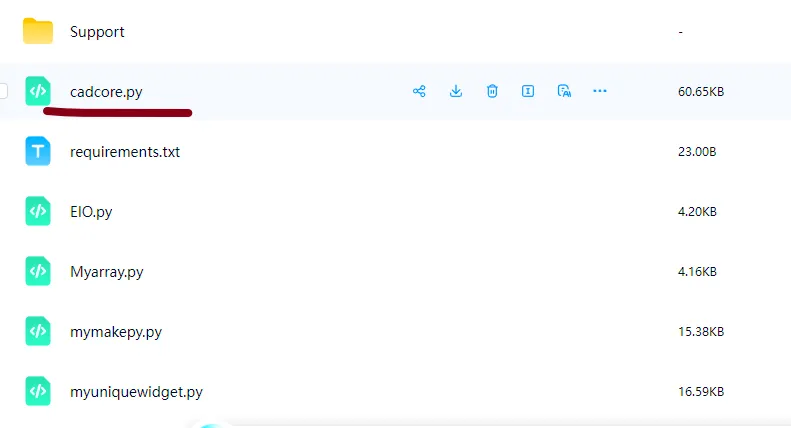
源码下载地址:
链接: https://pan.baidu.com/s/1GgaM0gwl8IBcADIyEz4xXQ
提取码: r534
程序主入口:
本文来自网友投稿或网络内容,如有侵犯您的权益请联系我们删除,联系邮箱:596563534@qq.com 。
