Python读写文本(二)
- 2026-09-22 11:24:22
Python读写文本(二)之前学习了Python打开文本的方法,使用open()函数, Python 读写文本(一) 但是使用open()必须添加close()方法,如果读取 / 写入过程中抛出异常(比如编码错误、文件损坏), with open(file_path,"r",encoding="utf-8") as f:中的“as f”是将open()返回的文件对象赋值给变量f;通过变量f可以调用文件的读/写方法。 读写文件的方法如下:
源文本内容如下: 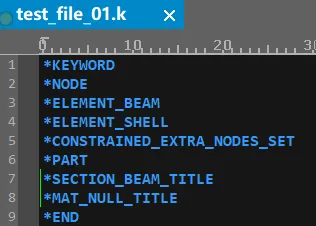
读取全部文本(read)代码如下: 运行代码后输出如下: 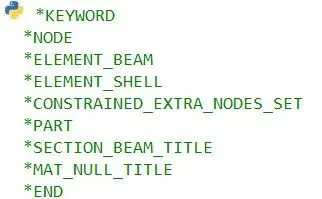
读取前5个字符代码如下: 运行代码后输出如下: 
按行读取(readline),读取前两行代码如下: 运行代码后输出如下: 
读取所有行(readlines),并显示行号,代码如下: 运行代码后输出如下: 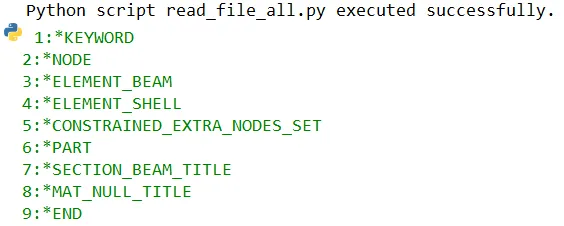
Python字符串的内置方法,作用是移除字符串末尾(右侧)的指定字符,如果不指定字符,默认移除空白字符(包括换行符\n,空格,制表符\t,回车符\r)。
# 1. 打开文件f = open("文件路径", "r", encoding="utf-8")# 2. 读取内容content = f.read()# 3. 关闭文件(必须!否则会占用系统资源)f.close()f.close() 不会执行,导致文件句柄泄露,系统会认为文件还在被使用,无法删除 / 修改,直到 Python 进程结束。推荐使用with open,可自动关闭文件,无需代码中添加close()例如:import osdir_path = r'C:\Users\86182\Desktop\read_file'file_name = "test_file.k"file_path = os.path.join(dir_path,file_name)try: with open(file_path,"r",encoding="utf-8") as f: content = f.read()print(content)except Exception as e:print(f"open failed due to {e}")f.read(size=-1) | size 个字符(默认 - 1,读取全部) | ||
f.readline(size=-1) | size 个字符) | ||
f.readlines(hint=-1) | hint 为预估字符数,减少内存分配) | ||
f.__iter__() | for line in f) |
f.write(string) | w(覆盖)/a(追加)/r+(读写)模式 | |
f.writelines(list) | \n) | lines = [line+'\n' for line in lines] |
f.flush() |
f.tell() | pos = f.tell() | |
f.seek(offset, whence=0) | offset:偏移量(字节)- whence:0 = 文件开头,1 = 当前位置,2 = 文件末尾 | f.seek(0) |
import osdir_path = r'C:\Users\86182\Desktop\read_file'file_name = "test_file_01.k"file_path = os.path.join(dir_path,file_name)try: with open(file_path,"r",encoding="utf-8") as f: content = f.read()print(content)except Exception as e:print(f"open failed due to {e}")import osdir_path = r'C:\Users\86182\Desktop\read_file'file_name = "test_file_01.k"file_path = os.path.join(dir_path,file_name)try: with open(file_path,"r",encoding="utf-8") as f: content = f.read(5)print(content)except Exception as e:print(f"open failed due to {e}")import osdir_path = r'C:\Users\86182\Desktop\read_file'file_name = "test_file_01.k"file_path = os.path.join(dir_path,file_name)try: with open(file_path,"r",encoding="utf-8") as f: first_line = f.readline()print(first_line) second_line = f.readline()print(second_line)except Exception as e:print(f"open failed due to {e}")import osdir_path = r'C:\Users\86182\Desktop\read_file'file_name = "test_file_01.k"file_path = os.path.join(dir_path,file_name)try: with open(file_path,"r",encoding="utf-8") as f: lines = f.readlines()for line_num,content in enumerate(lines,start=1): clean_content = content.rstrip('\n')print(f"{line_num}:{clean_content}")except Exception as e:print(f"open failed due to {e}")enumerate() 的作用是给可迭代对象(如列表、字符串、文件行等)的每个元素配上一个序号,遍历的时候能同时拿到 “序号” 和 “元素本身”。enumerate(iterable, start=0)interable:必须参数,要遍历的可迭代对象(列表,元组,字符串等)。start:可选参数,序号的起始值,默认是0.rstrip()rstrip() | |
lstrip() | |
strip() |
本文来自网友投稿或网络内容,如有侵犯您的权益请联系我们删除,联系邮箱:596563534@qq.com 。
随机文章
-
 10个月宝宝每天需要喝多少奶粉?
- 三启手机干翻电脑:把 Win11、Linux 和安卓塞进一部手机
- Linux基础 | lsof 命令使用指南
- Python学习【116】:从被动应对到主动重塑:如果python断供会怎么样?
- Python初学者入门教程 第5集输入输出
- Ubuntu/Linux是AI服务器的“事实标准”
- Python数据分析简答题【刷题必过版】
- Python进阶-19:Python办公自动化,掌握CSV、Word、Excel、PPT、PDF文件操作
- 2025 Python 生态全景:Rust 上位,AI 狂飙,新人涌入
- 100 个高频 Python 语法,新手速存少走弯路
- Python基础篇 - 面向过程与面向对象、类与对象初识