当前位置:首页>python>科研绘图之数据绘图-Python版

科研绘图之数据绘图-Python版

  • 2026-02-20 01:56:38
科研绘图之数据绘图-Python版

1 点线图

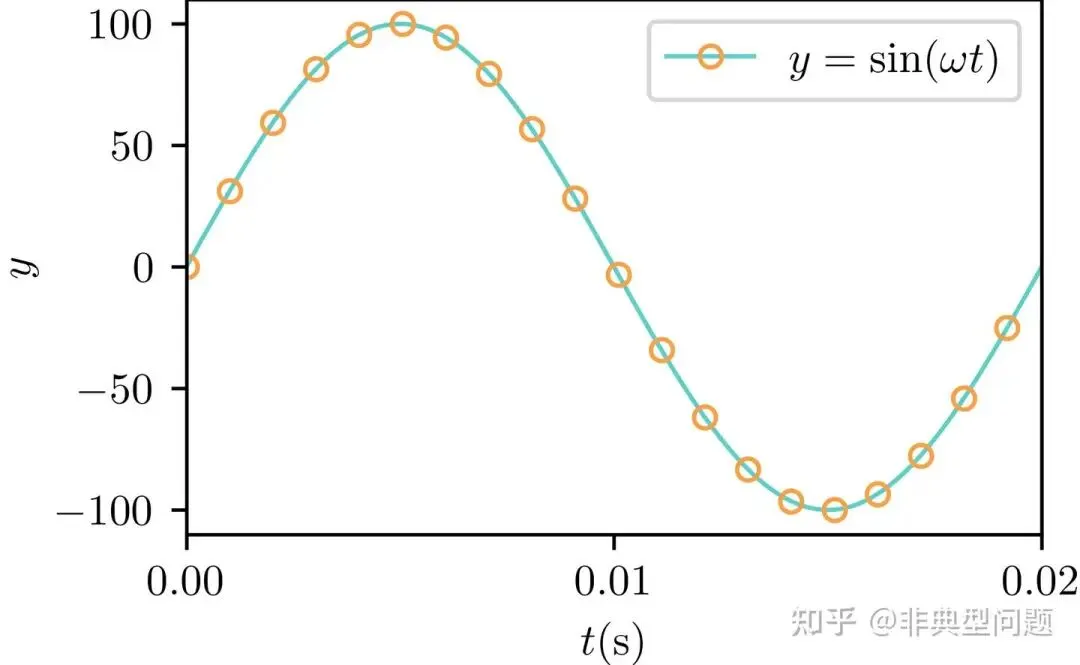
1.1 普通点线图matplotlib.axes.Axes.plot - Matplotlib 3.8.2 documentationmatplotlib.org/stable/api/_as_gen/matplotlib.axes.Axes.plot.html

# 引用包importnumpyasnpimportmatplotlib.pyplotaspltimportmatplotlibasmplfrommatplotlibimportrcParams# 自定义颜色color1=np.divide((91,206,201),255)color2=np.divide((140,215,122),255)color3=np.divide((250,159,66),255)color4=np.divide((243,83,59),255)# 自定义数据,自行修改f=50T=1/fomega=2*np.pi*ft=np.linspace(0,T,100)a=100*np.sin(omega*t)mpl.rcParams['font.sans-serif']='Times New Roman'# 设置字体为新罗马mpl.rcParams['text.usetex']=True# 默认为false,此处设置为TRUEfig,ax=plt.subplots(figsize=(3.5,2.2))# 设置图窗及窗口大小为宽3.5英寸,高2.2英寸ax.plot(t,a,'-o',linewidth=1.0,color=color1,markevery=5,markerfacecolor='none',markeredgecolor=color3,markersize='5',markeredgewidth=1,label='$y = \sin (\omega t)$')# 绘点线图ax.set_xlabel('$t{\mathrm{(s)}}$')# 设置X轴标签ax.set_ylabel('$y$')# 设置Y轴标签ax.minorticks_off()# 取消显示次刻度ax.set_xticks([min(t),(min(t)+max(t))/2,max(t)])# 设置X轴刻度标签,可以手动调节ax.set_xlim([min(t),max(t)])# 设置X轴显示范围ax.legend()# 设置图例plt.savefig('fig1.png',dpi=600,bbox_inches='tight',pad_inches=0.0)# 导出PNG格式图片,600DPI,无白边plt.savefig('fig1.pdf',dpi=600,bbox_inches='tight',pad_inches=0.0)# 导出pdf格式图片,600DPI,无白边plt.show()
点线图

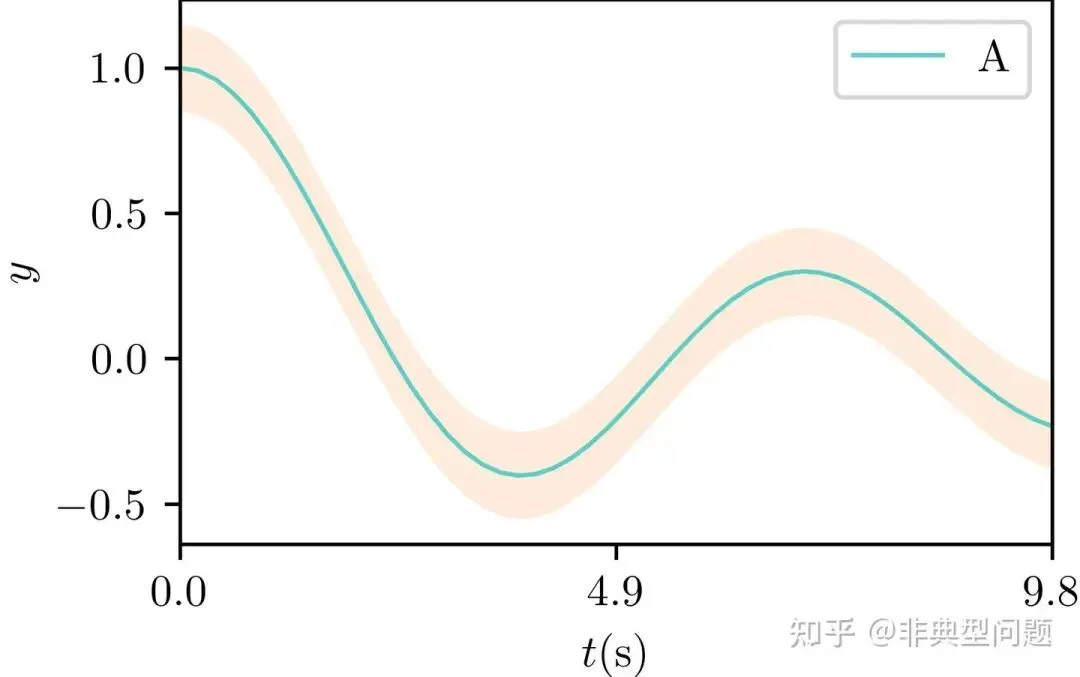
1.2 带置信区间的曲线图matplotlib.axes.Axes.fill_between - Matplotlib 3.8.2 documentationmatplotlib.org/stable/api/_as_gen/matplotlib.axes.Axes.fill_between.html

# 引用包importnumpyasnpimportmatplotlib.pyplotaspltimportmatplotlibasmplfrommatplotlibimportrcParamsfromscipy.specialimportjv# 自定义颜色color1=np.divide((91,206,201),255)color2=np.divide((140,215,122),255)color3=np.divide((250,159,66),255)color4=np.divide((243,83,59),255)# 自定义数据,自行修改a=np.arange(0,10,0.2)b=jv(0,a)# 贝塞尔函数mpl.rcParams['font.sans-serif']='Times New Roman'# 设置字体为新罗马mpl.rcParams['text.usetex']=True# 默认为false,此处设置为TRUEfig,ax=plt.subplots(figsize=(3.5,2.2))# 设置图窗及窗口大小为宽3.5英寸,高2.2英寸ax.plot(a,b,'-',linewidth=1.0,color=color1,markevery=5,markerfacecolor='none',markeredgecolor=color3,markersize='5',markeredgewidth=1,label='A')# 绘线图ax.fill_between(a,b-0.15,b+0.15,facecolor=color3,alpha=0.2)# 绘制置信范围ax.set_xlabel('$t{\mathrm{(s)}}$')# 设置X轴标签ax.set_ylabel('$y$')# 设置Y轴标签ax.minorticks_off()# 取消显示次刻度ax.set_xticks([min(a),(min(a)+max(a))/2,max(a)])# 设置X轴刻度标签,可以手动调节ax.set_xlim([min(a),max(a)])# 设置X轴显示范围ax.legend()# 设置图例plt.savefig('fig2.png',dpi=600,bbox_inches='tight',pad_inches=0.0)# 导出PNG格式图片,600DPI,无白边plt.savefig('fig2.pdf',dpi=600,bbox_inches='tight',pad_inches=0.0)# 导出pdf格式图片,600DPI,无白边plt.show()
带置信区间的曲线图

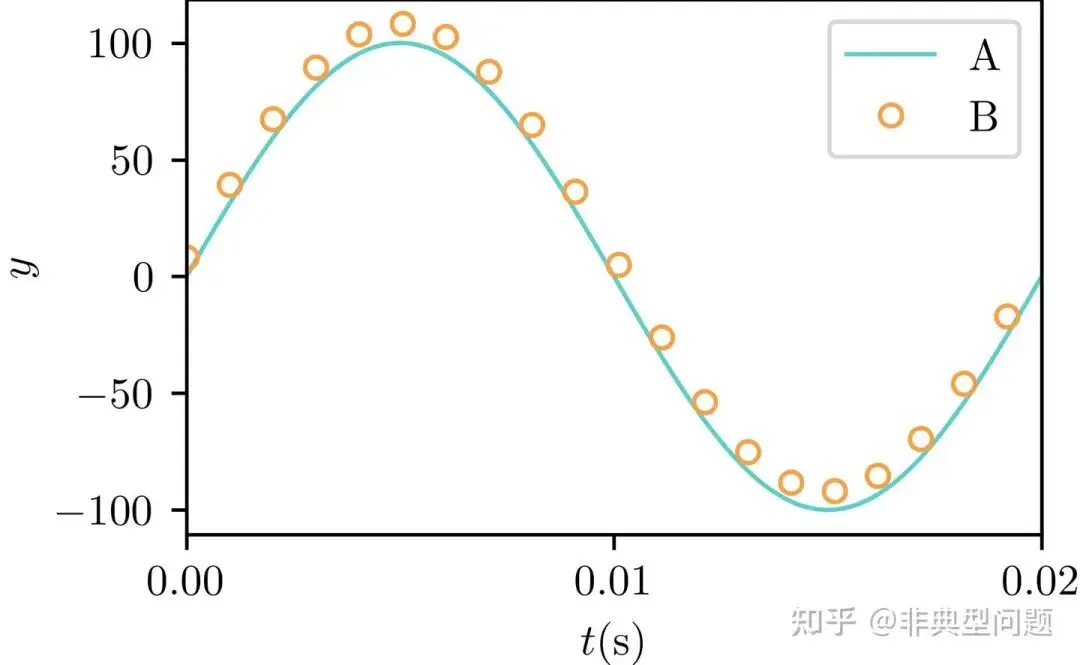
1.3 点、线组合图matplotlib.axes.Axes.plot - Matplotlib 3.8.2 documentationmatplotlib.org/stable/api/_as_gen/matplotlib.axes.Axes.plot.html

# 引用包importnumpyasnpimportmatplotlib.pyplotaspltimportmatplotlibasmplfrommatplotlibimportrcParams# 自定义颜色color1=np.divide((91,206,201),255)color2=np.divide((140,215,122),255)color3=np.divide((250,159,66),255)color4=np.divide((243,83,59),255)# 自定义数据,自行修改f=50T=1/fomega=2*np.pi*ft=np.linspace(0,T,100)a=100*np.sin(omega*t)b=a+10*np.random.rand()mpl.rcParams['font.sans-serif']='Times New Roman'# 设置字体为新罗马mpl.rcParams['text.usetex']=True# 默认为false,此处设置为TRUEfig,ax=plt.subplots(figsize=(3.5,2.2))# 设置图窗及窗口大小为宽3.5英寸,高2.2英寸ax.plot(t,a,'-',linewidth=1.0,color=color1,label='$\mathrm{A}$')# 绘线图ax.plot(t,b,'o',linewidth=1.0,color=color3,markevery=5,markerfacecolor='none',markeredgecolor=color3,markersize='5',markeredgewidth=1,label='$\mathrm{B}$')# 绘点图ax.set_xlabel('$t{\mathrm{(s)}}$')# 设置X轴标签ax.set_ylabel('$y$')# 设置Y轴标签ax.minorticks_off()# 取消显示次刻度ax.set_xticks([min(t),(min(t)+max(t))/2,max(t)])# 设置X轴刻度标签,可以手动调节ax.set_xlim([min(t),max(t)])# 设置X轴显示范围ax.legend()# 设置图例plt.savefig('fig3.png',dpi=600,bbox_inches='tight',pad_inches=0.0)# 导出PNG格式图片,600DPI,无白边plt.savefig('fig3.pdf',dpi=600,bbox_inches='tight',pad_inches=0.0)# 导出pdf格式图片,600DPI,无白边plt.show()
点、线组合图

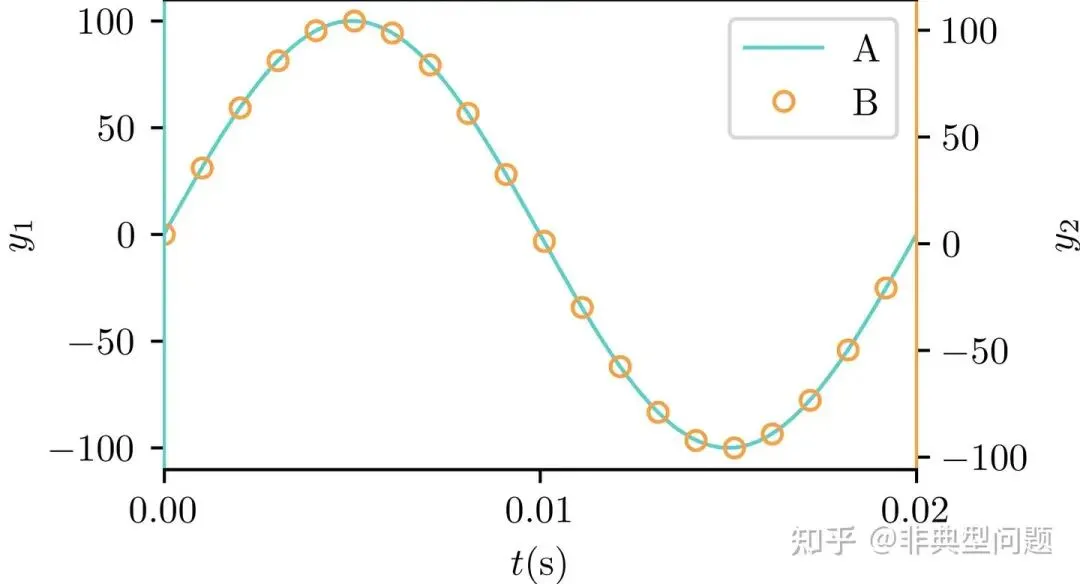
1.4 双Y轴折线图

matplotlib.axes.Axes.plot — Matplotlib 3.8.2 documentationmatplotlib.org/stable/api/_as_gen/matplotlib.axes.Axes.plot.html

# 引用包importnumpyasnpimportmatplotlib.pyplotaspltimportmatplotlibasmplfrommatplotlibimportrcParams# 自定义颜色color1=np.divide((91,206,201),255)color2=np.divide((140,215,122),255)color3=np.divide((250,159,66),255)color4=np.divide((243,83,59),255)# 自定义数据,自行修改f=50T=1/fomega=2*np.pi*ft=np.linspace(0,T,100)a=100*np.sin(omega*t)b=a+10*np.random.rand()mpl.rcParams['font.sans-serif']='Times New Roman'# 设置字体为新罗马mpl.rcParams['text.usetex']=True# 默认为false,此处设置为TRUEfig,ax1=plt.subplots(figsize=(3.5,2.2))# 设置图窗及窗口大小为宽3.5英寸,高2.2英寸ax2=ax1.twinx()#复制坐标轴line1=ax1.plot(t,a,'-',linewidth=1.0,color=color1,label='$\mathrm{A}$')# 绘线图line2=ax2.plot(t,b,'o',linewidth=1.0,color=color3,markevery=5,markerfacecolor='none',markeredgecolor=color3,markersize='5',markeredgewidth=1,label='$\mathrm{B}$')# 绘点图ax1.set_xlabel('$t{\mathrm{(s)}}$')# 设置X轴标签ax1.set_ylabel('$y_1$')# 设置Y1轴标签ax2.set_ylabel('$y_2$')# 设置Y2轴标签# 设置轴线颜色ax1.spines['left'].set_color(color1)ax2.spines['left'].set_color(color1)ax1.spines['right'].set_color(color3)ax2.spines['right'].set_color(color3)ax1.minorticks_off()# 取消显示次刻度ax1.set_xticks([min(t),(min(t)+max(t))/2,max(t)])# 设置X轴刻度标签,可以手动调节ax1.set_xlim([min(t),max(t)])# 设置X轴显示范围# 合并显示图例lines=line1+line2labels=[h.get_label()forhinlines]ax1.legend(lines,labels,loc='upper right')# 设置图例plt.savefig('fig4.png',dpi=600,bbox_inches='tight',pad_inches=0.0)# 导出PNG格式图片,600DPI,无白边plt.savefig('fig4.pdf',dpi=600,bbox_inches='tight',pad_inches=0.0)# 导出pdf格式图片,600DPI,无白边plt.show()
双Y轴折线图

2 条形图

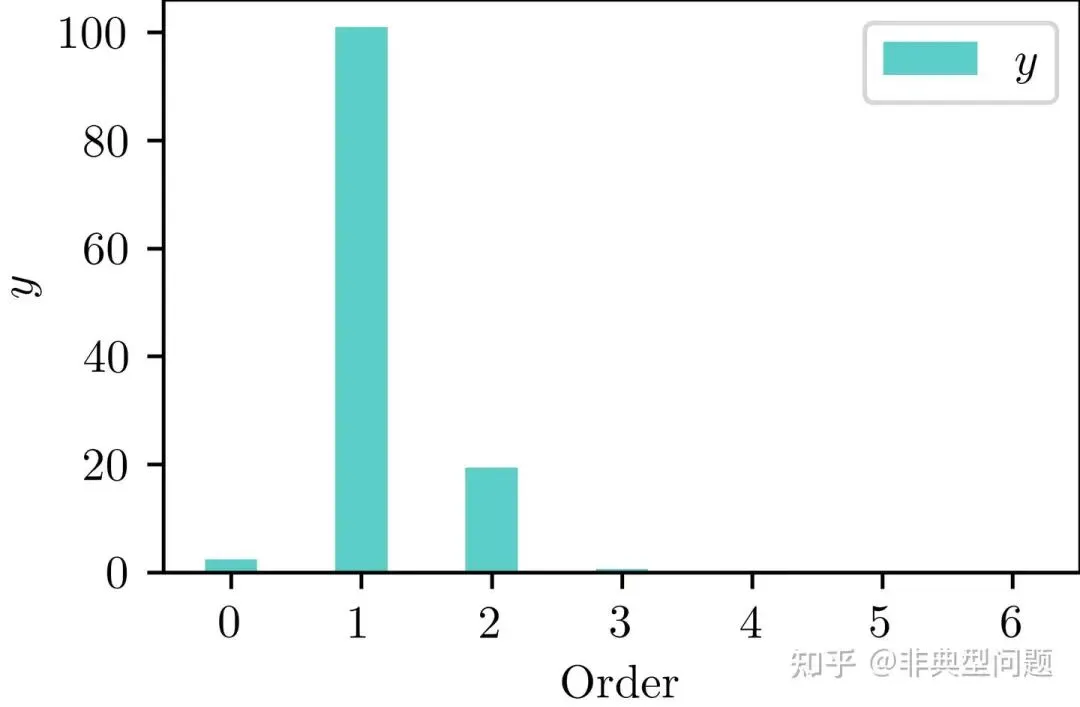
2.1 普通条形图matplotlib.axes.Axes.bar - Matplotlib 3.8.2 documentationmatplotlib.org/stable/api/_as_gen/matplotlib.axes.Axes.bar.html

# 引用包importnumpyasnpimportmatplotlib.pyplotaspltimportmatplotlibasmplfrommatplotlibimportrcParamsfromscipy.specialimportjv# 自定义颜色color1=np.divide((91,206,201),255)color2=np.divide((140,215,122),255)color3=np.divide((250,159,66),255)color4=np.divide((243,83,59),255)# 自定义数据,自行修改f=50# 频率T=1/f# 一周期时间omega=2*np.pi*ft_data=np.linspace(0,T,100)a=100*np.cos(omega*t_data)+20*np.cos(2*omega*t_data)a_complex=np.fft.fft(a)a_fft=2*abs(a_complex)/len(a_complex)mpl.rcParams['font.sans-serif']='Times New Roman'# 设置字体为新罗马mpl.rcParams['text.usetex']=True# 默认为false,此处设置为TRUEfig,ax=plt.subplots(figsize=(3.5,2.2))# 设置图窗及窗口大小为宽3.5英寸,高2.2英寸x_data=np.linspace(0,6,7)width=0.4# bar宽度ax.bar(x_data,a_fft[0:len(x_data)],width=width,label='$y$',color=color1)ax.set_xlabel('$\mathrm{Order}$')# 设置X轴标签ax.set_ylabel('$y$')# 设置Y轴标签ax.minorticks_off()# 取消显示次刻度ax.set_xticks(x_data)# 设置X轴刻度标签,可以手动调节ax.legend()# 设置图例plt.savefig('fig5.png',dpi=600,bbox_inches='tight',pad_inches=0.0)# 导出PNG格式图片,600DPI,无白边plt.savefig('fig5.pdf',dpi=600,bbox_inches='tight',pad_inches=0.0)# 导出pdf格式图片,600DPI,无白边plt.show()
条形图

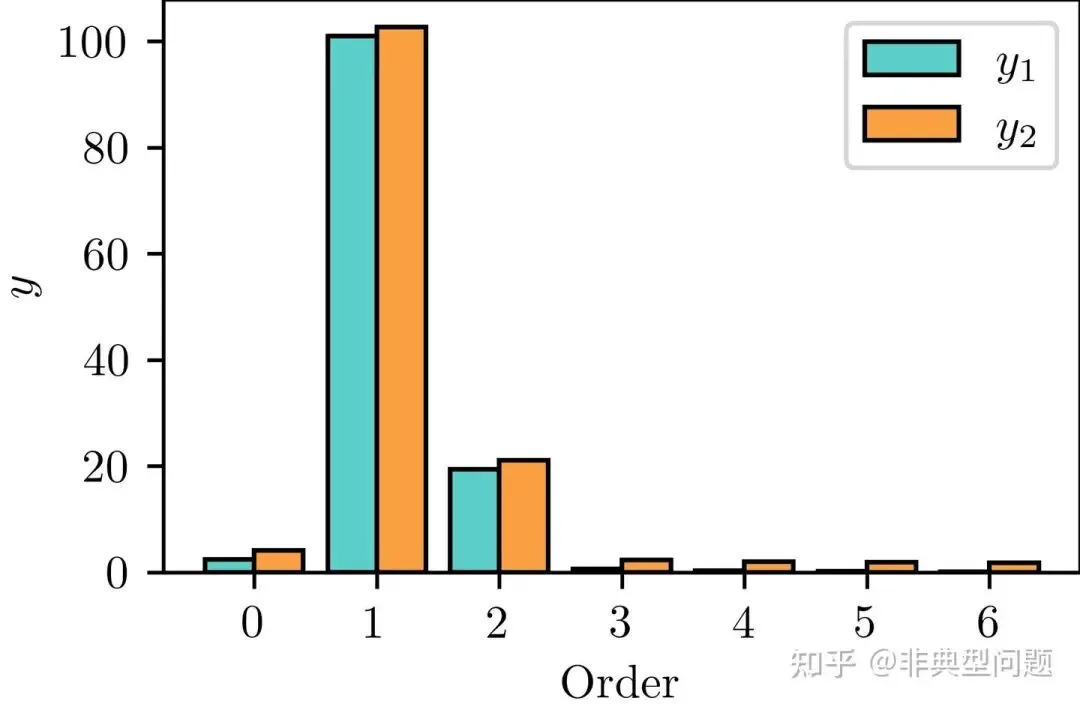
2.2 组合条形图matplotlib.axes.Axes.bar - Matplotlib 3.8.2 documentationmatplotlib.org/stable/api/_as_gen/matplotlib.axes.Axes.bar.html

# 引用包importnumpyasnpimportmatplotlib.pyplotaspltimportmatplotlibasmplfrommatplotlibimportrcParamsfromscipy.specialimportjv# 自定义颜色color1=np.divide((91,206,201),255)color2=np.divide((140,215,122),255)color3=np.divide((250,159,66),255)color4=np.divide((243,83,59),255)# 自定义数据,自行修改f=50# 频率T=1/f# 一周期时间omega=2*np.pi*ft_data=np.linspace(0,T,100)a=100*np.cos(omega*t_data)+20*np.cos(2*omega*t_data)a_complex=np.fft.fft(a)a_fft=2*abs(a_complex)/len(a_complex)b=a_fft+5*np.random.rand()mpl.rcParams['font.sans-serif']='Times New Roman'# 设置字体为新罗马mpl.rcParams['text.usetex']=True# 默认为false,此处设置为TRUEfig,ax=plt.subplots(figsize=(3.5,2.2))# 设置图窗及窗口大小为宽3.5英寸,高2.2英寸x_data=np.linspace(0,6,7)# X轴标签width=0.4# bar宽度ax.bar(x_data-width/2,a_fft[0:len(x_data)],width=width,label='$y_1$',color=color1,edgecolor='k')ax.bar(x_data+width/2,b[0:len(x_data)],width=width,label='$y_2$',color=color3,edgecolor='k')ax.set_xlabel('$\mathrm{Order}$')# 设置X轴标签ax.set_ylabel('$y$')# 设置Y轴标签ax.minorticks_off()# 取消显示次刻度ax.set_xticks(x_data)# 设置X轴刻度标签,可以手动调节ax.legend()# 设置图例plt.savefig('fig6.png',dpi=600,bbox_inches='tight',pad_inches=0.0)# 导出PNG格式图片,600DPI,无白边plt.savefig('fig6.pdf',dpi=600,bbox_inches='tight',pad_inches=0.0)# 导出pdf格式图片,600DPI,无白边plt.show()
组合条形图

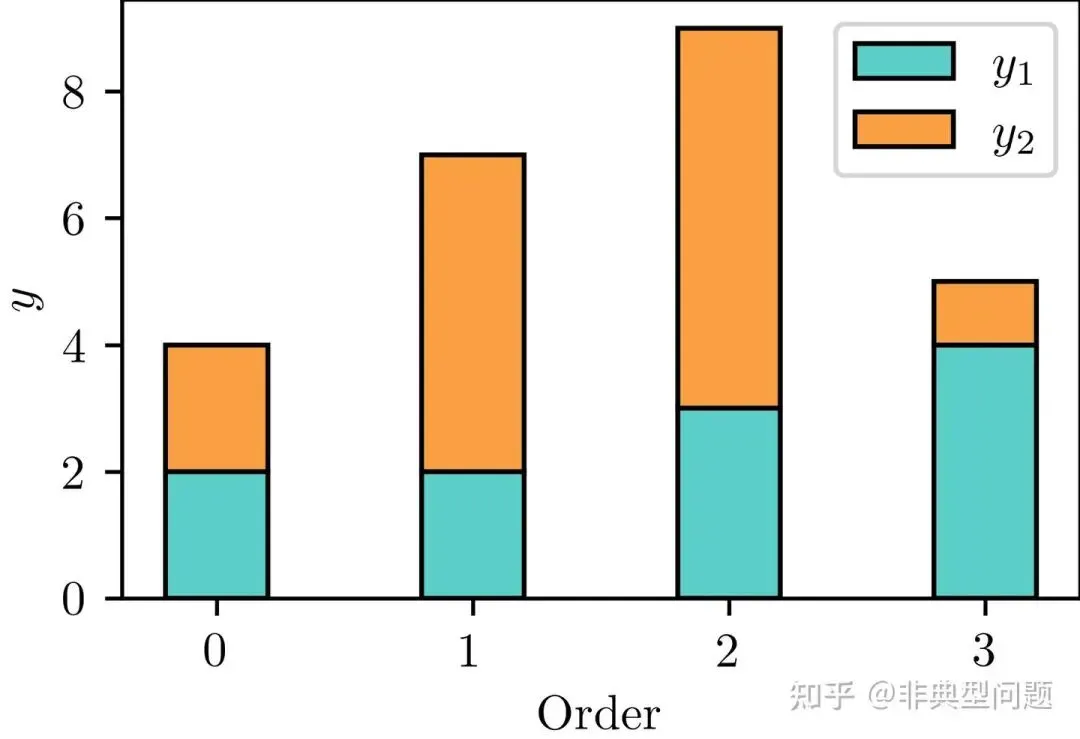
2.3 堆叠条形图matplotlib.axes.Axes.bar - Matplotlib 3.8.2 documentationmatplotlib.org/stable/api/_as_gen/matplotlib.axes.Axes.bar.html

# 引用包importnumpyasnpimportmatplotlib.pyplotaspltimportmatplotlibasmplfrommatplotlibimportrcParamsfromscipy.specialimportjv# 自定义颜色color1=np.divide((91,206,201),255)color2=np.divide((140,215,122),255)color3=np.divide((250,159,66),255)color4=np.divide((243,83,59),255)# 自定义数据,自行修改y_1=(2,2,3,4)y_2=(2,5,6,1)mpl.rcParams['font.sans-serif']='Times New Roman'# 设置字体为新罗马mpl.rcParams['text.usetex']=True# 默认为false,此处设置为TRUEfig,ax=plt.subplots(figsize=(3.5,2.2))# 设置图窗及窗口大小为宽3.5英寸,高2.2英寸x_data=(0,1,2,3)width=0.4# bar宽度ax.bar(x_data,y_1,width=width,label='$y_1$',color=color1,edgecolor='k')ax.bar(x_data,y_2,bottom=y_1# 设置第二组bar在Y方向的起始位置,width=width,label='$y_2$',color=color3,edgecolor='k')ax.set_xlabel('$\mathrm{Order}$')# 设置X轴标签ax.set_ylabel('$y$')# 设置Y轴标签ax.minorticks_off()# 取消显示次刻度ax.set_xticks(x_data)# 设置X轴刻度标签,可以手动调节ax.legend()# 设置图例plt.savefig('fig7.png',dpi=600,bbox_inches='tight',pad_inches=0.0)# 导出PNG格式图片,600DPI,无白边plt.savefig('fig7.pdf',dpi=600,bbox_inches='tight',pad_inches=0.0)# 导出pdf格式图片,600DPI,无白边plt.show()
堆叠条形图

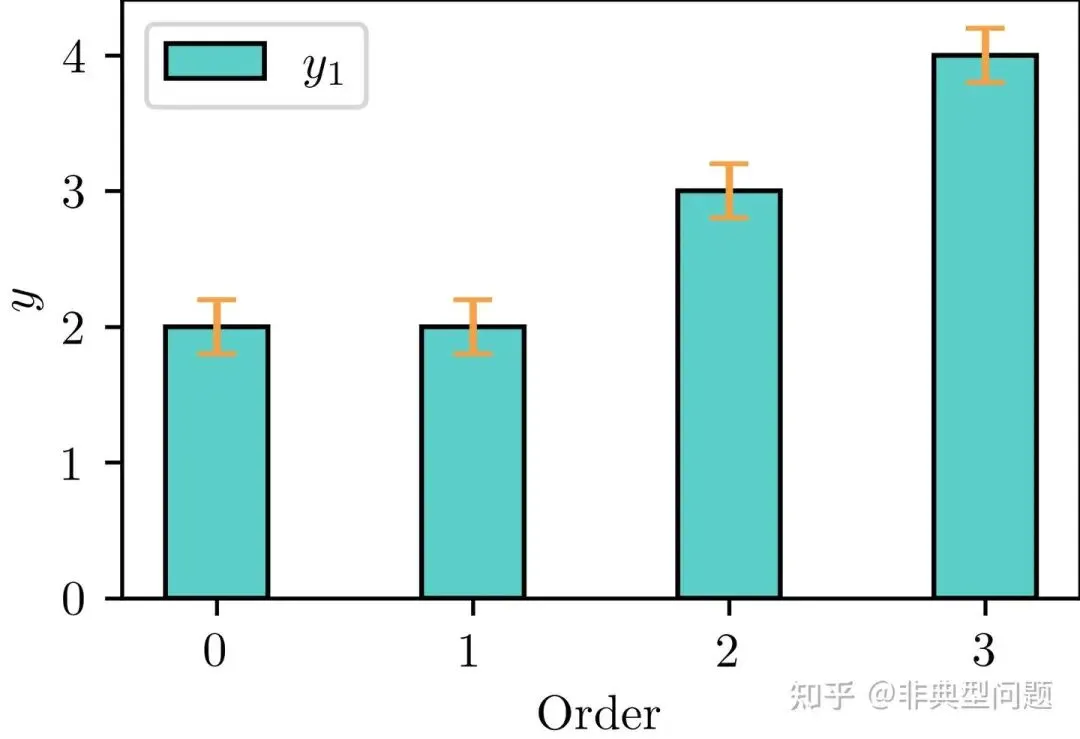
2.4 条形图带误差棒matplotlib.axes.Axes.errorbar - Matplotlib 3.8.2 documentationmatplotlib.org/stable/api/_as_gen/matplotlib.axes.Axes.errorbar.html

# 引用包importnumpyasnpimportmatplotlib.pyplotaspltimportmatplotlibasmplfrommatplotlibimportrcParamsfromscipy.specialimportjv# 自定义颜色color1=np.divide((91,206,201),255)color2=np.divide((140,215,122),255)color3=np.divide((250,159,66),255)color4=np.divide((243,83,59),255)# 自定义数据,自行修改x_data=(0,1,2,3)y_1=(2,2,3,4)mpl.rcParams['font.sans-serif']='Times New Roman'# 设置字体为新罗马mpl.rcParams['text.usetex']=True# 默认为false,此处设置为TRUEfig,ax=plt.subplots(figsize=(3.5,2.2))# 设置图窗及窗口大小为宽3.5英寸,高2.2英寸width=0.4ax.bar(x_data,y_1,width=width,label='$y_1$',color=color1,edgecolor='k')# 绘制条形图ax.errorbar(x_data,y_1,yerr=0.2,capsize=4,fmt=' ',color=color3)# 绘制误差棒,不显示折线ax.set_xlabel('$\mathrm{Order}$')# 设置X轴标签ax.set_ylabel('$y$')# 设置Y轴标签ax.minorticks_off()# 取消显示次刻度ax.set_xticks(x_data)# 设置X轴刻度标签,可以手动调节ax.legend()# 设置图例plt.savefig('fig8.png',dpi=600,bbox_inches='tight',pad_inches=0.0)# 导出PNG格式图片,600DPI,无白边plt.savefig('fig8.pdf',dpi=600,bbox_inches='tight',pad_inches=0.0)# 导出pdf格式图片,600DPI,无白边plt.show()
条形图带误差棒

2.5 条形图带纹理填充matplotlib.pyplot.bar - Matplotlib 3.8.2 documentationmatplotlib.org/stable/api/_as_gen/matplotlib.pyplot.bar.html

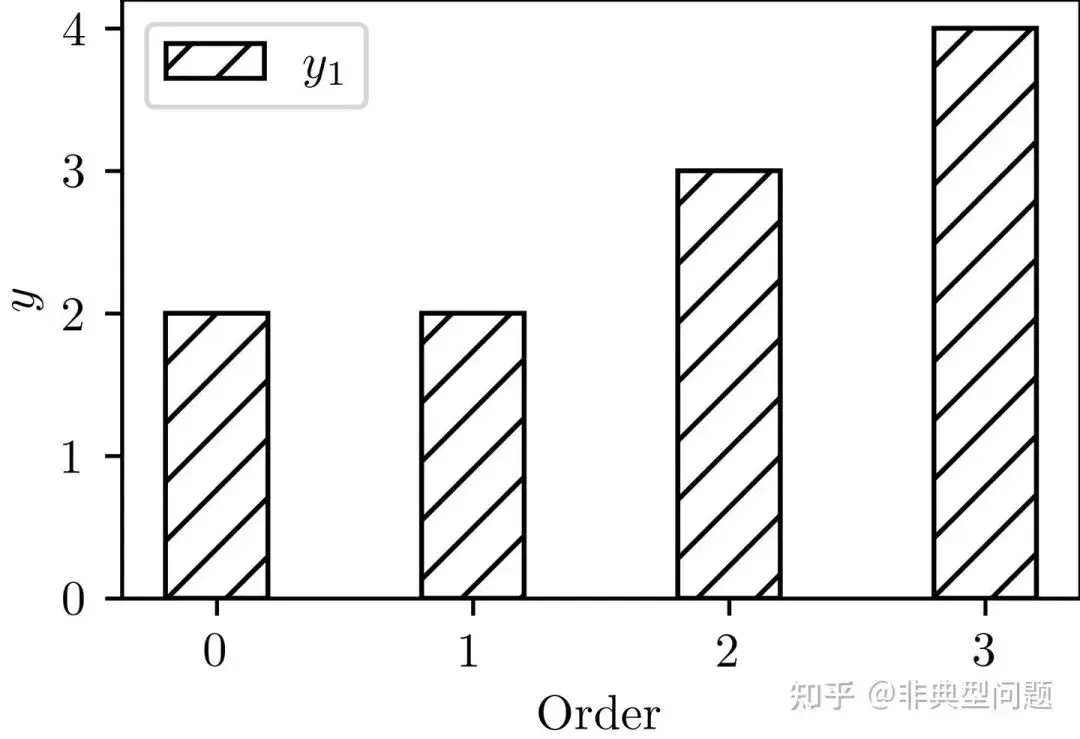
# 引用包importnumpyasnpimportmatplotlib.pyplotaspltimportmatplotlibasmplfrommatplotlibimportrcParamsfromscipy.specialimportjv# 自定义颜色color1=np.divide((91,206,201),255)color2=np.divide((140,215,122),255)color3=np.divide((250,159,66),255)color4=np.divide((243,83,59),255)# 自定义数据,自行修改x_data=(0,1,2,3)y_1=(2,2,3,4)mpl.rcParams['font.sans-serif']='Times New Roman'# 设置字体为新罗马mpl.rcParams['text.usetex']=True# 默认为false,此处设置为TRUEfig,ax=plt.subplots(figsize=(3.5,2.2))# 设置图窗及窗口大小为宽3.5英寸,高2.2英寸width=0.4ax.bar(x_data,y_1,width=width,label='$y_1$',color='white',edgecolor='k',hatch='//')ax.set_xlabel('$\mathrm{Order}$')# 设置X轴标签ax.set_ylabel('$y$')# 设置Y轴标签ax.minorticks_off()# 取消显示次刻度ax.set_xticks(x_data)# 设置X轴刻度标签,可以手动调节ax.legend()# 设置图例plt.savefig('fig9.png',dpi=600,bbox_inches='tight',pad_inches=0.0)# 导出PNG格式图片,600DPI,无白边plt.savefig('fig9.pdf',dpi=600,bbox_inches='tight',pad_inches=0.0)# 导出pdf格式图片,600DPI,无白边plt.show()
条形图带纹理填充

支持的填充纹理有如下:

{'/', '\', '|', '-', '+', 'x', 'o', 'O', '.', '*'}

3 组合图

3.1 局部放大图

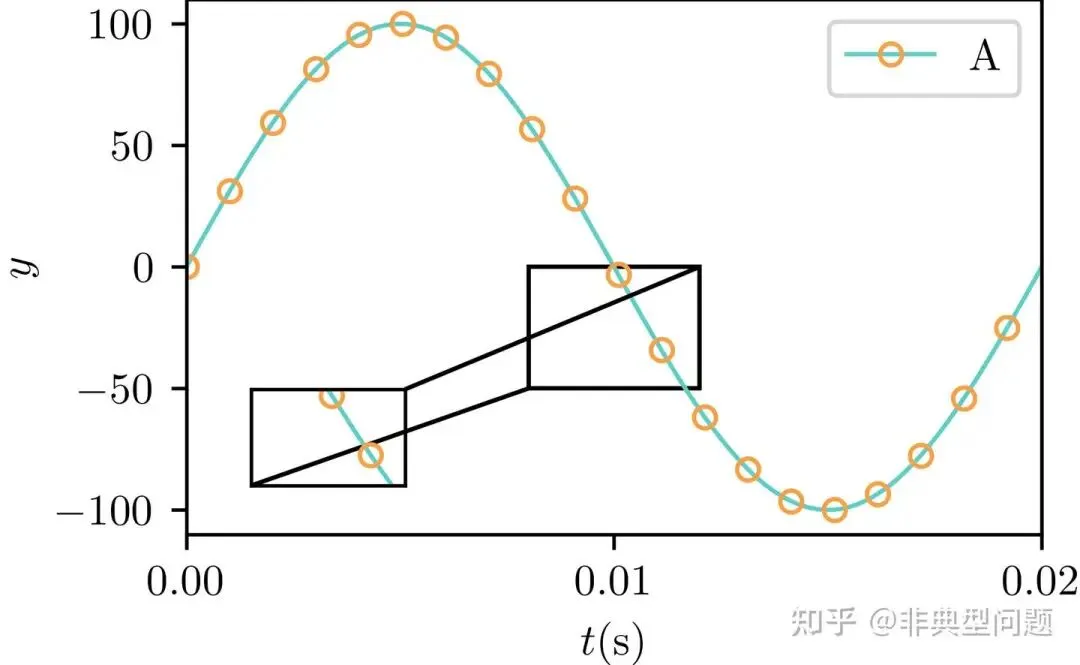
# 引用包importnumpyasnpimportmatplotlib.pyplotaspltimportmatplotlibasmplfrommatplotlibimportrcParamsfrommpl_toolkits.axes_grid1.inset_locatorimportmark_insetfrommpl_toolkits.axes_grid1.inset_locatorimportinset_axes# 自定义颜色color1=np.divide((91,206,201),255)color2=np.divide((140,215,122),255)color3=np.divide((250,159,66),255)color4=np.divide((243,83,59),255)# 自定义数据,自行修改f=50T=1/fomega=2*np.pi*ft=np.linspace(0,T,100)a=100*np.sin(omega*t)b=a+10*np.random.rand()mpl.rcParams['font.sans-serif']='Times New Roman'# 设置字体为新罗马mpl.rcParams['text.usetex']=True# 默认为false,此处设置为TRUEfig,ax1=plt.subplots(figsize=(3.5,2.2))# 设置图窗及窗口大小为宽3.5英寸,高2.2英寸line1=ax1.plot(t,a,'-o',linewidth=1.0,color=color1,markevery=5,markerfacecolor='none',markeredgecolor=color3,markersize='5',markeredgewidth=1,label='$\mathrm{A}$')# 绘线图# 插入放大区域的坐标系ax2=inset_axes(ax1,width="20%",height="20%",loc='lower left',# 参数根据需要自行修改bbox_to_anchor=(0.05,0.05,0.9,0.9),# 参数根据需要自行修改bbox_transform=ax1.transAxes)ax2.plot(t,a,'-o',linewidth=1.0,color=color1,markevery=5,markerfacecolor='none',markeredgecolor=color3,markersize='5',markeredgewidth=1,label='$\mathrm{A}$')# 绘线图# 放大区域xlim_ax2=(0.008,0.012)# X轴显示范围ylim_ax2=(-50,0)# Y轴显示范围ax2.set_xlim(xlim_ax2)# 设置X轴显示范围ax2.set_ylim(ylim_ax2)# 设置Y轴显示范围mark_inset(ax1,ax2,loc1=3,loc2=1,fc="none",ec='k',lw=1)# 放大区域与原位置的连接线# 细节设置ax1.set_xlabel('$t{\mathrm{(s)}}$')# 设置X轴标签ax1.set_ylabel('$y$')# 设置Y轴标签ax1.minorticks_off()ax1.set_xticks([min(t),(min(t)+max(t))/2,max(t)])# 设置X轴刻度标签,可以手动调节ax1.set_xlim([min(t),max(t)])# 设置X轴显示范围ax2.set_xticks([])# 不显示放大区域X轴刻度,可以手动修改ax2.set_yticks([])# 不显示放大区域Y轴刻度,可以手动修改ax1.legend()# 设置图例plt.savefig('fig10.png',dpi=600,bbox_inches='tight',pad_inches=0.0)# 导出PNG格式图片,600DPI,无白边plt.savefig('fig10.pdf',dpi=600,bbox_inches='tight',pad_inches=0.0)# 导出pdf格式图片,600DPI,无白边plt.show()
局部放大图

3.2 组合图

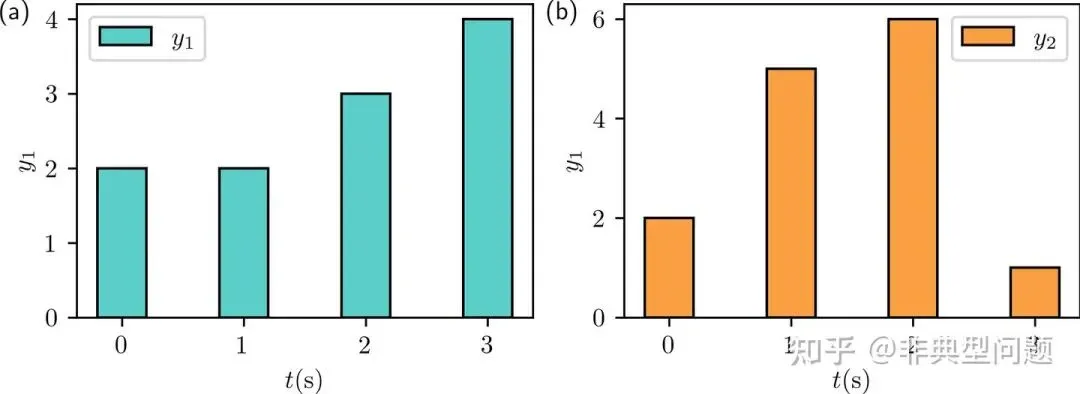
# 引用包importnumpyasnpimportmatplotlib.pyplotaspltimportmatplotlibasmplfrommatplotlibimportrcParamsfromscipy.specialimportjv# 自定义颜色color1=np.divide((91,206,201),255)color2=np.divide((140,215,122),255)color3=np.divide((250,159,66),255)color4=np.divide((243,83,59),255)# 自定义数据,自行修改y_1=(2,2,3,4)y_2=(2,5,6,1)mpl.rcParams['font.sans-serif']='Times New Roman'# 设置字体为新罗马mpl.rcParams['text.usetex']=True# 默认为false,此处设置为TRUEfig1,(ax1,ax2)=plt.subplots(1,2,figsize=(7,2.2))# 设置子图数量及图窗大小x_data=(0,1,2,3)width=0.4# 柱子宽度ax1.bar(x_data,y_1,width=width,label='$y_1$',color=color1,edgecolor='k')ax1.legend()# 显示图例ax1.text(-1,4,'(a)')# x,y的坐标根据图形显示的坐标轴刻度自行调整ax1.set_xlabel('$t{\mathrm{(s)}}$')# 设置X轴标签ax1.set_ylabel('$y_1$')# 设置Y1轴标签ax2.bar(x_data,y_2,width=width,label='$y_2$',color=color3,edgecolor='k')ax2.legend()#  显示图例ax2.text(-1,6,'(b)')# x,y的坐标根据图形显示的坐标轴刻度自行调整ax2.set_xlabel('$t{\mathrm{(s)}}$')# 设置X轴标签ax2.set_ylabel('$y_1$')# 设置Y2轴标签plt.savefig('fig11.png',dpi=600,bbox_inches='tight',pad_inches=0.0)# 导出PNG格式图片,600DPI,无白边plt.savefig('fig11.pdf',dpi=600,bbox_inches='tight',pad_inches=0.0)# 导出pdf格式图片,600DPI,无白边plt.show()
组合图
原文链接:https://zhuanlan.zhihu.com/p/676573903

版权声明

来源:【非典型问题】知乎文章内容仅做学术分享之用,不代表本号观点,版权归原作者所有,若涉及侵权等行为,请联系我们删除,万分感谢!

最新文章

随机文章

基本 文件 流程 错误 SQL 调试
  1. 请求信息 : 2026-02-28 16:14:30 HTTP/2.0 GET : https://f.mffb.com.cn/a/475566.html
  2. 运行时间 : 0.143894s [ 吞吐率:6.95req/s ] 内存消耗:5,180.15kb 文件加载:140
  3. 缓存信息 : 0 reads,0 writes
  4. 会话信息 : SESSION_ID=cc5dc5aa1ce16509b23044bd9a77361d
  1. /yingpanguazai/ssd/ssd1/www/f.mffb.com.cn/public/index.php ( 0.79 KB )
  2. /yingpanguazai/ssd/ssd1/www/f.mffb.com.cn/vendor/autoload.php ( 0.17 KB )
  3. /yingpanguazai/ssd/ssd1/www/f.mffb.com.cn/vendor/composer/autoload_real.php ( 2.49 KB )
  4. /yingpanguazai/ssd/ssd1/www/f.mffb.com.cn/vendor/composer/platform_check.php ( 0.90 KB )
  5. /yingpanguazai/ssd/ssd1/www/f.mffb.com.cn/vendor/composer/ClassLoader.php ( 14.03 KB )
  6. /yingpanguazai/ssd/ssd1/www/f.mffb.com.cn/vendor/composer/autoload_static.php ( 4.90 KB )
  7. /yingpanguazai/ssd/ssd1/www/f.mffb.com.cn/vendor/topthink/think-helper/src/helper.php ( 8.34 KB )
  8. /yingpanguazai/ssd/ssd1/www/f.mffb.com.cn/vendor/topthink/think-validate/src/helper.php ( 2.19 KB )
  9. /yingpanguazai/ssd/ssd1/www/f.mffb.com.cn/vendor/topthink/think-orm/src/helper.php ( 1.47 KB )
  10. /yingpanguazai/ssd/ssd1/www/f.mffb.com.cn/vendor/topthink/think-orm/stubs/load_stubs.php ( 0.16 KB )
  11. /yingpanguazai/ssd/ssd1/www/f.mffb.com.cn/vendor/topthink/framework/src/think/Exception.php ( 1.69 KB )
  12. /yingpanguazai/ssd/ssd1/www/f.mffb.com.cn/vendor/topthink/think-container/src/Facade.php ( 2.71 KB )
  13. /yingpanguazai/ssd/ssd1/www/f.mffb.com.cn/vendor/symfony/deprecation-contracts/function.php ( 0.99 KB )
  14. /yingpanguazai/ssd/ssd1/www/f.mffb.com.cn/vendor/symfony/polyfill-mbstring/bootstrap.php ( 8.26 KB )
  15. /yingpanguazai/ssd/ssd1/www/f.mffb.com.cn/vendor/symfony/polyfill-mbstring/bootstrap80.php ( 9.78 KB )
  16. /yingpanguazai/ssd/ssd1/www/f.mffb.com.cn/vendor/symfony/var-dumper/Resources/functions/dump.php ( 1.49 KB )
  17. /yingpanguazai/ssd/ssd1/www/f.mffb.com.cn/vendor/topthink/think-dumper/src/helper.php ( 0.18 KB )
  18. /yingpanguazai/ssd/ssd1/www/f.mffb.com.cn/vendor/symfony/var-dumper/VarDumper.php ( 4.30 KB )
  19. /yingpanguazai/ssd/ssd1/www/f.mffb.com.cn/vendor/topthink/framework/src/think/App.php ( 15.30 KB )
  20. /yingpanguazai/ssd/ssd1/www/f.mffb.com.cn/vendor/topthink/think-container/src/Container.php ( 15.76 KB )
  21. /yingpanguazai/ssd/ssd1/www/f.mffb.com.cn/vendor/psr/container/src/ContainerInterface.php ( 1.02 KB )
  22. /yingpanguazai/ssd/ssd1/www/f.mffb.com.cn/app/provider.php ( 0.19 KB )
  23. /yingpanguazai/ssd/ssd1/www/f.mffb.com.cn/vendor/topthink/framework/src/think/Http.php ( 6.04 KB )
  24. /yingpanguazai/ssd/ssd1/www/f.mffb.com.cn/vendor/topthink/think-helper/src/helper/Str.php ( 7.29 KB )
  25. /yingpanguazai/ssd/ssd1/www/f.mffb.com.cn/vendor/topthink/framework/src/think/Env.php ( 4.68 KB )
  26. /yingpanguazai/ssd/ssd1/www/f.mffb.com.cn/app/common.php ( 0.03 KB )
  27. /yingpanguazai/ssd/ssd1/www/f.mffb.com.cn/vendor/topthink/framework/src/helper.php ( 18.78 KB )
  28. /yingpanguazai/ssd/ssd1/www/f.mffb.com.cn/vendor/topthink/framework/src/think/Config.php ( 5.54 KB )
  29. /yingpanguazai/ssd/ssd1/www/f.mffb.com.cn/config/app.php ( 0.95 KB )
  30. /yingpanguazai/ssd/ssd1/www/f.mffb.com.cn/config/cache.php ( 0.78 KB )
  31. /yingpanguazai/ssd/ssd1/www/f.mffb.com.cn/config/console.php ( 0.23 KB )
  32. /yingpanguazai/ssd/ssd1/www/f.mffb.com.cn/config/cookie.php ( 0.56 KB )
  33. /yingpanguazai/ssd/ssd1/www/f.mffb.com.cn/config/database.php ( 2.48 KB )
  34. /yingpanguazai/ssd/ssd1/www/f.mffb.com.cn/vendor/topthink/framework/src/think/facade/Env.php ( 1.67 KB )
  35. /yingpanguazai/ssd/ssd1/www/f.mffb.com.cn/config/filesystem.php ( 0.61 KB )
  36. /yingpanguazai/ssd/ssd1/www/f.mffb.com.cn/config/lang.php ( 0.91 KB )
  37. /yingpanguazai/ssd/ssd1/www/f.mffb.com.cn/config/log.php ( 1.35 KB )
  38. /yingpanguazai/ssd/ssd1/www/f.mffb.com.cn/config/middleware.php ( 0.19 KB )
  39. /yingpanguazai/ssd/ssd1/www/f.mffb.com.cn/config/route.php ( 1.89 KB )
  40. /yingpanguazai/ssd/ssd1/www/f.mffb.com.cn/config/session.php ( 0.57 KB )
  41. /yingpanguazai/ssd/ssd1/www/f.mffb.com.cn/config/trace.php ( 0.34 KB )
  42. /yingpanguazai/ssd/ssd1/www/f.mffb.com.cn/config/view.php ( 0.82 KB )
  43. /yingpanguazai/ssd/ssd1/www/f.mffb.com.cn/app/event.php ( 0.25 KB )
  44. /yingpanguazai/ssd/ssd1/www/f.mffb.com.cn/vendor/topthink/framework/src/think/Event.php ( 7.67 KB )
  45. /yingpanguazai/ssd/ssd1/www/f.mffb.com.cn/app/service.php ( 0.13 KB )
  46. /yingpanguazai/ssd/ssd1/www/f.mffb.com.cn/app/AppService.php ( 0.26 KB )
  47. /yingpanguazai/ssd/ssd1/www/f.mffb.com.cn/vendor/topthink/framework/src/think/Service.php ( 1.64 KB )
  48. /yingpanguazai/ssd/ssd1/www/f.mffb.com.cn/vendor/topthink/framework/src/think/Lang.php ( 7.35 KB )
  49. /yingpanguazai/ssd/ssd1/www/f.mffb.com.cn/vendor/topthink/framework/src/lang/zh-cn.php ( 13.70 KB )
  50. /yingpanguazai/ssd/ssd1/www/f.mffb.com.cn/vendor/topthink/framework/src/think/initializer/Error.php ( 3.31 KB )
  51. /yingpanguazai/ssd/ssd1/www/f.mffb.com.cn/vendor/topthink/framework/src/think/initializer/RegisterService.php ( 1.33 KB )
  52. /yingpanguazai/ssd/ssd1/www/f.mffb.com.cn/vendor/services.php ( 0.14 KB )
  53. /yingpanguazai/ssd/ssd1/www/f.mffb.com.cn/vendor/topthink/framework/src/think/service/PaginatorService.php ( 1.52 KB )
  54. /yingpanguazai/ssd/ssd1/www/f.mffb.com.cn/vendor/topthink/framework/src/think/service/ValidateService.php ( 0.99 KB )
  55. /yingpanguazai/ssd/ssd1/www/f.mffb.com.cn/vendor/topthink/framework/src/think/service/ModelService.php ( 2.04 KB )
  56. /yingpanguazai/ssd/ssd1/www/f.mffb.com.cn/vendor/topthink/think-trace/src/Service.php ( 0.77 KB )
  57. /yingpanguazai/ssd/ssd1/www/f.mffb.com.cn/vendor/topthink/framework/src/think/Middleware.php ( 6.72 KB )
  58. /yingpanguazai/ssd/ssd1/www/f.mffb.com.cn/vendor/topthink/framework/src/think/initializer/BootService.php ( 0.77 KB )
  59. /yingpanguazai/ssd/ssd1/www/f.mffb.com.cn/vendor/topthink/think-orm/src/Paginator.php ( 11.86 KB )
  60. /yingpanguazai/ssd/ssd1/www/f.mffb.com.cn/vendor/topthink/think-validate/src/Validate.php ( 63.20 KB )
  61. /yingpanguazai/ssd/ssd1/www/f.mffb.com.cn/vendor/topthink/think-orm/src/Model.php ( 23.55 KB )
  62. /yingpanguazai/ssd/ssd1/www/f.mffb.com.cn/vendor/topthink/think-orm/src/model/concern/Attribute.php ( 21.05 KB )
  63. /yingpanguazai/ssd/ssd1/www/f.mffb.com.cn/vendor/topthink/think-orm/src/model/concern/AutoWriteData.php ( 4.21 KB )
  64. /yingpanguazai/ssd/ssd1/www/f.mffb.com.cn/vendor/topthink/think-orm/src/model/concern/Conversion.php ( 6.44 KB )
  65. /yingpanguazai/ssd/ssd1/www/f.mffb.com.cn/vendor/topthink/think-orm/src/model/concern/DbConnect.php ( 5.16 KB )
  66. /yingpanguazai/ssd/ssd1/www/f.mffb.com.cn/vendor/topthink/think-orm/src/model/concern/ModelEvent.php ( 2.33 KB )
  67. /yingpanguazai/ssd/ssd1/www/f.mffb.com.cn/vendor/topthink/think-orm/src/model/concern/RelationShip.php ( 28.29 KB )
  68. /yingpanguazai/ssd/ssd1/www/f.mffb.com.cn/vendor/topthink/think-helper/src/contract/Arrayable.php ( 0.09 KB )
  69. /yingpanguazai/ssd/ssd1/www/f.mffb.com.cn/vendor/topthink/think-helper/src/contract/Jsonable.php ( 0.13 KB )
  70. /yingpanguazai/ssd/ssd1/www/f.mffb.com.cn/vendor/topthink/think-orm/src/model/contract/Modelable.php ( 0.09 KB )
  71. /yingpanguazai/ssd/ssd1/www/f.mffb.com.cn/vendor/topthink/framework/src/think/Db.php ( 2.88 KB )
  72. /yingpanguazai/ssd/ssd1/www/f.mffb.com.cn/vendor/topthink/think-orm/src/DbManager.php ( 8.52 KB )
  73. /yingpanguazai/ssd/ssd1/www/f.mffb.com.cn/vendor/topthink/framework/src/think/Log.php ( 6.28 KB )
  74. /yingpanguazai/ssd/ssd1/www/f.mffb.com.cn/vendor/topthink/framework/src/think/Manager.php ( 3.92 KB )
  75. /yingpanguazai/ssd/ssd1/www/f.mffb.com.cn/vendor/psr/log/src/LoggerTrait.php ( 2.69 KB )
  76. /yingpanguazai/ssd/ssd1/www/f.mffb.com.cn/vendor/psr/log/src/LoggerInterface.php ( 2.71 KB )
  77. /yingpanguazai/ssd/ssd1/www/f.mffb.com.cn/vendor/topthink/framework/src/think/Cache.php ( 4.92 KB )
  78. /yingpanguazai/ssd/ssd1/www/f.mffb.com.cn/vendor/psr/simple-cache/src/CacheInterface.php ( 4.71 KB )
  79. /yingpanguazai/ssd/ssd1/www/f.mffb.com.cn/vendor/topthink/think-helper/src/helper/Arr.php ( 16.63 KB )
  80. /yingpanguazai/ssd/ssd1/www/f.mffb.com.cn/vendor/topthink/framework/src/think/cache/driver/File.php ( 7.84 KB )
  81. /yingpanguazai/ssd/ssd1/www/f.mffb.com.cn/vendor/topthink/framework/src/think/cache/Driver.php ( 9.03 KB )
  82. /yingpanguazai/ssd/ssd1/www/f.mffb.com.cn/vendor/topthink/framework/src/think/contract/CacheHandlerInterface.php ( 1.99 KB )
  83. /yingpanguazai/ssd/ssd1/www/f.mffb.com.cn/app/Request.php ( 0.09 KB )
  84. /yingpanguazai/ssd/ssd1/www/f.mffb.com.cn/vendor/topthink/framework/src/think/Request.php ( 55.78 KB )
  85. /yingpanguazai/ssd/ssd1/www/f.mffb.com.cn/app/middleware.php ( 0.25 KB )
  86. /yingpanguazai/ssd/ssd1/www/f.mffb.com.cn/vendor/topthink/framework/src/think/Pipeline.php ( 2.61 KB )
  87. /yingpanguazai/ssd/ssd1/www/f.mffb.com.cn/vendor/topthink/think-trace/src/TraceDebug.php ( 3.40 KB )
  88. /yingpanguazai/ssd/ssd1/www/f.mffb.com.cn/vendor/topthink/framework/src/think/middleware/SessionInit.php ( 1.94 KB )
  89. /yingpanguazai/ssd/ssd1/www/f.mffb.com.cn/vendor/topthink/framework/src/think/Session.php ( 1.80 KB )
  90. /yingpanguazai/ssd/ssd1/www/f.mffb.com.cn/vendor/topthink/framework/src/think/session/driver/File.php ( 6.27 KB )
  91. /yingpanguazai/ssd/ssd1/www/f.mffb.com.cn/vendor/topthink/framework/src/think/contract/SessionHandlerInterface.php ( 0.87 KB )
  92. /yingpanguazai/ssd/ssd1/www/f.mffb.com.cn/vendor/topthink/framework/src/think/session/Store.php ( 7.12 KB )
  93. /yingpanguazai/ssd/ssd1/www/f.mffb.com.cn/vendor/topthink/framework/src/think/Route.php ( 23.73 KB )
  94. /yingpanguazai/ssd/ssd1/www/f.mffb.com.cn/vendor/topthink/framework/src/think/route/RuleName.php ( 5.75 KB )
  95. /yingpanguazai/ssd/ssd1/www/f.mffb.com.cn/vendor/topthink/framework/src/think/route/Domain.php ( 2.53 KB )
  96. /yingpanguazai/ssd/ssd1/www/f.mffb.com.cn/vendor/topthink/framework/src/think/route/RuleGroup.php ( 22.43 KB )
  97. /yingpanguazai/ssd/ssd1/www/f.mffb.com.cn/vendor/topthink/framework/src/think/route/Rule.php ( 26.95 KB )
  98. /yingpanguazai/ssd/ssd1/www/f.mffb.com.cn/vendor/topthink/framework/src/think/route/RuleItem.php ( 9.78 KB )
  99. /yingpanguazai/ssd/ssd1/www/f.mffb.com.cn/route/app.php ( 1.72 KB )
  100. /yingpanguazai/ssd/ssd1/www/f.mffb.com.cn/vendor/topthink/framework/src/think/facade/Route.php ( 4.70 KB )
  101. /yingpanguazai/ssd/ssd1/www/f.mffb.com.cn/vendor/topthink/framework/src/think/route/dispatch/Controller.php ( 4.74 KB )
  102. /yingpanguazai/ssd/ssd1/www/f.mffb.com.cn/vendor/topthink/framework/src/think/route/Dispatch.php ( 10.44 KB )
  103. /yingpanguazai/ssd/ssd1/www/f.mffb.com.cn/app/controller/Index.php ( 4.81 KB )
  104. /yingpanguazai/ssd/ssd1/www/f.mffb.com.cn/app/BaseController.php ( 2.05 KB )
  105. /yingpanguazai/ssd/ssd1/www/f.mffb.com.cn/vendor/topthink/think-orm/src/facade/Db.php ( 0.93 KB )
  106. /yingpanguazai/ssd/ssd1/www/f.mffb.com.cn/vendor/topthink/think-orm/src/db/connector/Mysql.php ( 5.44 KB )
  107. /yingpanguazai/ssd/ssd1/www/f.mffb.com.cn/vendor/topthink/think-orm/src/db/PDOConnection.php ( 52.47 KB )
  108. /yingpanguazai/ssd/ssd1/www/f.mffb.com.cn/vendor/topthink/think-orm/src/db/Connection.php ( 8.39 KB )
  109. /yingpanguazai/ssd/ssd1/www/f.mffb.com.cn/vendor/topthink/think-orm/src/db/ConnectionInterface.php ( 4.57 KB )
  110. /yingpanguazai/ssd/ssd1/www/f.mffb.com.cn/vendor/topthink/think-orm/src/db/builder/Mysql.php ( 16.58 KB )
  111. /yingpanguazai/ssd/ssd1/www/f.mffb.com.cn/vendor/topthink/think-orm/src/db/Builder.php ( 24.06 KB )
  112. /yingpanguazai/ssd/ssd1/www/f.mffb.com.cn/vendor/topthink/think-orm/src/db/BaseBuilder.php ( 27.50 KB )
  113. /yingpanguazai/ssd/ssd1/www/f.mffb.com.cn/vendor/topthink/think-orm/src/db/Query.php ( 15.71 KB )
  114. /yingpanguazai/ssd/ssd1/www/f.mffb.com.cn/vendor/topthink/think-orm/src/db/BaseQuery.php ( 45.13 KB )
  115. /yingpanguazai/ssd/ssd1/www/f.mffb.com.cn/vendor/topthink/think-orm/src/db/concern/TimeFieldQuery.php ( 7.43 KB )
  116. /yingpanguazai/ssd/ssd1/www/f.mffb.com.cn/vendor/topthink/think-orm/src/db/concern/AggregateQuery.php ( 3.26 KB )
  117. /yingpanguazai/ssd/ssd1/www/f.mffb.com.cn/vendor/topthink/think-orm/src/db/concern/ModelRelationQuery.php ( 20.07 KB )
  118. /yingpanguazai/ssd/ssd1/www/f.mffb.com.cn/vendor/topthink/think-orm/src/db/concern/ParamsBind.php ( 3.66 KB )
  119. /yingpanguazai/ssd/ssd1/www/f.mffb.com.cn/vendor/topthink/think-orm/src/db/concern/ResultOperation.php ( 7.01 KB )
  120. /yingpanguazai/ssd/ssd1/www/f.mffb.com.cn/vendor/topthink/think-orm/src/db/concern/WhereQuery.php ( 19.37 KB )
  121. /yingpanguazai/ssd/ssd1/www/f.mffb.com.cn/vendor/topthink/think-orm/src/db/concern/JoinAndViewQuery.php ( 7.11 KB )
  122. /yingpanguazai/ssd/ssd1/www/f.mffb.com.cn/vendor/topthink/think-orm/src/db/concern/TableFieldInfo.php ( 2.63 KB )
  123. /yingpanguazai/ssd/ssd1/www/f.mffb.com.cn/vendor/topthink/think-orm/src/db/concern/Transaction.php ( 2.77 KB )
  124. /yingpanguazai/ssd/ssd1/www/f.mffb.com.cn/vendor/topthink/framework/src/think/log/driver/File.php ( 5.96 KB )
  125. /yingpanguazai/ssd/ssd1/www/f.mffb.com.cn/vendor/topthink/framework/src/think/contract/LogHandlerInterface.php ( 0.86 KB )
  126. /yingpanguazai/ssd/ssd1/www/f.mffb.com.cn/vendor/topthink/framework/src/think/log/Channel.php ( 3.89 KB )
  127. /yingpanguazai/ssd/ssd1/www/f.mffb.com.cn/vendor/topthink/framework/src/think/event/LogRecord.php ( 1.02 KB )
  128. /yingpanguazai/ssd/ssd1/www/f.mffb.com.cn/vendor/topthink/think-helper/src/Collection.php ( 16.47 KB )
  129. /yingpanguazai/ssd/ssd1/www/f.mffb.com.cn/vendor/topthink/framework/src/think/facade/View.php ( 1.70 KB )
  130. /yingpanguazai/ssd/ssd1/www/f.mffb.com.cn/vendor/topthink/framework/src/think/View.php ( 4.39 KB )
  131. /yingpanguazai/ssd/ssd1/www/f.mffb.com.cn/vendor/topthink/framework/src/think/Response.php ( 8.81 KB )
  132. /yingpanguazai/ssd/ssd1/www/f.mffb.com.cn/vendor/topthink/framework/src/think/response/View.php ( 3.29 KB )
  133. /yingpanguazai/ssd/ssd1/www/f.mffb.com.cn/vendor/topthink/framework/src/think/Cookie.php ( 6.06 KB )
  134. /yingpanguazai/ssd/ssd1/www/f.mffb.com.cn/vendor/topthink/think-view/src/Think.php ( 8.38 KB )
  135. /yingpanguazai/ssd/ssd1/www/f.mffb.com.cn/vendor/topthink/framework/src/think/contract/TemplateHandlerInterface.php ( 1.60 KB )
  136. /yingpanguazai/ssd/ssd1/www/f.mffb.com.cn/vendor/topthink/think-template/src/Template.php ( 46.61 KB )
  137. /yingpanguazai/ssd/ssd1/www/f.mffb.com.cn/vendor/topthink/think-template/src/template/driver/File.php ( 2.41 KB )
  138. /yingpanguazai/ssd/ssd1/www/f.mffb.com.cn/vendor/topthink/think-template/src/template/contract/DriverInterface.php ( 0.86 KB )
  139. /yingpanguazai/ssd/ssd1/www/f.mffb.com.cn/runtime/temp/067d451b9a0c665040f3f1bdd3293d68.php ( 11.98 KB )
  140. /yingpanguazai/ssd/ssd1/www/f.mffb.com.cn/vendor/topthink/think-trace/src/Html.php ( 4.42 KB )
  1. CONNECT:[ UseTime:0.000676s ] mysql:host=127.0.0.1;port=3306;dbname=f_mffb;charset=utf8mb4
  2. SHOW FULL COLUMNS FROM `fenlei` [ RunTime:0.000834s ]
  3. SELECT * FROM `fenlei` WHERE `fid` = 0 [ RunTime:0.000387s ]
  4. SELECT * FROM `fenlei` WHERE `fid` = 63 [ RunTime:0.000374s ]
  5. SHOW FULL COLUMNS FROM `set` [ RunTime:0.000621s ]
  6. SELECT * FROM `set` [ RunTime:0.000230s ]
  7. SHOW FULL COLUMNS FROM `article` [ RunTime:0.000530s ]
  8. SELECT * FROM `article` WHERE `id` = 475566 LIMIT 1 [ RunTime:0.003877s ]
  9. UPDATE `article` SET `lasttime` = 1772266470 WHERE `id` = 475566 [ RunTime:0.048029s ]
  10. SELECT * FROM `fenlei` WHERE `id` = 66 LIMIT 1 [ RunTime:0.000341s ]
  11. SELECT * FROM `article` WHERE `id` < 475566 ORDER BY `id` DESC LIMIT 1 [ RunTime:0.002287s ]
  12. SELECT * FROM `article` WHERE `id` > 475566 ORDER BY `id` ASC LIMIT 1 [ RunTime:0.000509s ]
  13. SELECT * FROM `article` WHERE `id` < 475566 ORDER BY `id` DESC LIMIT 10 [ RunTime:0.004643s ]
  14. SELECT * FROM `article` WHERE `id` < 475566 ORDER BY `id` DESC LIMIT 10,10 [ RunTime:0.009259s ]
  15. SELECT * FROM `article` WHERE `id` < 475566 ORDER BY `id` DESC LIMIT 20,10 [ RunTime:0.002225s ]
0.145565s