Linux运维-综合架构-nginx 常用模块 (上)
- 2026-08-25 22:15:15
nginx 常用模块 (上)
目录索引模块
下载站点场景 当 ngx_http_index_module 模块找不到索引文件时,通常会将请求传递给 ngx_http_autoindex_module 模 块。
当用户发起域名访问 Nignx 站点,匹配了 server_name,再匹配到 location 标签时,寻找 / ,找不到 Index 的话,不会返回 403,它会寻找 ngx_http_autoindex_module 模块块处理以斜杠字符('/') 结尾的请求,并生成目录列表; 再找不到的话通常会设置成返回 403 错误 ;
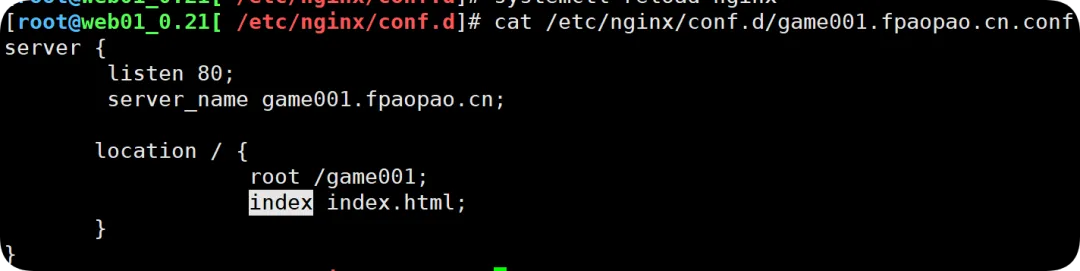
配置目录书语法演示
403 错误前的呈现下载列表;
//修改hosts文件。类似DNS劫持192.168.0.21 mirrors.fpaopao.cn//创建站点目录,目前站点目录中不存在任何文件,例如index.html等;[root@web01_0.21[ /mirrors] pwd/mirrors[root@web01_0.21[ /mirrors] tree.├── Centos├── MacOS└── Windows//创建站点主配置文件[root@web01_0.21[ /etc/nginx/conf.d]# pwd/etc/nginx/conf.d[root@web01_0.21[ /etc/nginx/conf.d]# vim mirrors.fpaopao.cn.conf[root@web01_0.21[ /etc/nginx/conf.d] cat mirrors.fpaopao.cn.confserver { listen 80; server_name mirrors.fpaopao.cn; location / { root /mirrors; index index.html; }}//检查并重载[root@web01_0.21[ /mirrors]# nginx -tnginx: the configuration file /etc/nginx/nginx.conf syntax is oknginx: configuration file /etc/nginx/nginx.conf test is successful[root@web01_0.21[ /mirrors]# systemctl reload nginx目前的配置,返回 403 错误的根本原因是 location 层下的/里并没有匹配到 index 或者 index.html 文件;

开启目录索引配置语法
注意:这里暂将索引功能作用到 location 层(作用域直只针对当前 locaion 层,后续若是 locaiton / 比较多时,可以放到 server 层,作用域在全局
启用或禁用目录列表输出,on 开启,off 关闭
[root@web01_0.21[ /etc/nginx/conf.d]# cat mirrors.fpaopao.cn.confserver { listen 80; server_name mirrors.fpaopao.cn; location / { root /mirrors; index index.html; autoindex on; //暂时作用到loacaion层,启用或禁用目录列表输出,on开启,off关闭 }//检查并重载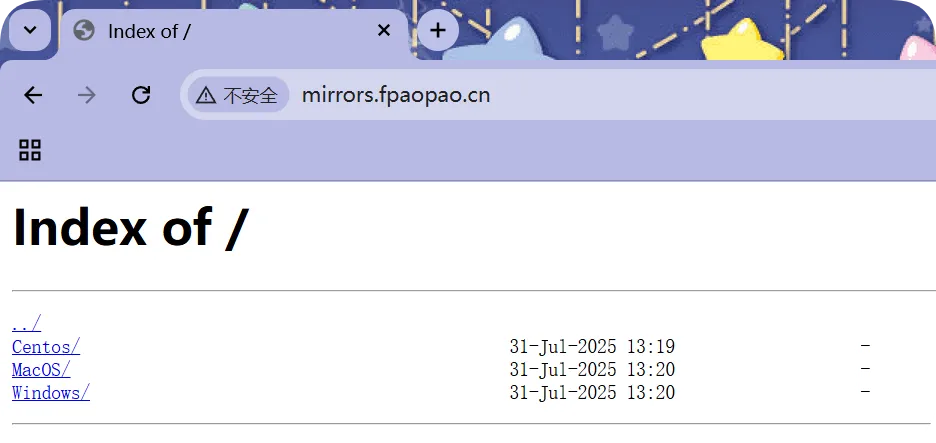
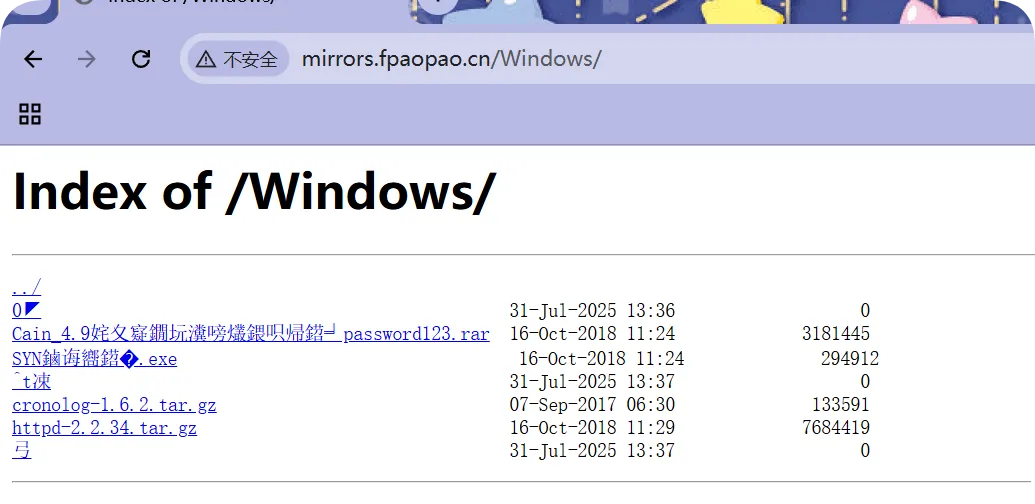
指定目录列表中输出确切的文件大小(缺省是关闭的)
[root@web01_0.21[ /mirrors/Windows]# cat /etc/nginx/conf.d/mirrors.fpaopao.cn.confserver { listen 80; server_name mirrors.fpaopao.cn; location / { root /mirrors; index index.html; autoindex on; autoindex_exact_size off; //指定是否应在目录列表中输出确切的文件大小,on显示字节,off显示大概单位。 }}//检查语法&重载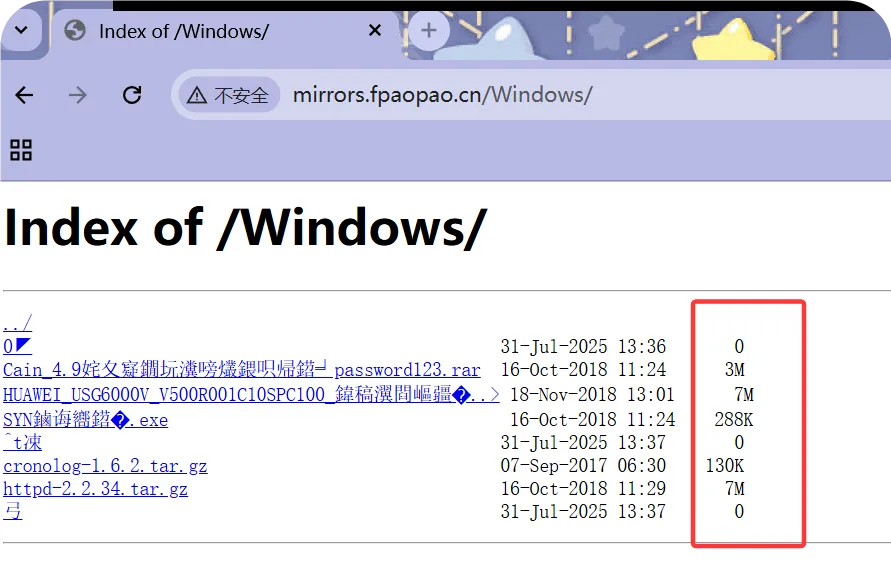
指定目录列表中的北京(本地)时间
[root@web01_0.21[ ~]# cat /etc/nginx/conf.d/mirrors.fpaopao.cn.confserver { listen 80; server_name mirrors.fpaopao.cn; location / { root /mirrors; index index.html; autoindex on; autoindex_exact_size off; autoindex_localtime on; //指定目录列表中的时间是应以本地时区还是UTC输出。on 本地时区,off UTC时间。 }}//检查语法并重载;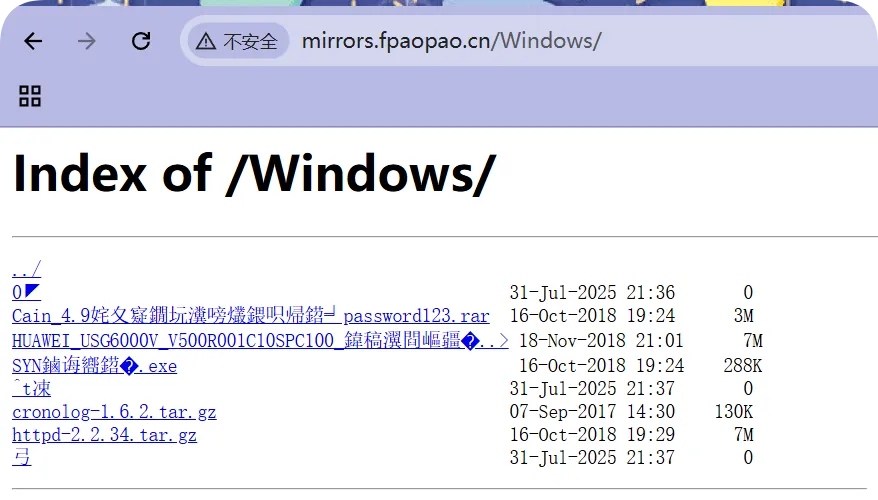
设定字符集配置
[root@web01_0.21[ ~] cat /etc/nginx/conf.d/mirrors.fpaopao.cn.confserver { listen 80; server_name mirrors.fpaopao.cn; charset uft8,gbk; //通常作用在server层,设定字符集,防止中文字 符乱码显示 location / { root /mirrors; index index.html; autoindex on; autoindex_exact_size off; autoindex_localtime on; }}// 检查重载;Nginx 访问控制
ngx_http_access_module 模块允许限制对某些客户端(来源)地址的访问;
注意:deny 和 allow 的顺序是有影响的 默认情况下,从第一条规则进行匹配 如果匹配成功,则不继续匹配下面的内容。 如果匹配不成功,则继续往下寻找能匹配成功的内容。
Nginx 访问控制语法配置
vim /etc/nginx/conf.d/mirrors.fpaopao.cn.confserver { listen 80; server_name mirrors.fpaopao.cn; charset uft-8; location / { root /mirrors; index index.html; autoindex on; autoindex_exact_size off; autoindex_localtime on; allow 10.0.0.1/32; //允许地址或地址段 deny all; //拒绝所有人 }}//检查重载
Nginx 基础认证 (基本验证)
ngx_http_auth_basic_module 模块允许使用 HTTP 基本身份验证,验证用户名和密码来限制对资源的访问。

参考链接:https://nginx.org/en/docs/http/ngx_http_auth_basic_module.html
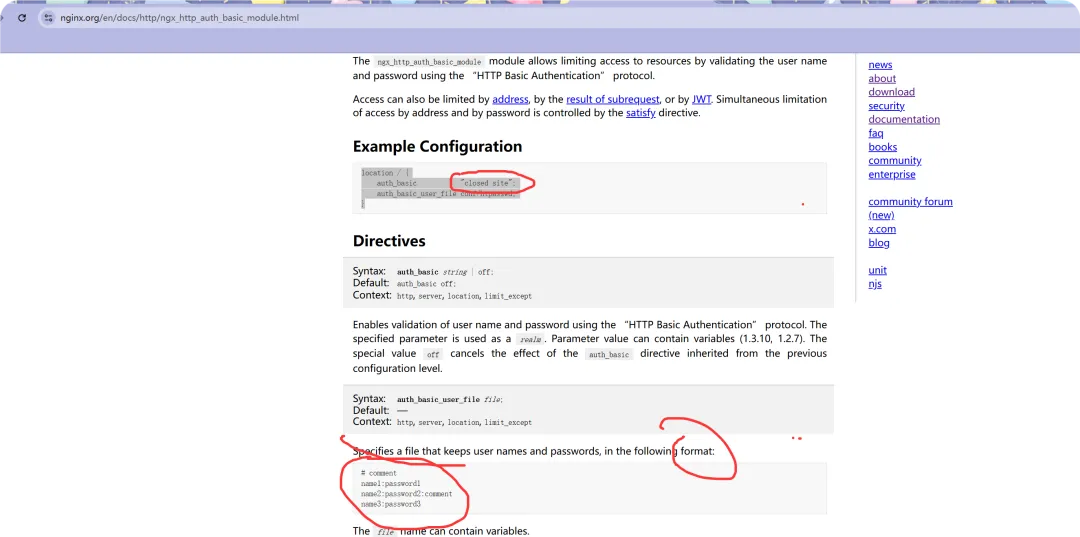
//官方演示的示例location / { auth_basic "closed site"; // 在location层中写入一个站点(描述) auth_basic_user_file conf/htpasswd; //基本认证后要写入一个相对或者绝对路径的文件 (用户名和密码)}这个用户名和密码是用怎样的格式?
用户名和密码必须以加密的结果文件形式展现;
htpasswd openssl passwd
Specifies a file that keeps user names and passwords, in the following format:# commentname1:password1 //冒号分隔,并不是手动填写输入用户名和密码name2:password2:commentname3:password3使用 htpasswd 生成一个密码文件
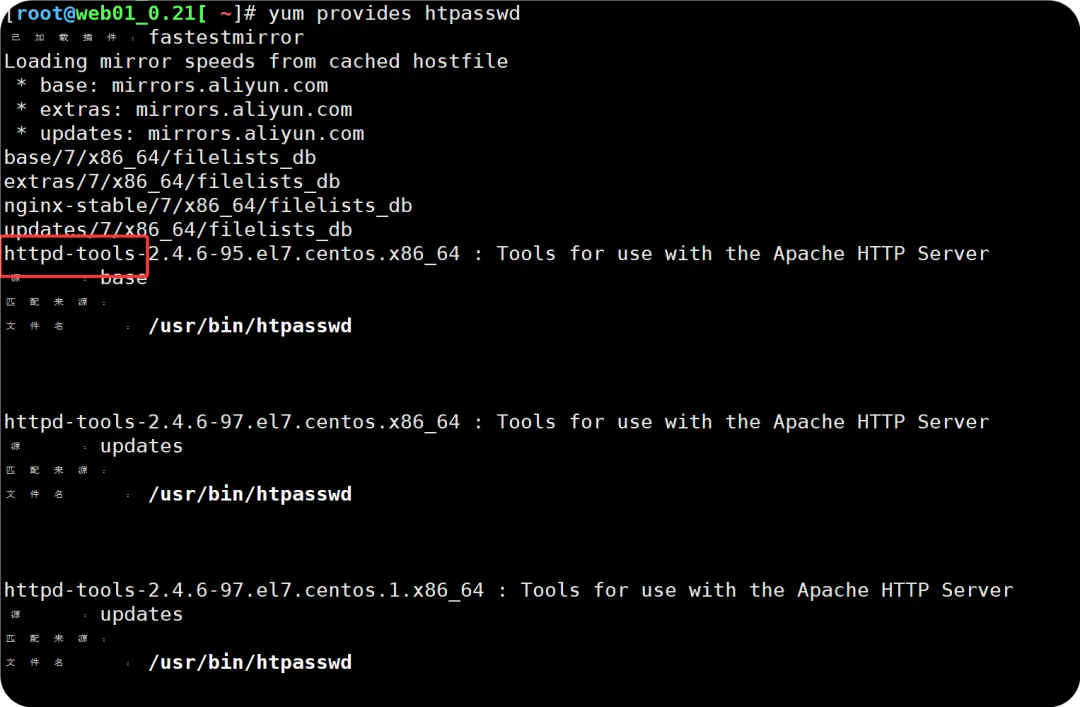
//安装httpd-tools[root@web01_0.21[ ~]# yum install -y httpd-tool[root@web01_0.21[ ~]# rpm -qa httpd-tools //有的话就不用下载了httpd-tools-2.4.6-99.el7.centos.1.x86_64//使用htpaswd,生成用户名和密码,存放在指定路径下[root@web01_0.21[ /]# htpasswd -c -b /etc/nginx/ngx.passwd fengxin 123.com!Adding password for user fengxin[root@web01_0.21[ /]# cat /etc/nginx/ngx.passwdfengxin:$apr1$libgce79$qfT1cGVR1JHgLxcpxsZ6n/ //用户名:密码,符合官方格式[root@web01_0.21[ /]# cat /etc/nginx/conf.d/mirrors.fpaopao.cn.confserver { listen 80; server_name mirrors.fpaopao.cn; charset uft-8; location / { root /mirrors; index index.html; autoindex on; autoindex_exact_size off; autoindex_localtime on;# allow 10.0.0.1/32;# deny all; auth_basic "auth"; auth_basic_user_file /etc/nginx/ngx.passwd; //指定保存用户名和密码的文件 }}//检查语法并重载htpasswd 参数详解
[root@web01_0.21[ ~]# htpasswdUsage: htpasswd [-cimB25dpsDv] [-C cost] [-r rounds] passwordfile username //携带参数后,指定文件存放位置,里面写入了用户名 htpasswd -b[cmB25dpsDv] [-C cost] [-r rounds] passwordfile username password //携带参数后,指定文件存储位置,里面写入了用户名和密码 htpasswd -n[imB25dps] [-C cost] [-r rounds] username htpasswd -nb[mB25dps] [-C cost] [-r rounds] username password -c Create a new file. //创建新文件 -n Don't update file; display results on stdout. -b Use the password from the command line rather than prompting for it. //允许输入明文密码 -i Read password from stdin without verification (for script usage). -m Force MD5 encryption of the password (default). -2 Force SHA-256 crypt() hash of the password (secure). -5 Force SHA-512 crypt() hash of the password (secure). -B Force bcrypt aencryption of the password (very secure). -C Set the computing time used for the bcrypt algorithm (higher is more secure but slower, default: 5, valid: 4 to 31). -r Set the number of rounds used for the SHA-256, SHA-512 algorithms (higher is more secure but slower, default: 5000). -d Force CRYPT encryption of the password (8 chars max, insecure). -s Force SHA-1 encryption of the password (insecure). -p Do not encrypt the password (plaintext, insecure). -D Delete the specified user. -v Verify password for the specified user.On other systems than Windows and NetWare the '-p' flag will probably not work.The SHA-1 algorithm does not use a salt and is less secure than the MD5 algorithm.
Nginx 限流限速(生产场景中常用)
为什么要限速?
限制某个用户在一定时间内能够产生的 Http 请求数。或者说限制某个用户的下载速度,多出的次数页面会抛出 503HTTP 状态码: 过载保护,。
限速应用场景
下载限速:限制用户下载资源的速度; ngx_http_core_module 请求限制:限制用户单位时间内所产生的 Http 请求数; ngx_http_limit_req_module 连接限制:限制同一时间的连接数,及并发数限制; ngx_http_limit_conn_module
请求频率限速原理
水(请求)从上方倒入水桶,从水桶下方流出(被处理);
如果说水(请求)流入的过快,水桶流出(被处理)的过慢,来不及流出的水存在水桶中(缓存),然后以固 定速率流出,水桶满后则水溢出(丢弃)。
简单来说就是:当处理速度,达不到请求的速度,则会将请求放置缓存,然后持续处理。当缓存被沾满,如果还有大量的请求,则会被丢弃。

配置前,参考官方文档 https://nginx.org/en/docs/http/ngx_http_limit_req_module.html
limit_req_zone req是request的简写 zone=one:10m 理解成水桶最大的存储容量 rate=1r/s; 理解成速率,每秒只能出现一个请求的意思; burst=5 触发的值 (允许容纳的缓存数) $binary_remote_addr 是一个变量,顾名思义来源IP地址, $remote_addr 也是一个变量,两者间的区别 nodelay 具体的拒绝;
参数的具体含义
zone=req_one 设置使用哪个配置区域来做 限制,与上面limit_req_zone 里的name对应。 第二个参数:burst=3,设置一个大小为3的缓冲区,当有大量请求过来时,超过了访问频次限制的请求可以先放到这个缓冲区内。 第三个参数:nodelay,超过访问频次并且缓冲区也满了 的时候,则会返回503,如果没有设置,则所有请求会等待排队。
//示例http { //工作在http层 limit_req_zone $binary_remote_addr zone=one:10m rate=1r/s; //工作在HTTP层,定义基本请求限速规则 ... server { ... location /search/ { limit_req zone=one burst=5; //调用,bursts是触发的值 limit_req zone=perip burst=5 nodelay; }Directivesbinary_remote_addr和remote_addr 区别
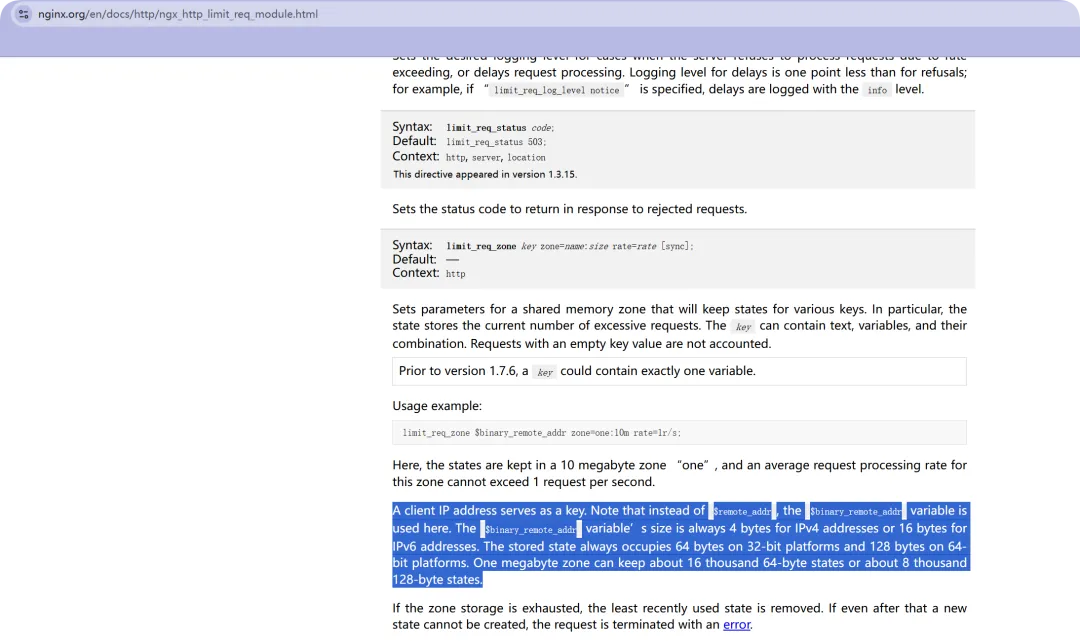
客户端IP地址作为密钥使用。需要注意的是,此处使用的变量是remoteAddress。$binaryRemoteAddress的存储大小在IPv4地址中始终为4字节,在IPv6地址中则为16字节。在32位平台上,存储状态始终占用64字节;而在64位平台上则需占用128字节。一个兆字节的存储区域可容纳约16,000个64字节状态或约8,000个128字节状态。
简单来说,使用binary_remote_addr这个变量,比remote_addr存储的IP地址较多。
定义限速配置
注意: 定义在http层的变量名称只能是唯一,如果需要多次定义,需要改变其变量名称
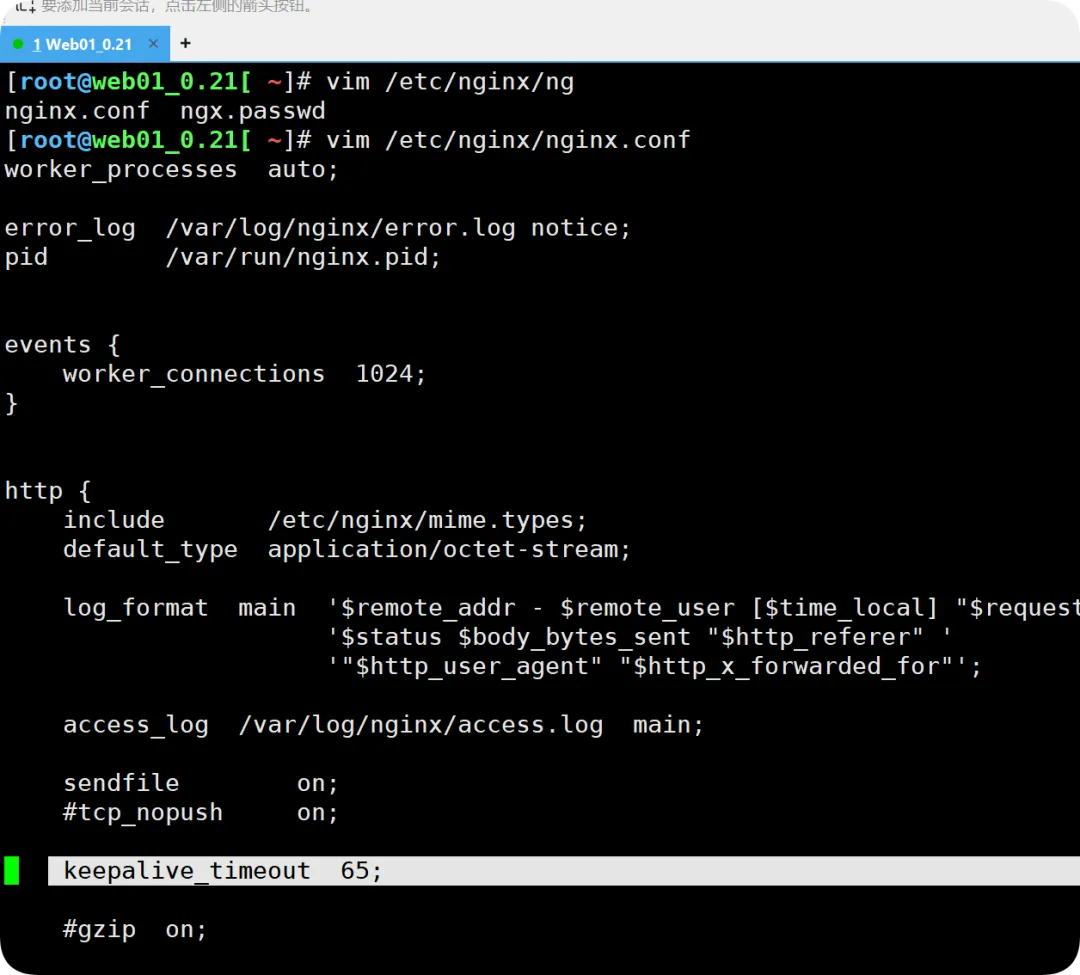
[root@web01_0.21[ /]# cat /etc/nginx/nginx.conf //查看nginx的主配置文件user nginx;worker_processes auto;error_log /var/log/nginx/error.log notice;pid /var/run/nginx.pid;events { worker_connections 1024;}http { include /etc/nginx/mime.types; default_type application/octet-stream; log_format main '$remote_addr - $remote_user [$time_local] "$request" ''$status $body_bytes_sent "$http_referer" ''"$http_user_agent" "$http_x_forwarded_for"'; access_log /var/log/nginx/access.log main; sendfile on;#tcp_nopush on; keepalive_timeout 65;#gzip on; include /etc/nginx/conf.d/*.conf; //官方文档说明该模块要加在http层。因为是被包含的关系,因此可以写在站点配置文件中}//限制请求并发数配置(指令看起来稍微复杂)[root@web01_0.21[ /]# cat /etc/nginx/conf.d/mirrors.fpaopao.cn.conf limit_req_zone $binary_remote_addr zone=req_one:10m rate=1r/s; //http标签段定义请求限制, rate限制速率,限制一秒钟 最多一个IP请求(对来源IP做限制)server { listen 80; server_name mirrors.fpaopao.cn; charset uft-8; location / { root /mirrors; index index.html; autoindex on; autoindex_exact_size off; autoindex_localtime on;# allow 10.0.0.1/32;# deny all;# auth_basic "auth";# auth_basic_user_file /etc/nginx/ngx.passwd; limit_req zone=req_one burst=5 nodelay; //调用,请求超过1r/s,剩下的将被延迟处理,请求数超过burst定义的数量,则返回503,实际的企业生产环境,不要调那么低 }}//检查重载
更改限制请求的HTTP状态码
[root@web01_0.21[ /]# vim /etc/nginx/conf.d/mirrors.fpaopao.cn.conf limit_req_zone $binary_remote_addr zone=req_one:10m rate=1r/s;server { listen 80; server_name mirrors.fpaopao.cn; charset uft-8; location / { root /mirrors; index index.html; autoindex on; autoindex_exact_size off; autoindex_localtime on;# allow 10.0.0.1/32;# deny all;# auth_basic "auth";# auth_basic_user_file /etc/nginx/ngx.passwd; limit_req zone=req_one burst=5 nodelay; limit_req_status 411; }}//检查重载~ 
限制并发连接数
通常的生产场景用于VIP收费下载,还是基于来源IP做限制。
配置
[root@web01_0.21[ ~]# cat /etc/nginx/conf.d/mirrors.fpaopao.cn.conf limit_req_zone $binary_remote_addr zone=req_one:10m rate=1r/s; limit_conn_zone $binary_remote_addr zone=conn_od:10m; //请求限制的定义server { listen 80; server_name mirrors.fpaopao.cn; charset uft-8; location / { root /mirrors; index index.html; autoindex on; autoindex_exact_size off; autoindex_localtime on;# allow 10.0.0.1/32;# deny all;# auth_basic "auth";# auth_basic_user_file /etc/nginx/ngx.passwd;# limit_req zone=req_one burst=5 nodelay;# limit_req_status 411; limit_rate 200k; //暂时做限速,验证限制并发链接数; limit_conn conn_od 2; //限制并发两个链接数 }}//检查语法,重载[root@web01_0.21[ ~]# nginx -tnginx: the configuration file /etc/nginx/nginx.conf syntax is oknginx: configuration file /etc/nginx/nginx.conf test is successful[root@web01_0.21[ ~]# systemctl reload nginx//模拟出一个大容量文件,放在站点文件路径下[root@web01_0.21[ /mirrors/Windows] pwd/mirrors/Windows[root@web01_0.21[ /mirrors/Windows] dd if=/dev/zero of=/mirrors/Windows/win2016.iso bs=2048MB count=1记录了1+0 的读入记录了1+0 的写出2048000000字节(2.0 GB)已复制,19.0975 秒,107 MB/秒[root@web01_0.21[ /mirrors/Windows]# ls -l win2016.iso -rw-r--r-- 1 root root 2048000000 8月 13 19:57 win2016.iso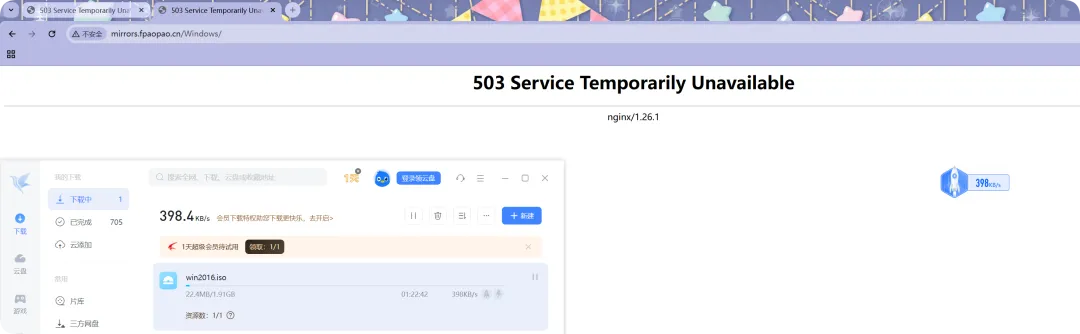
由于nginx 判断来源IP,并不判断socken的五元组,所以必须取消掉一个下载请求,才可以进行第二个,在实际的场景中,抛出的503会被一个让你充值提示的页面来代替; TCP 的 ESTABLISHED 状态表示连接已成功建立,双方进入正常数据传输阶段。

使用内部重定向机制,模拟充值提速服务
limit_req_zone $binary_remote_addr zone=req_one:10m rate=1r/s; limit_conn_zone $binary_remote_addr zone=conn_od:10m;server { listen 80; server_name mirrors.fpaopao.cn; charset uft-8; error_page 503 @temp; //拦截503错误,进行内部跳转 //location接收 location @temp { default_type text/html; //定义媒介基本资源 return 200 'Please contact us at 18888888.'; //返回一句话而已 } location / { root /mirrors; index index.html; autoindex on; autoindex_exact_size off; autoindex_localtime on; # allow 10.0.0.1/32; # deny all; # auth_basic "auth"; # auth_basic_user_file /etc/nginx/ngx.passwd; # limit_req zone=req_one burst=5 nodelay; # limit_req_status 411; limit_rate 200k; limit_conn conn_od 2; }}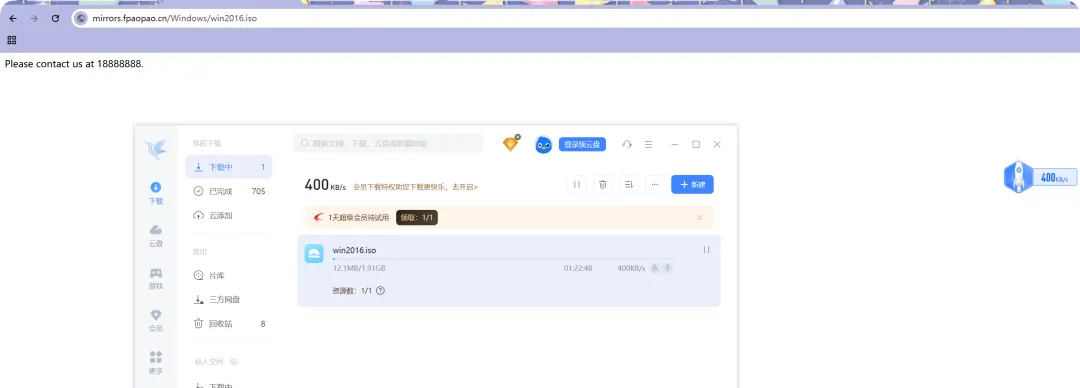
限制下载速度
某盘某雷的盈利手段之一
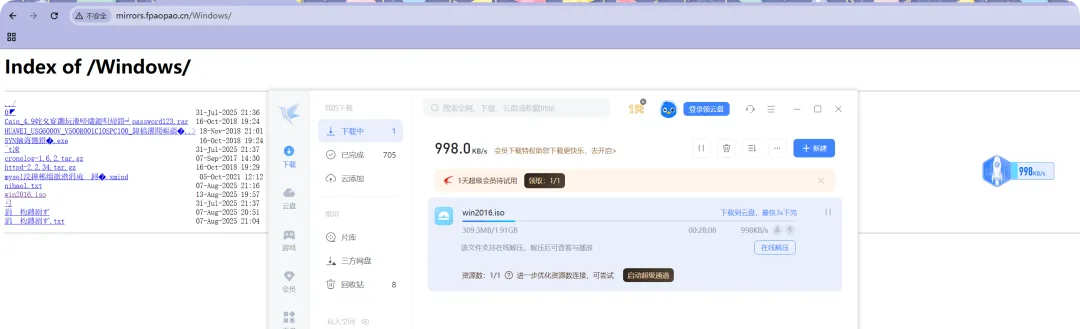
//从文件容量的200mb开始,才开始执行限速操作,执行限速为300kb/s,建议放在server层;[root@web01_0.21[ /mirrors/Windows]# cat /etc/nginx/conf.d/mirrors.fpaopao.cn.conf limit_req_zone $binary_remote_addr zone=req_one:10m rate=1r/s; limit_conn_zone $binary_remote_addr zone=conn_od:10m;server { listen 80; server_name mirrors.fpaopao.cn; charset uft-8; limit_rate 300k; //从文件容量的200mb开始,才开始执行限速操作,执行限速为300kb/s,建议放在server层; limit_rate_after 200m;# error_page 503 @temp;# location @temp {# default_type text/html;# return 200 'Please contact us at 18888888.';# } location / { root /mirrors; index index.html; autoindex on; autoindex_exact_size off; autoindex_localtime on;# allow 10.0.0.1/32;# deny all;# auth_basic "auth";# auth_basic_user_file /etc/nginx/ngx.passwd;# limit_req zone=req_one burst=5 nodelay;# limit_req_status 411;# limit_rate 200k;# limit_conn conn_od 2; }}//检查语法重载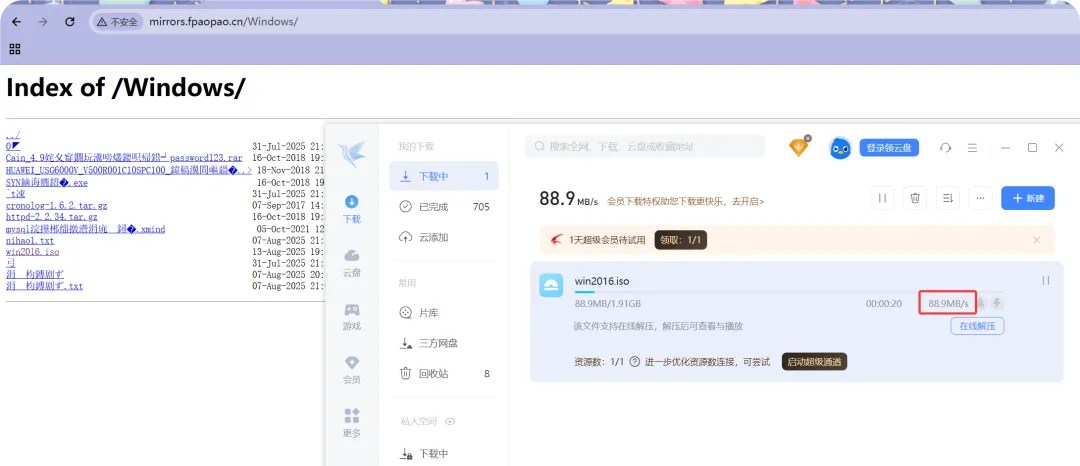 某盘某雷的盈利手段之一,基于用户ID来定义,划入到VIP组(普通和白金)的范围;
综合场景练习
配置需求
限制web服务器请求数处理为1秒一个,触发值为5,限制用户仅可同时下载一个文件。 当下载超过100M则限制下载速度为500k . 如果同时下载超过2个视频,则返回提示 "Please contact us at 18888888." 或者跳转到其他页面(类似会员加速充值页面);
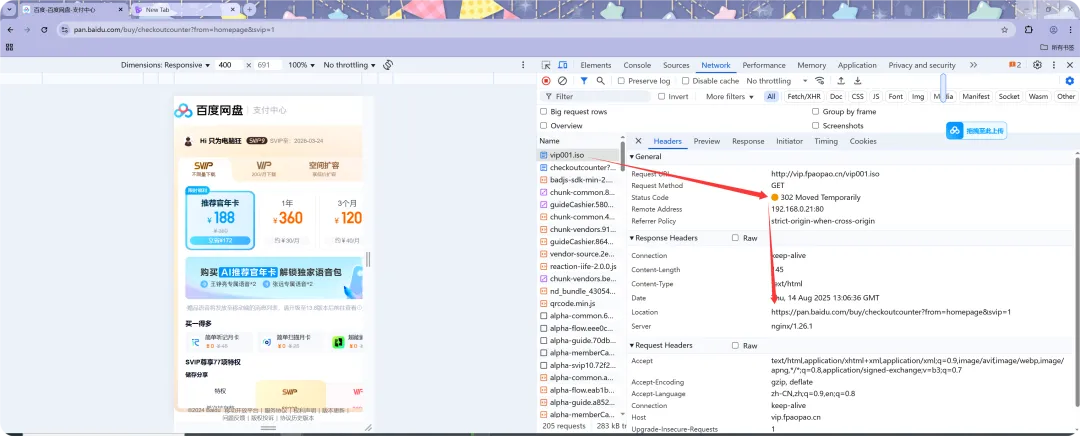
//创建站点目录[root@web01_0.21[ /etc/nginx/conf.d] mkdir /vip//站点目录中默认的首页文件,写入一些内容[root@web01_0.21[ /etc/nginx/conf.d] cd /vip/[root@web01_0.21[ /vip] echo"vip.vip.vip.vip" >index.html// DNS劫持重定向C:\Windows\System32\drivers\etc192.168.0.21 vip.fpaopao.cnC:\Users\ASUA>ping vip.fpaopao.cn正在 Ping vip.fpaopao.cn [192.168.0.21] 具有 32 字节的数据:来自 192.168.0.21 的回复: 字节=32 时间<1ms TTL=64来自 192.168.0.21 的回复: 字节=32 时间<1ms TTL=64//站点内模拟生成一个容量较大的文件[root@web01_0.21[ /vip] dd if=/dev/zero of=/vip/vip001.iso bs=2048MB count=1[root@web01_0.21[ /vip] ls -l总用量 2000004-rw-r--r-- 1 root root 16 8月 14 19:58 index.html-rw-r--r-- 1 root root 2048000000 8月 14 20:00 vip001.iso//定义vip.fengpaopao.cn站点配置文件[root@web01_0.21[ /vip] cat /etc/nginx/conf.d/vip.fpaopao.cn.conf # 定义limit_req_zone $binary_remote_addr zone=req_od01:10m rate=1r/s;limit_conn_zone $binary_remote_addr zone=conn_od01:10m;server { listen 80; server_name vip.fpaopao.cn; root /vip; limit_req zone=req_od01 burst=5 nodelay; limit_conn conn_od01 1; limit_rate 500k; limit_rate_after 100m; error_page 503 500 502 @error_temp; location @error_temp {return 302 https://pan.baidu.com/buy/checkoutcounter?from=homepage&svip=1; } location / { index index.html; }}//检查重载
目前的配置测试,访问请求频繁会导致跳转到指定的重置页面,有一点点不符合需求(下载才会跳转到该页面)

//调整访问请求过多,抛出指定的状态码[root@web01_0.21[ /vip] cat /etc/nginx/conf.d/vip.fpaopao.cn.conf # 定义limit_req_zone $binary_remote_addr zone=req_od01:10m rate=1r/s;limit_conn_zone $binary_remote_addr zone=conn_od01:10m;server { listen 80; server_name vip.fpaopao.cn; root /vip; limit_req zone=req_od01 burst=5 nodelay; limit_req_status 411; //增加这一行 limit_conn conn_od01 1; limit_rate 500k; limit_rate_after 100m; error_page 503 500 502 @error_temp; location @error_temp {return 302 https://pan.baidu.com/buy/checkoutcounter?from=homepage&svip=1; } location / { index index.html; }}//检查重载
//请求过快也会在日志中体现[root@web01_0.21[ /vip] tail -f /var/log/nginx/error.log2025/08/14 20:46:32 [error] 2069#2069: *18 limiting requests, excess: 5.560 by zone "req_od01", client: 192.168.0.166, server: vip.fpaopao.cn, request: "GET / HTTP/1.1", host: "vip.fpaopao.cn"2025/08/14 20:46:35 [error] 2069#2069: *18 limiting requests, excess: 5.017 by zone "req_od01", client: 192.168.0.166, server: vip.fpaopao.cn, request: "GET / HTTP/1.1", host: "vip.fpaopao.cn"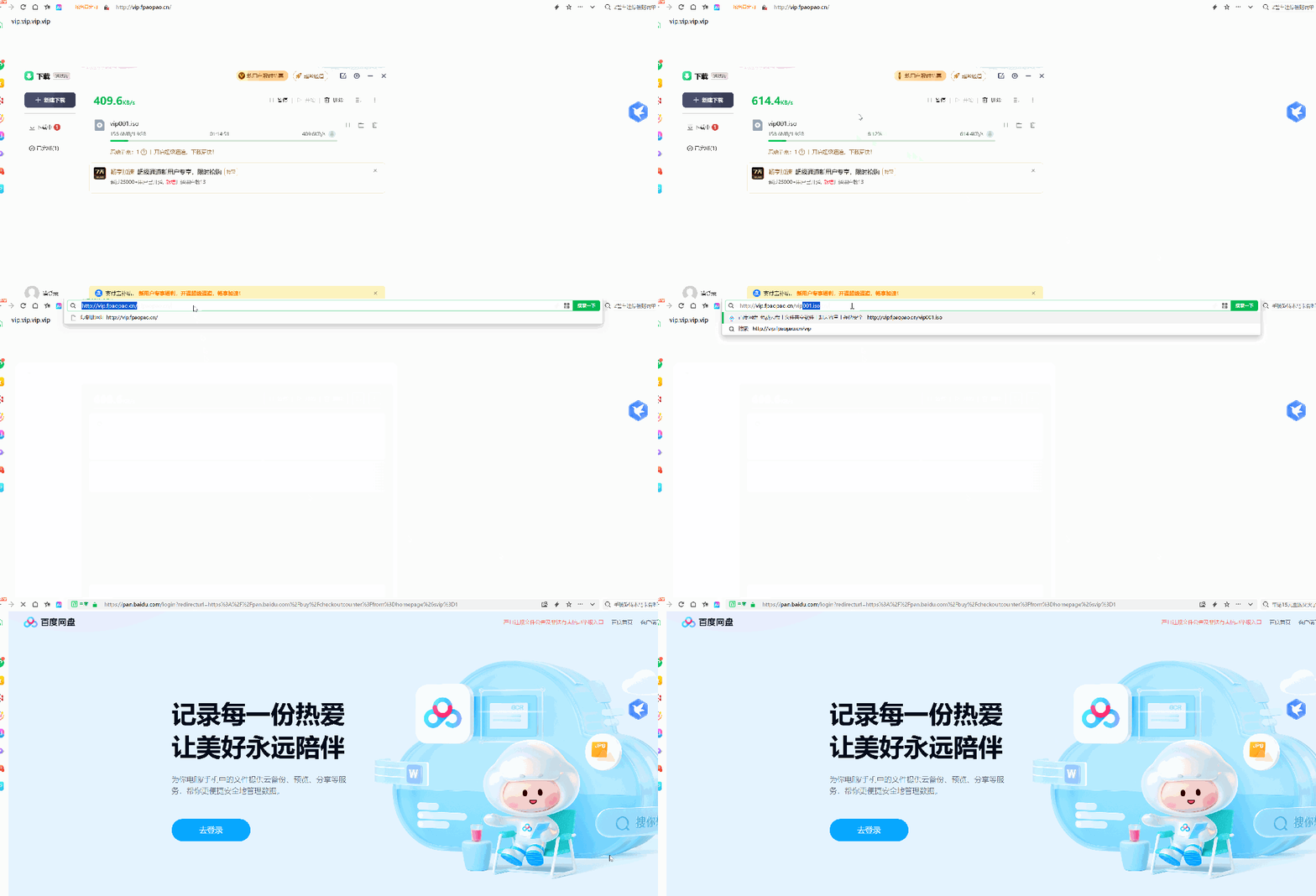
Nginx状态监控
ngx_http_stub_status_module模块提供对基本状态信息的访问。 默认情况下不集成该模块,需要使用 --with- http_stub_status_module集成。

配置示例
//可以工作在server层,通常放在location层[root@web01_0.21[ /vip]# vim /vim /etc/nginx/conf.d/vip.fpaopao.cn.conf # 定义limit_req_zone $binary_remote_addr zone=req_od01:10m rate=1r/s;limit_conn_zone $binary_remote_addr zone=conn_od01:10m;server { listen 80; server_name vip.fpaopao.cn; root /vip; limit_req zone=req_od01 burst=5 nodelay; limit_req_status 411; limit_conn conn_od01 1; limit_rate 500k; limit_rate_after 100m; error_page 503 500 502 @error_temp; location @error_temp {return 302 https://pan.baidu.com/buy/checkoutcounter?from=homepage&svip=1; } location / { index index.html; } location /ngx_status { stub_status; //开启状态监测 allow 192.168.0.0/24; //为监控脚本考虑,查看Nginx状态的url,只允许本机或者指定IP访问; deny all; }}//检查,重载- Active connections: 2 活跃的链接数是2- server accepts(已接收的总TCP连接数量) handled(已处理的TCP连接数量) requests ( 当前总http请求数量) 32263 32263 32502 - Reading(当前读取的请求头数量。): 0 Writing:(当前响应的请求头数量) 1 Waiting: 0 (当前等待请求的空闲客户端连接数。)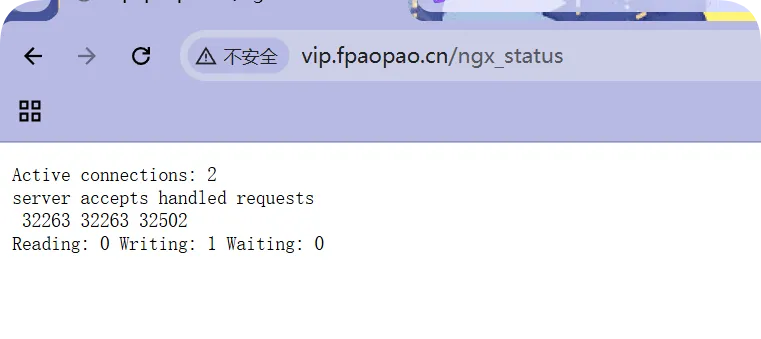
如何理解Reading、Writing、Waiting ?
Active connections:当前活跃连接数,包括 Waiting等待连接数。 accepts: 已接收的总TCP连接数量。 handled: 已处理的TCP连接数量。 requests: 当前总http请求数量。 Reading: 当前读取的请求头数量。 Writing: 当前响应的请求头数量。 Waiting: 当前等待请求的空闲客户端连接数。
假设现在有两条船分别为C 、S。C船需要 S船的1个物品,那么此时C船就要给S船发送一个消息。
S船收到这个消息时就是reading S船将物资发送给C船,这个时候就是writing 如果C船需要S船很多个物品,那么需要C船和S船建立起一个物资传送管道,不断的传送物资。这个管道建立起来的时候,就是waiting状态了。
waiting状态 属于已经要建立连接的一种状态;
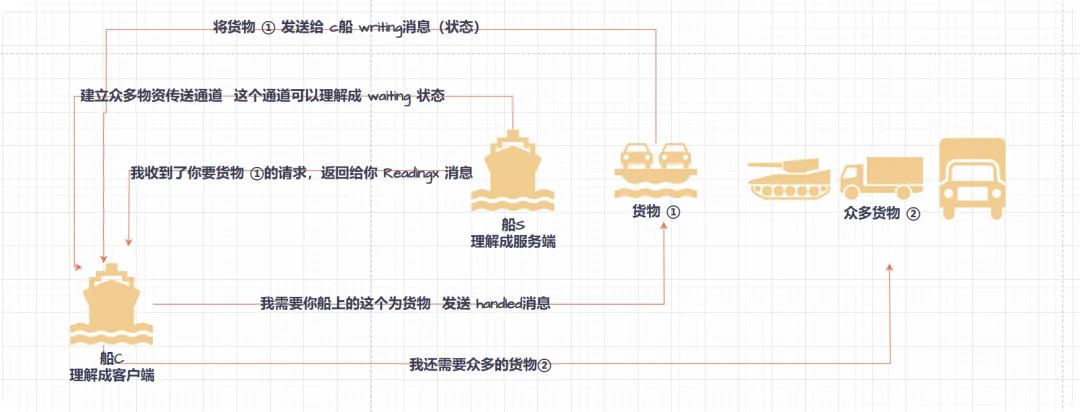

监控该数值的大概流程
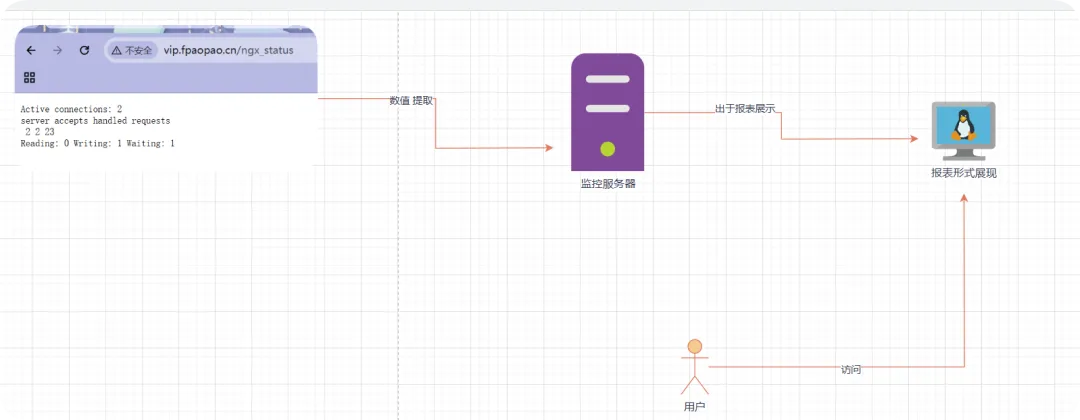
//修改站点主配置文件,允许127.0.0.1网段访问[root@web01_0.21[ ~]# cat /etc/nginx/conf.d/vip.fpaopao.cn.conf # 定义limit_req_zone $binary_remote_addr zone=req_od01:10m rate=1r/s;limit_conn_zone $binary_remote_addr zone=conn_od01:10m;server { listen 80; server_name vip.fpaopao.cn; root /vip; limit_req zone=req_od01 burst=5 nodelay; limit_req_status 411; limit_conn conn_od01 1; limit_rate 500k; limit_rate_after 100m; error_page 503 500 502 @error_temp; location @error_temp {return 302 https://pan.baidu.com/buy/checkoutcounter?from=homepage&svip=1; } location / { index index.html; } location /ngx_status { stub_status; allow 192.168.0.0/24; allow 127.0.0.1; deny all; } }//使用 curl命令携带主机头[root@web01_0.21[ ~] curl -HHost:vip.fpaopao.cn http://127.0.0.1/ngx_statusActive connections: 1 server accepts handled requests 8 8 28 Reading: 0 Writing: 1 Waiting: 0 //配合awk命令,以冒号为分隔符,取第一例最后一个数值[root@web01_0.21[ ~] curl -s -HHost:vip.fpaopao.cn http://127.0.0.1/ngx_status | awk 'NR==1 {print $NF}'1//形成友好输出提示:这就是监控需要curl命令去提取[root@web01_0.21[ ~] echo"当前nginx的活跃数:$(curl -s -HHost:vip.fpaopao.cn http://127.0.0.1/ngx_status | awk 'NR==1 {print $NF}') "当前nginx的活跃数:1 
随机文章
-
 10个月宝宝每天需要喝多少奶粉?
- 动手做⑧‖python每日一练
- Python & MATLAB 仿真实现按需定制的抗衍射光束用于光镊光通信,流线工程算法
- 【第36期】21天养成编程习惯:Python刷题第20天
- Python基础知识点汇总
- Python写得再快也没用?这5个“伪高效”写法正在悄悄拖垮你!
- Python Tkinter程序打包发布?别慌,PyInstaller这一套我给你讲透了
- Python读写文本(二)
- 【Python小白速通】用with打开文件?说白了就是"给代码配个自动关门的冰箱"!
- Arcjet Python SDK:安全防护,代码原生集成!
- 一天一个Python知识点——Day 155:神经网络基础