大家好,我是Toby老师,今天为大家提供Python读取csv报错解决方案
CSV(Comma-Separated Values)
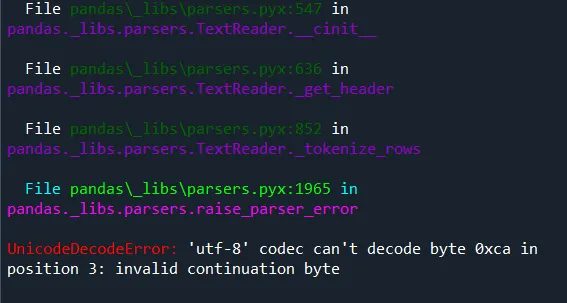
CSV(Comma-Separated Values)是一种简单的纯文本格式,用逗号分隔数据字段,每行代表一条记录,通常第一行是列标题,广泛用于表格数据的存储和交换,具有轻量、易读、通用性强的特点。我们在金融风控领域训练模型时,把数据集保存为pickle,csv等格式,读取速度比Excel快。但国外编程语言对中文不太友好,经常出现报错。UnicodeDecodeError: 'utf-8' codec can't decode byte 0xca in position 3: invalid continuation byte
对于中文CSV文件,最常见的编码是:
GBK/GB2312 - Windows中文系统默认
UTF-8 - 现代应用和Linux系统常用
UTF-8 with BOM - 某些Windows应用生成
方法1:指定正确的编码格式(推荐)
# 尝试GBK编码(最常用的中文编码)data = pd.read_csv(readFileName, encoding='gbk')# 如果GBK不行,尝试GB2312data = pd.read_csv(readFileName, encoding='gb2312')# 或者尝试GB18030(支持更全的中文字符)data = pd.read_csv(readFileName, encoding='gb18030')# 也可以尝试通用的latin1或ISO-8859-1data = pd.read_csv(readFileName, encoding='latin1')# 或data = pd.read_csv(readFileName, encoding='ISO-8859-1')
方法2:自动检测文件编码
import chardet# 先检测文件编码with open(readFileName, 'rb') as f: result = chardet.detect(f.read(10000)) # 读取前10000字节检测 print(f"检测到的编码: {result['encoding']}, 置信度: {result['confidence']}")# 使用检测到的编码读取data = pd.read_csv(readFileName, encoding=result['encoding'])
import chardetdef detect_encoding(file_path, n_bytes=10000): with open(file_path, 'rb') as f: raw_data = f.read(n_bytes) return chardet.detect(raw_data)['encoding']encoding = detect_encoding(readFileName)print(f"使用编码: {encoding}")data = pd.read_csv(readFileName, encoding=encoding)
方法3:在读取时忽略错误字符
# 忽略无法解码的字符(可能会丢失数据)data = pd.read_csv(readFileName, encoding='utf-8', errors='ignore')# 或替换无法解码的字符data = pd.read_csv(readFileName, encoding='utf-8', errors='replace')
方法4:先转换文件编码
# 先以二进制读取,再解码with open(readFileName, 'rb') as f: content = f.read() # 尝试不同编码 try: content_str = content.decode('gbk') except: content_str = content.decode('utf-8', errors='ignore')# 保存为UTF-8格式temp_file = 'temp_utf8.csv'with open(temp_file, 'w', encoding='utf-8') as f: f.write(content_str)# 再读取data = pd.read_csv(temp_file)
方法5:使用文件编辑器先转换
用Notepad++、VS Code等编辑器打开CSV文件查看当前编码(通常显示在右下角)转换为UTF-8编码并保存再用pandas读取
快速诊断脚本
import pandas as pdimport chardetdef read_csv_with_encoding(file_path): # 常见的中文编码列表 encodings = ['gbk', 'gb2312', 'gb18030', 'utf-8', 'latin1', 'ISO-8859-1', 'cp936'] for encoding in encodings: try: print(f"尝试使用 {encoding} 编码...") data = pd.read_csv(file_path, encoding=encoding) print(f"成功!使用 {encoding} 编码读取了 {len(data)} 行数据") return data except Exception as e: print(f"{encoding} 失败: {str(e)[:50]}...") continue # 如果常用编码都失败,尝试自动检测 print("\n常用编码都失败,尝试自动检测编码...") with open(file_path, 'rb') as f: result = chardet.detect(f.read(100000)) detected_encoding = result['encoding'] print(f"检测到编码: {detected_encoding}, 置信度: {result['confidence']}") try: data = pd.read_csv(file_path, encoding=detected_encoding) print(f"成功!使用检测到的 {detected_encoding} 编码") return data except: print("自动检测的编码也失败") return None# 使用函数读取文件data = read_csv_with_encoding(readFileName)if data is not None: print(data.head())
如果你有企业债券违约风险预测模型建模需求请商务联系QQ:231469242,微信:drug666123,或扫描下面二维码加微信咨询。
公司自营课程如下
如果你对《python风控建模实战案例数据库》数据库感兴趣,微信二维码扫一扫即可访问和收藏,了解更多相关介绍。

 10个月宝宝每天需要喝多少奶粉?