用 Python Tkinter 实现的“错题纸模板
- 2026-09-02 20:20:51
用 Python Tkinter 实现的“错题纸模板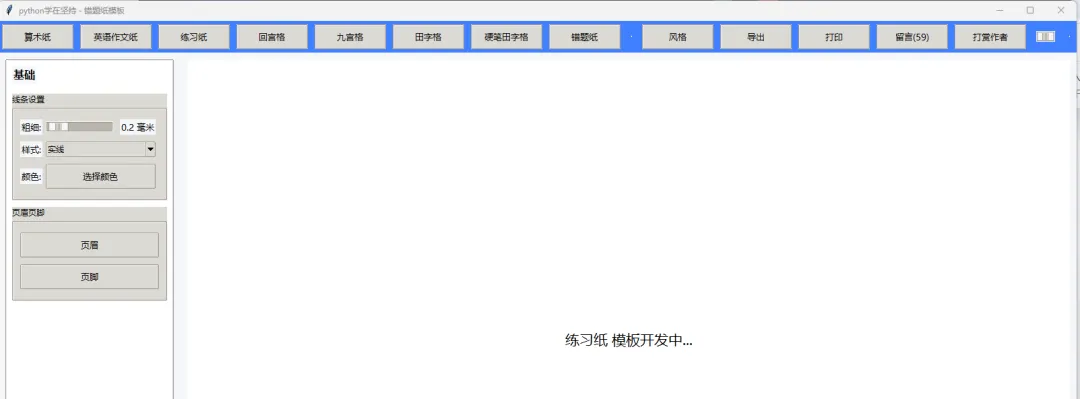
下面是一个用 Python Tkinter 实现的错题纸模板示例,包含左侧设置面板和右侧预览区域,支持线条粗细、样式、颜色调整,以及页眉页脚配置,可导出图片。
import tkinter as tkfrom tkinter import ttk, colorchooser, filedialogfrom PIL import Image, ImageDraw, ImageFontimport mathclassEasyPaperApp:def__init__(self, root): self.root = root self.root.title("易纸 - 错题纸模板") self.root.geometry("1600x900")# 全局样式 self.style = ttk.Style() self.style.theme_use("clam") self.style.configure("TFrame", background="#f5f7fa") self.style.configure("TLabel", background="#f5f7fa", font=("Microsoft YaHei", 10)) self.style.configure("TButton", font=("Microsoft YaHei", 10), padding=6) self.style.configure("TScale", background="#f5f7fa")# 全局变量 self.line_width = 0.2# 毫米 self.line_style = "实线" self.line_color = "#000000" self.header_text = "" self.footer_text = "" self.paper_type = "错题纸"# 主布局 self.main_frame = ttk.Frame(root) self.main_frame.pack(fill=tk.BOTH, expand=True)# 顶部工具栏 self.toolbar = ttk.Frame(self.main_frame, height=60, style="Toolbar.TFrame") self.toolbar.pack(side=tk.TOP, fill=tk.X) self.toolbar.configure(style="Toolbar.TFrame") self.root.style = ttk.Style() self.root.style.configure("Toolbar.TFrame", background="#4080ff") self.create_toolbar()# 左侧设置面板 self.left_panel = ttk.Frame(self.main_frame, width=300, style="LeftPanel.TFrame") self.left_panel.pack(side=tk.LEFT, fill=tk.Y, padx=10, pady=10) self.left_panel.configure(style="LeftPanel.TFrame") self.root.style.configure("LeftPanel.TFrame", background="#ffffff", relief=tk.RAISED, borderwidth=1) self.create_left_panel()# 右侧预览区域 self.right_panel = ttk.Frame(self.main_frame, style="RightPanel.TFrame") self.right_panel.pack(side=tk.RIGHT, fill=tk.BOTH, expand=True, padx=10, pady=10) self.right_panel.configure(style="RightPanel.TFrame") self.root.style.configure("RightPanel.TFrame", background="#ffffff") self.canvas = tk.Canvas(self.right_panel, bg="white", highlightthickness=0) self.canvas.pack(fill=tk.BOTH, expand=True)# 初始绘制 self.draw_preview()defcreate_toolbar(self):# 模板选择 templates = ["算术纸", "英语作文纸", "练习纸", "回宫格", "九宫格", "田字格", "硬笔田字格", "错题纸"]for i, template in enumerate(templates): btn = ttk.Button(self.toolbar, text=template, command=lambda t=template: self.select_template(t)) btn.pack(side=tk.LEFT, padx=5, pady=5)# 分隔线 ttk.Separator(self.toolbar, orient=tk.VERTICAL).pack(side=tk.LEFT, padx=10, pady=5)# 功能按钮 ttk.Button(self.toolbar, text="风格", command=self.change_style).pack(side=tk.LEFT, padx=5, pady=5) ttk.Button(self.toolbar, text="导出", command=self.export_paper).pack(side=tk.LEFT, padx=5, pady=5) ttk.Button(self.toolbar, text="打印", command=self.print_paper).pack(side=tk.LEFT, padx=5, pady=5) ttk.Button(self.toolbar, text="留言(59)", command=self.show_messages).pack(side=tk.LEFT, padx=5, pady=5) ttk.Button(self.toolbar, text="打赏作者", command=self.donate_author).pack(side=tk.LEFT, padx=5, pady=5)# 缩放控制 ttk.Separator(self.toolbar, orient=tk.VERTICAL).pack(side=tk.RIGHT, padx=10, pady=5) self.zoom_var = tk.DoubleVar(value=0.7) zoom_scale = ttk.Scale(self.toolbar, from_=0.1, to=2.0, variable=self.zoom_var, command=self.update_zoom) zoom_scale.pack(side=tk.RIGHT, padx=10, pady=5) ttk.Label(self.toolbar, text="70%(自适应)", foreground="white").pack(side=tk.RIGHT, padx=5, pady=5)defcreate_left_panel(self):# 基础设置 ttk.Label(self.left_panel, text="基础", font=("Microsoft YaHei", 12, "bold")).pack(anchor=tk.W, padx=10, pady=10)# 线条设置 line_frame = ttk.LabelFrame(self.left_panel, text="线条设置", padding=10) line_frame.pack(fill=tk.X, padx=10, pady=5)# 粗细 ttk.Label(line_frame, text="粗细:").grid(row=0, column=0, sticky=tk.W, pady=5) self.width_scale = ttk.Scale(line_frame, from_=0.1, to=2.0, variable=tk.DoubleVar(value=self.line_width), command=self.update_line_width) self.width_scale.grid(row=0, column=1, sticky=tk.EW, padx=5, pady=5) self.width_label = ttk.Label(line_frame, text=f"{self.line_width} 毫米") self.width_label.grid(row=0, column=2, sticky=tk.W, padx=5, pady=5)# 样式 ttk.Label(line_frame, text="样式:").grid(row=1, column=0, sticky=tk.W, pady=5) self.style_var = tk.StringVar(value=self.line_style) style_combo = ttk.Combobox(line_frame, textvariable=self.style_var, values=["实线", "虚线", "点线"], state="readonly") style_combo.grid(row=1, column=1, columnspan=2, sticky=tk.EW, padx=5, pady=5) style_combo.bind("<<ComboboxSelected>>", self.update_line_style)# 颜色 ttk.Label(line_frame, text="颜色:").grid(row=2, column=0, sticky=tk.W, pady=5) self.color_btn = ttk.Button(line_frame, text="选择颜色", command=self.choose_color) self.color_btn.grid(row=2, column=1, columnspan=2, sticky=tk.EW, padx=5, pady=5)# 页眉页脚 header_frame = ttk.LabelFrame(self.left_panel, text="页眉页脚", padding=10) header_frame.pack(fill=tk.X, padx=10, pady=5) ttk.Button(header_frame, text="页眉", command=self.edit_header).pack(fill=tk.X, pady=5) ttk.Button(header_frame, text="页脚", command=self.edit_footer).pack(fill=tk.X, pady=5)defselect_template(self, template): self.paper_type = template self.draw_preview()defchange_style(self):# 切换主题风格passdefexport_paper(self): file_path = filedialog.asksaveasfilename( defaultextension=".png", filetypes=[("PNG Image", "*.png"), ("PDF Document", "*.pdf"), ("All Files", "*.*")] )if file_path:if file_path.endswith(".png"): self.export_to_png(file_path)elif file_path.endswith(".pdf"): self.export_to_pdf(file_path)defprint_paper(self):# 打印功能passdefshow_messages(self): tk.messagebox.showinfo("留言", "留言功能开发中...")defdonate_author(self): tk.messagebox.showinfo("打赏", "打赏功能开发中...")defupdate_zoom(self, value): zoom = float(value) ttk.Label(self.toolbar, text=f"{int(zoom*100)}%(自适应)", foreground="white").pack(side=tk.RIGHT, padx=5, pady=5) self.draw_preview()defupdate_line_width(self, value): self.line_width = round(float(value), 2) self.width_label.config(text=f"{self.line_width} 毫米") self.draw_preview()defupdate_line_style(self, event): self.line_style = self.style_var.get() self.draw_preview()defchoose_color(self): color = colorchooser.askcolor(title="选择线条颜色")[1]if color: self.line_color = color self.draw_preview()defedit_header(self): header_win = tk.Toplevel(self.root) header_win.title("编辑页眉") header_win.geometry("400x200") ttk.Label(header_win, text="页眉内容:").pack(anchor=tk.W, padx=10, pady=10) header_entry = ttk.Entry(header_win, width=50) header_entry.pack(fill=tk.X, padx=10, pady=5) header_entry.insert(0, self.header_text)defsave_header(): self.header_text = header_entry.get() header_win.destroy() self.draw_preview() ttk.Button(header_win, text="保存", command=save_header).pack(pady=10)defedit_footer(self): footer_win = tk.Toplevel(self.root) footer_win.title("编辑页脚") footer_win.geometry("400x200") ttk.Label(footer_win, text="页脚内容:").pack(anchor=tk.W, padx=10, pady=10) footer_entry = ttk.Entry(footer_win, width=50) footer_entry.pack(fill=tk.X, padx=10, pady=5) footer_entry.insert(0, self.footer_text)defsave_footer(): self.footer_text = footer_entry.get() footer_win.destroy() self.draw_preview() ttk.Button(footer_win, text="保存", command=save_footer).pack(pady=10)defdraw_preview(self): self.canvas.delete("all") zoom = self.zoom_var.get() canvas_width = self.canvas.winfo_width() canvas_height = self.canvas.winfo_height()if self.paper_type == "错题纸": self.draw_error_paper(canvas_width, canvas_height, zoom)else:# 其他模板占位 self.canvas.create_text(canvas_width//2, canvas_height//2, text=f"{self.paper_type} 模板开发中...", font=("Microsoft YaHei", 16))defdraw_error_paper(self, width, height, zoom):# A4纸比例 210x297mm paper_width_mm = 210 paper_height_mm = 297 scale = min(width / paper_width_mm, height / paper_height_mm) * zoom# 转换为像素 pw = int(paper_width_mm * scale) ph = int(paper_height_mm * scale) x0 = (width - pw) // 2 y0 = (height - ph) // 2# 绘制纸张边框 self.canvas.create_rectangle(x0, y0, x0+pw, y0+ph, outline=self.line_color, width=self.line_width*scale, dash=(5,5) if self.line_style == "虚线"elseNone)# 绘制错题纸布局 margin = 10 * scale # 边距 header_height = 20 * scale section_height = (ph - 2*margin - header_height) / 2# 页眉 self.canvas.create_text(x0 + margin, y0 + margin + header_height/2, text=self.header_text, anchor=tk.W, font=("Microsoft YaHei", int(12*scale))) self.canvas.create_line(x0 + margin, y0 + margin + header_height, x0+pw - margin, y0 + margin + header_height, fill=self.line_color, width=self.line_width*scale, dash=(5,5) if self.line_style == "虚线"elseNone)# 第一部分:科目、日期、题目&错题 self.canvas.create_text(x0 + margin, y0 + margin + header_height + 10*scale, text="科目:", anchor=tk.NW, font=("Microsoft YaHei", int(10*scale))) self.canvas.create_text(x0 + pw - margin, y0 + margin + header_height + 10*scale, text="日期:", anchor=tk.NE, font=("Microsoft YaHei", int(10*scale))) self.canvas.create_text(x0 + margin, y0 + margin + header_height + 30*scale, text="题目&错题(可粘贴):", anchor=tk.NW, font=("Microsoft YaHei", int(10*scale))) self.canvas.create_text(x0 + pw - margin, y0 + margin + header_height + 30*scale, text="错误原因", anchor=tk.NE, font=("Microsoft YaHei", int(10*scale)))# 第二部分:正确解答 self.canvas.create_text(x0 + margin, y0 + margin + header_height + section_height + 10*scale, text="正确解答", anchor=tk.NW, font=("Microsoft YaHei", int(10*scale)))# 绘制分隔线 self.canvas.create_line(x0 + margin, y0 + margin + header_height + section_height, x0+pw - margin, y0 + margin + header_height + section_height, fill=self.line_color, width=self.line_width*scale, dash=(5,5) if self.line_style == "虚线"elseNone) self.canvas.create_line(x0 + pw/2, y0 + margin + header_height, x0 + pw/2, y0 + margin + header_height + section_height, fill=self.line_color, width=self.line_width*scale, dash=(5,5) if self.line_style == "虚线"elseNone)# 页脚 self.canvas.create_text(x0 + pw/2, y0 + ph - margin, text=self.footer_text, anchor=tk.S, font=("Microsoft YaHei", int(10*scale)))defexport_to_png(self, file_path):# 导出为高清PNG zoom = 2.0# 高清缩放 paper_width_mm = 210 paper_height_mm = 297 dpi = 300 scale = dpi / 25.4# 每毫米像素数 pw = int(paper_width_mm * scale) ph = int(paper_height_mm * scale) image = Image.new("RGB", (pw, ph), "white") draw = ImageDraw.Draw(image)# 绘制错题纸 margin = 10 * scale header_height = 20 * scale section_height = (ph - 2*margin - header_height) / 2# 页眉 draw.text((margin, margin + header_height/2), self.header_text, fill=self.line_color, font=ImageFont.truetype("simhei.ttf", int(12*scale))) draw.line([(margin, margin + header_height), (pw - margin, margin + header_height)], fill=self.line_color, width=int(self.line_width*scale))# 内容 draw.text((margin, margin + header_height + 10*scale), "科目:", fill=self.line_color, font=ImageFont.truetype("simhei.ttf", int(10*scale))) draw.text((pw - margin, margin + header_height + 10*scale), "日期:", fill=self.line_color, font=ImageFont.truetype("simhei.ttf", int(10*scale))) draw.text((margin, margin + header_height + 30*scale), "题目&错题(可粘贴):", fill=self.line_color, font=ImageFont.truetype("simhei.ttf", int(10*scale))) draw.text((pw - margin, margin + header_height + 30*scale), "错误原因", fill=self.line_color, font=ImageFont.truetype("simhei.ttf", int(10*scale))) draw.text((margin, margin + header_height + section_height + 10*scale), "正确解答", fill=self.line_color, font=ImageFont.truetype("simhei.ttf", int(10*scale)))# 分隔线 draw.line([(margin, margin + header_height + section_height), (pw - margin, margin + header_height + section_height)], fill=self.line_color, width=int(self.line_width*scale)) draw.line([(pw/2, margin + header_height), (pw/2, margin + header_height + section_height)], fill=self.line_color, width=int(self.line_width*scale))# 页脚 draw.text((pw/2, ph - margin), self.footer_text, fill=self.line_color, font=ImageFont.truetype("simhei.ttf", int(10*scale))) image.save(file_path, dpi=(dpi, dpi)) tk.messagebox.showinfo("导出成功", f"已保存为 {file_path}")defexport_to_pdf(self, file_path):# 导出为PDF(简化版) self.export_to_png(file_path.replace(".pdf", ".png"))# 实际项目中可使用 reportlab 或 fpdf2 库生成专业PDF tk.messagebox.showinfo("导出提示", "PDF导出功能开发中,已生成PNG文件")if __name__ == "__main__": root = tk.Tk() app = EasyPaperApp(root) root.mainloop()功能说明
模板选择:支持多种纸张模板(当前实现了错题纸,其他模板可扩展) 线条设置:可调整线条粗细、样式(实线/虚线/点线)和颜色 页眉页脚:可自定义页眉和页脚内容 预览缩放:支持0.1-2.0倍缩放预览 导出功能:可导出高清PNG图片(PDF功能可扩展) 美观界面:采用现代UI设计,符合截图中的视觉风格
你可以直接运行这段代码,也可以根据需要扩展其他模板(如田字格、九宫格等)的绘制逻辑。
在这个 Tkinter 版应用里,调整线条的粗细、样式和颜色,都在左侧的线条设置面板里操作,具体步骤如下:
1. 调整线条粗细
在左侧面板找到「线条设置」区域。 拖动「粗细」滑块,实时调整线条的粗细(单位:毫米)。 右侧预览区会同步更新,显示当前粗细的效果。
2. 调整线条样式
在「线条设置」里找到「样式」下拉框。 点击下拉框,选择 实线、虚线 或 点线。 选择后,预览区的线条样式会立即更新。
3. 调整线条颜色
在「线条设置」里点击「选择颜色」按钮。 在弹出的颜色选择器中,挑选你想要的线条颜色。 确认颜色后,预览区的线条颜色会同步更新。
代码层面的对应逻辑
如果你想在代码里修改默认值或扩展功能,可以直接修改以下变量:
self.line_width:控制线条粗细(毫米)self.line_style:控制线条样式("实线"/"虚线"/"点线")self.line_color:控制线条颜色(十六进制色值,如"#000000")
这些变量在 __init__ 方法中初始化,并在 update_line_width、update_line_style、choose_color 等方法中更新,最终通过 draw_preview 方法渲染到画布上。
本文来自网友投稿或网络内容,如有侵犯您的权益请联系我们删除,联系邮箱:596563534@qq.com 。
随机文章
-
 10个月宝宝每天需要喝多少奶粉?
- Linux 7.0 可在构建时替换 Tux 启动图标
- Linux进阶 | sudo 用户免密码登录指南(配置与风险全解析)
- Linux 文件权限与用户管理:深入原理与实践指南
- Linux内核测试专题
- 7张图搞懂Linux文件页缓存(Page Cache)
- 教材推荐 | Ubuntu Linux操作系统实战教程(微课视频版)
- 告别手写 UI!2 款免费 Python 拖拽式 GUI 工具,小白也能做桌面软件,可视化软件
- Python 工业监控的"心电图":Tkinter实时绘制传感器数据曲线的硬核实战
- 用Python一键生成3D地形图:让你的数据“站”起来
- 【时间序列机器学习】Python13时间序列Transformer神经网络模型拟合及可视化