仓库地址
gitee.com/bobobobbb/py_whisper_ffm...
背景
嗯,拿到很多 video,学习的,但是没字幕啊。直接听,效率没那么高,
转笔记麻烦。
win11 实时字幕还得挂着,线上一些网站提供的服务太垃圾了。
索性自己整一个吧。
整体思路
- 用
whisper(本地开源模型)对视频做语音识别,生成字幕文件(srt 或 vtt)。 - 再写一个简单解析脚本,把字幕里的文本部分抽取出来,按顺序写入
txt。
整个流程全本地,不依赖云服务。
配环境
下在 ffmpeg
注意 很多博主说去 镜像站下 https://www.gyan.dev/ffmpeg/builds/,实际上慢的要死。
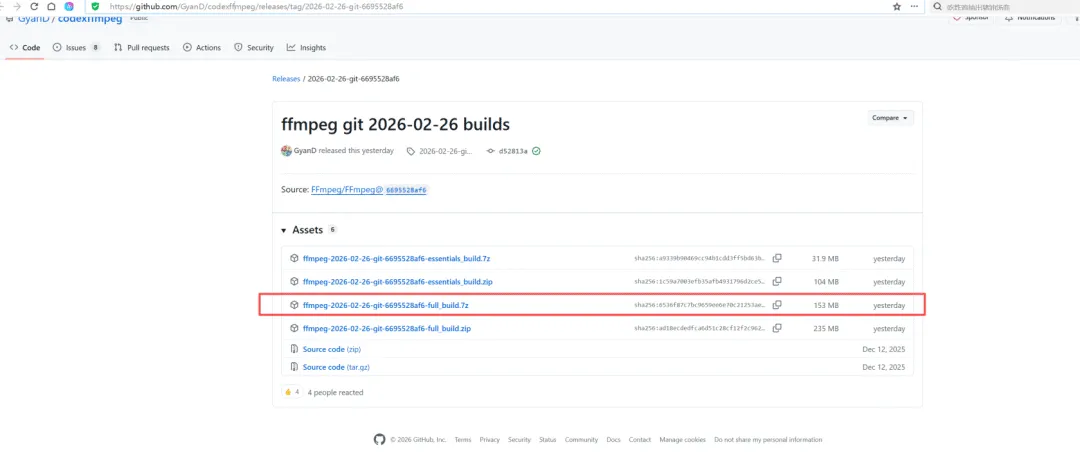
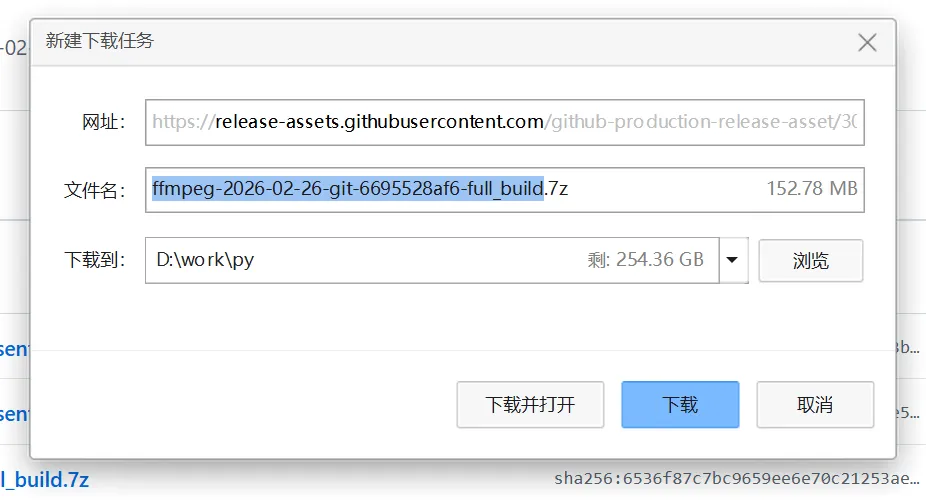
这里建议大家直接去 github 下,起码自己还能加速一下。
github.com/GyanD/codexffmpeg/relea...
速度 提上来了。
下载完成后,把压缩包解压到一个固定目录,比如:
D:\apps\ffmpeg
解压后一般是这种结构:
D:\apps\ffmpeg
    └─ ffmpeg-6.x-full_build
        ├─ bin
        │   ├─ ffmpeg.exe
        │   ├─ ffprobe.exe
        │   └─ ...
        └─ ...
记住 bin 目录路径,例如:
D:\apps\ffmpeg\ffmpeg-6.x-full_build\bin
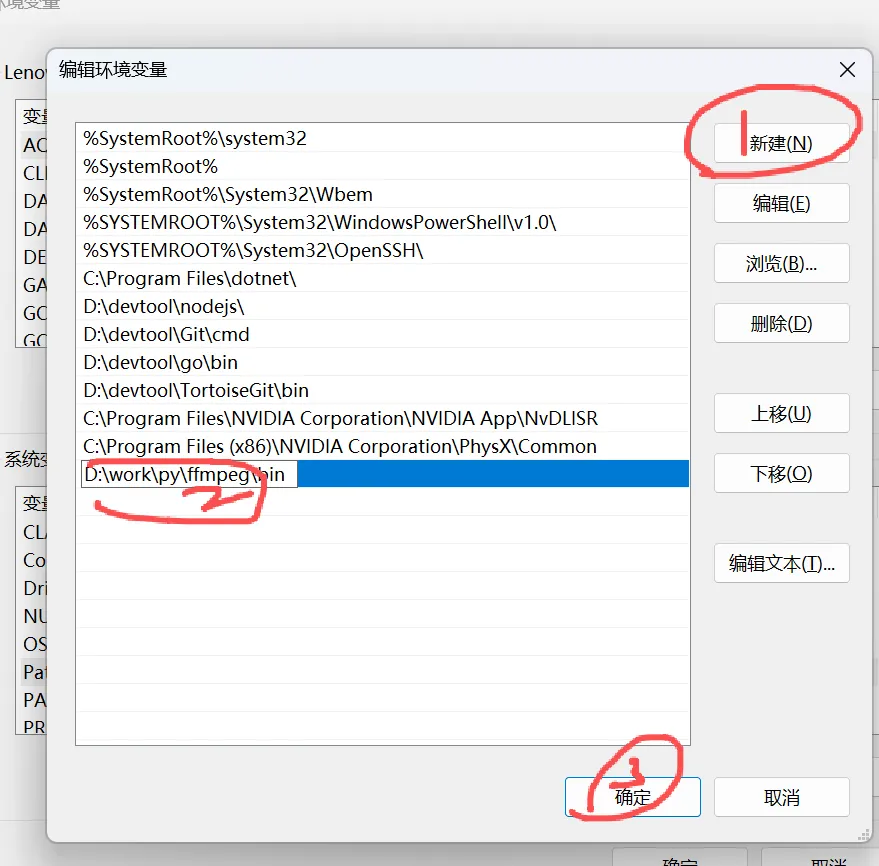
二、把 ffmpeg 加到系统 PATH
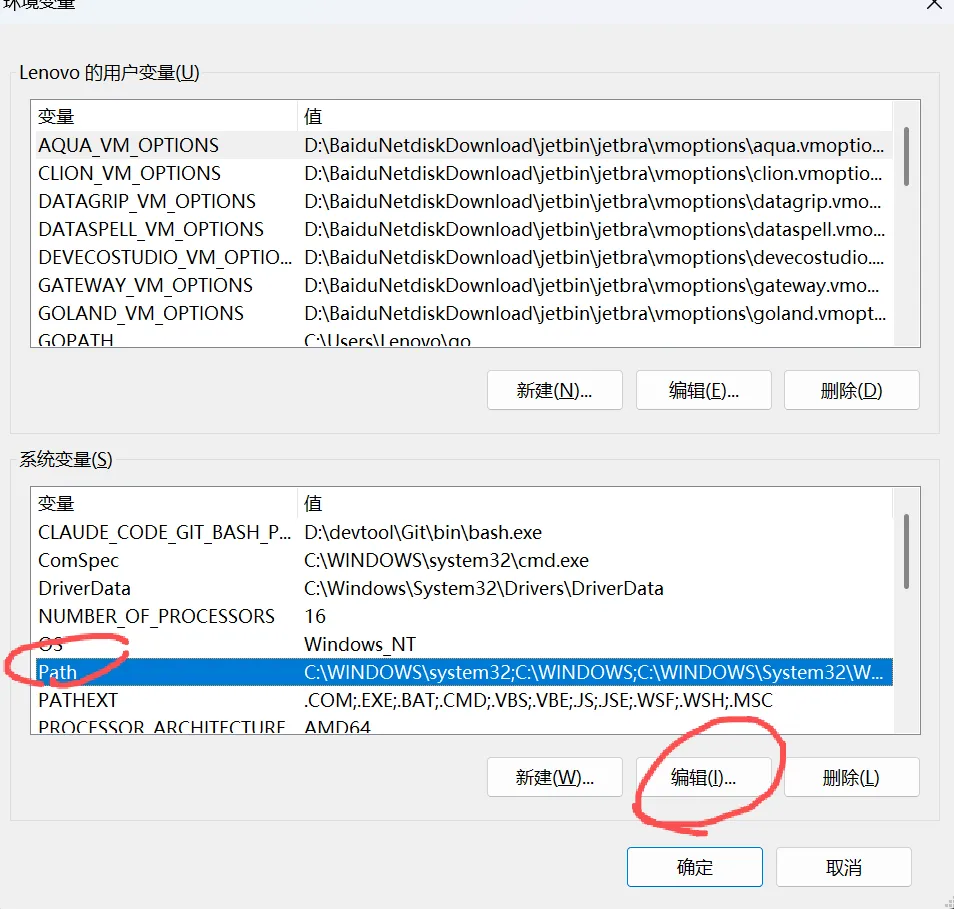
- 在桌面右键 “此电脑” → 属性 → 左边 “高级系统设置”
- 在 “系统变量” 里找到
Path → 选中 → 点击 “编辑”
点击 “新建”,把刚才的 bin 路径粘进去,例如:
D:\apps\ffmpeg\ffmpeg-6.x-full_build\bin
注意:改完 PATH 之后,要重新打开一个新的 PowerShell / CMD 窗口,旧窗口里看不到更新。
三、验证 ffmpeg 是否可用
新开一个终端(不要用之前那个窗口):
ffmpeg -version
如果能看到版本信息,就说明 PATH 配好了。
代码
代码:视频生成 srt 字幕
import whisper
import os

defvideo_to_srt(video_path, model_size="small", language="zh"):
"""
    :param video_path: 视频文件路径
    :param model_size: 模型大小 tiny/base/small/medium/large
    :param language: 语言,中文 zh,英文 en,自动检测用 None
    """
# 加载模型(首次会自动下载)
    model = whisper.load_model(model_size)

# 识别
    result = model.transcribe(video_path, language=language)

# 输出 srt 文件路径
    base, _ = os.path.splitext(video_path)
    srt_path = base +".srt"

# 写入 srt
withopen(srt_path,"w", encoding="utf-8")as f:
        counter =1
for seg in result["segments"]:
            start = seg["start"]
            end = seg["end"]
            text = seg["text"].strip()

defformat_time(t):
                h =int(t //3600)
                m =int((t %3600)//60)
                s =int(t %60)
                ms =int((t -int(t))*1000)
returnf"{h:02d}:{m:02d}:{s:02d},{ms:03d}"

            f.write(f"{counter}\n")
            f.write(f"{format_time(start)} --> {format_time(end)}\n")
            f.write(text +"\n\n")
            counter +=1

print("SRT 生成完成:", srt_path)
return srt_path

if __name__ =="__main__":
    video_file =r"D:\video\example.mp4"# 改成你自己的路径
    video_to_srt(video_file, model_size="small", language="zh")
说明:
model_sizelanguage- 不确定就
language=None 让它自动检测。
把 srt 字幕解析为 txt(纯文本)
1
00:00:00,000-->00:00:02,000
这是第一句字幕

2
00:00:02,000-->00:00:04,000
这是第二句字幕
代码:srt 转 txt
import os
import re

defsrt_to_txt(srt_path):
    base, _ = os.path.splitext(srt_path)
    txt_path = base +".txt"

    lines =[]
withopen(srt_path,"r", encoding="utf-8")as f:
for line in f:
            line = line.strip()
# 跳过空行、数字行、时间轴行
ifnot line:
continue
if line.isdigit():
continue
if re.match(r"\d{2}:\d{2}:\d{2},\d{3} -->", line):
continue
# 其它认为是字幕正文
            lines.append(line)

# 合并写入 txt,可按你喜好处理:直接一行一条、或合并成一段
withopen(txt_path,"w", encoding="utf-8")as f:
for l in lines:
            f.write(l +"\n")

print("TXT 生成完成:", txt_path)
return txt_path

if __name__ =="__main__":
    srt_file =r"D:\video\example.srt"# 改成你的 srt 路径
    srt_to_txt(srt_file)
整合为一个脚本
import os
import re
import whisper

defvideo_to_srt(video_path, model_size="small", language="zh"):
    model = whisper.load_model(model_size)
    result = model.transcribe(video_path, language=language)

    base, _ = os.path.splitext(video_path)
    srt_path = base +".srt"

withopen(srt_path,"w", encoding="utf-8")as f:
        counter =1
for seg in result["segments"]:
            start = seg["start"]
            end = seg["end"]
            text = seg["text"].strip()

defformat_time(t):
                h =int(t //3600)
                m =int((t %3600)//60)
                s =int(t %60)
                ms =int((t -int(t))*1000)
returnf"{h:02d}:{m:02d}:{s:02d},{ms:03d}"

            f.write(f"{counter}\n")
            f.write(f"{format_time(start)} --> {format_time(end)}\n")
            f.write(text +"\n\n")
            counter +=1

return srt_path

defsrt_to_txt(srt_path):
    base, _ = os.path.splitext(srt_path)
    txt_path = base +".txt"

    lines =[]
withopen(srt_path,"r", encoding="utf-8")as f:
for line in f:
            line = line.strip()
ifnot line:
continue
if line.isdigit():
continue
if re.match(r"\d{2}:\d{2}:\d{2},\d{3} -->", line):
continue
            lines.append(line)

withopen(txt_path,"w", encoding="utf-8")as f:
for l in lines:
            f.write(l +"\n")

return txt_path

if __name__ =="__main__":
    video_file =r"D:\video\example.mp4"# 改成你的视频路径
    srt_file = video_to_srt(video_file, model_size="small", language="zh")
    txt_file = srt_to_txt(srt_file)
print("全部完成:", txt_file)
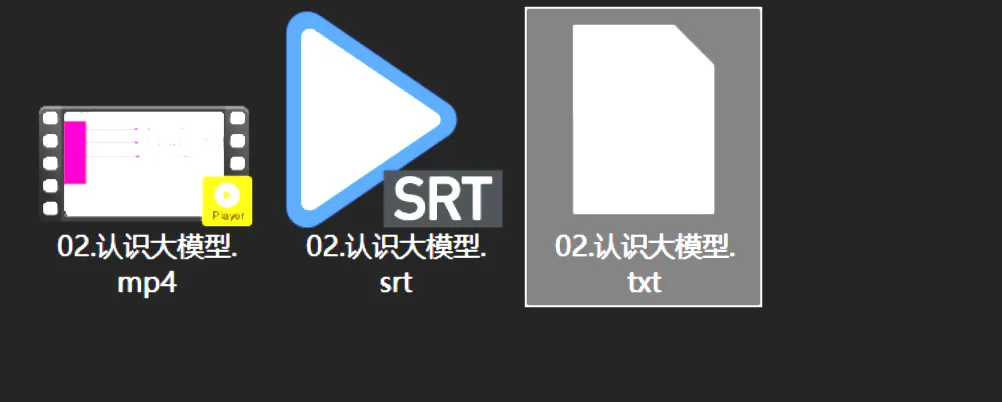
执行结果。
也就 2 分钟得视频,怎么这么慢。。
你们可以根据自己电脑配置进行修改代码配置的哈。
成果
进阶版本代码
我的测试机笔记本是 3080 显卡,cpu 是 11th Gen Intel® Core™ i7-11800H @ 2.30GHz (2.30 GHz),内存 32.0 GB
- 用 GPU(3080)+ whisper
medium 模型识别 - 预设笔记本性能参数(GPU、batch、fp16 等)
依赖确认
虚拟环境里先装好:
pip install --upgrade pip
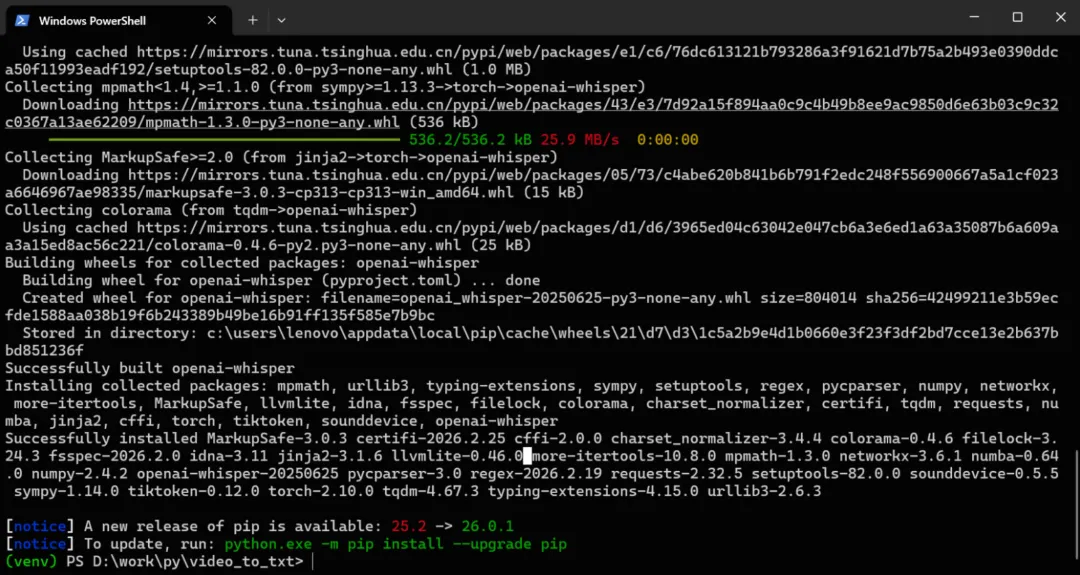
pip install openai-whisper torch
如果你本地还没装 GPU 版 torch,可以直接试一下,whisper 会自动尝试用 GPU;
如果报错说没有 CUDA,再按官方指引装对应 CUDA 版本的 torch。
批量处理脚本:batch_video_to_txt.py
import os
import re
import torch
import whisper
from typing import List

# -------------------- 配置区域 --------------------

# 要批量处理的视频目录(改成你的目录)
VIDEO_DIR =r"D:\work\videos"

# 支持的视频扩展名
VIDEO_EXTS ={".mp4",".mkv",".avi",".mov",".flv",".wmv",".m4v"}

# whisper 模型大小:tiny / base / small / medium / large
# 你 3080 + 32G,建议直接用 medium,效果和速度比较均衡
WHISPER_MODEL_SIZE ="medium"

# 语言:中文 "zh",英文 "en",None 自动检测
LANGUAGE =None# 如果大部分是中文,也可以写成 "zh"

# 是否强制使用 GPU(如果有)
USE_GPU =True

# -------------------- 工具函数 --------------------

deflist_videos(root:str)-> List[str]:
"""递归扫描目录下所有视频文件"""
    files =[]
for dirpath, _, filenames in os.walk(root):
for name in filenames:
            ext = os.path.splitext(name)[1].lower()
if ext in VIDEO_EXTS:
                files.append(os.path.join(dirpath, name))
return files

defformat_timestamp(t:float)->str:
"""秒 -> SRT 时间格式 00:00:00,000"""
    h =int(t //3600)
    m =int((t %3600)//60)
    s =int(t %60)
    ms =int((t -int(t))*1000)
returnf"{h:02d}:{m:02d}:{s:02d},{ms:03d}"

defsave_srt(result:dict, srt_path:str):
"""whisper 识别结果保存为 .srt"""
withopen(srt_path,"w", encoding="utf-8")as f:
for i, seg inenumerate(result["segments"], start=1):
            start = seg["start"]
            end = seg["end"]
            text = seg["text"].strip()

            f.write(f"{i}\n")
            f.write(f"{format_timestamp(start)} --> {format_timestamp(end)}\n")
            f.write(text +"\n\n")

defsrt_to_txt(srt_path:str)->str:
"""从 .srt 提取纯文本,保存为 .txt"""
    base, _ = os.path.splitext(srt_path)
    txt_path = base +".txt"

    lines =[]
withopen(srt_path,"r", encoding="utf-8")as f:
for line in f:
            line = line.strip()
ifnot line:
continue
if line.isdigit():
continue
if re.match(r"\d{2}:\d{2}:\d{2},\d{3} -->", line):
continue
            lines.append(line)

withopen(txt_path,"w", encoding="utf-8")as f:
for l in lines:
            f.write(l +"\n")

return txt_path

# -------------------- 主逻辑 --------------------

defmain():
# 检查 CUDA
if USE_GPU and torch.cuda.is_available():
        device ="cuda"
else:
        device ="cpu"

print(f"使用设备: {device}")
print(f"加载 whisper 模型: {WHISPER_MODEL_SIZE}")

# 加载模型(放外面,只加载一次,批量用)
    model = whisper.load_model(WHISPER_MODEL_SIZE, device=device)

# 性能参数:你 3080,可以开 fp16 + 合理的 beam_size
# (如果要自定义可以改这里)
    common_kwargs ={
"fp16": device =="cuda",# GPU 用 fp16,CPU 用 fp32
"beam_size":5,
"best_of":5,
}

if LANGUAGE:
        common_kwargs["language"]= LANGUAGE

# 扫描所有视频
    videos = list_videos(VIDEO_DIR)
ifnot videos:
print(f"目录下没有找到视频文件: {VIDEO_DIR}")
return

print(f"在 {VIDEO_DIR} 发现 {len(videos)} 个视频文件")

for idx, video_path inenumerate(videos, start=1):
        base, ext = os.path.splitext(video_path)
        srt_path = base +".srt"
        txt_path = base +".txt"

print(f"\n[{idx}/{len(videos)}] 处理: {video_path}")

# 如果已经有 txt,默认跳过(避免重复算)
if os.path.exists(txt_path):
print(f"已存在 txt,跳过: {txt_path}")
continue

# 如果已经有 srt,就直接转 txt
if os.path.exists(srt_path):
print(f"已存在 srt,直接生成 txt: {srt_path}")
            srt_to_txt(srt_path)
print(f"完成 txt: {txt_path}")
continue

# 识别
print("开始识别(whisper.transcribe)...")
        result = model.transcribe(video_path,**common_kwargs)

# 保存 srt
        save_srt(result, srt_path)
print(f"完成 srt: {srt_path}")

# srt -> txt
        txt_path = srt_to_txt(srt_path)
print(f"完成 txt: {txt_path}")

print("\n全部视频处理完毕。")

if __name__ =="__main__":
    main()
使用方式
- 把脚本保存为:
batch_video_to_txt.py - 把你要处理的视频都放到一个目录,例如:
D:\work\videos
VIDEO_DIR =r"D:\work\videos"
WHISPER_MODEL_SIZE ="medium"# 也可以试试 "large"
LANGUAGE =None# 全中文可以写成 "zh"
cd D:\work\py\video_to_txt
.\venv\Scripts\activate

python batch_video_to_txt.py
处理逻辑:
- 如果有
.srt 没 .txt,只做 srt→txt,不重复识别。
本作品采用《CC 协议》,转载必须注明作者和本文链接